Twitter (X) Likes API: What You Can Read, Like and Unlike in 2026
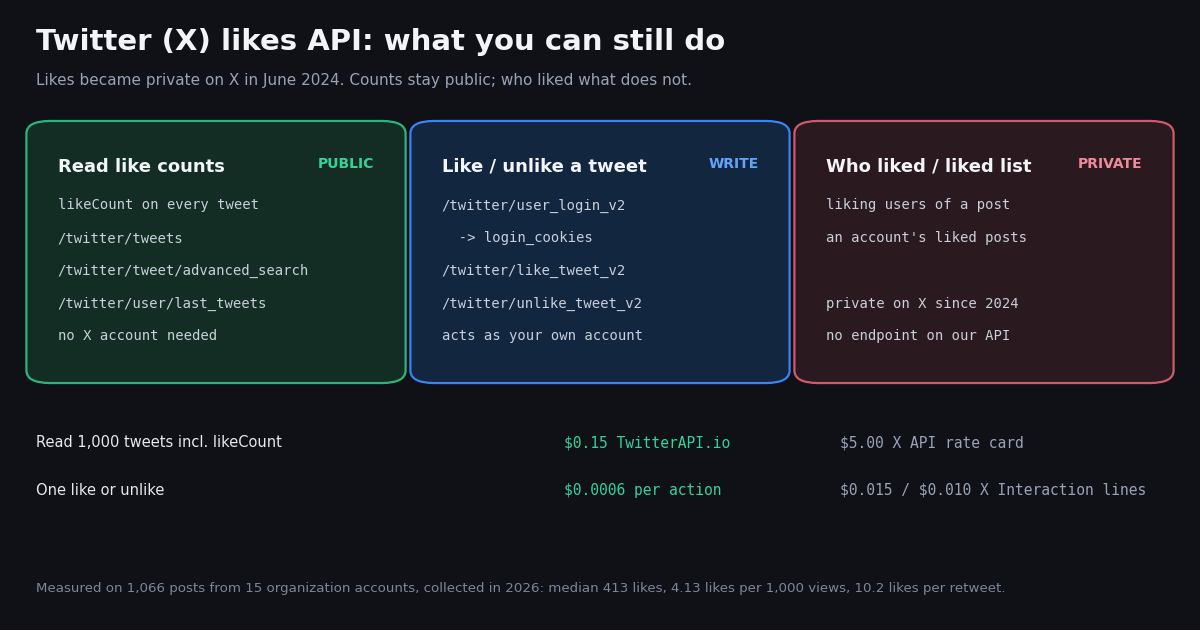
- Like counts are public:
likeCountis on every tweet returned by/twitter/tweets,/twitter/tweet/advanced_searchand/twitter/user/last_tweets; $0.15 per 1,000 tweets returned, no X account needed. - Like / unlike is a write:
/twitter/user_login_v2once, then/twitter/like_tweet_v2or/twitter/unlike_tweet_v2(60 credits = $0.0006 per action), acting as your own account at a human pace. - Who liked what is private: X made likes private on June 11-12, 2024. TwitterAPI.io has no liking-users or liked-tweets endpoint; X still documents both under Like: Read ($0.001 per resource).
- Our study: 1,066 posts from 15 organization accounts, median 413 likes, 4.13 likes per 1,000 views, 10.2 likes per retweet.
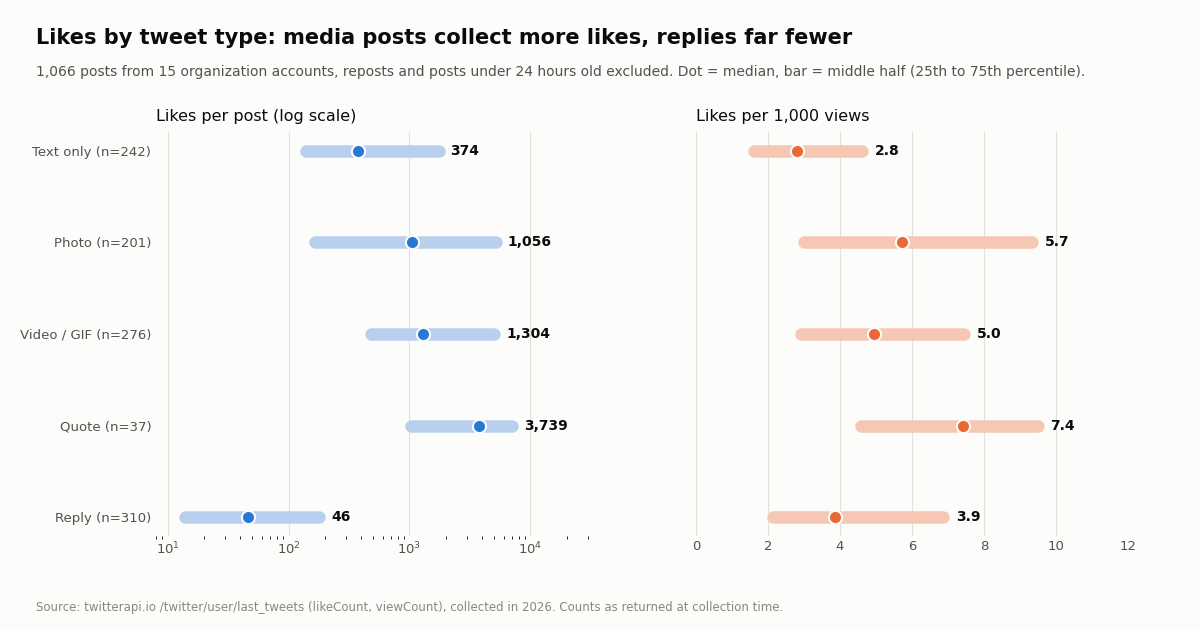
- Tweet type matters: video posts had a median of 1,304 likes, photos 1,056, text-only 374, replies 46.
- Counts move: the same @NASA post went from 1,626 to 1,647 likes between two fetches in one session, so store each read with a timestamp.
"Twitter likes API" is a search that hides three separate questions. One developer wants the like count of a tweet for a dashboard. Another wants a script that likes or unlikes tweets from their own account. A third wants the list of people who liked a post, or every post an account has liked. Before June 2024 all three were ordinary API calls. Since X made likes private, only the first two are generally available, and the answer to the third depends on whose likes you are asking about.
This guide maps each job to the endpoints that exist today, on TwitterAPI.io and on the official X API, with the price of each from the published rate cards. It also adds something the documentation does not: a real-data study of 1,519 timeline posts from 16 organization accounts, collected in 2026, showing what likeCount actually looks like by tweet type, how it relates to views and retweets, and why a like count is a snapshot rather than a fixed fact.
4.13
The three things a likes API can mean, and which still work
Sort the request first, because each job has a different endpoint, a different cost and a different set of rules.
Reading counts is the common case. If you are building analytics, ranking posts, or reporting engagement, likeCount is all you need, and it is returned on every tweet object. No login, no OAuth, no X developer account: an X-API-Key header is enough.
Writing is a separate product. Liking requires an authenticated X session, because a like is an action taken by a specific account. That is why the write endpoints need login_cookies and a proxy, and why they carry the account-safety caveats covered below.
Lists of likers are the part that changed. X's own posts describe the change in plain words, and the rest of this guide treats that as the starting point rather than a footnote.
What changed when X made likes private (June 2024)
We pulled X's own announcement through the API this session rather than relying on press coverage. On June 11, 2024 the X Engineering account (@Engineering) posted: "This week we're making Likes private for everyone to better protect your privacy." The post listed four consequences: you can still see posts you have liked (but others cannot); like counts and other metrics for your own posts still show up under notifications; you will no longer see who liked someone else's post; and a post's author can see who liked its posts.
On June 12, 2024 the same account followed up: "Starting today, Likes are private for everyone. Liking more posts will make your For you timeline better." X's @Safety account reposted it the same day. Both posts are at x.com/Engineering/status/1800634371906380067 and x.com/Engineering/status/1800959499932496139.
What this means for developers. The like count stayed public: every tweet we collected in 2026 still carries likeCount, and it is the single largest interaction counter (see the study below). What went private is the edge between a person and a post: who liked it, and what a given person liked. The announcement frames visibility per viewer, so the post's author still sees likers and each user still sees their own likes.
The official endpoints are still documented. X's Likes introduction at docs.x.com/x-api/posts/likes/introduction still lists "See who liked a Post" (GET /2/tweets/:id/liking_users) and "Get Posts liked by a user" (GET /2/users/:id/liked_tweets), and notes that the liking users endpoint "returns a maximum of 100 users per Post for all time, regardless of the actual number of likes." The reference pages require OAuth 2.0 user context with the like.read scope, which X describes as "View Posts you have liked and likes you can see." The docs pages we read this session do not state how these endpoints answer for posts or users other than your own after the privacy change, and we did not call them (no X developer app was used for this guide), so treat any result for another account as something to test on your own app rather than an assumption.
What TwitterAPI.io offers here. Nothing: there is no liking-users endpoint and no liked-tweets endpoint, and we do not plan around one. If your project needs the list of people who liked a post, the realistic routes are the post author's own view on X, or the official API for posts you own.
Reading like counts on any tweet
Three read endpoints cover nearly every like-count task. All return the same tweet object, with likeCount, retweetCount, replyCount, quoteCount, viewCount and bookmarkCount as plain integers. There is no public_metrics wrapper on our side; that is the official X API's shape.
/twitter/tweets with tweet_ids takes a comma-separated list of IDs and returns a top-level tweets[]. Use it when you already have the posts and want fresh counts, for example re-checking a campaign's tweets each day.
/twitter/user/last_tweets with userName returns an account's recent posts newest first under data.tweets, 20 per page, with has_next_page and next_cursor. Add includeReplies=true to include the account's replies. This is the endpoint our study used.
/twitter/tweet/advanced_search with query returns a top-level tweets[] and accepts X search operators. min_faves: filters by like count on the search side: in a check this session, from:NASA min_faves:5000 (Latest) returned a full page of 20 posts whose lowest likeCount was 5,610, with more pages available. That makes "tweets with at least N likes about a topic" one query instead of a crawl.
Here is a trimmed response from /twitter/tweets for one @NASA post, as returned during our collection (counts are a snapshot):
{
  "tweets": [
    {
      "id": "2126050028032872522",
      "url": "https://x.com/NASA/status/2126050028032872522",
      "createdAt": "Thu Nov 26 20:26:41 +0000 2026",
      "likeCount": 1647,
      "retweetCount": 229,
      "replyCount": 73,
      "quoteCount": 21,
      "viewCount": 131162,
      "bookmarkCount": 68,
      "author": {"userName": "NASA", "followers": 92079043}
    }
  ],
  "status": "success",
  "msg": null
}Study: like counts across 1,066 organization posts by tweet type
We read the recent timelines of 16 public organization accounts with /twitter/user/last_tweets (replies included) and kept every post that was not a repost and was at least 24 hours old, leaving 1,066 posts from 15 accounts (all of @NBA's sampled posts were under 24 hours old). Each row is one tweet type; the numbers are medians.
Media posts collect more likes in absolute terms. The median video post had 1,304 likes and the median photo post 1,056, against 374 for text-only posts. Per view the gap is smaller: 5.73 and 4.95 likes per 1,000 views for photos and videos, 2.8 for text. Quote posts had the highest medians (3,739 likes, 7.43 per 1,000 views), but there were only 37 of them, so read that row as indicative.
Replies are a different population. The 310 replies had a median of 46 likes, yet 3.85 likes per 1,000 views, close to the overall 4.13. Replies are seen by fewer people, not liked less by the people who see them. If you rank an account's posts by raw likeCount with replies included, the replies sink to the bottom for that reason alone.
Likes dwarf the other counters. Across the sample, likes were 84.6% of all likes, retweets, replies and quotes combined, a post had a median of 10.2 likes per retweet, and likes exceeded retweets on 99.3% of posts. Only 0.6% of posts had zero likes. For organization accounts, likeCount is the counter with the finest resolution; retweets and replies are often single digits on the same posts.
The spread is wide. The middle half of all posts sat between 81 and 2,204 likes, the 90th percentile was 8,040, and the single highest post had 391,526. Means would be dominated by that tail, which is why every number here is a median.
Like counts are relative: compare per view, not per post
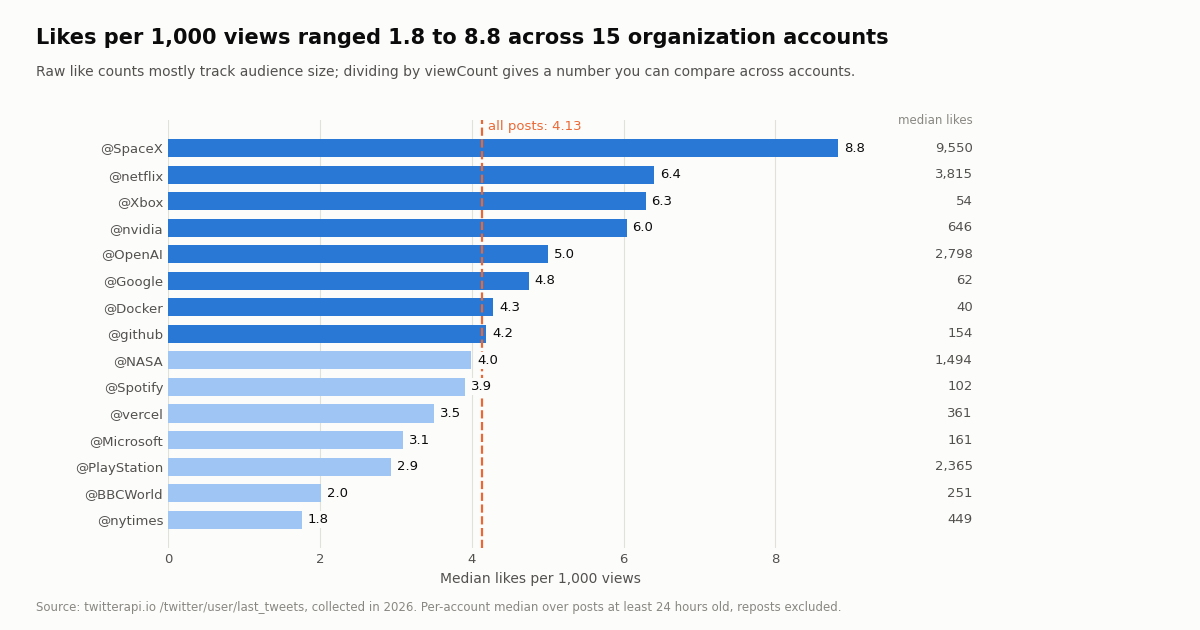
Raw like counts mostly measure audience size. Across the 15 accounts, the median post ranged from 40 to 9,550 likes, while the median likes per 1,000 views stayed within 1.76 to 8.82. Dividing likeCount by viewCount turns a size number into a response-rate number you can compare between accounts, between tweet types, and over time.
Two accounts make the point. @Xbox had a median of 54 likes per post, because 85.5% of its sampled posts were replies, yet 6.29 likes per 1,000 views, above the overall median. @PlayStation had a median of 2,365 likes but 2.94 per 1,000 views. Ranked by likes, PlayStation wins easily; ranked by likes per view, Xbox does.
A practical formula. For each tweet: likes per 1,000 views = likeCount / viewCount * 1000, skipping tweets where viewCount is 0 or missing. Report the median per account or per tweet type, not the mean. If you also want a single engagement figure, the engagement-rate calculator linked below uses the same counters.
Exclude reposts. On a repost, the counters belong to the original post, not to the account that reposted it. Our sample dropped 276 reposts for that reason; a repost is marked by a retweeted_tweet object on the tweet.
A like count is a snapshot: store it with a timestamp
Like counts keep moving long after a post goes out. During this study we fetched the newest @NASA post twice, once from the timeline and once by ID with /twitter/tweets, a short time apart in the same session. Likes went from 1,626 to 1,647 and views from 128,371 to 131,162, while the per-view rate barely moved (12.67 versus 12.56 per 1,000 views).
That is also why the study excluded the 177 posts younger than 24 hours: their counts were still climbing. Three rules follow for any pipeline that stores likes:
Record when you read. Save likeCount with your own fetch time, next to the tweet's createdAt. A like count without a read time cannot be compared with another one.
Compare posts at the same age. "Likes after 24 hours" or "likes after 7 days" is a fair comparison; "likes right now" between a post from this morning and one from last month is not.
Re-read on a schedule, by ID. Batch the IDs you track into /twitter/tweets calls. Each tweet returned costs 15 credits, so refreshing 1,000 tracked tweets once a day costs $0.15 a day.
Liking and unliking tweets via the API (write actions)
A like is an action by a specific account, so it runs through an authenticated session. On TwitterAPI.io that is two steps:
Step 1: log in once. POST /twitter/user_login_v2 with user_name, email, password, proxy (a proxy you supply) and, if the account uses an authenticator app, totp_secret. The login costs $0.10 and returns login_cookies. Treat that string like a password.
Step 2: like or unlike. POST /twitter/like_tweet_v2 or POST /twitter/unlike_tweet_v2 with a JSON body of login_cookies, tweet_id and proxy (all three required, per docs.twitterapi.io). The response has status (success or error) and message. Each call is 60 credits, $0.0006.
The caveats that come with every write. The call acts as that account: X can rate-limit, lock or suspend it, so keep a normal human pace on your own account only. X's automation rules apply, and this is not a way around any limit. The session can need a fresh login, and every HTTP 200 call is billed, including one where X declined the action, so read status and message in the body.
What this is for. Liking a post you chose, unliking something you liked by mistake, or cleaning up your own likes (the bulk-unlike guide linked below covers the archive-driven version of that). It is not for liking posts automatically by keyword or at volume: that is engagement farming, it is what X's automation rules are written against, and it is a quick way to get the account locked.
Official API comparison. On X's API, liking is POST /2/users/:id/likes and unliking is DELETE /2/users/:id/likes/:tweet_id, with a user access token from your own X developer app. X's pay-per-usage rate card has no line named for likes; the closest lines are "User Interaction: Create" at $0.015 per request and "Interaction: Delete" at $0.010 per request. Check the Developer Console for the line your calls are billed under.
import os
import requests

BASE = "https://api.twitterapi.io"
HEADERS = {"X-API-Key": os.environ["TWITTERAPI_IO_KEY"]}

body = {
    "user_name": os.environ["X_USERNAME"],
    "email": os.environ["X_EMAIL"],
    "password": os.environ["X_PASSWORD"],
    "proxy": os.environ["X_PROXY"],          # a proxy you supply
}
if os.environ.get("X_TOTP_SECRET"):
    body["totp_secret"] = os.environ["X_TOTP_SECRET"]

r = requests.post(f"{BASE}/twitter/user_login_v2", headers=HEADERS, json=body, timeout=120)
data = r.json()
if data.get("status") != "success":
    raise SystemExit(f"login failed: {data.get('message')}")
login_cookies = data["login_cookies"]       # store it like a password

# Like one tweet you picked yourself
r = requests.post(f"{BASE}/twitter/like_tweet_v2", headers=HEADERS, timeout=60,
                  json={"login_cookies": login_cookies,
                        "tweet_id": "2126050028032872522",
                        "proxy": os.environ["X_PROXY"]})
print(r.status_code, r.json())   # {"status": "success" | "error", "message": "..."}
Cost: TwitterAPI.io vs the official X API rate card
Prices from TwitterAPI.io's pricing and docs and from X's pay-per-usage rate card at docs.x.com/x-api/getting-started/pricing, both read this session.
For reading like counts, $5 against $0.15 per 1,000 tweets is roughly 33 times the price on X's rate card. Our own study read 1,519 tweets in 80 requests for $0.23. On X's side, pay-per-usage is capped at 3 million post reads per monthly billing cycle, with Enterprise above that, and X adds $20 in credits when you save a first eligible card. X also prices "Owned Reads" at $0.001 per resource when the {id} in a qualifying endpoint is the authenticated user who owns the developer app; its pricing page lists likes among the data that counts as your own.
On TwitterAPI.io you pay only for the data returned: an empty search still costs the 15-credit minimum ($0.00015), purchased credits never expire, and new accounts that pass the automatic bot check get free starter credits (no card, one per person or network, expiring after 31 days). Rate limits are 0.2 requests per second before the first payment and 20 once paid, with higher tiers on larger plans.
How we collected this
Question. What does the public likeCount field look like across real tweets, and how do likes relate to views, retweets and bookmarks by tweet type?
Accounts. @NASA, @SpaceX, @nvidia, @OpenAI, @Google, @Microsoft, @github, @vercel, @Docker, @Xbox, @PlayStation, @Spotify, @netflix, @NBA, @nytimes, @BBCWorld. Public organization accounts only.
Method and window. /twitter/user/last_tweets with includeReplies=true, up to 5 pages per account, newest first: the latest posts of each account at collection time, collected in 2026. 80 requests returned 1,519 tweets (about $0.23). We excluded 276 reposts and 177 posts younger than 24 hours, leaving 1,066 posts from 15 accounts. Two follow-up calls checked a re-fetch by ID and the min_faves: operator. Tweet types: reply (isReply), quote (quoted_tweet), video or GIF and photo (extendedEntities.media type), text (none of these).
What the sample cannot show. These are large organization accounts, not typical users; their per-view rates do not transfer to small or personal accounts. Each account's window differs (a few days for busy news accounts, months for quieter ones). Counts are a single snapshot. Nothing here says who liked any post: that data is private and was not collected.
Privacy. Aggregates only, organization accounts only, no analysis of the people who reply to, quote or are reposted by these accounts. The analysis script, protocol and de-identified per-tweet rows are kept with the study.
import os
import time
import requests

BASE = "https://api.twitterapi.io"
HEADERS = {"X-API-Key": os.environ["TWITTERAPI_IO_KEY"]}


def tweets_by_id(ids):
    """Read likeCount (and the other public counters) for up to a batch of tweet IDs."""
    r = requests.get(f"{BASE}/twitter/tweets",
                     headers=HEADERS, params={"tweet_ids": ",".join(ids)}, timeout=30)
    r.raise_for_status()
    body = r.json()
    if body.get("status") != "success":
        raise RuntimeError(body.get("msg"))
    return body["tweets"]


def timeline(user_name, max_pages=3, include_replies=False):
    """Yield an account's recent tweets, newest first, following next_cursor."""
    cursor = ""
    for _ in range(max_pages):
        params = {"userName": user_name, "cursor": cursor}
        if include_replies:
            params["includeReplies"] = "true"
        r = requests.get(f"{BASE}/twitter/user/last_tweets",
                         headers=HEADERS, params=params, timeout=30)
        r.raise_for_status()
        body = r.json()
        data = body.get("data") or {}
        yield from data.get("tweets", [])
        if not body.get("has_next_page") or not body.get("next_cursor"):
            break
        cursor = body["next_cursor"]


def like_stats(t):
    likes = t.get("likeCount") or 0
    views = t.get("viewCount") or 0
    rts = t.get("retweetCount") or 0
    return {
        "id": t["id"],
        "likes": likes,
        "likes_per_1k_views": round(likes / views * 1000, 2) if views else None,
        "likes_per_retweet": round(likes / rts, 1) if rts else None,
        "bookmarks": t.get("bookmarkCount") or 0,
    }


def like_tweet(tweet_id, login_cookies, proxy, unlike=False):
    """Like or unlike ONE tweet as your own logged-in account (60 credits per HTTP 200 call).

    Only your own account, a normal human pace, X's automation rules apply,
    it can be rate-limited/locked/suspended; this is not a way around any limit.
    """
    if unlike:
        url = f"{BASE}/twitter/unlike_tweet_v2"
    else:
        url = f"{BASE}/twitter/like_tweet_v2"
    r = requests.post(url, headers=HEADERS,
                      json={"login_cookies": login_cookies, "tweet_id": tweet_id, "proxy": proxy},
                      timeout=60)
    body = r.json()
    return r.ok and body.get("status") == "success", body.get("message")


if __name__ == "__main__":
    # 1) Like counts for specific tweets (no X account needed)
    for t in tweets_by_id(["2126050028032872522"]):
        print(like_stats(t))

    # 2) Like counts across an account's recent posts
    rows = [like_stats(t) for t in timeline("NASA", max_pages=2)]
    rows.sort(key=lambda x: x["likes"], reverse=True)
    for row in rows[:5]:
        print(row)

    # 3) Optional write: like one tweet you chose by hand, then pause
    cookies = os.environ.get("X_LOGIN_COOKIES")      # from /twitter/user_login_v2
    proxy = os.environ.get("X_PROXY")                # your own proxy URL
    if cookies and proxy:
        ok, message = like_tweet("2126050028032872522", cookies, proxy)
        print("liked" if ok else f"not liked: {message}")
        time.sleep(5)  # fixed pause before any further action
Researching this?Free starter credits cover end-to-end testing — Google sign-in, no card. Get a key.
Questions readers ask
Is there a Twitter API endpoint to get who liked a tweet?
X documents GET /2/tweets/:id/liking_users, which according to X's own docs returns up to 100 users per post for all time, and requires an OAuth 2.0 user token with the like.read scope. Since X made likes private in June 2024, X's own announcement says you no longer see who liked someone else's post; only the post's author does. TwitterAPI.io has no liking-users endpoint.
Can I get the list of tweets a user has liked?
Not for other people in general. X's June 2024 change made each account's likes visible only to that account. X still documents GET /2/users/:id/liked_tweets and prices your own data under Owned Reads; TwitterAPI.io has no liked-tweets endpoint. For your own likes, your X data archive is the other source.
How do I get the like count of a tweet with an API?
Read likeCount from the tweet object. On TwitterAPI.io, /twitter/tweets?tweet_ids=... returns it for specific tweets, and /twitter/user/last_tweets and /twitter/tweet/advanced_search return it for every tweet in the page. It costs $0.15 per 1,000 tweets returned and needs no X account. On the official API it is public_metrics.like_count.
How do I like a tweet with the API?
Log in once with POST /twitter/user_login_v2 to get login_cookies, then call POST /twitter/like_tweet_v2 with login_cookies, tweet_id and proxy. Each like is 60 credits ($0.0006), billed per HTTP 200 call. It acts as your own account, so keep a normal human pace; X can rate-limit, lock or suspend accounts that behave like automation.
Can I unlike all my liked tweets with an API?
Yes, one call per tweet with /twitter/unlike_tweet_v2, at a human pace. The hard part is getting the IDs, because there is no liked-tweets endpoint on TwitterAPI.io; the bulk-unlike guide walks through using your X data archive as the source of IDs.
Why does a tweet's like count change between API calls?
Because people keep liking it. In our study the same @NASA post went from 1,626 to 1,647 likes between two fetches in one session. Store every count with your fetch time and compare posts at the same age.
Can I search for tweets with more than a certain number of likes?
Yes. /twitter/tweet/advanced_search accepts the min_faves: operator. from:NASA min_faves:5000 returned a full page of 20 posts in our check, the lowest with 5,610 likes. Combine it with keywords, lang: or date operators.
Continue
- X developer docs: Likes introduction (liking users, liked posts, manage likes; 100-user cap)
- X developer docs: pay-per-usage pricing (Posts: Read, Like: Read, Owned Reads, Interaction lines)
- X developer docs: GET /2/users/:id/liked_tweets reference (like.read scope)
- X Engineering: "This week we're making Likes private for everyone" (June 11, 2024)
- TwitterAPI.io docs: POST /twitter/like_tweet_v2 (login_cookies, tweet_id, proxy; 60 credits)
- X developer docs: metrics (public_metrics.like_count is a public metric)
- X (Twitter) API overview and endpoint map
- Bulk unlike and unretweet with the API
- Why you can't see likes on Twitter (X)
- X error 226: "this request looks like it might be automated"
- Log in and post to X via API: login_cookies explained
- Twitter engagement rate calculator
- TwitterAPI.io pay-per-use pricing
- 01Twitter (X) Account Locked: Why It Happens and How to Unlock It
- 02The Library of Congress Twitter (X) Archive: What Happened and Can You Access It?
- 03Databricks Twitter (X) Pipeline: Load Tweets into a Delta Table in 2026
- 04Twitter (X) CRM: Sync X Profiles and Buying Signals into HubSpot or Salesforce
- 05Twitter (X) in Looker Studio: Build the Dashboard Without a Paid Connector
- 06Why Can't I See My Likes on Twitter (X) Anymore?
- 07Brandwatch API Explained: Consumer Research vs Engage, Access, and What You Get for Twitter (X)
- 08Brave Search API: Pricing, API Key, Rate Limits and Fresh Twitter (X) Posts
Writing about something you built with TwitterAPI.io? Our community rewards program pays API credits for honest tutorials, build logs and videos.
Stop reading. Start building.
Starter credits cover real testing on real data. Google sign-in, no card, no application queue.
Get an API keyAlready building with TwitterAPI.io? Publish an honest tutorial or build log about it and earn up to $200 a month in API credits.