Twitter (X) Account Locked: Why It Happens and How to Unlock It
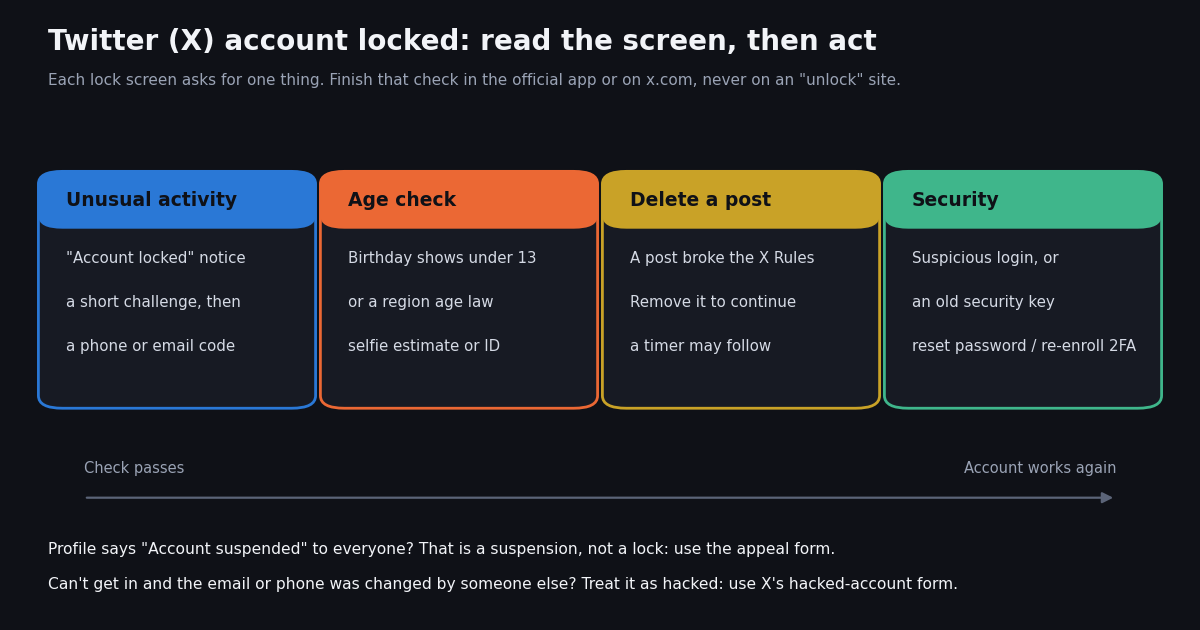
- Locked is not suspended. A lock holds the account until you finish one check; your profile usually still loads for others. A suspension shows "Account suspended" to everyone.
- Read the lock screen. It names the check: a challenge plus a phone or email code, an age verification, a post to delete, or a password / 2FA step.
- Age locks are real and growing. X locks accounts whose birthday shows they joined under 13, and runs age assurance where a law requires it (Australia's under-16 rule from 10 December 2025, for example).
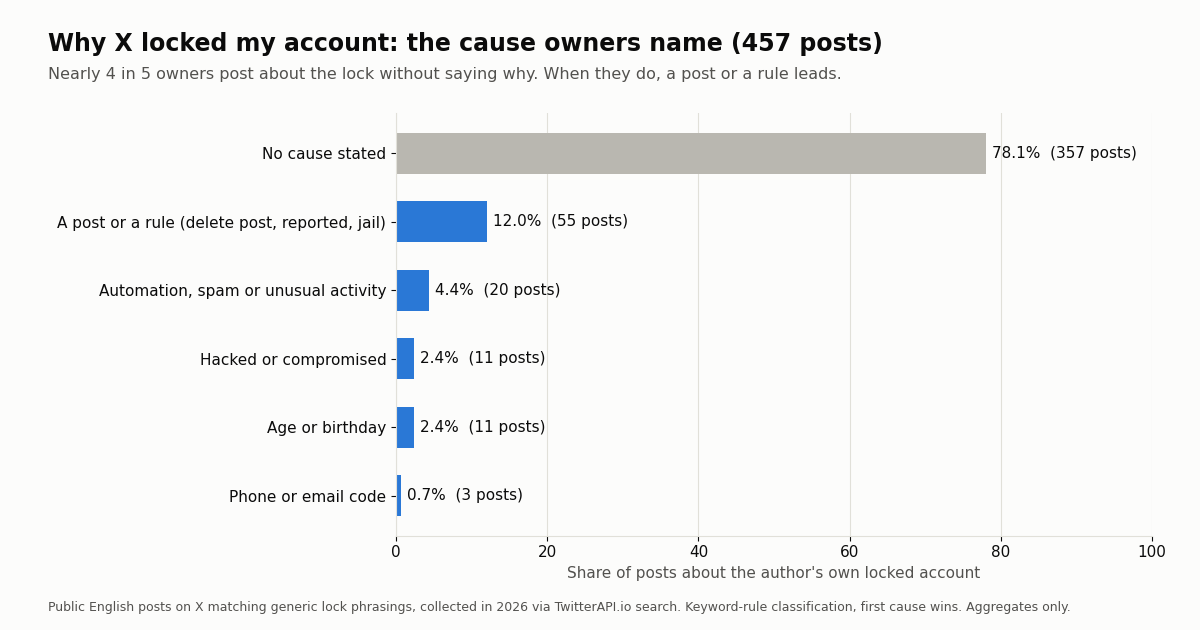
- Our study: 457 posts from owners of locked accounts; 78.1% named no cause, 12.0% named a post or a rule, 4.4% automation or unusual activity.
- Hacked is a different path. If you cannot log in because someone changed your email or phone, use X's hacked-account form (
help.x.com/en/forms/account-access/regain-access/hacked-or-compromised). - Never use an "unlock service". An outside site cannot complete X's checks for you, and giving one your password invites a takeover.
You open X and instead of your timeline you get a full-screen notice: your account has been locked. Maybe it asks for a phone number, maybe a birthday, maybe it wants you to delete a post you barely remember. The good news is that a lock is the lightest account-level action X takes, and in the large majority of cases the owner can lift it in a few minutes, from the same screen, without writing to anyone.
This guide walks through each kind of lock X uses, what the screen asks for, how long each one lasts, how to tell a lock apart from a suspension, a read-only limit or a hacked account, and what to do when the check itself fails. It is built on X's own public posts from its @Safety and @GlobalAffairs accounts, X's Help Center pages (cited by address, because they block automated reading), and a study of public posts from people whose own account was locked, collected in 2026 through TwitterAPI.io's search.
One promise up front: this page tells you how to get your own account back by doing what X asks. It does not offer tips for making automated activity look human, and you should distrust anyone who does.
78.1% of 457 public posts about the author's own locked account (collected in 2026). When a cause is named, a post or a rule leads at 12.0%, then automation or unusual activity at 4.4%.
Locked, suspended, limited or hacked: which one is it?
Four different situations get described as "my Twitter is locked", and each has a different fix. Spend thirty seconds identifying yours before you do anything else, because the wrong form wastes days.
The decisive test is your public profile. Open it in a logged-out browser window or ask a friend. If it says "Account suspended", see our guide to a suspended account in the related links below. If it loads normally, you are dealing with a lock or a limit, and the fix is on the lock screen.
A shadowban is something else again. If you can post but people say your replies are hidden or you do not appear in search, that is a visibility question, not a lock. The free shadowban checker in the related links tests search and reply visibility from outside your account.
"Locked" also means protected. Some people say they "locked" their account when they switched on Protect your posts, which hides posts from non-followers. That is a privacy setting you control, and it has nothing to do with the lock screens on this page. We dropped those posts from our study for that reason.
Why X locks accounts: the four triggers
X does not publish a full list of lock triggers, and its Help Center page on locked and limited accounts (help.x.com/en/managing-your-account/locked-and-limited-accounts) cannot be read by automated tools, so we cite it by address only. What follows combines X's own public posts with what owners report.
1. Unusual or automated-looking activity. X's automation rules (help.x.com/en/rules-and-policies/x-automation) and its platform manipulation and spam policy (help.x.com/en/rules-and-policies/platform-manipulation) prohibit bulk or aggressive following, liking, reposting and duplicate posting. When an account suddenly behaves very differently from its history, for example many follows in a short time, the same reply pasted under many posts, or logins from a new device in another country, X can lock it and ask the owner to prove they are a person and confirm a phone number or email. In our sample, owners in this group often said things like "they thought I was a bot" or "had to complete a captcha".
2. Age. X requires users to be at least 13, and a lock follows when the birthday on the account shows the owner was younger than that at sign-up, even years later. Owners in our sample repeatedly described adding a birthday to their profile and being locked immediately because the date implied they joined at 12. Separately, X runs age assurance where a law requires it; see the age section below.
3. A post that broke the rules. X's enforcement options page (help.x.com/en/rules-and-policies/enforcement-options) describes requiring a post to be deleted and placing an account in read-only mode as account-level actions short of suspension. Owners call this "Twitter jail": the account is locked until the post is removed, then sometimes limited for a set time.
4. Security. If X suspects someone else has access, it can lock the account until the owner resets the password. X also locks accounts on purpose for 2FA housekeeping: on October 24, 2025 @Safety posted that after November 10, 2025, accounts that had not re-enrolled a security key would be locked until the owner re-enrolled, chose a different 2FA method, or turned 2FA off.
Outside these four, people also report locks right after changing their username, logging in from a VPN, or signing in from a new phone. Those are usually the unusual-activity flow under another name, and they clear the same way.
What 457 owners said about their own locked account
To see what the experience is actually like, we collected public English posts on X that match the phrases people use when this happens ("account locked", "locked my account", "account is locked", "account got locked", "locked out of my" Twitter or X). After removing duplicates, posts about other services, and people who had simply set their own account to protected, 457 posts describe the author's own locked account. We classified each by the first cause it names.
The majority do not know why. 78.1% of owners post about the lock without naming any cause, and a further 2.6% say outright it happened "for no reason". That matches the experience: the lock screen tells you what to do, not why X decided to do it. Reading the screen carefully is the fastest route out.
When a cause is named, a post or a rule leads. 12.0% name a post they were told to delete, a report, or "Twitter jail". Automation, spam or unusual activity comes next at 4.4%, then age at 2.4% and hacking at 2.4%.
Time is on people's minds. 14.4% mention a duration (hours, days, weeks), 9.4% tag a support account, Elon Musk or mention an appeal, and 5.7% say the account is already back. Only a few post again after a lock clears, so the share of locks that resolve is certainly higher than that figure.
Age locks cluster in their own searches. When we added two searches aimed at age locks ("age verification" with "locked", and "locked" with birthday, under 13 or date of birth), the age share across all 514 own-account posts rose to 13.2%. Age locks are a distinct, well-defined group, so they get their own section below.
How to unlock a Twitter (X) account, step by step
The steps below are the general shape of the flow. X changes the screens and wording from time to time, so follow what your screen says when it differs.
Step 1. Open the official app or x.com. Sign in on the official X app or on x.com in a normal browser. Third-party clients and scheduling tools cannot show the lock screen, and an app that has lost its session cannot help you. If you see "Please use the official X app to sign in", that is a separate app-integrity message with its own guide in the related links.
Step 2. Press Start and pass the challenge. For an unusual-activity lock, X typically shows a Start button and then a short challenge to confirm a person is at the keyboard, such as a picture puzzle. Take your time and follow the on-screen instructions.
Step 3. Confirm a phone number or email. X sends a code to a phone number or email address. If you have no phone on the account, X may ask you to add one. Use a number that receives text messages and that you will keep; a number you lose later is a recovery problem. If a code does not work, request a new one rather than retyping the old one.
Step 4. Reset the password if asked. If the lock is a security lock, X sends a password reset. Choose a new password you have not used on any other site. If a reset email never arrives, check spam folders and the email on file; X's login help (help.x.com/en/managing-your-account/log-in-issues) lists the cases where only support can help, such as having lost access to both the email and the phone.
Step 5. Re-check two-factor authentication. If you used a hardware security key and never re-enrolled it after X's change, X locks the account until you re-enroll the key, pick another method (an authentication app is free and needs no phone number), or switch 2FA off. Our 2FA guide in the related links has the full setup.
Step 6. Delete or appeal the post, if that is the ask. For a rule lock, the screen shows the post and the rule. You can remove it to continue, or file an appeal if you believe it was a mistake. Removing it is usually faster; an appeal keeps the lock in place while it is reviewed.
Step 7. Review connected apps. Once you are back in, open Settings, then Security and account access, then Apps and sessions, and revoke anything you do not recognize or no longer use. Menus move between app versions, so search Settings for "connected apps" if the path differs. A third-party app with write access is a common reason the same lock comes back.
When nothing works. If the challenge fails repeatedly, the code never arrives, or the screen loops, X's appeal form for locked or suspended accounts (help.x.com/en/forms/account-access/appeals) is the official route. Fill it in once, from the email on the account, and keep the ticket email. Sending the same form many times does not speed it up.
After you are back in: keep the same lock from coming back. None of the following are tricks; they are the plain reading of X's own rules.
Keep a working phone and email on the account. The majority of locks are cleared with a code. A lock is a five-minute problem with a working phone and a support case without one.
Use an authentication app or a security key for 2FA, and keep the backup code somewhere outside your phone. If you use a hardware key, re-enroll it whenever X asks.
Fix the birthday once. If the birthday on your account is wrong, correct it carefully, because a date that implies you joined under 13 triggers an age lock.
Treat third-party apps with write access as part of your account. Anything that follows, likes, reposts or posts for you acts as you. If it misbehaves, X's automation rules apply to your account, not to the app.
X age verification: why X locked your account for age
Age locks have their own search family: "x age verification" alone is searched about as often as "twitter account locked" in DataForSEO's US data. There are two separate mechanisms, and they need different fixes.
The under-13 lock. X's terms require users to be at least 13. On February 18, 2026 @Safety restated that "users under 13 cannot create accounts" and that minor accounts (13 to 17) default to Protected. If the birthday on your account shows you were under 13 when you signed up, X locks the account, even if you are an adult today. This is not new: TechCrunch reported on May 14, 2019 that Twitter had spent about a year locking accounts it believed had been opened by users under 13 after GDPR took effect in May 2018, and that returning accounts had to agree to the deletion of content posted before the owner turned 13. Owners in our sample described the same thing years later: adding a birthday to the profile, then losing access because the date implied they joined at 12.
Age assurance under local law. Separately, X verifies or estimates age where a law requires it. @Safety wrote on February 18, 2026 that "where X is legally required to do so, we take a multi-faceted age assurance approach to verify or estimate user age." Examples X has named in its own posts: Australia's social media minimum age, under which @Safety said on December 10, 2025 that users must be at least 16 to use an X account in Australia, that under-16 accounts receive an account lockout notice with instructions to verify age, and that verification data is deleted within 30 days; and Ireland's Online Safety Code, which @GlobalAffairs said in September 2025 introduced age verification requirements that apply to X across the EU because X is based in Ireland. X has also written about the UK Online Safety Act as it rolled out in 2025.
How X checks age. X's Help Center page on age assurance (help.x.com/en/rules-and-policies/age-assurance) describes the methods; we could not open it with automated tools, so treat this summary as general: X first tries to estimate age from signals it already has, and where that is not enough it offers a live selfie for facial age estimation or a government-issued ID. The page also describes how to challenge a result you think is wrong.
What to do about an age lock. If you are old enough, follow the in-app age verification and use the method that is offered. Make sure the birthday on your account is right before you start, because the check compares against it. If you were genuinely under 13 when you signed up and you are now old enough, the lock notice links to the age flow; expect that posts from before the minimum age may be removed, as happened in 2019. If you are under the minimum age in your country, the lock stays until you reach it.
Privacy. Age checks ask for sensitive data. Do them only inside the X app or on x.com, never through a link in a DM or an email you did not request, and never send an ID to anyone claiming to be X support on X itself.
How long does a Twitter (X) lock last?
There is no single number, because a lock lasts until its check is done and some checks add a timer.
In our study, 14.4% of owners mention a duration. The durations people quote, such as 12 hours or 24 hours, usually describe a read-only countdown after a rule lock, not the lock itself. X does not publish appeal response times. The @Support account is no longer a public channel either: when we checked it for this page, @Support had 6,313,917 followers and its posts were protected, so its replies cannot be read by non-followers and our search returned none of its posts.
If the timer seems stuck, log out and back in on the official app, update the app, and check that your device clock is correct. A countdown that does not move after a full day is a case for the appeal form.
If your account was hacked, not just locked
A lock you can clear yourself. A takeover you cannot, because the attacker controls the email or phone that receives the codes. The signs: your password stopped working without you changing it, you received an email that your email address or phone number was changed, or people tell you your account is posting things you did not write.
If you can still log in, change the password at once, check that the email and phone on the account are yours, sign out of all other sessions, revoke unknown connected apps, and turn on 2FA with an authentication app or a security key. @Safety's thread of January 5, 2023 gives the same order: change the password, secure the email address, review third-party apps, and consider 2FA.
If you cannot log in, start with a password reset from the login screen. If the reset goes to an address you no longer control, use X's form for a hacked or compromised account (help.x.com/en/forms/account-access/regain-access/hacked-or-compromised), sent from the email address you originally used, with your username and the date you last had access. X's guide for compromised accounts is at help.x.com/en/safety-and-security/x-account-compromised. If the problem is a lost 2FA method rather than an attacker, X has a separate 2FA problem form (help.x.com/en/forms/account-access/regain-access/2fa-problem).
Then secure the email account too. A takeover of your X account very often starts with your email. Change that password and enable 2FA there as well, or the attacker can take the X account back.
Ignore recovery offers in replies. After a public "I got hacked" post, accounts offering to recover it for a fee tend to appear in the replies. No outside service can restore an X account; recovery runs through X's own forms, and anyone asking for your password or a fee is a second risk, not a fix.
For developers: checking an account's public state from outside
If you manage a brand account, or you track a list of public accounts, it helps to see what logged-out readers see. While an account is locked the owner cannot look from the inside; a read from outside shows whether the profile still loads, when it last posted publicly, and whether its recent posts are still returned by search.
The profile endpoint /twitter/user/info returns the public profile, or a short object with unavailable and unavailableReason for an account X has made unavailable, or status: "error" with msg: "user not found" for a handle that does not exist. /twitter/user/last_tweets returns the newest public posts under data.tweets, and /twitter/tweet/advanced_search with from:handle shows whether the account's posts are currently searchable. The script at the end of this page runs all three.
Reading needs no X account; writing acts as one. Reading public data does not need an X account at all. With TwitterAPI.io you send an API key, not a login, so a monitoring or research script cannot get your personal account locked. Writing is different: posting, liking, following or sending a DM through /twitter/user_login_v2 plus endpoints such as /twitter/create_tweet_v2 acts as that account. One login is $0.10 (with a proxy you supply) and each action is 60 credits, $0.0006, billed per HTTP 200 call. Use only your own account, keep a normal human pace, follow X's automation rules, and expect that the account can be rate-limited, locked or suspended and that the session can need a re-login; this is not a way around any limit.
Per 1,000 posts that is $0.15 against $5 on X's rate card (docs.x.com/x-api/getting-started/pricing), about 33 times more on the official route. Every call that finds nothing costs the 15-credit minimum, $0.00015. New accounts get free starter credits (no card, one per person or network, expiring after 31 days) after the automatic bot check, and requests are limited to 0.2 per second until the first payment, 20 per second after it.
{"status": "success", "msg": "success",
 "data": {"unavailable": true, "message": "User is suspended", "unavailableReason": "Suspended"}}

{"status": "error", "msg": "user not found", "data": null}How we collected this
To set the owner reports against what X itself says, we searched X's own accounts. @Safety posts on locks, security and age, all years our search returns, gave the milestones below (each is a public post by X or, for 2019, a TechCrunch report).
Question. When people say their X account is locked, what cause do they state, and what has X said publicly about locks and age checks?
Accounts and queries. Part A: X's @Safety and @GlobalAffairs accounts (organization accounts), searched for lock, security and age terms, plus the @Support profile record. Part B: public English posts matching five generic lock phrasings, plus two searches aimed at age locks, through TwitterAPI.io's /twitter/tweet/advanced_search with the Latest sort.
Window and sample. Collected in 2026. Search returned 1,009 posts, 1,003 unique. We dropped posts without a lock phrase in their own text, posts about other services, and people describing their own protected setting, leaving 852 posts; 514 describe the author's own account, 457 of them from the generic searches, which is the base of the headline split. The majority of posts are recent, because Latest returns newest first. The whole study used 74 API requests; the public-post searches cost $0.15 at $0.15 per 1,000 tweets returned.
Method. Keyword rules assign causes (hacked, age, a post or rule, automation or unusual activity, a phone or email code); a post can name several, and the first named in that order is its primary cause. Rules miss sarcasm and context, so treat the shares as a rough map, not exact rates.
What the sample cannot show. How often X locks accounts, how many locks resolve, or why X locked any particular account. People who post publicly about a lock are not a representative sample of locked owners, and owners who fixed the lock in a minute rarely post at all.
Privacy. Aggregates only. Posts by private individuals were classified and then discarded; the published sample keeps only de-identified labels (no text, IDs, links or handles). Only X's organization accounts are named.
"""See what logged-out readers see for an X account: profile state, newest public post,
and whether recent posts still show up in search. Reads only; no X account needed."""
import os
import time

import requests

BASE = "https://api.twitterapi.io"
HEADERS = {"X-API-Key": os.environ["TWITTERAPI_IO_KEY"]}
PAUSE = 5  # 0.2 requests per second before the first payment; 20 per second after it


def get(url, params):
    for _ in range(3):
        r = requests.get(url, headers=HEADERS, params=params, timeout=30)
        if r.status_code == 429:
            time.sleep(10)
            continue
        r.raise_for_status()
        return r.json()
    raise RuntimeError("rate limited three times in a row")


def profile_state(handle):
    body = get(f"{BASE}/twitter/user/info", {"userName": handle})
    data = body.get("data")
    if body.get("status") == "error" or data is None:
        return "not_found", body.get("msg")
    if data.get("unavailable"):
        return (data.get("unavailableReason") or "unavailable").lower(), data.get("message")
    return "visible", f"{data.get('followers')} followers, protected={data.get('protected')}"


def newest_public_post(handle):
    body = get(f"{BASE}/twitter/user/last_tweets", {"userName": handle})
    tweets = (body.get("data") or {}).get("tweets") or []
    return tweets[0]["createdAt"] if tweets else None


def searchable_posts(handle, pages=1):
    found, cursor = 0, ""
    for _ in range(pages):
        body = get(f"{BASE}/twitter/tweet/advanced_search",
                   {"query": f"from:{handle}", "queryType": "Latest", "cursor": cursor})
        found += len(body.get("tweets") or [])
        if not body.get("has_next_page"):
            break
        cursor = body.get("next_cursor") or ""
        time.sleep(PAUSE)
    return found


if __name__ == "__main__":
    handle = os.environ.get("HANDLE", "NASA")
    state, detail = profile_state(handle)
    print(f"@{handle} profile: {state} ({detail})")
    if state == "visible":
        time.sleep(PAUSE)
        print("newest public post:", newest_public_post(handle))
        time.sleep(PAUSE)
        print("posts returned by from: search (first page):", searchable_posts(handle))
Researching this?Free starter credits cover end-to-end testing — Google sign-in, no card. Get a key.
Questions readers ask
Why is my Twitter (X) account locked?
X locks an account when it wants the owner to complete one check: unusual or automated-looking activity (a challenge plus a phone or email code), an age question (a birthday that implies you joined under 13, or a local age-assurance law), a post that broke the X Rules (delete it to continue), or a security issue such as a suspicious login or a security key that was never re-enrolled. The lock screen tells you which check applies.
How do I unlock my Twitter account?
Sign in on the official X app or x.com, press Start, pass the short challenge, and confirm the code X sends to your phone or email. If asked, reset your password, re-enroll your 2FA method, delete the flagged post, or verify your age. If the check keeps failing, use X's appeal form for locked or suspended accounts at help.x.com/en/forms/account-access/appeals.
How long does a Twitter lock last?
A lock lasts until you complete its check, which usually takes minutes. Rule locks can add a read-only period shown as a countdown, often quoted by owners as 12 or 24 hours. Age checks and appeals take longer because they can involve review, and X does not publish response times.
Is a locked account the same as a suspended account?
No. A locked account still exists and usually remains visible to others; the owner just has to finish a check. A suspended account shows "Account suspended" to everyone, and the fix is an appeal rather than a code or a challenge.
Why did X lock my account because of my age?
Either the birthday on the account shows you were under 13 when you signed up, which breaks X's minimum age, or you live where a law requires X to check ages (Australia's under-16 rule, for example). X then asks you to verify your age, by an estimate or with a selfie or an ID where offered. Content posted while you were under the minimum age may be removed.
Can I unlock my account without a phone number?
Sometimes. X can send the code to your email instead, depending on the lock. If the screen insists on a phone number, it has to be a number that can receive text messages. If you have lost access to both the phone and the email on the account, only X support can help, through the Help Center forms.
My Twitter account was hacked and locked. What do I do?
Try a password reset first. If the email or phone was changed by the attacker, use X's hacked or compromised account form at help.x.com/en/forms/account-access/regain-access/hacked-or-compromised from your original email, then change your email password, revoke unknown apps and turn on 2FA. Ignore anyone in replies offering to recover the account for a fee.
Will an API or a third-party app get my account locked?
Reading public data through TwitterAPI.io needs only an API key, not your X login, so it cannot lock your personal account. Apps that post, like or follow for you act as your account, and X's automation rules apply to you; a misbehaving app is a common reason a lock comes back.
Continue
- @Safety: accounts without a re-enrolled security key are locked after November 10, 2025
- @Safety: Australia's under-16 minimum age, account lockout notice and age verification (December 2025)
- @Safety: under 13 cannot create accounts; age assurance where legally required (February 2026)
- @Safety: what to do if your account has been compromised (January 2023 thread)
- TechCrunch: Twitter returns accounts locked as under-13 after GDPR (May 2019)
- X API docs: pay-per-usage pricing ($0.005 per post read, $0.010 per user read)
- X API guide: data access, pricing and endpoints
- Twitter account suspended: what to do and how to appeal
- Twitter (X) 2FA: methods, backup codes and recovery
- "Please use the official X app to sign in" explained
- X temporary label: what it means and how long it lasts
- Free Twitter shadowban checker
- Get an API key to read X data without an X account
- 01The Library of Congress Twitter (X) Archive: What Happened and Can You Access It?
- 02Databricks Twitter (X) Pipeline: Load Tweets into a Delta Table in 2026
- 03Twitter (X) CRM: Sync X Profiles and Buying Signals into HubSpot or Salesforce
- 04Twitter (X) Likes API: What You Can Read, Like and Unlike in 2026
- 05Twitter (X) in Looker Studio: Build the Dashboard Without a Paid Connector
- 06Deactivating a Twitter (X) Account: What Happens, Step by Step
- 07Twitter (X) Account Activity API: What It Was, Its End of Life, and What Replaces It
- 08Twitter (X) Account Suspended: Why It Happened and How to Get It Back
Writing about something you built with TwitterAPI.io? Our community rewards program pays API credits for honest tutorials, build logs and videos.
Stop reading. Start building.
Starter credits cover real testing on real data. Google sign-in, no card, no application queue.
Get an API keyAlready building with TwitterAPI.io? Publish an honest tutorial or build log about it and earn up to $200 a month in API credits.