Twitter (X) CRM: Sync X Profiles and Buying Signals into HubSpot or Salesforce
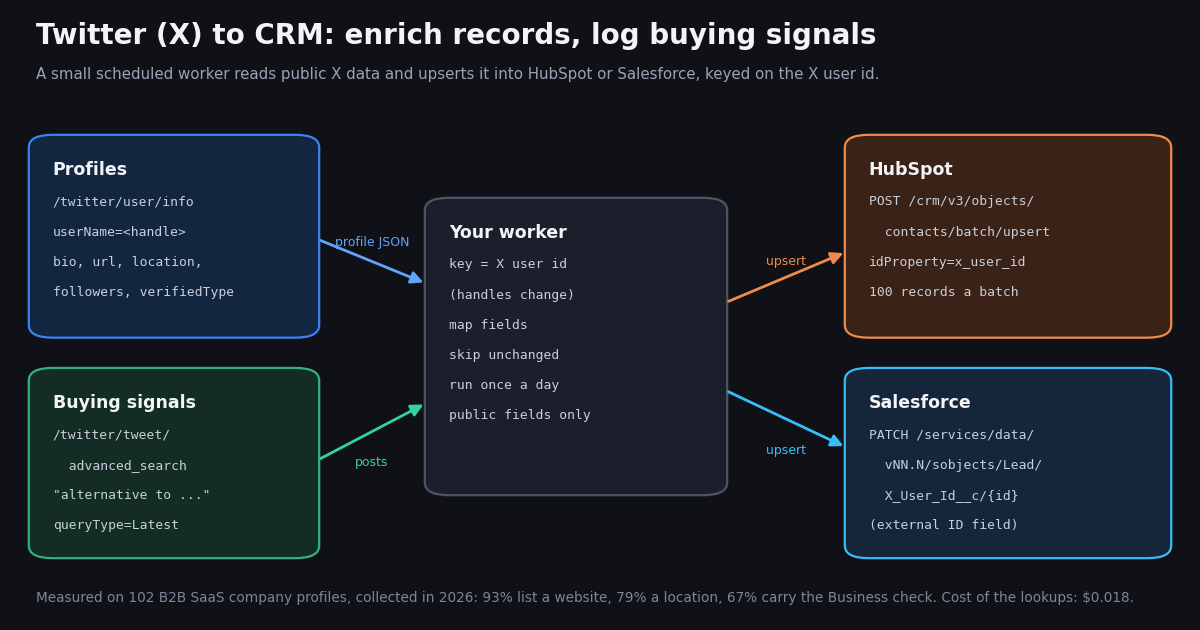
- No native X-to-CRM record sync in HubSpot or Salesforce today: HubSpot's social tool publishes and shows seven-day X feeds; Salesforce Social Studio was retired on November 18, 2024.
- Build a small worker:
/twitter/user/infoper handle, map fields, upsert into HubSpotbatch/upsert(100 records a batch) or a Salesforce External ID PATCH. - Dedupe on the X user id, never the handle: 5 of our 107 looked-up handles came back not found or suspended.
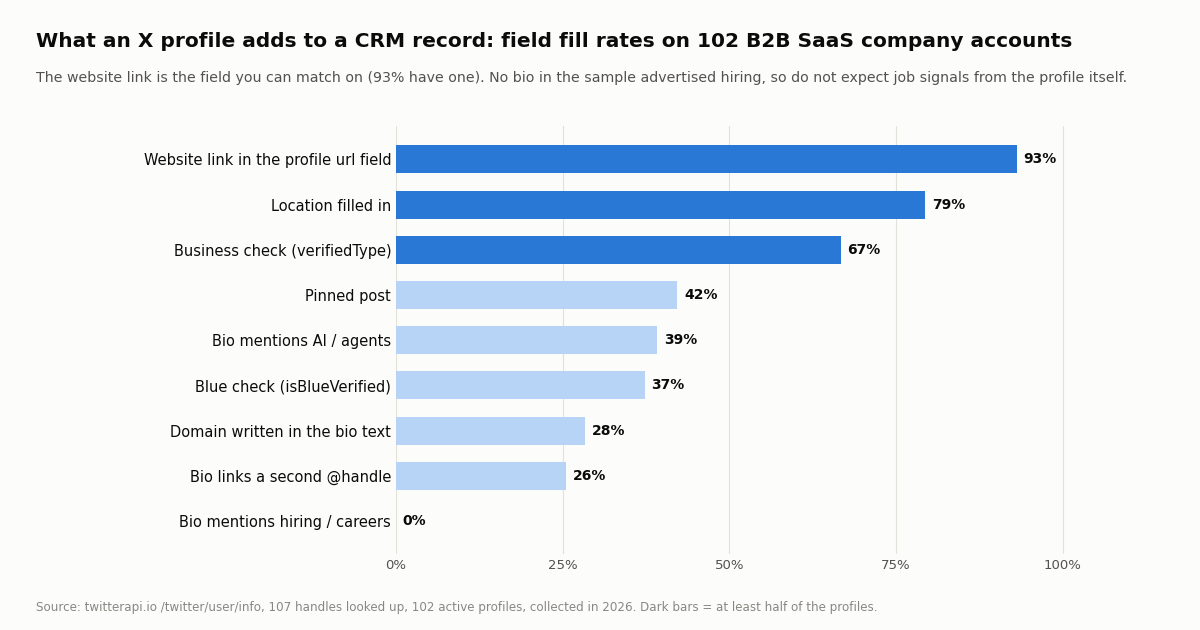
- What you actually get: website link 93%, location 79%, Business check 67%, hiring mentioned in the bio 0% (measured on 102 company profiles).
- Buying signals are rare and cheap to watch: four phrase searches returned 27 matching public posts in the last 30 days, so a once-a-day check is enough.
- Cost: $0.18 per 1,000 profiles and $0.15 per 1,000 tweets returned; enriching 10,000 records is $1.80 here vs $100 on the official X API rate card.
People who search for a Twitter CRM want one of two things. Some want a tool that manages their own X relationships (followers, DMs, prospects) as a lightweight CRM. Others already run HubSpot or Salesforce and want X data to show up on the records there: who the account is, what its bio and website say, how big it is, and whether anyone is publicly asking for a product like theirs. This guide is for the second group, the builders.
We checked what HubSpot and Salesforce offer natively for X today, then ran the enrichment for real: 107 B2B SaaS company handles through /twitter/user/info, plus four buying-signal searches through /twitter/tweet/advanced_search. The result is a field-mapping table you can copy, measured fill rates for each field, a cost model against the official X API, and a Python worker that upserts into HubSpot (with a Salesforce variant).
93%
What HubSpot and Salesforce do with X today (verified)
Before building anything, check whether your CRM already covers the job. We read the vendors' own documentation this session; here is what it says.
HubSpot. The knowledge base article knowledge.hubspot.com/social/connect-your-social-media-accounts-to-hubspot lists X among six networks you can connect, on Marketing Hub Professional or Enterprise. You authorize your own X account and choose whether reports cover posts from all sources or only posts published from HubSpot. HubSpot notes that account information such as your login email or number is not stored. The feeds article (knowledge.hubspot.com/social/create-and-monitor-twitter-streams) says an X feed shows only posts from the past seven days, can take up to four hours to update, works with public lists only, and recommends limiting searches to 10 to 15 keywords. Neither article describes turning an X user into a contact or writing X profile fields onto a record.
Salesforce. Salesforce's Trailblazer Community notice says the company retired Marketing Cloud Social Studio on November 18, 2024, and pointed customers to a partner tool for social management. Standard Lead and Contact objects carry no X-specific fields, so X data in Salesforce means custom fields you create and fill.
What that means for you. The CRMs handle your own brand's publishing. Getting X data about other accounts onto CRM records, on your schedule and with your field mapping, is an integration you build. It is a small one: two read endpoints on the X side and one upsert call on the CRM side.
The architecture: one scheduled worker, keyed on the X user id
The integration has three parts, and none of them needs an X account of your own, because reads on TwitterAPI.io work with an API key only.
1. A list of handles. These come from the CRM itself (a property your reps fill in, a form field, a company's website footer) or from a list you import. Normalize them: strip the @, trim spaces, lowercase for comparison.
2. Two X reads. /twitter/user/info with userName=<handle> returns the public profile: id, name, userName, description, location, url, entities, followers, following, statusesCount, createdAt, isBlueVerified, verifiedType, canDm, protected and more. /twitter/tweet/advanced_search with queryType=Latest returns the newest public posts for a query, 20 per page, with has_next_page and next_cursor.
3. A CRM upsert. In HubSpot, POST /crm/v3/objects/contacts/batch/upsert takes up to 100 inputs, each with an idProperty, an id and the properties to set; existing records are updated, missing ones created. In Salesforce, a PATCH on /services/data/<version>/sobjects/Lead/X_User_Id__c/<id> upserts one record by an External ID field.
Key on the numeric X id, not the handle. Handles can be renamed or released and later claimed by someone else; the numeric id stays with the account. Store the handle too, but upsert on x_user_id. HubSpot's docs add a reason of their own: partial upserts are not supported when email is the idProperty for contacts, so a custom unique property is the cleaner key anyway.
Run it once a day. Profiles change slowly. A daily run (cron, a scheduled cloud job, or a CI schedule) keeps follower counts and bios current without paying to re-read unchanged data every hour. Skip the CRM write when nothing changed.
Field mapping: X profile to HubSpot property to Salesforce field
This is the mapping we use. HubSpot's default contact properties list (knowledge.hubspot.com/properties/hubspots-default-contact-properties) has no X-specific property in the version we read, so the X fields go into custom properties you create once under Settings, Properties. Call GET /crm/v3/properties/0-1 to see what your portal already has before you create duplicates. In Salesforce, create custom fields on Lead (or Contact) and mark X_User_Id__c as External ID and Unique.
Use the expanded URL, not url. The profile url field holds a t.co short link. The real address sits in entities.url.urls[0].expanded_url (for HubSpot's own account it was https://www.hubspot.com/new). Strip the scheme, www. and path to get a domain you can match against the company domain in your CRM.
Treat location as free text. X lets anyone type anything in the location box. Store it raw in x_location; only copy it to a structured address field after you have parsed it.
Verification has two flags. In our sample, company accounts with the gold check came back with verifiedType: "Business" and isBlueVerified: false (HubSpot's own profile looks like that), while the blue check shows as isBlueVerified: true. Legacy isVerified was false on every profile. Store one combined value. What each check means is covered in our guide to Twitter verification (linked below).
Do not map what you should not keep. Profiles also carry canDm, follower lists and post history. A CRM record does not need them, and messaging prospects in bulk from a CRM is an outreach pattern X's automation rules restrict. Keep the record to the public profile fields above.
{
  "inputs": [
    {
      "idProperty": "x_user_id",
      "id": "14458280",
      "properties": {
        "x_handle": "HubSpot",
        "x_followers": 781843,
        "x_bio": "The agentic customer platform to scale your business.",
        "x_location": "Cambridge, MA",
        "x_website": "https://www.hubspot.com/new",
        "x_verified_type": "Business",
        "x_checked_at": "YYYY-MM-DD"
      }
    }
  ]
}What enrichment actually fills: measured on 102 company profiles
Enrichment is only useful if the fields come back filled. We looked up 107 B2B SaaS company handles (CRM, developer, data, payments and HR software vendors) and measured each field across the 102 active profiles.
The website link is the matching key you can count on. 93.1% of profiles linked a website, and with a domain typed in the bio as a fallback the coverage reached 94.1%. That is what lets a worker attach an X profile to the right company record automatically instead of guessing from the display name.
Company bios do not advertise hiring. Not one of the 102 bios mentioned hiring, careers or jobs. If job openings are your buying signal, look for them in posts (a search such as from:<handle> hiring) rather than in the profile.
These are established accounts. The median account in the sample was 14.3 years old, 41.2% were created before 2012, the median follower count was 44,014 and the median post count 10,743. 2.0% were protected and none carried the automated-account label.
Bad handles are part of the data. 3 handles returned HTTP 200 with status: "error" and msg: "user not found", and 2 returned a profile object with unavailable: true and unavailableReason: "Suspended", meaning the handle we had on file now resolves to a suspended account rather than the company. A worker must flag both cases instead of writing empty fields over good CRM data.
Small accounts leave more fields empty
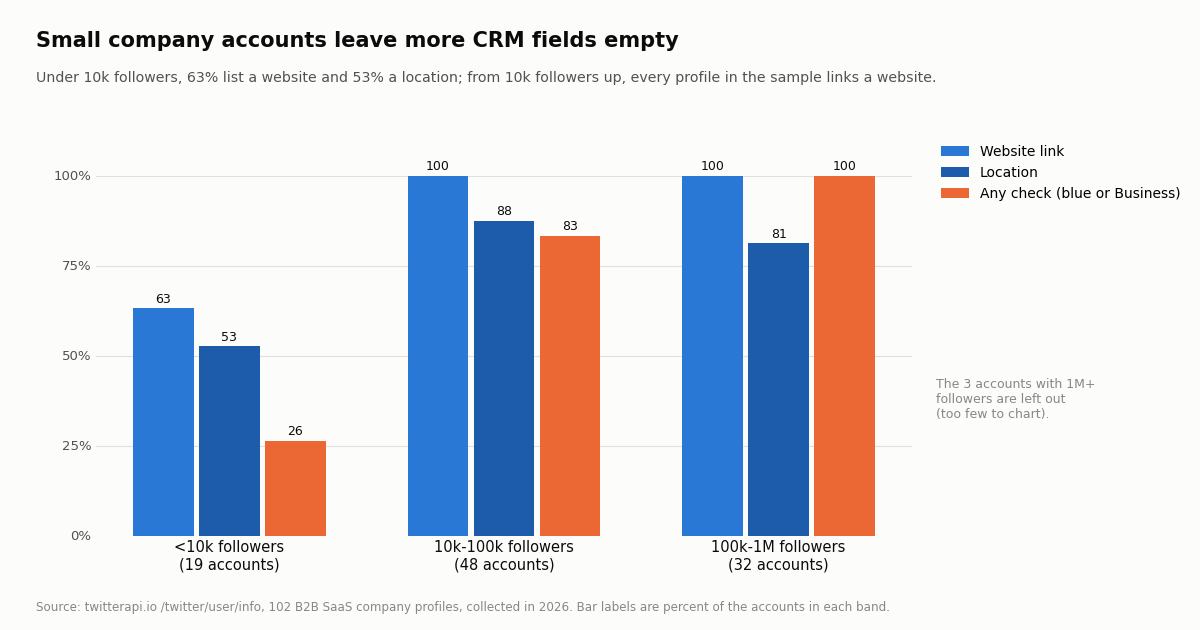
The fill rates are not flat across account sizes. Split by follower band, the small company accounts are where enrichment comes back thinnest, which matters if your CRM is full of early-stage companies.
Under 10,000 followers, over a third of profiles have no website link. Only 63.2% of the 19 small accounts linked a website and 52.6% gave a location, against 100% website coverage from 10,000 followers up. For small accounts, plan a fallback match: the domain in the bio, or a human check.
Checks track size too. 26.3% of small accounts carried a blue or Business check, against 100.0% of accounts with 100,000 to 1 million followers. Treat a missing check on a small account as normal, not as a red flag.
The 1M+ row is three accounts. We keep it in the table for completeness; it is too small to read anything into.
Buying signals: log public posts as CRM activities, carefully
The second use of X in a CRM is intent: public posts where someone asks for a CRM recommendation or for an alternative to a product you compete with. A worker can search for those posts and put them in front of a rep. We ran four such searches to see how much there is to find.
Exact-phrase buying signals are rare. Across the four queries we found 27 matching posts in the last 30 days and 41 in the last 90. The 40 newest posts per query reached back between 419 and 1493 days. Polling these queries every minute would be wasted money; once a day catches everything with a delay nobody will notice.
The authors are mostly individuals. Between 62.5% and 82.5% of matching posts came from accounts with fewer than 10,000 followers. That is why we kept only aggregate counts from these searches and why the worker below writes signals to a review file rather than creating contacts automatically.
Log, review, then act like a person. Store the post id, time, URL and text as an activity or a review-queue row. A rep reads it and decides whether to reply publicly. Do not auto-create contacts for private individuals from a single post, do not enrich them beyond what they chose to publish, and do not message them in bulk. Check your own privacy obligations (GDPR, CCPA) before storing data about people who are not yet customers.
Write tighter queries than ours. Add your competitors' names, your category terms, lang:en, -filter:replies if you only want top-level asks, and min_faves: thresholds if volume grows. Our guide to the Twitter mentions API covers the operators and the brand-mention variant.
The worker: HubSpot upsert in Python, plus the Salesforce variant
The full script is in the code block at the end of this page. It reads handles from handles.txt, calls /twitter/user/info for each, flags not-found and suspended handles, maps the profile onto the custom properties above, and sends them to HubSpot's batch upsert 100 at a time. It then runs two buying-signal searches, pages through has_next_page / next_cursor until it reaches posts it already logged, and appends new ones to signals_to_review.csv.
Authentication on the HubSpot side changed this year. HubSpot's changelog says creating legacy private apps was disabled on September 28, 2026 for new accounts and on October 26, 2026 for existing ones; existing private apps keep working. For new data integrations HubSpot points to Service Keys (Settings, Integrations, Service Keys), sent as a Bearer token in the Authorization header. The script reads that key from HUBSPOT_SERVICE_KEY; grant only the contacts scopes it needs.
Plan for HubSpot's next API versioning. HubSpot's changelog says endpoints on /v1/, /v2/ and /v3/ paths move to unsupported status after September 2027, with date-based versions replacing them and per-endpoint replacements due in a March 2027 release. The /crm/v3/objects/contacts calls in this guide work today; keep the CRM write in one function so swapping the path later is a one-line change.
Rate limits on our side. TwitterAPI.io allows 0.2 requests per second before the first payment and 20 once paid (50 on Scale, 500 on Business, up to 1,000 on request). A daily run over a few thousand handles at 20 requests per second finishes in minutes.
Write actions are a separate product. If your workflow also posts or replies from a brand account, those calls run through an authenticated session: one /twitter/user_login_v2 login ($0.10, with a proxy you supply) returns login_cookies, and each action such as /twitter/create_tweet_v2 is $0.0006, billed per HTTP 200 call. The call acts as that account, so X can rate-limit, lock or suspend it; keep a normal human pace, expect the session to need a re-login now and then, and remember this is not a way around any X limit. A CRM enrichment worker needs none of it.
Salesforce upserts one record per call with a PATCH on the External ID field. The Salesforce REST docs describe it as create-if-missing, update-if-found; from API version 46.0 a created record returns 201 and an update returns 200 with a created flag, and a value that matches several records returns 300 without changing anything. For larger batches, the sObject Collections upsert takes up to 200 records per call.
Lead needs two fields. Salesforce's Lead reference marks LastName (up to 80 characters) and Company as required. For a company X account, put the display name in both or map them from your own data; for a person, use their name and employer.
Mark the External ID unique. Salesforce's docs note that a non-unique External ID field needs the View All Data permission for upserts, and a value that matches several records fails with 300. A unique X_User_Id__c avoids both.
Add the picklist value first. LeadSource is a picklist, so add an "X (Twitter)" value before the worker writes it, or leave the field out.
import os
import requests

# Salesforce: upsert a Lead keyed on a custom External ID field X_User_Id__c (mark it Unique).
INSTANCE = os.environ["SF_INSTANCE_URL"]        # e.g. https://yourdomain.my.salesforce.com
VERSION = os.environ["SF_API_VERSION"]          # pick one your org lists at /services/data/
HEADERS = {"Authorization": f"Bearer {os.environ['SF_ACCESS_TOKEN']}", "Content-Type": "application/json"}


def upsert_lead(profile, website):
    body = {
        "LastName": profile["name"][:80],        # required on Lead (80 characters)
        "Company": profile["name"][:255],        # required on Lead
        "Website": website[:255],
        "City": (profile.get("location") or "")[:40],
        "Description": (profile.get("description") or "")[:32000],
        "LeadSource": "X (Twitter)",            # add this value to the picklist first
        "X_Handle__c": profile["userName"],
        "X_Followers__c": profile.get("followers", 0),
    }
    url = f"{INSTANCE}/services/data/{VERSION}/sobjects/Lead/X_User_Id__c/{profile['id']}"
    r = requests.patch(url, headers=HEADERS, json=body, timeout=30)
    # 201 = created, 200 or 204 = updated, 300 = the id matched more than one record
    return r.status_code
Cost: TwitterAPI.io vs the official X API for CRM enrichment
Prices on both sides are per result. TwitterAPI.io bills $0.18 per 1,000 profiles and $0.15 per 1,000 tweets returned, with a minimum of 15 credits ($0.00015) when a search finds nothing. The official X API pay-per-usage rate card (docs.x.com/x-api/getting-started/pricing) lists $0.010 per user read and $0.005 per post read, capped at 3 million post reads a month before Enterprise.
The ratio. Per profile it is $0.00018 against $0.010, about 56x; per 1,000 tweets it is $0.15 against $5, about 33x. Both rates are from the respective price pages; check /pricing for the current credit packs and subscriptions (Starter $29, Builder $99, Pro $199, Scale $499 and Business $1,499 a month).
Polling frequency is the cost lever for signals. The same empty check every 60 seconds for a month is 43,200 checks, $6.48; every 5 minutes it is $1.30; once a day it is $0.0045. With a few matching posts a month, the daily schedule is the sensible one.
Getting started. New accounts that pass the automatic bot check get free starter credits (no card, one per person or network, expiring after 31 days); purchased credits never expire. The amount is on the pricing page.
How we collected this
Question. If you enrich CRM records with public X profiles, which fields come back filled, and how many public buying-signal posts does a scheduled search find?
Accounts and queries. Part A: 107 B2B SaaS company handles (CRM, support, developer tools, databases, cloud, payments, HR and analytics vendors, for example @HubSpot, @salesforce, @stripe, @vercel, @supabase, @datadoghq, @pipedrive, @attio), one /twitter/user/info call each. Part B: four phrase searches on /twitter/tweet/advanced_search with queryType=Latest and retweets excluded, two pages each.
Sample and window. 102 active company profiles (3 handles not found, 2 resolving to suspended accounts), profile state at collection time; 159 distinct posts from 141 authors, the 40 newest per query. Collected in 2026. 115 requests in total, about $0.04 of credits.
What the sample cannot show. It covers established software companies, not the small businesses or individual contacts that fill many CRMs; our band split suggests fill rates drop for small accounts. Keyword matching on bios is simple word matching. Buying-signal counts depend on our exact phrases; broader queries find more posts and more noise. Nothing here measures conversion from a signal to a deal.
Privacy. Company profiles are public organization accounts and their raw responses are kept with the study. The buying-signal posts come mostly from private individuals: we kept only aggregate counts, no ids, handles, texts or URLs. No emails or private data were collected.
"""Twitter (X) to CRM worker: enrich records with public X profile fields and queue
buying-signal posts for human review. Run it once a day (cron, a scheduled job, or a CI schedule).

Needs: TWITTERAPI_KEY (twitterapi.io), HUBSPOT_SERVICE_KEY (HubSpot service key with contacts
read/write scopes). Create these HubSpot contact properties first: x_user_id (unique value),
x_handle, x_followers, x_bio, x_location, x_website, x_verified_type, x_checked_at.
"""
import csv
import os
import time

import requests

BASE = "https://api.twitterapi.io"
X_HEADERS = {"X-API-Key": os.environ["TWITTERAPI_KEY"]}
HUBSPOT = "https://api.hubapi.com"
HS_HEADERS = {"Authorization": f"Bearer {os.environ['HUBSPOT_SERVICE_KEY']}", "Content-Type": "application/json"}


def x_profile(handle):
    """Public profile by handle. Returns (status, data): ok, not_found or unavailable."""
    r = requests.get(f"{BASE}/twitter/user/info", headers=X_HEADERS, params={"userName": handle}, timeout=30)
    r.raise_for_status()  # a missing or invalid parameter is HTTP 400 with the text in "detail"
    body = r.json()
    data = body.get("data")
    if body.get("status") != "success" or not data:
        return "not_found", None  # HTTP 200 with msg "user not found": flag the row, do not retry in a loop
    if data.get("unavailable"):
        return "unavailable", data.get("unavailableReason")  # e.g. "Suspended"
    return "ok", data


def website(data):
    """The profile url field is a t.co link; the real address sits in entities.url.urls."""
    urls = ((data.get("entities") or {}).get("url") or {}).get("urls") or []
    return urls[0].get("expanded_url", "") if urls else ""


def to_hubspot(data):
    return {
        "idProperty": "x_user_id",  # dedupe on the numeric X id: handles can change, ids do not
        "id": data["id"],
        "properties": {
            "x_handle": data["userName"],
            "x_followers": data.get("followers", 0),
            "x_bio": (data.get("description") or "")[:1000],
            "x_location": data.get("location") or "",
            "x_website": website(data),
            "x_verified_type": data.get("verifiedType") or ("Blue" if data.get("isBlueVerified") else ""),
            "x_checked_at": time.strftime("%Y-%m-%d"),
        },
    }


def upsert_hubspot(inputs):
    for i in range(0, len(inputs), 100):  # HubSpot batch operations take 100 records at a time
        r = requests.post(f"{HUBSPOT}/crm/v3/objects/contacts/batch/upsert", headers=HS_HEADERS,
                          json={"inputs": inputs[i:i + 100]}, timeout=60)
        if r.status_code >= 300:
            print("HubSpot batch failed:", r.status_code, r.text[:300])


def buying_signals(query, seen, max_pages=3):
    """Newest public posts for one query, deduped by tweet id across runs."""
    found, cursor = [], ""
    for _ in range(max_pages):
        params = {"query": query, "queryType": "Latest"}
        if cursor:
            params["cursor"] = cursor
        r = requests.get(f"{BASE}/twitter/tweet/advanced_search", headers=X_HEADERS, params=params, timeout=30)
        r.raise_for_status()
        body = r.json()
        fresh = [t for t in body.get("tweets", []) if t["id"] not in seen]
        found += fresh
        # stop at the first page that holds posts we already logged, or when there is no next page
        if len(fresh) < len(body.get("tweets", [])) or not body.get("has_next_page"):
            break
        cursor = body.get("next_cursor", "")
    return found


if __name__ == "__main__":
    handles = [h.strip().lstrip("@") for h in open("handles.txt") if h.strip()]
    inputs, flagged = [], []
    for h in handles:
        status, data = x_profile(h)
        if status == "ok":
            inputs.append(to_hubspot(data))
        else:
            flagged.append((h, status, data))
    upsert_hubspot(inputs)
    print(f"upserted {len(inputs)} records, flagged {len(flagged)} handles:", flagged)

    # Buying signals go to a review file. A person reads them; nothing is auto-messaged.
    seen = set(open("seen_ids.txt").read().split()) if os.path.exists("seen_ids.txt") else set()
    queries = ['"alternative to salesforce" -filter:retweets', '"looking for a crm" -filter:retweets']
    with open("signals_to_review.csv", "a", newline="") as f:
        w = csv.writer(f)
        for q in queries:
            for t in buying_signals(q, seen):
                w.writerow([q, t["id"], t["createdAt"], t["url"], t["text"].replace("\n", " ")[:280]])
                seen.add(t["id"])
    with open("seen_ids.txt", "w") as f:
        f.write("\n".join(sorted(seen)))
Researching this?Free starter credits cover end-to-end testing — Google sign-in, no card. Get a key.
Questions readers ask
Does HubSpot have a Twitter (X) integration?
Yes, for your own brand account. HubSpot's social tool (Marketing Hub Professional or Enterprise) connects an X account to publish posts, report on them and show X feeds of the past seven days, refreshed within up to four hours. HubSpot's documentation does not describe creating contacts from X users or writing X profile fields onto records; that part is an integration you build with the CRM API.
Does Salesforce still integrate with Twitter?
Salesforce retired Marketing Cloud Social Studio on November 18, 2024, according to its Trailblazer Community notice. Standard Lead and Contact objects have no X fields, so X data in Salesforce today means custom fields filled by your own integration, for example a PATCH upsert on an External ID field such as X_User_Id__c.
What X data can I legally put in my CRM?
Stick to what accounts publish on their public profiles: name, handle, bio, website link, location, follower count and verification type, plus public posts you choose to log. Do not collect emails or private data, do not profile private individuals from a single post, and check your own GDPR or CCPA obligations before storing data about people who are not customers yet.
How do I avoid duplicate contacts when syncing X data?
Upsert on the numeric X user id, not on the handle. Handles can be renamed and released; the id stays with the account. In HubSpot, create a unique-value property such as x_user_id and pass it as idProperty in batch upsert. In Salesforce, create X_User_Id__c as a unique External ID field and PATCH on it.
How much does it cost to enrich CRM records with X profiles?
TwitterAPI.io charges $0.18 per 1,000 profiles, so 10,000 records cost $1.80 to enrich once. The official X API pay-per-usage rate card lists $0.010 per user read, which is $100 for the same 10,000. Our test enrichment of 102 company profiles cost about $0.018.
Can I find leads on X who are looking for a CRM?
You can search public posts for phrases such as "looking for a crm" or "alternative to salesforce" with /twitter/tweet/advanced_search. In our run, four such phrase searches returned 27 matching posts in the last 30 days in total, so check once a day and send results to a person for review rather than auto-creating contacts.
Do I need an X developer account or an X login for this?
No. Profile and search reads on TwitterAPI.io need only an API key, no X account. An X login is only involved if you also want to post or reply from a brand account, which runs through a separate authenticated session with its own caveats.
Continue
- HubSpot Knowledge Base: connect your social media accounts (X supported, Marketing Hub Professional / Enterprise)
- HubSpot Knowledge Base: create and monitor X feeds (past seven days, up to four hours to update)
- HubSpot developer docs: CRM contacts API (batch upsert with idProperty, 100 records per batch)
- HubSpot developer changelog: legacy private app creation sunset and Service Keys
- Salesforce Object Reference: Lead (LastName and Company required, Website, Description, LeadSource)
- X API pricing: $0.010 per user read, $0.005 per post read (official rate card)
- Twitter (X) API overview and endpoint hub
- Twitter user API: every profile field explained
- Twitter mentions API: track brand mentions and search operators
- Make.com Twitter integration (no-code CRM routing)
- n8n Twitter API workflow
- What the blue and gold Twitter (X) checks mean
- TwitterAPI.io pricing: per-profile and per-tweet rates
- 01Twitter (X) Account Locked: Why It Happens and How to Unlock It
- 02The Library of Congress Twitter (X) Archive: What Happened and Can You Access It?
- 03Databricks Twitter (X) Pipeline: Load Tweets into a Delta Table in 2026
- 04Twitter (X) Likes API: What You Can Read, Like and Unlike in 2026
- 05Twitter (X) in Looker Studio: Build the Dashboard Without a Paid Connector
- 06Twitter (X) API in PHP: a Guzzle client with safe decoding and cursor paging
- 07Twitter (X) Spaces API: Official Endpoints, Space Details and Real Listener Data
- 08Twitonomy Review: What the Twitter (X) Analytics Tool Still Does, and an API Alternative
Writing about something you built with TwitterAPI.io? Our community rewards program pays API credits for honest tutorials, build logs and videos.
Stop reading. Start building.
Starter credits cover real testing on real data. Google sign-in, no card, no application queue.
Get an API keyAlready building with TwitterAPI.io? Publish an honest tutorial or build log about it and earn up to $200 a month in API credits.