Twitter (X) API timeline: get a user's tweets, page by page
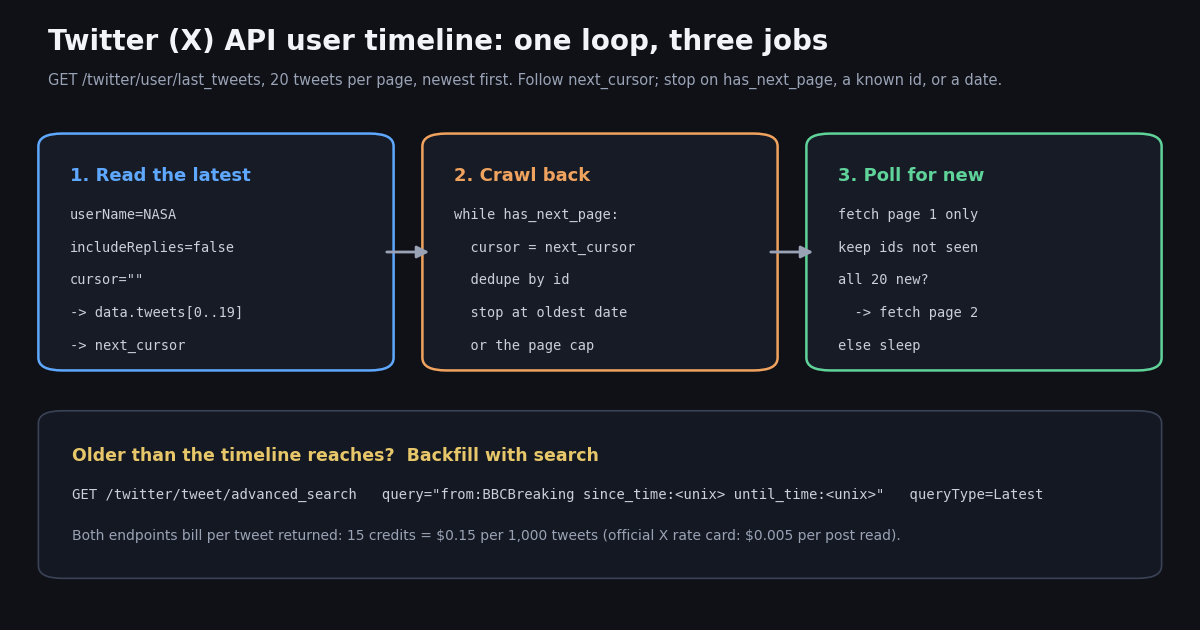
- Endpoint:
GET /twitter/user/last_tweetswithuserNameoruserId(userId wins if you send both),cursor, and optionalincludeReplies(default false). - Shape: tweets live in
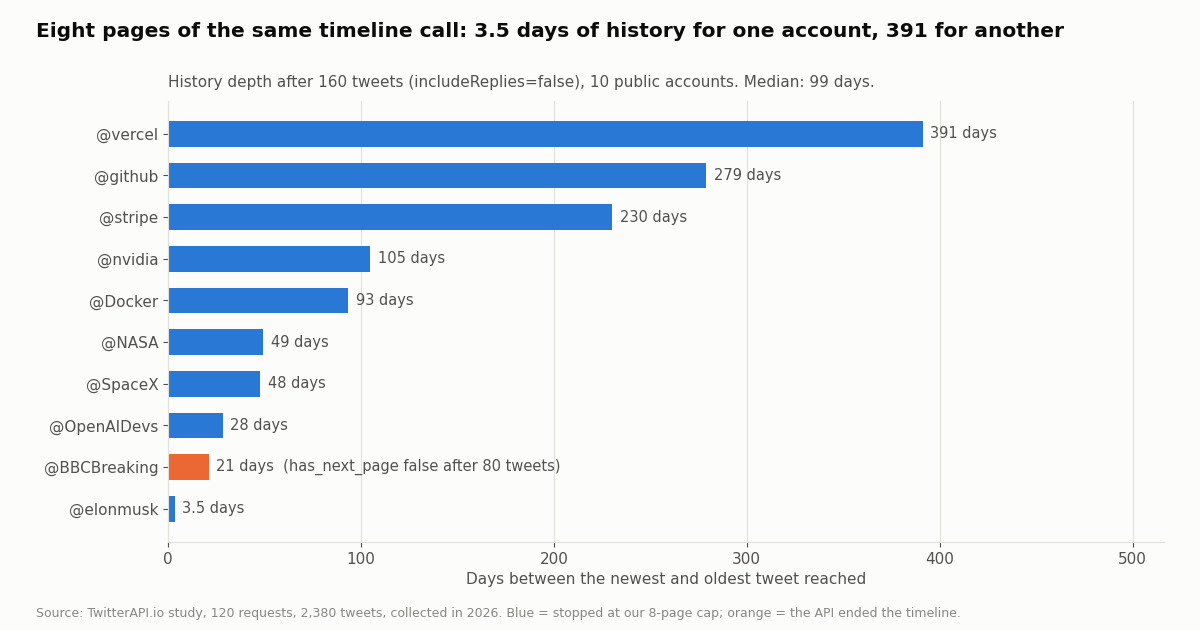
data.tweets[];has_next_pageandnext_cursorsit at the top level. In our crawl all 110 timeline pages that had tweets held exactly 20, with 0 duplicate ids. - Depth depends on posting rate, not on a date: 160 tweets covered 3.5 days for @elonmusk and 391 days for @vercel (median 99 days across 10 accounts).
- Replies:
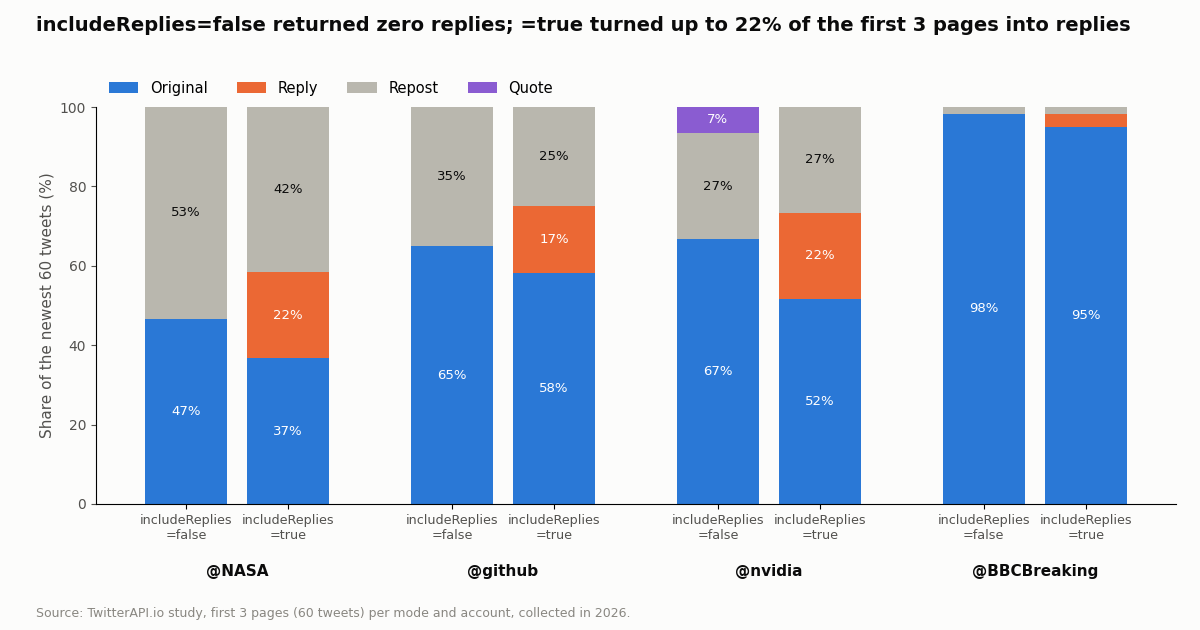
includeReplies=falsereturned 0 replies in 1,960 tweets;trueturned up to 22% of the first three pages into replies. - Polling and backfill: for new tweets and for history older than the timeline reaches, use
/twitter/tweet/advanced_searchwithfrom:<user>and Unixsince_time/until_time(date-onlyuntil:overshot by up to 31 hours in our test). - Cost: $0.15 per 1,000 tweets returned, so 3,200 tweets cost $0.48 here and $16.00 at X's $0.005 per post read.
"Get a user's timeline" is a common first task on any Twitter (X) API: show an account's recent posts in an app, archive a brand's feed, feed a model with one person's writing, or watch a competitor. The request is one GET. What takes time is everything around it: how pagination ends, how far back it goes, what counts as a reply, how to fetch only what is new, and what to do when you need older posts than the timeline gives you.
This guide covers that one task end to end on TwitterAPI.io's /twitter/user/last_tweets endpoint, with the official X API v2 equivalent (GET /2/users/:id/tweets) alongside for comparison. Every behavior claim below was measured: we crawled the timelines of 10 public organization and public-figure accounts, compared includeReplies on and off, and tested search-based backfill, 120 requests in total, collected in 2026. If you are migrating code that used the retired v1.1 statuses/user_timeline, the v1.1 guide linked below maps that call; if you want to export a whole account to a file, see the download guide; if you need alerts within seconds of a post, see the monitoring guide.
3.5 to 391 days
Request and response: the user timeline endpoint
The endpoint is GET https://api.twitterapi.io/twitter/user/last_tweets, authenticated with an X-API-Key header. It takes four query parameters, none of them strictly required, though you must send one of the first two.
Prefer userId in stored jobs. A handle can change; the numeric id never does. Resolve the handle once (the username lookup guide and the Twitter ID finder tool linked below both do it), store the id, and pass userId from then on. A crawl keyed on a handle silently breaks the day the account renames itself.
There is no page-size parameter. Unlike X's max_results (5 to 100), this endpoint returns up to 20 tweets per page, and in our study every page that had tweets held exactly 20. Plan your loop around 20, not around a number you choose.
No X login is involved. Reading a public timeline needs no X account, no OAuth app and no bearer token. Protected accounts are not readable this way.
A successful page has status: "success", the tweets nested under data.tweets, and the pagination fields at the top level. That nesting is the first thing that trips people coming from the search endpoint, where tweets is top level.
Each tweet carries id, url, text, createdAt (a string such as Wed Nov 18 21:40:00 +0000 2026, not ISO 8601), lang, the engagement counters likeCount, retweetCount, replyCount, quoteCount, viewCount and bookmarkCount, the threading fields conversationId, isReply, inReplyToId and inReplyToUsername, entities, extendedEntities.media[] for photos and video, and a full author object (userName, name, followers, isBlueVerified, pinnedTweetIds and more). Reposts embed the original under retweeted_tweet; quotes embed the quoted post under quoted_tweet.
Parse createdAt explicitly. In Python, datetime.strptime(s, "%a %b %d %H:%M:%S %z %Y") handles it. Sorting the raw strings alphabetically sorts by weekday name, which is a real bug we have seen in feed code.
data.pin_tweet was null on every page we read. The pinned post is not lifted out of the timeline. The id of the pinned post is in author.pinnedTweetIds: 7 of our 10 accounts had one, and in all 7 cases that id also turned up inside the crawled timeline. If your UI shows a pinned post first, look it up by that id (with /twitter/tweets?tweet_ids=) rather than expecting the timeline to flag it.
Errors come back as JSON, not only as HTTP codes. Check status and read msg when it is not success; a missing or invalid parameter returns HTTP 400 with the text in detail.
{
  "status": "success",
  "code": 0,
  "msg": "success",
  "data": {
    "pin_tweet": null,
    "tweets": [
      {
        "type": "tweet",
        "id": "2123169377855922254",
        "url": "https://x.com/NASA/status/2123169377855922254",
        "createdAt": "Wed Nov 18 21:40:00 +0000 2026",
        "lang": "en",
        "likeCount": 986,
        "retweetCount": 167,
        "replyCount": 51,
        "quoteCount": 18,
        "viewCount": 144300,
        "bookmarkCount": 51,
        "isReply": false,
        "conversationId": "2123169377855922254",
        "retweeted_tweet": null,
        "quoted_tweet": null,
        "author": { "userName": "NASA", "name": "NASA", "isBlueVerified": true, "pinnedTweetIds": [] }
      }
    ]
  },
  "has_next_page": true,
  "next_cursor": "DAADDAABCgAB..."
}Cursor pagination: crawl a timeline until it ends
The loop is the same as on every list endpoint here: send an empty cursor, read data.tweets, then send the returned next_cursor until has_next_page is false. Add two guards of your own: a page cap so a runaway loop cannot spend more than you planned, and a stop when a page comes back empty.
Dedupe by id anyway. We saw 0 duplicate ids across 1,960 timeline tweets, but a seen set costs nothing and protects a database unique key if a page is ever retried.
Do not assume strict date order inside a page. The timeline is newest first overall, but in 39 of 1,950 adjacent pairs the later tweet was newer than the one before it. Several were an account's own post sitting right after a repost; others were runs of the account's own posts a few days out of order. Sort by createdAt after collecting if order matters to you, and never break a loop on the first older-looking date in the middle of a page; decide at page boundaries.
How the end looks. For @BBCBreaking the fifth page came back with zero tweets and has_next_page: false after 80 tweets covering 21 days. That empty final page still bills the 15-credit minimum ($0.00015). The other nine accounts were still returning full pages with has_next_page: true when we stopped at our cap.
import os
import time
import requests

BASE = "https://api.twitterapi.io"
HEADERS = {"X-API-Key": os.environ["TWITTERAPI_IO_KEY"]}


def get_timeline_page(user_name, cursor="", include_replies=False):
    """One page of a user's timeline: up to 20 tweets, newest first."""
    r = requests.get(
        f"{BASE}/twitter/user/last_tweets",
        headers=HEADERS,
        params={
            "userName": user_name,
            "cursor": cursor,
            "includeReplies": str(include_replies).lower(),
        },
        timeout=30,
    )
    r.raise_for_status()
    body = r.json()
    if body.get("status") != "success":
        raise RuntimeError(body.get("msg"))
    tweets = (body.get("data") or {}).get("tweets") or []
    return tweets, body.get("has_next_page"), body.get("next_cursor")


def kind(t):
    if t.get("retweeted_tweet"):
        return "repost"
    if t.get("quoted_tweet"):
        return "quote"
    if t.get("isReply"):
        return "reply"
    return "original"


def crawl_timeline(user_name, max_pages=10, include_replies=False):
    """Follow next_cursor until has_next_page is false or max_pages is reached."""
    seen, out, cursor = set(), [], ""
    for _ in range(max_pages):
        tweets, has_next, cursor = get_timeline_page(user_name, cursor, include_replies)
        for t in tweets:
            if t["id"] not in seen:
                seen.add(t["id"])
                out.append(t)
        if not has_next or not cursor or not tweets:
            break
    return out


if __name__ == "__main__":
    tweets = crawl_timeline("NASA", max_pages=5)
    print(len(tweets), "tweets")
    for t in tweets[:10]:
        print(t["createdAt"], kind(t), t["likeCount"], t["text"][:70].replace("\n", " "))
How far back a timeline goes (what we measured)
"How many tweets can I get?" is the question every timeline guide skips. The honest answer is that depth is measured in tweets, and what that means in days depends entirely on how often the account posts. We crawled 8 pages (160 tweets) per account with includeReplies=false, and 30 pages for @NASA.
The spread is two orders of magnitude. The same 160 tweets were 3.5 days of @elonmusk and 391 days of @vercel. If your product promises "the last 90 days", that is 1 page for some accounts and dozens for others, so budget by tweets, not by days.
The deep crawl kept going. @NASA's timeline returned full pages for all 30 pages we requested (600 tweets). The first 29 pages reached 305 days back; the 30th held a short run of much older posts, the oldest from 2022. Treat the tail of a very deep crawl as possibly sparse and check dates rather than counts.
One timeline ended early. @BBCBreaking stopped after 80 tweets and 21 days, even though the account posted before that. When the timeline ends before the date you need, move to search-based backfill, described below.
What X documents for its own endpoint. X's timelines introduction says the user Posts timeline returns up to the 3,200 most recent Posts of a user. That ceiling is X's documented figure for GET /2/users/:id/tweets; our crawl did not test any equivalent ceiling on last_tweets.
Replies, reposts and quotes: separating what you get
A timeline is not just an account's own words. Across our 1,960 tweets with replies off, 58.9% were originals, 33.9% reposts and 7.2% quotes. For @OpenAIDevs, 83.8% of the timeline was reposts; for @BBCBreaking, 98.8% was original posts.
Classify by the embedded objects. A repost has a non-null retweeted_tweet; a quote has a non-null quoted_tweet; a reply has isReply: true. The isRetweet flag agreed with retweeted_tweet on all 1,960 tweets, while isQuote disagreed with quoted_tweet on 88, so key quote detection on the object, not the flag.
For a repost, read the original from retweeted_tweet. The outer object's text is the "RT @handle:" wrapper and its counters belong to the wrapper; the real text, media and engagement are inside retweeted_tweet.
includeReplies does exactly what it says. With it off, we saw 0 replies in 1,960 tweets. With it on, replies took 21.7% of the first three pages for @NASA, 16.7% for @github and 21.7% for @nvidia, and the same 60 tweets then covered fewer days.
Pick the mode by use case. A public feed widget or a content archive usually wants includeReplies=false: fewer tweets per day of history and no out-of-context one-liners. Customer-support analysis, conversation research or a full archive wants true, and then filters with isReply and inReplyToUsername on your side.
Incremental polling: fetch only what is new
Once you have an account's history, the next job is keeping it current. There are two ways, and the cost difference between them is large.
Option 1: re-read page 1 of the timeline. Fetch the first page, keep every tweet whose id you have not stored, and fetch page 2 only if the whole first page was new. Because order inside a page is not strictly by date, compare ids across the whole page instead of stopping at the first known id. This is simple, and the helper poll_new() in the full example at the end does it. The catch: the timeline always answers with a full page, so every check bills 20 tweets ($0.003) even when nothing is new.
Option 2: search for posts newer than your last check. /twitter/tweet/advanced_search with query=from:NASA since_time:<unix> and queryType=Latest returns only tweets after that moment, so an idle check returns an empty list and bills the 15-credit minimum ($0.00015). Overlap each window by a minute and let a seen set drop repeats.
Arithmetic, not a quote. A check every 60 seconds is 43,200 checks in a 30-day month; at the $0.00015 minimum that is $6.48, against $129.60 for re-reading a full timeline page each time. New tweets found add $0.15 per 1,000 on top either way.
When polling is the wrong tool. If you need a post within seconds for many accounts, polling gets wasteful. That is the monitoring guide's territory (filter rules that push matches to your webhook); this page stops at the pull model.
import os
import time
import requests

BASE = "https://api.twitterapi.io"
HEADERS = {"X-API-Key": os.environ["TWITTERAPI_IO_KEY"]}


def new_tweets_since(user_name, since_unix):
    """Only tweets newer than since_unix. An empty answer bills the 15-credit minimum."""
    out, cursor = [], ""
    while True:
        r = requests.get(
            f"{BASE}/twitter/tweet/advanced_search",
            headers=HEADERS,
            params={
                "query": f"from:{user_name} since_time:{since_unix}",
                "queryType": "Latest",
                "cursor": cursor,
            },
            timeout=30,
        )
        r.raise_for_status()
        body = r.json()
        out.extend(body.get("tweets") or [])
        if not body.get("has_next_page") or not body.get("next_cursor"):
            return out
        cursor = body["next_cursor"]


seen = set()
since = int(time.time()) - 300
while True:
    started = int(time.time())
    for t in new_tweets_since("NASA", since - 60):  # 60 s overlap, the seen set removes repeats
        if t["id"] not in seen:
            seen.add(t["id"])
            print("new:", t["createdAt"], t["url"])
    since = started
    time.sleep(300)
Backfill older history with advanced search
When the timeline ends, as @BBCBreaking's did after 80 tweets, or when you need a specific month without paging through everything newer, use search. from:<user> restricts results to one author; since_time: and until_time: take Unix seconds and bound the window. The docs.twitterapi.io search reference recommends exactly these two operators and says the since:YYYY-MM-DD_HH:MM:SS_UTC form is not supported.
We tested both. Search reached past every timeline crawl we pointed it at: a window ending where @BBCBreaking's timeline ran out returned 60 older tweets in three pages, all by @BBCBreaking, and continued with has_next_page: true.
Use the Unix operators. The date-only until:YYYY-MM-DD form returned tweets dated after the bound on all three accounts we tried, by up to 31.1 hours. until_time:<unix> stayed inside the bound in both tests. The _UTC date-time form also stayed inside in our one test, but the docs say it is unsupported, so do not build on it.
Walk backwards in windows. For a long backfill, ask for one month at a time (or one week for a prolific account), newest window first, and dedupe by id across windows. Small windows keep each crawl short and make it easy to resume after an error.
Replies in search. Search returns replies by default. Add -filter:replies to the query to mirror includeReplies=false. The full operator list and its caveats are in the advanced search guide linked below.
Checklist before you ship timeline code. Read data.tweets on last_tweets but top-level tweets on search. Stop on has_next_page: false, an empty page or your own cap, not on next_cursor alone. Budget pages from posting rate, not days. Check retweeted_tweet before analyzing text. Compare whole pages, not the first known id. Poll with since_time search, not by re-reading timeline pages. Store userId, not handles.
import os
from datetime import datetime, timezone
import requests

BASE = "https://api.twitterapi.io"
HEADERS = {"X-API-Key": os.environ["TWITTERAPI_IO_KEY"]}


def unix(y, m, d):
    return int(datetime(y, m, d, tzinfo=timezone.utc).timestamp())


def backfill(user_name, since_unix, until_unix, max_pages=50):
    """Older history the timeline crawl did not reach, one date window at a time."""
    out, cursor = [], ""
    for _ in range(max_pages):
        r = requests.get(
            f"{BASE}/twitter/tweet/advanced_search",
            headers=HEADERS,
            params={
                "query": f"from:{user_name} since_time:{since_unix} until_time:{until_unix}",
                "queryType": "Latest",
                "cursor": cursor,
            },
            timeout=30,
        )
        r.raise_for_status()
        body = r.json()
        out.extend(body.get("tweets") or [])
        if not body.get("has_next_page") or not body.get("next_cursor"):
            break
        cursor = body["next_cursor"]
    return out


older = backfill("BBCBreaking", unix(2026, 10, 1), unix(2026, 10, 28))
print(len(older), "tweets;", "oldest", older[-1]["createdAt"] if older else None)
The official X API equivalent, and the cost of each
On X's own API the same job is GET /2/users/:id/tweets. It takes a numeric user id (so you resolve the handle first), returns 5 to 100 posts per call via max_results, paginates with pagination_token and meta.next_token, supports exclude=replies,retweets, start_time / end_time (on or after 2010-11-06) and since_id / until_id, and requires an X developer app and token. X's timelines introduction documents the 3,200 most recent Posts as its ceiling.
Price is per item on both sides. X's pay-per-usage rate card lists $0.005 per post read, with pay-per-usage capped at 3 million post reads per monthly billing cycle (Enterprise above that). TwitterAPI.io bills 15 credits per tweet returned, which is $0.15 per 1,000 tweets. Per 1,000 tweets that is $5.00 against $0.15, about 33 times apart.
Where each one fits. X's endpoint gives you 100 posts per call, since_id built into the timeline itself, and first-party terms. TwitterAPI.io gives you the same data shape across every read endpoint, lookup by handle without a separate call, no developer-app approval, and a per-tweet price that makes deep crawls and frequent checks affordable. Rate limits are per key: 0.2 requests per second before the first payment, 20 once paid, 50 on Scale, 500 on Business, and up to 1,000 on request.
Getting started costs nothing up front. New accounts that pass the automatic bot check get up to $1 of free credits (at most 100,000 credits, no card, one per person or network, expiring after 31 days). That is enough for more than 6,000 timeline tweets. Purchased credits never expire.
How we collected this
Question. How deep does a paginated /twitter/user/last_tweets crawl go, how many tweets does each page carry, how do replies, reposts and quotes change with includeReplies, and does advanced_search with from: and a time bound reach beyond the timeline?
Accounts. Ten public organization and public-figure accounts: @NASA, @github, @vercel, @Docker, @nvidia, @OpenAIDevs, @stripe, @SpaceX, @elonmusk and @BBCBreaking.
Method and sample. Up to 8 timeline pages per account with includeReplies=false (30 for @NASA), 3 pages with includeReplies=true for four accounts, and 9 search pages across six backfill queries: 120 requests and 2,380 tweets, collected in 2026, through our rate-limited read client. Each account's window runs from its newest to its oldest tweet reached at collection time. The study cost $0.36 in credits.
What the sample cannot show. Ten accounts are not a census: depth for a private individual, a very new account or an account with tens of thousands of posts per year may differ, and we capped most crawls at 8 pages, so we did not find where most timelines end. The ordering and flag observations describe what we saw, not a documented guarantee.
Privacy. Aggregates only, organization and public-figure accounts only; we did not analyze the authors of reposted, quoted or replied-to posts. The question, account list and metrics were written down before collection; the analysis script and per-tweet sample with no ids, URLs or text are kept with the study.
import os
import time
import requests

BASE = "https://api.twitterapi.io"
HEADERS = {"X-API-Key": os.environ["TWITTERAPI_IO_KEY"]}


def get_timeline_page(user_name, cursor="", include_replies=False):
    """One page of a user's timeline: up to 20 tweets, newest first."""
    r = requests.get(
        f"{BASE}/twitter/user/last_tweets",
        headers=HEADERS,
        params={
            "userName": user_name,
            "cursor": cursor,
            "includeReplies": str(include_replies).lower(),
        },
        timeout=30,
    )
    r.raise_for_status()
    body = r.json()
    if body.get("status") != "success":
        raise RuntimeError(body.get("msg"))
    tweets = (body.get("data") or {}).get("tweets") or []
    return tweets, body.get("has_next_page"), body.get("next_cursor")


def kind(t):
    if t.get("retweeted_tweet"):
        return "repost"
    if t.get("quoted_tweet"):
        return "quote"
    if t.get("isReply"):
        return "reply"
    return "original"


def crawl_timeline(user_name, max_pages=10, include_replies=False):
    """Follow next_cursor until has_next_page is false or max_pages is reached."""
    seen, out, cursor = set(), [], ""
    for _ in range(max_pages):
        tweets, has_next, cursor = get_timeline_page(user_name, cursor, include_replies)
        for t in tweets:
            if t["id"] not in seen:
                seen.add(t["id"])
                out.append(t)
        if not has_next or not cursor or not tweets:
            break
    return out


def poll_new(user_name, known_ids):
    """Incremental check: read page 1, keep unseen ids, go deeper only while a whole page is new."""
    fresh, cursor = [], ""
    for _ in range(5):
        tweets, has_next, cursor = get_timeline_page(user_name, cursor)
        unseen = [t for t in tweets if t["id"] not in known_ids]
        fresh.extend(unseen)
        if len(unseen) < len(tweets) or not has_next or not cursor:
            break
    known_ids.update(t["id"] for t in fresh)
    return fresh


if __name__ == "__main__":
    tweets = crawl_timeline("NASA", max_pages=5)
    counts = {}
    for t in tweets:
        counts[kind(t)] = counts.get(kind(t), 0) + 1
    print(len(tweets), "tweets", counts)
    print("newest", tweets[0]["createdAt"], "oldest", tweets[-1]["createdAt"])

    known = {t["id"] for t in tweets}
    time.sleep(60)
    for t in poll_new("NASA", known):
        print("new:", t["createdAt"], t["url"])
Researching this?Free starter credits cover end-to-end testing — Google sign-in, no card. Get a key.
Questions readers ask
How do I get a user's tweets with the Twitter API?
Call GET /twitter/user/last_tweets with userName or userId and an X-API-Key header. Each page returns up to 20 tweets in data.tweets, newest first; pass next_cursor back as cursor until has_next_page is false. On the official X API the equivalent is GET /2/users/:id/tweets with a developer app token.
How many tweets can I get from a user's timeline?
X documents the 3,200 most recent Posts for its own user timeline endpoint. On last_tweets we read 600 tweets (30 pages) of @NASA without reaching the end, while @BBCBreaking's timeline ended after 80 tweets. For older posts, backfill with advanced_search using from: and since_time / until_time.
Does the timeline include replies and retweets?
Reposts and quotes are always included and carry retweeted_tweet or quoted_tweet. Replies are excluded by default; includeReplies=true adds them. In our study replies made up to 22% of the first three pages once enabled.
How do I get only new tweets since my last check?
Either re-read page 1 of the timeline and keep ids you have not stored, or search from:<user> since_time:<unix> with queryType=Latest. Search is the lower-cost way to poll: an empty check bills the 15-credit minimum ($0.00015), while a timeline page always returns 20 tweets ($0.003).
Do I need an X developer account to read a timeline?
Not with TwitterAPI.io: reads need only an API key and no X account. The official GET /2/users/:id/tweets needs an X developer app and token, and bills $0.005 per post read on X's pay-per-usage rate card.
Should I use userName or userId?
Use userId for anything stored or scheduled. The docs call it more stable and faster, it wins if you send both, and it survives a handle change.
How much does it cost to download a user's timeline?
15 credits per tweet returned, or $0.15 per 1,000 tweets. 3,200 tweets cost $0.48; the same count at X's $0.005 per post read is $16.00.
Can I read a protected account's timeline?
No. Only public timelines are readable through the read endpoints.
Continue
- TwitterAPI.io docs: Get User Last Tweets (userId, userName, cursor, includeReplies; up to 20 per page, newest first)
- TwitterAPI.io docs: Advanced Search (since_time / until_time in Unix seconds, queryType Latest or Top)
- X developer docs: Timelines introduction (user Posts timeline: up to 3,200 most recent Posts)
- X developer docs: GET /2/users/{id}/tweets (max_results 5-100, pagination_token, exclude, start_time, since_id)
- X developer docs: pay-per-usage pricing ($0.005 per post read; 3M post reads per month cap)
- Community reference of X search operators (from:, -filter:replies, since_time)
- X (Twitter) API hub: endpoints, pricing and guides
- Twitter API v1.1 migration: statuses/user_timeline and its replacements
- How to download tweets with an API: archive a whole account
- Monitor Twitter (X) accounts for new tweets in real time
- Twitter (X) API v2 explained
- Twitter (X) advanced search API guide: operators and queryType
- Twitter username lookup API: handle to user id
- Twitter ID finder tool
- TwitterAPI.io API reference: last_tweets parameters and response
- 01How to Log Out of Twitter (X) on Web, iPhone and Android
- 02How to Change Your Twitter (X) Username, Step by Step
- 03Twitter (X) User API: Get Profiles and Understand Every Field of the User Object
- 04Twitter (X) Feed API: How to Build Your Own Feed in 2026
- 05How to Make Your Twitter (X) Account Private, and Public Again
- 06Twitter (X) API OAuth 2.0 User-Context — Setup + PKCE Guide
- 07Twitter (X) User Search: Find Accounts by Name, Keyword or Bio
- 08TweetGrok Twitter (X) Viewer: What It Is, Whether It Works, and Safer Options
Writing about something you built with TwitterAPI.io? Our community rewards program pays API credits for honest tutorials, build logs and videos.
Stop reading. Start building.
Starter credits cover real testing on real data. Google sign-in, no card, no application queue.
Get an API keyAlready building with TwitterAPI.io? Publish an honest tutorial or build log about it and earn up to $200 a month in API credits.