Twitter (X) Feed API: How to Build Your Own Feed in 2026
- Three feed sources: an account timeline (
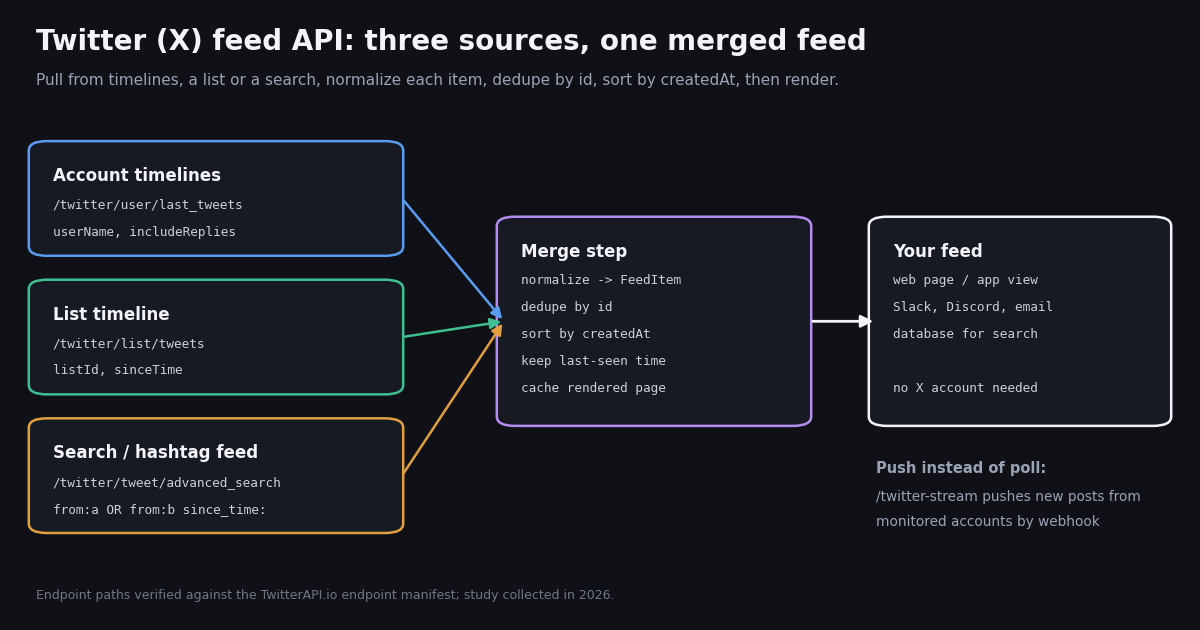
/twitter/user/last_tweets), a list timeline (/twitter/list/tweets,listId) and a search feed (/twitter/tweet/advanced_search,from:, hashtags, keywords). All return the same tweet object. - Merging is your job: dedupe by
id, sort bycreatedAtyourself. In our sample, 3 of 24 timelines had items out of strict time order. - Feeds are bursty: 24 public accounts together produced about 34.4 items an hour, yet 61% of 60-second refreshes would have found nothing new.
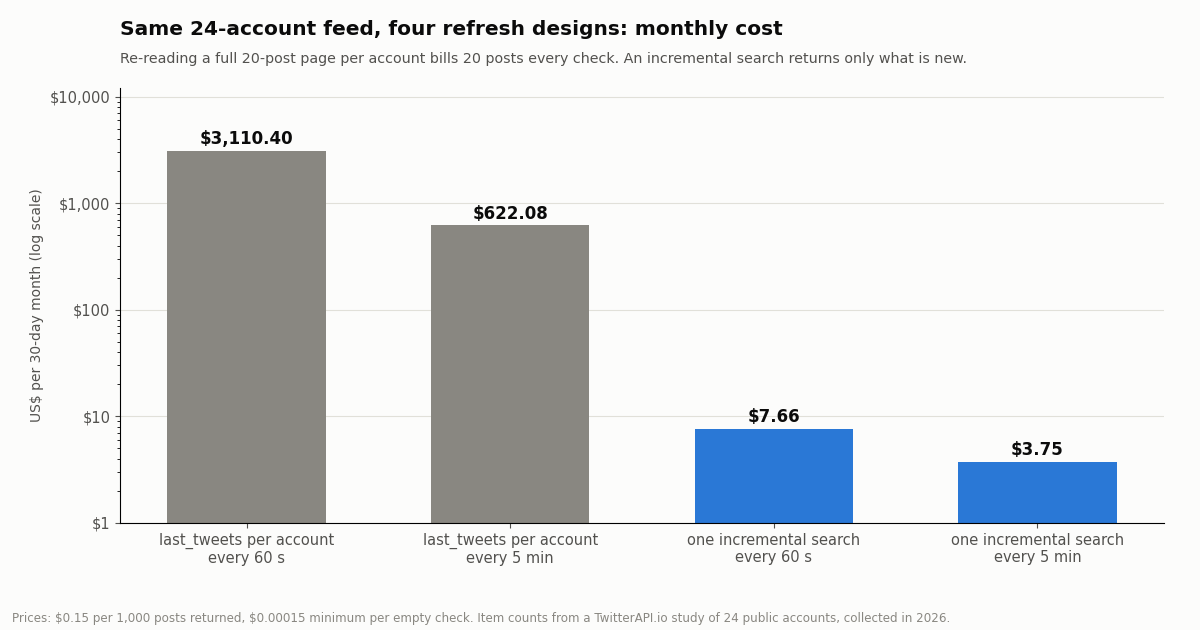
- Refresh design decides the bill: re-reading 24 timelines every 5 minutes is about $622.08 a month; one incremental
since_time:search is about $3.75. - No For You feed via API: a user's personal home timeline needs that user's own OAuth login on the official X API. TwitterAPI.io has no home-timeline endpoint; build the feed from accounts, lists and searches instead.
- Price per result: $0.15 per 1,000 posts returned on TwitterAPI.io vs $0.005 per post read ($5 per 1,000) on X's pay-per-usage rate card, about 33x. No X account needed to read.
Most people searching for a Twitter feed API want one concrete thing: a list of recent posts from accounts they choose, as JSON, so they can render it in their own page, app, dashboard, Slack channel or database. This guide covers exactly that job, from picking the right source endpoint to merging several timelines into one feed, refreshing it without paying for the same posts twice, and what each refresh interval really costs.
It is not a guide to the X embed widget (if you only want X's own timeline box on a website, see the embed guide in the related links), and it is not about producing an RSS file (also linked below). It also states up front a limit that trips many projects: no public API returns the personal For You or Following feed of a logged-in X user unless that user signs in with OAuth on the official X API. Everything here uses public posts, read with an API key and no X account.
Every number on this page comes from our own study: we read the recent timelines of 24 public organization, news and developer accounts (1,420 posts, collected in 2026) and simulated a merged feed at 60-second and 5-minute refresh intervals.
34.4 items an hour, yet 61% of 60-second refreshes found nothing new (1,420 posts from 24 public accounts, collected in 2026). An incremental search every 5 minutes kept that feed at about $3.75 a month.
What a Twitter feed API can and cannot return
A feed is an ordered list of posts. With an API you can build it from public sources, but there are three distinct things people call a "Twitter feed", and only some of them are available.
The For You and Following feeds are personal. X's official endpoint for a home timeline, GET /2/users/{id}/timelines/reverse_chronological on docs.x.com, needs a user-context OAuth token for the account whose feed you want, and returns up to 100 posts per page. TwitterAPI.io has no home-timeline endpoint (we checked the full endpoint list). The practical substitute is to rebuild a Following-style feed from the accounts that user cares about, which is what the rest of this guide does.
Reads need no X account. Every read endpoint here works with a TwitterAPI.io API key in the X-API-Key header. You do not log in to X, and you do not need a developer app on developer.x.com.
Three feed sources and when to use each
All three sources return the same tweet object (id, text, createdAt, author, counts, entities, extendedEntities, quoted_tweet, retweeted_tweet), so your rendering code does not care where an item came from. What differs is how you address them and how you refresh them.
Account timeline: /twitter/user/last_tweets. Pass userName (or userId), optionally includeReplies=true, and follow next_cursor while has_next_page is true. The response nests posts under data.tweets, newest first, 20 per page. This is the natural way to backfill a feed on first load and to show a single account's page.
List timeline: /twitter/list/tweets. Pass listId (the number in an X list URL); optional sinceTime, untilTime, includeReplies and cursor. Posts come back under top-level tweets, 20 per page. A list is a good fit when someone else already curates the accounts (a news desk, a conference speaker list) or when you want the membership managed on X rather than in your code. In our test page from a public list, 40 items spanned only about an hour and came from 35 different authors, so list feeds move fast.
Search feed: /twitter/tweet/advanced_search. Pass query and queryType=Latest. Use from:NASA OR from:SpaceX to merge accounts in one call, #hashtag or keywords for a topic feed, and since_time:<unix seconds> to ask only for posts after your last refresh. Posts are under top-level tweets. This is the source that keeps refresh costs low, because an idle refresh returns nothing and bills only the minimum.
Push instead of pull. If you would rather not poll at all, TwitterAPI.io can push new posts to you. Filter rules (/oapi/tweet_filter/add_rule, a query plus interval_seconds) deliver matches to a webhook or WebSocket, and the account stream on /twitter-stream (/oapi/x_user_stream/add_user_to_monitor_tweet) watches named accounts, including their replies, quotes and reposts. Push suits feeds that must update within seconds; polling suits feeds that refresh every minute or more and need no public receiver.
How busy is a merged feed? What we measured
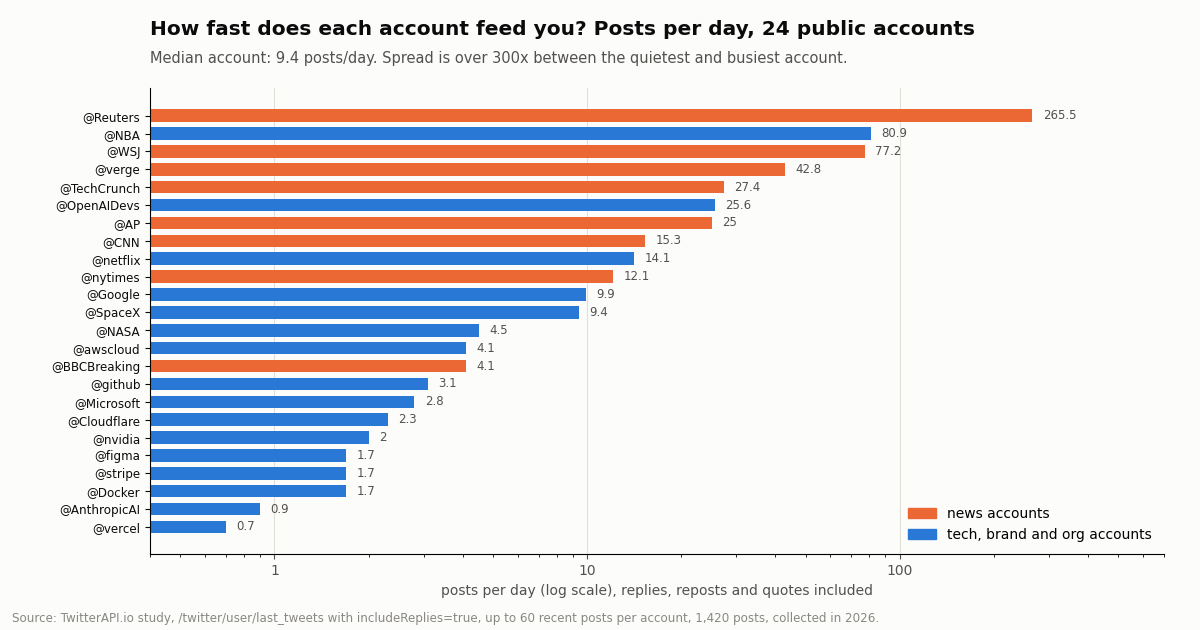
We read up to 60 recent posts from each of 24 public accounts with includeReplies=true and measured how often each one posts. The median account posted 9.4 times a day, but the spread is wide: @Reuters posted about 265.5 times a day over its sampled window, while @vercel posted 0.7. A feed built from a handful of news accounts behaves very differently from one built from developer-tool brands.
Across all 1,420 posts, 64% were original posts, 18% replies, 14% reposts and 3% quotes. The mix matters for a feed: @Google (63% replies) and @awscloud (67% replies) mostly answer other people, so a feed that shows every item from them is mostly half-conversations. Decide per account whether replies belong in your feed, and use includeReplies or filter on isReply accordingly. News accounts were the opposite: @Reuters, @verge and @TechCrunch posted 100% original items in our sample.
To see the merged feed, we took the last 5.4 hours in which every account's sample was complete and counted new items per refresh window. The 24-account feed received 186 items in that window, about 34.4 an hour (the long-run average across each account's own window was 26.5 an hour). Yet 61% of 60-second windows contained nothing new, and the busiest 60-second window held 8 items. At a 5-minute interval only 3% of windows were empty and the busiest held 10.
The takeaway for feed design: even a busy feed is idle most minutes, so your refresh must be cheap when nothing changed, and it must be able to absorb a burst of several items at once (render them in order, do not assume one new item per refresh).
A minimal feed item model (from the real JSON)
Do not store raw API responses as your feed. Normalize each post into a small, stable record the moment it arrives, so a field rename or a new source does not ripple through your UI. These are the fields we found worth keeping, read exactly as the API returns them.
In our sample, 40% of posts carried media, 54% contained at least one link in entities.urls, 14% were reposts and 4% quotes. So plan your card layout for media-heavy items, and decide how to show a repost: the reposted post is in retweeted_tweet, with its own author, and that inner object is usually what a reader wants to see, credited to the original author with a small "reposted by" line.
Counts go stale. likeCount and viewCount are a snapshot at read time. A feed that shows counts either accepts that they freeze when the item arrives, or re-reads recent items by ID with /twitter/tweets (tweet_ids as a comma list) on a slower schedule, which bills per post returned.
Merging several accounts into one feed
Merging has three rules: dedupe by id, sort by createdAt yourself, and keep a bounded window.
Dedupe by id. The same post can reach you twice: from two sources (a list and a search), from an overlapping refresh, or as a repost. In our 24-account sample only 1 underlying post appeared through two accounts (one account reposting another's post), but overlap between refreshes is far more common, and that is where dedupe earns its keep. A dictionary keyed by id is enough for a feed of a few hundred items; use a unique index if you store the feed in a database.
Sort by createdAt yourself. Timelines are newest first, but not strictly. In our sample, 18 of 1,396 adjacent pairs were out of time order, in 3 of 24 accounts (@TechCrunch, @AnthropicAI and @netflix), typically posts a few seconds or minutes apart and scheduled or threaded posts. Two consequences: re-sort after every merge, and never stop reading a page at the first item older than your last refresh. Read the whole page, then dedupe.
Bound the window. Keep the newest few hundred items in memory or a capped table, and page older history from storage. A feed that grows forever slows rendering and makes every refresh more expensive to merge.
One search can replace many timelines. (from:NASA OR from:SpaceX OR from:verge) since_time:<unix> returns new posts from all three accounts in one call, already newest first. We tested a three-account OR query this session; for long account lists, split them into several shorter queries rather than one huge one, and remember each extra query adds its own idle minimum.
Refreshing the feed: polling, incremental search or push
Once the feed exists, the expensive part is keeping it fresh. There are three designs.
Re-read every timeline. Call /twitter/user/last_tweets for each account on every refresh and merge. It is simple, but each call returns a full 20-post page whether or not anything is new, so you pay for 20 posts per account per check, and most of them are posts you already have.
Incremental search with since_time. Keep the time of your last successful refresh, and ask /twitter/tweet/advanced_search for (from:a OR from:b ...) since_time:<last refresh minus a small overlap>. An idle refresh returns zero posts and bills the request minimum; a busy one bills only the new posts. The small overlap (one or two minutes) plus dedupe by id covers posts whose timestamps arrive slightly out of order.
Push. A filter rule (/oapi/tweet_filter/add_rule) or the account stream on /twitter-stream sends new posts to your webhook or WebSocket as they are found. You host a receiver, and the feed updates within seconds without any polling loop. This is the right design for live dashboards and alerting; the monitoring guide in the related links walks through it.
For feeds that refresh every minute or more, start with the incremental search. It needs no public endpoint, survives restarts (store the last refresh time), and is the design the code below uses.
What each refresh interval costs per month
Using the item counts we measured, here is what the same 24-account feed costs per 30-day month under each design. Prices: $0.15 per 1,000 posts returned (15 credits per post), with a minimum charge of 15 credits ($0.00015) when a check returns nothing. A full 20-post timeline page costs $0.003.
The incremental search at 60 seconds costs more than at 5 minutes mainly because of idle checks: 61% of them return nothing but still bill the $0.00015 minimum (a check every 60 s for a month is 43,200 checks, $6.48 of floor). At 5 minutes the floor is $1.30 a month and almost every check carries real new posts. For the smaller feeds in our study, an incremental search every 5 minutes came to about $2.61 a month for the 8 news accounts and $1.97 for the 16 tech and brand accounts.
Compared with the official X API. Our measured feed produced about 24,768 new posts a month. Reading them once at X's pay-per-usage rate card ($0.005 per post read, docs.x.com/x-api/getting-started/pricing) comes to about $123.84; on TwitterAPI.io at $0.15 per 1,000 posts the same posts cost about $3.72. Per 1,000 posts that is $5 vs $0.15, about 33x. X's pay-per-usage tier is also capped at 3 million post reads per monthly billing cycle, with Enterprise above that.
Plans and rate limits are on the pricing page: requests are limited to 0.2 per second before the first payment and 20 per second once paid, which is far above what one feed needs.
Caching, serving the feed, and writes
Never call the API from the browser on every page view. Your API key would be exposed, and a hundred visitors would mean a hundred identical calls. The standard shape is a small server job that refreshes the feed on a schedule and writes it to storage, and a page or endpoint that serves the stored feed.
Refresh on a schedule, serve from cache. A cron job, a worker loop or a serverless scheduled function runs the refresh every 1 to 5 minutes and writes the merged feed to a JSON file, Redis key or database table. Your site reads that, so traffic to your page never changes your API bill.
Store the last refresh time with the feed. It is the since_time for the next run. If a run fails, the next one asks from the older time and catches up; dedupe by id makes the catch-up safe.
Back off when idle hours are long. Many accounts in our sample went quiet for hours. If your feed is for a dashboard nobody watches overnight, a slower schedule at night cuts idle checks without changing what readers see in the morning.
Render media from media_url_https. For photos, the URL in extendedEntities.media[].media_url_https loads directly. Videos list their files under video_info.variants. Keep the post url on every card so readers can open the original on X.
Writes are separate from the feed. Reading a feed needs no X account. Posting into X from your app, for example replying to an item or reposting it, is a separate product that acts as a specific X account. It runs through an authenticated session: one /twitter/user_login_v2 login ($0.10, with a proxy you supply) returns login_cookies, and each write such as /twitter/create_tweet_v2 or /twitter/retweet_tweet_v2 then costs 60 credits ($0.0006), billed per HTTP 200 call.
The call acts as that account, so X can rate-limit, lock or suspend it. Use only your own account, keep a normal human pace, and expect that the session can need a fresh login. X's automation rules apply, and this is not a way around any limit. Most feeds never need writes; keep them out of the refresh loop.
How we collected this
Question. If you merge the timelines of N public accounts into one feed, how many new items arrive per hour, what share are replies, reposts and quotes, how many refreshes come back empty at 60 seconds and 5 minutes, and what does each refresh design cost per month?
Accounts. 24 public organization, news and developer accounts: @vercel, @github, @Docker, @OpenAIDevs, @nvidia, @NASA, @Reuters, @AP, @BBCBreaking, @nytimes, @CNN, @WSJ, @TechCrunch, @verge, @SpaceX, @Google, @Microsoft, @AnthropicAI, @stripe, @Cloudflare, @awscloud, @figma, @netflix and @NBA.
Method and sample. /twitter/user/last_tweets with includeReplies=true, up to 3 pages (60 posts) per account, 1,420 posts in total, collected in 2026. One list timeline (2 pages) and one from: search (2 pages, plus one since_time: test) were read to compare shapes. About 79 requests in all. Posts per day = posts in the sample divided by the hours between the account's oldest and newest sampled post.
Merged feed simulation. We used the last 5.4 hours in which every account's sample was complete, split them into 60-second and 5-minute windows, and counted items per window. Monthly costs scale that window to 30 days.
What the sample cannot show. A few hours of merged activity is one slice of one day; breaking news days, product launches and live sports push rates far higher, and weekends lower. For very busy accounts (@Reuters, @NBA, @WSJ) 60 posts cover less than a day, so their daily rate reflects the hours we caught. Engagement counts were not analyzed. Your own account list will behave differently, so measure it before you size a budget.
Privacy. Aggregates only. Only the named organization and news accounts are analyzed; reposted, quoted and replied-to authors were not. Raw pages that contain other authors were kept out of the published study files.
"""twitter_feed.py - build one merged Twitter (X) feed from several public accounts.

First run: backfill each account with /twitter/user/last_tweets (one 20-post page).
Every refresh after that: one incremental /twitter/tweet/advanced_search per batch of
accounts with since_time, so you only pay for posts that are new.
Requires: pip install requests. Set TWITTERAPI_IO_KEY in your environment.
"""
import json
import os
import time
from dataclasses import asdict, dataclass
from datetime import datetime
from pathlib import Path

import requests

BASE = "https://api.twitterapi.io"
HEADERS = {"X-API-Key": os.environ["TWITTERAPI_IO_KEY"]}
ACCOUNTS = ["NASA", "SpaceX", "verge", "TechCrunch", "github", "vercel"]
BATCH = 6               # accounts per search query; keep queries short
REFRESH_SECONDS = 300   # 5 minutes
OVERLAP_SECONDS = 120   # re-ask a little of the past; dedupe by id catches repeats
STATE = Path("feed_state.json")


@dataclass
class FeedItem:
    id: str
    url: str
    author: str
    author_name: str
    created_at: float
    kind: str           # original | reply | repost | quote
    text: str
    media: list
    likes: int
    views: int


def parse_time(s):
    return datetime.strptime(s, "%a %b %d %H:%M:%S %z %Y").timestamp()


def to_item(t):
    if t.get("retweeted_tweet"):
        kind = "repost"
    elif t.get("isReply"):
        kind = "reply"
    elif t.get("quoted_tweet"):
        kind = "quote"
    else:
        kind = "original"
    media = [m.get("media_url_https") for m in (t.get("extendedEntities") or {}).get("media", [])]
    author = t.get("author") or {}
    return FeedItem(
        id=t["id"], url=t.get("url", ""), author=author.get("userName", ""),
        author_name=author.get("name", ""), created_at=parse_time(t["createdAt"]),
        kind=kind, text=t.get("text", ""), media=media,
        likes=t.get("likeCount") or 0, views=t.get("viewCount") or 0,
    )


def backfill(account):
    """One page (20 posts) of an account's timeline, newest first."""
    r = requests.get(f"{BASE}/twitter/user/last_tweets",
                     headers=HEADERS, params={"userName": account, "includeReplies": "true"}, timeout=30)
    r.raise_for_status()
    body = r.json()
    return [to_item(t) for t in (body.get("data") or {}).get("tweets", [])]


def new_posts(accounts, since_unix):
    """Everything posted by these accounts since since_unix, following next_cursor."""
    query = "(" + " OR ".join(f"from:{a}" for a in accounts) + f") since_time:{int(since_unix)}"
    params = {"query": query, "queryType": "Latest"}
    items = []
    while True:
        r = requests.get(f"{BASE}/twitter/tweet/advanced_search", headers=HEADERS, params=params, timeout=30)
        r.raise_for_status()
        body = r.json()
        items += [to_item(t) for t in body.get("tweets", [])]
        if not body.get("has_next_page") or not body.get("next_cursor"):
            return items
        params["cursor"] = body["next_cursor"]


def merge(feed, incoming, keep=500):
    by_id = {i.id: i for i in feed}
    for item in incoming:
        by_id[item.id] = item              # dedupe by id
    merged = sorted(by_id.values(), key=lambda i: i.created_at, reverse=True)
    return merged[:keep]                   # sort by createdAt yourself, newest first


def load():
    if STATE.exists():
        s = json.loads(STATE.read_text())
        return [FeedItem(**i) for i in s["items"]], s["last_check"]
    return [], None


def save(feed, last_check):
    STATE.write_text(json.dumps({"items": [asdict(i) for i in feed], "last_check": last_check}))


def main():
    feed, last_check = load()
    if last_check is None:
        for a in ACCOUNTS:
            feed = merge(feed, backfill(a))
        last_check = time.time()
        save(feed, last_check)
    while True:
        started = time.time()
        fresh = []
        for i in range(0, len(ACCOUNTS), BATCH):
            fresh += new_posts(ACCOUNTS[i:i + BATCH], last_check - OVERLAP_SECONDS)
        before = {i.id for i in feed}
        feed = merge(feed, fresh)
        added = [i for i in feed if i.id not in before]
        last_check = started
        save(feed, last_check)
        print(f"{len(added)} new, feed holds {len(feed)} items")
        for item in added[:5]:
            print(f"  @{item.author} [{item.kind}] {item.text[:80]!r}")
        time.sleep(REFRESH_SECONDS)


if __name__ == "__main__":
    main()
Researching this?Free starter credits cover end-to-end testing — Google sign-in, no card. Get a key.
Questions readers ask
Is there an API for a user's Twitter (X) home feed or For You timeline?
Only on the official X API, and only with that user's own OAuth login: GET /2/users/{id}/timelines/reverse_chronological returns the authenticated user's reverse-chronological timeline. TwitterAPI.io has no home-timeline endpoint. To show a Following-style feed without a user login, rebuild it from the accounts the user follows, a list, or a search.
How do I get a Twitter feed as JSON?
Call /twitter/user/last_tweets?userName=<account> with your key in the X-API-Key header. The response is JSON with posts under data.tweets, newest first, 20 per page, plus has_next_page and next_cursor for older pages. For several accounts in one response, use /twitter/tweet/advanced_search with from:a OR from:b.
Can I build a feed from an X list?
Yes. /twitter/list/tweets takes the numeric listId from the list URL, with optional sinceTime, untilTime, includeReplies and cursor, and returns 20 posts per page under tweets. Membership is managed on X, so the feed follows whoever the list owner adds or removes.
How often should I refresh a custom Twitter feed?
For a reading feed, every 1 to 5 minutes is typical. In our 24-account study, 61% of 60-second refreshes found nothing new against 3% at 5 minutes, so 5 minutes loses little freshness and costs about half as much with an incremental search. For updates within seconds, use push (a filter rule webhook or the account stream) instead of faster polling.
Why does my feed show posts out of order?
Timelines come back newest first, but not strictly: in our sample 18 of 1,396 adjacent pairs were out of time order, in 3 of 24 accounts. Merge every source, dedupe by id, then sort by createdAt yourself before rendering.
Should I show replies and reposts in the feed?
It depends on the account. Across our sample 18% of items were replies and 14% reposts, but some brand accounts were over 60% replies. Filter on isReply and retweeted_tweet per account, and render a repost using the inner retweeted_tweet object credited to its original author.
Do I need an X developer account or an X login to read a feed?
No. Reading public posts with TwitterAPI.io needs only an API key from the dashboard. New accounts that pass the automatic bot check get up to $1 of free credits (at most 100,000 credits, no card, one per person or network, expiring after 31 days).
How is this different from embedding a Twitter timeline on my site?
An embed shows X's own widget, styled and controlled by X. A feed API gives you the raw posts as JSON, so you choose the accounts, filter, merge, style and store them yourself. If the widget is all you need, the embed guide in the related links covers it; for an RSS file, see the RSS guide.
Continue
- X API docs: reverse-chronological home timeline (user-context OAuth, max_results up to 100)
- X API pay-per-usage pricing: $0.005 per post read, 3 million post reads per month cap
- TwitterAPI.io documentation: endpoints and $0.15 per 1,000 tweets
- TwitterAPI.io docs: user last tweets endpoint
- TwitterAPI.io docs: advanced search endpoint
- X (Twitter) API overview and endpoint hub
- Twitter Lists API: manage lists and read list timelines
- Monitor Twitter accounts for new tweets in real time
- Embed tweets and X timelines on a website
- Turn a Twitter account into an RSS feed
- Twitter advanced search API operators guide
- Real-time account stream by webhook or WebSocket
- TwitterAPI.io pricing and rate limits
- 01How to Log Out of Twitter (X) on Web, iPhone and Android
- 02How to Change Your Twitter (X) Username, Step by Step
- 03Twitter (X) API timeline: get a user's tweets, page by page
- 04Twitter (X) User API: Get Profiles and Understand Every Field of the User Object
- 05How to Make Your Twitter (X) Account Private, and Public Again
- 06Most Mentioned Stocks and Crypto on Twitter (X): 81.3 Million Cashtag Mentions, 2024-2026
- 07Custom GPT retirement: what migrates, and how to rebuild a Twitter (X) Action as an MCP connector
- 08Codex MCP: How to Add Any MCP Server to OpenAI Codex (CLI, IDE and App)
Writing about something you built with TwitterAPI.io? Our community rewards program pays API credits for honest tutorials, build logs and videos.
Stop reading. Start building.
Starter credits cover real testing on real data. Google sign-in, no card, no application queue.
Get an API keyAlready building with TwitterAPI.io? Publish an honest tutorial or build log about it and earn up to $200 a month in API credits.