How to Change Your Twitter (X) Username, Step by Step
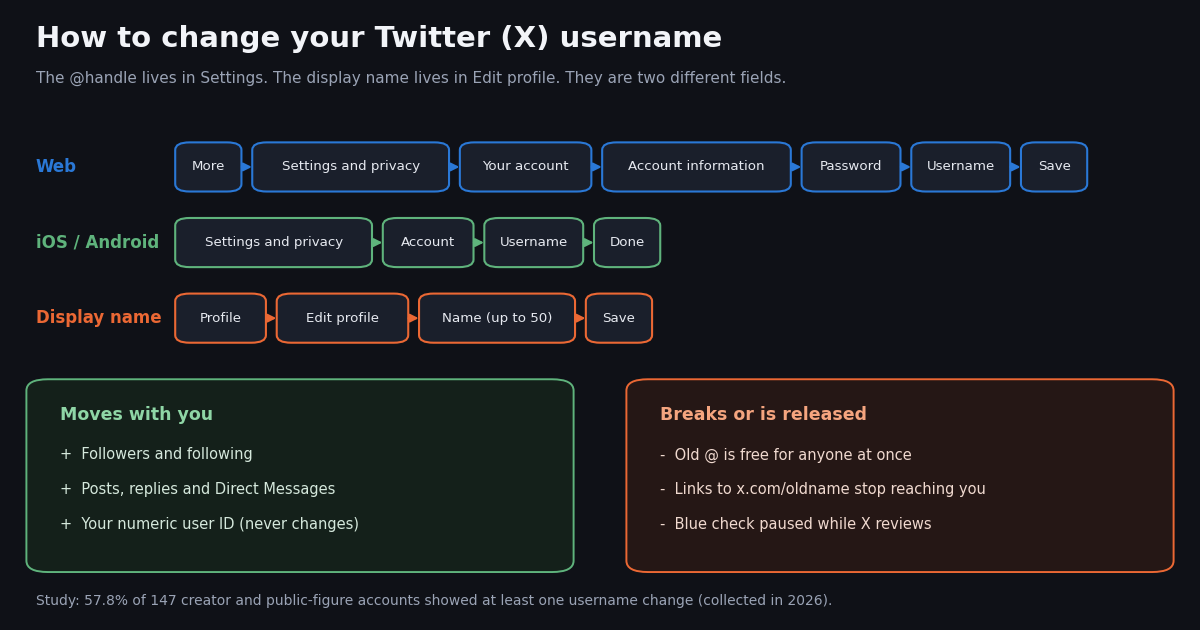
- Web: More, Settings and privacy, Your account, Account information, confirm your password, edit Username, Save (X help center).
- iPhone and Android: Settings and privacy, Account, Username, type the new handle, Done. If your app does not show the field, use x.com in a browser.
- Username rules: more than 4 and at most 15 characters, letters, numbers and underscores only, not taken, and no
XorAdminunless the account is official. - Display name is separate: Edit profile, Name, up to 50 characters, spaces and emoji allowed, change it whenever you like.
- What breaks: your old @ is free for anyone at once, links to
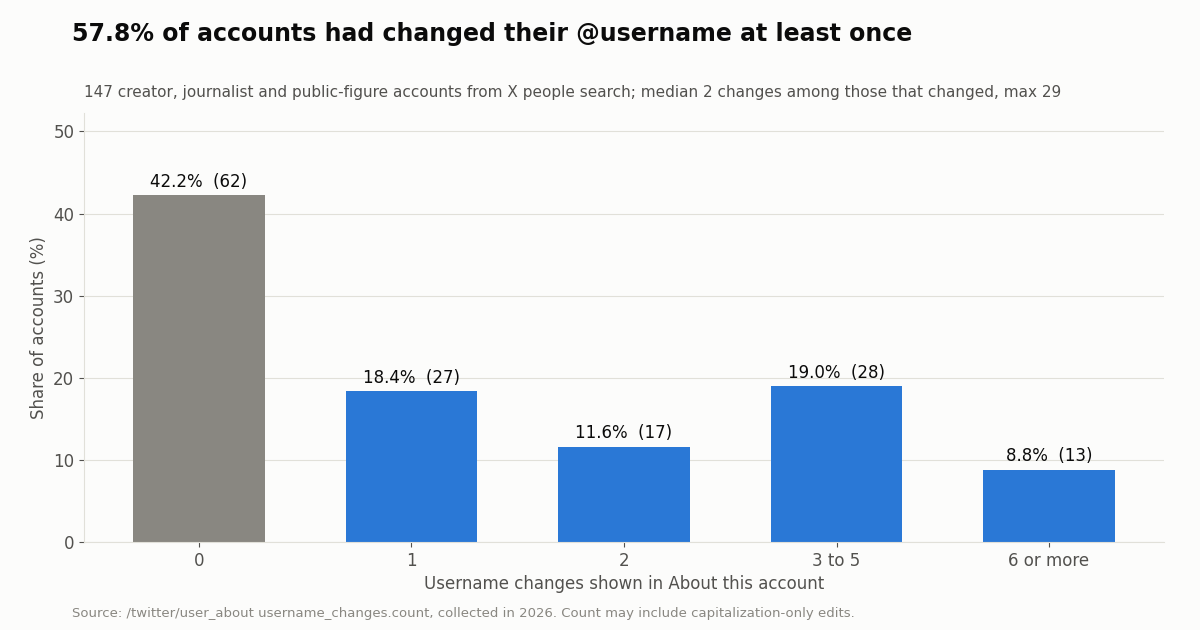
x.com/<old handle>stop reaching you, and a paid blue checkmark is paused until X reviews the change. - Our data: 57.8% of 147 creator and public-figure accounts showed at least one username change; among those, the median was 2 changes and the maximum 29 (collected in 2026).
Most people who search for how to change a Twitter username want one of two different things. Some want a new @handle, the unique name in their profile URL that people type to mention them. Others want a new display name, the bold name shown above the handle, which can contain spaces and emoji and does not have to be unique. X keeps the two in different places, with different rules and different side effects, and mixing them up is a common reason the steps seem not to work.
This guide gives the exact routes X's help center lists for the web, iPhone and Android, the rules a new username has to pass, and a plain list of what moves with you and what breaks once you save. It closes with a small study we ran on 147 public accounts to show how often people actually rename, and a short section for anyone who tracks accounts in a spreadsheet or app and needs those records to survive a rename.
57.8% of 147 creator, journalist and public-figure accounts (median 2 changes among them, maximum 29), and 94.6% of those created from 2020 onward. Collected in 2026 from X's About this account data.
Username vs display name: which one do you want to change?
X's help page on changing a username describes the username as the handle that begins with @, is unique to your account and appears in your profile URL; X also uses it to log you in, and people can search for you by it. The same page describes the display name, which X simply calls name, as a personal identifier that can be playful, a business name or a real name, shown next to your username and changeable at any time.
Quick test. If you want people to type something different after the @, or your profile link to change, you need the username. If you only want the bold name to read differently, change the display name and leave the handle alone; it is the lower-risk edit because nothing points at the display name.
Our sample shows the two rarely match. In a pool of 200 accounts from X's people search, only 20.0% had a display name identical to the handle once case, spaces and punctuation were removed, and another 21.5% had one name contained in the other. In 58.5% the two were different. The median display name was 18 characters, 86.5% contained a space and 9.0% contained an emoji, none of which a username allows.
How to change your Twitter username on web, iPhone and Android
These are the steps X's help center lists for the desktop site (help.x.com/en/managing-your-account/change-x-handle). The help center does not allow automated fetching, so we read the page through a web archive snapshot from this year. Menus on X move from time to time; if a label differs, the Username field is always inside the account settings area of Settings and privacy.
On a computer (x.com). The desktop route takes four steps.
Step 1: open Settings. Sign in at x.com, click More in the left navigation bar, then click Settings and privacy.
Step 2: open your account information. Click Your account, then Account information. X asks you to type your password to confirm it is you.
Step 3: edit the Username field. Under Account information, click Username and replace the handle shown there. Type it without the @. If the name is taken, X tells you and asks you to choose another.
Step 4: save. Click Save. The change is immediate: your profile URL becomes x.com/<new handle> and your posts show the new name.
Before you click Save, copy the new handle exactly as you want it capitalized. Capitals are display only, so JaneDoeWrites and janedoewrites reach the same account, but the version you save is the one people see.
In the X app on iPhone or Android. X's help page lists the same short route for iOS and Android. Open the app and go to Settings and privacy.
Step 1. In Settings and privacy, tap Account. If your version labels the menus differently, look for the Username field inside your account settings.
Step 2. Tap Username and replace the handle in the field. If the name is taken, the app asks you to pick another.
Step 3. Tap Done. The new handle is live right away.
If the Username field is missing or grayed out. Update the app first. If it still does not appear, sign in at x.com in your phone's browser and use the web steps above; the setting is the same account setting either way. Several third-party guides report differences between app versions, so the browser route is the dependable fallback.
If the change will not save. The usual causes are a name that breaks the rules (next section), a name held by a suspended or deactivated account, which X says is not immediately available, or a recent profile change on an account with a paid blue checkmark, which X says freezes further name changes during its review.
How to change your display name (the bold name)
X's help page on customizing your profile (help.x.com/en/managing-your-account/how-to-customize-your-profile) gives one route for the web and both apps.
Step 1. Sign in on x.com or open the iOS or Android app, and go to your profile.
Step 2. Click or tap Edit profile.
Step 3. Edit Name. X allows up to 50 characters, and the name may be shorter than 4 characters, include spaces, emoji or a business name.
Step 4. Click or tap Save.
One catch for new accounts. X notes that while you are first setting up a profile, the option to change the display name does not appear until you have uploaded a profile photo and a header photo.
How long names get in practice. In our 200-account pool the median display name was 18 characters, 90% were 35 characters or shorter, 14.0% were longer than 30 and the longest was exactly 50, the limit. 66.0% were longer than 15 characters, which is the most a username can be. If your display name is long, people will see it; the handle stays the short identifier.
Username rules: what X accepts
X publishes the rules on two help pages: the change-username page and the username registration page (help.x.com/en/managing-your-account/x-username-rules). X's developer data dictionary (docs.x.com/x-api/fundamentals/data-dictionary) agrees: usernames are unique but subject to change, typically at most 15 characters, and the display name is typically capped at 50.
Short handles you see elsewhere. Some well-known accounts have handles of four characters or fewer. They were registered under older rules; a new username today needs at least five.
Wanting a name an inactive account holds. X's registration page says it cannot release inactive usernames. X does run a separate handle program for subscribers, covered in our guide to the X Handle Marketplace, but it is X's own allocation process, not a way to claim a specific dormant name on request.
Never pay a stranger to move a name to you. X's help pages describe no transfer between accounts, and the Handle Marketplace FAQ says handles acquired there are non-transferable.
What happens after you change your username
X's change-username page is short and specific about the effects. Everything below that X states is attributed; the rest follows from how handles and profile URLs work, and we say so.
The immediate release is the real risk. Because X frees the old username at once, someone else can register it minutes later and inherit every link, business card and email signature that still points at it. X suggests telling your followers before you switch so they send replies and DMs to the new handle. For a brand, the safer sequence is: update the website, link-in-bio pages and email signatures first, change the handle, then check that nothing important still links to the old one.
Keeping the old name out of other hands. A common practice is to register the old handle on a second account you control right after the switch, so nobody else can take it; our guide on second accounts covers how to set one up. X's help pages do not mention this tactic, so treat it as practice, not policy.
Links to individual posts. A post link contains both the handle and the post's numeric ID. X does not document how it treats the old handle inside such links, so after a rename open one of your older post links to check where it goes.
The blue checkmark pause. X's page on the blue checkmark says changes to your profile photo, display name or username lead to a temporary loss of the checkmark until the account is validated again, and that no further changes to those three fields are allowed during that review. If you need to change both names, do them together in one sitting rather than a day apart.
How often do people change their username? 147 accounts, collected in 2026
X shows, for many accounts, an About this account panel that includes how many times the username has changed and when it last changed. We read that count for 147 accounts found through X's people search for ten creator and public-figure queries (journalist, podcast, author, streamer, athlete, musician, founder, developer, artist, creator).
Most of them had renamed. 57.8% showed at least one username change; 42.2% never had. Among the accounts that changed, the median was 2 changes and the average 3.8. 27.9% of all accounts had changed three times or more, 4.8% ten times or more, and the highest count was 29. The count can include capitalization-only edits, so a change does not always mean a new name.
Renames are recent and ongoing. Of the 85 accounts with a change, 28 made their last one from 2024 onward and 15 in 2026 itself. The rest last changed between 2016 and 2023, roughly evenly spread.
Blue-check and mid-size accounts renamed more. 67.1% of the 82 accounts with a blue checkmark showed a change, against 46.2% of the 65 without. By audience, 32.5% of accounts under 100,000 followers had changed, 68.0% of those between 100,000 and 1 million, and 60.0% of the 10 accounts above 1 million. The groups are small, so read these as directions, not rates.
Newer accounts rename far more often
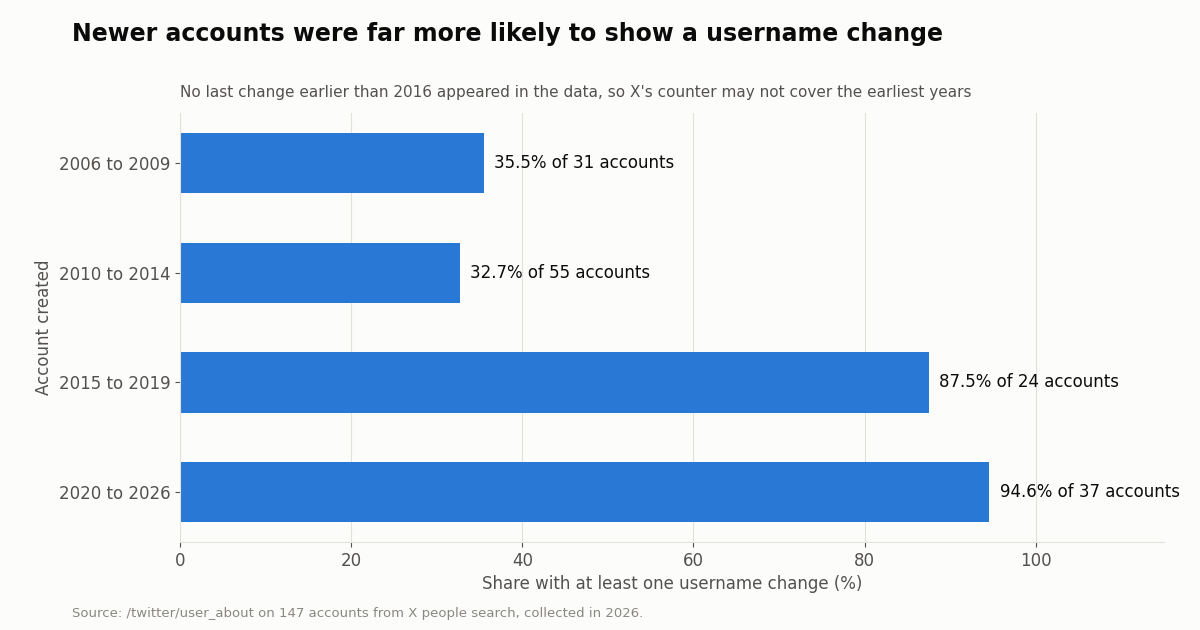
Grouping the same 147 accounts by the year they were created shows a sharp split. Accounts created from 2015 onward were more than twice as likely to show a username change as accounts from the first years of Twitter.
Read this carefully. No account in the sample showed a last change earlier than 2016, including accounts created in 2006 to 2009. That suggests X's counter may not cover the earliest years, which would make old accounts look more stable than they were. X does not document when the count starts. What the data does show plainly is that renaming is common on younger accounts: almost every account in the newest group had done it at least once.
What this means for you. A rename is ordinary on X, and your followers will see it as a new name next to the same profile photo. The cost is not the followers; it is the old links and the released name, covered in the section above.
If you track accounts in a spreadsheet or app: store the ID, not the handle
This part is for marketers, researchers and developers who keep lists of X accounts. A handle is a label that can move to someone else the moment its owner renames; the numeric user ID never changes. X's own corporate account shows it: it posted as @Twitter for years and became @X in July 2023, and when we asked our API for user ID 783214 it returned the handle X and a creation date in 2007, the same account under a new name.
The fix is one column. Save each account's user ID next to its handle. To find an ID for a single account, the free Twitter ID finder tool does it in the browser. For a list, look the handles up once, keep the IDs, and refresh the handles from the IDs on a schedule; any row where the handle changed is a rename.
On TwitterAPI.io reads need no X account: /twitter/user/batch_info_by_ids takes a comma-separated userIds list and returns users[] with the current userName, and /twitter/user_about returns the username-change count in about_profile.username_changes.count. Profiles cost $0.18 per 1,000 returned. On the official X API rate card (docs.x.com/x-api/getting-started/pricing), a user read is $0.010, which is $10 per 1,000. New accounts that pass the automatic bot check get up to $1 of free credits (at most 100,000 credits, no card, one per person or network, expiring after 31 days).
The API cannot change a username. Our profile-update endpoint, /twitter/update_profile_v2, edits the display name, bio, location and website of an account you log in as through /twitter/user_login_v2; it has no username field, so the handle change stays a manual step in X's settings. Any write call acts as that account, X can rate-limit, lock or suspend it, keep a normal human pace, the session can need a re-login, and each HTTP 200 call is billed.
The full script below refreshes a saved list by ID and prints every rename it finds.
import os, requests

BASE = "https://api.twitterapi.io"
HEADERS = {"X-API-Key": os.environ["TWITTERAPI_IO_API_KEY"]}

# id -> handle as you saved it last time
saved = {"783214": "Twitter", "11348282": "NASA"}

r = requests.get(f"{BASE}/twitter/user/batch_info_by_ids",
                 headers=HEADERS, params={"userIds": ",".join(saved)}, timeout=30)
r.raise_for_status()
for u in r.json().get("users", []):
    old, new = saved.get(u["id"]), u["userName"]
    if old and old.lower() != new.lower():
        print(f"renamed: id {u['id']} @{old} -> @{new}")
saved[u["id"]] = newHow we collected this
Question. How common is a username change on X, how many changes do accounts show, how recent was the last one, and does it differ by blue checkmark, audience size and account age? A second pool covers the display-name side: how often the display name differs from the handle, and how long and decorated display names are.
Accounts. We ran X's people search through our /twitter/user/search endpoint for ten queries (journalist, podcast, author, streamer, athlete, musician, founder, developer, artist, creator), one page of 20 per query, de-duplicated to 200 accounts for the display-name metrics. For 150 of them, picked in turn across queries and skipping protected accounts, we read /twitter/user_about; 147 returned a username-change count.
Window and size. A single snapshot, collected in 2026: about 160 read requests in total.
Method. The change count is about_profile.username_changes.count, and the last change is last_changed_at_msec converted to a year. Display-name matching lowercases both names and removes everything except letters and digits before comparing. Follower and creation-year groups come from the search results and the About data.
What the sample cannot show. People search ranks visible, established accounts first, so this is a picture of public creators and figures, not of the typical personal account. The count may include capitalization-only edits and may not cover the earliest years. The subgroups are small (10 to 97 accounts), and the panel does not reveal what earlier handles were.
Privacy. Aggregates only. Search results can include private individuals, so no account from the sample is named, raw responses were kept out of the published study, and the per-account rows we publish carry no ID, handle, name or text.
"""rename_watch.py - keep a list of X (Twitter) accounts keyed by user ID and report
handle changes. A handle can move to someone else after a rename; the ID never changes.

    pip install requests
    export TWITTERAPI_IO_API_KEY=...   # from your twitterapi.io dashboard
    python rename_watch.py NASA Reuters XDevelopers
"""
import json
import os
import sys

import requests

BASE = "https://api.twitterapi.io"
HEADERS = {"X-API-Key": os.environ["TWITTERAPI_IO_API_KEY"]}
STORE = "accounts.json"  # {user_id: {"handle": ..., "name": ...}}


def load():
    return json.load(open(STORE)) if os.path.exists(STORE) else {}


def add_handles(store, handles):
    """Resolve new handles to IDs once with /twitter/user/info."""
    for h in handles:
        r = requests.get(f"{BASE}/twitter/user/info", headers=HEADERS,
                         params={"userName": h.lstrip("@")}, timeout=30)
        r.raise_for_status()
        body = r.json()
        if body.get("status") != "success" or not body.get("data"):
            print(f"@{h}: {body.get('msg')}")  # unknown user -> status error, msg 'user not found'
            continue
        u = body["data"]
        store[u["id"]] = {"handle": u["userName"], "name": u["name"]}


def refresh(store):
    """Re-read every saved ID in batches and report handle or display-name changes."""
    ids = list(store)
    for i in range(0, len(ids), 100):
        chunk = ids[i:i + 100]
        r = requests.get(f"{BASE}/twitter/user/batch_info_by_ids", headers=HEADERS,
                         params={"userIds": ",".join(chunk)}, timeout=30)
        r.raise_for_status()
        seen = set()
        for u in r.json().get("users", []):
            seen.add(u["id"])
            old = store[u["id"]]
            if old["handle"].lower() != u["userName"].lower():
                print(f"handle changed  id {u['id']}: @{old['handle']} -> @{u['userName']}")
            if old["name"] != u["name"]:
                print(f"name changed    id {u['id']}: {old['name']!r} -> {u['name']!r}")
            store[u["id"]] = {"handle": u["userName"], "name": u["name"]}
        for missing in set(chunk) - seen:
            print(f"id {missing}: not returned (suspended, deactivated or protected?)")


def rename_count(handle):
    """How many times X says this account changed its username."""
    r = requests.get(f"{BASE}/twitter/user_about", headers=HEADERS,
                     params={"userName": handle}, timeout=30)
    r.raise_for_status()
    about = (r.json().get("data") or {}).get("about_profile") or {}
    return int((about.get("username_changes") or {}).get("count", 0))


if __name__ == "__main__":
    store = load()
    add_handles(store, [h for h in sys.argv[1:] if h.lstrip("@").lower()
                        not in {v["handle"].lower() for v in store.values()}])
    refresh(store)
    for uid, v in store.items():
        print(f"{uid:>20}  @{v['handle']:<16} username changes: {rename_count(v['handle'])}")
    json.dump(store, open(STORE, "w"), indent=1)
Researching this?Free starter credits cover end-to-end testing — Google sign-in, no card. Get a key.
Questions readers ask
Can I change my Twitter username in the X app?
X's help center lists app steps for iOS and Android: Settings and privacy, Account, Username, then Done. If your app version does not show the Username field, sign in at x.com in your phone's browser and use the web route: More, Settings and privacy, Your account, Account information, Username, Save.
Will I lose my followers if I change my Twitter handle?
No. X states that changing your username does not affect your existing followers, Direct Messages or replies; followers simply see the new username next to your profile photo. What you do lose is the old handle itself, which X makes available to anyone immediately.
How often can I change my Twitter username?
X does not publish a fixed limit; the change-username page only requires that the new name follows the rules and is not taken. The exception is a paid blue checkmark: X says a change to your display name, username or profile photo pauses the checkmark for review and blocks further changes until the review ends. In our sample, accounts that had renamed showed a median of 2 changes and up to 29.
Why can't I change my username on X?
The usual reasons are a name that breaks the rules (5 to 15 characters, letters, numbers and underscores only, no X or Admin), a name that is taken or held by a suspended or deactivated account, a missing field in an older app version (use x.com in a browser), or a blue checkmark review still in progress after a recent profile change.
What is the difference between a Twitter name and a username?
The name, or display name, is the bold text at the top of your profile: up to 50 characters, spaces and emoji allowed, not unique, changed in Edit profile. The username is the @handle in your profile URL: 5 to 15 letters, numbers or underscores, unique, changed in Settings and privacy. Both can be changed; only the username change releases the old name.
Can someone take my old Twitter username?
Yes. X's help page says that once you change your username, the previous one is immediately available for someone else. If the old name matters, update your links first, and consider registering it on a second account you control right after the switch.
Does my Twitter user ID change when I change my username?
No. The numeric user ID is permanent. X's former @Twitter account is now @X and still has user ID 783214. Tools and apps that store the ID keep working after a rename; anything that stores only the handle can lose track of the account.
Continue
- X Help Center: how to change your X username (web, iOS and Android steps; followers, DMs and replies unaffected; previous username immediately available to others)
- X Help Center: help with username registration (15-character maximum, letters, numbers and underscores, reserved words, suspended and inactive usernames)
- X Help Center: how to customize your profile (Edit profile, Name)
- X Help Center: about the blue checkmark (name, username or photo changes pause the checkmark for review)
- X developer docs: data dictionary, user object (usernames unique but subject to change; name typically capped at 50)
- twitterapi.io docs: GET /twitter/user_about (about_profile.username_changes)
- X (Twitter) API hub: endpoints, pricing and guides
- What a Twitter handle is, with real handle-length data
- Username ideas for X and how to check availability
- X Handle Marketplace: how X reallocates inactive handles
- How to create a second X account
- Free Twitter ID finder: handle to user ID and back
- Username lookup API reference: resolve handles to user IDs
- Pay-per-use pricing for profile lookups
- 01How to Log Out of Twitter (X) on Web, iPhone and Android
- 02Twitter (X) API timeline: get a user's tweets, page by page
- 03Twitter (X) User API: Get Profiles and Understand Every Field of the User Object
- 04Twitter (X) Feed API: How to Build Your Own Feed in 2026
- 05How to Make Your Twitter (X) Account Private, and Public Again
- 06Twitter (X) Username Lookup — A Developer's API Reference
- 07How to change your Twitter (X) font: text size, Chirp, and Unicode "fancy fonts"
- 08Browser Use MCP Server: Setup, CLI and Twitter (X) Reads in 2026
Writing about something you built with TwitterAPI.io? Our community rewards program pays API credits for honest tutorials, build logs and videos.
Stop reading. Start building.
Starter credits cover real testing on real data. Google sign-in, no card, no application queue.
Get an API keyAlready building with TwitterAPI.io? Publish an honest tutorial or build log about it and earn up to $200 a month in API credits.