Twitter (X) User API: Get Profiles and Understand Every Field of the User Object
- One profile:
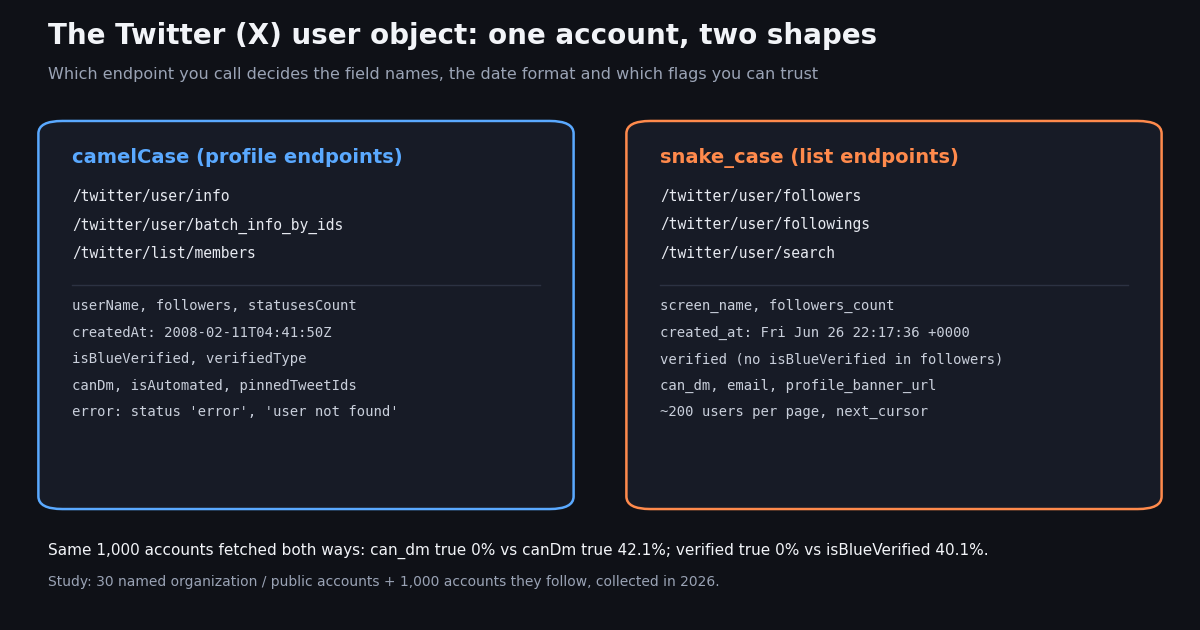
GET /twitter/user/info?userName=githubreturnsdata{...}in camelCase. Many profiles:GET /twitter/user/batch_info_by_ids?userIds=...returnsusers[]in the same camelCase shape. - Two shapes, one account: followers, followings and user search return snake_case rows (
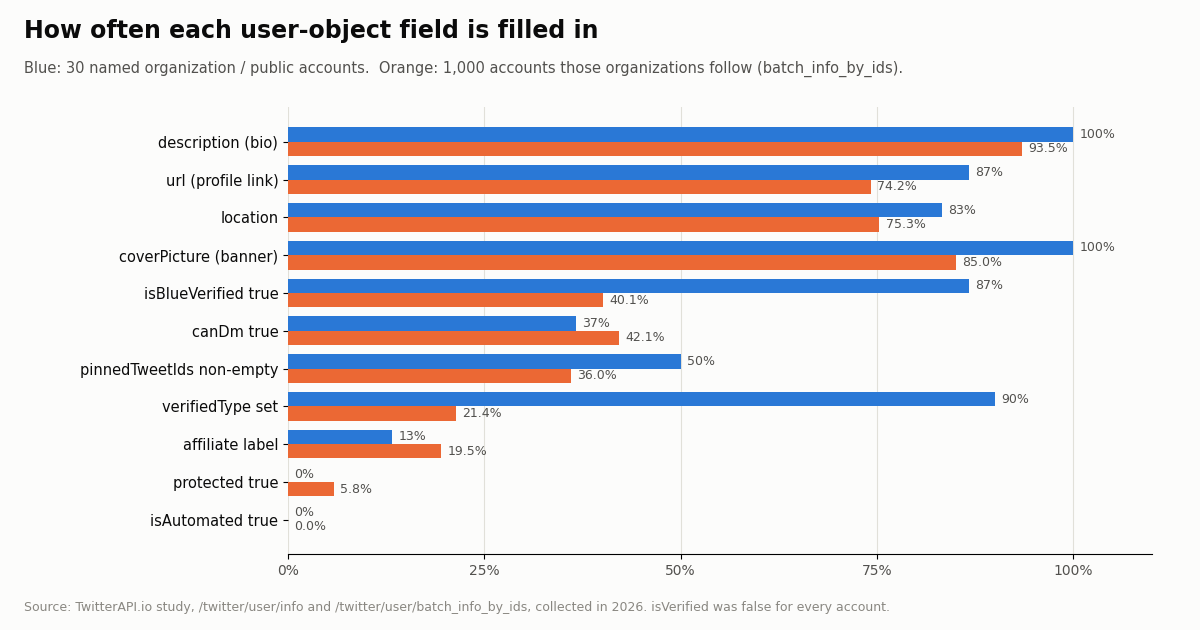
screen_name,followers_count,created_at). For the same 1,000 accounts,can_dmwas true for 0% andcanDmfor 42.1%. - Fill rates are uneven: among 1,000 accounts that large organizations follow, 93.5% had a bio, 74.2% a link, 75.3% a location and 36.0% a pinned post.
- Errors are not 404s: an unknown handle returns HTTP 200 with
status: "error"andmsg: "user not found"; unknown IDs in a batch call are silently left out. - Cost: $0.18 per 1,000 profiles on TwitterAPI.io vs $0.010 per user read ($10 per 1,000) on the official X API pay-per-usage rate card. No X developer account needed for reads.
- Handle to ID is covered on the username lookup reference and the free Twitter ID finder; this page is about the profile object itself.
Most products that touch X data keep a table of accounts: the people a brand monitors, the authors of collected posts, a list of leads, the followers of a competitor. Every one of those rows is a user object, and how well you understand that object decides whether your dashboard shows the right follower count, whether your "accepts DMs" filter works, and whether a renamed account breaks your joins.
This page is about the user, or profile, object: what each field means, which endpoint returns which shape, how to fetch thousands of profiles by ID, how errors look, and how to keep a stored user table fresh. It is not about turning a handle into an ID; that single task has its own page, the Twitter username lookup API reference, plus a free ID finder tool. Here we cover it in one short section and link out.
Everything below is checked against live responses. We pulled 30 named organization and public-figure profiles and 1,000 accounts those organizations follow, fetched the same accounts through both the snake_case and camelCase endpoints, and measured which fields are filled and which values disagree. The numbers in the tables and charts all come from that study.
0% vs 42.1%
The user endpoint family: which call to use
TwitterAPI.io exposes several read endpoints that return users. They differ in input (handle, ID, keyword, relationship), page size and, importantly, in the shape of the object they return. All of them use the base URL https://api.twitterapi.io, an X-API-Key header and no X login.
Pick by input. Have a handle and need one profile: /twitter/user/info. Have stored numeric IDs: /twitter/user/batch_info_by_ids, 100 per call. Need people matching a word: /twitter/user/search (covered in depth on our Twitter user search page). Need an account's audience: the followers endpoint, covered in the get Twitter account followers guide.
The about endpoint is different. /twitter/user_about returns a smaller identity record plus an about_profile block with account_based_in, source, username_changes.count and a verification_info block. On our five named probes, OpenAI reported 4 username changes and XDevelopers 1, while NASA returned the block with empty values. Treat it as an enrichment call, not a replacement for /twitter/user/info.
Every field of the profile object, from a real response
This is what /twitter/user/info?userName=github returned in our study, trimmed only for the image URLs. batch_info_by_ids returns exactly this object per user inside users[].
{
  "status": "success",
  "msg": "success",
  "data": {
    "id": "13334762",
    "name": "GitHub",
    "userName": "github",
    "location": "San Francisco, CA",
    "url": "https://t.co/bbJgfyzKzp",
    "description": "The AI-powered developer platform to build, scale, and deliver secure software.",
    "entities": {
      "description": {},
      "url": {
        "urls": [
          {
            "display_url": "github.com",
            "expanded_url": "http://github.com",
            "indices": [
              0,
              23
            ],
            "url": "https://t.co/bbJgfyzKzp"
          }
        ]
      }
    },
    "protected": false,
    "isVerified": false,
    "isBlueVerified": true,
    "verifiedType": "Business",
    "followers": 2741973,
    "following": 335,
    "favouritesCount": 9123,
    "statusesCount": 11098,
    "mediaCount": 3206,
    "createdAt": "2008-02-11T04:41:50.000000Z",
    "coverPicture": "https://pbs.twimg.com/profile_banners/13334762/...",
    "profilePicture": "https://pbs.twimg.com/profile_images/.../ATxxTJXO_normal.jpg",
    "canDm": true,
    "affiliatesHighlightedLabel": {},
    "isAutomated": false,
    "automatedBy": null,
    "pinnedTweetIds": [
      "2122756587073028306"
    ],
    "profile_interstitial_type": ""
  }
}Field reference: what each value means and when it is empty
The table lists each camelCase field, what it holds, and how often it was filled in our two samples (named organizations first, followed accounts second). Fill rate means a non-empty string, a non-empty list, or true for flags.
Counts. followers, following, statusesCount (posts including replies and reposts), favouritesCount (likes given) and mediaCount are integers that were present on every record. createdAt is ISO 8601 with microseconds and a Z suffix.
What the verification fields really say. isVerified was false for every one of the 1,030 accounts we pulled, so do not use it as a "verified" filter. The checkmark you see in the app maps to isBlueVerified, and the color to verifiedType. In the followed sample, 147 accounts were Business and 67 Government; 56 accounts with a verifiedType had isBlueVerified false, so check both fields rather than assuming one implies the other. X's own data dictionary lists verified_type values such as blue, business and government for the official API.
canDm is a hint, not a guarantee. Our docs describe the flag as unreliable, and the study agrees that it depends on the endpoint (next section). Never build outreach on it; at most use it to hide a "message" button you would otherwise show.
url and description links are shortened. Both carry t.co links; the expanded targets are in entities. Store expanded_url if you want the real domain.
The camelCase vs snake_case gotcha (measured on the same accounts)
Followers, followings and user search return users in a snake_case shape that looks like the old v1.1 user object. We took 1,000 accounts from /twitter/user/followings and fetched the same IDs again with /twitter/user/batch_info_by_ids, then compared field by field.
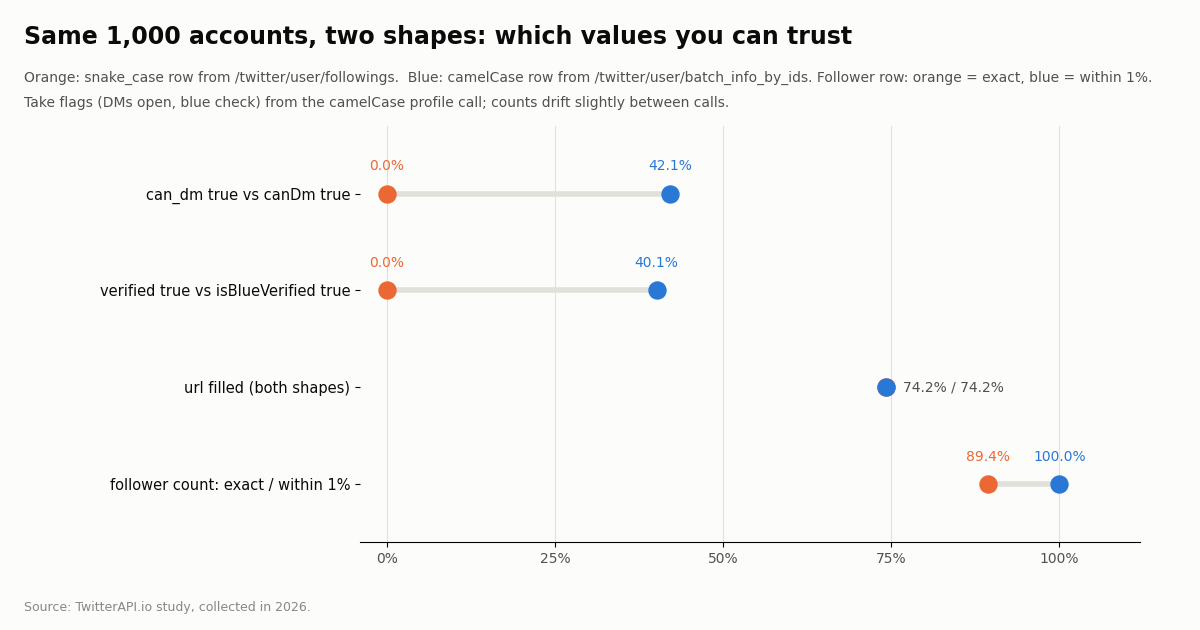
Flags disagree. In the snake_case rows can_dm was true for 0% of accounts and verified for 0%; the camelCase records for the same accounts had canDm true for 42.1% and isBlueVerified true for 40.1%. If you filter follower rows on can_dm or verified, you get an empty result and may not notice.
Text fields agree. Display name and handle matched on 100% of accounts, bio on 100%, location on 99.7% and the profile link was filled at the same 74.2% rate in both shapes.
Counts drift a little. Follower counts were identical on 89.4% of accounts and within 1% on 100%; post counts matched on 99.8%. Large accounts gain followers between two calls, so compare counts with a tolerance, never with equality.
email is almost always null. The snake_case key exists, but it was non-null on only 3.8% of rows. Do not design a feature around it.
Practical rule. Normalize both shapes into one internal record at the edge of your code (the example at the end has a normalize() function), take text and IDs from whichever call you made, and take flags (canDm, isBlueVerified, verifiedType, pinnedTweetIds) only from a camelCase profile call.
Batch lookup by ID (and handle to ID in one paragraph)
Stored IDs are the right key for a user table, because handles change and IDs do not. GET /twitter/user/batch_info_by_ids?userIds=13334762,783214,... takes a comma-separated list and returns users[]. We sent 1,000 IDs in ten calls of 100 and got 1,000 profiles back; a probe with 101 IDs also returned 101. The docs give no hard maximum, so stay at 100 per call to keep URLs short and retries cheap.
Unknown IDs disappear quietly. A probe with one real ID and two non-existent IDs returned status: "success" and one user. There is no per-ID error, so diff the IDs you sent against the IDs you got back and mark the rest as missing (deleted, suspended or never existed) after a second attempt.
Results are keyed by id, not by position. Build a dict from users[] and look up each requested ID; never zip the input list with the output list.
Suspended accounts. Our docs state that an unavailable account comes back with unavailable: true and an unavailableReason such as Suspended, without the usual profile fields. Check for that key before reading counts.
Cost of a batch. Profiles bill at 18 credits each ($0.18 per 1,000). batch_info_by_ids has a bulk tier: 1 credit per profile when a request returns 100 or more profiles (otherwise 18 per profile). The count is profiles returned, not IDs sent: 100 IDs with 3 suspended accounts return 97 profiles and bill at 18 each. Filling each call past 100 IDs, with a margin for accounts that no longer resolve, is both faster and less expensive than smaller chunks. Check the pricing page for the current tiers before you budget.
Handle to ID and back. /twitter/user/info?userName=<handle> returns data.id, which is the handle-to-ID direction; batch_info_by_ids returns userName for each ID, which is the reverse. That is all most code needs. Edge cases (leading @, case, renamed and suspended handles, bulk handle lists) are covered on our Twitter username lookup API reference, and the free Twitter ID finder tool does a one-off conversion in the browser. Store the id. In the user_about probes OpenAI reported 4 username changes, so a table keyed on handles would have broken four times for a heavily watched account.
Errors and edge cases
The profile endpoints answer with HTTP 200 even when the account does not exist. Branch on the body, not on the status code.
Protected accounts. The profile of a protected account is still returned (in our followed sample 5.8% were protected); only its posts are limited to approved followers.
Empty strings, not nulls. Missing bios and locations usually come back as empty strings in camelCase records, while snake_case rows use null for some keys such as url and email. Normalize both to one representation.
{
  "status": "error",
  "msg": "user not found",
  "data": null
}Refresh strategy for a stored user table
Profiles are state, not events, so you pay to re-read them. The question is how often each field changes enough to matter.
Refresh by ID in full batches. Keep a last_refreshed timestamp per row, select the oldest ~110 IDs (up to 200 per call; more returns a 400), call batch_info_by_ids, upsert by id, and mark IDs not returned twice in a row as gone. Send a few more than 100 IDs per call so the response still returns 100 or more profiles after suspended or deleted accounts drop out.
Tier the schedule. Accounts you show on a dashboard every day can be refreshed daily; accounts you only need for attribution (the author of a collected post) can be refreshed weekly or when they reappear. Handles and display names change rarely; follower counts change constantly on large accounts, but within 1% between two calls in our study.
Reuse what you already have. Every tweet you collect carries an author object with the same camelCase basics (userName, followers, isBlueVerified, createdAt). If you already pull posts, update the author row from them instead of paying for a separate profile read.
Budget it. At $0.18 per 1,000 profiles, re-reading a 50,000-account table once a day is 50,000 profiles, $9 a day at the standard profile price, and less under the batch_info_by_ids bulk tier: 1 credit per profile when a request returns 100 or more profiles (otherwise 18 per profile). On the official X API the same daily refresh is 50,000 user reads at $0.010, which is $500 a day.
Cost and limits vs the official X API
The official X API offers the same lookups (GET /2/users/:id, GET /2/users with up to 100 IDs, GET /2/users/by/username/:username, GET /2/users/by for up to 100 usernames). By default it returns only id, name and username; you add fields with user.fields such as created_at, description, public_metrics, pinned_tweet_id, verified_type. Its pay-per-usage rate card charges per resource returned.
At list prices that is $10 vs $0.18 per 1,000 profiles, about 55 times more on the official rate card (docs.x.com/x-api/getting-started/pricing). For posts the same comparison is $5 vs $0.15 per 1,000, about 33 times. New TwitterAPI.io accounts that pass the automatic bot check get up to $1 of free credits (at most 100,000 credits, no card, one per person or network, expiring after 31 days), which covers several thousand profile reads; purchased credits never expire. Subscription plans (Starter $29 to Business $1,499 a month) are on the pricing page.
Writes exist too, but they are a separate product: actions such as follow or unfollow run through an authenticated session created with /twitter/user_login_v2 ($0.10 per login, with a proxy you supply), then 60 credits ($0.0006) per action, billed per HTTP 200 call. Each call acts as that account, so X can rate-limit, lock or suspend it; keep a normal human pace on your own account only. Reading profiles needs none of this.
How we collected this
Question. Which user-object fields are filled in, and how do the camelCase and snake_case user shapes differ for the same accounts?
Accounts. 30 named organization and public-figure accounts (for example github, vercel, nvidia, NASA, OpenAI, stripe, Reuters, NBA) via /twitter/user/info; 1,000 accounts followed by nine organization accounts (github, stripe, vercel, nvidia, NASA, OpenAI, Docker, Microsoft, Google), drawn at random from 1,659 unique followed accounts via /twitter/user/followings, then re-fetched with /twitter/user/batch_info_by_ids; /twitter/user_about on five named accounts; error probes for an unknown handle and unknown IDs.
Window and size. A single snapshot, collected in 2026: 64 requests, roughly 9,000 credits in total (under $0.10).
What the sample cannot show. Accounts followed by large tech organizations skew older (median account age 16.3 years, median 5,280 followers) and more often verified than X users at large; fill rates for random accounts will be lower. A snapshot says nothing about how often fields change over time.
Privacy. Aggregates only. Raw profile pages are kept only for the named organization and public-figure accounts; the followed-accounts sample includes private individuals, so its raw pages were discarded after analysis and only de-identified rows (no ID, handle, name, link or bio text) are kept.
import time
import requests

API_KEY = "YOUR_TWITTERAPI_IO_KEY"
BASE = "https://api.twitterapi.io"
HEADERS = {"X-API-Key": API_KEY}


def get_user(handle):
    """One profile by handle. Unknown handles come back as HTTP 200 with status 'error'."""
    r = requests.get(f"{BASE}/twitter/user/info", headers=HEADERS,
                     params={"userName": handle}, timeout=30)
    r.raise_for_status()
    body = r.json()
    if body.get("status") != "success" or not body.get("data"):
        return None  # msg is "user not found"
    return body["data"]


def get_users_by_ids(ids):
    """Profiles for many numeric IDs, 100 per call. Missing IDs are simply absent."""
    found = {}
    for i in range(0, len(ids), 100):
        chunk = ids[i:i + 100]
        r = requests.get(f"{BASE}/twitter/user/batch_info_by_ids", headers=HEADERS,
                         params={"userIds": ",".join(chunk)}, timeout=60)
        r.raise_for_status()
        for u in r.json().get("users") or []:
            found[u["id"]] = u
        time.sleep(0.1)
    missing = [i for i in ids if i not in found]
    return found, missing


def normalize(u):
    """Map either shape (camelCase profile or snake_case follower/search row) to one record."""
    camel = "userName" in u and "followers" in u
    return {
        "id": u["id"],
        "handle": u["userName"] if camel else u.get("screen_name") or u.get("username"),
        "name": u.get("name"),
        "bio": u.get("description") or "",
        "location": u.get("location") or "",
        "followers": u["followers"] if camel else u.get("followers_count"),
        "following": u["following"] if camel else u.get("following_count"),
        "posts": u["statusesCount"] if camel else u.get("statuses_count"),
        "created_at": u["createdAt"] if camel else u.get("created_at"),
        # Flags: trust these only from the camelCase profile endpoints.
        "blue": u.get("isBlueVerified") if camel else None,
        "verified_type": u.get("verifiedType") if camel else None,
        "can_dm": u.get("canDm") if camel else None,
        "pinned": (u.get("pinnedTweetIds") or []) if camel else None,
    }


def followings_ids(handle, max_pages=2):
    """IDs an account follows (snake_case rows, about 200 per page)."""
    ids, cursor = [], ""
    for _ in range(max_pages):
        r = requests.get(f"{BASE}/twitter/user/followings", headers=HEADERS,
                         params={"userName": handle, "pageSize": 200, "cursor": cursor}, timeout=60)
        r.raise_for_status()
        body = r.json()
        ids += [row["id"] for row in body.get("followings", [])]
        if not body.get("has_next_page"):
            break
        cursor = body.get("next_cursor") or ""
    return ids


if __name__ == "__main__":
    me = get_user("github")
    print(me["userName"], me["followers"], me["verifiedType"], me["pinnedTweetIds"])
    ids = followings_ids("github", max_pages=1)
    profiles, missing = get_users_by_ids(ids)
    rows = [normalize(u) for u in profiles.values()]
    open_dms = sum(1 for r in rows if r["can_dm"])
    print(len(rows), "profiles,", open_dms, "accept DMs,", len(missing), "ids not returned")
Researching this?Free starter credits cover end-to-end testing — Google sign-in, no card. Get a key.
Questions readers ask
How do I get a Twitter user's profile with an API?
Call GET https://api.twitterapi.io/twitter/user/info?userName=<handle> with an X-API-Key header. The profile is in data (camelCase): id, userName, name, description, followers, following, statusesCount, createdAt, isBlueVerified, verifiedType, canDm, pinnedTweetIds and more. No X account is needed.
How do I look up many Twitter users by ID at once?
Use GET /twitter/user/batch_info_by_ids?userIds=<id1,id2,...> with 100 IDs per call. Match results by id, because unknown or deleted IDs are simply left out of users[] and the call still returns status: "success".
Why do follower and search results use different field names?
Followers, followings and user search return a snake_case row (screen_name, followers_count, created_at in the classic Twitter date format), while profile endpoints return camelCase (userName, followers, ISO createdAt). In our study the snake_case can_dm and verified flags were false for every account, so take flags from a camelCase profile call.
Which field tells me an account is verified?
isBlueVerified shows the checkmark and verifiedType gives Business or Government when set. The legacy isVerified was false for all 1,030 accounts we pulled, so it is not a useful filter.
What happens if the username does not exist?
/twitter/user/info returns HTTP 200 with {"status": "error", "msg": "user not found", "data": null}. It never returns a 404, so branch on status.
How much does the Twitter user API cost?
On TwitterAPI.io a profile is 18 credits, $0.18 per 1,000 profiles, and batch_info_by_ids has a bulk tier: 1 credit per profile when a request returns 100 or more profiles (otherwise 18 per profile). The official X API pay-per-usage rate card charges $0.010 per user read, $10 per 1,000.
Can I get a user's email address from the API?
No reliable way. The snake_case follower row has an email key, but it was null on 96.2% of the accounts in our study, and the camelCase profile has no email field. Do not build a feature that depends on it.
How often should I refresh stored profiles?
Refresh by ID in batches of a little over 100 IDs (so each response still returns 100 or more profiles), daily for accounts you display and weekly for accounts kept for attribution. Update author rows from posts you already collect, and compare follower counts with a tolerance because they drift between calls.
Continue
- TwitterAPI.io API reference: get user info by username (fields, user not found, unavailable accounts)
- TwitterAPI.io API reference: batch get user info by user IDs (userIds parameter, users array)
- X API docs: user lookup endpoints, up to 100 users per request (the official route)
- X API docs: data dictionary, User object fields and default fields
- X API pay-per-usage pricing: $0.010 per user read, $0.005 per post read
- TwitterAPI.io pricing: profile credits and the batch bulk tier
- Twitter (X) API overview and endpoint hub
- Twitter username lookup API reference (handle to ID)
- Twitter user search: find accounts by keyword
- How to get a Twitter account's followers with an API
- Twitter profile analytics API guide
- Free Twitter ID finder tool
- TwitterAPI.io pricing and profile credit tiers
- 01How to Log Out of Twitter (X) on Web, iPhone and Android
- 02How to Change Your Twitter (X) Username, Step by Step
- 03Twitter (X) API timeline: get a user's tweets, page by page
- 04Twitter (X) Feed API: How to Build Your Own Feed in 2026
- 05How to Make Your Twitter (X) Account Private, and Public Again
- 06Twitter (X) API OAuth 2.0 User-Context — Setup + PKCE Guide
- 07Twitter (X) User Search: Find Accounts by Name, Keyword or Bio
- 08Twitter (X) API Pagination Explained: max_id, next_token and Cursors
Writing about something you built with TwitterAPI.io? Our community rewards program pays API credits for honest tutorials, build logs and videos.
Stop reading. Start building.
Starter credits cover real testing on real data. Google sign-in, no card, no application queue.
Get an API keyAlready building with TwitterAPI.io? Publish an honest tutorial or build log about it and earn up to $200 a month in API credits.