How to Search Twitter (X) by Location in 2026: Near Me, Operators, and the API
"Twitter search by location" means two different things depending on who is typing it. One group wants tweets near me: what people are saying within a few miles, right now, usually for an event, an outage, or a local story. The other group is a developer who needs to filter posts or accounts by a city or country programmatically and has discovered that the operator every old tutorial recommends either returns nothing or returns the same results as a plain keyword search. This page covers both, in that order.
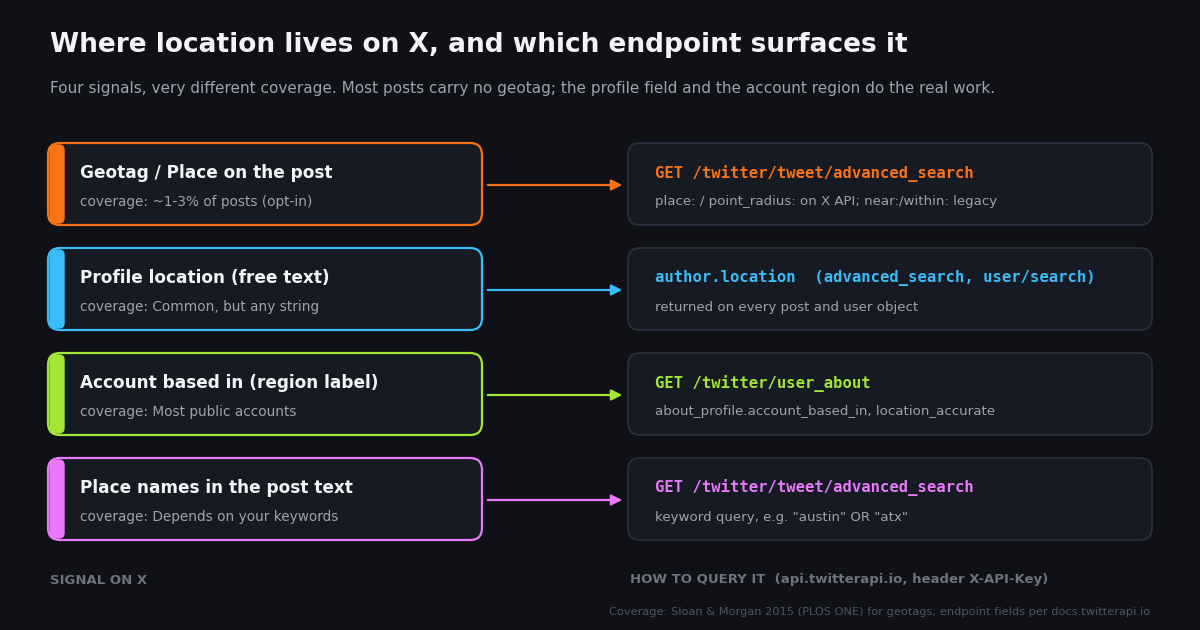
The underlying problem is the same for both groups: X stores location in four separate places, none of them complete. A post may carry a Place tag, but very few do. A profile may have a location string, but it is free text and can say "the moon". Since November 2025 every public profile also shows a country or region label that X infers from signals such as IP history and app-store region, and that label is now exposed by API. And finally, the text of a post may simply mention a place. A useful location search uses more than one of these, and knows which one it is trusting.
Everything programmatic here uses read-only endpoints on twitterapi.io with an X-API-Key header; no login to your own X account, no browser automation, nothing that risks the account you post from. Every path is a real endpoint and the scripts run as written once you set TWITTERAPI_IO_KEY in your environment.
Where location actually lives on X in 2026: the four signals
Before touching an operator or an endpoint, it helps to be precise about what "location" can mean for a post or an account on X, because each meaning has its own coverage and its own way of being wrong. Two of the four describe the post, two describe the author, and only one of them was ever chosen by the person with a map in front of them.
The practical consequence: a query that only matches geotagged posts will miss something like 97% of what was actually written from a city, so "no results" from a strict geo operator tells you little. The profile location and the account region have far better coverage, at the cost of being about the author rather than the post. For most jobs (local sentiment, finding accounts in a market, event monitoring) that is a trade worth making, and the rest of this page shows how to make it explicitly instead of letting an operator make it silently.
Twitter near me: location search in the X app and on x.com
If you just want to see tweets near you on your phone, the X app is the shortest path, and it uses your device location rather than any operator. Open Search, run any keyword, open the Search filters panel, and look for a Near you (sometimes labelled Location) toggle; with it on, results are restricted to posts X associates with your current area. The filter is not shown in every region or app version, and X moves these controls around without notice, so if you do not see it, that is expected rather than a settings problem on your side.
Without a keyword, the app gives you nothing location-specific: the Explore tab's trends are regional at the country or metro level, not within a radius. To see what is being said about a specific event near you, pair a keyword with the filter, or type an operator query directly into the search box, for example power outage near:"Austin" within:15mi. When that works it is because the post was Place-tagged or the author's profile location resolves to that area; when it returns nothing, the next section explains why.
On the desktop site, the Advanced search form at x.com/search-advanced has fields for words, accounts, filters, engagement and dates, but no location field; the Near this place field was removed from the form years ago. The form is still a convenient query builder: fill it in, then append the location operator to the URL query by hand.
Two expectations worth setting for the consumer case. First, Near you is X deciding which posts are local, and X does not document how; it is widely believed by practitioners to combine Place tags and profile locations, but you cannot audit it. Second, you will never see private accounts or posts from people who did not mention or tag a place, so a quiet result does not mean a quiet neighbourhood. If you need to know what people in a place are actually saying, the account-centric methods later on this page cover far more of them.
The near:, within: and geocode: operators: syntax and what still works
Three legacy operators are what almost every "search tweets by location" guide teaches, so here is the honest status of each as of 2026. The syntax is unchanged from the Twitter era; the behaviour is not.
The important distinction is between the two families. The place family is documented by X and does exactly what it says, but only against posts that carry a Place, so it is precise and sparse. The near: family is undocumented in 2026 and, when it worked, quietly widened the net to the author's profile location, which is why old tutorials remember it as generous. On X's own search operator page, the self-serve query limit is 512 characters for recent search and 1,024 for the full archive (docs.x.com, verified 2026), so a long list of neighbourhood names fits, but a long list of accounts does not.
Our rule for any location operator on any backend: run the query twice, once with the operator and once without, and compare the first page of IDs. If the two pages are identical, the operator was ignored and you should fall back to filtering on author.location yourself. If the operator page is empty while the plain page is full, the operator is being honoured against a geotag-only index. The script at the end of this page does this check automatically.
Programmatic route: GET /twitter/tweet/advanced_search with location operators
The twitterapi.io search endpoint is GET https://api.twitterapi.io/twitter/tweet/advanced_search with three parameters: query (any X search string, including from:, lang:, since_time: and the location operators above), queryType (Latest or Top; default Latest), and cursor (empty string for the first page). Each page returns up to about 20 posts in tweets, plus has_next_page and next_cursor for pagination (docs.twitterapi.io, verified 2026). Billing is $0.15 per 1,000 posts returned with a $0.00015 minimum per call (twitterapi.io pricing page, checked in 2026), so a full page costs about $0.003 and the minimum only bites on empty pages.
The field that makes this route work regardless of operator support is author.location: every post's author object carries the profile location string, documented as possibly empty. That means the cheapest reliable location search is often a plain keyword query sized for your topic, followed by a local filter on author.location. It costs the same per post, the operator cannot be silently ignored, and you control the matching: a regex on austin|atx is explicit in a way that near: never was.
For a radius query, send the legacy operator and let the control check decide whether to trust it. Use queryType=Latest for anything time-sensitive; Top is ranked by engagement and mixes in older posts, which is wrong for "what is happening near me now". Add lang:en (or your language) when the city name is ambiguous, and -filter:retweets is not required because the endpoint already strips ads and non-post items, though you may still want to drop isReply posts for a cleaner local read.
"""One page of a Twitter location search: operator query plus a plain control query.

Needs TWITTERAPI_IO_KEY in the environment. Costs about $0.006 (two pages).
"""
import os

import requests

HEADERS = {"X-API-Key": os.environ["TWITTERAPI_IO_KEY"]}


def first_page(query):
    r = requests.get(
        "https://api.twitterapi.io/twitter/tweet/advanced_search",
        params={"query": query, "queryType": "Latest", "cursor": ""},
        headers=HEADERS,
        timeout=30,
    )
    r.raise_for_status()
    return r.json()


located = first_page('"power outage" near:"Austin" within:25mi lang:en')
control = first_page('"power outage" lang:en')

loc_ids = [t["id"] for t in located.get("tweets") or []]
ctl_ids = [t["id"] for t in control.get("tweets") or []]
print(f"operator page: {len(loc_ids)} posts, has_next_page={located.get('has_next_page')}")
print(f"control page:  {len(ctl_ids)} posts")
if loc_ids and loc_ids == ctl_ids:
    print("identical pages: the location operator was ignored; filter on author.location instead")

for t in (located.get("tweets") or [])[:5]:
    author = t.get("author") or {}
    print(f"@{author.get('userName')} | location={author.get('location')!r} | {t.get('text', '')[:80]!r}")
Finding accounts by location: /twitter/user/search plus the profile location string
When the job is "find people in Denver who talk about cycling" rather than "find posts from Denver", search for accounts, not posts. GET https://api.twitterapi.io/twitter/user/search takes a query keyword and a cursor, and returns users with the full profile object, has_next_page and next_cursor (docs.twitterapi.io, verified 2026). The search matches names, handles and bios, so a query like Denver cycling surfaces accounts that put the city in their display name or description, which is exactly the population that also tends to fill in the location field. Profiles are billed at $0.18 per 1,000 users (twitterapi.io pricing page, checked in 2026).
The location string needs normalising before you count on it. In practice you will see Denver, CO, denver, Denver | Boulder, DEN, Colorado, Mile High City, emoji flags, and plenty of empty strings. Lower-case it, strip punctuation and emoji, split on separators such as |, / and ,, and match each piece against a small alias list for your target (city name, state or province, airport code, well-known nicknames). Keep the raw string in your output so a human can spot-check the misses; a location filter that you cannot audit is just near: again.
Two things the location string will not tell you. It will not distinguish an account that lives in a place from one that sells to it (real-estate agents and tourism boards fill the field with their market), and it says nothing about where the person actually is today. If the region of the account rather than the self-description matters, add the user_about call from the next section; the two fields disagree often enough to be worth the extra fraction of a cent.
"""Find accounts by location: user search, then normalise and filter the profile location string."""
import os
import re

import requests

HEADERS = {"X-API-Key": os.environ["TWITTERAPI_IO_KEY"]}
ALIASES = {"denver", "den", "colorado", " co", "mile high", "boulder"}


def normalise(raw):
    s = re.sub(r"[^\w\s,|/]", " ", (raw or "").lower())
    return [p.strip() for p in re.split(r"[,|/]", s) if p.strip()]


def in_target(raw):
    pieces = normalise(raw)
    return any(alias.strip() in piece or piece in alias.strip() for piece in pieces for alias in ALIASES)


cursor, matches, seen = "", [], 0
for _ in range(3):  # 3 pages; widen once the alias list is tuned
    r = requests.get(
        "https://api.twitterapi.io/twitter/user/search",
        params={"query": "Denver cycling", "cursor": cursor},
        headers=HEADERS,
        timeout=30,
    )
    r.raise_for_status()
    data = r.json()
    for u in data.get("users") or []:
        seen += 1
        if in_target(u.get("location")):
            matches.append((u.get("userName"), u.get("location"), u.get("followers")))
    if not data.get("has_next_page") or not data.get("next_cursor"):
        break
    cursor = data["next_cursor"]

print(f"{len(matches)} of {seen} accounts have a Denver-area profile location")
for handle, loc, followers in sorted(matches, key=lambda m: -(m[2] or 0))[:20]:
    print(f"@{handle:<20} {loc!r:<35} {followers}")
The account region label: GET /twitter/user_about and About this account
In November 2025 X rolled out About this account globally: tap the join date on any public profile and you see the country or region the account is based in, how it connected (for example which app store region), how many times the username changed, and the join date. X's head of product described the based-in label as inferred from a mix of signals such as IP history, app-store region and device locale, and said it is not 100% accurate, especially for older accounts, with updates arriving on a randomized, delayed schedule. Users can choose to display a region or continent instead of a country, and X warns accounts that appear to connect through a VPN or proxy that the displayed region may change.
The same label is available by API. GET https://api.twitterapi.io/twitter/user_about takes a single userName parameter and returns a data object with the identity fields (id, name, userName, createdAt, isBlueVerified, protected) plus an about_profile object containing account_based_in (for example United States), a location_accurate boolean, an affiliate_username for organisation-affiliated accounts, and username_changes.count (docs.twitterapi.io, verified 2026). It is a per-account lookup, so budget one call per handle: between the $0.00015 per-call minimum and the $0.18 per 1,000 profile rate, call it roughly $0.15 to $0.18 per 1,000 accounts (twitterapi.io pricing page, checked in 2026). For a quick single-handle check without code, a free account-location checker is on our tools page.
Use this field for what it is good at: country-level segmentation of accounts, spotting profiles whose self-declared city and inferred region disagree, and filtering a list of local-sounding accounts down to ones that are plausibly in the market. Do not use it as proof of where a person is: travel, corporate social teams in several countries, and VPNs all move the label, and when location_accurate is false X itself is telling you to discount it. For context, the official X API v2 user object has no equivalent field as far as we can find in its current reference (docs.x.com, checked 2026), so this signal is only queryable here or by hand on the profile.
"""Read the account-based-in region for a list of handles via /twitter/user_about."""
import os
import time

import requests

HEADERS = {"X-API-Key": os.environ["TWITTERAPI_IO_KEY"]}
HANDLES = ["NASA", "ESA", "JAXA_en", "CSA_ASC"]  # public agency accounts, for a known-answer test

for handle in HANDLES:
    r = requests.get(
        "https://api.twitterapi.io/twitter/user_about",
        params={"userName": handle},
        headers=HEADERS,
        timeout=30,
    )
    r.raise_for_status()
    body = r.json()
    about = (body.get("data") or {}).get("about_profile") or {}
    print(
        f"@{handle:<10} based_in={about.get('account_based_in')!r:<20} "
        f"accurate={about.get('location_accurate')} "
        f"username_changes={(about.get('username_changes') or {}).get('count')}"
    )
    time.sleep(0.2)  # human-paced; this is a read-only lookup
What a Twitter location search costs: twitterapi.io vs the official X API
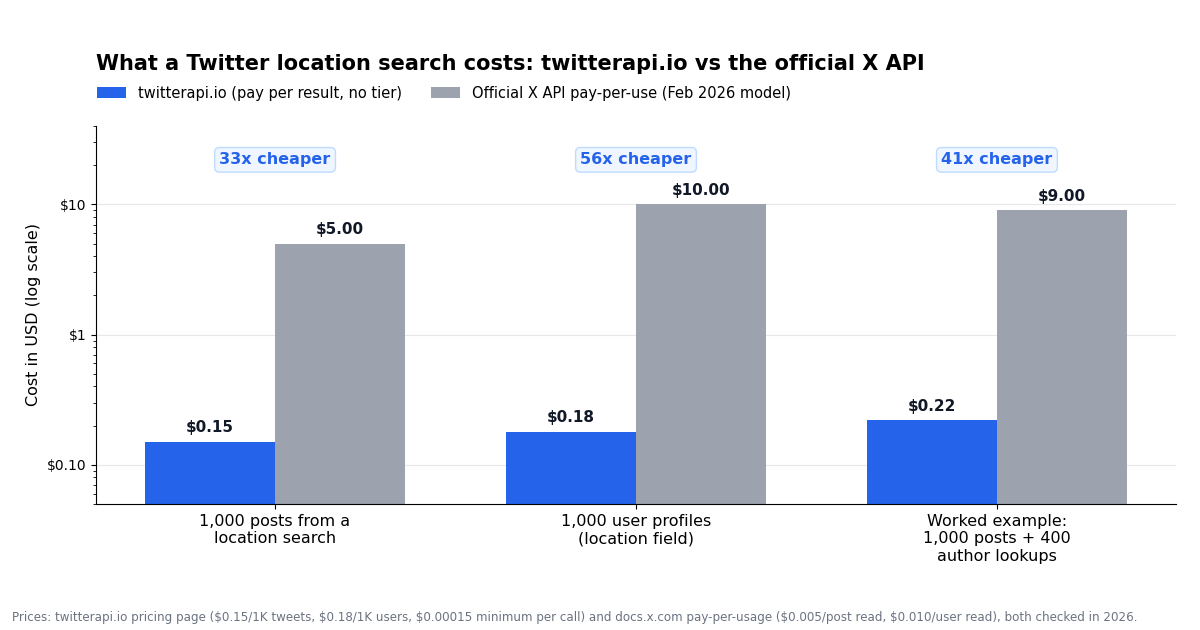
Since February 2026 the official X API sells access on a pay-per-usage plan with no subscription: $0.005 per post read, $0.010 per user read, capped at 3 million post reads per monthly billing cycle before you need an Enterprise contract (docs.x.com, verified 2026). twitterapi.io charges $0.15 per 1,000 posts and $0.18 per 1,000 user profiles, with a $0.00015 minimum per call (twitterapi.io pricing page, checked in 2026). Both are usage-priced now, so the comparison is a straight per-result ratio.
The ratios are arithmetic from the two published price lists, not a benchmark, and the official route does buy you documented geo operators and official support. The place where the gap matters most is the worked example: a location study is rarely one query, it is a keyword query, a filter on author location, and a few hundred account lookups to confirm regions, and at official rates the lookups alone cost more than the whole job does here. The chart below plots the three money rows.
One honest caveat in the other direction: the 33x headline applies to posts actually returned. If your near: query is honoured against a geotag-only index and returns two posts, you pay the $0.00015 minimum per empty page on twitterapi.io, so a mis-specified radius search over 50 pages costs about $0.0075 for nothing. That is cheap, but it is why the control check is in the script rather than left as advice.
Choosing a method, and the mistakes that waste the budget
You want tweets near you, now, on your phone. Use the X app: keyword plus the Near you filter, or type keyword near:"City" within:15mi into the search box. Accept that it shows a small, X-selected slice.
You need posts about a place, repeatably. Keyword query on /twitter/tweet/advanced_search built from place names and local hashtags, queryType=Latest, then filter on author.location with an alias list. Add the near: operator only with the control check.
You need accounts in a market. /twitter/user/search with the city and topic as keywords, filter the location string, then confirm the region of the survivors with /twitter/user_about. Keep both fields in the output.
You need country-level segmentation of a list you already have. Skip search entirely: one /twitter/user_about call per handle and group by account_based_in, discounting rows where location_accurate is false.
You need geotagged posts specifically (for example to put dots on a map). Only the official place / point_radius family guarantees that semantics, and it will return a small fraction of relevant posts; has:geo on a plain keyword query tells you how small before you spend anything.
Mistake: trusting a zero. An empty result from near: or geocode: is usually the operator being ignored or the geotag index being sparse, not an absence of local posts. Always compare with the plain query.
Mistake: Top for local news. queryType=Top ranks by engagement across time; for anything happening now use Latest and, if needed, a since_time: bound.
Mistake: matching "Paris" literally. Normalise and use an alias list that includes the state or country and excludes the homonyms you have seen; log the raw strings so the list keeps improving.
Mistake: treating the based-in label as a person's position. It is an inferred account attribute, moved by VPNs, travel and multi-country teams; X flags its own uncertainty with location_accurate.
Mistake: automating your own account to do any of this. Searching, reading profiles and reading About this account are read-only here and need no X login. Keep anything you automate human-paced, and do not pair location filtering with unsolicited outreach; aside from the ethics, that is how accounts get restricted.
"""Twitter search by location, end to end.

1. Runs a near:/within: query on /twitter/tweet/advanced_search and paginates with cursor.
2. Runs the same keyword WITHOUT the operator as a control page, to detect an ignored operator.
3. Bins every returned post by the author's profile location string (normalised).
4. Optionally confirms the account-based-in region for the top authors via /twitter/user_about.

Needs TWITTERAPI_IO_KEY in the environment. At the defaults (10 pages, 15 lookups) it costs
about $0.03 + $0.003: ~200 posts at $0.00015 each plus 15 user_about calls.
"""
import os
import re
import time
from collections import Counter

import requests

HEADERS = {"X-API-Key": os.environ["TWITTERAPI_IO_KEY"]}
KEYWORD = '"power outage"'
LOCATION = 'near:"Austin" within:25mi'
LANG = "lang:en"
MAX_PAGES = 10          # ~20 posts per page
CONFIRM_AUTHORS = 15    # user_about lookups for the most frequent authors; 0 to skip


def search(query, max_pages):
    posts, cursor = [], ""
    for _ in range(max_pages):
        r = requests.get(
            "https://api.twitterapi.io/twitter/tweet/advanced_search",
            params={"query": query, "queryType": "Latest", "cursor": cursor},
            headers=HEADERS,
            timeout=30,
        )
        r.raise_for_status()
        data = r.json()
        posts.extend(data.get("tweets") or [])
        if not data.get("has_next_page") or not data.get("next_cursor"):
            break
        cursor = data["next_cursor"]
    return posts


def norm_location(raw):
    s = re.sub(r"[^\w\s,]", " ", (raw or "").lower())
    s = re.sub(r"\s+", " ", s).strip()
    return s or "(empty)"


def based_in(handle):
    r = requests.get(
        "https://api.twitterapi.io/twitter/user_about",
        params={"userName": handle},
        headers=HEADERS,
        timeout=30,
    )
    r.raise_for_status()
    about = (r.json().get("data") or {}).get("about_profile") or {}
    return about.get("account_based_in"), about.get("location_accurate")


if __name__ == "__main__":
    located = search(f"{KEYWORD} {LOCATION} {LANG}", MAX_PAGES)
    control = search(f"{KEYWORD} {LANG}", 1)

    page_ids = [p["id"] for p in located[: len(control)]]
    ctl_ids = [p["id"] for p in control]
    print(f"{len(located)} posts with {LOCATION!r}; control page {len(ctl_ids)} posts")
    if page_ids and page_ids == ctl_ids:
        print("WARNING: first pages are identical, so the location operator was ignored.")
        print("         Bin on author.location below and treat it as a plain keyword search.")
    elif not located and ctl_ids:
        print("NOTE: operator honoured but nothing matched; the geotag index is sparse for this topic.")

    bins = Counter(norm_location((p.get("author") or {}).get("location")) for p in located)
    print(f"\n{'author profile location':<40} posts")
    for loc, n in bins.most_common(15):
        print(f"{loc:<40} {n}")
    print(f"\n{bins.get('(empty)', 0)}/{len(located)} authors have no profile location set")

    if CONFIRM_AUTHORS:
        authors = Counter((p.get("author") or {}).get("userName") for p in located)
        print(f"\n{'handle':<20} {'profile location':<28} based_in            accurate")
        for handle, _ in authors.most_common(CONFIRM_AUTHORS):
            if not handle:
                continue
            region, accurate = based_in(handle)
            profile_loc = next(((p.get("author") or {}).get("location") for p in located
                                if (p.get("author") or {}).get("userName") == handle), "")
            print(f"@{handle:<19} {str(profile_loc)[:27]:<28} {str(region):<19} {accurate}")
            time.sleep(0.2)  # human-paced, read-only
Questions readers ask
How do I search tweets near me on X?
In the X app, search a keyword, open Search filters and turn on Near you (where available); it uses your device location. Or type an operator into the search box, for example traffic near:"Chicago" within:15mi. Both show a small slice, because only a few percent of posts carry any location, and the operator is no longer documented by X, so an empty result does not mean nobody posted.
Does the near: operator still work on Twitter (X) in 2026?
It still parses, but X's current API operator reference does not list near:, within: or geocode: (docs.x.com, verified 2026), and practitioners widely report it returning nothing or the same results as a plain search since 2022. Run the same query with and without the operator; identical first pages mean it was ignored, and you should filter on the author's profile location instead.
How do I search Twitter by geocode (latitude and longitude)?
The legacy form is geocode:lat,lon,radius with no spaces, for example geocode:51.5074,-0.1278,20km, and it can be typed into the X search box or sent as the query to /twitter/tweet/advanced_search. The officially documented equivalent on the X API is point_radius:[lon lat 16km], longitude first, which matches only posts tagged with a Place or coordinates.
How can I find Twitter users by location?
Search accounts rather than posts: call /twitter/user/search with the city and topic as keywords, then filter the returned location string with a normalised alias list (city, state, airport code, nicknames). To confirm the region, call /twitter/user_about for each survivor and read account_based_in; the two fields disagree often enough to be worth checking.
How does X know where an account is based?
The About this account label, rolled out in November 2025, is inferred from signals such as IP address history, app-store region and device locale rather than from the profile's location field. X says it is not 100% accurate, especially for older accounts, updates on a delayed schedule, and can be shown as a region or continent instead of a country if the user prefers. By API it is about_profile.account_based_in on /twitter/user_about, with a location_accurate flag.
What percentage of tweets are geotagged?
A small minority. Sloan and Morgan's 2015 PLOS ONE study of the public sample stream found 3.1% of users had produced a geotagged post in the study window and cites an earlier estimate of about 0.85% of posts; Huang and Carley (ASONAM 2019) found the share varies from under 3% of Korean-language users to over 40% of Indonesian-language users. Precise-coordinate tagging was removed from the apps in June 2019, so the numbers are unlikely to have grown.
How much does a location-based Twitter search cost via API?
On twitterapi.io, posts are $0.15 per 1,000 and profiles $0.18 per 1,000 with a $0.00015 minimum per call, so 1,000 posts plus 400 author region lookups is about $0.22. The official X API pay-per-use plan charges $0.005 per post read and $0.010 per user read (docs.x.com, verified 2026), about $9.00 for the same job and without an account-region field.
Continue
- twitterapi.io docs: Advanced Search (query, queryType, cursor; author.location on every post)
- twitterapi.io docs: Get User Profile About (account_based_in, location_accurate)
- X API v2 search operators reference (place:, place_country:, point_radius:, bounding_box:, has:geo), the official and pricier route
- X API pay-per-usage pricing: $0.005 per post read, $0.010 per user read, 3M read cap
- Sloan and Morgan (2015), PLOS ONE: Who Tweets with Their Location? Geotagging share and demographics
- X head of product announcing the global rollout of About this account (country or region where an account is based)
- Twitter (X) API overview: the hub for reading X data
- Twitter (X) advanced search via API: the three paths compared
- Twitter (X) search operators that still work in 2026
- Twitter (X) username lookup API reference: every profile field
- Twitter (X) API with Python: the complete guide
- Free Twitter (X) tools, including the account-location checker
- twitterapi.io pay-per-call pricing
Stop reading. Start building.
Starter credits cover real testing on real data. Google sign-in, no card, no application queue.
Get an API key