Twitter (X) Geolocation: What Location Data X Still Exposes, and How to Read It
![Diagram titled Twitter (X) geolocation: the four places location data still lives. Four cards from coarse to fine. Free text: profile location, /twitter/user/info, data.location, 25.6% of 2,000 followers filled it in, 17.2% named a real place. Country: Account based in, /twitter/user_about, about_profile.account_based_in, country or region X derives from signals it does not publish, shown for 3 of 5 organizations. City-level: geo-tagged post, /twitter/user/last_tweets, tweets[].place, 0 of 500 organization posts carried a place, precise coordinates off since June 2019. Inferred: posting hours plus lang, createdAt, lang, mentions, hour-of-day histogram, recovered the HQ time zone within 1 hour for 5 of 5 organizations. Footer: measured on 2,000 follower profiles and 500 posts of five organization accounts, collected in 2026, aggregates only.](/blog/twitter-geolocation/hero.png)
Most pages that rank for twitter geolocation are either ten years old (announcements of the 2009 geotagging API) or they sell a location finder that quietly reads the same two public fields anyone can read. This page is the reference in between: what location data an X account and its posts actually expose in 2026, field by field, where each one comes from, how often it is populated, and how to read it through an API without guessing. It is written for developers and OSINT analysts who need to know what a field means before they put it in a pipeline or a report.
A sibling page, /blog/twitter-search-by-location, covers the other direction: finding posts and accounts by a place, with the near:, within: and geocode: operators. This page is about the location data attached to an account or a post you already have in hand. Read that one when the place is your input; read this one when the place is your output.
Everything quantitative here is first-hand. We pulled the most recent 400 followers of each of five organization accounts (@NASA, @github, @BBCNews, @esa, @NintendoCoLtd) and classified 2,000 profile location strings, then pulled 100 recent posts from each organization and checked every place field and every timestamp. Followers are private individuals, so their rows never left a temporary folder and only aggregates appear below. The organizations are named because their headquarters are public, which is what makes them a usable test for the inference section.
Where location lives on X in 2026: four fields, four resolutions
Before 2019 the question had a simple answer: if the author opted in, a tweet carried latitude and longitude, and the coordinates object was the geolocation. That ended when X (then Twitter) removed precise location tagging from its apps in June 2019, keeping only the option to tag a named place. Since the About this account panel arrived in November 2025, with a country or region X works out on its own, the picture has four layers again, but they are different in kind: one is typed by the owner, one is derived by X, one is a rare opt-in tag, and one is something you compute.
The table is also a precision ladder, and it runs the opposite way from what people expect. The field that is populated most often (the profile string) is the one X trusts least: X's own data dictionary calls it a freeform value that may not indicate a valid location. The field that is most structured (a place with a country_code and a bounding box) is the one almost nobody fills in. The derived country label sits in between: structured, but produced by X's own heuristics and displayed only for some accounts.
A practical consequence for anyone building on these fields: there is no single location column. A pipeline that wants a country per account has to read three sources, rank them by trust, and accept that for most accounts the honest value is unknown. The rest of this page goes through each source in turn, with the numbers from the sample.
The profile location string: free text, filled by a quarter, usable for a sixth
data.location on /twitter/user/info is the field everyone reads first. It is a string of up to 30 characters that the owner types in the profile editor, and it is returned verbatim: San Francisco, CA for @github, London for @BBCNews, Pale Blue Dot for @NASA, Europe for @esa and a Japanese city name for @NintendoCoLtd. Three of those five are places; two are statements. That ratio is roughly what the follower sample shows at scale.
We classified 2,000 follower location strings (400 per organization, newest followers first as the endpoint returns them) with a vocabulary of countries, US states and about 180 major cities in several scripts, plus flag emoji mapped to countries. A string counts as place-like if any token matches; everything else is split into free text with no place, jokes and vague places (Earth, Mars, Worldwide, Internet), URL or handle, and emoji or symbols only.
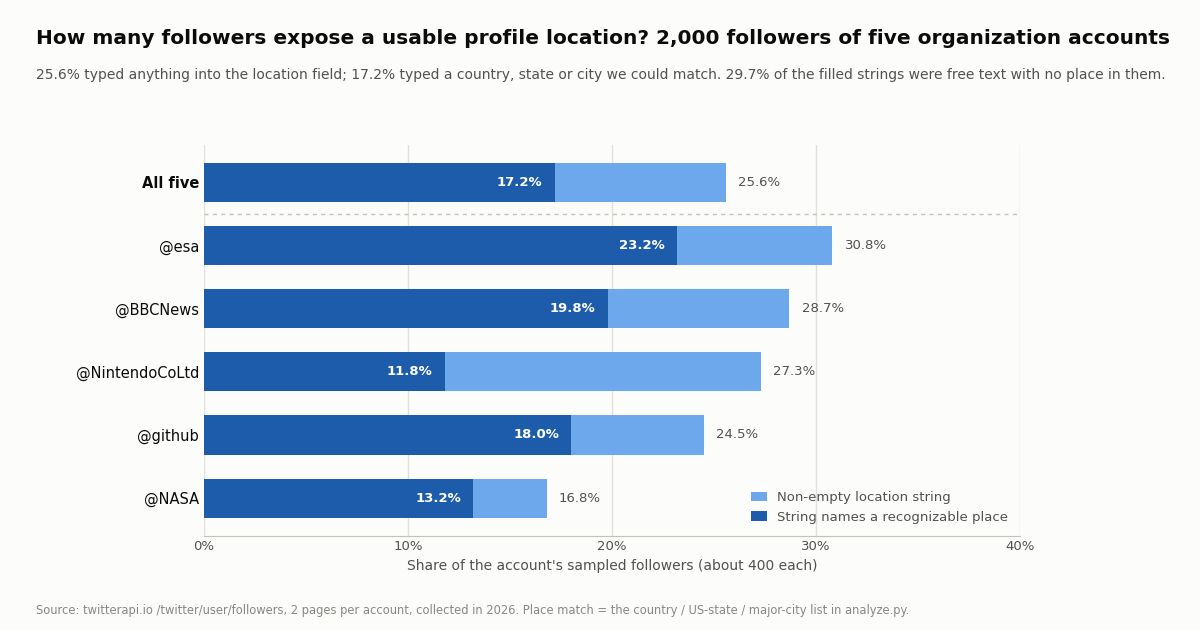
Across the whole sample, 512 of 2,000 followers (25.6%) had typed anything at all, 344 (17.2%) had typed something our list recognized as a place, 152 (7.6% of all, 29.7% of the filled strings) had typed free text with no place in it, 12 (2.3% of filled) had a joke or a vague place, and 4 were a URL, a handle or emoji only. Counting a country token specifically, 13.9% of all followers exposed one; 9.7% exposed a city, state or region token. The median filled string was 12 to 13 characters long for the four Western-audience accounts and 6 for the Japanese one, which is one city name in kanji.
The @NintendoCoLtd row shows the limit of the method rather than of the field: 15.0% of its followers wrote something our vocabulary did not recognize, and spot-checking the classes (not the rows) shows most of those are Japanese prefecture or ward names that are not in the list. If you classify location strings in production, build the vocabulary for the audience you expect; a global list undercounts every non-English market. The country tokens are also audience-shaped: the United States leads for all four English-language organizations, and Japan leads for the Kyoto one.
Two more things the string cannot tell you. It is not timestamped, so it can be years stale; and it is not validated, so a US state abbreviation after a comma is a strong signal while a bare two-letter word is noise (we only matched state codes in the , XX pattern for that reason). Treat the string as a self-declared, optional hint that is right when it is a place and absent for three quarters of accounts.
Account based in: the country label X derives, and how to read it from the API
In November 2025 X added an About this account panel to every public profile, opened from the join-date line under the bio. Besides the join date and the number of username changes it shows an Account based in line with a country, or a broader region if the owner chose that in settings, plus a Connected via line. Reporting at launch, and X's own clarification afterwards, described the value as derived from signals such as IP history and app-store country rather than from the bio, and acknowledged that it was wrong for some accounts, which is why X attaches an accuracy flag. The help article X links from the panel is help.twitter.com/managing-your-account/about-twitter-verified-accounts, which is the URL returned in the field learn_more_url below.
On the API side this is a separate endpoint, not a field on the profile object. GET /twitter/user_about?userName=<handle> returns data.about_profile, an object whose keys we saw vary by account: account_based_in (a country name such as United States, United Kingdom, Japan), location_accurate (boolean), created_country_accurate (boolean), source (for example Web), username_changes (a count, and a last_changed_at_msec when there has been one), affiliate_username for accounts affiliated with a parent organization, and learn_more_url. The plain /twitter/user/info response carries none of these; its only location-bearing key is location.
Three things to take from that table. The key is simply absent, not null, when X does not display a value, so read it with a default. The location_accurate flag is independent of whether a value is shown: @BBCNews shows a country with the flag false, @NASA shows no country with the flag true. And the label is a country or region, never a city; nothing in this panel gets finer than that, which is also the design limit of our checker at /tools/twitter-account-location, the interactive step for anyone who wants to look up one account without writing code.
This is the one field on this page that the account owner did not type, which is why it matters for provenance work: a profile string that says one country and an Account based in label that says another is a finding worth noting (with the accuracy flag beside it), not a contradiction to resolve by picking one. X does not publish how the value is computed, so treat it as X's claim about the account, attributed to X, with the flag it ships with.
import os, requests

BASE = "https://api.twitterapi.io"
H = {"X-API-Key": os.environ["TWITTERAPI_IO_API_KEY"]}

r = requests.get(f"{BASE}/twitter/user_about", headers=H, params={"userName": "github"}, timeout=30).json()
about = (r.get("data") or {}).get("about_profile") or {}
# Keys are absent (not null) when X does not display the line, so use defaults.
print("account_based_in :", about.get("account_based_in", "not shown"))
print("location_accurate:", about.get("location_accurate"))
print("source           :", about.get("source", "not shown"))
print("username changes :", (about.get("username_changes") or {}).get("count"))Geo-tagged posts: the place object, and why it was null 500 times out of 500
The post-level field is the one most people mean by tweet geolocation, and it is the emptiest. X's data dictionary describes a geo object on a post holding a place_id, expandable to a Place object with id, full_name (for example Manhattan, NY), name, country, country_code (ISO alpha-2), place_type, a GeoJSON geo with a bounding box, and contained_within. Note what is not there: a point. Since June 2019 the X apps let an author attach a named place but not their exact coordinates (precise location in photos stayed; X's help center article on post location explains the current settings).
On twitterapi.io the same data arrives as place on every tweet object, from /twitter/user/last_tweets, /twitter/tweet/advanced_search, /twitter/user/mentions and /twitter/tweets alike. In our 500 organization posts the place key was present on all 500 and null on all 500; no post carried a coordinates key either. That is five accounts that post from offices, so it is a floor rather than an estimate for the whole platform; the published academic range for geo-tagged tweets before and after the 2019 change was already in low single-digit percentages, and the sibling page on location search cites those studies. For a timeline pipeline the engineering conclusion is the same either way: read place defensively, expect None, and never make a feature depend on it.
When a place is present it is structured and worth keeping: full_name and country_code are the two fields that survive joins, and the bounding box gives you a polygon rather than a point, so a tag like a city means somewhere inside that city. X's search operators mirror the object: has:geo matches posts with geolocation data, place: and place_country: match the tag and its country code, and point_radius: and bounding_box: match against it spatially, all per the current operators reference. On twitterapi.io the equivalent search-side operators and what they still return are covered in the /blog/twitter-search-by-location guide, which owns that topic; this page stops at reading the field off a post you already have.
One subtle point for investigators: a place is chosen by the author at posting time and can be any place X's picker offers, not necessarily where the device is. It is evidence that the author selected that place, nothing more. Combined with the 2019 change, that makes the post field the weakest of the four for the question where is this account, and the strongest for the much narrower question did the author choose to tag a place on this post.
Inference signals: posting hours, language and mentions
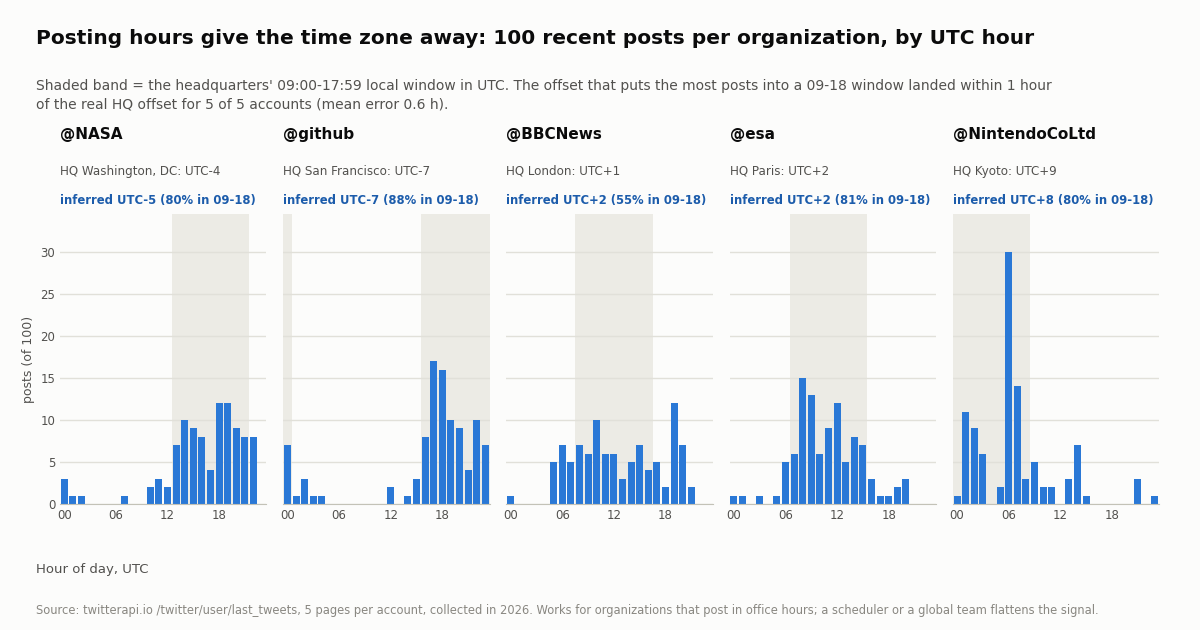
When the declared fields are empty, analysts turn to behavior, and the first behavioral signal is time. Every post carries createdAt in UTC. An account run by people who work office hours will concentrate its posts in a nine-hour band of the day, and the UTC offset that moves that band onto 09:00-18:00 is a time-zone estimate. We tested the simplest possible version on the five organizations: for each candidate offset from UTC-12 to UTC+14, count the posts that fall in local 09:00-17:59, and keep the offset with the highest count.
Five of five landed within one hour of the real headquarters offset, with a mean absolute error of 0.6 hours, on just 100 posts each; a second estimator (the circular mean of posting time, mapped to a 13:30 local midpoint) gave UTC-4, UTC-6, UTC+1, UTC+2 and UTC+7 respectively, so the two methods bracket the truth. The one-hour misses are instructive: daylight-saving offsets, an afternoon-heavy schedule or a late shift all slide the band by an hour, and an hour is the resolution limit of the method. A time zone is a band roughly 1,500 km wide at mid-latitudes, and often spans several countries; this is a region estimate, not a location.
The failure modes matter as much as the hits. @BBCNews is the weakest row (55% of posts in the best window) because a 24-hour newsroom posts around the clock, and its 100 posts span only 2.6 days, so a single news cycle dominates. A scheduled-content account, a global team, a bot or a night owl flattens or shifts the histogram, and the method will still return a number; always report the share of posts inside the window as the confidence, as the table does. The posting-hours chart below shows all five histograms with the headquarters window shaded.
Language is the second signal and the easiest to read: every post has lang, X's own detection. In the sample it was en for 100% of @NASA, @BBCNews and @esa posts, 98% of @github posts, and ja for 94% of @NintendoCoLtd posts (6% en). Language separates continents well and countries badly: English, Spanish, Arabic and Portuguese each span many countries, and large accounts post in a second language for a second audience. Use it to rule regions out rather than in.
Mentions and place names are the third signal: the cities, venues, teams, weather and local institutions an account talks about, which you can extract from text and entities with a gazetteer or a named-entity model. It is the most informative signal and the most dangerous one, because it is also the one that turns a region estimate into a neighborhood. For organizations (the only accounts this page measures) it is fine: @esa mentioning Darmstadt and Kourou is public information about a public body. For private individuals this is where analysis becomes locating a person, and that is not something this page or our tools support; the ethics section below says why.
Reading all four fields with one script
The end-to-end script at the bottom of this page does what the study did for one account: it reads the profile string from /twitter/user/info, the derived country from /twitter/user_about, then walks /twitter/user/last_tweets for up to five pages (following has_next_page and next_cursor, 20 posts per page) to count non-null place values, build the UTC hour histogram, infer the offset with the window method, and tally lang. It prints a small report with the confidence next to each inferred value, which is the shape we recommend for anything that goes into a dashboard or a case file.
A few implementation notes that save time. Authenticate with the X-API-Key header on every call; no X account is needed to read. /twitter/user/info returns HTTP 200 with status: "error" and msg: "user not found" (and data: null) for an unknown handle, so check status rather than the HTTP code. createdAt is a string like Thu Oct 16 12:34:56 +0000 2026, parse it with %a %b %d %H:%M:%S %z %Y. For follower-level work use /twitter/user/followers, which returns about 200 rows per page in snake_case (screen_name, location, description, followers_count) and pages the same way; it was the source of the 2,000-row sample above.
If you need the fields for many accounts at once, /twitter/user/batch_info_by_ids takes a comma-separated list of user IDs and returns the profile objects (camelCase) in one call, which keeps the profile cost at the per-user rate while cutting requests. There is no batch form of /twitter/user_about; it is one call per account, and in practice you only need it for the accounts you are actually looking at.
What it costs: this study at twitterapi.io prices vs the official X API rate card
The whole study was 45 requests: 5 profile reads, 5 About reads, 10 follower pages (2,000 records) and 25 timeline pages (500 posts). At twitterapi.io prices that is 500 posts at 15 credits each ($0.15 per 1,000 posts, so $0.075), 2,000 follower records at 1 to 3 credits each depending on the per-page tier ($0.02 to $0.06), and ten profile-type calls at the 18-credits-per-user profile rate ($0.0018): about $0.10 to $0.14 in total. You pay only for the data returned; an empty page costs the 15-credit minimum ($0.00015).
The official X API rate card (docs.x.com/x-api/getting-started/pricing) prices post reads at $0.005 each, user reads at $0.010 and follower or following reads at $0.010, capped at 3 million post reads a month on pay-per-usage, with Enterprise above that; new developers get $20 in credits on a first saved card plus a match of the first auto-recharge up to $50. Per 1,000 posts that is $5 against $0.15, about 33x, and the gap on follower lists is wider because a follower row is billed at 1 to 3 credits on twitterapi.io and at $0.010 on X. The follower endpoint is where location studies spend their budget, so that is the line that decides whether a 20,000-row sample is a lunch or a line item.
Rate limits on twitterapi.io are 0.2 requests per second before the first payment and 20 once paid (50 on Scale, 500 on Business, up to 1,000 on request); the study ran under a shared 5 requests per second client and finished in a couple of minutes. New accounts get up to $1 of free credits (at most 100,000 credits, no card) when they pass the automatic bot check, one per person or network, expiring after 31 days, which is enough to repeat this entire study several times over. Subscription tiers (Starter $29 to Business $1,499 a month) and the per-feature price list are on the pricing page.
Ethics and limits: aggregates, organizations, and what this page will not do
Everything above was measured on organizations whose headquarters are public, and on followers only as an anonymous aggregate: the follower pages were written to a temporary folder, classified, counted, and deleted; the committed sample holds one row per follower with the class of its location string and nothing that identifies it. That is the standard we would ask of anyone using these fields. A country-level share across thousands of profiles is market research; a city-level inference about one named private person is surveillance, and the same code can do both.
The line is not about the fields but about the target and the resolution. The profile string and the Account based in label are information the owner or X chose to publish on a public profile, and reading them for a public figure or an organization is ordinary due diligence; our checker shows exactly that value and nothing finer. Posting-hour inference yields a time zone band and should be reported as one, with its confidence. Mention-based inference is the step that can reach a neighborhood, and this page deliberately does not provide a recipe for applying it to an individual. X's terms also govern how data from its platform may be used, and personal-data law applies regardless of whether something is technically public.
There are also plain accuracy limits. The profile string is stale and unvalidated for most accounts. The Account based in label is X's heuristic, shipped with an accuracy flag that was false for two of our five organizations and absent for two. A place tag is a choice, not a measurement. A time zone is roughly a continent wide at the latitude of most users. Anyone presenting a location derived from X data should carry those caveats with the number, which is why the script prints the share of posts inside the window next to the inferred offset instead of the offset alone.
How we collected this
Question. How much location data does X still expose per field: what share of profiles carry a non-empty and a usable location string, how often the About panel shows a country, how often a post carries a place, and whether posting hours alone recover an organization's time zone.
Accounts. Five organization accounts with public headquarters in five time zones: @NASA (Washington, DC), @github (San Francisco), @BBCNews (London), @esa (Paris), @NintendoCoLtd (Kyoto). Followers of those accounts for the profile-string part; the organizations' own posts for the place and timing parts.
Window and sample. Collected in 2026. The 400 most recent followers of each account (2 pages of /twitter/user/followers, 2,000 records); the 100 most recent original posts of each account (5 pages of /twitter/user/last_tweets, default includeReplies, 500 posts); one /twitter/user/info and one /twitter/user_about call per organization. The post windows differ by account: 2.6 days for the newsroom, 30 to 51 days for three accounts, and about 676 days for the low-volume Kyoto account.
Method. Location strings classified with a country / US-state / major-city vocabulary in several scripts plus flag emoji, state codes matched only in the , XX pattern; a string is place-like if any token matches. Time-zone inference: the UTC offset that maximizes the share of posts in local 09:00-17:59, plus a circular-mean cross-check. Every number on this page is read from the study's results file by the charts and the text.
What the sample cannot show. Newest followers of five large accounts are not a random sample of X; follower location coverage on the platform as a whole may differ. The place result (0 of 500) is for office-run organization accounts and says nothing about individuals' posting habits. The inference test is five accounts, chosen because they keep office hours; the method is expected to fail on accounts that do not, and the newsroom row shows the degradation. The classification vocabulary undercounts non-English place names, visibly for the Japanese audience.
Privacy. Followers are private individuals: raw follower pages stayed in a temporary folder and were deleted after analysis; only aggregates and de-identified class labels were kept, and no place token is reported below a count of three. Organizations are named because their headquarters are public. No private individual was located or profiled in the making of this page.
"""x_location_report.py - read every location field X exposes for one public account.

    pip install requests
    export TWITTERAPI_IO_API_KEY=...   # twitterapi.io dashboard, no X account needed
    python x_location_report.py github

Reads: profile location string (/twitter/user/info), the About panel country
(/twitter/user_about), and up to 5 pages of posts (/twitter/user/last_tweets) to
count geo-tagged posts, infer a UTC offset from posting hours, and tally languages.
Cost: 2 profile-type calls (18 credits each) + 15 credits per post returned
($0.15 per 1,000 posts), so about $0.015 for a 100-post report.
"""
import os
import sys
from collections import Counter
from datetime import datetime

import requests

BASE = "https://api.twitterapi.io"
HEADERS = {"X-API-Key": os.environ["TWITTERAPI_IO_API_KEY"]}


def get(url, **params):
    r = requests.get(url, headers=HEADERS, params=params, timeout=30)
    r.raise_for_status()
    return r.json()


def profile_location(user):
    body = get(f"{BASE}/twitter/user/info", userName=user)
    if body.get("status") == "error":          # unknown handle -> HTTP 200, status error
        sys.exit(f"user/info: {body.get('msg')}")
    return body["data"].get("location") or ""


def account_based_in(user):
    body = get(f"{BASE}/twitter/user_about", userName=user)
    about = (body.get("data") or {}).get("about_profile") or {}
    # keys are absent (not null) when X does not display the line
    return about.get("account_based_in"), about.get("location_accurate"), about.get("source")


def recent_posts(user, pages=5):
    posts, cursor = [], None
    for _ in range(pages):
        params = {"userName": user}
        if cursor:
            params["cursor"] = cursor
        body = get(f"{BASE}/twitter/user/last_tweets", **params)
        posts.extend((body.get("data") or {}).get("tweets", []))
        if not body.get("has_next_page") or not body.get("next_cursor"):
            break
        cursor = body["next_cursor"]
    return posts


def infer_offset(hours_utc):
    """Offset (hours from UTC) that puts the most posts into local 09:00-17:59, with that share."""
    best = (None, -1.0)
    for off in range(-12, 15):
        share = sum(1 for h in hours_utc if 9 <= (h + off) % 24 <= 17) / max(len(hours_utc), 1)
        if share > best[1]:
            best = (off, share)
    return best


def main(user):
    loc = profile_location(user)
    based_in, accurate, source = account_based_in(user)
    posts = recent_posts(user)
    hours = [datetime.strptime(p["createdAt"], "%a %b %d %H:%M:%S %z %Y").hour for p in posts]
    with_place = [p for p in posts if p.get("place")]
    langs = Counter(p.get("lang") for p in posts)
    off, share = infer_offset(hours)

    print(f"@{user}")
    print(f"  profile location string : {loc!r}  (free text, owner-typed)")
    print(f"  account based in        : {based_in or 'not shown'}  accurate={accurate}  source={source or 'not shown'}")
    print(f"  geo-tagged posts        : {len(with_place)} of {len(posts)}")
    for p in with_place[:3]:
        pl = p["place"]
        print(f"    place: {pl.get('full_name') or pl.get('name')} ({pl.get('country_code')})")
    print(f"  inferred UTC offset     : {off:+d}  ({share:.0%} of posts in local 09-18; a time zone band, not a location)")
    top = ", ".join(f"{l} {n / len(posts):.0%}" for l, n in langs.most_common(3)) if posts else "-"
    print(f"  languages (lang)        : {top}")


if __name__ == "__main__":
    main(sys.argv[1] if len(sys.argv) > 1 else "github")
Questions readers ask
Can you find the location of a Twitter (X) account?
You can read what is published: the free-text location in the bio (filled by about a quarter of accounts in our sample, a real place for about a sixth) and the Account based in country or region in the About this account panel, which X derives itself and shows only for some accounts. Posting hours can suggest a time zone. None of that is a street, a city with certainty, or a position, and X removed precise coordinates from posts in June 2019. For a public figure or organization that is due diligence; for a private person, trying to go finer than what they published is surveillance, and this page does not show how.
Does the Twitter API return GPS coordinates for tweets?
Not for posts made since June 2019 through the X apps, where precise location tagging was removed. A post can still carry an author-chosen place (a city, neighborhood or venue) with a bounding box and a country_code, and X's data dictionary documents the Place object with those fields rather than a point. In our 500 organization posts the place field was null on every one, so build any pipeline to expect None.
What is the Account based in field on X, and can I get it through an API?
It is the country or region X displays in the About this account panel (opened from the join-date line on a profile), introduced in November 2025 and derived by X from signals it does not publish; the owner can choose a broader region instead of a country, and X attaches an accuracy flag. On twitterapi.io it is GET /twitter/user_about?userName=<handle>, which returns about_profile.account_based_in together with location_accurate, source and username_changes; the key is absent when X shows no value. Our free checker at /tools/twitter-account-location reads the same field.
How accurate is the profile location string?
It is whatever the owner typed, up to 30 characters, unvalidated and undated. X's own data dictionary calls it a freeform value that may not indicate a valid location. In our 2,000-follower sample 67.2% of the filled strings named a recognizable country, state or city, 29.7% were free text with no place, and 2.3% were jokes or vague places such as Earth. It is a useful hint when it is a place and silent for three quarters of accounts.
Can posting times reveal where a Twitter account is?
They can suggest a time zone, which is a band often spanning several countries, not a place. On five organization accounts that keep office hours, choosing the UTC offset that puts the most posts into 09:00-18:00 landed within one hour of the real headquarters offset every time, with 55% to 88% of posts inside the window. Accounts that post around the clock, use schedulers or are run by a distributed team break the method, so always report the in-window share as the confidence.
What is the difference between this page and the Twitter search by location guide?
Direction. The search guide starts from a place and finds posts or accounts there, using the near:, within: and geocode: operators and the user search endpoint. This page starts from an account or a post you already have and explains the location data attached to it: the profile string, the Account based in label, the place object and the inference signals. They share the same underlying fields, so most projects use both.
What does it cost to read location fields at scale?
At twitterapi.io prices, profiles are 18 credits per user ($0.18 per 1,000), follower records 1 to 3 credits each, and timeline posts 15 credits each ($0.15 per 1,000), with $1 equal to 100,000 credits and no charge beyond the data returned. Our 45-request study (2,000 follower rows, 500 posts, 10 profile-type calls) cost about $0.10 to $0.14; the same reads on the official X API pay-per-usage rate card ($0.005 per post read, $0.010 per follower or user read) would be about $22.60.
Continue
- X API v2 data dictionary: the User location field (freeform value) and the Place object (full_name, country_code, geo bounding box)
- X API search operators: has:geo, place:, place_country:, point_radius:, bounding_box:
- X Help Center: Post location FAQs (opt-in place tagging, precise location settings)
- X Help Center: How to use precise location on mobile devices (off by default, opt-in)
- twitterapi.io API reference: Get User Profile About (account_based_in, location_accurate, source, username_changes)
- X API pay-per-usage pricing: $0.005 per post read, $0.010 per user and per follower read, 3M post-read cap
- Twitter (X) API hub: endpoints, data fields and pricing
- How to search Twitter (X) by location: near:, within:, geocode: and the API
- Free checker: the Account based in country X shows for any public profile
- OSINT on Twitter (X): what public data you can pull, and how
- Twitter (X) user search: finding accounts by keyword, bio and location string
- Twitter (X) profiler: building an account dossier from public fields
- Pay-per-call pricing: posts, profiles and follower lists
- twitterapi.io API reference
- 01How to Get a Grok API Key: Setup, Pricing and Live X Data for the xAI API
- 02The X Developer Portal (X Developer Console) for the Twitter (X) API: Sign-Up, Apps and Keys, Billing, Limits, and When You Do Not Need It
- 03SKILL.md explained: the Agent Skills format, X's own skill, and a Twitter (X) API skill you can install
- 04Twitter (X) Auto Post: Schedule in X, RSS or Sheets to X, and Posting from Code
- 05How to Search and Track Mentions on Twitter (X), Including Someone Else's
- 06X Communities API: How Do You Read Community Posts and Post to a Community?
- 07What Was Twitter (X) Circle, and What Can You Use Instead?
- 08Twitter (X) Tweet Metadata — API Fields Reference
Stop reading. Start building.
Starter credits cover real testing on real data. Google sign-in, no card, no application queue.
Get an API key