Twitter (X) Verified Followers API: List, Count and Analyze Checkmarked Followers
- Endpoint:
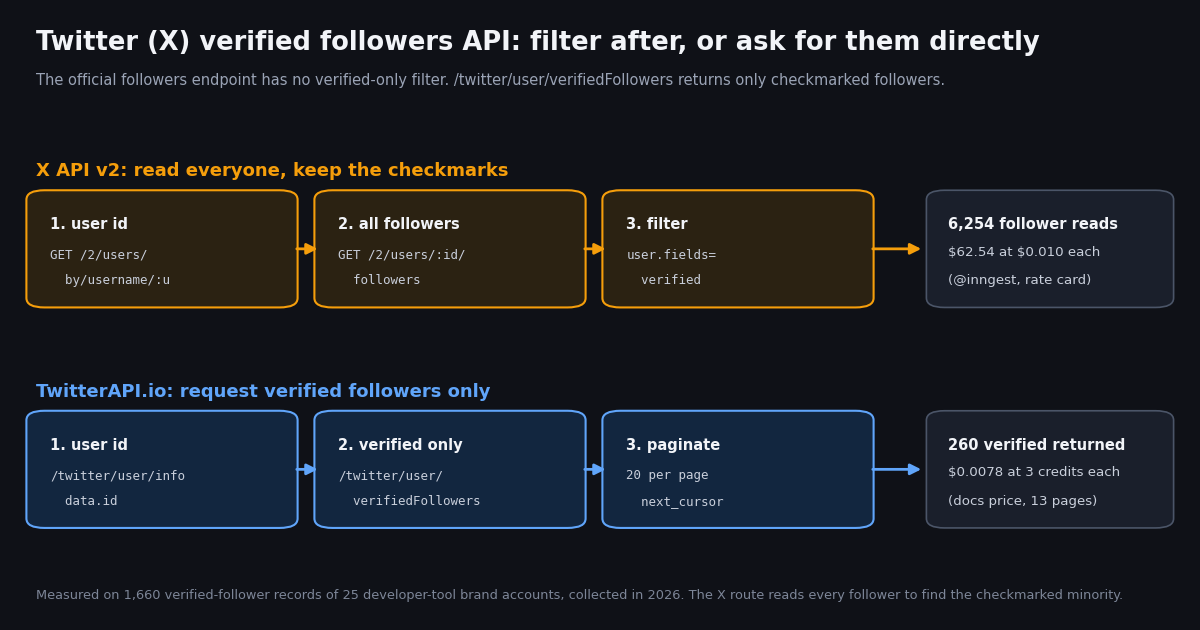
/twitter/user/verifiedFollowers?user_id=<numeric id>returns only verified followers, 20 per page, newest first; follownext_cursorwhilehas_next_pageis true. - Get the id first:
/twitter/user/info?userName=<handle>givesdata.id; we confirmeduserNameon the verified endpoint returns HTTP 400. - What a checkmark means here: all 50 returned followers we cross-checked with
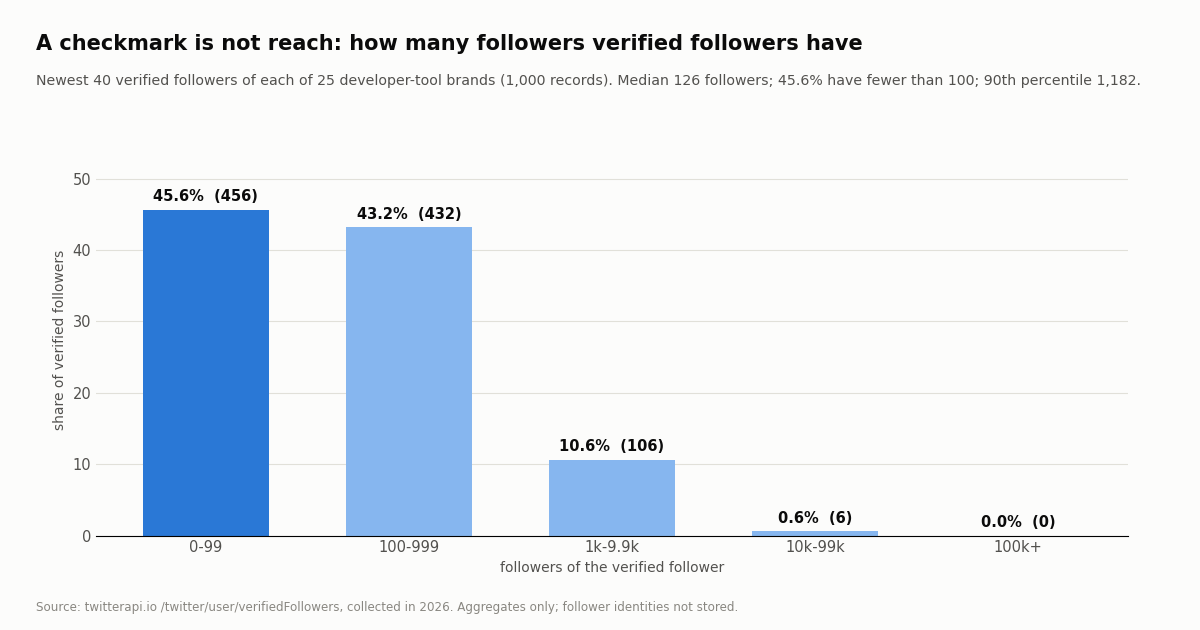
batch_info_by_idscarried the blue checkmark (isBlueVerified: true); none were gold Business or gray Government accounts. - The study: 1,660 verified-follower records of 25 developer-tool brands. Median verified follower has 126 followers; 45.6% have fewer than 100; none in the sample had 100k or more.
- Verified share: for @inngest, @liveblocks and @biomejs (6k to 10k followers) we stopped at 260 verified followers each with more pages left, so their verified share is at least 4.16%, 2.9% and 2.63%.
- Cost: documented at 3 credits per verified follower ($0.03 per 1,000). Finding the same people on X API v2 means reading every follower at $0.010 each: $62.54 for @inngest's 6,254 followers.
Verified followers are a filter people reach for when a follower count alone says too little: a brand wants to know which paying, checkmarked accounts follow it, a creator wants to track the verified-follower number that X uses in some of its own programs, and a growth team wants a shortlist of checkmarked accounts that already follow a competitor or a partner. X's own apps show this slice on a profile, but the official X API v2 does not expose it as a filter. You get every follower and sort them yourself.
This guide shows the direct route: one endpoint that returns only verified followers, how to page through it, which fields come back, what it costs next to the official rate card, and a small Python tool that lists and summarizes the verified followers of any public account. Every number below comes from our own study of 25 developer-tool and SaaS brands, collected in 2026 with the same endpoint, and the raw method is described in full at the end.
One thing to settle up front: this page is about reading data. It does not cover getting a checkmark, what the different checkmark colors mean (see the linked guide on Twitter verification), or buying followers of any kind.
126 followers: across the newest 40 verified followers of 25 developer-tool brands (1,000 records, collected in 2026), 45.6% had fewer than 100 followers and none had 100,000 or more.
The endpoint: /twitter/user/verifiedFollowers in one request
The request is a plain GET with two query parameters. user_id is required and must be the account's numeric id, as a string. cursor is optional: leave it empty (or omit it) for the first page and pass the next_cursor from the previous response for each page after that. Authentication is a single X-API-Key header; you do not need an X account, a developer app or OAuth.
Page size is 20. Every one of the 83 verified-follower pages we fetched in the study held exactly 20 profiles, which matches the documentation (up to 20 verified followers per page). The order is newest first, so page 1 holds the 20 verified accounts that followed latest.
The handle does not work directly. We sent userName=tursodatabase to the endpoint and got HTTP 400; the same call with user_id=1432739296008671245 returned a full page. So the first step is always /twitter/user/info?userName=<handle>, which returns data.id, data.followers (the total follower count you will want for a verified share) and the account's own checkmark fields. An unknown handle answers HTTP 200 with status: "error" and msg: "user not found", not a 404, so check status before reading data.
Stopping rule. Keep requesting while has_next_page is true and next_cursor is non-empty. In the study, none of the 25 brands ran out of verified followers within the pages we fetched (2 per brand, 13 for three of them), so for accounts with tens of thousands of followers expect dozens to hundreds of pages if you want the full list.
# 1) resolve the handle to a numeric id
curl -s "https://api.twitterapi.io/twitter/user/info?userName=inngest" \
  -H "X-API-Key: $TWITTERAPI_IO_API_KEY" | jq '.data | {id, followers, isBlueVerified, verifiedType}'

# 2) first page of verified followers (20, newest first)
curl -s "https://api.twitterapi.io/twitter/user/verifiedFollowers?user_id=1388644859859275777" \
  -H "X-API-Key: $TWITTERAPI_IO_API_KEY" | jq '{n: (.followers | length), has_next_page, next_cursor}'

# 3) next page: pass the cursor back
curl -s "https://api.twitterapi.io/twitter/user/verifiedFollowers?user_id=1388644859859275777&cursor=<next_cursor>" \
-H "X-API-Key: $TWITTERAPI_IO_API_KEY"What comes back: the response shape and every field
The response is a JSON object with a top-level followers array plus has_next_page, next_cursor, status, msg and code (0 on success). Each follower is a snake_case profile, the same style as /twitter/user/followers and /twitter/user/search, and different from the camelCase objects that /twitter/user/info and /twitter/user/batch_info_by_ids return. Mixing the two styles is the usual bug when people merge results: followers_count here, followers there.
The 17 keys we saw on every record were: id, name, screen_name, userName (the same handle as screen_name), description, location, url, email, followers_count, following_count, statuses_count, favourites_count, media_tweets_count, can_dm, created_at, profile_image_url_https and profile_banner_url.
Two documented fields were not in the live payload. The documentation's follower object lists verified and isBlueVerified, but none of the records we collected in 2026 carried them. That is not a problem for this endpoint (every record is verified by definition), but code that reads u["isBlueVerified"] will raise a KeyError; use u.get(...) or call /twitter/user/batch_info_by_ids when you need the checkmark type.
email is a key, not data. It was an empty string on 99% of the records we fetched; do not build anything that expects it, and treat any value as personal data. created_at uses X's classic format (Fri Mar 10 15:55:09 +0000 2023), so the year is the last four characters.
{
  "followers": [
    {
      "id": "...",
      "name": "...",
      "screen_name": "...",
      "userName": "...",
      "description": "...",
      "location": "...",
      "url": "...",
      "email": "",
      "followers_count": 126,
      "following_count": 764,
      "statuses_count": 473,
      "favourites_count": 2210,
      "media_tweets_count": 31,
      "can_dm": false,
      "created_at": "Fri Mar 10 15:55:09 +0000 2023",
      "profile_image_url_https": "...",
      "profile_banner_url": "..."
    }
  ],
  "has_next_page": true,
  "next_cursor": "...",
  "status": "success",
  "msg": "success",
  "code": 0
}What 'verified' means in this list (we checked)
X shows three kinds of checkmark today. The X API v2 data dictionary on docs.x.com describes verified_type with the example values blue, business and government, and our own /twitter/user/info exposes the same split as isBlueVerified (true or false) and verifiedType (for example Business). Blue comes with a paid X subscription for individuals; gold is the organization checkmark; gray marks government and multilateral accounts.
To see which of these the verified-followers list includes, we took 50 returned followers (the first and last record from each brand) and looked them up with /twitter/user/batch_info_by_ids. All 50 had isBlueVerified: true, none had a verifiedType of Business or Government, and none were unverified. So in practice this endpoint is a list of blue-checkmark followers, which matches the 'blue check followers' phrasing many developers search for. A sample of 50 cannot prove that a gold or gray follower would never appear; if that distinction matters for your use, re-check the type with batch_info_by_ids (18 credits per profile).
For the brands themselves the picture was different: of the 25 accounts we studied, 16 carried the gold Business checkmark, 7 were blue and 2 had none. The brand's own checkmark does not change what the endpoint returns; @biomejs and @vitest_dev have no checkmark and still have pages of verified followers.
Study: who verified followers of developer-tool brands actually are
We pulled the newest 40 verified followers (two pages) of each of 25 developer-tool and SaaS brand accounts, from @inngest at 6,254 followers to @appwrite at 125,528, a total of 1,000 records. The question was simple: when a brand says 'we have N verified followers', what kind of accounts are those?
A checkmark is not reach. The median verified follower had 126 followers and the 90th percentile was 1,182. 45.6% had fewer than 100 followers, and only 6 of 1,000 had 10,000 or more. 89.7% follow more accounts than follow them back. These are, overwhelmingly, individual developers and builders who pay for a subscription, not influencers.
They are real, established profiles. 76.8% have a bio, 60.1% a location and 47.8% a website link; only 2.8% have never posted. 43.4% of the accounts were created before 2015 and 10.4% in 2025 or 2026. 48.0% accept DMs from anyone (can_dm: true).
Deeper pages look similar. For three brands we read 13 pages (260 verified followers each). The 660 records on pages 3 to 13, older follows than the first 40, had a median of 159 followers and 39.2% under 100, close to the newest slice. Recency in the follow order does not seem to change who these accounts are much.
Audiences overlap. The 1,660 records contained 1,163 distinct accounts; 225 of them showed up in the samples of two or more brands. In a niche like developer tools, the same checkmarked builders follow many of the companies they use, which is exactly what the overlap script further down measures.
Per brand: the share of small accounts varies, the pattern does not
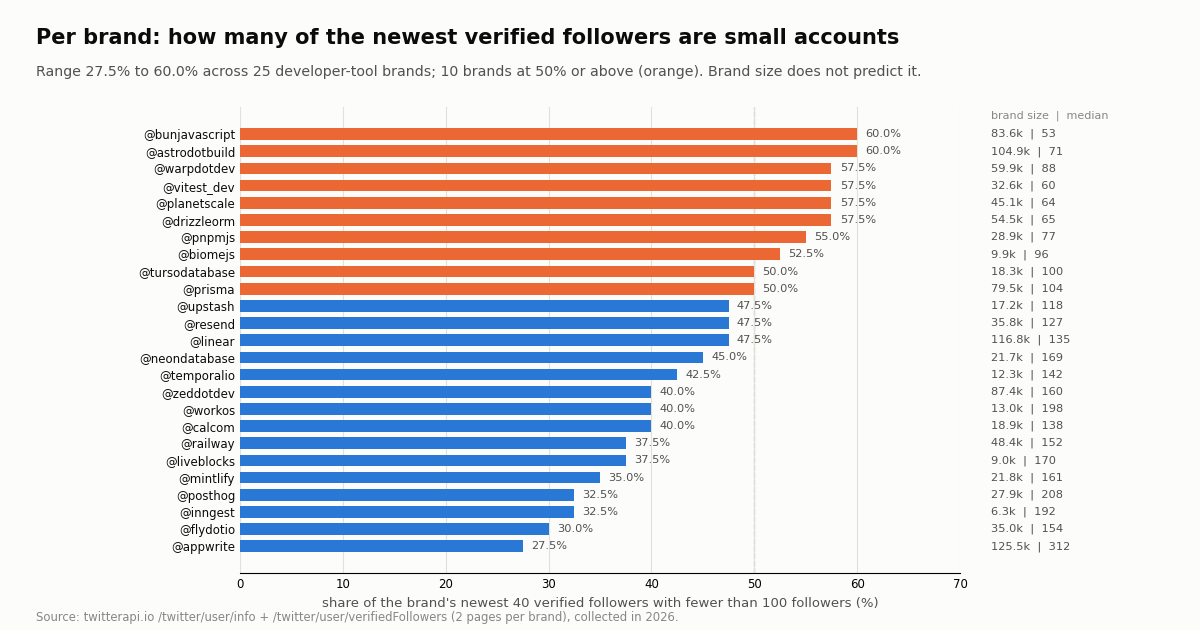
Splitting the same 1,000 records by brand shows how much the mix moves from one audience to another, and that brand size is not what moves it.
The share of newest verified followers with under 100 followers ran from 27.5% (@appwrite) to 60.0% (@bunjavascript and @astrodotbuild). Ten of 25 brands were at 50% or above. Large and small brands sit at both ends: @appwrite, the largest account in the sample, had the highest median (312 followers), while @astrodotbuild at a similar size had a median of 71. If you compare two accounts by verified followers, compare the distribution, not only the count.
Read these as a snapshot of the newest follows at collection time. Two pages per brand is a thin slice for an account with 100,000 followers, and a single launch or viral post can shift who followed last week.
How to count verified followers and compute the verified share
There is no single field that holds an account's verified-follower total in either API: the profile object gives followers (all followers) but not a verified subtotal. To count them you page through the endpoint until has_next_page is false and count the records. The verified share is then that count divided by the followers value from /twitter/user/info.
If you stop early, what you have is a lower bound, and you should label it that way. That is what happened in our study for the three smallest brands, where we capped the run at 13 pages:
All three still had has_next_page: true after 260 records, so the true verified share is higher than shown, and reading the full list takes more than 13 pages even for accounts with under 10,000 followers.
Working out the page budget. Pages needed = verified followers / 20, rounded up. You do not know the verified count in advance, so set a page cap, record whether you hit it, and report 'at least N' when you did. For a recurring dashboard, store the list with each follower's id and re-read only the first few pages each day: the order is newest first, so you can stop as soon as you reach an id you already have.
Cost and limits next to the official X API
The two APIs answer the question in different ways, which is why the price per record is not the whole story. X API v2 bills each follower it returns, so the cost of finding verified followers is the cost of reading the entire follower list. The verified endpoint only returns the verified ones.
Worked example. For @inngest (6,254 followers), finding its verified followers on X API v2 means reading all 6,254 followers at $0.010 each, $62.54, then filtering on verified. On the verified endpoint, the 260 verified followers we fetched are 13 pages at the documented 3 credits per verified follower, 780 credits or $0.0078. The two numbers are not the same work (X also gives you every unverified follower), so if you need the full follower list anyway, compare against /twitter/user/followers, which bills 1 to 3 credits per user returned depending on page size.
Pricing source. The per-follower price above is what the endpoint's documentation states (3 credits per verified follower returned, $0.03 per 1,000, a full page of 20 is 60 credits, with a minimum charge of 15 credits for a page). Prices change; the pricing page is the reference. Credits are $1 per 100,000, purchased credits never expire, and new accounts that pass the automatic bot check get free starter credits (no card, one per person or network, expiring after 31 days).
Throughput. At 20 records per page, the 0.2 requests per second allowed before the first payment works out to about 14,400 verified followers an hour; 20 requests per second once paid is 400 records a second. X's limit for GET /2/users/:id/followers is 300 requests per 15 minutes per app and per user, at up to 1,000 followers each.
# The official route for comparison: X API v2 has no verified-only filter, so you read every
# follower and keep the ones whose user object says verified. Every follower read is billed.
import os
import requests

X = "https://api.x.com/2"
H = {"Authorization": f"Bearer {os.environ['X_BEARER_TOKEN']}"}

uid = requests.get(f"{X}/users/by/username/inngest", headers=H, timeout=30).json()["data"]["id"]
params = {"max_results": 1000, "user.fields": "verified,verified_type,public_metrics"}
verified = []
while True:
    page = requests.get(f"{X}/users/{uid}/followers", headers=H, params=params, timeout=30).json()
    verified += [u for u in page.get("data", []) if u.get("verified")]
    token = page.get("meta", {}).get("next_token")
    if not token:
        break
    params["pagination_token"] = token
print(len(verified), "verified followers found after reading every follower")
Use cases: overlap, shortlists and audits
Audience overlap between two accounts. Pull the verified followers of two brands and intersect the ids. In our sample, 225 accounts followed two or more of the 25 brands within just their newest 40 verified followers, so overlaps in a niche show up quickly. The script below works with any two public accounts.
A partner shortlist you review by hand. Sort a brand's verified followers by followers_count, keep those with a bio and a website link, and read the profiles yourself. Keep it to reading: if you later act from an account (follow, reply), those are write actions through an authenticated session, billed at 60 credits ($0.0006) for each action that returns HTTP 200 after a /twitter/user_login_v2 login ($0.10, with a proxy you supply). The call acts as that account, so use only your own account at a normal human pace; X's automation rules apply and the account can be rate-limited, locked or suspended, the session can need a re-login, and this is not a way around any limit.
Audience-quality audits. The verified share and the follower-count bands of verified followers are two numbers an audit can track over time next to total followers. They do not prove an audience is 'real' (an unverified follower can be a real person too), but a sudden jump in verified followers with zero posts and accounts created this year is worth a look.
Creator program checks. X uses verified followers in some of its own eligibility rules (creator revenue sharing lists a verified-follower minimum on help.x.com/en/using-x/creator-revenue-sharing; that page blocks automated fetches, so check the current number there). Counting your own verified followers with the endpoint tells you where you stand without guessing from the app.
# Which verified accounts follow BOTH of two brands? Uses the same helpers as the main script.
a_id, _ = user_id_for("neondatabase")
b_id, _ = user_id_for("upstash")
a = {u["id"]: u for u in verified_followers(a_id, max_pages=10)}   # up to the newest 200
b = {u["id"] for u in verified_followers(b_id, max_pages=10)}
shared = [a[i] for i in a.keys() & b]
print(len(shared), "verified accounts follow both (within the newest 200 of each)")
for u in sorted(shared, key=lambda u: -u["followers_count"])[:10]:
    print(f"@{u['screen_name']:<20} {u['followers_count']:>8,} followers")
How we collected this
Question. What does /twitter/user/verifiedFollowers return for developer-tool and SaaS brands with modest audiences, and who are those verified followers in aggregate?
Accounts. 32 candidate brand handles were looked up with /twitter/user/info. Seven were dropped: three did not exist and four handles belonged to people or were not the brand's account. The 25 kept organization accounts had 6,254 to 125,528 followers (median 32,598): @appwrite, @astrodotbuild, @biomejs, @bunjavascript, @calcom, @drizzleorm, @flydotio, @inngest, @linear, @liveblocks, @mintlify, @neondatabase, @planetscale, @pnpmjs, @posthog, @prisma, @railway, @resend, @temporalio, @tursodatabase, @upstash, @vitest_dev, @warpdotdev, @workos and @zeddotdev.
Method and window. Two pages (40 newest verified followers) per brand, and 13 pages (260) for the three smallest; one probe of the userName parameter; one /twitter/user/batch_info_by_ids cross-check of 50 returned followers. 118 requests in total, collected in 2026. A snapshot of each account's follower graph at collection time.
What the sample cannot show. The newest-first order makes the two-page slice the latest follows, not a representative sample of all verified followers. Verified shares are lower bounds because no list was read to the end. Developer-tool audiences skew toward individual engineers and may not resemble a consumer brand's. The 50-record checkmark cross-check cannot rule out that a gold or gray follower would ever appear.
Privacy. Verified followers are mostly private individuals. Their raw pages were analyzed in a temporary folder and never stored; the published sample keeps de-identified rows only (no id, handle, name, bio, link or location text), and this page reports aggregates. Only the 25 brand accounts are named.
"""verified_followers.py - list the verified (checkmarked) followers of an X (Twitter) account
with twitterapi.io, then summarize them. Reads only public profile fields; no X account needed.

    pip install requests
    export TWITTERAPI_IO_API_KEY=...        # from the twitterapi.io dashboard
    python verified_followers.py inngest --pages 5
"""
import argparse
import os
import statistics
import time

import requests

BASE = "https://api.twitterapi.io"
HEADERS = {"X-API-Key": os.environ["TWITTERAPI_IO_API_KEY"]}


def user_id_for(username):
    """verifiedFollowers takes a numeric user_id, so resolve the handle first."""
    r = requests.get(f"{BASE}/twitter/user/info", headers=HEADERS,
                     params={"userName": username}, timeout=30)
    r.raise_for_status()
    body = r.json()
    if body.get("status") != "success" or not body.get("data"):
        raise SystemExit(f"lookup failed: {body.get('msg')}")   # unknown user -> http 200, msg "user not found"
    return body["data"]["id"], body["data"]["followers"]


def verified_followers(user_id, max_pages):
    """Yield verified followers, newest first, 20 per page, following next_cursor."""
    cursor = ""                                              # the first page uses an empty cursor
    for _ in range(max_pages):
        r = requests.get(f"{BASE}/twitter/user/verifiedFollowers", headers=HEADERS,
                         params={"user_id": user_id, "cursor": cursor}, timeout=30)
        if r.status_code == 429:                             # over your QPS tier: wait, then retry
            time.sleep(2)
            continue
        r.raise_for_status()
        page = r.json()
        for user in page.get("followers") or []:
            yield user
        if not page.get("has_next_page") or not page.get("next_cursor"):
            return
        cursor = page["next_cursor"]


def band(n):
    for limit, label in ((100, "0-99"), (1000, "100-999"), (10000, "1k-9.9k"), (100000, "10k-99k")):
        if n < limit:
            return label
    return "100k+"


def main():
    ap = argparse.ArgumentParser()
    ap.add_argument("username")
    ap.add_argument("--pages", type=int, default=5, help="20 verified followers per page")
    a = ap.parse_args()

    uid, total = user_id_for(a.username)
    users = list(verified_followers(uid, a.pages))
    if not users:
        print("no verified followers returned")
        return
    counts = {}
    for u in users:
        counts[band(u["followers_count"])] = counts.get(band(u["followers_count"]), 0) + 1

    print(f"@{a.username}: {total:,} followers, {len(users)} verified followers fetched")
    print(f"lower bound on the verified share: {100 * len(users) / total:.2f}%")
    print("median followers of those verified followers:",
          statistics.median(u["followers_count"] for u in users))
    for label in ("0-99", "100-999", "1k-9.9k", "10k-99k", "100k+"):
        print(f"  {label:>8}: {counts.get(label, 0)}")
    for u in users[:5]:                                  # newest verified followers first
        print(f"  @{u['screen_name']}  {u['followers_count']:,} followers  joined {u['created_at'][-4:]}")


if __name__ == "__main__":
    main()
Researching this?Free starter credits cover end-to-end testing — Google sign-in, no card. Get a key.
Questions readers ask
Does the official X API have a verified followers endpoint?
No. GET /2/users/:id/followers returns all followers with no verified-only parameter. You can request user.fields=verified,verified_type and filter the results yourself, but each follower read is billed ($0.010 per follower read on X's pay-per-usage rate card), verified or not.
Can I pass a username instead of a user id?
Not to /twitter/user/verifiedFollowers: we tested userName and got HTTP 400. Call /twitter/user/info?userName=<handle> first and use data.id as user_id.
How many verified followers does one page return?
20, newest first. Every one of the 83 pages in our study held exactly 20. Follow next_cursor while has_next_page is true.
How do I get an account's verified followers count?
Neither API exposes a verified-follower total on the profile. Page through /twitter/user/verifiedFollowers to the end and count the records, then divide by the followers value from /twitter/user/info for the verified share. If you stop early, report it as a lower bound.
Does the list include gold (business) and gray (government) checkmarks?
In our check of 50 returned followers, all 50 were blue-checkmark accounts (isBlueVerified: true) and none had a Business or Government verifiedType. That sample cannot rule them out entirely; confirm the type with /twitter/user/batch_info_by_ids if it matters.
Why does my code fail on isBlueVerified?
The documentation lists verified and isBlueVerified on the follower object, but the live records we collected did not include them. Every record from this endpoint is verified already; use .get() or fetch the checkmark type with batch_info_by_ids.
How much does it cost to list verified followers?
The endpoint documentation states 3 credits per verified follower returned, $0.03 per 1,000, so a full page of 20 is 60 credits, with a 15-credit minimum for a page. Check the pricing page for current rates.
Do I need an X account or developer app?
No. Reading verified followers needs only a TwitterAPI.io API key in the X-API-Key header; no X login, OAuth or developer project.
Continue
- TwitterAPI.io docs: Get User Verified Followers (user_id, cursor, 20 per page, price)
- X API docs: GET /2/users/:id/followers (parameters, user.fields; no verified-only filter)
- X API docs: pay-per-usage pricing ($0.010 per follower/following read)
- X API docs: rate limits (followers lookup 300 requests per 15 minutes)
- X API docs: data dictionary, User object verified and verified_type
- X (Twitter) API overview: endpoints, pricing and access
- How to get all followers of a Twitter (X) account
- Track new and lost Twitter followers with an API
- What Twitter (X) verification checkmarks mean
- Twitter user API: profile lookup fields and costs
- Free tool: check whether one account follows another
- TwitterAPI.io pricing and credits
- TwitterAPI.io API documentation
- 01Twitter (X) Account Locked: Why It Happens and How to Unlock It
- 02The Library of Congress Twitter (X) Archive: What Happened and Can You Access It?
- 03Databricks Twitter (X) Pipeline: Load Tweets into a Delta Table in 2026
- 04Twitter (X) CRM: Sync X Profiles and Buying Signals into HubSpot or Salesforce
- 05Twitter (X) Likes API: What You Can Read, Like and Unlike in 2026
- 06Increase Twitter (X) Followers — Data-Driven Growth Tactics via API
- 07Who Has the Most Twitter (X) Followers — Build a Live API Leaderboard
- 08How to Use OpenAI Codex with the Twitter (X) API
Writing about something you built with TwitterAPI.io? Our community rewards program pays API credits for honest tutorials, build logs and videos.
Stop reading. Start building.
Starter credits cover real testing on real data. Google sign-in, no card, no application queue.
Get an API keyAlready building with TwitterAPI.io? Publish an honest tutorial or build log about it and earn up to $200 a month in API credits.