X Articles API: get the full text of any Twitter (X) Article by tweet ID
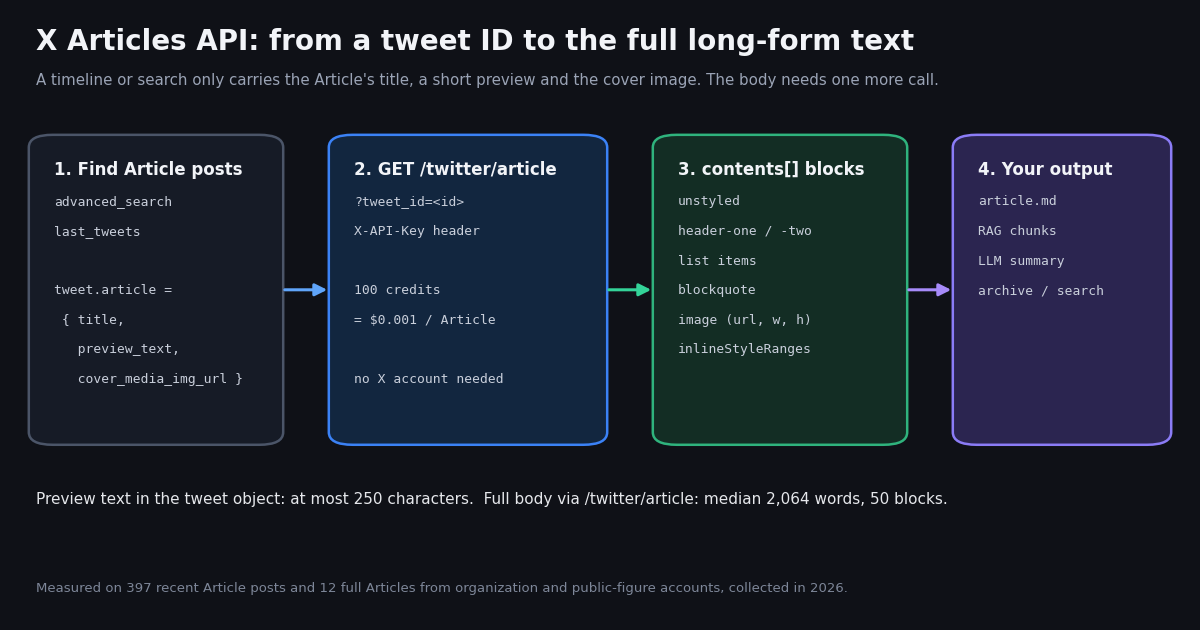
This page is about X Articles, the long-form posts with a title, a cover image and a formatted body that open on x.com under /i/article/. It is not about threads: if the text you want is a chain of ordinary posts, our guide to unrolling a Twitter thread covers that case, and the general X API playground walks through every read endpoint. Here we stay on one question developers keep typing into search boxes: how do I get the content of an X Article out of the platform, as data, without opening a browser?
The short version is that you need two things. First, the ID of the tweet that shares the Article, which you can find with a search or a user timeline because those tweet objects carry an article field. Second, one call to /twitter/article, which returns the full body as structured blocks. We called that endpoint on twelve Articles from organization and public-figure accounts, read 397 recent Article posts through search and compared 28 Article posts with 383 ordinary posts from the same six accounts, so every number below comes from data we collected in 2026, not from a spec sheet.
Prices on this page use the TwitterAPI.io rate card (100,000 credits = $1) and X's own pay-per-usage table at docs.x.com/x-api/getting-started/pricing, both read this session.
What an X Article looks like to an API
An X Article is published from the Articles composer and then shared as a post. That post is what shows up in timelines, search and notifications. Its text is usually nothing but a t.co link: in our search sample, 69.7% of Article posts had no words outside the link, which is also why X tags most of them with the language code zxx (no linguistic content).
What makes the post useful is the article object attached to it. On TwitterAPI.io search and timeline results that object has exactly three keys in every one of the 396 Article posts we read: title, preview_text and cover_media_img_url. Titles ran a median 41 characters (longest 100), previews a median 193.5 characters (longest 250), and 87.6% had a non-empty cover image URL.
So a timeline call tells you that an Article exists, what it is called and how it opens. It does not give you the argument, the data, the list of steps or the closing call to action. For that you need the body, and the body lives behind a separate endpoint.
GET /twitter/article: parameters, response and errors
The endpoint takes one required query parameter, tweet_id, the ID of the post that shares the Article (the number in x.com/<user>/status/<id>). Authentication is the same X-API-Key header as every other read. The docs page at docs.twitterapi.io/api-reference/endpoint/get_article states the price as 100 credits per Article; with 100,000 credits to the dollar that is $0.001 per Article, or $1 for 1,000.
We called it 12 times on Articles from six organization and public-figure accounts and got status: "success" every time. The article object came back with these keys: id (an opaque Article entity ID, not the tweet ID), author (the full user profile), title, preview_text, cover_media_img_url, createdAt, likeCount, replyCount, quoteCount, viewCount and contents. Two details differ from the published schema, so code defensively: viewCount arrived as a string in all 12 responses (the schema says integer), and the error text came back in msg, while the schema names it message.
There is no repost or bookmark count on the Article object. If you need those, read them from the sharing tweet (retweetCount, bookmarkCount) with /twitter/tweets or from the search result you used to find the post.
Not an Article, or a bad ID. We called the endpoint once with the ID of an ordinary White House post and once with the string abc. Both returned the same JSON body: article: null, status: "failed", msg: "article not found". Check status before you touch article, and do not retry these: the answer will not change.
curl -s "https://api.twitterapi.io/twitter/article?tweet_id=2115083713512091917" \
  -H "X-API-Key: $TWITTERAPI_IO_KEY"

# trimmed response (real call, collected in 2026)
{
  "article": {
    "id": "QXJ0aWNsZUVudGl0eToyMTE1MDc4MDkzNDg4NzA5NjMy",
    "author": {"userName": "bhorowitz", "name": "...", "followers": 768070, "...": "..."},
    "title": "Databricks & the Future of the Firm ",
    "preview_text": "So many aspects of our lives are going to change over the next twenty years. And ...",
    "cover_media_img_url": "https://pbs.twimg.com/media/HVpF_cwa0AAqBFE.jpg",
    "createdAt": "Tue Oct 27 14:10:28 +0000 2026",
    "likeCount": 1560, "replyCount": 55, "quoteCount": 87, "viewCount": "939960",
    "contents": [
      {"type": "unstyled", "text": "So many aspects of our lives ...",
       "inlineStyleRanges": [{"offset": 0, "length": 6, "style": "Bold"}]},
      {"type": "header-one", "text": "From Spark to Agents"},
      {"type": "image", "url": "https://pbs.twimg.com/media/...", "width": 1000, "height": 1000}
    ]
  },
  "status": "success",
  "msg": null
}

# a tweet that does not share an Article, or a malformed id
{"article": null, "status": "failed", "msg": "article not found"}The contents[] blocks, measured on 12 real Articles
The body is a list of blocks in reading order. Each block has a type; text blocks add text and, when the author used bold or italic, inlineStyleRanges entries of offset, length and style (we saw only Bold and Italic). Image blocks carry url, width and height instead of text. If that model looks familiar, it is the same idea as a DraftJS content state, which X's own Articles endpoints accept for drafts.
Across the 12 Articles we fetched there were 990 blocks. Plain paragraphs dominate, but structure matters for any converter:
The published schema also lists header-three, gif (an mp4 URL plus a previewUrl) and markdown; none appeared in our twelve, and blockquote appeared although the schema enum does not list it. Treat the type list as open: fall back to a plain paragraph for any type you do not recognize rather than dropping it.
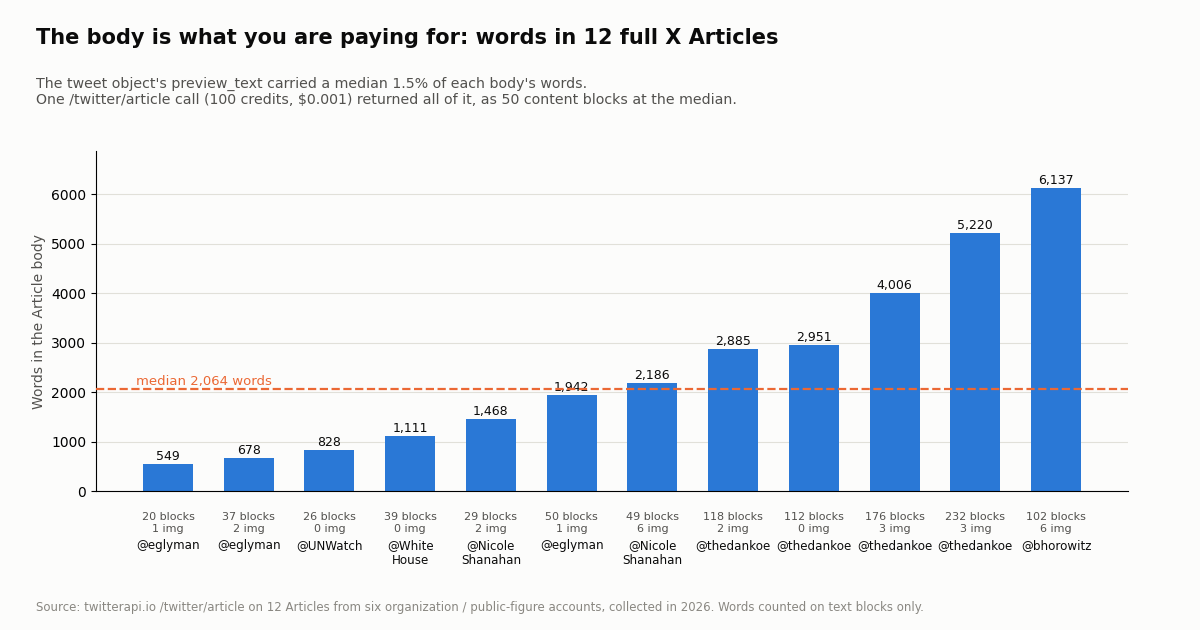
Lengths varied by a factor of eleven. The shortest body was 549 words, the longest 6,137, the median 2,064 words or 13,577 characters. Images were sparse: 26 across all twelve, a median of 2 per Article, and 3 Articles had none beyond the cover.
Python: save any X Article as Markdown
The script below does the full job: it finds an account's Article posts with a search, fetches each body with /twitter/article, applies bold and italic from inlineStyleRanges, maps each block type to Markdown and writes one .md file per Article. We ran the conversion function on all twelve responses from the study without errors; for the 6,137-word Article it produced Markdown with the Article's six section headings and six images in place.
Search first, then fetch. The query from:<handle> url:"x.com/i/article" keeps the search to that account's Article posts, and the code still checks t.get("article") so a quote of someone else's Article does not slip through. A search page that returns tweets costs 15 credits per tweet; an Article fetch costs 100 credits.
Emphasis offsets. inlineStyleRanges offsets index into the block text. The converter inserts markers from the end of the string backwards so earlier insertions do not shift later offsets, and trims spaces inside a range so you do not get ** word**.
Lists. Consecutive list-item blocks form one list; the converter closes a list with a blank line when the next block is something else, otherwise Markdown renderers fold the next paragraph into the last bullet.
Rate limits. Before your first payment your key runs at 0.2 requests per second, so a loop over dozens of Articles should sleep about five seconds between calls; paid accounts get 20 requests per second (50 on Scale, 500 on Business).
import os
import re
import time
import requests
BASE = "https://api.twitterapi.io"
HEADERS = {"X-API-Key": os.environ["TWITTERAPI_IO_KEY"]}
def find_article_posts(handle, max_pages=3):
"""Posts by one account that share an X Article (tweet.article is set)."""
found, cursor = [], ""
for _ in range(max_pages):
r = requests.get(f"{BASE}/twitter/tweet/advanced_search", headers=HEADERS, timeout=30,
params={"query": f'from:{handle} url:"x.com/i/article"', "queryType": "Latest", "cursor": cursor})
r.raise_for_status()
body = r.json()
found += [t for t in body.get("tweets", []) if t.get("article")]
if not body.get("has_next_page"):
break
cursor = body.get("next_cursor", "")
return found
def get_article(tweet_id):
"""Full Article body for the tweet that shares it. 100 credits per call."""
r = requests.get(f"{BASE}/twitter/article", headers=HEADERS, params={"tweet_id": tweet_id}, timeout=30)
r.raise_for_status()
body = r.json()
if body.get("status") != "success" or not body.get("article"):
raise ValueError(f"{tweet_id}: {body.get('msg') or body.get('message')}")
return body["article"]
MARKS = {"Bold": "**", "Italic": "*"}
def styled(text, ranges):
"""Apply inlineStyleRanges (offset/length/style) as Markdown emphasis."""
inserts = []
for rg in ranges or []:
mark = MARKS.get(rg.get("style"))
if not mark or rg.get("length", 0) <= 0:
continue
start, end = rg["offset"], rg["offset"] + rg["length"]
while start < end and text[start].isspace():
start += 1
while end > start and text[end - 1].isspace():
end -= 1
if start < end:
inserts += [(start, 1, mark), (end, 0, mark)]
for pos, _, mark in sorted(inserts, key=lambda x: (x[0], x[1]), reverse=True):
text = text[:pos] + mark + text[pos:]
return text
def to_markdown(article):
out = [f"# {article.get('title', '').strip()}", ""]
a = article.get("author") or {}
out += [f"By {a.get('name', '')} (@{a.get('userName', '')}), {article.get('createdAt', '')}", ""]
if article.get("cover_media_img_url"):
out += [f"", ""]
n, prev = 0, ""
for b in article.get("contents", []):
kind, text = b.get("type"), styled(b.get("text", ""), b.get("inlineStyleRanges"))
n = n + 1 if kind == "ordered-list-item" else 0
if prev.endswith("list-item") and kind != prev:
out.append("") # close the list before the next block
prev = kind
if kind == "header-one":
out += [f"## {text}", ""]
elif kind == "header-two":
out += [f"### {text}", ""]
elif kind == "header-three":
out += [f"#### {text}", ""]
elif kind == "unordered-list-item":
out.append(f"- {text}")
elif kind == "ordered-list-item":
out.append(f"{n}. {text}")
elif kind == "blockquote":
out += [f"> {text}", ""]
elif kind == "image":
out += [f"})", ""]
elif kind == "gif":
out += [f"[animated image]({b.get('url', '')})", ""]
elif kind == "divider":
out += ["---", ""]
else: # unstyled, markdown and any new block type
out += [text, ""]
return re.sub(r"\n{3,}", "\n\n", "\n".join(out)).strip() + "\n"
if __name__ == "__main__":
for post in find_article_posts("bhorowitz", max_pages=1)[:3]:
art = get_article(post["id"])
name = re.sub(r"[^a-z0-9]+", "-", art["title"].lower()).strip("-")[:60] or post["id"]
with open(f"{name}.md", "w", encoding="utf-8") as f:
f.write(to_markdown(art))
words = sum(len(b.get("text", "").split()) for b in art["contents"])
print(f"{post['id']} {art['title']!r} {words} words {len(art['contents'])} blocks -> {name}.md")
time.sleep(0.3)
Finding Article posts: search and timelines
You cannot fetch an Article without its tweet ID, so discovery is half the work. The most reliable filter we found is the search operator url:"x.com/i/article". On 20 pages of Latest results it returned 397 posts, and 396 of them (99.7%) carried the article object; the single exception was a repost. Combine it with from:, lang:, min_faves: or since: to narrow the stream.
The stream is large and mostly small accounts. Those 397 posts spanned about 2.2 hours, roughly 180 Article posts an hour for this query. 173 came from accounts under 1,000 followers and only 29 from accounts above 100,000; the median post had 1 like and 96 views, and 48.5% had no likes at all. 98.5% of the authors carried the blue check, which fits the common reading that Articles are a paid-tier feature, though a sample cannot prove that.
For a known account, /twitter/user/last_tweets is simpler: every tweet object in data.tweets[] has the same article field, so a filter on it picks out Article posts from the rest. That is the route to use when you watch specific publishers.
import os, requests

BASE = "https://api.twitterapi.io"
HEADERS = {"X-API-Key": os.environ["TWITTERAPI_IO_KEY"]}

r = requests.get(f"{BASE}/twitter/tweet/advanced_search", headers=HEADERS, timeout=30,
                 params={"query": 'url:"x.com/i/article" lang:en min_faves:100', "queryType": "Latest"})
body = r.json()
for t in body.get("tweets", []):
    art = t.get("article")          # None on ordinary posts
    if art:
        print(t["id"], t["author"]["userName"], art["title"], len(art.get("preview_text") or ""))
print("more:", body.get("has_next_page"), body.get("next_cursor"))Do Article posts perform better? A six-account comparison
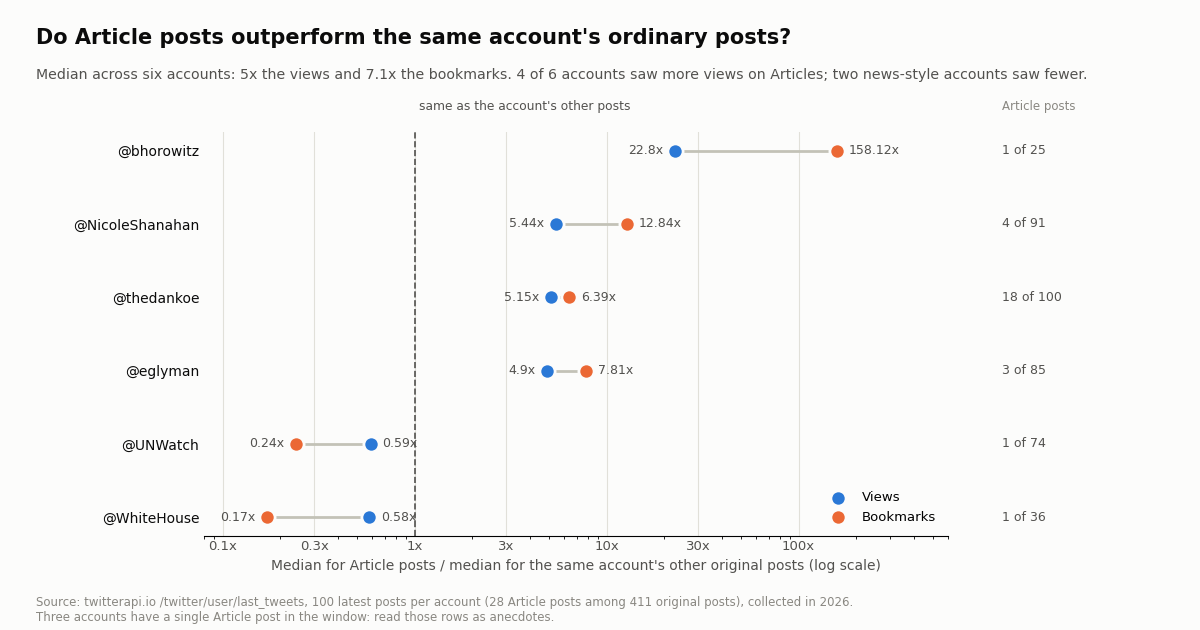
To see whether Articles are worth tracking, we pulled the latest 100 posts of six organization and public-figure accounts that publish them and compared each account's Article posts with its other original posts (reposts and replies excluded). That left 28 Article posts against 383 ordinary ones.
Taking the median of the six per-account ratios, Article posts drew 5x the views, 7.1x the bookmarks, 2.1x the reposts and 1.2x the likes. Bookmarks moved most, which fits long reads people save for later.
The split is not universal. The two news-style accounts, @WhiteHouse and @UNWatch, each had one Article in the window and it drew 0.58x and 0.59x their usual views: for accounts whose ordinary posts are already announcements, a long-form version adds little reach. The essay writers, by contrast, saw about five to twenty-three times their usual views on Articles. @thedankoe, the only account with a large Article count (18 of 100 posts), still came out at 5.15x views and 6.39x bookmarks.
Read the single-Article rows as anecdotes. The useful conclusion for a developer is narrower: when you monitor publishers, Article posts are disproportionately the ones that get saved and shared, so fetching their bodies is often where the value is.
What the official X API offers for Articles
X's data dictionary lists article among the optional Post fields you can request with tweet.fields, described as an object that "contains metadata for the Article present in this Tweet" with the suggested use "to get the text and entities of an Article". X's changelog dates that addition to July 2024 ("Get article metadata"). We did not call X's endpoint for this page, so we do not claim more about its payload than those two sentences.
On the writing side, X added two endpoints in June 2026: POST https://api.x.com/2/articles/draft creates a draft from a title, a DraftJS content state and optional cover media, and POST https://api.x.com/2/articles/{article_id}/publish publishes it and returns the new post ID. Both need a user access token (OAuth 1.0a or OAuth 2.0 with PKCE, scopes tweet.read, tweet.write and users.read). X's OpenAPI schema notes a markdown limit of 10,000 weighted characters per Article for code blocks and tables.
On price, X's pay-per-usage table has no separate Articles line. A post lookup bills as Posts: Read at $0.005 per resource, so 1,000 post reads cost $5. On TwitterAPI.io, 1,000 Article bodies cost $1 (100 credits each) and 1,000 ordinary tweets cost $0.15, about 33x less than X's $5 per 1,000 post reads. X's rate card also caps pay-per-usage at 3 million post reads a month (Enterprise above) and offers $20 of credits on a first card purchase plus a match of up to $50 on the first auto-recharge.
TwitterAPI.io's write endpoints (posting, deleting, liking, following and so on through /twitter/create_tweet_v2 and its siblings) run through an authenticated session from /twitter/user_login_v2 and cost 60 credits ($0.0006) per call, but Article drafting is not among them. If you need to publish Articles programmatically, X's own endpoints are the documented path.
Watching publishers for new Articles
A common job is to catch a newsletter-style account's new Article within minutes and push the full text into a summarizer, a search index or a Slack channel. The loop below polls one account's latest posts every five minutes, keeps only tweets with an article object it has not seen and fetches the body once per new Article.
Polling cost. A check that finds nothing is billed at the 15-credit minimum, $0.00015. Every five minutes for a month is about $1.30 per account; every 60 seconds is $6.48. A last_tweets page that does return 20 tweets costs $0.003, and each new Article adds $0.001. Even the most prolific publisher in our sample (@thedankoe, 18 Article posts among its latest 100) would add only cents a month in Article fetches.
Fewer requests for many accounts. For a list of publishers, one search with (from:a OR from:b OR from:c) url:"x.com/i/article" replaces one timeline call per account, and an empty result still costs only the minimum. If you need push delivery instead of polling, the filter-rule webhook route described in our real-time guides can carry the same query.
What to store. Keep the tweet ID as your key (the article.id entity string is opaque), the title, createdAt, the Markdown body and the image URLs. Image URLs point at pbs.twimg.com; download them if you need a durable archive.
import os, time, requests

BASE = "https://api.twitterapi.io"
HEADERS = {"X-API-Key": os.environ["TWITTERAPI_IO_KEY"]}
seen = set()

def new_articles(handle):
    r = requests.get(f"{BASE}/twitter/user/last_tweets", headers=HEADERS, timeout=30,
                     params={"userName": handle})
    tweets = (r.json().get("data") or {}).get("tweets", [])
    return [t for t in tweets if t.get("article") and t["id"] not in seen]

while True:
    for t in new_articles("bhorowitz"):
        seen.add(t["id"])
        full = requests.get(f"{BASE}/twitter/article", headers=HEADERS, timeout=30,
                            params={"tweet_id": t["id"]}).json()
        if full.get("status") == "success":
            words = sum(len(b.get("text", "").split()) for b in full["article"]["contents"])
            print("new Article:", full["article"]["title"], words, "words")
time.sleep(300) # every 5 minutesHow we collected this
Question. What does an X Article look like as data, how much of it does a normal tweet object carry, and do Article posts perform differently from the same accounts' ordinary posts?
Accounts and query. Six organization and public-figure accounts that publish Articles: @WhiteHouse, @bhorowitz, @UNWatch, @eglyman, @thedankoe and @NicoleShanahan. A search for url:"x.com/i/article" (Latest, 20 pages) for the wider sample.
Window and sample. The most recent posts at collection time, collected in 2026: 397 search posts spanning about 2.2 hours, 600 timeline posts (100 per account), and 12 full Articles fetched with /twitter/article from the six accounts. In total 65 requests, about $0.17 of credits.
What the sample cannot show. Six accounts and twelve full Articles are enough to describe the data format and to show a direction, not to estimate a platform-wide lift. The search sample covers a couple of hours of one query and leans toward small accounts. View counts are X's own, read at collection time, and older posts have had longer to accumulate them.
Privacy. Aggregates only. Search results from private individuals stayed out of the published data; the de-identified sample keeps no IDs, text or handles. Only organization and public-figure accounts are named.
import os
import re
import time
import requests
BASE = "https://api.twitterapi.io"
HEADERS = {"X-API-Key": os.environ["TWITTERAPI_IO_KEY"]}
def find_article_posts(handle, max_pages=3):
"""Posts by one account that share an X Article (tweet.article is set)."""
found, cursor = [], ""
for _ in range(max_pages):
r = requests.get(f"{BASE}/twitter/tweet/advanced_search", headers=HEADERS, timeout=30,
params={"query": f'from:{handle} url:"x.com/i/article"', "queryType": "Latest", "cursor": cursor})
r.raise_for_status()
body = r.json()
found += [t for t in body.get("tweets", []) if t.get("article")]
if not body.get("has_next_page"):
break
cursor = body.get("next_cursor", "")
return found
def get_article(tweet_id):
"""Full Article body for the tweet that shares it. 100 credits per call."""
r = requests.get(f"{BASE}/twitter/article", headers=HEADERS, params={"tweet_id": tweet_id}, timeout=30)
r.raise_for_status()
body = r.json()
if body.get("status") != "success" or not body.get("article"):
raise ValueError(f"{tweet_id}: {body.get('msg') or body.get('message')}")
return body["article"]
MARKS = {"Bold": "**", "Italic": "*"}
def styled(text, ranges):
"""Apply inlineStyleRanges (offset/length/style) as Markdown emphasis."""
inserts = []
for rg in ranges or []:
mark = MARKS.get(rg.get("style"))
if not mark or rg.get("length", 0) <= 0:
continue
start, end = rg["offset"], rg["offset"] + rg["length"]
while start < end and text[start].isspace():
start += 1
while end > start and text[end - 1].isspace():
end -= 1
if start < end:
inserts += [(start, 1, mark), (end, 0, mark)]
for pos, _, mark in sorted(inserts, key=lambda x: (x[0], x[1]), reverse=True):
text = text[:pos] + mark + text[pos:]
return text
def to_markdown(article):
out = [f"# {article.get('title', '').strip()}", ""]
a = article.get("author") or {}
out += [f"By {a.get('name', '')} (@{a.get('userName', '')}), {article.get('createdAt', '')}", ""]
if article.get("cover_media_img_url"):
out += [f"", ""]
n, prev = 0, ""
for b in article.get("contents", []):
kind, text = b.get("type"), styled(b.get("text", ""), b.get("inlineStyleRanges"))
n = n + 1 if kind == "ordered-list-item" else 0
if prev.endswith("list-item") and kind != prev:
out.append("") # close the list before the next block
prev = kind
if kind == "header-one":
out += [f"## {text}", ""]
elif kind == "header-two":
out += [f"### {text}", ""]
elif kind == "header-three":
out += [f"#### {text}", ""]
elif kind == "unordered-list-item":
out.append(f"- {text}")
elif kind == "ordered-list-item":
out.append(f"{n}. {text}")
elif kind == "blockquote":
out += [f"> {text}", ""]
elif kind == "image":
out += [f"})", ""]
elif kind == "gif":
out += [f"[animated image]({b.get('url', '')})", ""]
elif kind == "divider":
out += ["---", ""]
else: # unstyled, markdown and any new block type
out += [text, ""]
return re.sub(r"\n{3,}", "\n\n", "\n".join(out)).strip() + "\n"
if __name__ == "__main__":
for post in find_article_posts("bhorowitz", max_pages=1)[:3]:
art = get_article(post["id"])
name = re.sub(r"[^a-z0-9]+", "-", art["title"].lower()).strip("-")[:60] or post["id"]
with open(f"{name}.md", "w", encoding="utf-8") as f:
f.write(to_markdown(art))
words = sum(len(b.get("text", "").split()) for b in art["contents"])
print(f"{post['id']} {art['title']!r} {words} words {len(art['contents'])} blocks -> {name}.md")
time.sleep(0.3)
Questions readers ask
Is there an API to get the content of an X Article?
Yes. GET https://api.twitterapi.io/twitter/article?tweet_id=<id> returns the title, author, counts and every body block of the Article shared by that tweet, for 100 credits ($0.001). X's own API documents an article post field described as Article metadata; check its payload against your needs before relying on it for full bodies.
Which ID do I pass, the Article ID or the tweet ID?
The tweet ID of the post that shares the Article, the number in x.com/<user>/status/<id>. The article.id in the response is an opaque entity string and is not accepted as tweet_id.
Why does my timeline or search result only show a short preview?
Tweet objects carry a compact article object with title, preview_text and cover_media_img_url. In our sample the preview was at most 250 characters, a median 1.5% of the body. The full text needs one /twitter/article call.
What happens if the tweet is not an Article?
You get a normal JSON body with article: null, status: "failed" and msg: "article not found". We saw the same response for a malformed ID. Check status first and do not retry.
How do I convert an X Article to Markdown?
Map each contents[] block type to Markdown (headers to ##, list items to - or 1., blockquote to >, image to , divider to ---) and apply inlineStyleRanges for bold and italic. The Python script on this page does exactly that and writes one .md file per Article.
Can I scrape X Articles without an API?
Articles render in the x.com web app, so a browser can display them, but automating a logged-in browser is slow, breaks when the page changes and acts as your account. An API call returns the same text as structured JSON without an X account.
Can I publish an X Article through an API?
Through X's official API, yes: since June 2026 POST /2/articles/draft creates a draft and POST /2/articles/{article_id}/publish publishes it, both with a user access token. TwitterAPI.io's write endpoints cover posts, replies, likes, follows and similar actions but not Article drafting.
How much does it cost to fetch 1,000 X Articles?
$1 on TwitterAPI.io (100 credits each, 100,000 credits per dollar), plus about $0.15 per 1,000 tweets for the searches that find them. New accounts that pass the automatic bot check get up to $1 of free credits (at most 100,000 credits, no card, one per person or network, expiring after 31 days).
Continue
- TwitterAPI.io docs: Get Article (tweet_id, response schema, 100 credits per article)
- X API data dictionary: the article Post field
- X API: Articles draft and publish endpoints
- X API changelog: article metadata (July 2024), Articles endpoints (June 2026)
- X API pay-per-usage pricing
- DraftJS ContentState reference (the block model X's Articles endpoints use)
- X API overview: every TwitterAPI.io read and write endpoint
- X API playground: try read endpoints with real responses
- Unroll a Twitter (X) thread into one document
- Twitter scraping guide: API vs browser vs libraries
- How X's internal GraphQL API works
- Feed X data to Claude for summaries and research
- TwitterAPI.io pricing and credit plans
- Get Article endpoint reference
- 01Twitter (X) API License: The Developer Agreement in Plain English
- 02Claude Agent SDK: Build a Twitter (X) Research Agent in Python
- 03OpenRouter API: Base URL, API Key, Free Models and Pricing, Plus a Twitter (X) Agent That Swaps Models
- 04Codex vs Claude Code: Setup, MCP, Headless Runs and Pricing Compared for Twitter (X) Data Agents
- 05Open AI API Key: How to Get One, Pay for It, Keep It Safe and Feed It Live Twitter (X) Data
- 06Can You Edit a Tweet? How Editing Works on X
- 07Twitter (X) Stalker Tools: What They Can See, What They Can't, and Where the Line Is
- 08How to Use LangChain with the Twitter (X) API
Stop reading. Start building.
Starter credits cover real testing on real data. Google sign-in, no card, no application queue.
Get an API keyAlready building with TwitterAPI.io? Publish an honest tutorial or build log about it and earn up to $200 a month in API credits.