Cline vs Cursor in 2026: Cost, Models, Plan/Act and MCP Compared
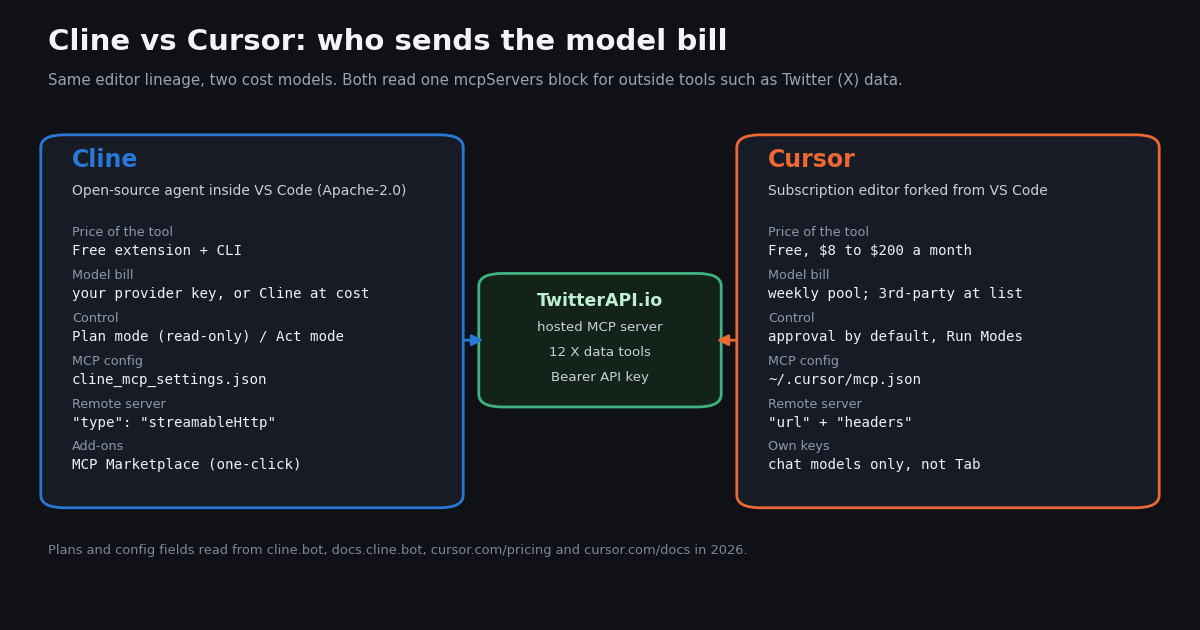
- Cost model: Cline is free software and you pay the model provider directly (or Cline's provider "at cost"); Cursor is a subscription (Free, then $8, $30, $100 or $200, billed monthly) with a weekly usage pool.
- Claude in Cursor costs extra: Cursor bills third-party models at API list price on top of the plan; Plus ($8) is Grok-only. Own keys in Cursor work for chat models only, never Tab.
- One agent task, priced: an illustrative Claude Sonnet 5.5 task (300,000 input tokens, 80% cached, 30,000 output) is about $0.44 in Cline on your own key ($0.90 with no cache hits).
- Control: Cline's Plan mode "cannot modify any files or execute commands" and can use a different model from Act mode; Cursor asks before running MCP tools by default and follows Run Modes.
- MCP: both read
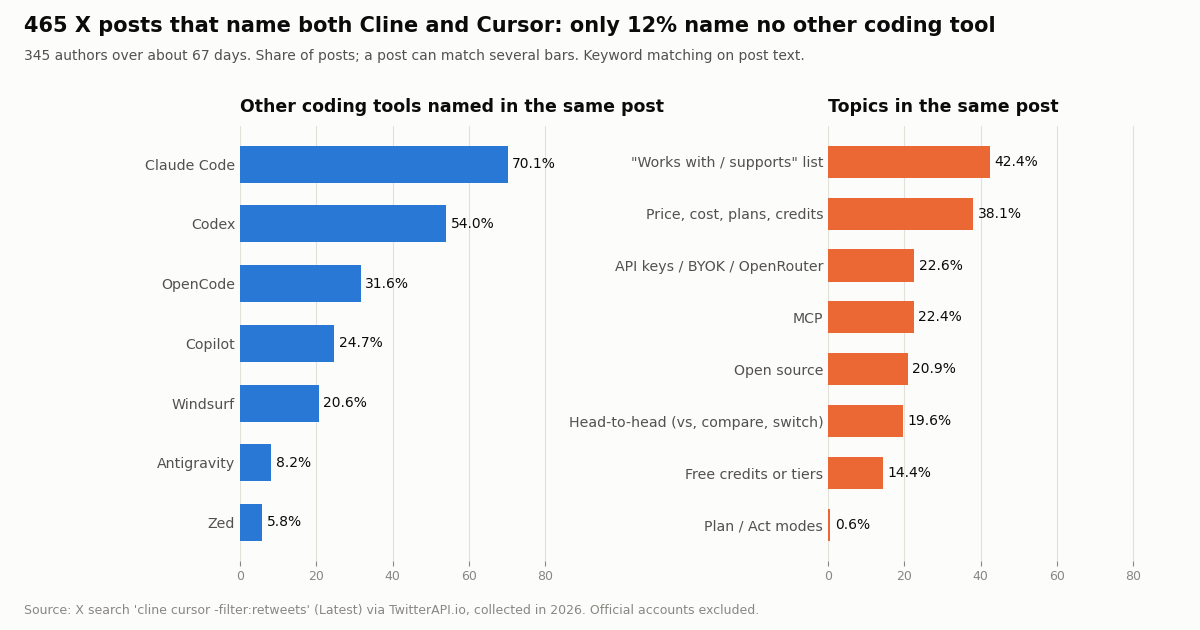
mcpServersJSON. Cline needs"type": "streamableHttp"for a remote server (omitting it falls back to legacy SSE) and has a one-click MCP Marketplace. - On X: 70.1% of 465 posts naming both tools also name Claude Code and 54.0% name Codex; 42.4% are "works with" lists, only 19.6% are head-to-head.
This page answers one question: should you run Cline inside VS Code on your own model keys, or pay for Cursor? It covers the cost model, the models each one can reach, how much control you keep over the agent, and how each one connects to outside tools through MCP. It deliberately keeps Cursor's plan detail short and does not cover other editors; if you are weighing Google's agent editor instead, see our Antigravity vs Cursor comparison, and if your other option is GitHub's assistant, see Cursor vs Copilot. Here the second column is always Cline.
Every price, plan and config field below was read this session from cline.bot, docs.cline.bot, the github.com/cline/cline releases, cursor.com/pricing, cursor.com/docs and Anthropic's pricing docs. We did not benchmark the two agents, so there are no speed or accuracy scores. What we did measure is X data: 465 recent posts in which developers name both tools, and the official @cline and @cursor_ai timelines, collected with TwitterAPI.io in 2026 for about $0.12 in API credits.
12% of 465 X posts (collected in 2026); 70.1% also name Claude Code and 38.1% talk price or plans.
Cline vs Cursor at a glance
The short version: Cline is an agent you add to the editor you already use, with no seat fee for individuals; Cursor is the editor itself, sold as a subscription that bundles its own models and Grok. The table compares what you actually choose between.
What we verified about Cline's state. The cline/cline repository describes itself as an "Autonomous coding agent as an SDK, IDE extension, or CLI assistant", is not archived, had about 71,400 stars and 7,900 forks when we checked, and was pushed to the day before we wrote this. The latest extension release was v4.1.26 on October 26, 2026, shipped the same day as CLI v3.0.74, desktop v0.0.49 and SDK v0.2.0. So Cline is very much alive and now spans four surfaces, not just the VS Code sidebar.
What the Cursor row leaves out on purpose. Cursor's plans carry far more detail (seat types, cloud agents, code review, Grok products). This page only needs the part that changes the Cline decision: you pay a monthly fee for an allowance, and Claude or GPT usage beyond Cursor's own and Grok models is billed on top.
Cost model: bring your own key vs a monthly pool
Cline. The pricing page lists one individual plan, "Open Source", at "Free", with "Purchase and Model Inference at Cost or BYOK", the VS Code extension, the CLI, the MCP Marketplace and community support. There are no seats or subscriptions for individuals: you either paste a key from a provider (Anthropic, OpenAI, Gemini, OpenRouter, Azure, Vertex, or a local model through Ollama or LM Studio, among others named in its release notes) and that provider bills you, or you buy usage through the Cline provider, which the page describes as "at cost". The Enterprise plan is "Custom" and adds SSO, an SLA, centralized billing, role-based access control, a setting to limit which inference providers a team can use, and a JetBrains extension.
Cursor. The pricing page lists Free ($0/month, "Limited AI usage"), Plus ($8/month, a shared AI usage pool, Grok models only), Premium ($30/month, 4x Plus usage, adds third-party models at API list price), Super ($100/month, 15x) and Ultra ($200, monthly, 50x), plus Teams from $30 per user a month and custom Enterprise. The pool is shared across Cursor and Grok and refreshes weekly; when it runs out you buy a top-off or wait. Third-party models "are not included in the plan price" and are billed separately at API list price with an optional spending cap.
Own keys inside Cursor. Cursor's API keys page accepts OpenAI, Anthropic, Google, Azure and AWS Bedrock keys, with three limits worth knowing before you treat Cursor as a BYOK tool: "Custom API keys only work with chat models", "Tab completion continues using Cursor's built-in models", and Cursor's Zero Data Retention policy does not apply to requests made with your own key. On individual plans the provider bills those requests and they do not use your included pool; on Teams and Enterprise, eligible requests made with your own key still carry the Cursor Token Rate of $0.25 per million tokens.
The practical reading: if your daily driver is Claude, Cline costs you exactly the Anthropic bill, and Cursor costs that bill plus a subscription that mostly buys Tab and Cursor's own agent models. If you live in Grok or in Cursor's models and lean on Tab all day, Cursor's flat fee is the simpler deal. Prices and plan contents change often on both sides, so check cline.bot/pricing and cursor.com/pricing before you commit.
What one agent task costs in Cline on your own key
Because Cline's bill is just tokens, you can price a task with a formula instead of guessing at a pool: cost = fresh input tokens x input price + cached input tokens x cache-hit price + cache writes x write price + output tokens x output price. Anthropic's pricing docs list Claude Sonnet 5.5 at $2 per million input tokens, $10 per million output tokens, $0.10 per million cache hits and $2.50 per million 5-minute cache writes. Cline resends the conversation every turn, so most of a long task's input is cache hits.
The worked example below uses stated assumptions, not a measurement of Cline: a 20-turn agent task that reads 300,000 input tokens in total, 80% of them served from cache, and writes 30,000 output tokens. Your own tasks will differ; replace these inputs with the token counts from your provider's usage dashboard after one run.
The MCP overhead is small but real. Every connected MCP server sends its tool definitions with each request. We fetched the tools/list response of TwitterAPI.io's hosted server this session: 12 tools, 11,303 bytes of JSON, the largest being search_tweets at 1,999 bytes. At the common rule of thumb of about four characters per token that is roughly 2,826 tokens per turn, which adds about $0.012 to the 20-turn task once it is cached. Ten servers of that size would add ten times as much, which is the main reason to disable servers you are not using ("disabled": true in Cline).
The data bill is separate. If the task pulls 200 tweets through the MCP server, TwitterAPI.io charges 15 credits per tweet returned, $0.15 per 1,000 tweets, so $0.03. The same 200 post reads on the official X API pay-per-use rate card (docs.x.com/x-api/getting-started/pricing, $0.005 per post read) cost $1.00, about 33x more. Task total in Cline on your own key: about $0.49.
The same task in Cursor. You cannot price it per task from Cursor's published pages, because the pool is described in multiples of Plus usage (4x, 15x, 50x), not in tokens or dollars. If you run it on Claude, Cursor bills the Claude tokens at API list price, so the model line is the same as the table above, and the monthly plan comes on top. The X data line is identical in both editors, since the MCP server bills your TwitterAPI.io key either way.
Models and control: Plan/Act in Cline vs approvals in Cursor
Cline treats the model as a setting, not a product. Its provider list covers the large labs, routers such as OpenRouter, cloud platforms such as Azure and SAP AI Core, and local runtimes such as Ollama and LM Studio. The v4.1.26 notes show how fast that list moves: a refreshed catalog that adds the CommandCode, Reflection, Liquid Inference and Munito AI providers and drops CrofAI, iFlow and Llama; GPT-6 models (gpt-6-sol, gpt-6.1-sol) fixed on OpenAI and Azure endpoints; and, with no model chosen, the Cline provider defaulting to Claude Sonnet 5.5 again, "back at the top of Cline's recommended list". The same release changed the default model for most other providers, mostly to Kimi K3.1 Pro, MiniMax M3.1 Flash or DeepSeek V4.1 Flash 1017, so pin a model if you care which one runs.
Cursor sells access instead of choice. On Plus only Grok models are available; Premium and up add the latest Grok models and third-party models at API list price, and Cursor's own agent models sit inside the pool. You can also paste your own OpenAI, Anthropic, Google, Azure or Bedrock key, but only for chat models.
Mixing models per step. Cline's settings include "Use different models for Plan and Act". With it on, switching modes switches the model, so a common setup is a stronger reasoning model for Plan and a cheaper or faster one for Act. Because Plan mode only reads and talks, that split keeps the expensive model away from the long, token-heavy edit-and-run loop.
Cline Plan mode "can read your codebase, run searches, and discuss strategy" but "cannot modify any files or execute commands". Act mode "can now modify files, run commands, and execute your strategy" and keeps the context from planning. Each mode has its own tool set: the v4.1.26 notes fixed a case where toggling while a task was starting left the session running "with the other mode's tools". In Cline's new cloud sessions the Plan/Act toggle and the auto-approve bar are hidden.
Approvals in Cline are per action, with an auto-approve bar for categories you trust, and per MCP tool through the autoApprove list in cline_mcp_settings.json. Cline's docs advise: "Limit autoApprove to safe tools." For an X data server, the read tools (search, user lookup, timelines) are reasonable candidates; anything that acts on an account should stay manual.
Cursor asks for approval before using MCP tools by default, and "MCP follows the same Run Modes as terminal commands". In Auto-review mode, allowlisted MCP tools run immediately and everything else is routed through a classifier. There is no named equivalent of a read-only Plan mode in the pages we read; you get the same effect by reviewing before you let the agent run.
Interestingly, the control model barely registers on X: only 0.6% of the posts naming both tools mention Plan or Act mode, against 38.1% that mention price, cost, plans or credits.
MCP side by side: add the same Twitter (X) data server to both
Both tools read a JSON object with an mcpServers map, so a server definition moves between them with one edit. The difference that trips people up is the transport field: Cline's docs say that omitting type "defaults to the legacy sse transport for backward compatibility", so a modern Streamable HTTP server needs "type": "streamableHttp" in Cline, while Cursor infers it from url.
Cline's MCP Marketplace. cline.bot/mcp-marketplace is marked "Preview" and says servers "can only be installed through the Cline extension": browse, click Install, and Cline sets the server up. Server authors submit through the cline/mcp-marketplace GitHub repository. Cursor's pricing page mentions a team marketplace for internal rules, skills and plugins on higher Teams seat tiers; for individual users, adding a server is a JSON edit or the settings screen.
Step 1. Get a TwitterAPI.io API key from the dashboard with a Google sign-in; no X developer account is needed. New accounts that pass the automatic bot check get up to $1 of free credits (at most 100,000 credits, no card, one per person or network, expiring after 31 days). Step 2. In Cline, open MCP Servers, then Configure, then Configure MCP Servers, and add the block below to cline_mcp_settings.json (or use the Remote Servers tab: name, URL, transport Streamable HTTP). Step 3. Ask Cline something that needs live data, for example "find the 20 most-liked posts this week that mention our product and summarize the complaints", and approve the search_tweets call.
Our hosted server answered initialize this session as twitterapi-mcp and describes itself as read-only access to Twitter/X data via 12 tools (search tweets, user lookup, followers, replies, trends and more), authenticated by your API key as a Bearer token.
{
  "mcpServers": {
    "twitterapi-io": {
      "type": "streamableHttp",
      "url": "https://mcp.twitterapi.io/mcp",
      "headers": { "Authorization": "Bearer your_key_here" },
      "disabled": false,
      "autoApprove": []
    }
  }
}The same server in Cursor, and what the X data costs
In Cursor, create or open ~/.cursor/mcp.json for all projects (or .cursor/mcp.json for one) and add the block below. The ${env:TWITTERAPI_IO_API_KEY} form reads the key from your environment, so the file can be committed without the secret. Cursor will ask for approval the first time the agent calls a tool unless you allowlist it in your Run Mode.
What the data costs in either editor. The server bills your TwitterAPI.io key per result: 15 credits per tweet returned, $0.15 per 1,000 tweets, and 18 credits per profile, $0.18 per 1,000 profiles. A query that finds nothing still costs the 15-credit minimum, $0.00015. The official X API's pay-per-use rate card lists $0.005 per post read and $0.010 per user read, so 1,000 tweets cost $5.00 there against $0.15 here, about 33x. Paid TwitterAPI.io accounts get 20 requests per second (0.2 before the first payment); plans and higher rate limits are on the pricing page.
If you would rather call the REST API from code the agent writes, the REST endpoints for the same data are, for example, /twitter/tweet/advanced_search and /twitter/user/last_tweets on https://api.twitterapi.io with an X-API-Key header. The script at the end of this page is exactly that: it reproduces the study below.
{
  "mcpServers": {
    "twitterapi-io": {
      "url": "https://mcp.twitterapi.io/mcp",
      "headers": { "Authorization": "Bearer ${env:TWITTERAPI_IO_API_KEY}" }
    }
  }
}What developers say when they mention Cline and Cursor together
We searched X for recent posts containing both words (Latest, reposts excluded) and kept the 465 posts whose text names both Cline and Cursor, excluding the two official accounts. They came from 345 distinct authors over about 67 days, roughly 6.9 posts a day. The first finding is that a clean two-way comparison is rare: only 12% of the posts name no other coding tool, and 41% name five or more.
The second finding is what the posts are about. 42.4% read like compatibility lists ("works with Claude Code, Cursor, Cline"), typically a new MCP server, skill pack or model gateway announcing the agents it supports. Price, cost, plans or credits come up in 38.1%, API keys, BYOK or OpenRouter in 22.6%, MCP in 22.4% and open source in 20.9%. Actual head-to-head language (vs, compare, switch, instead of, alternative) appears in 19.6%, and free credits or free tiers in 14.4%.
Model names follow the same pattern: Claude, Sonnet, Opus or Anthropic appear in 46.0% of the posts, GPT or OpenAI in 33.8%, open-weight families (DeepSeek, Kimi, Qwen, GLM, MiniMax) in 32.0%, Gemini in 31.2% and Grok in 18.1%. The sample is 74.4% English and 16.6% Chinese. A typical post is small: median 8 likes and 925 views, and the median text is 739 characters, which fits long list-style posts more than quick takes.
What this means for the decision: on X, Cline and Cursor are usually treated as two of several interchangeable hosts for the same models and MCP servers, and the live question is cost and keys, not features. That matches the structure of this page: decide on the billing model first, then confirm the tool you need (MCP, Plan/Act, Tab) is there.
How the official @cline and @cursor_ai accounts differ
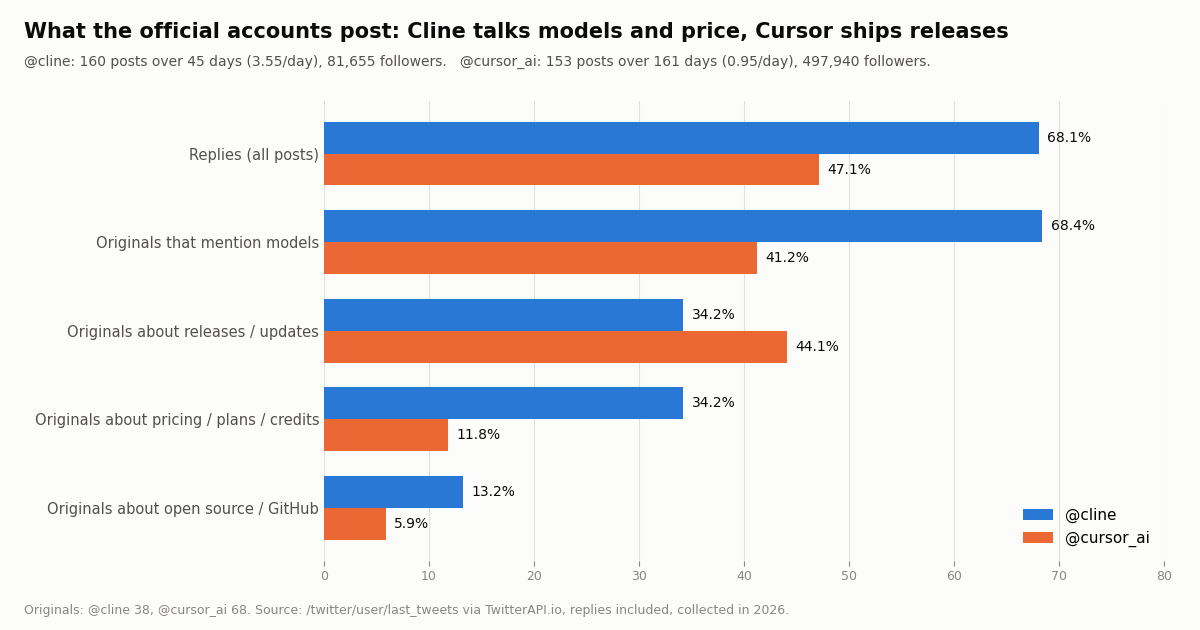
The official accounts show what each company wants you to notice. We pulled the most recent posts, replies included. @cline posts far more often (3.55 posts a day over 45 days) and most of it is conversation: 68.1% are replies. @cursor_ai posts 0.95 times a day over 161 days, 47.1% replies, and its original posts reach a far larger audience.
Among original posts (38 for Cline, 68 for Cursor), Cline names a model in 68.4% and touches pricing, plans, credits or free usage in 34.2%, against 41.2% and 11.8% for Cursor. Cursor leads on release and update posts (44.1% vs 34.2%). That fits the products: a model-agnostic agent markets which models it runs and what they cost, while a subscription editor markets what ships next.
How we collected this, and which one to pick
Question. When developers on X mention Cline and Cursor together, what else do they bring up, and what do the two official accounts post about? Accounts and query. /twitter/user/info and /twitter/user/last_tweets (replies included, 8 pages each) for @cline (160 posts) and @cursor_ai (153 posts), and /twitter/tweet/advanced_search with cline cursor -filter:retweets (Latest, 25 pages, 500 posts returned, 465 naming both tools). Window. The most recent posts at collection time, in 2026: about 67 days for the search, 45 days for @cline and 161 days for @cursor_ai. Method. Case-insensitive keyword matching on post text; a post counts once per topic. Cost. 43 requests, 813 tweets returned, about $0.12 in credits.
What the sample cannot show. Keyword matching is coarse: "plan" can mean a pricing plan, and a post listing ten tools is not an opinion about any of them. The search returns the latest matching posts, not a random sample of all users, and 89.7% of the authors carry a paid verification badge, which leans the sample toward accounts that post long-form. Nothing here measures code quality, speed or which tool developers actually use. The worked task cost uses stated assumptions, and the MCP token figure is an estimate from byte counts, not a tokenizer. Privacy. Aggregates only; the two organization accounts are named, no individual author is.
Pick Cline if you already live in VS Code (or want a CLI agent), you want to choose the model per task and per mode, you want every token on your own provider bill with no seat fee, you run local or open-weight models, or your team needs to restrict which inference providers are allowed.
Pick Cursor if you want one integrated editor where Tab autocomplete and the agent come from the same vendor, you are happy with Grok or Cursor's own models inside a weekly pool, and a flat monthly fee is easier to approve than a usage bill.
Use both if you like Cursor's editor and Tab but want Cline's Plan/Act agent: Cursor is a VS Code fork and Cline ships as a VS Code extension, so you can install Cline inside Cursor (it is also published on the Open VSX registry). Either way, the MCP block above is the same, and the X data line of the bill does not change with the editor.
"""cline_vs_cursor_on_x.py - measure how X (Twitter) talks about two coding tools.

    pip install requests
    export TWITTERAPI_IO_API_KEY=...   # from twitterapi.io/dashboard, no X developer account

Pulls recent posts that name both tools, then the official accounts' timelines, and prints
topic shares plus the data bill. Cost: 15 credits per tweet returned = $0.15 per 1,000 tweets.
"""
import os
import re
import statistics

import requests

BASE = "https://api.twitterapi.io"
HEADERS = {"X-API-Key": os.environ["TWITTERAPI_IO_API_KEY"]}

TOPICS = {
    "price / plans": r"\$\d|pric|cost|subscription|\bplan\b|credits?\b",
    "API keys / BYOK": r"api[\s-]?keys?|\bbyok\b|bring your own|openrouter",
    "MCP": r"\bmcp\b",
    "open source": r"open[\s-]?source",
    "Claude Code": r"claude\s*code",
    "Codex": r"\bcodex\b",
}


def search_latest(query, max_pages=10):
    """Yield tweets from advanced_search, newest first, following next_cursor."""
    cursor = ""
    for _ in range(max_pages):
        params = {"query": query, "queryType": "Latest", "cursor": cursor}
        r = requests.get(f"{BASE}/twitter/tweet/advanced_search", headers=HEADERS, params=params, timeout=30)
        r.raise_for_status()
        body = r.json()
        yield from body.get("tweets", [])
        if not body.get("has_next_page") or not body.get("next_cursor"):
            break
        cursor = body["next_cursor"]


def last_tweets(user, max_pages=4):
    """Yield an account's recent posts (replies included), following next_cursor."""
    cursor = ""
    for _ in range(max_pages):
        params = {"userName": user, "includeReplies": "true", "cursor": cursor}
        r = requests.get(f"{BASE}/twitter/user/last_tweets", headers=HEADERS, params=params, timeout=30)
        r.raise_for_status()
        data = r.json().get("data") or {}
        yield from data.get("tweets", [])
        if not data.get("has_next_page") or not data.get("next_cursor"):
            break
        cursor = data["next_cursor"]


def main():
    returned = 0
    posts = []
    for t in search_latest("cline cursor -filter:retweets"):
        returned += 1
        if re.search(r"\bcline\b", t["text"], re.I) and re.search(r"\bcursor\b", t["text"], re.I):
            posts.append(t)
    print(f"{len(posts)} of {returned} posts name both Cline and Cursor")
    for name, rx in TOPICS.items():
        hits = sum(1 for t in posts if re.search(rx, t["text"], re.I))
        print(f"  {name:<16} {100 * hits / max(len(posts), 1):5.1f}%")

    for user in ("cline", "cursor_ai"):
        tweets = [t for t in last_tweets(user) if t["author"]["userName"].lower() == user]
        returned += len(tweets)
        originals = [t for t in tweets if not t.get("isReply") and not t.get("quoted_tweet")]
        replies = sum(1 for t in tweets if t.get("isReply"))
        views = [t.get("viewCount") or 0 for t in originals]
        print(f"@{user}: {len(tweets)} posts, {100 * replies / max(len(tweets), 1):.1f}% replies, "
              f"median views per original {statistics.median(views) if views else 0:,.0f}")

    print(f"tweets returned: {returned}, data bill about ${returned * 0.00015:.2f}")


if __name__ == "__main__":
    main()
Researching this?Free starter credits cover end-to-end testing — Google sign-in, no card. Get a key.
Questions readers ask
Is Cline free?
The software is. Cline's pricing page lists the individual "Open Source" plan as Free, with the VS Code extension, CLI and MCP Marketplace included. You still pay for model inference: either your provider bills your own API key, or you buy usage through the Cline provider, which the page describes as at cost. Local models cost nothing beyond your hardware.
Can I use Cline inside Cursor?
Cursor is a fork of VS Code and Cline ships as a VS Code extension, and Cline is also published on the Open VSX registry (v4.1.26 when we checked), so you can add it to Cursor's extensions. You keep Cursor's Tab autocomplete and add Cline's Plan/Act agent on your own keys. Configure MCP servers separately in each, since Cline reads cline_mcp_settings.json and Cursor reads mcp.json.
Is Cline cheaper than Cursor?
It depends on how much you run and which model. Cline has no subscription, so light use on your own key can cost a few dollars a month, while heavy agent use on a frontier model can exceed a Cursor plan. Our worked example of one 20-turn Claude Sonnet 5.5 task comes to about $0.44 in model tokens. In Cursor, Claude is billed at API list price on top of the plan, so for Claude-heavy work Cline avoids the plan fee.
Can Cursor use my own Anthropic or OpenAI API key?
Yes, for chat models. Cursor's API keys page accepts OpenAI, Anthropic, Google, Azure and AWS Bedrock keys, but custom keys only work with chat models, Tab keeps using Cursor's built-in models, and Cursor's Zero Data Retention policy does not apply to those requests. On Teams and Enterprise, eligible requests on your own key still carry a $0.25 per million token Cursor Token Rate.
What is Plan mode in Cline?
Plan mode lets Cline read your codebase, run searches and discuss a strategy, but it cannot modify files or execute commands. When the plan is right you switch to Act mode, which can edit and run commands and keeps the planning context. You can set a different model for each mode.
Why does my remote MCP server fail in Cline but work in Cursor?
Usually the transport. Cline's docs say that leaving out the type field defaults to the legacy SSE transport, so a Streamable HTTP server such as mcp.twitterapi.io/mcp needs "type": "streamableHttp" in cline_mcp_settings.json. Cursor infers the transport from the url field.
How do I give Cline or Cursor live Twitter (X) data?
Add TwitterAPI.io's hosted MCP server (mcp.twitterapi.io/mcp) with your API key as a Bearer token; it exposes 12 read tools such as tweet search, user lookup and timelines. Data costs $0.15 per 1,000 tweets returned, against $0.005 per post read on the official X API pay-per-use rate card. No X developer account is needed.
Is Cline still maintained?
Yes. When we checked, the cline/cline repository was not archived, had been pushed to the previous day, and its latest extension release, v4.1.26, shipped on October 26, 2026 alongside new CLI, desktop and SDK releases.
Continue
- Cline on GitHub: releases (v4.1.26, CLI, desktop and SDK notes)
- Cline pricing: Open Source (free, BYOK or at-cost inference) and Enterprise
- Cline docs: Configuring MCP servers (streamableHttp, headers, autoApprove)
- Cline docs: Plan and Act modes
- Cursor docs: API keys (chat models only, Tab on Cursor models)
- Cursor docs: Model Context Protocol (mcp.json, env interpolation, approvals)
- Twitter (X) API hub: endpoints, pricing and guides
- Antigravity vs Cursor: plans, models and MCP setup
- Cursor vs Copilot: plans, agents and MCP compared
- Cursor vs Claude Code: plans, rules files and headless runs
- Claude Code alternatives with MCP support
- How to use Cursor with the Twitter API (MCP setup guide)
- TwitterAPI.io hosted Twitter MCP server quickstart
- TwitterAPI.io pricing and rate limits
- 01Zapier Pricing in 2026: Plans, Tasks per Month, Overage and a Worked Twitter (X) Zap Bill
- 02LlamaIndex vs LangChain: Which to Use, With the Same Twitter (X) RAG Pipeline Built in Both
- 03Agentic Payments: How AI Agents Pay, and Which Protocol Does What
- 04Kiro Pricing in 2026: Plans, Credits, Model Multipliers and Worked Monthly Bills
- 05Zed vs Cursor in 2026: Speed, Agents, Models, Pricing and MCP Compared
- 06Cursor Pricing in 2026: Plans, the Weekly Usage Pool, Worked Monthly Bills and the Cost of Adding Twitter (X) Data
- 07Antigravity vs Cursor: Plans, Models and a Twitter (X) MCP Setup in Both
- 08Cursor vs GitHub Copilot: Plans, Agent Mode, MCP and a Twitter (X) Data Setup in Both
Writing about something you built with TwitterAPI.io? Our community rewards program pays API credits for honest tutorials, build logs and videos.
Stop reading. Start building.
Starter credits cover real testing on real data. Google sign-in, no card, no application queue.
Get an API keyAlready building with TwitterAPI.io? Publish an honest tutorial or build log about it and earn up to $200 a month in API credits.