Zed vs Cursor in 2026: Speed, Agents, Models, Pricing and MCP Compared
- Short answer: Zed for a native, open-source editor where AI is optional and model access is open (own keys free, ACP agents); Cursor for an AI-first VS Code fork bundled with Grok, X and a weekly usage pool.
- Price floor: Zed Personal $0 with your own keys; Zed Pro $10 a month with $5 of tokens, then list price +10%. Cursor Free has limited agent use; Plus is $8 a month for Grok and Composer models only; Premium $30, Super $100, Ultra $200.
- Same Claude model, two bills: Claude Sonnet 5.5 is $2 input / $10 output per million tokens in Cursor (Premium and up, from prepaid credit) and $2.20 / $11.00 through Zed Pro, or the provider's own rate with your key on free Zed.
- MCP: Zed reads
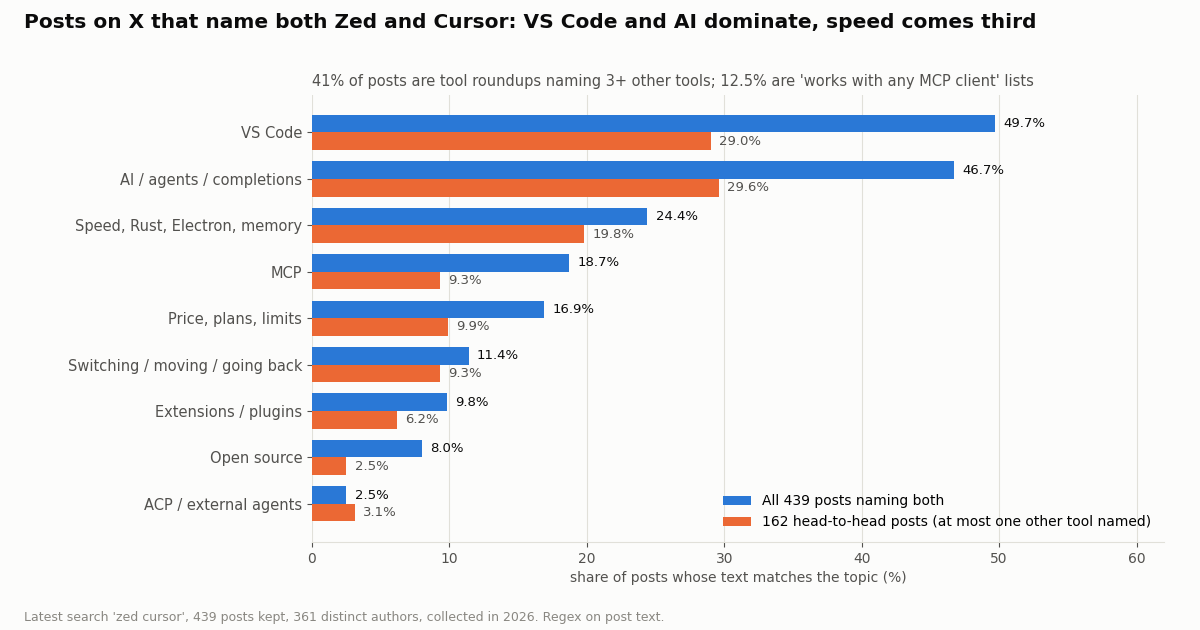
context_servers(Tools and Prompts supported, OAuth when no Authorization header). Cursor readsmcpServers(stdio, SSE, Streamable HTTP; tools, prompts, resources, roots, elicitation, MCP Apps). - What X says: of 439 recent posts naming both, 49.7% also name VS Code, 46.7% talk AI or agents, 24.4% speed, 18.7% MCP; 32.1% also name Claude Code and 31.2% Codex.
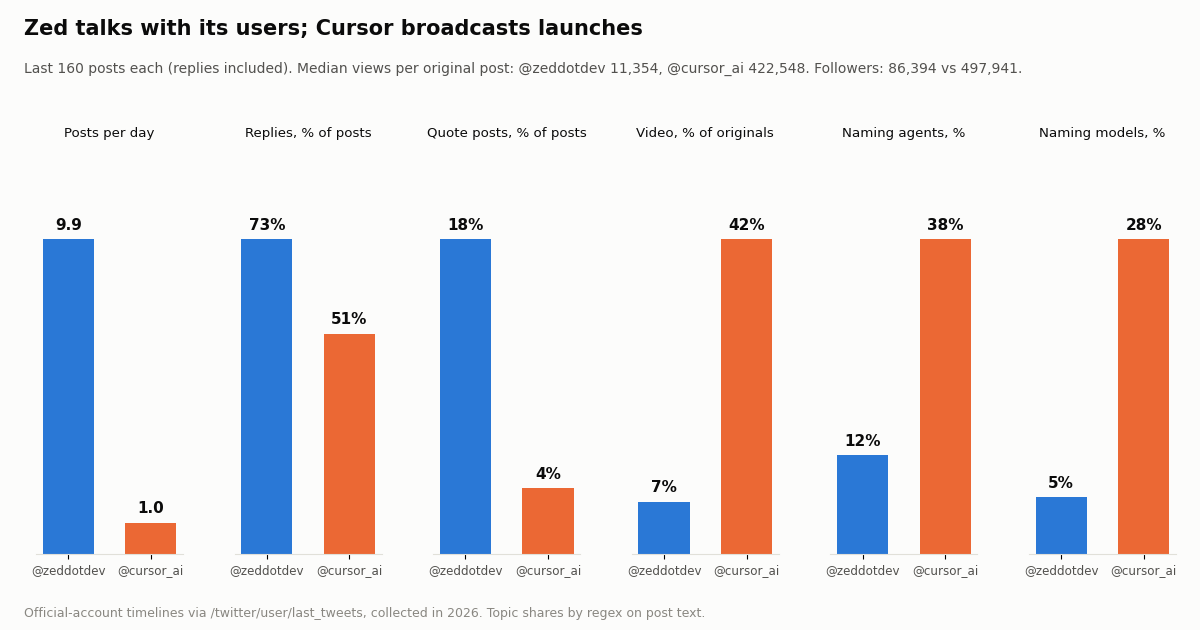
- Official accounts: @zeddotdev posted 9.9 times a day, 73% replies; @cursor_ai 1.0 a day with video on 42% of originals. Our whole study cost $0.12 for 820 tweets.
Zed and Cursor answer the same question from opposite ends. Zed started as a fast native editor and added agents on top; Cursor started as a VS Code fork built around an AI agent and is now part of The X Subscription alongside Grok and X. This page compares them on the things you actually feel day to day: what each vendor claims about speed, how the agent panel works, which models you can reach and what they cost, the plan prices taken from each vendor's own page this session, and how each one loads an MCP server.
Our Antigravity vs Cursor and Cursor vs Copilot comparisons already cover Cursor's plan tiers in depth, so here Cursor's plans get a short summary and the space goes to Zed and to the head-to-head. The X angle comes last: we read the recent timelines of @zeddotdev and @cursor_ai and 439 recent posts that name both editors, and we show the one MCP block that puts live X (Twitter) data into either editor's agent.
49.7% of 439 recent posts (collected in 2026); 24.4% talk about speed and 18.7% mention MCP. The whole study read 820 tweets for $0.12.
Zed vs Cursor at a glance
Every row below comes from the vendors' own pages (zed.dev pricing and docs, cursor.com pricing and docs) read this session, plus the Zed GitHub repository. Where a row is a vendor's claim rather than a measured fact, the text after the table says so.
Speed is a claim, not a measurement here. Zed's homepage calls it "the world's fastest IDE", and Zed's comparison page (zed.dev/compare/cursor) says Zed "starts faster, uses less memory" and that Cursor, being Electron-based, "can lag, freeze, or crash with large files". Those are one vendor's words about a rival. Cursor's pricing and docs pages make no matching speed claim about Zed. We did not run a benchmark, and you should treat any startup-time or RAM figure you see on third-party comparison sites as unverified unless it comes with a method.
Repository facts. The zed-industries/zed repository on GitHub is written in Rust, had about 93,600 stars when we checked this session, and tagged v1.27.0 as its latest release. It carries both a LICENSE-GPL and a LICENSE-APACHE file. Cursor publishes docs and a changelog but not its editor source.
Performance: what each vendor claims and what that means for you
Zed's whole pitch rests on architecture. The editor is written in Rust and draws its interface with GPUI, Zed's own GPU-accelerated UI framework, instead of running inside a browser engine. Zed's comparison page lists "Native performance in Rust with GPU acceleration. No Electron overhead" as a strength and "Performance can suffer from Electron and heavy AI workflows, especially in larger projects or long sessions" as a Cursor weakness. Its own docs add one practical detail: while an agent thread runs, Zed asks the operating system not to idle-sleep so long turns are not interrupted.
Cursor inherits VS Code's architecture, which is also why it inherits VS Code's extension marketplace, keybindings and themes. That trade is the real decision. If your day depends on a niche VS Code extension (a specific debugger adapter, a language pack, a company-internal plugin), Cursor runs it and Zed probably does not; Zed's comparison page itself lists a "newer and less mature" extension ecosystem as Zed's main weakness.
How to judge speed yourself. Open the largest repository you work in, in both editors, and time three things: cold start to a usable window, opening a very large file (a lockfile or a generated bundle), and project-wide search. Then run the same agent task in each and watch whether the editor stays responsive while the agent streams edits. That is a 15-minute test and it beats any number on a comparison site, because the result depends on your machine, your language servers and your repository size.
What developers bring up. In our sample of 439 posts on X that name both editors, 24.4% mention speed, Rust, Electron, lag or memory. In the 162 posts that compare the two directly (at most one other tool named) the share is 19.8%, almost level with VS Code (29.0%) and AI (29.6%). Speed is the reason people bring Zed into the conversation; AI is the reason Cursor is in it.
Agent panel vs Cursor Agent: how the AI workflow differs
Zed's Agent Panel. Open it with agent: new thread from the Command Palette or the sparkle icon in the status bar. By default it runs the Zed Agent, Zed's first-party agent, with whichever model you configured. From the New Thread menu you can instead start a thread with any installed External Agent, a Terminal thread, or a fresh thread seeded with a summary of the current one (useful when a thread nears its context limit). You can run several threads at once from the Threads Sidebar, isolate a thread in its own Git worktree when two agents might touch the same files, queue messages while the agent works and "Steer" a queued message so it lands at the next tool-call boundary, and follow the agent with the crosshair button so your editor jumps to each file it reads or edits.
External agents through ACP. This is the part Cursor does not have an equivalent for. Zed hosts agents built by others through the Agent Client Protocol: its docs list Claude Agent, Codex, Gemini CLI, OpenCode, Copilot, Cursor and Pi as common choices, installed from the ACP Registry (zed: acp registry). Each external agent owns its own login, model choice and billing, and Zed states that it does not charge for External Agents. So a Claude subscriber can run Claude Agent inside Zed without paying Zed anything.
Cursor Agent. Cursor's agent is the product: Agent in the editor, the CLI, Cloud Agents that run remotely (Premium and up), Automations, Bugbot code review and the Agents Window. Cursor's docs describe Plan Mode, subagents, rules, skills, hooks and a plugin marketplace. If you want the agent to keep working in the cloud while your laptop is closed, or to review pull requests on its own, that is Cursor's ground: Zed's pricing page lists no cloud-hosted agents or automated PR review, although its comparison page describes background agents inside the editor.
Cursor's agent inside Zed. The two products also meet in the middle. Cursor's CLI docs describe an ACP mode (agent acp, JSON-RPC over stdio) and name Zed as an example client, and Zed's External Agents page lists Cursor. In that mode Cursor's agent reads MCP servers from your project or user .cursor/mcp.json, but Cursor notes that team-level MCP servers set in its dashboard are not supported in ACP mode. Billing stays with your Cursor plan.
Approval and safety. Zed's tool permissions default to "confirm", set with agent.tool_permissions.default ("confirm", "allow" or "deny") in v0.224.0 and later, with per-tool pattern rules; MCP tools are addressed as mcp:<server>:<tool_name>. Cursor asks for approval before MCP tools by default and applies the same Run Modes as terminal commands, so allowlisted tools run immediately in Auto-review mode. Both give you a per-tool allowlist, which matters once an agent can call outside services.
Where AI shows up in the conversation. The chart shows that 46.7% of posts naming both editors talk about AI, agents or completions, and 32.1% also name Claude Code and 31.2% Codex. Many developers are not choosing one editor's built-in agent; they are choosing which editor to run a terminal agent beside, which is the case Zed's ACP support is built for.
Models and what they cost in each editor
Zed. Three ways to reach a model. First, Zed-hosted models on Pro ($10 a month, $5 of tokens included) or Business, billed at the provider's list price plus 10%. Zed's hosted list includes Claude Fable 5.1, Claude Opus 5.5 and Sonnet 5.5, GPT-6 Astra, GPT-6.1 Sol and GPT-6 Luna, the GPT-5.x line, Gemini 4 Argon, Gemini 3.1 Pro and the Gemini Flash models. Second, your own API keys on any plan, including the free one: Zed lists Amazon Bedrock, Anthropic, GitHub Copilot, Deepseek, Google AI, LM Studio, Mistral, Ollama, OpenAI, OpenRouter and Vercel, plus local models. Third, External Agents with their own subscriptions. Edit Predictions (Zed's tab completion) are unlimited on Pro; on the free plan you can use another provider such as GitHub Copilot or a local model.
Cursor. Cursor's included pool covers its own models: Grok 4.7, Grok 4.6, Grok 4.5 and Composer 2.5. On Plus those run at fixed settings (Fast off, medium effort) and nothing else is available, including your own API keys. From Premium up, Claude, GPT and Gemini models are available at the model's API list price from the first request, paid from prepaid credit; Teams and Enterprise add a Cursor Token Rate on eligible third-party models. The pool refreshes weekly and is shared with Grok's chat, voice and image apps.
Reading the table. For a third-party model, Cursor's per-token price equals the provider's list price and Zed's hosted price adds 10%, but Cursor only opens those models from the $30 Premium tier, while Zed opens them from the $10 Pro tier and, with your own key, from $0. The Grok row is from Cursor's model table and applies once you exhaust the weekly pool; Zed's models page says it no longer offers hosted xAI models, having retired Grok 4, Grok 4 Fast and Grok Code Fast 1 on May 15, 2026. Zed's free trial is 14 days with $5 of GPT-6 Luna only, no card required, and it falls back to the free plan when it ends.
Pricing side by side, from each vendor's page
Prices below are exactly as each vendor's pricing page showed them when we fetched it this session; both exclude tax. Cursor's plan detail is kept short here because our other Cursor comparisons already go tier by tier.
Zed's bill has two parts. The $10 subscription and token usage beyond the included $5, charged at month end or for every extra $10 incurred, whichever comes first. Zed's docs say the default monthly spend limit for Pro is $10 of extra tokens (a $20 month at most), and you can set it to $0 to cap Zed at exactly $10 a month. Business seats carry no fixed AI credit: members use hosted AI at standard usage rates or their own keys, and admins set an org-wide spend limit. Business has no free trial and no minimum seat count; SSO, SAML and SCIM are listed as planned, not available.
Cursor's bill has two parts too. The subscription buys a weekly pool of Cursor-model usage (Plus is the base; Premium 4x, Super 15x, Ultra 50x), and third-party models bill on top at API list price. Annual billing is $80, $300, $1,000 and $2,000 a year for Plus, Premium, Super and Ultra. Because the subscription also includes X and Grok benefits, the Cursor price is partly paying for things that are not the editor.
Which costs less depends on your model. If you live on Claude or GPT models and already pay a provider, Zed with your own key costs $0 for the editor, and Cursor needs at least Premium ($30) before it will run those models at all. If Grok and Composer are enough for you, Cursor Plus at $8 includes a usage pool and Zed no longer hosts any Grok model. Price-and-limits talk shows up in 16.9% of the posts on X that name both editors.
MCP and context servers: the same X data server in Zed and in Cursor
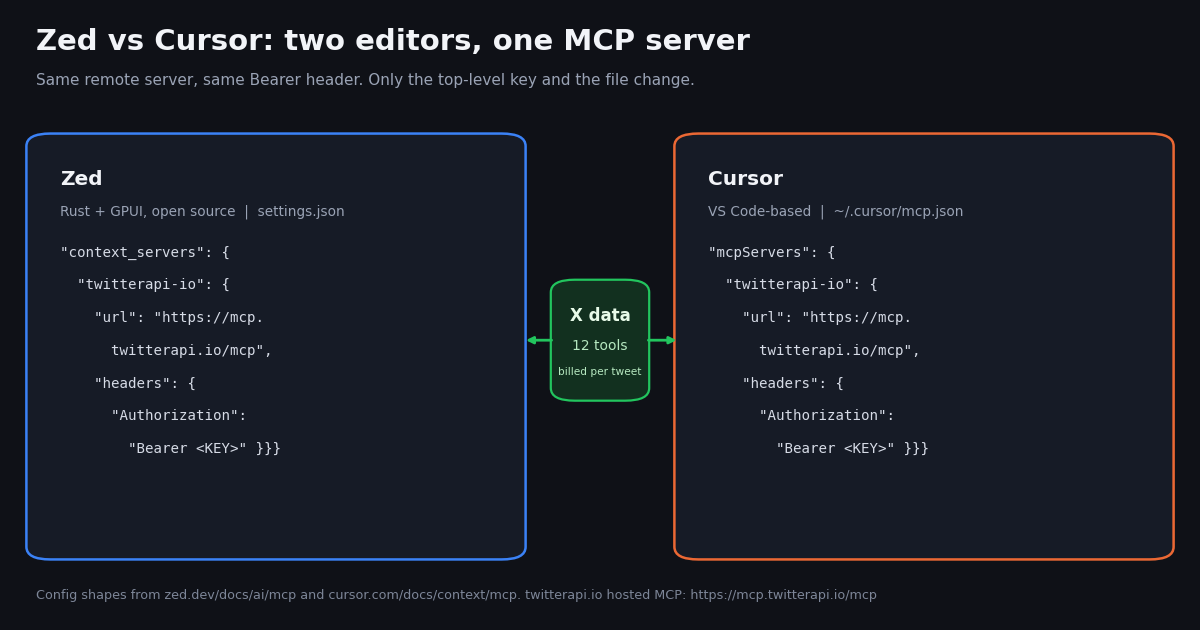
Zed calls MCP servers context servers and stores them under context_servers in its settings file (open it with zed: open settings file). The UI path is Settings, AI, MCP Servers, then Add Server, where you choose Add Local Server (a command with args and env), Add Remote Server (a url with optional headers), or Install from Extensions. Zed's docs list Context7, GitHub, Puppeteer, Brave Search, Prisma, Figma and Resend among the servers packaged as Zed extensions. A green dot next to the server name with the tooltip "Server is active" means it connected. The context_servers block for our X data server is at the end of this section.
Zed specifics. Zed supports MCP Tools and Prompts and reloads the tool list when a server sends notifications/tools/list_changed. If a remote server has no Authorization header, Zed starts the standard MCP OAuth flow. To make the agent prefer one server's tools, Zed's docs suggest a custom agent profile with the built-in tools you do not need turned off and only that server's tools on. When you run an external agent, Zed can forward your configured MCP servers over ACP, and the agent may also read its own native MCP config.
Cursor specifics. Cursor resolves ${env:NAME}, ${userHome} and ${workspaceFolder} inside command, args, env, url and headers, so the key can live in your shell environment instead of the file. Cursor's Marketplace offers one-click installs with OAuth, and team admins can distribute servers through a team marketplace. Cursor's block for the same server is in the next section; only the top-level key differs.
MCP is how the two editors meet on X. 18.7% of the posts naming both editors mention MCP, and 12.5% are "works with any MCP client" lists that put Zed and Cursor side by side with Claude Code, Codex and others. For a tool author, supporting both editors costs one extra JSON block.
{
  "context_servers": {
    "twitterapi-io": {
      "url": "https://mcp.twitterapi.io/mcp",
      "headers": {
        "Authorization": "Bearer YOUR_TWITTERAPI_IO_KEY"
      }
    }
  }
}Step by step: add live X (Twitter) data to either editor
TwitterAPI.io runs a hosted MCP server at https://mcp.twitterapi.io/mcp. Its initialize response, which we requested this session, describes 12 tools (tweet search, user lookup, followers, replies, trends and more) and asks for your TwitterAPI.io API key as the Bearer token. You get the key with a Google sign-in, with no X developer account needed; new accounts that pass the automatic bot check get up to $1 of free credits (at most 100,000 credits, no card, one per person or network, expiring after 31 days).
In Zed. Step 1. Copy your API key from the dashboard. Step 2. Open Settings, AI, MCP Servers, click Add Server and choose Add Remote Server, or run zed: open settings file and paste the context_servers block shown in the previous section (the block below is Cursor's version). Step 3. Replace YOUR_TWITTERAPI_IO_KEY and save. Step 4. Check for the green "Server is active" dot. Step 5. In the Agent Panel, name the server in your prompt ("use twitterapi-io to find..."), or allow its tools with a rule under agent.tool_permissions using the mcp:twitterapi-io:<tool_name> form so the agent stops asking on every call.
In Cursor. Step 1. Export the key in your shell profile as TWITTERAPI_IO_KEY. Step 2. Save the mcpServers block below as ~/.cursor/mcp.json (all projects) or .cursor/mcp.json (one project). Step 3. Enable the server from Customize in the sidebar and approve the tools you trust. Our Cursor guide covers the local npx alternative and common errors.
Prompts that work in both. "Search X for posts from the last day that mention our package name and summarize the bug reports." "Pull the last 40 posts from @zeddotdev and list every feature they announced." "Find who replied to this post and group the replies by question." Each runs as one or more tool calls, and each call is billed by the tweets it returns.
Do not commit the key. Zed keeps the header value as plain text in your settings file, so keep that file out of shared dotfile repositories. In Cursor, the ${env:...} form keeps the key out of the file entirely, and a project-level .cursor/mcp.json can then be committed safely.
{
  "mcpServers": {
    "twitterapi-io": {
      "url": "https://mcp.twitterapi.io/mcp",
      "headers": {
        "Authorization": "Bearer ${env:TWITTERAPI_IO_KEY}"
      }
    }
  }
}How the official accounts differ on X
The two companies use X in opposite ways. @zeddotdev (86,394 followers) posted 9.9 times a day across the 16 days its last 160 posts covered, and 73.1% of those posts were replies, mostly answering users. @cursor_ai (497,941 followers) needed 161 days to reach 160 posts, about 1.0 a day, and its original posts are launch material: 42.3% carry a video.
Reach vs response. A median Cursor original drew 422,548 views against 11,354 for Zed, which tracks the follower gap and Cursor's place inside X's own subscription. Per view, Zed's audience engaged slightly more: a median 10.3 likes per 1,000 views against 8.5. The topic split matches the products: 27.5% of Cursor's own posts name a model and 32.7% use launch language, while Zed's posts are mostly conversation, with 5.7% naming MCP, ACP or context servers against 2.0% for Cursor.
If you are deciding on support quality. A reply-heavy account is not a support contract, but it does mean questions asked in public get answered in public. Swap the search query in the Python script at the end of this page for to:zeddotdev or to:cursor_ai to read what users are asking each team this week before you switch.
How we collected this, what it cost, and which editor to pick
Question: how do the official X accounts of Zed and Cursor differ in what they post and how their audience responds, and when people on X name both editors in one post, what do they talk about and which other tools do they bring in.
Accounts and query: the public organization accounts @zeddotdev and @cursor_ai (profile via /twitter/user/info, last 160 posts each via /twitter/user/last_tweets with replies included), and a Latest search for zed cursor -filter:retweets via /twitter/tweet/advanced_search, 25 pages. We kept only the 439 posts whose text contains both words as whole words (361 distinct authors, 80.4% in English, spanning about 112 days). Topics and co-mentions are case-insensitive regex matches on post text; a "head-to-head" post names at most one other tool, a "roundup" names three or more (41.0% of the sample).
Window and sample size: the most recent posts at collection time, collected in 2026. 43 requests, 820 tweets and 2 profiles.
What the sample cannot show: which editor is faster or better (we measured conversation, not software), how many people use either one, or anything about the authors. "Zed" and "Cursor" are common words, so the both-words filter keeps posts about other things now and then, and Latest search returns a recent slice, not every post. Regex topic matching over-counts and under-counts at the edges; treat the shares as directional.
Privacy: aggregates only. The two organization accounts are named; no individual author is profiled, quoted or counted beyond the distinct-author total. Raw search pages were not published or kept in the repository, and the de-identified rows we kept carry no ids, URLs, text or handles.
The X data bill in either editor. TwitterAPI.io charges 15 credits per tweet returned, which is $0.15 per 1,000 tweets, with a 15-credit minimum ($0.00015) when a search comes back empty; a full 20-tweet page is $0.003. X's official pay-per-use rate card (docs.x.com/x-api/getting-started/pricing) lists $0.005 per post read and $0.010 per user read, so 1,000 tweets cost $5 there against $0.15 here, about 33x. Pay-per-usage on X is capped at 3 million post reads a month. The MCP server bills the same way whether Zed's agent or Cursor's agent makes the call.
Pick Zed if you want a fast native editor that works with AI off, prefer open source, want to bring your own model keys for free, or want to run Claude Agent, Codex or Gemini CLI inside the editor through ACP. Pick Cursor if your workflow depends on VS Code extensions, you want cloud agents, automations and code review in one subscription, or Grok and Composer models cover your work. Try both if you mostly drive a terminal agent such as Claude Code or Codex: the editor matters less than the agent, and the 15-minute test in the performance section will settle it.
"""zed_vs_cursor_on_x.py - compare the official Zed and Cursor accounts on X and measure
what people say when they name both tools in one post.

    pip install requests
    export TWITTERAPI_IO_API_KEY=...     # from the twitterapi.io dashboard
    python zed_vs_cursor_on_x.py
"""
import os
import re
import statistics

import requests

BASE = "https://api.twitterapi.io"
HEADERS = {"X-API-Key": os.environ["TWITTERAPI_IO_API_KEY"]}

TOPICS = {
    "VS Code": r"vs ?code|vscode|visual studio code",
    "AI / agents": r"\bai\b|\bagents?\b|agentic|\bllm\b",
    "Speed": r"fast|speed|perf|latenc|snappy|\blag|slow|memory|electron|rust",
    "MCP": r"\bmcp\b",
    "Price / limits": r"pric|\$\d|limits?\b|quota|credits?\b|subscription|\bplans?\b",
}


def timeline(user, pages=8):
    """Newest-first posts of one account, replies included (20 per page)."""
    cursor, out = "", []
    for _ in range(pages):
        r = requests.get(f"{BASE}/twitter/user/last_tweets", headers=HEADERS,
                         params={"userName": user, "includeReplies": "true", "cursor": cursor}, timeout=30)
        r.raise_for_status()
        body = r.json()
        out.extend((body.get("data") or {}).get("tweets", []))
        if not body.get("has_next_page") or not body.get("next_cursor"):
            break
        cursor = body["next_cursor"]
    return out


def search(query, pages=10):
    """Latest search results, following next_cursor."""
    cursor, out = "", []
    for _ in range(pages):
        r = requests.get(f"{BASE}/twitter/tweet/advanced_search", headers=HEADERS,
                         params={"query": query, "queryType": "Latest", "cursor": cursor}, timeout=30)
        r.raise_for_status()
        body = r.json()
        out.extend(body.get("tweets", []))
        if not body.get("has_next_page") or not body.get("next_cursor"):
            break
        cursor = body["next_cursor"]
    return out


def summarize(user):
    posts = timeline(user)
    originals = [t for t in posts if not t.get("isReply") and not t.get("retweeted_tweet")]
    replies = sum(1 for t in posts if t.get("isReply"))
    views = [t.get("viewCount") or 0 for t in originals]
    print(f"@{user}: {len(posts)} posts, {100 * replies / max(len(posts), 1):.0f}% replies, "
          f"median views per original {statistics.median(views) if views else 0:,.0f}")
    return posts


def main():
    fetched = len(summarize("zeddotdev")) + len(summarize("cursor_ai"))
    raw = search("zed cursor -filter:retweets")
    fetched += len(raw)
    both = [t for t in raw if re.search(r"\bzed\b", t["text"], re.I) and re.search(r"\bcursor\b", t["text"], re.I)]
    print(f"\n{len(both)} recent posts name both Zed and Cursor")
    for name, rx in TOPICS.items():
        hits = sum(1 for t in both if re.search(rx, t["text"], re.I))
        print(f"  {name:<15} {100 * hits / max(len(both), 1):5.1f}%")
    # 15 credits per tweet returned = $0.15 per 1,000 tweets (the official X API lists $0.005 per post read).
    print(f"\n{fetched} tweets returned, about ${fetched * 0.00015:.2f} on twitterapi.io "
          f"vs ${fetched * 0.005:.2f} at the X API pay-per-use rate")


if __name__ == "__main__":
    main()
Researching this?Free starter credits cover end-to-end testing — Google sign-in, no card. Get a key.
Questions readers ask
Is Zed faster than Cursor?
Zed says so. Its homepage calls it the world's fastest IDE, and its comparison page says Zed starts faster and uses less memory because it is native Rust with GPU rendering, while Cursor runs on Electron like VS Code. Those are Zed's claims; Cursor makes no counter-claim on its pricing or docs pages, and we did not benchmark either. Time cold start, a very large file and project-wide search in your own repository to decide.
Is Zed free?
Yes. Zed Personal is $0 forever and includes unlimited use with your own API keys or external agents such as Claude Agent and Codex CLI. Zed-hosted models and unlimited Edit Predictions need Pro at $10 a month, which includes $5 of tokens; usage beyond that is billed at the provider's list price plus 10%. A 14-day Pro trial with $5 of GPT-6 Luna usage needs no card.
How much does Cursor cost compared with Zed?
Cursor Free is $0 with limited Agent and Chat. Plus is $8 a month and runs only Cursor's own models (Grok 4.7, 4.6, 4.5 and Composer 2.5). Premium $30, Super $100 and Ultra $200 add more usage and third-party models at API list price from prepaid credit. Zed Pro is $10 a month with $5 of tokens included; Zed Business is $30 per seat a month.
Can I use Claude or GPT models in Zed without paying Zed?
Yes. Zed's free plan accepts your own API keys from Anthropic, OpenAI, Google AI, Amazon Bedrock, OpenRouter, Mistral, Deepseek and others, and local models through Ollama or LM Studio. You pay the provider directly. You can also run Claude Agent or Codex as an External Agent through ACP; Zed states that it does not charge for External Agents.
Can I run Cursor's agent inside Zed?
Yes, through the Agent Client Protocol. Cursor's CLI has an ACP mode (agent acp) and its docs name Zed as an example client, and Zed's External Agents page lists Cursor. The agent keeps using your Cursor plan and reads MCP servers from your .cursor/mcp.json; Cursor notes that team-level MCP servers from its dashboard are not supported in ACP mode.
How do I add an MCP server to Zed?
Open Settings, AI, MCP Servers, click Add Server and choose Add Local Server or Add Remote Server, or edit the context_servers object in your settings file. A remote server takes a url and optional headers such as an Authorization Bearer token; without that header Zed starts the MCP OAuth flow. A green dot with the tooltip Server is active confirms the connection.
Does Zed support VS Code extensions?
No. Zed is not a VS Code fork, so VS Code extensions do not install in it. It has its own extension directory, supports VS Code-style keybindings, and builds language servers, formatters and linters into the editor. Zed's own comparison page names the smaller extension ecosystem as its main weakness against Cursor.
Can I get X (Twitter) data inside Zed or Cursor?
Yes. Add the hosted MCP server at https://mcp.twitterapi.io/mcp with your TwitterAPI.io key as a Bearer token: under context_servers in Zed, under mcpServers in Cursor. It exposes 12 tools such as tweet search and user lookup, needs no X developer account, and bills 15 credits per tweet returned ($0.15 per 1,000 tweets) against $0.005 per post read on X's official pay-per-use rate card.
Continue
- Zed pricing: Personal $0, Pro $10 per month, Business $30 per seat
- Zed docs: Model Context Protocol (context_servers, remote url and headers, OAuth)
- Zed docs: External Agents via the Agent Client Protocol
- Cursor docs: Models and pricing (plans, weekly pool, third-party models)
- Cursor docs: Model Context Protocol (mcp.json, transports, interpolation)
- X API pricing (official pay-per-use rate card)
- Twitter (X) API guide: endpoints, pricing and access
- Antigravity vs Cursor: plans, models and MCP compared
- Cursor vs GitHub Copilot: pricing, agents and MCP
- Cursor vs Claude Code compared
- Set up the Twitter (X) MCP server in Cursor
- What an MCP server is and how it works
- TwitterAPI.io pricing: pay per tweet returned
- 01Zapier Pricing in 2026: Plans, Tasks per Month, Overage and a Worked Twitter (X) Zap Bill
- 02LlamaIndex vs LangChain: Which to Use, With the Same Twitter (X) RAG Pipeline Built in Both
- 03Agentic Payments: How AI Agents Pay, and Which Protocol Does What
- 04Kiro Pricing in 2026: Plans, Credits, Model Multipliers and Worked Monthly Bills
- 05Cline vs Cursor in 2026: Cost, Models, Plan/Act and MCP Compared
- 06Antigravity vs Cursor: Plans, Models and a Twitter (X) MCP Setup in Both
- 07Cursor Pricing in 2026: Plans, the Weekly Usage Pool, Worked Monthly Bills and the Cost of Adding Twitter (X) Data
- 08Cursor vs GitHub Copilot: Plans, Agent Mode, MCP and a Twitter (X) Data Setup in Both
Writing about something you built with TwitterAPI.io? Our community rewards program pays API credits for honest tutorials, build logs and videos.
Stop reading. Start building.
Starter credits cover real testing on real data. Google sign-in, no card, no application queue.
Get an API keyAlready building with TwitterAPI.io? Publish an honest tutorial or build log about it and earn up to $200 a month in API credits.