Twitterviewer: What twitterviewer.com and twitterviewer.net Are, and Whether They Work on Twitter (X)
This page is about the brand: the two websites literally called Twitterviewer, twitterviewer.net and twitterviewer.com, and what each one does today. If you want the generic question, how to read X (Twitter) in a browser without an account and which viewer sites still work, our separate Twitter web viewer guide compares those options side by side; here we only test the two Twitterviewer sites, explain the difference between them, and say what to use when they fail.
Search interest in "twitterviewer" has risen sharply, and many people type the name without knowing that two different sites answer to it. So instead of repeating either site's marketing, we requested both sites, read the code their pages load, probed the backend twitterviewer.net calls, and checked logged-out x.com from the same network. Then, for 10 public organization accounts, we compared what each route returned with what our API returned for the same accounts: recent posts, replies, media and view counts.
What is Twitterviewer? Two different sites share the name
"Twitterviewer" is not one product. Two domains use the name, they look different, and nothing on either site says they are related. Both are third-party sites: X does not run or endorse a viewer, and X's own help pages describe only x.com and the official apps.
twitterviewer.net. Its homepage title starts with "Free Twitter/X Viewer" and promises tweets, profiles and replies "Without an Account". The menu lists a profile viewer, media viewer, reply viewer, advanced search, video downloader, GIF downloader, a location checker and a communities exporter, plus a blog, a bookmarklet called "Open from X" and a changelog. The site is published in English, Arabic and Japanese. Its changelog dates the first release (v1.0.0, basic tweet viewing) to May 2025, profile viewing to May 2025, image viewing to June 2025, video playback and download to July 2025, and an improved thread and quote display (v1.4.0) to November 2025.
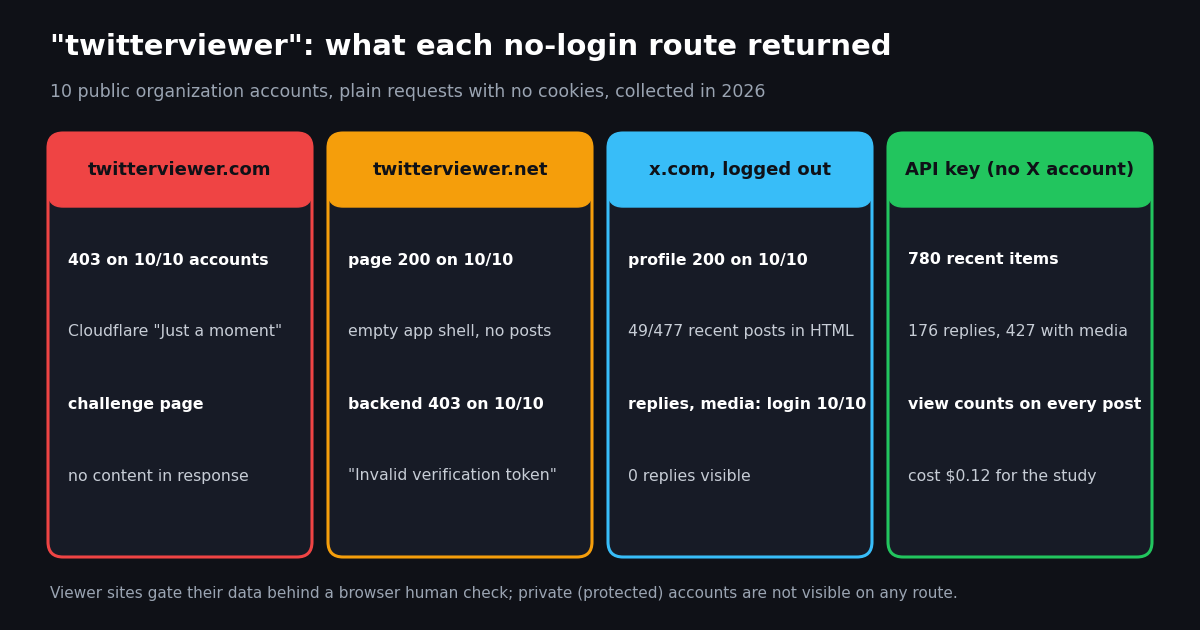
twitterviewer.com. We could not load it. Every request we made, to the homepage, to robots.txt and to profile paths, returned HTTP 403 with Cloudflare's "Just a moment... Enable JavaScript and cookies to continue" challenge page, both from our direct connection and through a second network. The Internet Archive's capture from August 2025 shows what it was then: a landing page titled "Twitter Viewer - Browse Twitter Anonymously for Free" for a browser extension, an iOS shortcut and an Android app that redirect x.com pages to the viewer, with an FAQ entry asking "When will Twitter Viewer be released?" and a footer line reading "A Twillot project". Twillot runs its own web viewer, which we reviewed separately. The archive's latest capture, from November 2025, has no readable page.
Which one people mean. Search data in our keyword notes shows twitterviewer.net ranking for the broad query "twitter viewer" and for "x viewer", and searches for "twitterviewer.net" and "twitter viewer net" growing. When someone says "Twitterviewer" today, the working site they reach is most likely twitterviewer.net. A third domain, twitterviewer.io, also answered HTTP 200 to a plain request; we did not test it beyond that and it is not covered here.
Does twitterviewer.net work? Our first-hand check
We requested twitterviewer.net from our own network with plain HTTPS requests, no cookies and a desktop browser user agent, then read the JavaScript the page loads to see where its data comes from. Here is what each step returned.
Everything happens in your browser. The profile page HTML is only an application shell. The app then asks its own backend, a separate host, for the profile and timeline. Its code calls services for user timelines, timelines with replies, user media, post search, user search and post video, which matches what the menu promises. Every one of those calls carries a Cloudflare Turnstile token: Turnstile is Cloudflare's human check that usually runs invisibly and sometimes shows a checkbox. Without a token the backend answered our request for each of the 10 accounts with HTTP 403 and Invalid verification token.
What that means for you. In a normal browser with JavaScript on, the check normally passes on its own and the viewer can load. If it never loads, the usual causes are a content blocker or privacy browser that stops Cloudflare's challenge script, an old browser, or a network Cloudflare treats as suspicious. A reload or a private window gets a fresh check. The app's code also tracks a remaining-uses count in a response header, so heavy use may hit a limit; the site does not publish one.
What we could not verify. Because the backend only answers browsers that pass the check, we could not complete a lookup from a headless session. We describe what the site offers from its pages and from the code it ships, not from a screenshot of a loaded profile, and we cannot vouch for how fresh or complete its results are on a given day.
Accounts are optional. The site shows "Checking your sign-in status" and has an optional account for features such as a watchlist (its privacy policy mentions watchlist notification emails) and bookmarks. Its code also contains an "Upgrade to Pro" dialog and a "Hide ads" option, which points to a free tier with ads and a paid tier; we did not see a price. Viewing public posts does not need an account.
Does twitterviewer.com work?
Not for us. All 10 account paths we requested, plus the homepage and robots.txt, returned HTTP 403 with a cf-mitigated: challenge header: a Cloudflare managed challenge that only a full browser with JavaScript and cookies can try to pass. The same happened through a second network. Our automated fetch tool got the same 403.
Is it down? A challenge page is not proof the site is down. It means the site owner has told Cloudflare to check every visitor before letting them through. Some sites set this permanently, others switch it on when they are under heavy load. What we can say is that a plain request gets nothing from it, so it cannot be used from scripts, feed readers or link previews, and we could not see whether a viewer sits behind the challenge today.
What it used to be. The August 2025 archive capture describes "Twitter Viewer" as a set of helpers that redirect x.com links to a viewer: a Chrome extension, an iOS shortcut and an Android app, with media downloads and profile, tweet and hashtag lookups. The FAQ on that page still asked when it would be released. If you find an extension or app under that name, check who publishes it and what permissions it asks for before installing it; an extension that runs on x.com can read the pages you open there.
What logged-out x.com shows, and what it hides
Viewer sites exist because x.com shows less to people who are not signed in. We requested the profile, replies and media routes of the same 10 accounts on x.com with no cookies.
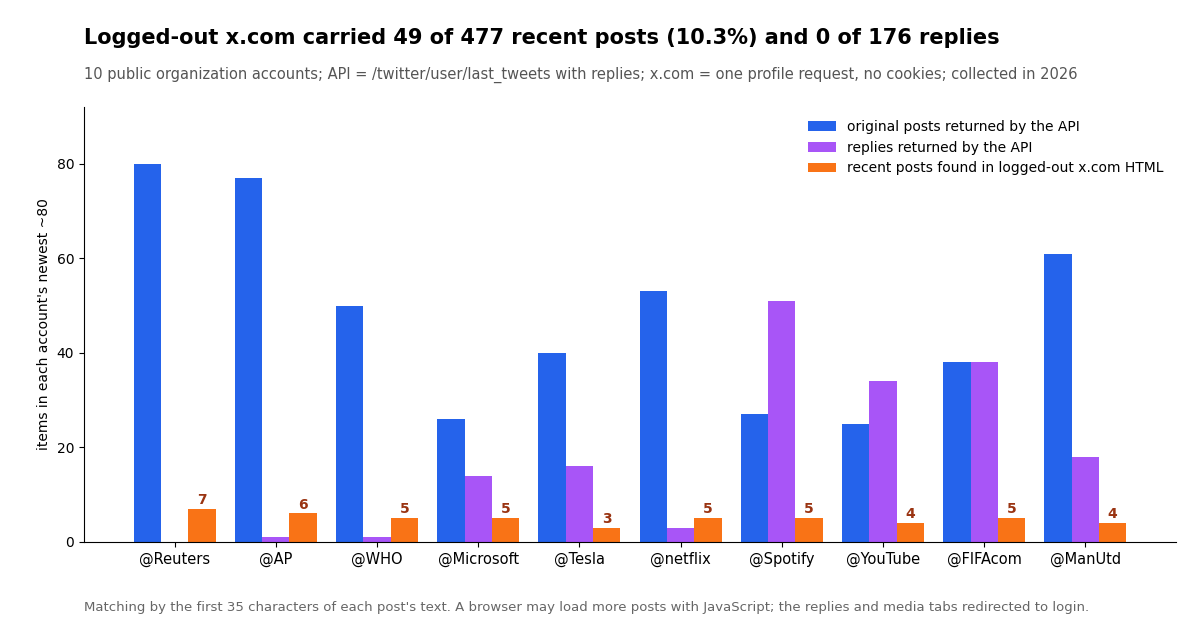
The profile page carries only a few posts. We matched the text of each account's recent original posts (from our API) against the HTML x.com returned. Only 49 of 477 recent original posts (10.3%) appeared, at most 7 for any single account, and none of the 176 replies. A real browser may load a few more posts with JavaScript, but the replies and media tabs and search all send you to the login page.
Single posts still open. A direct post link (x.com/<account>/status/<id>) still loads for logged-out visitors, and X's public oEmbed endpoint (publish.x.com/oembed) returned HTTP 200 for a recent post with no authentication. For reading one post someone sent you, you often need no viewer at all.
Protected accounts are private everywhere. X's help page on public and protected posts (help.x.com/en/safety-and-security/public-and-protected-posts) says protected posts are visible only to approved followers. No viewer, Twitterviewer included, can show them, and twitterviewer.net says so in its own FAQ. A site that claims otherwise is not telling the truth.
What a viewer has to show: 780 recent items from 10 public accounts
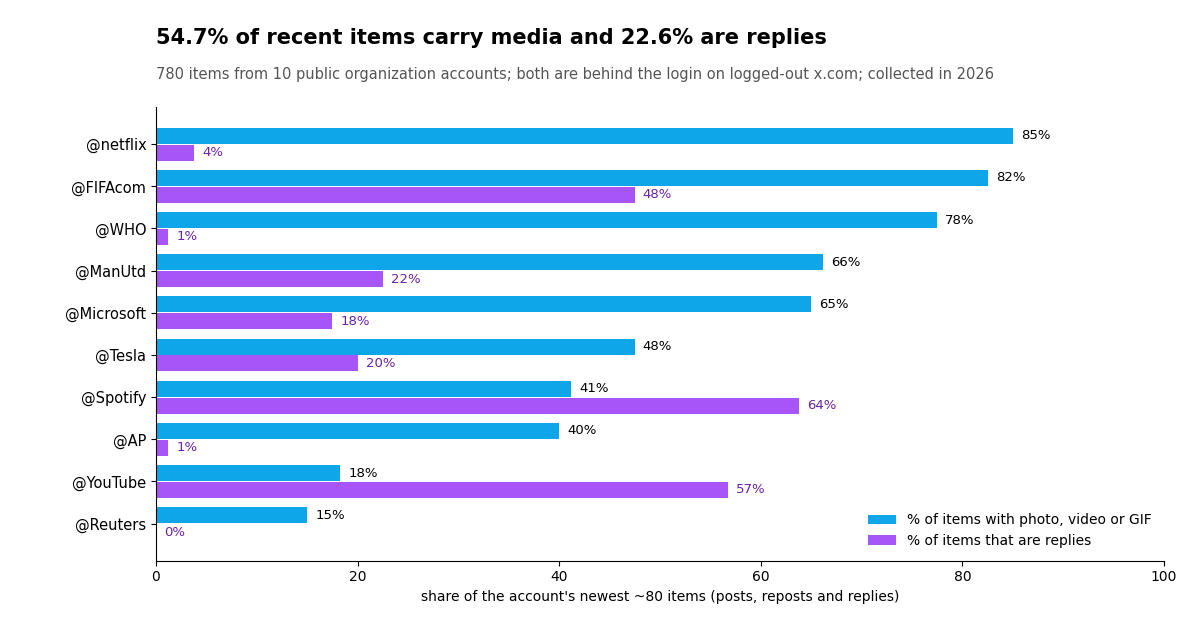
"It loads" is a low bar. The real test of a viewer is whether it shows what accounts actually publish, and our API sample shows how much of that sits behind x.com's login. We pulled the newest items (posts, reposts and replies) of 10 public organization accounts, about 80 each, 780 in total.
Replies are a big share for brands. 22.6% of all items were replies, and 9 of 10 accounts replied at least once. For customer-facing brands it dominates: replies were 64% of @Spotify's recent items and 57% of @YouTube's. Logged-out x.com shows none of them, which is why a reply viewer is one of the features viewer sites advertise.
Media is the norm. 54.7% of items carried a photo, video or GIF, and 21.4% carried video. The media tab is behind the login, so a viewer that shows media, or a video downloader, fills a real gap.
Timelines move fast. For the median account, the newest 20 items spanned only 42.8 hours. Any cached viewer page is out of date quickly for busy accounts, so check the timestamp on what you are reading.
View counts come with every post. The API returned a view count on every original post and reply in the sample; the median original post had 113,574 views. Viewer sites that show counts are passing on the same numbers X records.
Is Twitterviewer safe to use?
For reading public posts in a browser, the risk is modest, but it is not zero, and neither site is as private as its marketing suggests.
No X password. twitterviewer.net never asks for your X login, and viewing needs no account on the site either. Never type X credentials into any viewer site, under any name; a real viewer has no reason to ask for them.
Tracking claims versus what loads. The twitterviewer.net homepage says "No login, no tracking" and "We do not track you". The same page loads a Microsoft Clarity tag, a session-recording and heatmap analytics service, and a Google tag, and its privacy policy says it uses Google Analytics and keeps server logs. Every handle, link or search term you type goes to its backend along with your IP address. That is normal for a free website, but it is not "no tracking".
Ads and downloads. A free tier with a "Hide ads" option means ads. Be careful with download buttons on any viewer site, and only save files that end in a normal media type such as .mp4 or .jpg.
Extensions are a bigger step. The older twitterviewer.com concept was a browser extension and phone shortcut that intercept x.com links. An extension that runs on x.com can read every X page you open while signed in. If you install one, check the publisher, the user count and the permissions first.
The account owner is not notified. X does not show anyone who viewed their profile, and a third-party viewer does not tell them either. That is not a license to monitor private individuals: X's rules on targeted harassment still apply to what you do with what you see.
Twitterviewer alternatives that work without logging in
Which option is best depends on what you are trying to do. Viewer sites come and go, and the two Twitterviewer domains show how different two sites with the same name can be.
Our free tools. The tools under /tools work without an X account and without a sign-in on our site: the Twitter video downloader saves the MP4 from a public post, the account age checker shows when a public account was created, and the Twitter ID finder turns a handle into its numeric ID. They are built for one job each, not for scrolling a timeline.
Other viewer sites. Our Twitter web viewer guide compares the generic viewer and mirror sites, including the Nitter instances that still respond, and our pages on Snaplytics and Twillot test two other branded viewers. The pattern is the same everywhere: they show public data only, most now sit behind a human check or a sign-in, and any of them can stop working without notice.
Read public X profiles with an API key instead, and what it costs
If you need the same data reliably, for a dashboard, a spreadsheet or a daily check, a viewer site is the wrong tool: it cannot be scripted, it changes without notice, and it puts a human check in front of every lookup. An API key returns the same public data as JSON, with no X account and no browser.
Two calls cover what a viewer shows. /twitter/user/info returns the profile: name, bio, followers, following, statusesCount, mediaCount and whether the account is protected. /twitter/user/last_tweets returns the newest posts, 20 per page, and with includeReplies=true it includes replies, each with viewCount, likeCount, replyCount and any photos or videos in extendedEntities.media. Use has_next_page and next_cursor to page back.
Private accounts stay private. The API does not return posts from protected accounts. The profile call tells you an account is protected, and that is where it stops.
Writes exist, with care. If you ever need to post, like or follow from your own account, that runs through an authenticated session: one /twitter/user_login_v2 login ($0.10, with a proxy you supply) returns login_cookies, then each action such as /twitter/create_tweet_v2 or /twitter/follow_user_v2 is $0.002 and billed per HTTP 200 call. The call acts as that account, so X can rate-limit, lock or suspend it; keep a human pace, and expect to log in again when the session expires. Reading public data needs none of this.
The complete script at the end of this page prints a profile card and the newest posts and replies with their media links, the same things a viewer page shows.
What it costs compared with the official X API. Viewer sites are free because ads and analytics pay for them. An API is paid per result, so the cost is visible.
This study. We read 780 recent items and 10 profiles. On twitterapi.io that is 11,880 credits, $0.12: tweet endpoints cost 15 credits per tweet returned ($0.15 per 1,000 tweets) and profiles 18 credits each ($0.18 per 1,000). On the official X API pay-per-usage rate card (docs.x.com), at $0.005 per post read and $0.010 per user read, the same reads would cost $4.00.
That is about 33x less per 1,000 posts ($5 versus $0.15). X's pay-per-usage plan is also capped at 3 million post reads a month, with Enterprise above that. On twitterapi.io a request that returns nothing still costs the 15-credit minimum ($0.00015), so checking one account every 5 minutes for a month costs about $1.30 even when nothing new appears.
Getting started. New accounts that pass the automatic bot check get up to $1 of free credits (at most 100,000 credits, no card, one per person or network, expiring after 31 days), enough to repeat this study several times. Purchased credits never expire. Before the first payment the rate limit is 0.2 requests per second, and 20 once paid. Monthly plans are on the pricing page.
import os, requests

BASE = "https://api.twitterapi.io"
HEADERS = {"X-API-Key": os.environ["TWITTERAPI_IO_KEY"]}

r = requests.get(f"{BASE}/twitter/user/info", headers=HEADERS,
                 params={"userName": "Reuters"}, timeout=30)
body = r.json()
if body.get("status") == "error":
    print(body.get("msg"))          # e.g. "user not found"
else:
    u = body["data"]
    print(u["name"], u["followers"], u["statusesCount"], "protected:", u["protected"])
How we collected this
Question. What can a logged-out viewer actually show for a public X account, and how does each no-login route (logged-out x.com, twitterviewer.net, twitterviewer.com) compare with an API for the same accounts?
Accounts. 10 public organization accounts: @Reuters, @AP, @WHO, @Microsoft, @Tesla, @netflix, @Spotify, @YouTube, @FIFAcom and @ManUtd.
API side. Collected in 2026 with twitterapi.io's /twitter/user/info (1 request per account) and /twitter/user/last_tweets with includeReplies=true (4 pages of 20, newest first): 50 requests, 780 items (477 original posts, 176 replies, 127 reposts), 11,880 credits.
Viewer side. One plain HTTPS request per route per account from our own network, no cookies, desktop browser user agent: x.com profile, replies and media tabs; twitterviewer.net/<account>; the twitterviewer.net data backend with the request its page sends, minus the human-check token; and twitterviewer.com/<account>. We recorded status codes, redirects, and whether the account's name or post text appeared in the HTML (matched on the first 35 characters of each post's text). A second fetch of each x.com profile counted matched posts.
What the sample cannot show. We did not drive a real browser through Cloudflare's checks, so we cannot say what either Twitterviewer site renders for a human visitor on a given day, and x.com may load more posts with JavaScript than its HTML contains. Ten organization accounts are not a random sample of X; individuals post differently. Results describe one point in time.
Privacy. Aggregates only; organization accounts only; no analysis of reply targets or reposted authors. The analysis script, results and de-identified rows are in our repository under data/studies/twitterviewer/.
"""A no-login viewer for one public X account, built on an API key instead of a viewer site.

Prints the profile card and the newest posts and replies with view counts and media links,
the same things twitterviewer-style sites show. No X account is needed.
Cost: 18 credits for the profile, 15 credits per post returned ($0.15 per 1,000).
"""
import os
import sys
import requests

BASE = "https://api.twitterapi.io"
HEADERS = {"X-API-Key": os.environ["TWITTERAPI_IO_KEY"]}


def profile(user_name):
    r = requests.get(f"{BASE}/twitter/user/info", headers=HEADERS,
                     params={"userName": user_name}, timeout=30)
    r.raise_for_status()
    body = r.json()
    if body.get("status") == "error" or not body.get("data"):
        sys.exit(f"lookup failed: {body.get('msg')}")   # e.g. "user not found"
    return body["data"]


def timeline(user_name, pages=2, replies=True):
    cursor = ""
    for _ in range(pages):
        params = {"userName": user_name, "cursor": cursor}
        if replies:
            params["includeReplies"] = "true"
        r = requests.get(f"{BASE}/twitter/user/last_tweets", headers=HEADERS,
                         params=params, timeout=30)
        r.raise_for_status()
        body = r.json()
        yield from body["data"]["tweets"]
        if not body.get("has_next_page"):
            break
        cursor = body["next_cursor"]


def media_links(t):
    src = t.get("retweeted_tweet") or t
    out = []
    for m in (src.get("extendedEntities") or {}).get("media", []):
        if m.get("type") == "photo":
            out.append(m["media_url_https"])
        else:  # video or animated_gif: highest-bitrate mp4
            mp4 = [v for v in m.get("video_info", {}).get("variants", [])
                   if v.get("content_type") == "video/mp4"]
            if mp4:
                out.append(max(mp4, key=lambda v: v.get("bitrate", 0))["url"])
    return out


if __name__ == "__main__":
    name = sys.argv[1] if len(sys.argv) > 1 else "Reuters"
    p = profile(name)
    if p.get("protected"):
        sys.exit("protected account: posts are visible only to approved followers")
    print(f"{p['name']} (@{p['userName']})  followers={p['followers']:,}  "
          f"posts={p['statusesCount']:,}  media={p.get('mediaCount')}")
    print(p.get("description", ""))
    for t in timeline(name):
        kind = "repost" if t.get("retweeted_tweet") else ("reply" if t.get("isReply") else "post")
        print(f"\n[{kind}] {t['createdAt']}  views={t.get('viewCount')}  likes={t['likeCount']}")
        print(t["text"][:200])
        for link in media_links(t):
            print("  media:", link)
        print("  ", t["url"])
Questions readers ask
What is Twitterviewer?
Twitterviewer is the name of two separate third-party websites, twitterviewer.net and twitterviewer.com, that promise to show public X (Twitter) posts and profiles without an X account. Neither is run by X. In our 2026 tests, twitterviewer.net was the working site; twitterviewer.com answered every request with a Cloudflare challenge.
Is twitterviewer.com the same as twitterviewer.net?
Nothing on either site says they are related, and they look different. twitterviewer.net is a web app with tweet, profile, media and reply viewers. The last readable archive capture of twitterviewer.com, from August 2025, was a landing page for a browser extension and phone shortcut labeled "A Twillot project".
Why is Twitterviewer not working?
twitterviewer.net loads its data only after a Cloudflare human check in your browser; without it, its backend returns "Invalid verification token". Content blockers, privacy browsers or a flagged network can stop that check, so try a reload or a private window. twitterviewer.com returned a Cloudflare "Just a moment" challenge to every request we made.
Is Twitterviewer safe?
It does not ask for your X password, and you should never give one to any viewer. twitterviewer.net says it does not track you, but its homepage loads Microsoft Clarity and a Google tag, and its privacy policy mentions Google Analytics. Everything you type goes to its servers with your IP address. Be careful with download buttons and with extensions that run on x.com.
Can Twitterviewer see private (protected) accounts?
No. Protected posts are visible only to approved followers, and twitterviewer.net's own FAQ says private content is not shown. No viewer, and no API, can show protected posts. A site that claims it can is not telling the truth.
Does the account owner know I viewed their profile on Twitterviewer?
No. X does not show anyone who viewed their profile, and third-party viewers do not notify the owner. X's rules against targeted harassment still apply to how you use what you see.
Can I view X without an account without using a viewer site?
Partly. Logged-out x.com still opens profile pages and single posts, and X's oEmbed endpoint returns a single post with no authentication. Replies, the media tab and search redirect to the login page. For video, our free Twitter video downloader needs no X account.
What is the best Twitterviewer alternative for repeat checks?
An API key. Viewer sites cannot be scripted and can change without notice. twitterapi.io returns public profiles, posts, replies, media and view counts as JSON with no X account, at $0.15 per 1,000 tweets; our whole 10-account study cost $0.12.
Continue
- X API pay-per-usage pricing (docs.x.com): post and user read prices, 3M monthly cap
- X oEmbed API (docs.x.com): single posts without authentication
- Cloudflare challenges documentation: what the "Just a moment" page is
- Cloudflare Turnstile documentation: how the human check works
- Microsoft Clarity overview (Microsoft Learn): session recordings and heatmaps
- twitterapi.io docs: GET /twitter/user/last_tweets
- Twitter (X) API overview: the hub for reading X data
- Twitter web viewer: every way to read X without an account
- Twillot Twitter viewer: what it is and whether it works
- Snaplytics Twitter viewer tested
- Twitter private profile viewers: what is actually possible
- Nitter alternatives: project status and instance probe
- Does X show who viewed your profile?
- Free Twitter (X) video downloader, no login
- Free Twitter (X) account age checker
- Free Twitter (X) ID finder
- Build your own Twitter (X) viewer on an API
- twitterapi.io pay-per-result pricing
- 01GetXBot: What the Twitter (X) Video Bot Is, Whether It Is Safe, and Alternatives
- 02The Best Twitter (X) Accounts to Follow, by Topic
- 03What Is xcancel (X Cancel)? The Twitter (X) Nitter Front End, Explained
- 04Twitter (X) Media Viewer: How to Browse an Account's Photos and Videos
- 05AllMyTweets: What It Did, Its Limits, and How to See Every Tweet on Twitter (X)
- 06How to Track Ben Shapiro's Tweets Using the Twitter (X) API
- 07What Are Twitter (X) Impressions and How Are They Counted?
- 08TwitterAPI.io vs Tweet Binder — An Honest Comparison
Stop reading. Start building.
Starter credits cover real testing on real data. Google sign-in, no card, no application queue.
Get an API key