Best Time to Post on Twitter (X): What 1,672 Brand Posts Show
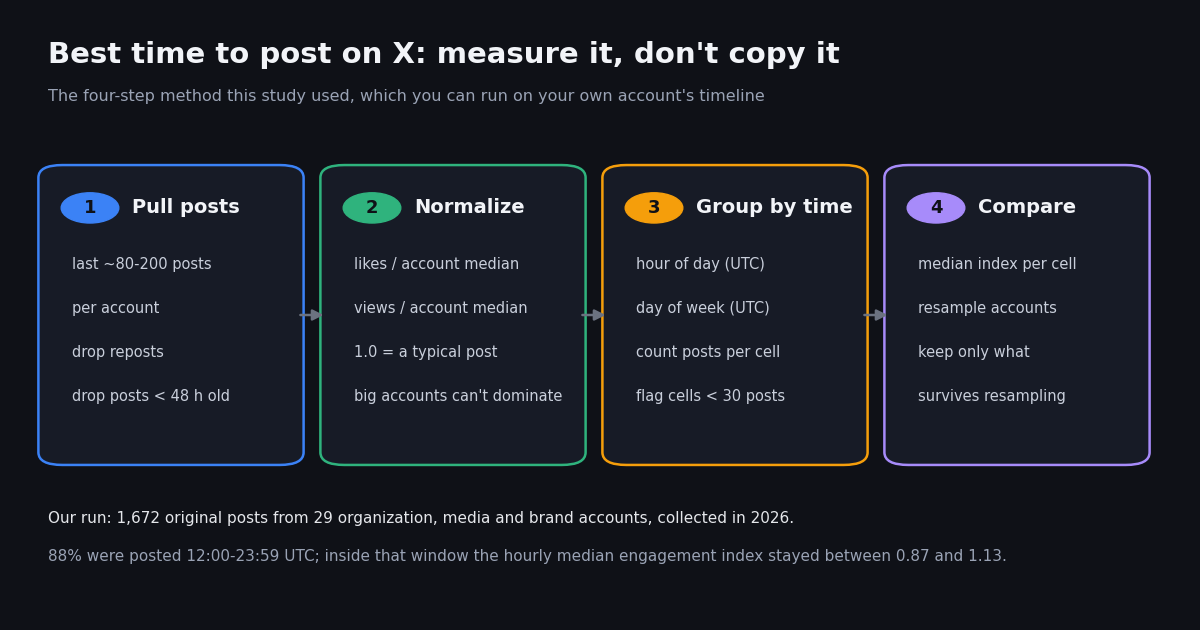
This page answers one question: at what hour and on which day should you publish on X (Twitter) to get the most engagement, and how do you find that out for your own account. It is not a guide to scheduling Grok to watch X for you (that is our Grok Tasks page) and not a tour of analytics dashboards and tools (that is our Twitter analytics page); here we only look at timing, with our own data.
Most "best time to post" articles publish a single chart of hours and days drawn from a scheduling tool's customer base, and the recommended slots disagree from one article to the next: weekday mornings in one, lunchtime and 5 PM in another, Tuesday to Thursday in a third. We wanted to know how much the hour actually matters once you stop comparing big accounts with small ones, so we measured it on public brand, media and organization accounts and scored each post against that account's own typical post.
The short version: the clock matters much less than these charts imply. The useful part is the method, which you can run on your own posts in a few minutes.
The best time to post on X, according to our data
We read the most recent posts of 34 public organization, media and brand accounts, dropped reposts and posts younger than 48 hours, and kept the 29 accounts with at least 10 usable posts: 1,672 original posts in all, collected in 2026. For every post we divided its engagements (likes + reposts + replies + quotes) by the median for that same account. The result is an engagement index: 1.0 is an ordinary post for that account, 1.5 is half again as good, 0.5 is half as good. Because each account is compared only with itself, an account with 92 million followers and one with 220,000 count equally.
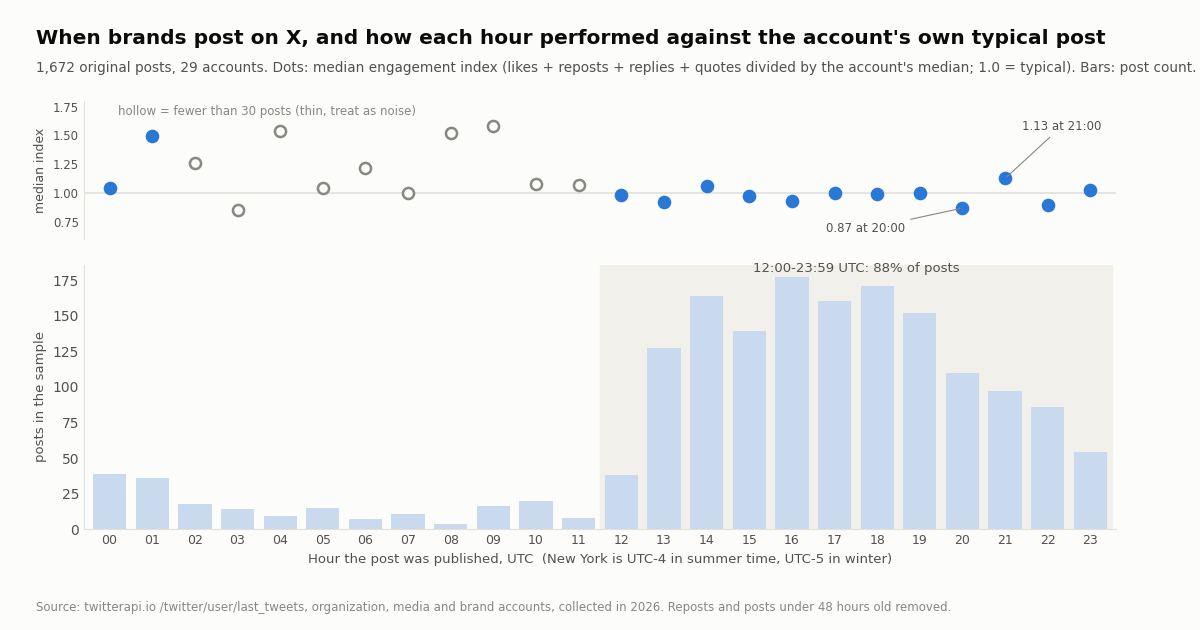
The headline result is a flat line. Between 12:00 and 23:59 UTC, the window that held 88.2% of the posts, the hourly median engagement index ranged from 0.87 (20:00 UTC) to 1.13 (21:00 UTC), and those two neighboring hours sit at opposite ends of the range. A post at a typical busy hour did about as well as a post at any other busy hour.
Grouped into 4-hour blocks, the picture is the same:
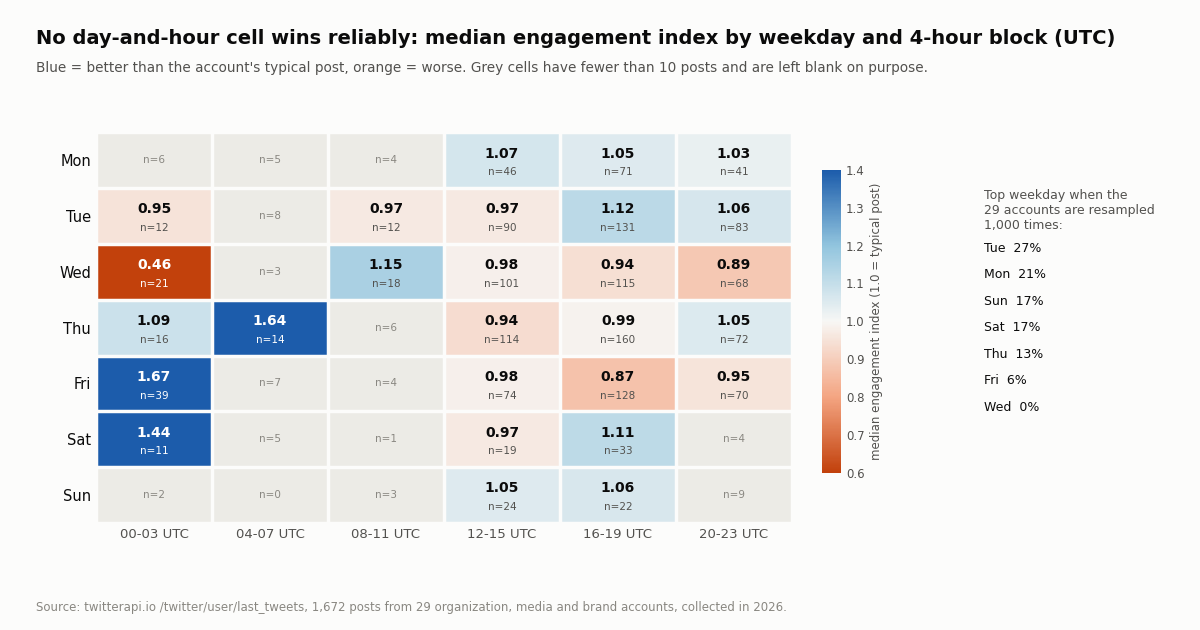
Read the table this way. The three crowded afternoon and evening blocks (UTC) all land at about 1.0, which is what you would expect if timing barely mattered. The three quiet blocks look a little better, but they contain only 197 posts from 10 to 24 accounts, and the posts a brand chooses to publish at an odd hour are not random: a launch timed for Asia, a late-night product reveal or a live event. That is a selection effect, not proof that 4 AM UTC is a magic hour.
So, if you need a default: publish during the waking hours of the audience you care about, on weekdays, and spend your effort on what you post rather than the minute you post it. Then measure your own account, which is the only best time that applies to you.
Best day to post on X: no weekday wins reliably
Day-of-week claims are the most repeated part of every best-time chart, so we tested them the same way. Weekdays are in UTC, which matters: a post at 01:00 UTC on a Friday is Thursday evening in the United States.
Tuesday, Sunday and Monday edge ahead and Wednesday trails, but the gaps are small. To check whether any of them is real, we resampled the 29 accounts 1,000 times (drawing accounts with replacement and recomputing the medians each time). Tuesday came out on top in 27% of the resamples, Monday in 21%, Sunday and Saturday in 17% each, Thursday in 13%, Friday in 6% and Wednesday in none. A real "best day" would win most of the time; here five different days each win at least one resample in eight.
What about posting on Sunday or the weekend? The weekend held only 8.0% of the posts (133 of 1,672), from 22 accounts, with a median engagement index of 1.05 against 1.00 on weekdays and a median view index of 1.12 on Sundays. Brands publish less on weekends, so each weekend post has less competition from other brand posts; it did not do worse. If your audience is consumers rather than office workers, a weekend test is cheap.
What the heatmap shows. The weekday-by-block heatmap below has a few striking cells (Friday 00:00-03:59 UTC at 1.67, Wednesday 00:00-03:59 UTC at 0.46), but each of them holds 21 to 39 posts. Cells that small swing with a single viral or flat post, which is why we left every cell under 10 posts blank instead of shading it.
Best time to post on X in the USA and other time zones
X stores and returns every timestamp in UTC (the API's createdAt field always ends in +0000), and most best-time charts quietly convert to one US time zone. Here is where the brand posting window falls locally. US daylight saving time shifts every US row one hour earlier in winter.
In other words, the brands in our sample run their accounts on a US East Coast working day: 25 of the 29 posted most between 12:00 and 19:59 UTC. That says more about when social media teams work than about when followers read, and it is the main reason the crowded hours all score about 1.0: everyone is posting into the same feed at the same time.
For a US audience the defensible default is weekday daytime Eastern time, which also covers the Pacific morning. For a European or Asian audience the US-centric charts are the wrong reference: convert your audience's waking hours to UTC and test those. The snippet below converts any createdAt value to the time zones you care about with the Python standard library.
from datetime import datetime
from zoneinfo import ZoneInfo

# createdAt as returned by /twitter/user/tweet_timeline (always +0000, i.e. UTC)
created = datetime.strptime("Wed Jul 16 17:30:00 +0000 2025", "%a %b %d %H:%M:%S %z %Y")
for zone in ["America/New_York", "America/Los_Angeles", "Europe/London", "Asia/Tokyo"]:
    local = created.astimezone(ZoneInfo(zone))
    print(f"{zone:<20} {local:%a %H:%M}")
# America/New_York     Wed 13:30
# America/Los_Angeles  Wed 10:30
# Europe/London        Wed 18:30
# Asia/Tokyo Thu 02:30Why posting time matters less than it used to
Timing advice comes from the era of a purely chronological timeline, where a post sank below the fold within minutes. Two things about the current For You feed explain why the hour now matters less, and both come from X's own published code rather than from guesswork.
Posts stay eligible for about two days. The README of xai-org/x-algorithm, the repository X published as the algorithm powering the For You feed, lists an AgeFilter that removes "posts older than 48 hours" before scoring. Inside that window a post can still be picked up, so publishing at 2 PM instead of 10 AM does not by itself decide whether it is seen.
Ranking is driven by predicted engagement, not by the clock. The same README describes a model that reads a viewer's recent engagement history, predicts the likelihood of actions such as likes, replies, reposts, quotes, clicks and dwell time, and combines them into a weighted score; in-network posts come from a store of recent posts by the accounts a viewer follows. The older twitter/the-algorithm repository, which Twitter published before it, described the same broad shape of candidate sources plus a neural "heavy ranker". Neither describes a bonus for a particular hour.
Where timing still matters. Early engagement still comes from people who are online when you post, and the in-network source favors recent posts from accounts people follow. So posting while your followers are awake helps, and posting at 3 AM for a local audience still hurts. What the data does not support is the idea that one specific hour, like Wednesday at 9 AM, beats the hours around it for everyone.
What moved engagement more than the clock
Since the timing effects were small, we checked one other variable the same posts carry: the type of media attached (the extendedEntities.media[].type field).
The gap between a video post and a text-only post (1.12 against 0.91) is larger than the gap between most busy hours. The GIF row has only 9 posts and is shown for completeness, not as advice. Like everything here, this is a comparison within the same accounts, not a controlled experiment: brands may save video for their strongest news.
We also checked whether the hours with more brand posts did worse. Across the 24 hours, post volume and the median engagement index had a rank correlation of -0.51: busier hours tended to score a little lower. That fits the idea that you compete with everyone else's posts at peak time, but with 24 points and thin night hours it is a hint, not a law.
How to find your own best time to post on X
Your account is the only sample that answers the question for you. There are two ways to look at it.
In the X app. X shows a view count under every post, and as the author you can open a post's analytics for impressions and engagements. At the time of writing, several social-media tool vendors report that the account-level analytics dashboard on desktop requires an X Premium subscription; check X's help center at help.x.com for what your account includes. Per-post numbers are enough for a manual version of this test: note the hour and day of each post, its engagements, and compare against your typical post.
With a script. The script at the end of this page does the same thing in one run. It looks up your numeric user ID with /twitter/user/info, then reads up to 200 of your recent posts through /twitter/user/tweet_timeline (20 per page, newest first, following next_cursor while has_next_page is true), drops reposts and anything younger than 48 hours, divides each post's engagements and views by your own median, converts the time to your audience's time zone and prints the median index per hour and per weekday, hiding any slot with fewer than 8 posts. Reads need no X account and no X developer app, only a twitterapi.io API key.
Run it like an experiment. First run the script on your history and pick two or three candidate windows. Then for four to six weeks rotate similar posts across those windows (same kind of content, so format does not muddy the result) and rerun it. Keep the window that wins on the median, not on one viral post, and repeat every few months as your audience changes.
Watch the sample size. With 200 posts spread over 24 hours you average about 8 posts per hour, which is why the script groups thin hours out and why 4-hour blocks are often more honest than single hours. If you post less than daily, use weekday-versus-weekend and morning-versus-evening splits instead of hours.
To turn a single post's numbers into an engagement rate, our free engagement rate calculator does it from a post URL, and the analytics report template shows how to present the result to a team or client.
Cost of measuring this yourself
Every tweet endpoint on twitterapi.io, including /twitter/user/tweet_timeline, costs 15 credits per tweet returned, which is $0.15 per 1,000 tweets; a full 20-post page is $0.003 and the minimum per request is 15 credits. You pay only for the data returned. Running the script on 200 of your own posts costs about $0.03. Checking 10 accounts you benchmark against, 200 posts each, costs about $0.30. This whole study fetched 2,660 timeline posts over 135 requests, about $0.40.
On the official X API, the pay-per-usage rate card at docs.x.com/x-api/getting-started/pricing lists $0.005 per post read, which is $5 per 1,000 posts, or about 33x more for reading other accounts such as competitors or the brands in this study. X prices reading your own account lower: its Owned Reads rate is $0.001 per resource for your own posts when the request is made by the authenticated owner of the developer app, which is $1 per 1,000 posts. X also deduplicates the same resource within a 24-hour UTC day and caps pay-per-usage at 3 million post reads a month, with Enterprise above that.
New twitterapi.io accounts that pass the automatic bot check get up to $1 of free credits (at most 100,000 credits, no card, one per person or network, expiring after 31 days), which covers this test many times over. Subscription plans and paid rate limits are on the pricing page.
How we collected this
Question: at which UTC hours and weekdays do organization, media and brand posts on X get more engagement than that account's typical post, and how much does posting time matter compared with other factors.
Accounts: we requested 34 public accounts: @NASA, @SpaceX, @NatGeo, @Spotify, @netflix, @Wendys, @duolingo, @Starbucks, @McDonalds, @PlayStation, @Xbox, @github, @vercel, @nvidia, @Google, @Microsoft, @Adobe, @Canva, @figma, @NotionHQ, @Airbnb, @NFL, @TheEconomist, @verge, @NintendoAmerica, @discord, @OpenAI, @Tesla, @tacobell, @Docker, @NASAWebb, @LEGO_Group, @Uber and @onepeloton. Five had fewer than 10 usable posts and were excluded (@Airbnb, whose recent timeline is mostly reposts; @NFL and @TheEconomist, which post so often that their last 80 posts were all under 48 hours old; @Starbucks and @LEGO_Group, whose last 80 posts were all more than a year old), leaving 29.
Method: /twitter/user/last_tweets with the default includeReplies (replies excluded), 4 pages of 20 per account, newest first: 135 requests and 2,660 timeline posts, collected in 2026. We dropped reposts (their counts belong to the original author), posts younger than 48 hours (engagement still rising) and posts older than a year, leaving 1,672 original posts. Each post's likes, views and engagements (likes + reposts + replies + quotes) were divided by its account's median for that metric; we report medians of that index by UTC hour, UTC weekday and weekday x 4-hour block, flag cells under 30 posts as thin and blank heatmap cells under 10, and resampled the accounts 1,000 times to see how often each block and weekday came out on top. The first 24 accounts left too few usable posts, so we added 10 more accounts during collection; the protocol file records that change.
What the sample cannot show: these are brand, media and organization accounts with professional teams and large followings, mostly run on US time; individual creators and small accounts may behave differently. Posting time is not randomly assigned, so the hour a brand chose and the content it chose are tangled together, and nothing here proves that moving a post would change its result. The time window differs by account (from about a day and a half for @verge to about nine months for @Adobe). We see post times in UTC, not the time zones of the people who engaged. Replies were not included.
Aggregates only. Every account named is an organization, media brand or company; reposted and quoted authors were not analyzed. The analysis script, results, a de-identified per-post sample and the raw pages for the organization accounts that passed our author check are kept with the study.
"""Find YOUR best time to post on X from your own timeline.

Pulls your recent original posts with twitterapi.io, normalizes each post against
your own median, and prints the median engagement index by hour and weekday in
your local time zone. 1.0 = a typical post for you; above 1.0 = better than typical.
"""
import statistics as st
from collections import defaultdict
from datetime import datetime, timedelta, timezone
from zoneinfo import ZoneInfo

import requests

API_KEY = "YOUR_API_KEY"
BASE = "https://api.twitterapi.io"
USER = "your_handle"            # without the @
TZ = ZoneInfo("America/New_York")  # where most of your audience lives
PAGES = 10                       # 20 posts per page -> up to 200 posts
MIN_CELL = 8                     # ignore hours / days with fewer posts than this


def user_id(user):
    r = requests.get(f"{BASE}/twitter/user/info", headers={"X-API-Key": API_KEY},
                     params={"userName": user}, timeout=30)
    r.raise_for_status()
    return r.json()["data"]["id"]


def fetch_posts(user, pages):
    # tweet_timeline reads by user ID; last_tweets can come back empty for
    # accounts X keeps out of search
    uid = user_id(user)
    posts, cursor = [], ""
    for _ in range(pages):
        r = requests.get(
            f"{BASE}/twitter/user/tweet_timeline",
            headers={"X-API-Key": API_KEY},
            params={"userId": uid, "cursor": cursor},
            timeout=30,
        )
        r.raise_for_status()
        body = r.json()
        data = body.get("data") or {}
        posts.extend(data.get("tweets") or [])
        if not body.get("has_next_page"):
            break
        cursor = body.get("next_cursor") or ""
    return posts


def parse(ts):
    return datetime.strptime(ts, "%a %b %d %H:%M:%S %z %Y")


raw = fetch_posts(USER, PAGES)
now = datetime.now(timezone.utc)
rows = []
for t in raw:
    if t.get("retweeted_tweet"):          # reposts carry the original author's counts
        continue
    created = parse(t["createdAt"])
    if now - created < timedelta(hours=48):  # let engagement settle first
        continue
    eng = t["likeCount"] + t["retweetCount"] + t["replyCount"] + t["quoteCount"]
    rows.append((created.astimezone(TZ), eng, t.get("viewCount") or 0))

if len(rows) < 30:
    raise SystemExit(f"only {len(rows)} usable posts: too few to say anything about timing")

med_eng = max(st.median(r[1] for r in rows), 1)
med_view = max(st.median(r[2] for r in rows), 1)
by_hour, by_day = defaultdict(list), defaultdict(list)
for local, eng, views in rows:
    by_hour[local.hour].append((eng / med_eng, views / med_view))
    by_day[local.strftime("%a")].append((eng / med_eng, views / med_view))


def report(title, groups, keys):
    print(f"\n{title}\n{'slot':>6} {'posts':>6} {'eng idx':>8} {'view idx':>9}")
    for k in keys:
        cell = groups.get(k, [])
        if len(cell) < MIN_CELL:
            continue
        e = st.median(c[0] for c in cell)
        v = st.median(c[1] for c in cell)
        print(f"{k!s:>6} {len(cell):>6} {e:>8.2f} {v:>9.2f}")


print(f"{len(rows)} original posts by @{USER}, times in {TZ.key}")
report("By hour of day", by_hour, range(24))
report("By weekday", by_day, ["Mon", "Tue", "Wed", "Thu", "Fri", "Sat", "Sun"])
Questions readers ask
What is the best time to post on X?
There is no single best time for every account. In our sample of 1,672 posts from 29 brand accounts, collected in 2026, the hourly median engagement index stayed between 0.87 and 1.13 across 12:00-23:59 UTC, where 88.2% of posts went out. A sensible default is weekday daytime in your audience's time zone (for a US audience, roughly 8 AM to 8 PM Eastern), then test your own account.
What is the best day to post on X?
No day won reliably in our data. Tuesday (median index 1.06) and Sunday (1.06) edged ahead and Wednesday trailed (0.93), but when we resampled the accounts 1,000 times Tuesday was top only 27% of the time and five different days each topped at least one resample in eight.
Is it good to post on X on Sunday or the weekend?
In our sample, weekend posts did not do worse: 133 weekend posts had a median engagement index of 1.05 against 1.00 on weekdays, and Sunday's median view index was 1.12. Brands post far less on weekends (8.0% of the sample), so there is less brand content competing. If your audience reads on weekends, test it.
What time zone should I use for the best time to post on X?
Your audience's. X timestamps are in UTC; most published charts convert to US Eastern time. If most of your followers are in Europe or Asia, convert their waking hours to UTC and test those rather than copying a US chart.
Does posting time still matter with the For You algorithm?
Less than it used to. X's published For You code keeps posts eligible for up to 48 hours and ranks them on predicted engagement. Posting while your followers are awake still helps the first wave of engagement, but in our data neighboring busy hours were within a few percent of each other.
How do I find my own best time to post on X?
Collect at least 100-200 of your own original posts with their time, engagements and views, divide each by your median, and group by hour and weekday in your audience's time zone. The script on this page does this through /twitter/user/tweet_timeline for about $0.03 per 200 posts. Then rotate similar posts across your two or three best windows for a few weeks and compare again.
How often should I post on X?
Our study did not test frequency, so we will not give you a number. What it does show is that brands with very different volumes (from about one post a week to dozens a day) all score each post against their own typical result, so post as often as you can keep the quality of a typical post.
Can I see when my followers are online on X?
X's own analytics focuses on posts (impressions and engagements). At the time of writing, third-party guides report the account-level dashboard requires X Premium on desktop. The engagement-by-hour approach on this page is an indirect but practical stand-in: it shows when your posts actually got engagement.
Continue
- X's published For You feed algorithm: AgeFilter (posts older than 48 hours), predicted-engagement scoring
- Twitter's earlier open-source recommendation algorithm: candidate sources and heavy ranker
- X API pay-per-usage pricing: $0.005 per post read, Owned Reads $0.001, 24-hour deduplication
- twitterapi.io API reference: user last tweets (userName, cursor, includeReplies, 20 per page, newest first)
- Python documentation: zoneinfo, IANA time zone support for converting UTC timestamps
- twitterapi.io documentation: authentication with the X-API-Key header and response fields
- X API guide: endpoints, pricing and access
- Twitter (X) analytics: free tools and the API route
- What Twitter (X) impressions are and how they are counted
- Twitter scheduler options, from SaaS tools to a DIY API route
- Twitter analytics report template
- Free Twitter engagement rate calculator
- Grok Tasks: schedule Grok to watch X for you
- Pay-per-call API pricing and plans
- 01How do you earn TwitterAPI.io credits by writing about the API?
- 02Twitter (X) Lists: What They Are, How to Make One, and How to Use Them
- 03Tweepcred: How Twitter (X) Scores Account Reputation, Read From the Code
- 04Tweet Failed to Send on Twitter (X)? What Each Error Means and How to Fix It
- 05How to Embed a Video on Twitter (X): In a Post or on Your Website
- 06The Best Third-Party Twitter (X) API in 2026
- 07The Best Twitter (X) Accounts to Follow, by Topic
- 08Twitter (X) Auto Post: Schedule in X, RSS or Sheets to X, and Posting from Code
Stop reading. Start building.
Starter credits cover real testing on real data. Google sign-in, no card, no application queue.
Get an API keyAlready building with TwitterAPI.io? Publish an honest tutorial or build log about it and earn up to $200 a month in API credits.