Ollama MCP: How to Give a Local Model MCP Tools (with Live Twitter (X) Data)
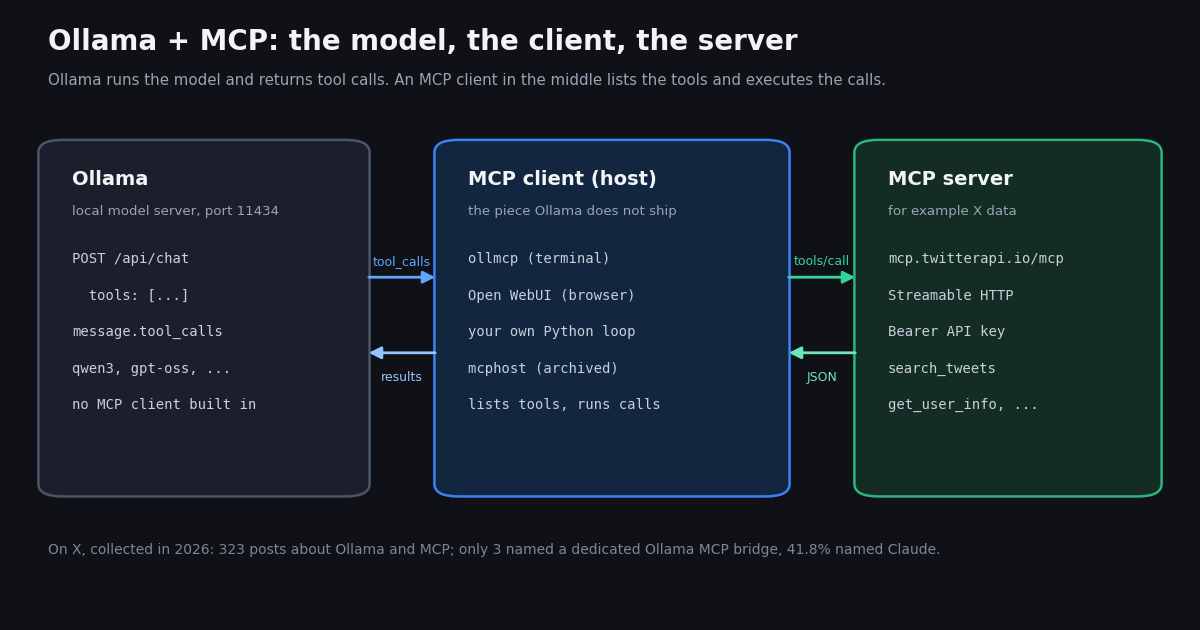
- No built-in MCP in Ollama. Ollama exposes tool calling on
/api/chat; an MCP client (host) has to sit between Ollama and the MCP server. Its release notes through v0.40.16 do not mention MCP. - Path 1, terminal:
ollmcp -j servers.json -m qwen3, with astreamable_httpentry and anAuthorizationheader inservers.json(per the ollmcp README). - Path 2, browser: Open WebUI, Settings > Integrations > External Tool Servers, Type
MCP (Streamable HTTP), AuthBearer. Native MCP is Streamable HTTP only; stdio servers need the mcpo proxy. - Path 3, code: a short Python loop that sends
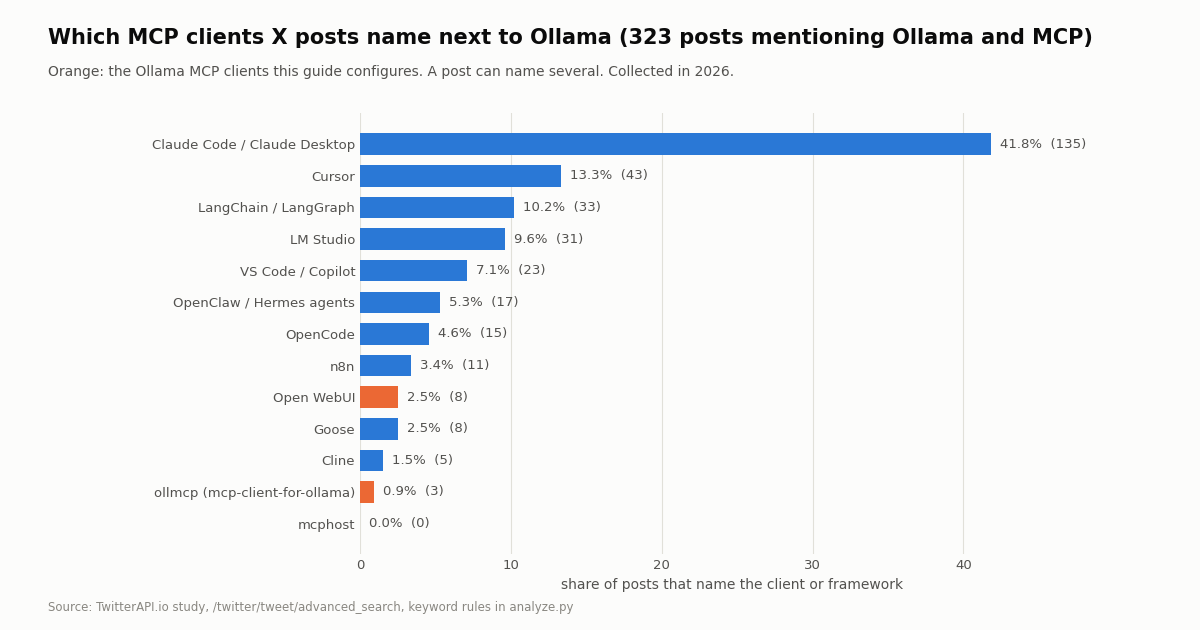
toolsto/api/chat, runs eachtool_callsentry and returns arole: toolmessage, shown below with live X data. - What X shows: of 323 posts about Ollama and MCP collected in 2026, 41.8% named Claude and 3 named ollmcp; 14.6% reported a problem.
- Cost of the X data: a tool call that returns 20 tweets costs $0.003 on TwitterAPI.io ($0.15 per 1,000 tweets) versus $0.10 at X's $0.005 per post read rate card.
Search for "ollama mcp" and you land on a dozen GitHub repos with similar names that do opposite things. Some are MCP servers that expose Ollama to another assistant (so Claude Desktop can call a local model), others are MCP clients that let an Ollama model call tools. If your goal is the second one, giving a model you run with ollama run access to files, databases or live web data through the Model Context Protocol, this guide is for you.
We checked the current Ollama release notes and docs, the ollmcp README, the Open WebUI MCP docs and the mcphost repository this session, and we wired every path to the same remote server: the TwitterAPI.io MCP server at https://mcp.twitterapi.io/mcp, which gives the model live X (Twitter) search and profile tools. None of these tools is installed on the machine that wrote this page, so every config below is quoted from the project's own documentation and labeled as such.
We also read what developers actually post about Ollama and MCP on X: 323 posts, collected in 2026, classified with open keyword rules. The short version: the conversation is mostly about running models locally, and almost nobody mentions the transport or the client, which is exactly where setups fail.
3
Does Ollama support MCP? What it does and does not do
Ollama is a local model server. It loads a model, listens on http://localhost:11434, and answers chat requests. Since it added tool calling, a request to /api/chat can carry a tools array of function definitions (name, description, JSON Schema parameters). When the model decides to use one, the response contains message.tool_calls, each with a function.name and function.arguments. Your code runs the function and sends the result back as a message with role: "tool", tool_name and content, per the Ollama tool-calling docs at docs.ollama.com/capabilities/tool-calling.
That is tool calling, not MCP. The Model Context Protocol is a wire protocol between an MCP client (the host application) and an MCP server: the client asks the server for its tool list (tools/list), and executes calls (tools/call) over stdio, SSE or Streamable HTTP. Ollama does not implement that client side. We read the release notes on github.com/ollama/ollama/releases up to v0.40.16 (the latest release when we checked) and none of them mentions MCP; the recent notes are about ollama launch integrations, Ollama Cloud web search decoding and model fixes.
So every working "Ollama MCP" setup has three parts. The model: Ollama with a model that supports tools. The client: a host that converts MCP tool definitions into Ollama tools, runs the calls and feeds results back. The server: any MCP server, local (stdio) or remote (Streamable HTTP). The rest of this guide is about choosing and configuring the middle part.
A naming trap. Several repos called ollama-mcp or mcp-ollama go the other way: they are MCP servers that wrap Ollama so a different client (Claude Desktop, Cline) can list or run your local models. Useful, but they do not give an Ollama model any tools. Check whether a repo calls itself a client or a server before you install it.
Path 1: ollmcp, the terminal MCP client for Ollama
ollmcp (the PyPI package and repo mcp-client-for-ollama) is a terminal chat app that connects an Ollama model to one or more MCP servers. Per its README it needs Python 3.11 or later and installs with uv tool install --upgrade ollmcp or pip install --upgrade ollmcp (or runs without installing via uvx ollmcp). It supports all three MCP transports: stdio, SSE and Streamable HTTP.
Flags that matter. -m picks the Ollama model, -j loads a servers.json, -u adds a server by URL, -s runs a local .py or .js server script, and -H points at a different Ollama host (default http://localhost:11434). If you leave out -m, the README says ollmcp uses the model saved in its configuration, or the first model available in Ollama.
Config for a remote server. The README's servers.json format uses the same mcpServers object as Claude Desktop, with type, url and headers for remote servers. It treats http, streamable-http and streamable_http as the same type, and a URL entry with no type defaults to Streamable HTTP. The block below follows that format with the TwitterAPI.io server, which takes your API key as a Bearer token in the Authorization header (per the /twitter-mcp-server setup page). Save it as servers.json and start a session with ollmcp -j servers.json -m qwen3.
The README also documents a one-line form, ollmcp mcp add --transport http <name> <url> --header "Authorization: Bearer <token>", which writes the same entry for you. Once connected, ask a plain question such as "what are people on X saying about Ollama today?" and the model should call search_tweets; ollmcp shows each tool call before running it, so you can see when a model invents arguments.
{
  "mcpServers": {
    "twitterapi-io": {
      "type": "streamable_http",
      "url": "https://mcp.twitterapi.io/mcp",
      "headers": { "Authorization": "Bearer your_key_here" },
      "disabled": false
    }
  }
}Path 2: Open WebUI with native MCP (Streamable HTTP only)
Open WebUI is the browser chat front end many Ollama users already run. Its docs at docs.openwebui.com/features/extensibility/mcp/ state that it "natively supports MCP (Model Context Protocol) starting in v0.6.31", and also that "Native MCP support in Open WebUI is Streamable HTTP only". A stdio server (the npx ... style most READMEs show) will not connect directly; the docs point to the open-source mcpo proxy, which turns stdio or SSE servers into OpenAPI endpoints.
Where to add it, per the docs. Log in as an admin, open Settings > Integrations, find External Tool Servers and click + Add Connection. Set Type to MCP (Streamable HTTP), paste the server URL (https://mcp.twitterapi.io/mcp for X data), choose Auth Bearer and paste your API key, then save. The Auth menu also offers None, Session, OAuth, OAuth 2.1 and OAuth 2.1 (Static), and a free-form Headers field takes a JSON object merged into every request.
The empty-key trap. The Open WebUI docs warn that choosing Bearer without entering a key sends an empty Authorization header, which many servers reject. If the connection test fails right away, check that field first.
Model choice. The same docs say MCP tools need a model with reliable native tool calling and suggest a stronger model when tool use fails. In practice that means picking an Ollama model whose card lists tool support and enabling the tool for the chat; a model that answers from memory instead of calling search_tweets is the most common symptom of a weak tool caller.
Path 3: your own Python loop (no MCP client needed)
If you are building an app rather than chatting, the shortest route is often to skip the MCP layer and give Ollama the tools directly. An MCP server is a convenient package of tools; when the tools are plain HTTP endpoints you can define them yourself in Ollama's tools format and call the endpoints in your loop. The request shape below is the one in Ollama's tool-calling docs.
The loop has four steps. Send the messages and the tools array to /api/chat with stream: false. Check message.tool_calls; if it is empty, the model has answered. Run each call by name with its arguments. Return each result as {"role": "tool", "tool_name": ..., "content": ...} and send the conversation again. Cap the number of rounds so a confused model cannot loop forever.
The full runnable example at the end of this page does exactly that with two tools, search_tweets (backed by /twitter/tweet/advanced_search) and get_user_info (backed by /twitter/user/info), using requests and the X-API-Key header. It reads tweets, has_next_page and next_cursor from the search response and the data object from the profile response, and it treats an unknown handle (HTTP 200 with status: "error" and msg: "user not found") as a normal tool result the model can explain.
When to use the MCP SDK instead. If you want your app to talk to arbitrary MCP servers, use the official Python SDK (pip install mcp). Check its README for the client API of the version you install: the current README shows a high-level Client class (async with Client("http://localhost:8000/mcp") as client: await client.call_tool(...)) rather than the lower-level session pattern many older tutorials copy, so snippets from older posts may not run unchanged.
{
  "model": "qwen3",
  "stream": false,
  "messages": [{"role": "user", "content": "What are people saying about Ollama today?"}],
  "tools": [{
    "type": "function",
    "function": {
      "name": "search_tweets",
      "description": "Search recent X posts with X search operators",
      "parameters": {
        "type": "object",
        "properties": {"query": {"type": "string"}},
        "required": ["query"]
      }
    }
  }]
}mcphost, Goose and other hosts: what changed
mcphost, a Go binary that many older Ollama MCP tutorials recommend (mcphost -m ollama/qwen2.5:3b, config in ~/.mcphost.yml or ~/.mcphost.json), is no longer maintained. Its GitHub repository states: "This repository is now archived and will not receive further updates or bug fixes", and points users to its successor, Kit (github.com/mark3labs/kit). Existing installs keep working, and its config still accepts a "type": "remote" entry with a url and a headers list such as ["Authorization: Bearer ..."], but new setups should not start there.
Other hosts can also drive an Ollama model with MCP tools, for example the Goose agent and several coding assistants that accept an OpenAI-compatible endpoint. Each documents its own MCP configuration, so follow that project's docs. The pattern stays the same: the host owns the MCP connection, Ollama only answers chat requests with tool calls.
Pick by where you work. Terminal and quick experiments: ollmcp. A shared browser UI for a team: Open WebUI with Streamable HTTP servers. A product or a scheduled job: your own loop, with or without the MCP SDK.
Troubleshooting: why the model does not call the tool
Two habits help with every client. Keep the tool list short. A server with a dozen tools adds a long schema to every request, and smaller local models choose worse from a long list; ollmcp and Open WebUI both let you enable only the tools you need. Trim tool results. A page of 20 tweets with full author objects is large; return the fields the model needs (text, time, likes, handle), as the example code does, so the result fits the model's context window.
What developers post about Ollama and MCP on X
We collected 725 recent X posts about Ollama with agents, tool calling or MCP, of which 323 mention MCP (from 255 distinct authors), in 2026. The most recent-first query alone returned 223 posts over 8.4 days, about 26.5 a day. Each post was classified with keyword rules published in analyze.py; a post can match several rows.
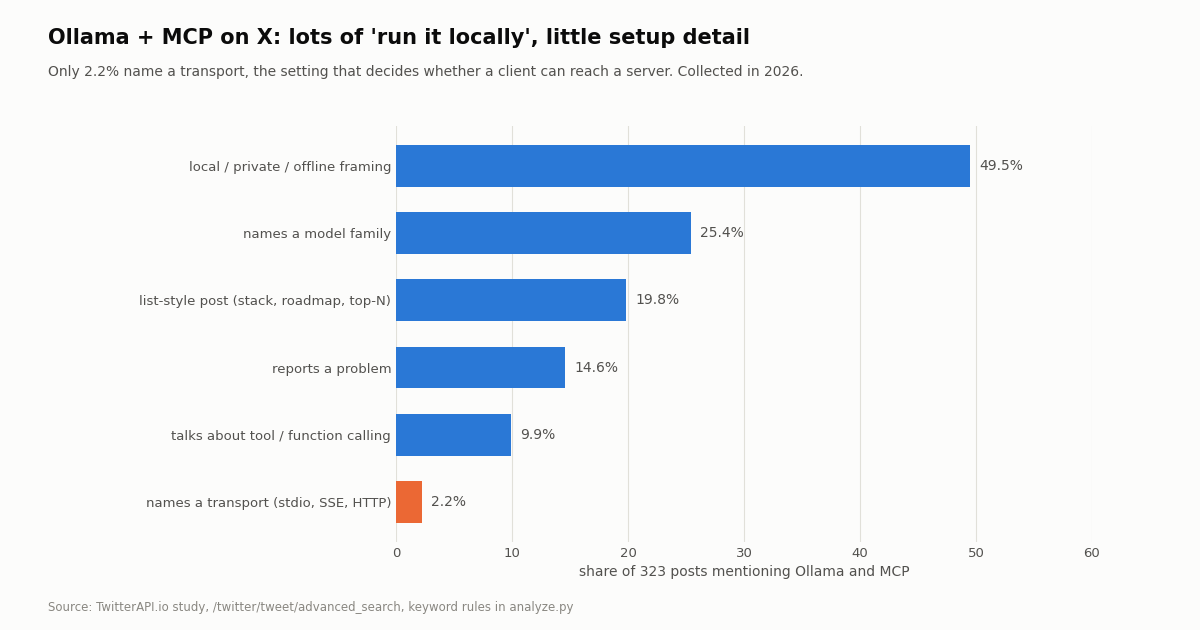
Ollama is usually one item in a larger stack. 41.8% of the MCP posts also name Claude and 19.8% are list-style posts (tech stacks, roadmaps, top-N repos). 49.5% use local, private, offline or self-hosted framing, which is the reason people reach for Ollama in the first place.
Setup detail is rare. Only 3 posts name a dedicated Ollama MCP client (ollmcp or mcphost), 2.2% name a transport, and 25.4% name any model family. 14.6% read like a problem report (errors, failures, things not working). That gap is why this page leads with exact configs and the transport rule.
The Ollama account itself rarely talks about MCP. In the most recent 200 posts on @ollama (118 own posts and 82 reposts over about 150 days), 1 own post mentions MCP, while 29.7% mention Ollama Cloud and 28.0% announce a model you can run. Ollama's own messaging is about models and launch integrations, consistent with MCP living in the client layer.
What an Ollama agent session costs when the tools fetch X data
The model runs on your machine, so Ollama itself adds no per-token bill. The cost sits in the tools. With the TwitterAPI.io MCP server or the REST endpoints, tweet tools cost 15 credits per tweet returned ($0.15 per 1,000 tweets), with a minimum of 15 credits per request, so a search that finds nothing costs $0.00015 and a full page of 20 tweets costs $0.003. Profiles cost 18 credits per user ($0.18 per 1,000). For comparison, X's official pay-per-usage rate card at docs.x.com/x-api/getting-started/pricing lists $0.005 per post read and $0.010 per user read.
Per 1,000 tweets that is $0.15 against $5, roughly 33 times less on the TwitterAPI.io price list than on X's published rate card. X's pay-per-usage plan is capped at 3 million post reads a month with Enterprise above that. New TwitterAPI.io accounts that pass the automatic bot check get up to $1 of free credits (at most 100,000 credits, no card, one per person or network, expiring after 31 days); purchased credits never expire. Before the first payment the rate limit is 0.2 requests per second, which is enough for an interactive chat but not for a fast agent loop; it rises to 20 once paid. Reads need no X account.
Keep tool calls cheap. Small local models sometimes call the same search twice or page further than needed. Cap pages per tool call (the example uses one page), cap rounds, and log every call. Our own study used 63 requests and 1,143 tweets, about $0.17 in total.
How we collected this
Question. When people on X talk about using MCP with Ollama, which clients, models and transports do they name, and how often do they report problems? And how often does the official @ollama account mention MCP?
Sources and queries. Three X searches through /twitter/tweet/advanced_search (two Latest, one Top): Ollama with MCP or "model context protocol"; Ollama with tool calling, function calling, agent or MCP; and Ollama MCP, ollmcp or "mcp server". Retweets excluded, duplicates removed by post ID. Plus the latest 200 posts on the @ollama timeline via /twitter/user/last_tweets.
Sample and window. 725 unique search posts, of which 323 mention MCP, from 255 authors; most are from the days before collection, while the Top query reaches further back. The @ollama sample covers about 150 days. Collected in 2026; 63 requests, 1,143 tweets returned.
Method. Case-insensitive keyword rules (published in analyze.py and results.json) for clients, models, runtimes, transports and themes. A post can match several rules. Shares are of the MCP subset.
What the sample cannot show. Keyword rules miss posts that describe a tool without naming it and count posts that name a client in passing; problem reports are a text signal, not a measured failure rate. X posts skew toward promotion and lists, so they show what is talked about, not what is installed. We did not run any of the clients or measure tool-calling accuracy per model.
Privacy. Aggregates only. Raw search pages were kept out of the repository; the published sample has no post IDs, URLs, text or handles. Only the organization account @ollama is named.
import json
import requests

OLLAMA = "http://localhost:11434"
BASE = "https://api.twitterapi.io"
HEADERS = {"X-API-Key": "your_key_here"}
MODEL = "qwen3"  # any Ollama model with tool support


def ollama_chat(messages, tools):
    """One non-streaming /api/chat round; returns the assistant message."""
    r = requests.post(f"{OLLAMA}/api/chat", json={
        "model": MODEL, "messages": messages, "tools": tools, "stream": False}, timeout=300)
    r.raise_for_status()
    return r.json()["message"]


def search_tweets(query, max_pages=1):
    """Recent posts for an X search query; 15 credits per tweet returned."""
    rows, cursor = [], ""
    for _ in range(max_pages):
        r = requests.get(f"{BASE}/twitter/tweet/advanced_search", headers=HEADERS,
                         params={"query": query, "queryType": "Latest", "cursor": cursor}, timeout=30)
        r.raise_for_status()
        body = r.json()
        for t in body.get("tweets", []):
            rows.append({"text": t["text"], "createdAt": t["createdAt"],
                         "likeCount": t["likeCount"], "author": t["author"]["userName"]})
        if not body.get("has_next_page"):
            break
        cursor = body.get("next_cursor", "")
    return rows


def get_user_info(userName):
    """One profile; 18 credits per user."""
    r = requests.get(f"{BASE}/twitter/user/info", headers=HEADERS,
                     params={"userName": userName}, timeout=30)
    r.raise_for_status()
    body = r.json()
    if body.get("status") == "error":
        return {"error": body.get("msg")}
    d = body["data"]
    return {k: d.get(k) for k in ("userName", "name", "followers", "following",
                                  "statusesCount", "createdAt", "isBlueVerified")}


TOOLS = [
    {"type": "function", "function": {
        "name": "search_tweets",
        "description": "Search recent X (Twitter) posts. Supports operators like from:, lang:, since_time:.",
        "parameters": {"type": "object", "properties": {"query": {"type": "string"}}, "required": ["query"]}}},
    {"type": "function", "function": {
        "name": "get_user_info",
        "description": "Profile of an X account by handle, without the @.",
        "parameters": {"type": "object", "properties": {"userName": {"type": "string"}}, "required": ["userName"]}}},
]
IMPL = {"search_tweets": search_tweets, "get_user_info": get_user_info}


def chat(prompt, max_turns=5):
    messages = [{"role": "user", "content": prompt}]
    for _ in range(max_turns):
        msg = ollama_chat(messages, TOOLS)
        messages.append(msg)
        calls = msg.get("tool_calls") or []
        if not calls:
            return msg.get("content", "")
        for call in calls:
            name = call["function"]["name"]
            args = call["function"].get("arguments") or {}
            if isinstance(args, str):
                args = json.loads(args)
            fn = IMPL.get(name)
            result = fn(**args) if fn else {"error": f"unknown tool {name}"}
            messages.append({"role": "tool", "tool_name": name,
                             "content": json.dumps(result)[:8000]})
    return "Stopped after max_turns tool rounds."


if __name__ == "__main__":
    print(chat("Summarize what people on X said about Ollama and MCP in the last day. "
               "Use search_tweets with: ollama mcp -filter:retweets"))
Researching this?Free starter credits cover end-to-end testing — Google sign-in, no card. Get a key.
Questions readers ask
Does Ollama support MCP natively?
No. Ollama supports tool calling on /api/chat (a tools array in, message.tool_calls out), but it does not include an MCP client, and its release notes through v0.40.16 do not mention MCP. You add a client such as ollmcp or Open WebUI, or write a small loop, to connect an Ollama model to MCP servers.
What is the difference between an Ollama MCP server and an Ollama MCP client?
An Ollama MCP client lets an Ollama model use tools from MCP servers (ollmcp, Open WebUI, mcphost). An "Ollama MCP server" usually means the reverse: a server that exposes your local Ollama models as tools to another assistant, such as Claude Desktop. Check the README before installing.
Which Ollama models work with MCP tools?
Any model that supports tool calling in Ollama; the Ollama tool-calling docs use qwen3 in every example. Open WebUI's MCP docs say tools need a model with reliable native tool calling. In the X posts we studied, Qwen and DeepSeek were the most named model families. Smaller models choose tools less reliably, so keep the tool list short.
Can I use a stdio MCP server with Open WebUI and Ollama?
Not directly. Open WebUI's native MCP support is Streamable HTTP only, per its docs. For stdio or SSE servers the docs recommend the mcpo proxy, which exposes them as OpenAPI endpoints. ollmcp, by contrast, supports stdio, SSE and Streamable HTTP.
Is mcphost still a good choice for Ollama?
Its GitHub repository is archived and says it will not receive further updates or bug fixes; it points to its successor, Kit. Existing setups keep working, but for a new setup ollmcp, Open WebUI or your own loop are the maintained options.
How do I give a local Ollama model live Twitter (X) data?
Add the remote MCP server https://mcp.twitterapi.io/mcp to your client with an Authorization: Bearer <your key> header, or call the REST endpoints such as /twitter/tweet/advanced_search from your own tool loop with the X-API-Key header. Tweets cost $0.15 per 1,000 returned; no X account is needed for reads.
Does Ollama itself cost anything when the model calls tools?
Running a model locally with Ollama has no per-token API fee; you pay for your own hardware. Tools that call paid APIs bill on their side: for X data through TwitterAPI.io that is 15 credits per tweet returned, with a 15-credit minimum per request.
Why does my Ollama model ignore the MCP tools?
The usual causes are a model without tool support, a client that never connected (transport mismatch or a missing Authorization header), or vague tool descriptions. Check the client's tool list first, then test with a direct prompt that names the tool, then switch to a stronger tool-calling model.
Continue
- Ollama release notes (GitHub)
- Ollama docs: tool calling
- ollmcp (mcp-client-for-ollama) README
- Open WebUI docs: MCP support
- mcphost repository (archived)
- X API pricing (docs.x.com)
- X (Twitter) API guides and endpoints
- what an MCP server is: hosts, clients and transports
- build your own MCP server
- debug MCP servers with MCP Inspector
- how to build an AI agent step by step
- the TwitterAPI.io MCP server setup for X data
- TwitterAPI.io pricing per tweet and per profile
- 01PhantomBuster Pricing: Plans, Execution Hours and What X (Twitter) Data Really Costs
- 02Sprinklr Pricing: What It Costs Now That Self-Serve Has Ended
- 03Goose MCP: How to Add MCP Servers (Extensions) to goose, Desktop and CLI
- 04ChatGPT Apps SDK Tutorial: Build a ChatGPT App That Answers With Live Twitter (X) Data
- 05LM Studio MCP: Connect MCP Servers (and Live Twitter (X) Data) to a Local Model
- 06Chrome DevTools MCP Server: What It Is, Setup, Tools and Flags (2026)
- 07ChatGPT MCP: how to add an MCP server to ChatGPT
- 08Browser Use MCP Server: Setup, CLI and Twitter (X) Reads in 2026
Writing about something you built with TwitterAPI.io? Our community rewards program pays API credits for honest tutorials, build logs and videos.
Stop reading. Start building.
Starter credits cover real testing on real data. Google sign-in, no card, no application queue.
Get an API keyAlready building with TwitterAPI.io? Publish an honest tutorial or build log about it and earn up to $200 a month in API credits.