ChatGPT Apps SDK Tutorial: Build a ChatGPT App That Answers With Live Twitter (X) Data
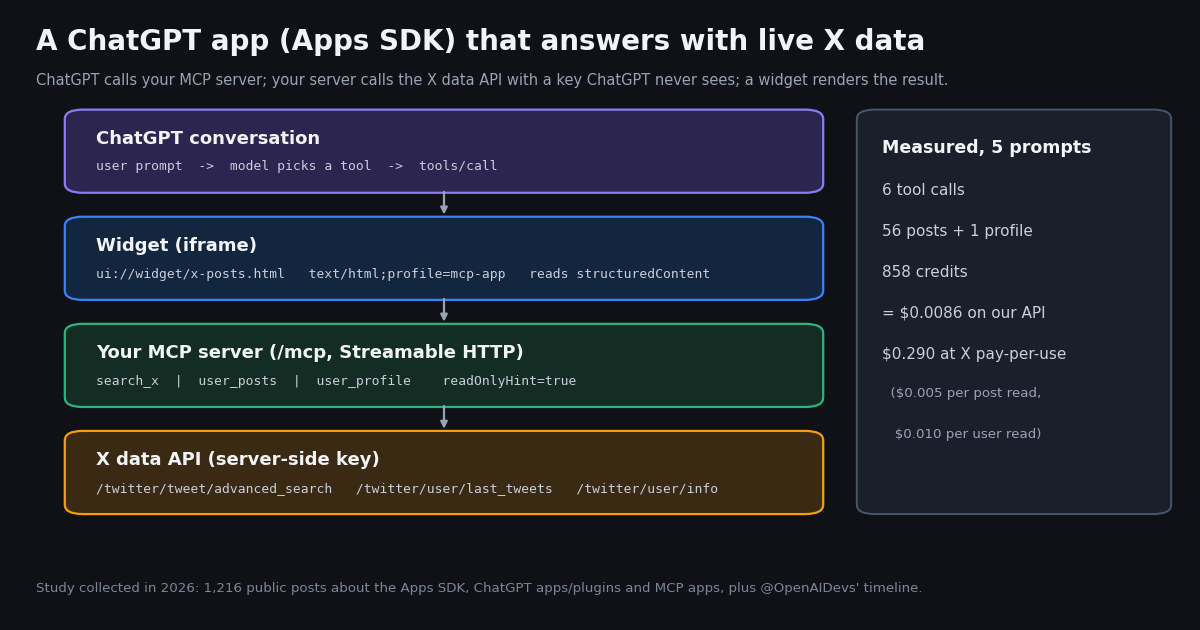
- Apps SDK = MCP server + optional widget. Tools are MCP tools with
inputSchemaand annotations; the widget is atext/html;profile=mcp-appresource on aui://URI, linked with_meta.ui.resourceUri. - The naming moved. OpenAI's developer docs at
developers.openai.com/apps-sdkare now titled Plugins, and the connect flow ends in a button called "Create as a plugin". The code you write is the same MCP server. - Keep the X key on your server. ChatGPT only ever sees your
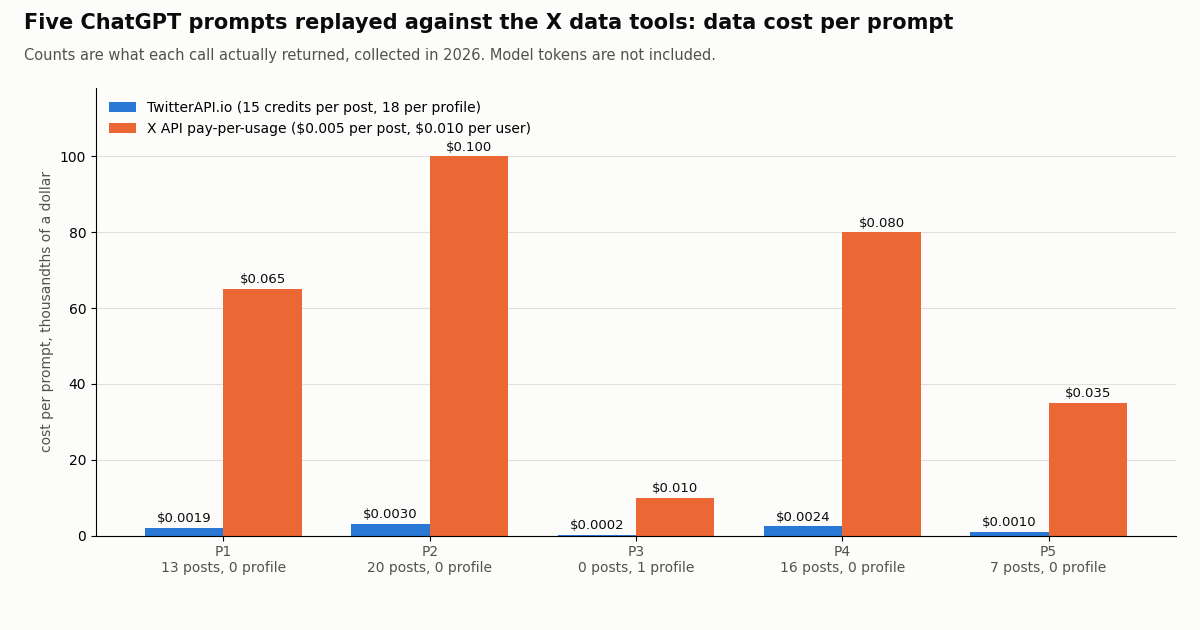
/mcpendpoint; the server addsX-API-Keywhen it callsapi.twitterapi.io, and OpenAI's docs say to keep secrets out of tool metadata and results. - Data cost per prompt is tiny when you return one page. Five replayed prompts used 858 credits in total ($0.0086); a full 20-post page is $0.003, a profile is 18 credits.
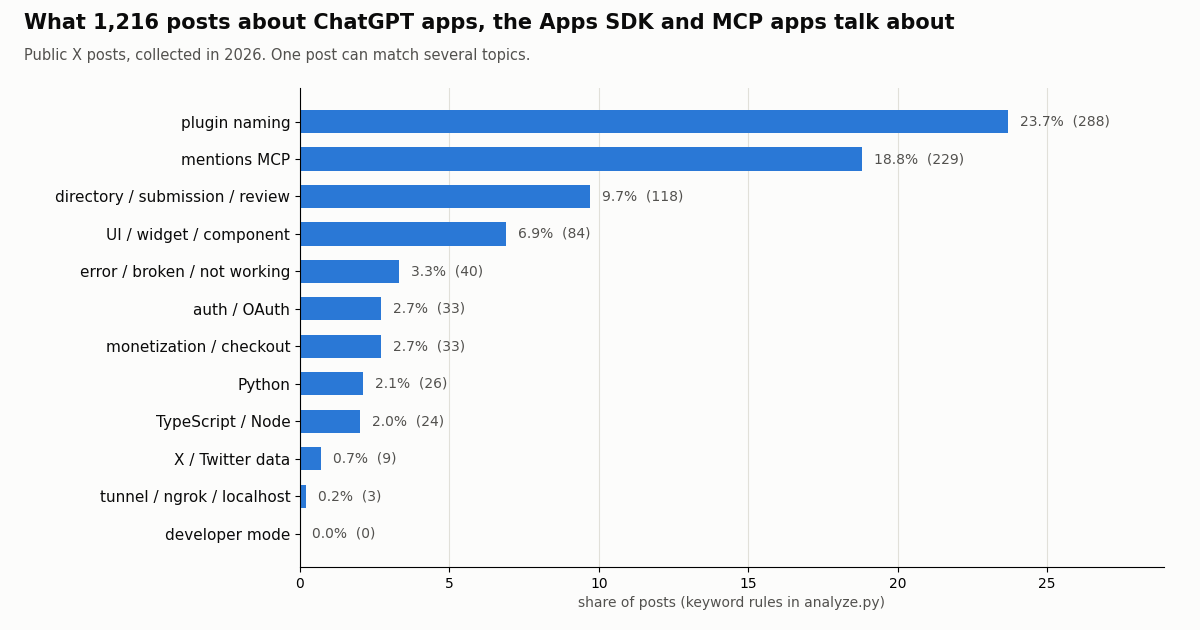
- Builders talk about MCP and naming, not X data. In 1,216 recent posts about the Apps SDK, ChatGPT apps/plugins and MCP apps, 23.7% use the word plugin, 18.8% mention MCP and only 0.7% mention Twitter or X data.
- Test before you submit. Run the MCP Inspector over Streamable HTTP, tunnel with ngrok, connect in ChatGPT, then submit on the Plugins page with five positive and three negative test cases, as OpenAI's submission guide requires.
Most Apps SDK tutorials stop at a to-do list or a pizza map. This one builds something people actually ask ChatGPT for: "what are people on X saying about this?", answered from live posts, rendered as cards, with the data bill measured per prompt. Every API detail below was checked against OpenAI's developer docs and its openai-apps-sdk-examples repository this year, and every number comes from a study we ran on public X data.
If you only want to use X data inside ChatGPT, you do not need to build anything: our ChatGPT MCP guide shows how to add an existing MCP server in Developer mode. Our OpenAI Agents SDK guide covers a different product, Python agents with @function_tool, and our Agent Builder guide covers OpenAI's visual workflow tool. This page is for the developer who wants to ship their own ChatGPT app (now a plugin) with its own tools, its own widget and its own key handling.
858 credits ($0.0086) vs $0.29 at X pay-per-usage
What the ChatGPT Apps SDK is in 2026, and why the docs now say plugins
OpenAI introduced apps in ChatGPT and the Apps SDK in October 2025 as a developer preview built on MCP, as its announcement and contemporaneous coverage reported. The architecture has not changed since: ChatGPT is an MCP client, your app is an MCP server, and the interface is an HTML component that ChatGPT loads into an iframe next to the answer.
What has changed is the vocabulary. The docs hub at developers.openai.com/apps-sdk is now titled Plugins and describes how to "build and publish plugins with skills, MCP servers, and optional UI". The connect guide sends you to ChatGPT Plugins (chatgpt.com/plugins), where you choose "Add custom MCP server" and finish with "Create as a plugin". Submission happens on a Plugins page on platform.openai.com. The URLs still contain apps-sdk, which is why most people, and most search results, still say Apps SDK.
MCP Apps is the shared standard underneath. OpenAI's page on MCP Apps in ChatGPT says ChatGPT implements the open MCP Apps standard, which defines how a server associates tools with UI resources and how the iframe talks to its host. UI resources use the MIME type text/html;profile=mcp-app, a tool points at its UI with _meta.ui.resourceUri, and ChatGPT still honors the older _meta["openai/outputTemplate"] key as a compatibility alias.
What is ChatGPT-only. The window.openai object adds extras the shared spec does not cover, such as requestCheckout, uploadFile, requestModal and setWidgetState, plus legacy aliases (toolOutput, callTool, sendFollowUpMessage). OpenAI's advice is to feature-detect rather than branch on the host name.
The app we are building, and the no-code alternative
The app answers three kinds of questions with live data. search_x runs an X search with the operators people already know (from:, since_time:, min_faves:, lang:) through /twitter/tweet/advanced_search. user_posts reads the newest posts of one account through /twitter/user/last_tweets. user_profile reads a profile through /twitter/user/info. The two post tools render as cards in a widget; the profile tool returns plain structured data that the model summarizes in text.
Why a REST API behind the tools. The X data calls need no X account, no OAuth app and no developer approval: one X-API-Key header on https://api.twitterapi.io. Search returns up to 20 posts per page with has_next_page and next_cursor; a profile lookup for an unknown handle comes back as HTTP 200 with status: "error" and msg: "user not found", which the tool turns into a clean error object instead of an exception.
Why only one page per tool call. A chat answer rarely needs more than 20 posts, and the model can call the tool again with a narrower query. Returning one page keeps the widget readable, the model context small and the data cost at most $0.003 (a full 20-post page). If you need deeper pulls, add a cursor argument and let the model request the next page explicitly.
Annotations matter. All three tools set readOnlyHint: true, destructiveHint: false and openWorldHint: true (they read the public internet). OpenAI's MCP server guide defines those hints, and the official Python example sets read-only annotations on its widget tools.
The no-code alternative: a hosted X MCP server. If you do not need your own widget, you can skip the server entirely. Our hosted MCP server at https://mcp.twitterapi.io/mcp exposes 12 read-only X tools, among them search_tweets, get_user_info, get_user_last_tweets, get_user_mentions, get_tweet_replies and get_trends. Our ChatGPT MCP guide walks through adding it as a custom MCP server with OAuth sign-in.
Pricing is the same either way. Both routes call the same endpoints and pay only for the data returned: $0.15 per 1,000 posts, $0.18 per 1,000 profiles. New accounts that pass the automatic bot check get up to $1 of free credits (at most 100,000 credits, no card, one per person or network, expiring after 31 days). The request rate is 0.2 requests per second before the first payment and 20 once paid, so a shared public app needs a paid account before real traffic.
Step 1: the MCP server in Python
OpenAI's build guide names the official MCP SDKs: @modelcontextprotocol/sdk for TypeScript and mcp for Python. Its own Python examples (pizzaz_server_python in github.com/openai/openai-apps-sdk-examples, MIT licensed) use FastMCP from mcp.server.fastmcp with stateless_http=True, register tools and resources through the low-level handlers, and serve mcp.streamable_http_app() with uvicorn. The server below follows that pattern exactly, with X data instead of pizza.
Three details to copy. First, the X key is read from an environment variable and only ever sent to api.twitterapi.io; ChatGPT never sees it. Second, each tool result carries a short content text for the model and the posts in structuredContent, which both the model and the widget can read. Third, failures come back as isError: true with a readable message, so a bad handle does not end the conversation.
Python example vs current docs. The repository's Python example still declares its widget as text/html+skybridge with openai/outputTemplate; the current MCP Apps page uses text/html;profile=mcp-app with _meta.ui.resourceUri. The full server in the code block at the end of this page uses the current MIME type and sets both keys, so it works with either convention.
# The three X calls behind the tools (excerpt of server.py, full file at the end)
import os, requests

BASE = "https://api.twitterapi.io"
HEADERS = {"X-API-Key": os.environ["TWITTERAPI_KEY"]}

def search_x(query, sort="Latest"):
    r = requests.get(f"{BASE}/twitter/tweet/advanced_search", headers=HEADERS,
                     params={"query": query, "queryType": sort}, timeout=30)
    r.raise_for_status()
    return r.json().get("tweets", [])          # top-level tweets[], up to 20

def user_posts(userName):
    r = requests.get(f"{BASE}/twitter/user/last_tweets", headers=HEADERS,
                     params={"userName": userName}, timeout=30)
    r.raise_for_status()
    return (r.json().get("data") or {}).get("tweets", [])   # data.tweets[]

def user_profile(userName):
    r = requests.get(f"{BASE}/twitter/user/info", headers=HEADERS,
                     params={"userName": userName}, timeout=30)
    body = r.json()
    return None if body.get("status") == "error" else body["data"]
Step 2: the widget that renders posts inside ChatGPT
The widget is a single HTML file, the same shape as the one in OpenAI's quickstart (public/todo-widget.html, no build step). The server registers it as a resource on ui://widget/x-posts-v1.html with MIME type text/html;profile=mcp-app, and each post tool points at it with _meta.ui.resourceUri. When the tool returns, ChatGPT loads the widget and sends the result over the bridge as a ui/notifications/tool-result message; the widget reads structuredContent.posts and draws one card per post.
Treat the URI as a cache key. OpenAI's MCP Apps page says to publish a new resource URI after breaking changes, because ChatGPT caches by URI. That is why the example ends in -v1.
Keep the payload small. The tool trims each post to id, url, text, time, author handle and four counters. Raw X objects carry nested authors, media variants and quoted posts; sending them through structuredContent would fill the model context with data nobody asked for.
Handshake. The quickstart widget performs the ui/initialize handshake before it renders; copy that part from OpenAI's quickstart rather than writing your own, since the bridge is a versioned protocol.
<!-- x-posts.html: rendered by ChatGPT in a sandboxed iframe -->
<div id="root" style="font:14px system-ui;display:grid;gap:8px"></div>
<script>
  // MCP Apps bridge: JSON-RPC over postMessage. Follow the quickstart widget
  // for the ui/initialize handshake; this part only renders tool results.
  function render(sc) {
    const root = document.getElementById("root");
    const posts = (sc && sc.posts) || [];
    root.replaceChildren(...posts.map((p) => {
      const card = document.createElement("a");
      card.href = p.url; card.target = "_blank";
      card.style.cssText = "display:block;padding:10px;border:1px solid #ddd;border-radius:10px;text-decoration:none";
      card.textContent = "@" + p.author + ": " + p.text + "  (" + p.likes + " likes, " + p.views + " views)";
      return card;
    }));
  }
  window.addEventListener("message", (e) => {
    const msg = e.data;
    if (msg && msg.method === "ui/notifications/tool-result") render(msg.params && msg.params.structuredContent);
  });
</script>Step 3: test locally, then connect it in ChatGPT
Run it. Install mcp[fastapi], uvicorn and requests (the official example's requirements.txt lists fastapi>=0.115.0, mcp[fastapi]>=0.1.0 and uvicorn>=0.30.0), set TWITTERAPI_KEY, and start uvicorn server:app --port 8000. The MCP endpoint is http://localhost:8000/mcp.
Inspect it. OpenAI's build guide uses the MCP Inspector: run npx @modelcontextprotocol/inspector, choose Streamable HTTP, enter your local /mcp URL and check the tool list, schemas, annotations and a real call. Do this before ChatGPT, because the Inspector shows raw JSON-RPC errors that ChatGPT hides.
Expose it. ChatGPT needs a public HTTPS URL. The quickstart uses ngrok http <port> and appends /mcp to the forwarding URL. The connect guide also offers a Secure MCP Tunnel option for private servers.
Connect it. Per OpenAI's connect guide: open ChatGPT Plugins at chatgpt.com/plugins, select the plus button, choose "Add custom MCP server", enter a name and description, paste the URL including /mcp, configure authentication, accept the risk warning and select "Create as a plugin". Then open a new chat, type @ and pick the plugin. After you change tools, redeploy, open the connection and select Refresh, then start a new conversation. The guide adds that account and workspace policies apply to custom MCP servers, so what you see depends on your plan and admin settings.
Authentication for this app. The app reads only public X data and holds one server-side key, so the first version can run without user sign-in. Add OAuth 2.1, as OpenAI's guide recommends, the moment a tool reads private data or acts for a specific user, and enforce authorization in the server on every request rather than trusting the model.
Five real prompts: tool calls, results and data cost
We replayed five prompts a user of this app might type and ran the exact calls the tools would make, one page each, then priced what came back. Credits follow the published rate: 15 credits per post returned (minimum 15 per request) and 18 per profile; $1 = 100,000 credits. The last column prices the same reads on X's pay-per-usage rate card at docs.x.com/x-api/getting-started/pricing ($0.005 per post read, $0.010 per user read). Model tokens are not included in either column.
What this means for a budget. Per 1,000 posts returned, our API charges $0.15 and X's pay-per-usage card charges $5, about 33 times more on X's own rate card. Note that X caps pay-per-usage at 3 million post reads a month and moves larger volumes to Enterprise. The biggest lever in a chat app is not the price but the page count: a prompt that triggers one page costs at most $0.003 in data, a prompt that makes the model paginate five times costs five times that.
Empty searches still cost the minimum. A search that finds nothing is billed the 15-credit minimum ($0.00015), so tell the model in the tool description to widen a query that returned nothing instead of retrying the same one.
What builders post about ChatGPT apps, plugins and MCP apps
To see where builders get stuck, we collected 1,216 recent public X posts from 1,034 distinct accounts that mention the Apps SDK, ChatGPT apps or plugins, or MCP apps, and tagged each post with transparent keyword rules (published in the study's analyze.py). One post can match several topics.
The rename is the conversation. The word plugin appears in 23.7% of posts, more than MCP (18.8%). Directory, submission and review talk shows up in 9.7%. Widgets and UI appear in 6.9% overall and in 25.8% of the posts that mention MCP, which matches how the docs frame MCP Apps: tools plus an interface.
Very few builders connect it to X data. Only 9 posts (0.7%) mention Twitter, X or tweets, so a ChatGPT app that answers with live X data is still an open niche rather than a crowded category. Error reports are a small share (3.3%), and auth / OAuth comes up in 2.7%.
Volume. The exact phrase "apps sdk" with lang:en returned only 40 posts across about 82 days, while "chatgpt app" / "chatgpt apps" ran at about 60 posts a day and "chatgpt plugin" / "chatgpt plugins" at about 36. In other words, people search for the SDK by name, but they talk about the apps and plugins.
OpenAI's own developer account. The last 200 posts on @OpenAIDevs covered about 39 days (5.1 a day), and 160 of the 200 were reposts. 38.5% mention Codex, 6.0% mention plugins, 1.5% mention MCP and 1 mentions the Apps SDK or apps in ChatGPT by name. Follow the docs changelog, not the timeline, for API changes.
Submitting the app: what OpenAI's review asks for
Testing in your own ChatGPT is enough for a private tool. To list the app publicly, OpenAI's submission guide routes you to the Plugins page on platform.openai.com, where a remote MCP server is submitted through the "With MCP" option with a stable, public HTTPS endpoint.
Who can submit. Organization owners, or members with the Apps Management Write role, after individual or business verification in the organization settings.
What reviewers need. Four HTTPS listing URLs (website, support, privacy policy, terms of service), a demo video, test credentials that work without MFA or email codes if the app has sign-in, and, for the initial MCP app review, exactly five positive and three negative test cases. The five prompts in the table above make a reasonable positive set; good negative cases are a prompt that should not call any X tool, an unknown handle and a request to post (this app is read-only).
Limits worth knowing. The guide says only one review can be active per plugin, only one MCP server can be connected per plugin, public submission rejects nonempty server headers, and hosted MCP servers are scanned daily, with eligible tool updates going live after automated checks. The nonempty-headers rule is one more reason to keep the X key on your server instead of asking users to paste it into a header.
If your app should also write. Our API offers write actions too, through an authenticated session: one /twitter/user_login_v2 login ($0.10, with a proxy you supply) returns login_cookies, then each post, like, follow or DM call (/twitter/create_tweet_v2, /twitter/follow_user_v2, ...) is 60 credits ($0.0006), billed per HTTP 200 call. The call acts as that account, so X can rate-limit, lock or suspend it; keep a human pace and expect to log in again when the session expires. In a ChatGPT app, mark such tools readOnlyHint: false so ChatGPT asks the user before it runs them.
How we collected this
Question. What do people post about building ChatGPT apps with the Apps SDK (now plugins), and what does a ChatGPT app that answers with X data cost per prompt?
Accounts and queries. Five X searches with queryType=Latest ("apps sdk"; "chatgpt app" or "chatgpt apps"; "chatgpt plugin" or "chatgpt plugins"; "mcp apps" or "mcp app"; "apps sdk" or "app sdk" with chatgpt or openai), reposts excluded, deduplicated to 1,216 posts; the last 200 posts of the organization account @OpenAIDevs; and the six calls behind the five prompts in the cost table.
Window. The most recent matching posts at collection time, collected in 2026. Busy queries cover a few days; the narrow "apps sdk" query reaches back about three months.
Method. Read-only API calls through a rate-limited client; topics assigned by case-insensitive regular expressions over the post text; prices computed from returned counts with the published per-result rates.
What the sample cannot show. Keyword rules miss sarcasm and context, and "chatgpt app" also matches posts about the ChatGPT mobile app, so topic shares are a rough map, not a census. Search results are what the search returns at a moment in time, not every post. The prompt replay prices data only; ChatGPT's own model usage and any hosting are extra, and a model may call a tool more or fewer times than our replay did.
Privacy. Aggregates only. Raw search pages were kept outside the repository and the published sample has no ids, URLs, text or handles; only the organization account @OpenAIDevs is named.
# server.py - a ChatGPT app (Apps SDK / MCP Apps) that answers with live X data.
# pip install "mcp[fastapi]" uvicorn requests      (Python 3.10+)
# TWITTERAPI_KEY=... uvicorn server:app --port 8000   -> http://localhost:8000/mcp
import os
from pathlib import Path

import requests
import mcp.types as types
from mcp.server.fastmcp import FastMCP

BASE = "https://api.twitterapi.io"
HEADERS = {"X-API-Key": os.environ["TWITTERAPI_KEY"]}  # stays on the server, never sent to ChatGPT
WIDGET_URI = "ui://widget/x-posts-v1.html"             # the URI is a cache key: bump v1 on breaking changes
WIDGET_MIME = "text/html;profile=mcp-app"              # MCP Apps UI resource type
WIDGET_HTML = Path(__file__).with_name("x-posts.html").read_text(encoding="utf8")

mcp = FastMCP(name="x-data-app", stateless_http=True)

TOOL_META = {"ui": {"resourceUri": WIDGET_URI}, "openai/outputTemplate": WIDGET_URI}
READ_ONLY = {"readOnlyHint": True, "destructiveHint": False, "openWorldHint": True}

TOOLS = [
    types.Tool(
        name="search_x",
        title="Search X posts",
        description="Use when the user asks what people on X (Twitter) say about a topic. "
                    "Accepts X search operators such as from:, since_time:, min_faves:, lang:.",
        inputSchema={"type": "object", "additionalProperties": False, "required": ["query"],
                     "properties": {"query": {"type": "string"},
                                    "sort": {"type": "string", "enum": ["Latest", "Top"]}}},
        annotations=READ_ONLY, _meta=TOOL_META),
    types.Tool(
        name="user_posts",
        title="Latest posts of an X account",
        description="Use when the user asks for the recent posts of one X account (handle without @).",
        inputSchema={"type": "object", "additionalProperties": False, "required": ["userName"],
                     "properties": {"userName": {"type": "string"}}},
        annotations=READ_ONLY, _meta=TOOL_META),
    types.Tool(
        name="user_profile",
        title="X account profile",
        description="Use when the user asks who an X account is, its bio or follower count.",
        inputSchema={"type": "object", "additionalProperties": False, "required": ["userName"],
                     "properties": {"userName": {"type": "string"}}},
        annotations=READ_ONLY),
]


def slim(t):
    a = t.get("author") or {}
    return {"id": t["id"], "url": t.get("url"), "text": t.get("text", "")[:400],
            "createdAt": t.get("createdAt"), "author": a.get("userName"),
            "likes": t.get("likeCount", 0), "reposts": t.get("retweetCount", 0),
            "replies": t.get("replyCount", 0), "views": t.get("viewCount", 0)}


def search_x(query, sort="Latest"):
    r = requests.get(f"{BASE}/twitter/tweet/advanced_search", headers=HEADERS,
                     params={"query": query, "queryType": sort}, timeout=30)
    r.raise_for_status()
    return [slim(t) for t in r.json().get("tweets", [])]   # one page = up to 20 posts


def user_posts(userName):
    r = requests.get(f"{BASE}/twitter/user/last_tweets", headers=HEADERS,
                     params={"userName": userName}, timeout=30)
    r.raise_for_status()
    return [slim(t) for t in (r.json().get("data") or {}).get("tweets", [])]


def user_profile(userName):
    r = requests.get(f"{BASE}/twitter/user/info", headers=HEADERS,
                     params={"userName": userName}, timeout=30)
    r.raise_for_status()
    body = r.json()
    if body.get("status") == "error":            # unknown handle: HTTP 200 with msg
        return {"error": body.get("msg")}
    d = body["data"]
    return {k: d.get(k) for k in ("userName", "name", "description", "followers",
                                  "following", "statusesCount", "createdAt", "isBlueVerified")}


@mcp._mcp_server.list_tools()
async def list_tools():
    return TOOLS


@mcp._mcp_server.list_resources()
async def list_resources():
    return [types.Resource(name="X posts widget", uri=WIDGET_URI, mimeType=WIDGET_MIME)]


async def read_resource(req: types.ReadResourceRequest):
    return types.ServerResult(types.ReadResourceResult(contents=[
        types.TextResourceContents(uri=WIDGET_URI, mimeType=WIDGET_MIME, text=WIDGET_HTML)]))


async def call_tool(req: types.CallToolRequest):
    args, name = req.params.arguments or {}, req.params.name
    try:
        if name == "search_x":
            data = {"posts": search_x(args["query"], args.get("sort", "Latest"))}
        elif name == "user_posts":
            data = {"posts": user_posts(args["userName"])}
        elif name == "user_profile":
            data = {"profile": user_profile(args["userName"])}
        else:
            raise ValueError(f"unknown tool {name}")
    except Exception as exc:  # report, do not crash the session
        return types.ServerResult(types.CallToolResult(
            content=[types.TextContent(type="text", text=f"X data error: {exc}")], isError=True))
    n = len(data.get("posts", [])) if "posts" in data else 1
    return types.ServerResult(types.CallToolResult(
        content=[types.TextContent(type="text", text=f"{name} returned {n} result(s).")],
        structuredContent=data))


mcp._mcp_server.request_handlers[types.CallToolRequest] = call_tool
mcp._mcp_server.request_handlers[types.ReadResourceRequest] = read_resource
app = mcp.streamable_http_app()
Researching this?Free starter credits cover end-to-end testing — Google sign-in, no card. Get a key.
Questions readers ask
Is the ChatGPT Apps SDK the same as plugins now?
The code is the same MCP server, and OpenAI's developer docs at developers.openai.com/apps-sdk are now titled Plugins: a plugin can bundle skills, an MCP server and optional UI. The connect flow ends with "Create as a plugin" and submission happens on the Plugins page. Most people still call it the Apps SDK, and the docs URLs keep that name.
Do I need to know MCP to use the Apps SDK?
Yes, at a basic level. An app is an MCP server: you declare tools with JSON input schemas and return results with content, structuredContent and optional _meta. The official TypeScript (@modelcontextprotocol/sdk) and Python (mcp) SDKs handle the protocol; the widget part follows the MCP Apps standard.
Can I build a ChatGPT app in Python?
Yes. OpenAI's examples repository includes several Python servers, such as pizzaz_server_python and kitchen_sink_server_python, built on FastMCP from the mcp package and served with uvicorn on Python 3.10 or newer. The widgets are plain HTML and JavaScript either way.
How does the widget get the tool result?
ChatGPT renders the widget in an iframe and sends the tool result over a JSON-RPC postMessage bridge as ui/notifications/tool-result; the widget reads structuredContent from it. The older window.openai.toolOutput alias still works for existing integrations, but OpenAI recommends the shared MCP Apps fields for new UI.
How do I test my app in ChatGPT before publishing?
Expose your local server over HTTPS (for example with ngrok), then in ChatGPT Plugins choose Add custom MCP server, paste the URL ending in /mcp, configure authentication and select Create as a plugin. After code changes, select Refresh on the connection and start a new chat. Check the MCP Inspector first; it shows protocol errors more clearly.
Where do I put my Twitter (X) API key?
On your MCP server, in an environment variable, and nowhere else. ChatGPT only talks to your /mcp endpoint; the server adds the X-API-Key header when it calls api.twitterapi.io. OpenAI's guide says to keep secrets out of tool metadata and results, and public submission rejects nonempty server headers.
How much does live X data cost per ChatGPT prompt?
In our replay of five prompts the data cost was 858 credits in total ($0.0086), at 15 credits per post returned and 18 per profile. A full 20-post page is $0.003. The same reads on X's pay-per-usage card would cost $0.29. ChatGPT model usage is separate.
Can my ChatGPT app post to X as well as read?
It can, through an authenticated session on our API: a /twitter/user_login_v2 login ($0.10) and then 60 credits per write call such as /twitter/create_tweet_v2. The call acts as that account, which X can rate-limit, lock or suspend, so keep a human pace, mark the tool as not read-only and let ChatGPT confirm with the user first.
Continue
- OpenAI developer docs: Plugins (Apps SDK)
- OpenAI: MCP Apps in ChatGPT (MIME type, _meta keys, bridge)
- OpenAI: connect a server to ChatGPT
- OpenAI: plugin submission requirements
- openai/openai-apps-sdk-examples (MIT)
- X API pay-per-usage pricing
- Twitter (X) API overview: endpoints, pricing and use cases
- Add an MCP server to ChatGPT in Developer mode
- Connect ChatGPT to X (Twitter): MCP, Actions and function calling
- OpenAI Agents SDK with the Twitter (X) API
- Build your own MCP server step by step
- Hosted Twitter (X) MCP server with 12 read tools
- TwitterAPI.io pricing per 1,000 posts and profiles
- 01PhantomBuster Pricing: Plans, Execution Hours and What X (Twitter) Data Really Costs
- 02Sprinklr Pricing: What It Costs Now That Self-Serve Has Ended
- 03Goose MCP: How to Add MCP Servers (Extensions) to goose, Desktop and CLI
- 04LM Studio MCP: Connect MCP Servers (and Live Twitter (X) Data) to a Local Model
- 05Ollama MCP: How to Give a Local Model MCP Tools (with Live Twitter (X) Data)
- 06ChatGPT MCP: how to add an MCP server to ChatGPT
- 07Getting Real Political Data From Twitter (X)
- 08Claude Agent SDK: Build a Twitter (X) Research Agent in Python
Writing about something you built with TwitterAPI.io? Our community rewards program pays API credits for honest tutorials, build logs and videos.
Stop reading. Start building.
Starter credits cover real testing on real data. Google sign-in, no card, no application queue.
Get an API keyAlready building with TwitterAPI.io? Publish an honest tutorial or build log about it and earn up to $200 a month in API credits.