Build a Polymarket Bot That Tracks Twitter (X) Tweet-Count Markets
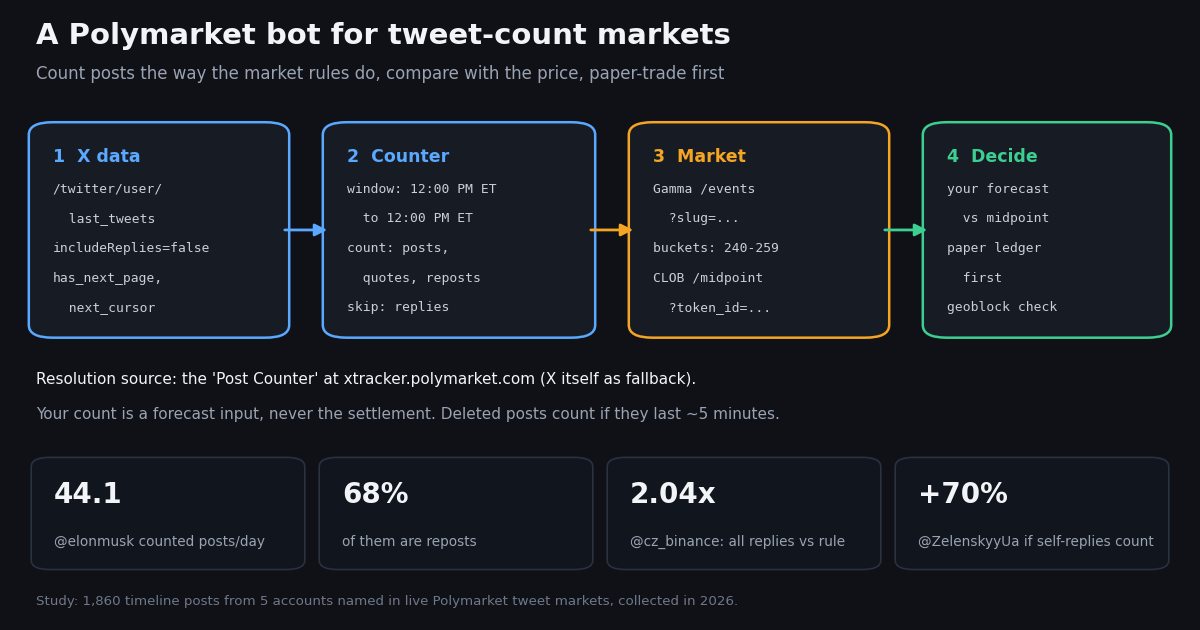
Most Polymarket bot tutorials stop at the plumbing: install a client, derive API credentials, post a limit order. That part is well documented by Polymarket itself and changes often, so this guide links to the source for it and spends its length on the part nobody pairs with the plumbing: the data the bot decides on. For one family of markets that data is unusually concrete. Polymarket runs recurring tweet-count markets, tagged Tweet Markets, that ask how many times @elonmusk, @cz_binance, @WhiteHouse, @ZelenskyyUa or @tedcruz will post on X between two 12:00 PM ET timestamps, split into count buckets such as 240-259.
A bot for those markets is a counter first and a trader second. If it counts what the rules count, it knows the running total before anyone has to guess it, and its forecast is only about the hours that remain. If it counts the wrong things, it is confidently wrong. We read the live rules, then pulled 1,860 recent posts from the five named accounts to measure how much the counting rule and the window length move the number. Everything below runs on public Polymarket reads plus twitterapi.io's user timeline endpoint, and the bot only writes to a paper ledger until you decide otherwise. For the regulated US exchange, see the sibling guide on building a Kalshi bot.
The Polymarket API map: Gamma, CLOB, Data API and the SDKs
Polymarket's own API page names four REST surfaces and four WebSocket channels. Each one does one job, and a tweet-market bot needs only two of them until it trades.
Authentication for orders has two layers. L1 is an EIP-712 signature over a ClobAuth typed-data message on chain ID 137 (Polygon), which proves you control the wallet and creates or derives API credentials. L2 signs each private request with those credentials using HMAC-SHA256. An order itself also carries a wallet signature, so a leaked API key alone cannot move funds, but a leaked private key can.
Which client library. Polymarket's SDK page now offers a unified TypeScript SDK (@polymarket/client) and a unified Python SDK published on PyPI as polymarket-client (source at github.com/Polymarket/py-sdk), with AsyncPublicClient and PublicClient for public data and AsyncSecureClient and SecureClient for trading. The long-standing py-clob-client repository is archived on GitHub, and the docs carry a migration guide from the legacy CLOB, relayer and builder-signing clients. Older tutorials that start with pip install py-clob-client still run against public endpoints, but new code should follow the unified SDK.
Fees are per market. Polymarket's fee page gives the taker fee as fee = C x feeRate x p x (1 - p), where C is shares and p is the price; makers are never charged. The live Elon Musk tweet markets we read carry a culture fee schedule with a taker rate of 0.05. Read feeSchedule from the Gamma market object rather than hard-coding it.
How Polymarket tweet-count markets resolve, and how to read them from code
Each tweet market is an event with one Yes/No market per count bucket. The rules live in the event's description field on the Gamma API, so a bot can read them instead of trusting a summary. We read the rules of six live events, two for @elonmusk and one each for @cz_binance, @WhiteHouse, @ZelenskyyUa and @tedcruz. The wording is nearly identical across them; the table records it.
The reply clause is the soft spot. The rules exclude replies, then say replies that appear on the main feed are counted by the tracker, and link one Elon Musk reply as the example. They do not define which replies those are. Thread continuations (an account replying to its own post) are the obvious candidates, and as the study below shows, they are a rounding error for some accounts and 70% extra for another. The tracker offers an Export Data button listing the individual posts it counted; diff your list against it for a closed window before you trust your counter on an open one.
Why deletion matters for polling. A post that is deleted after the tracker saw it still counts. A bot that polls every 15 minutes can miss a post that lived for 10, while the tracker counted it. Keep every ID you have ever seen for the window, and poll at a 5-minute cadence or faster near the close.
You do not need to scrape polymarket.com. The Gamma API's public search returns events by keyword, and each event carries its rules, its close time and one market per bucket. Two fields matter for the bot: groupItemTitle (the bucket label, such as 240-259 or 500+) and clobTokenIds (the Yes and No token IDs, in the same order as outcomes). The CLOB's public /midpoint?token_id=... and /book?token_id=... endpoints then give the current midpoint and the full book for a bucket, with no key.
Event slugs follow the pattern elon-musk-of-tweets-<start>-<end>-<year> and cz-binance-of-tweets-..., but do not build slugs by hand: weekly and 48-hour windows overlap, and a new event opens before the last one closes. Search, filter on titles that contain #, and pick the one whose close time you want.
import requests

# Find live tweet-count events through Polymarket's public Gamma search (no key)
r = requests.get(
    "https://gamma-api.polymarket.com/public-search",
    params={"q": "tweet count", "events_status": "active", "limit_per_type": 30},
    timeout=30,
)
for ev in r.json().get("events") or []:
    if "# " in ev["title"]:
        print(ev["slug"], "|", ev["title"], "| closes", ev["endDate"])

# Read one event: rules text, resolution source, and every bucket market
ev = requests.get("https://gamma-api.polymarket.com/events",
                  params={"slug": "<event-slug-from-above>"}, timeout=30).json()[0]
print(ev["description"])              # the counting rules, verbatim
for m in ev["markets"]:
    print(m["groupItemTitle"], m["outcomes"], m["clobTokenIds"], m["outcomePrices"])
Build the post counter on X data
The counter needs every post an account makes in the window, in order, with a type you can classify. twitterapi.io's /twitter/user/last_tweets endpoint returns an account's timeline newest first, 20 posts per page, with has_next_page and next_cursor for paging. Pass includeReplies=false and you get the main-feed view: in our sample, that pass contained zero rows with isReply set, and in the stretch both passes covered, every post it returned also appeared in the full pass with replies. Reposts arrive with a retweeted_tweet object and quotes with a quoted_tweet object, so classification is a field check, not text parsing.
Page backward from now to the window start. Because the timeline is newest first, the loop stops at the first page whose oldest post is older than the window start. A 7-day @elonmusk window at the pace we measured is about 18 pages on the first run; later runs only need the first page or two, because the seen-IDs file already holds the rest.
Do not use a keyword search as the counter. A search for from:elonmusk answers a different question (which posts match a query) and its handling of reposts and replies depends on operators. The timeline endpoint mirrors what the profile shows, which is what the rules describe.
No X account is needed for reads. The key goes in the X-API-Key header; the counter never logs in anywhere.
# Classify one timeline row the way the market rules read
def kind(t, account):
    if t.get("retweeted_tweet"):
        return "repost"        # counted
    if t.get("quoted_tweet"):
        return "quote"         # counted
    if t.get("isReply"):
        same = (t.get("inReplyToUsername") or "").lower() == account.lower()
        return "self_reply" if same else "reply_other"   # not counted (see the reply clause)
    return "original"          # counted
What the counting rule does to the number (study)
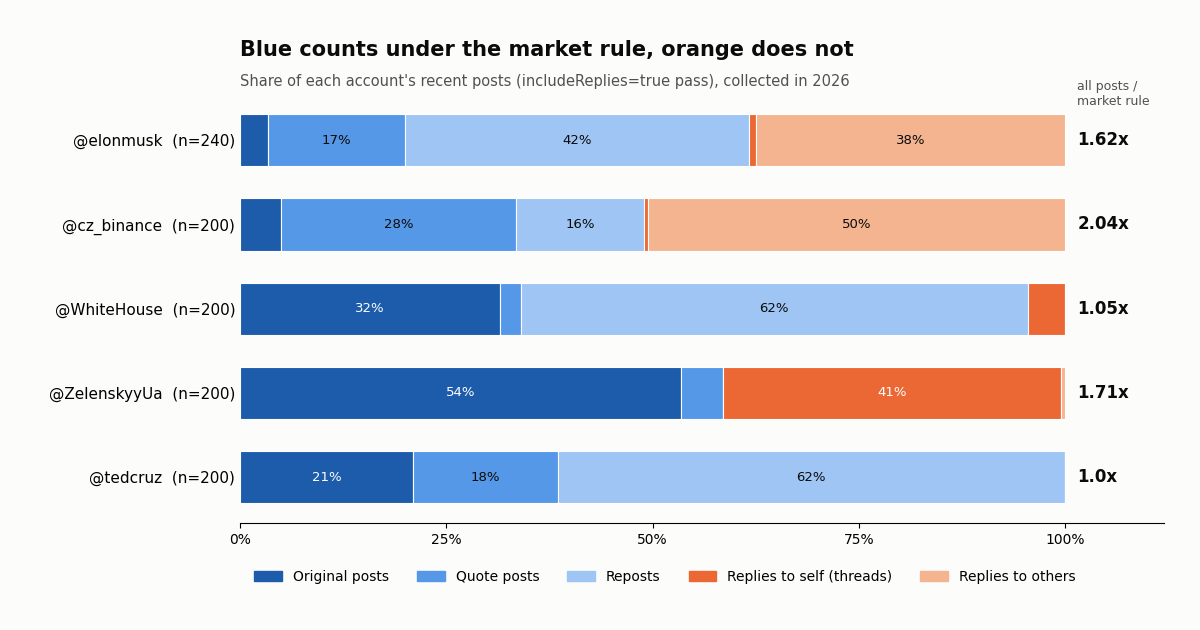
We pulled each account's timeline twice: once with includeReplies=false (the main-feed view) and once with includeReplies=true (everything), 1,860 posts in all. Counted posts per day below use the market rule on the main-feed pass; the ratio column comes from the full pass and shows how far a counter that also counted every reply would overshoot.
Reposts dominate the counts that move markets. @elonmusk posted 1.5 original posts a day in our sample, but 44.1 counted posts, because reposts were 68% of his counted total and quotes most of the rest. Reposts were 64% for @WhiteHouse and 62% for @tedcruz. A counter that only tallies posts with original text would be off by an order of magnitude on the Elon markets.
Replies are the next trap. @cz_binance's full timeline held 200 posts in the stretch we read, of which 98 count under the rule, so counting replies doubles his number (2.04x). @elonmusk's ratio was 1.62x. @tedcruz posted no replies at all in the 200 posts we read, so the rule makes no difference for him.
Self-replies are where the rules stop helping. @ZelenskyyUa threads heavily: 82 of the 200 posts in his full pass were replies to his own posts, against 117 counted posts. If the tracker treats those thread replies as main-feed posts, his weekly count is about 70% higher than a counter that drops them. For @elonmusk and @cz_binance, self-replies were 1.4% and 1% of counted posts, so the ambiguity barely matters there. Check the tracker export for a closed window before you decide.
How much the count swings by window (study)
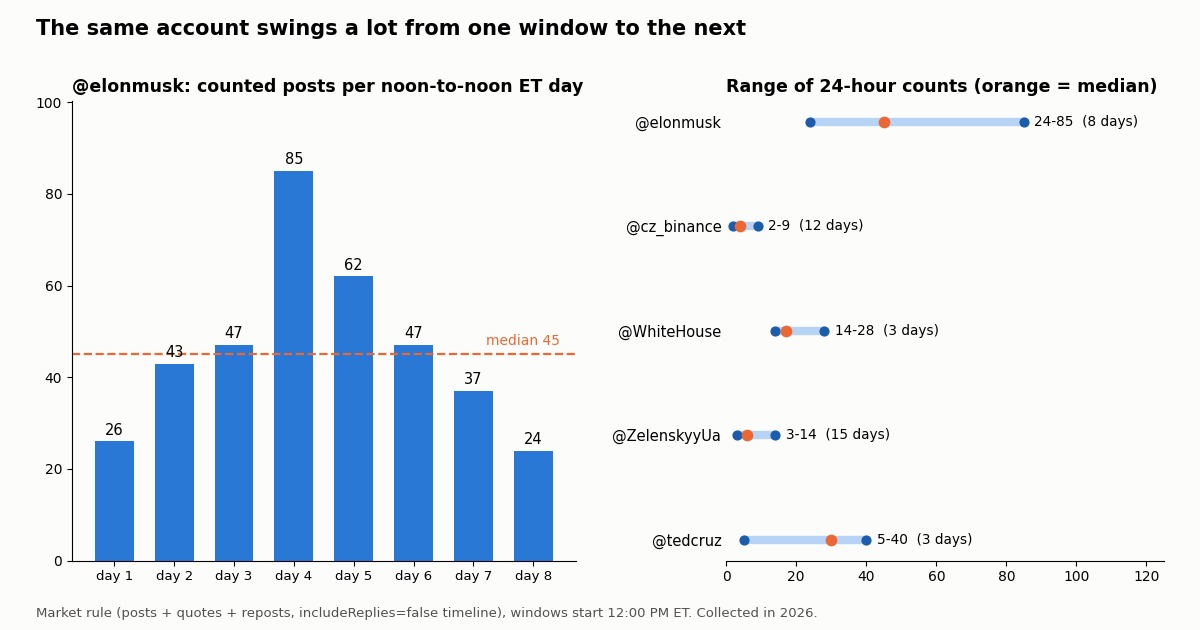
A bot's forecast is the current count plus a guess for the hours left. The guess is the hard part, so we measured how much each account's count varies between windows of the same length, using windows that start at 12:00 PM ET like the markets do. @elonmusk's counted posts ran 26, 43, 47, 85, 62, 47, 37, 24 on 8 consecutive noon-to-noon days: the busiest day was 3.54x the quietest.
Longer windows are steadier. @ZelenskyyUa's busiest day was 4.67x his quietest, but his busiest 7-day window was only 1.44x his quietest. @cz_binance went from 4.5x across days to 1.17x across weeks. That is the arithmetic of sums: busy and quiet days cancel. It also means the 48-hour markets are the harder forecast, and that extrapolating one day's pace to a week overstates your confidence.
Posting comes in bursts. The median gap between @elonmusk's counted posts was 4 minutes, but the longest gap was 9.2 hours. A pace projection made at the end of a quiet stretch and one made mid-burst can land several buckets apart. A sensible bot projects with a range, not a point, and widens it when the window is young.
From count to decision: compare, log, paper-trade first
The tracker in the code block at the end of this page does four things on each run: it reads the event and every bucket's Yes midpoint from Polymarket, pages the account's main feed back to the window start, merges new IDs into a seen-IDs file so deleted posts stay counted, and projects the close from the pace so far. It then writes one row to paper_ledger.csv: time, event, count, projection, the bucket the projection lands in, and that bucket's midpoint. It never sends an order.
Run it on a schedule and let the ledger grow. Every 5 minutes covers the deletion clause. After a few closed windows, score the ledger: how often did the projected bucket match the resolved one at 48 hours out, 24 hours out, 6 hours out? That score, not a backtest of a strategy you invented afterwards, tells you whether the counter has any information the market lacked.
Improve the forecast before you think about orders. The naive pace projection ignores the bursts measured above. Obvious next steps: a per-hour-of-day rate from the account's own history, a range rather than a point, and a separate model for the last 24 hours when most of the count is already known. The midpoint in a busy bucket already reflects many people running the same arithmetic.
If you later go live, change one thing at a time. Use the unified SDK's secure client, keep the private key out of the code, size orders to Polymarket's orderMinSize and orderPriceMinTickSize from the market object, prefer resting limit orders (makers pay no fee per the fee page), and keep the paper ledger running beside the live one so you can see when they diverge.
Legal and geographic limits, and the risk note
Polymarket's geographic restrictions page is explicit, and it applies to bots as much as to people. Orders submitted from blocked regions are rejected, and the docs ask builders to check https://polymarket.com/api/geoblock before placing any. The response carries blocked, ip, country and region.
Blocked completely (no new orders, no closing): OFAC-sanctioned jurisdictions, listed as Iran, Syria, Cuba, North Korea and the Crimea, Donetsk and Luhansk regions of Ukraine.
Close-only on the frontend and the API: a long list that includes the United States and its minor outlying islands, the United Kingdom, France, Germany, Italy, Belgium, Poland, Australia, New Zealand, Singapore, Taiwan, Thailand, Brazil, Russia and the Canadian provinces of Ontario, Quebec, British Columbia and Alberta, among others. Close-only means you can exit existing positions but not open new ones.
Close-only on the frontend only: Ireland, Japan, the Netherlands, South Korea, and Malta for sports. The docs say the API itself is not restricted there, which is not the same as saying trading is lawful for you; check your own law.
Polymarket's docs point US users to a separate product with its own documentation at docs.polymarket.us; this guide covers the international venue only. Running the counter and logging paper trades involves no order placement and works anywhere you can reach the public APIs.
Risk note. Prediction-market positions can go to zero. A Yes share in the wrong bucket settles at nothing, fees and spreads cost money on every round trip, and the resolution source is a tracker you do not control. Nothing on this page is financial advice or a claim that any strategy is profitable, and we make no such claim about our own code. Paper-trade first, and only risk money you can afford to lose.
import requests

geo = requests.get("https://polymarket.com/api/geoblock", timeout=30).json()
# {"blocked": true, "ip": "...", "country": "US", "region": "NY"}
if geo["blocked"]:
    raise SystemExit(f"Order placement is not available from {geo['country']}-{geo['region']}; "
                     "stay in paper mode.")
What the X data costs, next to the official X API
On twitterapi.io, timeline reads are 15 credits per tweet returned, which is $0.15 per 1,000 tweets, with a 15-credit minimum per request; a full 20-post page is $0.003. Reads need no X account and no developer approval. New accounts that pass the automatic bot check get up to $1 of free credits (at most 100,000 credits, no card, one per person or network, expiring after 31 days), and purchased credits never expire. Rate limits are 0.2 requests per second before the first payment and 20 once paid.
What a tweet market costs to track. Our whole study read 1,860 posts in 94 requests for $0.279. A tracker that re-reads the newest page every 5 minutes reads one 20-post page per run, $0.003, so a 7-day window is 2,016 runs and about $6.05, mostly re-reading posts it already has. Polling every 15 minutes away from the close and every 5 minutes in the last day costs less.
The official route. X's pay-per-usage rate card on docs.x.com lists $0.005 per post read, which is $5 per 1,000 posts against $0.15 here, roughly 33x, capped at 3 million post reads a month before Enterprise. Either works for a counter this size; the difference matters when the same bot also watches news accounts and keywords for a signal.
For a signal layer (breaking posts from news or official accounts that move a non-tweet market), the same key reads /twitter/tweet/advanced_search with a from: or keyword query, or you can register a filter rule and let matches be pushed to a webhook you host. See the streaming guide linked below.
How we collected this
Question. For the accounts that live Polymarket tweet markets are written on, how many posts land per day and per window, and how much do the counting rule and the window length change the total?
Accounts. The five accounts named, with their handles, in live Polymarket tweet-count events found through the public Gamma search at collection time: @elonmusk, @cz_binance, @WhiteHouse, @ZelenskyyUa and @tedcruz. All are public figures or an official organization account. Events whose rules did not name an X handle were left out.
Method. Two passes per account on /twitter/user/last_tweets, newest first: includeReplies=false (main feed) and includeReplies=true (everything). Posts were classified by fields: retweeted_tweet present means repost, quoted_tweet present means quote, isReply with inReplyToUsername equal to the account means self-reply, other replies are replies to others, the rest are originals. Windows start at 12:00 PM ET (16:00 UTC in the collection period). 1,860 posts, 94 requests, $0.279 at list price. Collected in 2026.
Window. Each account's most recent posts at collection time; spans differ by account, from about 4 days (@WhiteHouse and @tedcruz main feed) to about 32 days (@cz_binance full pass). The @WhiteHouse and @tedcruz main-feed samples are too short for a 7-day window, and only 2 complete 7-day windows fit the @elonmusk sample, so treat that row as two observations, not a range.
What the sample cannot show. It cannot see posts deleted before collection, which the markets count if they survived about 5 minutes. It does not reproduce xtracker's Post Counter, so it cannot settle the self-reply question; it measures how much that question is worth. It covers one recent stretch per account, not a season, and says nothing about market prices or whether any trade would have made money.
Privacy. Aggregates only. Only public-figure and official organization accounts named in public market rules were read; the authors these accounts reposted, quoted or replied to were not analyzed or stored. The raw timelines are kept compressed with the study files because every account is a public figure or an organization.
import csv
import json
import os
import sys
from datetime import datetime, timedelta, timezone

import requests

API_KEY = os.environ["TWITTERAPI_IO_KEY"]          # from twitterapi.io/dashboard
BASE = "https://api.twitterapi.io"
GAMMA = "https://gamma-api.polymarket.com"         # public market metadata, no key
CLOB = "https://clob.polymarket.com"               # public prices, no key for reads


def parse_ts(s):
    # createdAt looks like "Thu Oct 16 12:34:56 +0000 2026"
    return datetime.strptime(s, "%a %b %d %H:%M:%S %z %Y")


def bucket_range(label):
    label = label.replace(",", "").strip()
    if label.startswith("<"):
        return 0, int(label[1:]) - 1
    if label.endswith("+"):
        return int(label[:-1]), 10**9
    lo, hi = label.split("-")
    return int(lo), int(hi)


def load_buckets(slug):
    event = requests.get(f"{GAMMA}/events", params={"slug": slug}, timeout=30).json()[0]
    buckets = []
    for m in event["markets"]:
        if m.get("closed"):
            continue
        yes_token = json.loads(m["clobTokenIds"])[json.loads(m["outcomes"]).index("Yes")]
        mid = requests.get(f"{CLOB}/midpoint", params={"token_id": yes_token}, timeout=30).json().get("mid")
        lo, hi = bucket_range(m["groupItemTitle"])
        buckets.append({"label": m["groupItemTitle"], "lo": lo, "hi": hi,
                        "mid": float(mid) if mid else None})
    return event, sorted(buckets, key=lambda b: b["lo"])


def main_feed_posts(user, start, end):
    """Posts, quote posts and reposts in [start, end): the main-feed timeline."""
    found, cursor = {}, ""
    while True:
        r = requests.get(
            f"{BASE}/twitter/user/last_tweets",
            headers={"X-API-Key": API_KEY},
            params={"userName": user, "includeReplies": "false", "cursor": cursor},
            timeout=30,
        )
        r.raise_for_status()
        body = r.json()
        tweets = (body.get("data") or {}).get("tweets", [])
        for t in tweets:
            ts = parse_ts(t["createdAt"])
            if start <= ts < end:
                found[t["id"]] = ts.isoformat()
        # newest first: stop once the page reaches back past the window start
        if not tweets or parse_ts(tweets[-1]["createdAt"]) < start or not body.get("has_next_page"):
            return found
        cursor = body["next_cursor"]


def run(slug, user, window_days):
    event, buckets = load_buckets(slug)
    end = datetime.fromisoformat(event["endDate"].replace("Z", "+00:00"))   # 12:00 PM ET close
    start = end - timedelta(days=window_days)
    now = min(datetime.now(timezone.utc), end)

    # Keep every id ever seen: a post deleted after the tracker caught it still counts.
    seen_path = f"seen-{slug}.json"
    seen = json.load(open(seen_path)) if os.path.exists(seen_path) else {}
    seen.update(main_feed_posts(user, start, end))
    json.dump(seen, open(seen_path, "w"))

    count = len(seen)
    elapsed_h = max((now - start).total_seconds() / 3600, 1)
    left_h = max((end - now).total_seconds() / 3600, 0)
    projected = round(count + count / elapsed_h * left_h)    # naive pace projection

    print(f"{event['title']}\n  counted so far: {count}  projected at close: {projected}")
    for b in buckets:
        mark = "<- projection" if b["lo"] <= projected <= b["hi"] else ""
        print(f"  {b['label']:>9}  Yes midpoint {b['mid']}  {mark}")

    # Paper trading only: log what the bot WOULD do. No order is sent anywhere.
    pick = next((b for b in buckets if b["lo"] <= projected <= b["hi"]), None)
    with open("paper_ledger.csv", "a", newline="") as f:
        csv.writer(f).writerow([now.isoformat(), slug, count, projected,
                                pick and pick["label"], pick and pick["mid"]])


if __name__ == "__main__":
    # python tracker.py <event-slug> <x-handle> <window-days>
    # e.g. python tracker.py elon-musk-of-tweets-<window> elonmusk 7
    run(sys.argv[1], sys.argv[2], int(sys.argv[3]))
Questions readers ask
Is there an official Polymarket API for bots?
Yes. Polymarket documents the Gamma API (gamma-api.polymarket.com) for market discovery, the CLOB API (clob.polymarket.com) for prices, order books and orders, a Data API for positions and activity, and WebSocket channels for live books and user order updates. Public reads need no credentials; placing orders needs L1 wallet signing plus L2 HMAC API credentials.
Should I still use py-clob-client?
The py-clob-client repository is archived on GitHub. Polymarket's docs now direct Python developers to the unified polymarket-client package (with PublicClient, AsyncPublicClient, SecureClient and AsyncSecureClient) and publish a migration guide from the legacy clients. Existing code against public endpoints keeps working, but new bots should start on the unified SDK.
How do Polymarket Elon Musk tweet markets count tweets?
The live rules count main-feed posts, quote posts and reposts between 12:00 PM ET on the start and end dates. Replies do not count, except replies the tracker records on the main feed. Deleted posts count if they stayed up long enough for the tracker to capture them (about 5 minutes). The resolution source is the Post Counter at xtracker.polymarket.com, with X itself as a fallback if the tracker fails.
Can a bot know the tweet count before the market closes?
It can know the count so far, from the account's main-feed timeline. What nobody knows is how many posts land in the remaining hours. In our sample, @elonmusk's counted posts ranged from 24 to 85 per day, so the forecast for the remaining time is the uncertain part, and the market price already reflects other people's view of it.
Can I run a Polymarket trading bot from the United States?
Not on the international venue. Polymarket's geographic restrictions page lists the United States as close-only on both the frontend and the API: existing positions can be closed but new ones cannot be opened. The docs point to a separate US product with its own documentation. Reading public market data and paper trading do not place orders.
Do I need an X developer account to count someone's posts?
No. twitterapi.io's /twitter/user/last_tweets endpoint reads a public account's timeline with an API key in the X-API-Key header, no X account or developer approval. Pass includeReplies=false for the main-feed view the tweet markets describe.
Are Polymarket bots profitable?
We make no such claim and have not measured it. Prices already include what other traders know, takers pay fees on most market categories, and every position can settle at zero. Run the counter with a paper ledger for several closed windows and score it before risking money.
Is there a Kalshi equivalent?
Kalshi is a separate exchange with its own API, market rules and eligibility requirements. The data side is the same idea (count or watch X, compare with the price), but auth and contracts differ; see the Kalshi bot guide linked on this page.
Continue
- Polymarket docs: API surfaces (Gamma, CLOB, Data API, Relayer, WebSocket channels) and L1/L2 authentication
- Polymarket docs: geographic restrictions and the geoblock endpoint
- Polymarket docs: unified Python SDK (polymarket-client)
- GitHub: Polymarket/py-clob-client (archived)
- Polymarket docs: trading fees and the taker fee formula
- twitterapi.io API reference: user last tweets (includeReplies, cursor)
- Twitter (X) API overview: endpoints, pricing and limits
- Build a Kalshi bot on X data
- Count tweets with an API: a programmatic guide
- Twitter (X) streaming API: real-time posts without polling
- Using X data and AI for crypto trading signals
- Track one public figure's X posts in real time
- Pay-per-call pricing for X data
- 01X Radar Explained: Twitter (X) Keyword Monitoring, Tiers, Limits and an API Alternative
- 02TweetDeck (X Pro) Alternatives in 2026: Columns, Monitoring and Scheduling for Twitter (X)
- 03Twitonomy Review: What the Twitter (X) Analytics Tool Still Does, and an API Alternative
- 04llms.txt for API docs, measured on two Twitter (X) API doc sets
- 05Botometer in 2026: What It Scored, Its Status, and a Live Alternative for Twitter (X)
- 06How to Build a Twitter (X) to Discord Bot in 2026
- 07Grok Bot and the Twitter (X) API: what it can read, what it costs, and how to give it cheaper X data
- 08How to Build an AI Twitter (X) Bot with an LLM in 2026
Stop reading. Start building.
Starter credits cover real testing on real data. Google sign-in, no card, no application queue.
Get an API key