twitter-api-v2 (npm) Quick Start: the Twitter (X) API from Node.js and TypeScript in 2026
![Call map from the twitter-api-v2 npm package to TwitterAPI.io. Six rows. client.v2.search(q) with a bearer or user token maps to GET /twitter/tweet/advanced_search?query=&queryType=Latest returning tweets[]. client.v2.userByUsername(name) maps to GET /twitter/user/info?userName= returning data{}. client.v2.userTimeline(userId) maps to GET /twitter/user/last_tweets?userName= returning data.tweets[]. client.v2.tweets([ids]) maps to GET /twitter/tweets?tweet_ids= returning tweets[]. paginator.fetchNext() and for await, which read x-rate-limit headers, map to repeating the call with cursor=next_cursor while has_next_page. includes.medias(t), includes.author(t) and includes.quote(t), which need expansions, map to t.extendedEntities.media, t.author and t.quoted_tweet inline with no expansions. Footer: official X API $0.005 per post read and $0.010 per user read; TwitterAPI.io 15 credits per tweet returned, $0.15 per 1,000 tweets, $0.18 per 1,000 profiles; field study of 1,000 timeline posts from 5 organization accounts collected in 2026, 29.9% carry media, 24.0% are reposts, 3.2% quotes.](/blog/twitter-api-v2-npm/hero.png)
This page is about the npm package twitter-api-v2, the Node.js and TypeScript client that most JavaScript code uses to talk to the Twitter (X) API, not about the X API v2 platform itself. If you were looking for what the X API v2 is, its endpoints and its tiers, read our guide to the Twitter API v2 instead. The name collision is real: the library was published in 2020 when X's v2 endpoints were new, and it has carried the platform's name ever since.
The first half is a verified quick start: install, the three ways to authenticate (app-only bearer, OAuth 1.0a user keys, OAuth 2.0 with PKCE), the four reads nearly every script needs (search, a user by username, a user's timeline, tweets by ID), how its paginators and the official rate-limit plugin work, and what each of those calls costs on X's pay-per-usage rate card in 2026. Every method name, version number and price on this page was checked against the npm registry, the GitHub repository's docs and docs.x.com while writing, not recalled from memory.
The second half does the same four reads against TwitterAPI.io from Node 18+ with the built-in fetch, then answers the question every port runs into: X's API makes you request expansions and join an includes block to get media, authors and referenced tweets, while TwitterAPI.io returns them inline, so which of those fields are actually populated, how often, and where do the nulls hide? We pulled 1,000 timeline posts from five organization accounts a Node developer would recognize (@nodejs, @npmjs, @github, @vercel, @typescript), measured each field, and wrote the mapping function from those numbers. If you already use the Python equivalent, the same exercise for Tweepy is on our Tweepy migration page.
What twitter-api-v2 is, where it stands in 2026, and how to install and authenticate
twitter-api-v2 describes itself on npm as a "strongly typed, full-featured, light, versatile yet powerful Twitter API v1.1 and v2 client for Node.js". It wraps both API generations behind one TwitterApi class, ships its own TypeScript types for request parameters and responses, signs OAuth 1.0a requests itself, supports OAuth 2.0 user context, streaming, media upload through v1.1, and has no runtime dependencies (the README puts it at about 23 kB minified and gzipped). It is published under the Apache-2.0 license by PLhery; the README names @alkihis as the former main contributor.
Status at review time, from the registry and the repository. The npm registry lists 1.29.1 as latest, published in August 2026, after 1.29.0 in January 2026 and 1.28.0 in November 2025, so the cadence is a few releases a year. The registry's download counter reported about 259,000 downloads for the latest full week. The GitHub repository is not archived: 1,555 stars, 211 forks, 31 open issues, and its most recent commit ("upgrade to 1.29.1") is the August 2026 release. The README also carries a note that the maintainers are "disappointed and discouraged by the recent turn of events at Twitter since the takeover by Elon Musk" and that much of the API work they built on "has been shelved". Read that as a maintenance mode signal: the library keeps working and gets fixes, but it tracks a platform that is no longer adding what it was designed for.
The one thing the library cannot change is what sits behind it. Since X moved its API to pay-per-usage pricing, every client.v2.* read is a billed request against a credit balance you top up on console.x.com. That is the subject of the cost section below, and the reason the second half of this page exists.
Install with npm i twitter-api-v2 (or yarn add twitter-api-v2). The package is ESM and CommonJS friendly; import { TwitterApi } from 'twitter-api-v2' or const { TwitterApi } = require('twitter-api-v2') both work, and the types come with it, so no @types package is needed.
App-only (bearer token). Pass the bearer token from your X developer app as a string: new TwitterApi(bearer). This is the read-only, no-user context: search, user lookups and public timelines work; anything that acts as a user (posting, liking, reading the home timeline) does not. If you only stored the consumer key and secret, new TwitterApi({ appKey, appSecret }) followed by await client.appLogin() fetches a bearer token for you.
User context, OAuth 1.0a. Pass the four keys from the developer portal: new TwitterApi({ appKey, appSecret, accessToken, accessSecret }). The library signs every request. This is the classic bot setup: the app acts as the one account whose access token you generated.
User context, OAuth 2.0 with PKCE. Build the client from the OAuth 2.0 client credentials, new TwitterApi({ clientId, clientSecret }), call generateOAuth2AuthLink(callbackUrl, { scope: [...] }), store the returned codeVerifier and state in the session, redirect the user, and on return call loginWithOAuth2({ code, codeVerifier, redirectUri }), which returns a logged-in client plus accessToken, refreshToken and expiresIn. With the offline.access scope you can later call refreshOAuth2Token(refreshToken) on the client-credentials client. Scopes decide what the token may do; tweet.read and users.read cover the reads on this page.
readOnly and readWrite. client.readOnly returns a view of the client that only exposes read methods, which is a cheap way to make sure a script that should never post cannot. The code below sets up all three contexts; pick one.
// npm i twitter-api-v2        (1.29.1 at review time, zero dependencies, types included)
import { TwitterApi } from "twitter-api-v2";

// 1. App-only: a bearer token from console.x.com. Reads only.
const appClient = new TwitterApi(process.env.X_BEARER_TOKEN!);
const ro = appClient.readOnly;                       // exposes read methods only

// 1b. Or derive the bearer token from the consumer key + secret
const consumer = new TwitterApi({ appKey: process.env.X_API_KEY!, appSecret: process.env.X_API_SECRET! });
const appClientFromKeys = await consumer.appLogin();

// 2. User context, OAuth 1.0a: the four keys of one account (classic bot setup)
const userClient = new TwitterApi({
  appKey: process.env.X_API_KEY!,
  appSecret: process.env.X_API_SECRET!,
  accessToken: process.env.X_ACCESS_TOKEN!,
  accessSecret: process.env.X_ACCESS_SECRET!,
});

// 3. User context, OAuth 2.0 with PKCE: client credentials, then the authorization-code dance
const oauth2 = new TwitterApi({ clientId: process.env.X_CLIENT_ID!, clientSecret: process.env.X_CLIENT_SECRET! });
const { url, codeVerifier, state } = oauth2.generateOAuth2AuthLink("https://example.com/callback", {
  scope: ["tweet.read", "users.read", "offline.access"],
});
// ... store codeVerifier + state in the session, redirect the user to `url`, receive ?code=&state= ...
// const { client: logged, accessToken, refreshToken, expiresIn } =
//   await oauth2.loginWithOAuth2({ code, codeVerifier, redirectUri: "https://example.com/callback" });
// const { client: refreshed, refreshToken: nextRefreshToken } = await oauth2.refreshOAuth2Token(refreshToken!);

const me = await userClient.v2.me();                 // needs user context; app-only has no "me"
console.log(me.data.username);The four reads: search, user by username, user timeline, tweets by ID
The v2 methods live under client.v2 and mirror the X endpoints one to one. The four below cover most scripts; the full list is in the repository's doc/v2.md.
client.v2.search(query, options) hits recent search ("Search tweets of the last 7 days with a text query", in the doc's words) and returns a paginator. client.v2.searchAll is the full-archive variant and needs an access level that allows it. The query uses X's search operators (from:, -is:retweet, lang:), and max_results goes up to 100 per page.
client.v2.userByUsername(username, options) returns a UserV2Result ({ data: { id, name, username, ... } }); usersByUsernames takes an array. You need the numeric id from here before you can read a timeline, because client.v2.userTimeline(userId, options) takes an ID, not a handle. It returns a paginator over GET /2/users/:id/tweets; userMentionTimeline is the mentions equivalent.
client.v2.tweets(ids, options) looks up up to 100 tweets by ID (singleTweet for one). All four take the same option keys: expansions, tweet.fields, user.fields, media.fields. Nothing beyond id and text comes back unless you ask for it: created_at, public_metrics, entities and referenced_tweets are opt-in tweet.fields, and media, authors and quoted or retweeted posts arrive in a separate includes block that you join to each tweet with the paginator's helper (includes.medias(tweet), includes.author(tweet), includes.quote(tweet), includes.retweet(tweet)). That join is what the TwitterAPI.io section replaces.
// All four reads work with the app-only client. Field selection is opt-in on the X API.
const user = await ro.v2.userByUsername("nodejs", { "user.fields": "public_metrics,created_at" });
console.log(user.data.id, user.data.username, user.data.public_metrics?.followers_count);

const timeline = await ro.v2.userTimeline(user.data.id, {
  max_results: 100,
  exclude: "replies",
  expansions: "attachments.media_keys,referenced_tweets.id,author_id",
  "tweet.fields": "created_at,public_metrics,entities,referenced_tweets",
  "media.fields": "type,url,variants",
});
for (const tweet of timeline.tweets) {
  const media = timeline.includes.medias(tweet);     // joined from the includes block
  const quoted = timeline.includes.quote(tweet);
  console.log(tweet.created_at, tweet.public_metrics?.like_count, media.length, quoted?.id);
}

const found = await ro.v2.search('"twitter-api-v2" -is:retweet lang:en', {
  max_results: 100,
  "tweet.fields": "created_at,public_metrics",
});
console.log(found.tweets.length, "tweets on page 1; rate limit:", found.rateLimit);

const lookup = await ro.v2.tweets(["20", "1234567890123456789"], { "tweet.fields": "public_metrics" });
console.log(lookup.data?.length, "found;", lookup.errors?.length ?? 0, "errors");Paginators, rate limits and the @twitter-api-v2/plugin-rate-limit plugin
Search and timeline methods return a paginator rather than a bare page. await paginator.fetchNext() appends the next page to the same instance; await paginator.fetchLast(1000) keeps fetching until it has 1,000 more tweets, the API runs dry, or, in the doc's words, "the rate limit is hit"; paginator.next() returns the next page as a separate instance; for await (const tweet of paginator) walks every tweet across pages until the rate limit or the end; paginator.done tells you whether there is more. Fetched items are under .tweets (or .users, .ids for other endpoints), with .meta, .includes and .errors merged across pages.
Rate limits are per 15-minute window and come back in headers. Per docs.x.com, each response carries x-rate-limit-limit, x-rate-limit-remaining and x-rate-limit-reset (a Unix timestamp), and exceeding the window returns HTTP 429 "Rate limit exceeded". The published windows for the four reads on this page: recent search 450 requests per 15 minutes app-only or 300 with a user token; a user's tweets 10,000 app-only or 900 user; user by username 300 app-only or 900 user. The paginator exposes the last response's values as paginator.rateLimit ({ limit, remaining, reset }).
The plugin remembers them for you. @twitter-api-v2/plugin-rate-limit (version 1.1.0 on npm) stores the headers from every response, in memory by default or in a store you implement (the README mentions Redis, MongoDB and SQL as candidates). Pass it in the client options and ask rateLimitPlugin.v2.getRateLimit('users/me') before a call; hasHitRateLimit(status) and isRateLimitStatusObsolete(status) tell you whether to wait and whether the stored window has already reset.
One subtlety worth internalizing before the cost section: the docs state that "rate limits and billing are separate". Staying inside the 15-minute windows does not make a read free, and a 429 does not refund anything. The windows bound how fast you can spend; the rate card decides how much.
// npm i @twitter-api-v2/plugin-rate-limit
import { TwitterApi } from "twitter-api-v2";
import { TwitterApiRateLimitPlugin } from "@twitter-api-v2/plugin-rate-limit";

const rateLimitPlugin = new TwitterApiRateLimitPlugin();      // in-memory store by default
const client = new TwitterApi(process.env.X_BEARER_TOKEN!, { plugins: [rateLimitPlugin] });

// Walk a search until the 15-minute window is nearly used up, then stop instead of hitting 429
const page = await client.v2.search("from:nodejs -is:retweet", { max_results: 100 });
while (!page.done) {
  const status = await rateLimitPlugin.v2.getRateLimit("tweets/search/recent");
  if (status && rateLimitPlugin.hasHitRateLimit(status) && !rateLimitPlugin.isRateLimitStatusObsolete(status)) {
    const waitMs = status.reset * 1000 - Date.now();
    console.log(`window exhausted, resets in ${Math.ceil(waitMs / 1000)} s`);
    break;                                                     // or: await new Promise(r => setTimeout(r, waitMs))
  }
  await page.fetchNext();
}
console.log(page.tweets.length, "tweets; last window", page.rateLimit);

// Or let the paginator run and catch the 429 itself
try {
  for await (const tweet of page) { /* ... */ }
} catch (e: any) {
  if (e.code === 429) console.log("rate limited; reset at", e.rateLimit?.reset);
  else throw e;
}The wall every call hits in 2026: what the official X API charges per read
None of the code above runs until you have an X developer app and a credit balance. Per docs.x.com, X API v2 "uses pay-per-usage pricing": you "purchase credits, deducted per request" on console.x.com, and the rate card prices each resource read rather than each request. The published numbers that apply to the four reads on this page, and to the one write most bots make:
Two more rules from the same page: pay-per-usage plans are "capped at 3 million Post reads per monthly billing cycle" (Enterprise above that), and new accounts get "$20 in free X API credits when you save your first eligible payment card" plus a match of the first auto-recharge up to $50. The rate card also prices follower and following reads at $0.010 each and "owned reads" of your own app's own data at $0.001. Prices, the page says, "are subject to change"; the Developer Console is the authority.
What that means for a script. A timeline paginator that fetchLast(1000) through one account's posts is 1,000 post reads, $5.00. A keyword monitor that searches every minute and gets ten new posts each time reads 14,400 posts a day, $72. The rate limit never stops either of those; the credit balance does. twitter-api-v2 is a good wrapper around that economics, not a way out of it. The alternative below changes the economics, not the code shape.
The same four reads against TwitterAPI.io from Node (no library, no X app)
TwitterAPI.io exposes X data over plain HTTPS GET endpoints with one header, X-API-Key, so from Node 18+ the whole client is fetch plus a cursor loop; there is nothing to install. Reads need no X account, no developer app and no OAuth of any kind. Pricing is per data returned: tweet endpoints cost 15 credits per tweet returned ($0.15 per 1,000 tweets, with a 15-credit minimum per request so an empty search costs $0.00015 and a full 20-tweet page $0.003), profiles 18 credits each ($0.18 per 1,000), and $1 buys 100,000 credits. Against the official $0.005 per post read that is about 33x less per 1,000 tweets ($5.00 vs $0.15). New accounts that pass the automatic bot check get up to $1 of free credits (at most 100,000 credits, no card, one per person or network, expiring after 31 days); purchased credits never expire. The rate limit is 0.2 requests per second before the first payment and 20 once paid.
Three differences to code around. First, timelines are addressed by handle, not numeric ID, so the userByUsername round trip the library needs before userTimeline disappears. Second, /twitter/user/info answers HTTP 200 with status: "error", msg: "user not found" and data: null for an unknown handle, never a 404, so check body.status as well as res.ok; a missing or invalid parameter is an HTTP 400 with the text in detail. Third, the timeline endpoint nests its array under data.tweets while search, mentions and tweets-by-ID return tweets at the top level; the generator functions in the full example at the end of this page hide that.
Search operators carry over. from:, -filter:replies, lang:, since_time: and the rest of the classic search syntax work in query; queryType=Latest orders by time, Top by relevance. The library's -is:retweet becomes -filter:retweets here, though a from: search already omits reposts in our experience; use last_tweets for the account's full timeline including reposts.
Writes. client.v2.tweet() has an equivalent, but it is a different product with different rules: one /twitter/user_login_v2 login ($0.10, with a proxy you supply) returns login_cookies, and each post, like, retweet or follow is then $0.002 per call (/twitter/create_tweet_v2, /twitter/like_tweet_v2, /twitter/follow_user_v2). The call acts as that account, so X can rate-limit, lock or suspend it; keep a human pace, expect the session to need a re-login, and note that every HTTP 200 call is billed. This page stays on reads.
// Node 18+, no dependencies. TWITTERAPI_IO_API_KEY=... node reads.mjs
const BASE = "https://api.twitterapi.io";
const HEADERS = { "X-API-Key": process.env.TWITTERAPI_IO_API_KEY };

// client.v2.userByUsername("nodejs")  ->  /twitter/user/info   (18 credits = $0.00018)
const info = await fetch(`${BASE}/twitter/user/info?` + new URLSearchParams({ userName: "nodejs" }), { headers: HEADERS });
const body = await info.json();
if (body.status === "error") throw new Error(body.msg);     // "user not found" arrives as HTTP 200, not 404
console.log(body.data.id, body.data.userName, body.data.followers, "followers");

// client.v2.userTimeline(id) + fetchNext()  ->  /twitter/user/last_tweets, 20 per page, cursor pagination
let cursor = "";
const posts = [];
for (let page = 0; page < 3; page++) {                      // 3 pages = 60 posts = $0.009
  const params = new URLSearchParams({ userName: "nodejs" }); // add includeReplies=true to include replies
  if (cursor) params.set("cursor", cursor);
  const res = await fetch(`${BASE}/twitter/user/last_tweets?${params}`, { headers: HEADERS });
  if (!res.ok) throw new Error(`HTTP ${res.status}: ${await res.text()}`);
  const b = await res.json();
  posts.push(...(b.data?.tweets ?? []));                     // note: nested under data for this endpoint
  if (!b.has_next_page || !b.next_cursor) break;
  cursor = b.next_cursor;
}
console.log(posts.length, "posts; newest:", posts[0]?.createdAt, posts[0]?.likeCount, "likes");From expansions to flat fields: what 1,000 posts say the mapping must handle
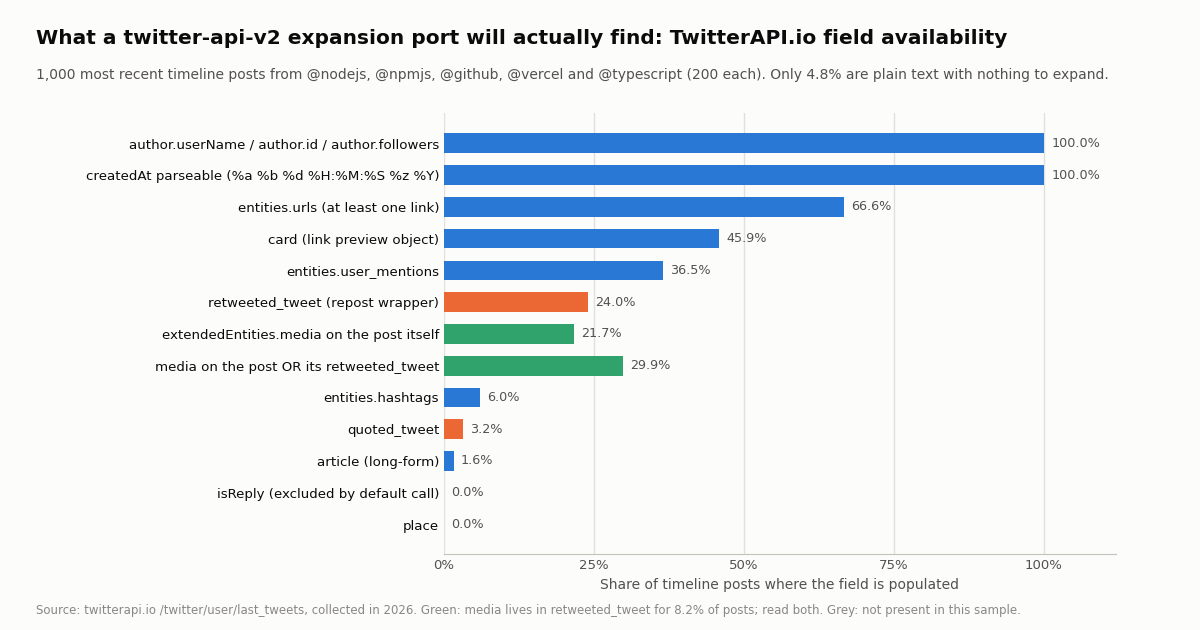
A twitter-api-v2 script that asked for expansions=attachments.media_keys,referenced_tweets.id,author_id and the usual tweet.fields reads five things out of each tweet: its author, its media, its referenced tweets (quoted, retweeted, replied to), its entities and its public_metrics. On TwitterAPI.io those arrive inline on every tweet with no includes join. The question for a port is which of them are actually populated and how often, because that decides the null handling. We pulled the 200 most recent timeline posts from @nodejs, @npmjs, @github, @vercel and @typescript (1,000 posts, 50 requests, every page exactly 20 tweets) and counted.
Media hides inside reposts. 24.0% of these posts are reposts, and a repost wrapper carries an empty extendedEntities almost every time: the photos and videos sit on retweeted_tweet.extendedEntities.media. Counting only the wrapper finds media on 21.7% of posts; reading the wrapper or, failing that, the inner tweet finds it on 29.9%. For 8.2% of all posts the media exists only in the inner object. The toTweetV2() function in the full example below does const src = t.retweeted_tweet ?? t before it looks for media for exactly that reason; the library's includes.medias(t) on a retweet behaves the same way, so a port that got it right before will need the same two-level lookup here.
Almost nothing is plain text. Only 4.8% of the 1,000 posts had no media, no link, no quoted or retweeted post, no card and were not a reply. A port that treats these fields as rare edge cases will be wrong on 19 posts in 20. The card object is the one field with no counterpart in the library's v2 types: it is the link preview X renders (title, description, image URLs under binding_values), present on 45.9% of posts and on most posts that contain a URL. Median text length was 154 characters, 9.0% of posts exceeded 280 (long-form posts return their full text in text), and 1.6% carried an article object.
viewCount, likeCount and per-account variation: where the nulls really are
viewCount is zero on old posts, not on random ones. viewCount was present on 100% of posts but greater than zero on only 66.4%. The split is exact: of the 336 posts created before 2023, 100% report viewCount: 0; of the 664 posts from 2023 on, 0% do, and their median is 59,248 views. X rolled view counts out on December 22, 2022, and press coverage of the launch (TechCrunch) noted it applied only to posts from mid-December 2022 on; older posts simply have no number. Two of our five accounts post rarely enough that 200 posts reach back years (191 of @npmjs's 200 and 145 of @typescript's are pre-2023), which is why their median viewCount is 0 while @github's is 81,557 and @vercel's 83,968. Map viewCount to impression_count, but treat 0 as "not available" when the post predates 2023, which the mapping function below does with t.viewCount || null. likeCount has no such gap: 99.9% of posts had at least one like, median 179, 90th percentile 1,042, maximum 10,598.
Views per like, for sanity checks. Across the 664 posts with a view count, the median post collected 0.36 likes per 100 views, or about 274 views per like. If a port's engagement-rate code suddenly reports 100% because it divided by a zero viewCount, this is why.
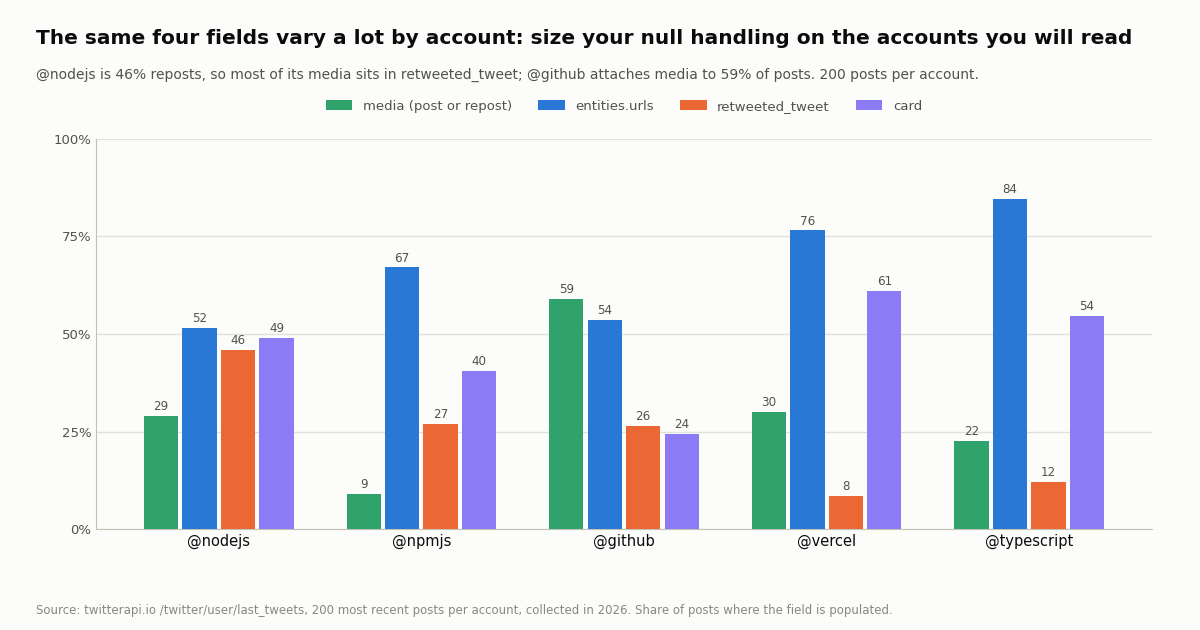
Quoted posts are rare everywhere: 2.0% for @nodejs and @npmjs, 3.0% for @vercel, 4.0% for @github, 5.0% for @typescript, 3.2% overall. Engagement, by contrast, depends on how far back 200 posts reach:
The spread is the point. @nodejs is 46.0% reposts, so most of its media is one level down; @github attaches media to 59.0% of its posts and almost never links out through a card; @typescript links in 84.5% of posts. A mapping tested only against one account will pass and then break on the next. Test the port on the accounts you will actually read, and keep the de-identified per-post rows in sample.json if you want to re-run the counts.
What the study cost, both ways. 1,000 posts over 50 requests was 15,000 credits, $0.15, on TwitterAPI.io. The same 1,000 post reads on the official pay-per-usage rate card are $5.00, before the developer app and the first card. The 20-tweets-per-page figure held on all 50 pages, so budget 50 requests per 1,000 timeline posts; at the paid rate limit of 20 requests per second that is a few seconds, and at the pre-payment 0.2 per second about four minutes.
Keep the library, switch, or run both: a decision table and the TypeScript types
Plenty of teams run both: the library for the OAuth 2.0 user features their product needs, fetch against TwitterAPI.io for the read volume that would otherwise dominate the X bill. The interfaces below are derived from the response shapes in the study, so they match what the endpoints return rather than what the OpenAPI spec promises; keep viewCount and the nested objects optional.
ESM or CommonJS. The examples use top-level await, which needs an .mjs file or "type": "module" in package.json. In CommonJS wrap them in an async function main(). fetch is global from Node 18; on older runtimes install undici and import it.
// types/twitterapi-io.d.ts - shapes as returned by TwitterAPI.io read endpoints (study of 1,000 timeline posts)
export interface TwitterApiIoAuthor {
  id: string;
  userName: string;
  name: string;
  followers: number;
  following: number;
  isBlueVerified?: boolean;
  isVerified?: boolean;
  createdAt?: string;
}

export interface TwitterApiIoMedia {
  type: "photo" | "video" | "animated_gif";
  media_url_https: string;
  video_info?: { variants: { bitrate?: number; content_type: string; url: string }[] };
}

export interface TwitterApiIoTweet {
  id: string;
  url: string;
  twitterUrl?: string;
  text: string;
  createdAt: string;                 // "Thu Oct 16 12:34:56 +0000 2026"
  lang?: string;
  likeCount: number;
  retweetCount: number;
  replyCount: number;
  quoteCount: number;
  viewCount: number;                 // 0 on posts older than 2023 in our sample
  bookmarkCount?: number;
  conversationId?: string;
  isReply: boolean;
  inReplyToId?: string | null;
  inReplyToUsername?: string | null;
  entities?: { hashtags?: unknown[]; urls?: { url: string; expanded_url?: string; display_url?: string }[]; user_mentions?: { screen_name: string; id_str?: string }[] };
  extendedEntities?: { media?: TwitterApiIoMedia[] };
  card?: Record<string, unknown> | null;
  place?: Record<string, unknown> | null;
  article?: Record<string, unknown> | null;
  quoted_tweet?: TwitterApiIoTweet | null;
  retweeted_tweet?: TwitterApiIoTweet | null;
  author: TwitterApiIoAuthor;
}

export interface SearchPage { tweets: TwitterApiIoTweet[]; has_next_page: boolean; next_cursor?: string }
export interface LastTweetsPage { data: { tweets: TwitterApiIoTweet[] }; has_next_page: boolean; next_cursor?: string }
export interface UserInfo { status?: "success" | "error"; msg?: string; data: (TwitterApiIoAuthor & { statusesCount: number; mediaCount?: number; location?: string; description?: string }) | null }How we collected this
Question: for a Node developer porting twitter-api-v2 code that relies on expansions and includes, which TwitterAPI.io tweet fields are populated and how often: media on the post and on its repost, links, quoted and retweeted posts, replies, cards, author fields, createdAt format, the viewCount versus likeCount distributions, and the number of tweets per page.
Accounts: five public organization accounts: @nodejs, @npmjs, @github, @vercel and @typescript.
Method: /twitter/user/last_tweets with the default includeReplies (replies excluded), 10 pages of 20 per account, newest first: 50 requests, 1,000 posts, collected in 2026 through a rate-limited, read-only client. Each post was reduced to a row of booleans and counts (media on the post, media on its retweeted_tweet, URLs, hashtags, mentions, quoted, retweeted, reply, card, place, article, author fields present, createdAt parseable, viewCount, likeCount, text length) and aggregated per account and overall. The viewCount era split uses the post's own createdAt with January 2023 as the boundary.
What the sample cannot show: 200 posts per account is a snapshot, and for the two quieter accounts it reaches back several years, which is what exposed the viewCount boundary but also means their engagement medians describe old posts. Five organization accounts are not individuals, news accounts or reply-heavy accounts; a timeline fetched with includeReplies=true, or a keyword search, will have a reply share far above the 0% here and probably a different media share. The field shares are about availability, not about what X's own API would have returned for the same posts, which we did not fetch. Library facts (version, downloads, stars, method names) were read from the npm registry and the GitHub repository at review time and will drift.
Aggregates only. The accounts named are organizations; no individual's posts were analyzed. The analysis script, results, de-identified per-post rows and the gzip-compressed raw pages for these organization accounts are kept with the study.
// twitterapi-io.mjs - the four twitter-api-v2 reads re-done against TwitterAPI.io with Node 18+ fetch, no dependencies,
// plus toTweetV2(), which reshapes each TwitterAPI.io tweet into the TweetV2-plus-includes object your existing code expects.
//   TWITTERAPI_IO_API_KEY=... node twitterapi-io.mjs
const BASE = "https://api.twitterapi.io";
const HEADERS = { "X-API-Key": process.env.TWITTERAPI_IO_API_KEY };
const sleep = (ms) => new Promise((r) => setTimeout(r, ms));

async function get(url) {
  for (let attempt = 0; attempt < 5; attempt++) {
    const res = await fetch(url, { headers: HEADERS });
    if (res.status === 429 || res.status >= 500) { await sleep(1000 * 2 ** attempt); continue; }   // 0.2 req/s before first payment, 20 after
    if (!res.ok) throw new Error(`HTTP ${res.status}: ${await res.text()}`);                         // 400 carries the reason in "detail"
    const body = await res.json();
    if (body.status === "error") throw new Error(body.msg);   // e.g. "user not found" from /twitter/user/info (HTTP 200)
    return body;
  }
  throw new Error("gave up after 5 attempts");
}

// client.v2.userByUsername(name)  ->  /twitter/user/info   (18 credits per profile)
export async function userByUsername(userName) {
  const body = await get(`${BASE}/twitter/user/info?` + new URLSearchParams({ userName }));
  return body.data;   // { id, userName, name, followers, following, statusesCount, createdAt, isBlueVerified, ... }
}

// client.v2.search(q) + for await  ->  /twitter/tweet/advanced_search, cursor pagination (15 credits per tweet returned)
export async function* search(query, { queryType = "Latest", maxPages = 5 } = {}) {
  let cursor = "";
  for (let page = 0; page < maxPages; page++) {
    const params = new URLSearchParams({ query, queryType });
    if (cursor) params.set("cursor", cursor);
    const body = await get(`${BASE}/twitter/tweet/advanced_search?${params}`);
    for (const t of body.tweets ?? []) yield t;
    if (!body.has_next_page || !body.next_cursor) return;
    cursor = body.next_cursor;
  }
}

// client.v2.userTimeline(id)  ->  /twitter/user/last_tweets   (by handle; 20 per page, newest first; array under data.tweets)
export async function* userTimeline(userName, { maxPages = 5, includeReplies = false } = {}) {
  let cursor = "";
  for (let page = 0; page < maxPages; page++) {
    const params = new URLSearchParams({ userName, includeReplies: String(includeReplies) });
    if (cursor) params.set("cursor", cursor);
    const body = await get(`${BASE}/twitter/user/last_tweets?${params}`);
    for (const t of body.data?.tweets ?? []) yield t;
    if (!body.has_next_page || !body.next_cursor) return;
    cursor = body.next_cursor;
  }
}

// client.v2.tweets(ids)  ->  /twitter/tweets
export async function tweets(ids) {
  const body = await get(`${BASE}/twitter/tweets?` + new URLSearchParams({ tweet_ids: ids.join(",") }));
  return body.tweets ?? [];
}

// Reshape a TwitterAPI.io tweet into the TweetV2 + includes object a twitter-api-v2 script already handles.
// From the 1,000-post study: media sat only inside retweeted_tweet for 8.2% of posts, and viewCount is 0 on every pre-2023 post.
export function toTweetV2(t) {
  const src = t.retweeted_tweet ?? t;                    // a repost wrapper keeps the original's media one level down
  const media = src.extendedEntities?.media ?? [];
  return {
    id: t.id,
    text: t.text,
    created_at: new Date(t.createdAt).toISOString(),     // "Thu Oct 16 12:34:56 +0000 2026" -> ISO 8601 (V8 parses this format)
    author_id: t.author?.id,
    author: { id: t.author?.id, username: t.author?.userName, name: t.author?.name, followers: t.author?.followers },
    conversation_id: t.conversationId,
    lang: t.lang,
    public_metrics: {
      like_count: t.likeCount,
      retweet_count: t.retweetCount,
      reply_count: t.replyCount,
      quote_count: t.quoteCount,
      bookmark_count: t.bookmarkCount,
      impression_count: t.viewCount || null,             // 0 means "not available" (posts older than the view-count rollout)
    },
    referenced_tweets: [
      ...(t.retweeted_tweet ? [{ type: "retweeted", id: t.retweeted_tweet.id, tweet: t.retweeted_tweet }] : []),
      ...(t.quoted_tweet ? [{ type: "quoted", id: t.quoted_tweet.id, tweet: t.quoted_tweet }] : []),
      ...(t.isReply && t.inReplyToId ? [{ type: "replied_to", id: t.inReplyToId }] : []),
    ],
    entities: {
      urls: t.entities?.urls ?? [],
      hashtags: t.entities?.hashtags ?? [],
      mentions: t.entities?.user_mentions ?? [],
    },
    media: media.map((m) => ({ type: m.type, url: m.media_url_https, variants: m.video_info?.variants ?? [] })),
    card: t.card ?? null,                                  // link preview; no counterpart in the X API v2 types
  };
}

// Demo: the three reads of a typical twitter-api-v2 script. 1 profile + 2 timeline pages + 1 search page = about $0.01.
const user = await userByUsername("nodejs");
console.log(user.userName, user.followers, "followers");

let shown = 0;
for await (const t of userTimeline("nodejs", { maxPages: 2 })) {        // 2 pages = 40 posts = $0.006
  const v2 = toTweetV2(t);
  if (shown++ < 3) console.log(v2.created_at, v2.public_metrics.like_count, "likes,", v2.media.length, "media,", v2.referenced_tweets.map((r) => r.type));
}

for await (const t of search('"twitter-api-v2" lang:en -filter:replies', { maxPages: 1 })) {
  console.log(`@${t.author.userName}:`, t.text.slice(0, 80));
}Questions readers ask
Is the twitter-api-v2 npm package still maintained in 2026?
At review time the npm registry listed 1.29.1 as the latest version, published in August 2026, after releases in January 2026 and November 2025, and the GitHub repository (PLhery/node-twitter-api-v2) was not archived, with 1,555 stars and 31 open issues. The README carries a note that the maintainers are discouraged by the direction of the platform since 2022. Fixes still ship; expect maintenance mode rather than new features.
What is the difference between twitter-api-v2 and the Twitter API v2?
The Twitter (X) API v2 is X's own HTTP API (endpoints such as GET /2/tweets/search/recent). twitter-api-v2 is a third-party Node.js library, published on npm in 2020, that wraps those endpoints (and the older v1.1 ones) in typed JavaScript methods. This page is about the library; our separate guide covers the platform.
Do I need app-only or user authentication with twitter-api-v2?
For public reads (search, user lookups, public timelines) a bearer token is enough: new TwitterApi(bearer). For anything that acts as a user (posting, liking, the home timeline, client.v2.me) you need user context, either the four OAuth 1.0a keys ({ appKey, appSecret, accessToken, accessSecret }) or an OAuth 2.0 client ({ clientId, clientSecret }) run through generateOAuth2AuthLink and loginWithOAuth2 with the right scopes.
How do I paginate results with twitter-api-v2?
Search and timeline methods return a paginator. Use await paginator.fetchNext() to append the next page, fetchLast(n) to pull n more tweets across as many requests as needed, for await (const tweet of paginator) to walk everything, and paginator.done to know when there is nothing left. Iteration stops when the API returns no more results or when the 15-minute rate-limit window is exhausted; the last window's numbers are in paginator.rateLimit.
How much does it cost to read 1,000 tweets with twitter-api-v2 vs TwitterAPI.io?
The library itself is free, but the X API it calls is pay-per-usage: $0.005 per post read, so 1,000 tweets are $5.00, with credits bought on console.x.com and a 3 million post-read cap per month. On TwitterAPI.io tweet endpoints cost 15 credits per tweet returned, $0.15 per 1,000, with a 15-credit minimum per request, about 33x less per 1,000 tweets. Our 1,000-post study cost $0.15. Plans and bonus credits are on /pricing.
Why is viewCount 0 on some tweets from TwitterAPI.io?
Because the post predates view counts. In our 1,000-post sample, 100% of posts created before 2023 had viewCount 0 and 0% of posts from 2023 on did; X rolled view counts out on December 22, 2022, for posts from mid-December 2022 on. Map viewCount to impression_count but treat 0 on an old post as not available, for example t.viewCount || null, so engagement-rate code never divides by zero.
Where are the photos and videos of a retweet in the TwitterAPI.io response?
Inside the retweeted_tweet object. A repost wrapper carries an empty extendedEntities, while retweeted_tweet.extendedEntities.media holds the original's media. In our sample 8.2% of posts had media only there, so read const src = t.retweeted_tweet ?? t before looking for media. Quoted posts are inline too, under quoted_tweet, and need no expansions.
Can I post tweets from Node with TwitterAPI.io instead of client.v2.tweet()?
Yes, through an authenticated session: one /twitter/user_login_v2 login ($0.10, with a proxy you supply) returns login_cookies, and each /twitter/create_tweet_v2 call is then $0.002. The call acts as that account, so X can rate-limit, lock or suspend it; keep a human pace, expect the session to need a re-login, and note that every HTTP 200 call is billed. For OAuth 2.0 user features on your own app, the library remains the right tool.
Continue
- npm: twitter-api-v2 (version 1.29.1, Apache-2.0, no dependencies, weekly downloads)
- GitHub: PLhery/node-twitter-api-v2 (README, auth examples, maintenance note, stars and issues)
- twitter-api-v2 docs: v2 endpoint wrappers (search, userByUsername, userTimeline, tweets, paginator and includes helpers)
- X API pay-per-usage pricing ($0.005 per post read, $0.010 per user read, 3M post-read cap)
- X API rate limits (15-minute windows, x-rate-limit headers, per-endpoint app and user limits)
- TwitterAPI.io API reference: user last tweets (data.tweets, has_next_page, next_cursor)
- X (Twitter) API hub: endpoints, pricing and guides
- What the Twitter (X) API v2 platform is and how its tiers work
- Tweepy vs TwitterAPI.io: the Python migration
- Twitter (X) API pagination: cursors, has_next_page and next_cursor
- Twitter (X) access tokens: bearer vs user tokens explained
- X API cost breakdown: pay-per-usage reads and writes
- Vercel AI SDK with Twitter (X) data from Node
- TwitterAPI.io API reference
- Pay-per-call pricing
- Twitter (X) API endpoints map
- 01Twitter (X) Statistics 2026: Attributed Figures and First-Hand Data on the Biggest Accounts
- 02Twitter (X) to SMS: Get a Text Message When an Account Posts
- 03Tweet Hunter (TweetHunter) Review: What It Automates, What It Costs, and the API Route for the Data Half
- 04How to Search Twitter (X) for Images: Operators, What They Return, and the API Route
- 05SOCMINT on Twitter (X): What Social Media Intelligence Is, and a Worked Method
- 06Twitter "This Request Looks Like It Might Be Automated" — Error 226, and How to Fix It
- 07Twitter (X) Templates — Bulk Post via API
- 08Twitter (X) API Cost — A Straight Answer
Stop reading. Start building.
Starter credits cover real testing on real data. Google sign-in, no card, no application queue.
Get an API key