Twitter (X) API in Dify: Build a Custom Tool from an OpenAPI Schema
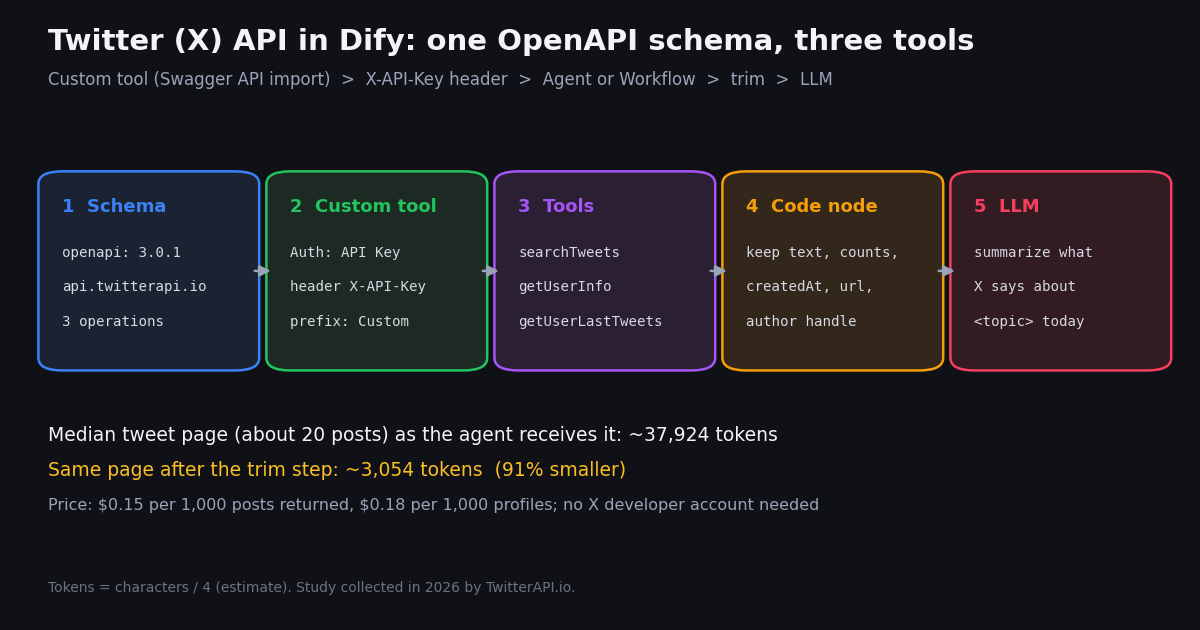
- Route: Dify Integrations, Tools, Swagger API: paste the OpenAPI 3.0 schema below (or import it from a URL), auth = API key in header
X-API-Key, no prefix. - Three tools:
searchTweets,getUserInfo,getUserLastTweets, each mapped to a real TwitterAPI.io path with real parameter names. No X developer app, no OAuth. - Token budget (measured): a median page of posts is about 37,924 tokens as the agent receives it; a nine-field trim brings it to about 3,054 (91% smaller).
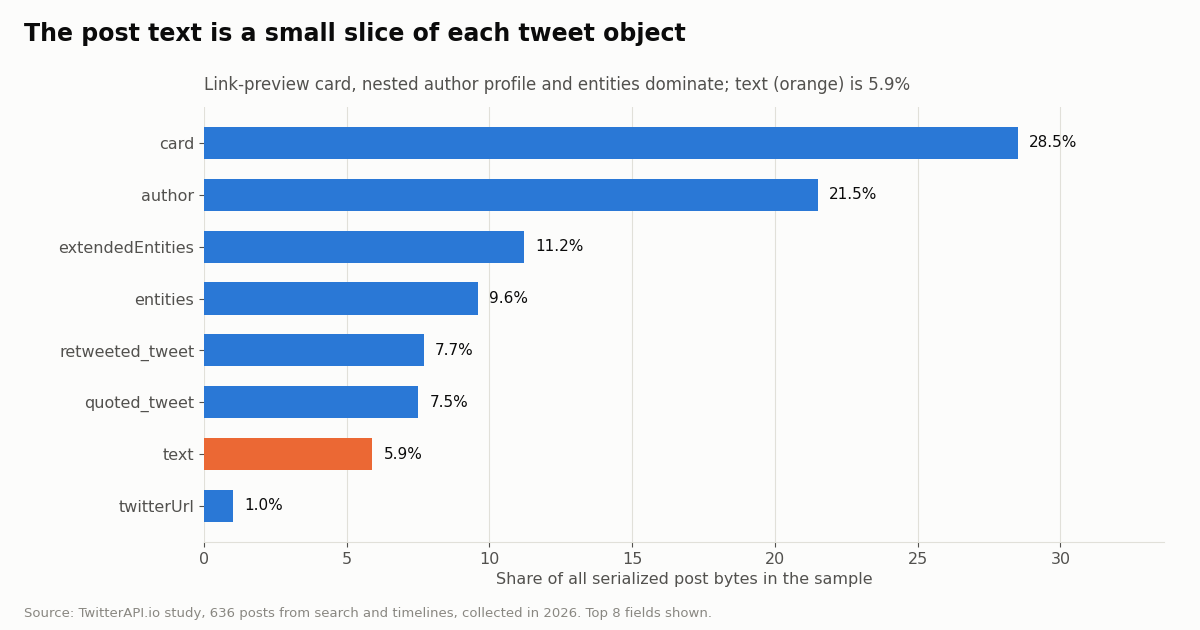
- Where the bytes go: the link-preview
cardis 28.5% of post bytes, the nestedauthor21.5%, the posttextonly 5.9%. - Cost per tool call: a 20-post page is $0.003, a profile $0.00018, an empty search $0.00015 (the minimum). The official X API rate card: $0.005 per post read.
- Not covered by Dify's official Twitter plugin: it lists send, like, delete and user lookup tools on an X OAuth 2.0 app, and no search or timeline tool.
Dify is an open-source platform for building LLM apps: agents, chatflows and workflows that call tools. It ships tool plugins for common services and lets you add any HTTP API as a custom tool by importing an OpenAPI (Swagger) schema. That second route is the one that matters for X data, because the official Twitter plugin in the Dify Marketplace posts, likes and deletes through your own X developer app but has no tool for searching posts or reading a timeline.
This page is the worked example. You get a complete OpenAPI 3.0.1 schema for three TwitterAPI.io read endpoints, the exact Dify settings for the X-API-Key header, an agent prompt and a workflow that answers "summarize what X says about a topic today", and a Code node that shrinks the tool output before the model reads it. We validated the schema with a parser and ran the same HTTP calls live; we did not run them inside a Dify instance, and the page says where that matters.
The numbers come from our own study: 40 live requests, 636 posts and 8 profiles, measured the way a Dify agent receives them. The headline is the token budget, which is the cost that surprises people building their first X agent, not the API bill (the whole study cost $0.097 in API credits).
37,924 to 3,054
Four ways to connect X data to Dify, and which one this page builds
Dify's tool documentation lists the tool types side by side: Tool Plugin, Swagger API, Workflow and MCP. For X data, each one fits a different job.
Why the custom tool. An HTTP Request node is a fixed step: the workflow always calls the same URL. A custom tool is something the model chooses to call, with parameters it fills in from the conversation. That is what an agent needs when the question is open ("what is X saying about this launch?") and the right call might be a search, a profile lookup or one account's timeline. Our Dify vs n8n comparison builds the HTTP Request version of an X digest; this page builds the tool version.
Why not the official plugin. The Marketplace listing for the langgenius Twitter plugin names four tools, send_tweet, get_user_info, like_tweet and delete_tweet, and asks for an X developer app with OAuth 2.0 and Read and Write permissions. It is the right choice if your agent only needs to post as you. It cannot answer a question about what other accounts are posting, because it has no search or timeline tool.
Why not the full TwitterAPI.io spec. Our documentation publishes an OpenAPI 3.0.1 file at docs.twitterapi.io/api-reference/openapi.json, and Dify's Swagger tool can import a schema from a URL. When we parsed it this session it held 84 operations and none of them carried an operationId. Dify's parser then names each tool after its path and method with the slashes removed (for example twittertweetadvanced_search_get), and an agent with 84 similar-looking tools picks worse than one with three clearly described ones. Import the full spec when you want to browse what exists; give the agent the short schema below.
The OpenAPI schema for the Dify custom tool
Paste this into the schema box of a new Swagger API tool. It is OpenAPI 3.0.1 YAML (Dify also accepts JSON, and converts Swagger 2.0). Every path is a real TwitterAPI.io endpoint and every parameter name matches the API: query, queryType and cursor for search, userName for the profile, userName, includeReplies and cursor for the timeline.
What Dify uses from it. Dify's schema parser (api/core/tools/utils/parser.py in the langgenius/dify repository) takes the first entry in servers as the base URL and fails the import if there is none. It creates one tool per operation, uses operationId as the tool name when present (it must match ^[a-zA-Z0-9_-]{1,64}$), and uses description, falling back to summary, as the text the model reads to decide when to call it. Each parameter's description becomes the hint the model sees while filling it in, which is why the descriptions below say what a good value looks like.
What it does not need. Dify ignores the securitySchemes block for authentication; the key is set in the tool's authorization dialog (next section). Keeping the block in the schema is harmless and keeps the file valid for other OpenAPI tools such as code generators.
Validation. We ran the schema through openapi-spec-validator (result: valid) and through a re-implementation of the checks Dify's parser applies: a server is present, paths are present, all three operationIds match Dify's pattern, no parameter name repeats, and each path exists in our endpoint list. All passed. The study's analyze.py contains the same schema and the checks, so you can re-run them.
openapi: 3.0.1
info:
  title: TwitterAPI.io for Dify
  description: Read public X (Twitter) posts and profiles. Three read operations, one X-API-Key header.
  version: 1.0.0
servers:
  - url: https://api.twitterapi.io
paths:
  /twitter/tweet/advanced_search:
    get:
      operationId: searchTweets
      summary: Search recent or top posts on X
      description: Search public X posts with X search syntax. Returns about 20 posts per page plus has_next_page and next_cursor. Use lang:en, from:handle and since_time:<unix seconds> inside query to narrow results.
      parameters:
        - name: query
          in: query
          required: true
          description: X search query, for example dify lang:en -is:retweet or from:dify_ai
          schema:
            type: string
        - name: queryType
          in: query
          required: true
          description: Latest for newest first, Top for the highest-engagement posts
          schema:
            type: string
            enum: [Latest, Top]
            default: Latest
        - name: cursor
          in: query
          required: false
          description: next_cursor from the previous page; leave empty for the first page
          schema:
            type: string
      responses:
        '200':
          description: tweets[], has_next_page, next_cursor
  /twitter/user/info:
    get:
      operationId: getUserInfo
      summary: Get an X profile by screen name
      description: Returns one profile (name, description, followers, following, statusesCount, createdAt, isBlueVerified). Unknown users return status error with msg user not found.
      parameters:
        - name: userName
          in: query
          required: true
          description: Screen name without the @, for example dify_ai
          schema:
            type: string
      responses:
        '200':
          description: data object with the profile
  /twitter/user/last_tweets:
    get:
      operationId: getUserLastTweets
      summary: Get the latest posts of one X account
      description: Returns the account's latest posts, newest first, 20 per page, in data.tweets, plus has_next_page and next_cursor.
      parameters:
        - name: userName
          in: query
          required: true
          description: Screen name without the @
          schema:
            type: string
        - name: includeReplies
          in: query
          required: false
          description: true to include the account's replies
          schema:
            type: boolean
            default: false
        - name: cursor
          in: query
          required: false
          description: next_cursor from the previous page; leave empty for the first page
          schema:
            type: string
      responses:
        '200':
          description: data.tweets[], has_next_page, next_cursor
components:
  securitySchemes:
    ApiKeyAuth:
      type: apiKey
      in: header
      name: X-API-Key
security:
- ApiKeyAuth: []Set up the tool in Dify: authorization, test and naming
Step 1, create the tool. Open Integrations, then Tools, and add a tool of the Swagger API type. Dify's docs describe three ways to supply the schema: paste it, import it from a URL, or start from the bundled example. Paste the YAML above. Dify lists the three operations it found; if it lists none, the usual cause is a missing servers entry or a YAML indentation error.
Step 2, authorization. Choose API Key as the authorization type, header as the location, X-API-Key as the header name, and the Custom prefix so the raw key is sent. In Dify's custom tool code the header name defaults to Authorization and the Basic and Bearer prefixes prepend Basic or Bearer to your value; TwitterAPI.io expects the bare key in X-API-Key, so either of those prefixes produces an authentication error. Dify also supports sending the key as a query parameter, which you should not use here: query strings end up in logs. (These are the option names in Dify's source; the dialog labels can differ slightly between Dify versions.)
Step 3, test. The tool editor lets you run an operation with sample values. Test getUserInfo with userName = dify_ai: it returns a profile of a few hundred tokens and costs $0.00018. If you test with a handle that does not exist, the API answers HTTP 200 with status: error and msg: user not found, not a 404, so the agent sees an error message rather than a failed call. Dify treats HTTP 400 and above as a tool error and passes the response text to the model.
Step 4, name and describe. The tool provider name and the operation descriptions are what the agent reads. Keep the provider name plain (for example X data) and resist adding more operations until the agent clearly needs them. Three tools with distinct jobs, search posts, read one account, look up one profile, cover the majority of "what is happening on X" questions.
Self-hosted note. On a self-hosted Dify, the custom tool's HTTP client uses a 10-second connect timeout and a 60-second read timeout by default (API_TOOL_DEFAULT_CONNECT_TIMEOUT and API_TOOL_DEFAULT_READ_TIMEOUT in the same source file). A single page from these endpoints returns well inside that.
Example 1: an agent that summarizes what X says about a topic
Create an Agent app (or an Agent node inside a workflow), pick a model that supports function calling, and add the three tools. Dify's classic Agent node offers two strategies: Function Calling, which passes the tool definitions to the model's native tool interface, and ReAct, which works through explicit reasoning steps for models without it. Set a low Max Iterations value; Dify's docs suggest 3-5 for simple tasks, and "summarize today's posts" is one.
The system prompt. The prompt below tells the agent which tool answers which kind of question, how to build a query, and to read one page unless asked for more. The last rule matters: an empty tweets list is a real answer (nothing matched), and the agent should say so rather than fill the gap.
What happens on a run. For "What is X saying about Dify today?", a function-calling model typically calls searchTweets once with a query such as dify lang:en since_time:<unix seconds> and queryType = Top, reads the page, and writes the summary. That is one API call of about 20 posts ($0.003). It is also a large observation: in our study the median Top search page was about 37,924 tokens. The model reads every byte of it before answering.
The time window. The search syntax accepts since_time: and until_time: with Unix seconds, which is what our documentation recommends over the date form. An agent can compute this if you give it the current time; Dify exposes the current time as a built-in tool, or you can add the timestamp to the prompt. In the workflow version below a Code node computes it, which is more reliable.
You answer questions about what people are posting on X (Twitter).
Tools:
- searchTweets(query, queryType): public posts. Use queryType=Top for "what is X saying",
  Latest for "what is new". Put lang:en and since_time:<unix seconds> inside query.
- getUserLastTweets(userName): one account's latest posts, newest first.
- getUserInfo(userName): one profile (followers, bio, createdAt).
Rules: call one tool at a time, read one page (do not follow next_cursor unless asked),
quote at least three posts by url, and say how many posts you read.
If a tool returns an empty tweets list, say nothing was found instead of guessing.What one tool call costs in tokens: the study
We ran the three operations the way an agent would, on five topic searches (Latest and Top) and eight organization accounts, and measured each response as Dify receives it: the full JSON text. Token counts are characters divided by four, a common rule of thumb for English text and an estimate only; your model's tokenizer will differ, and JSON with many digits and URLs often tokenizes less efficiently than prose.
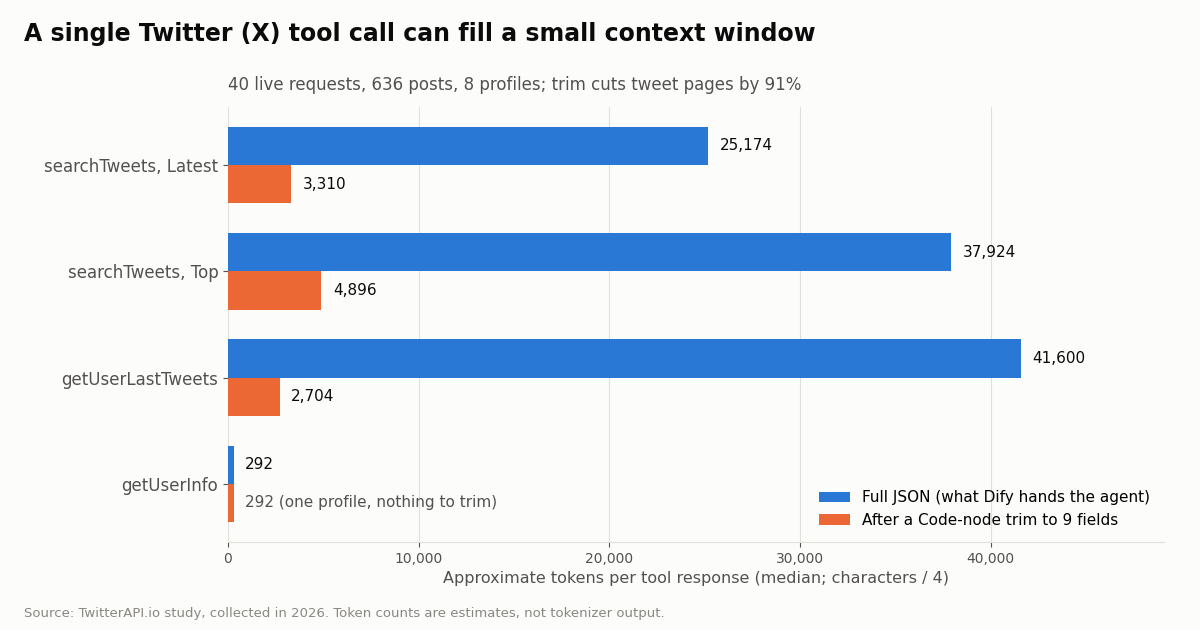
Timelines are the heaviest. The median getUserLastTweets page was about 41,600 tokens (166.4 KB), the 90th percentile 57,941 and the largest 81,396. Organization accounts repost and quote a lot, and every repost carries the full original post, its author and its media inside retweeted_tweet. Per post, a timeline page ran about 2,080 tokens against about 1,471 for search.
What fits in a context window. At the median, a 128,000-token context holds 3 untrimmed pages of posts and 41 trimmed ones; a 32,000-token context holds 0 untrimmed pages (one page alone is larger) and 10 trimmed. An agent on a small or local model can fail on its first tool call for this reason alone, with an error that looks like a model problem.
The API bill is the small part. A 20-post page costs $0.003 at $0.15 per 1,000 posts. The same 20 post reads on the official X API rate card are $0.10 at $0.005 per post read, about 33 times more, and still need an X developer app. On either API, the model's input tokens for an untrimmed page are usually the larger line item, which is why the next section exists.
Example 2: a workflow that trims the payload before the LLM reads it
When the job is always the same ("summarize what X says about this topic in the last 24 hours"), a workflow beats an agent: the steps are fixed, the time window is computed in code, and you can cut the tool output down before the model sees it. The workflow has five nodes.
1. User Input with one variable, topic.
2. Code node, build the query. It returns query = the topic plus lang:en and a since_time: value 24 hours back (first code block below).
3. Tool node, searchTweets, with query from the previous node and queryType = Top. In Dify's custom tool source, a JSON response produces two outputs: the parsed JSON and the raw response text, the latter kept for backward compatibility. The next node reads the text output.
4. Code node, trim. It parses the text and keeps nine fields per post: text, createdAt, url, likeCount, retweetCount, replyCount, viewCount, plus the author's userName and followers (second code block). It returns one compact JSON line per post as a string. Dify's Code node limits apply here: by default an array[object] output holds up to 30 items and a string output 400,000 characters, so returning a string keeps you clear of the array limit if a page ever holds more than 30 posts.
5. LLM node with a prompt such as: summarize the main themes in these posts about the topic, quote three by url, note the like counts of the posts you quote, and say how many posts you read. Then an End node or Answer node returns the summary.
The measured effect of step 4. Across every page of posts in our study, the trim removed 90.7% of the characters: a median page fell from about 37,924 to about 3,054 tokens. For timelines the cut was 93.4%, for search 86.2%. The trimmed page still carries what a summary needs. Add lang or quoted_tweet.text to KEEP if your summaries need them; each field you add costs tokens on every post.
Agents can use it too. Dify can publish a workflow that starts with a User Input node as a tool (Publish, then Workflow as Tool). Publish this workflow without the LLM node and give the resulting tool to your agent: the agent then receives trimmed posts instead of raw JSON. Remember that the published tool keeps running the version it was saved with until you save it again.
import time


def main(topic: str) -> dict:
    """Dify Code node placed before the Tool node: build a 24-hour query."""
    since = int(time.time()) - 24 * 3600
    return {"query": f"{topic} lang:en since_time:{since}"}


# ---- second Code node: trim the Tool node output ----
import json

KEEP = ["text", "createdAt", "url", "likeCount", "retweetCount", "replyCount", "viewCount"]


def main(raw: str) -> dict:
    """Dify Code node. Input variable raw = the Tool node's text output."""
    body = json.loads(raw)
    # searchTweets puts posts at the top level, getUserLastTweets under data
    tweets = body.get("tweets") or (body.get("data") or {}).get("tweets") or []
    lines = []
    for t in tweets:
        a = t.get("author") or {}
        row = {k: t.get(k) for k in KEEP}
        row["author"] = a.get("userName")
        row["followers"] = a.get("followers")
        lines.append(json.dumps(row, ensure_ascii=False))
    return {
        "posts": "\n".join(lines),
        "count": len(tweets),
        "next_cursor": body.get("next_cursor") or "",
}Why the raw response is so large
A post object from these endpoints is built for completeness: it carries the post, its counts, its entities, its media variants, a link-preview card, the full author profile, and, for reposts and quotes, the whole embedded post with its own author. We summed the serialized bytes of each top-level field across all 636 posts in the sample.
The author object repeats. Every post repeats its author's profile (bio, counts, banner and avatar URLs, pinned post IDs). On a timeline page all 20 copies describe the same account. At the median the author block was 26.6% of a post's bytes.
This is the reason to trim in Dify rather than ask the API for less. These endpoints return the full object; there is no field-selection parameter to add to the schema. The trim is a few lines in a Code node, and it runs on Dify's side for free.
Cost, rate limits and posting from Dify
Reads. Tweet endpoints, including search and timelines, cost 15 credits per post returned, which is $0.15 per 1,000 posts; profiles cost 18 credits each, $0.18 per 1,000. A request that returns nothing is billed the 15-credit minimum, $0.00015. $1 buys 100,000 credits, and purchased credits never expire. New accounts that pass the automatic bot check get free starter credits (no card, one per person or network, expiring after 31 days); see the pricing page for the current amount.
Against the official X API. The X API pay-per-usage rate card on docs.x.com lists $0.005 per post read and $0.010 per user read, capped at 3 million post reads a month with Enterprise above that. Per 1,000 posts that is $5 against $0.15, about 33 times more, before the developer app and OAuth setup the official route requires.
Rate limits. Accounts run at 0.2 requests per second before the first payment and 20 once paid (50 on the Scale plan, 500 on Business). An agent that calls one tool per turn stays far below 20. A workflow you fan out with Dify's Iteration node over many topics can reach it in parallel mode; the Iteration node also has a sequential mode, which keeps one request in flight.
Posting from an agent. Writes are available too, through an authenticated session: one /twitter/user_login_v2 login ($0.10, with a proxy you supply) returns login_cookies, and each post, like, retweet or follow is then 60 credits ($0.0006), for example /twitter/create_tweet_v2. You could add such an operation to the schema, but think before giving an autonomous agent a post tool. The call acts as that account, and X can rate-limit, lock or suspend it; keep a human pace (only your own account, a normal human pace, X's automation rules apply, it can be rate-limited, locked or suspended; this is not a way around any limit), expect the session to need a fresh login now and then, and note that every HTTP 200 call is billed. A human approval step before the post node is the safer design.
How we collected this
Question. When a Dify agent calls a Twitter (X) custom tool built from the schema on this page, how large is each response it has to read, what does each call cost, and how much does a simple trim step save?
Method. We used our rate-limited read-only client to call the three operations directly with the same parameters Dify would send: five topic searches (dify, "MCP server", "Claude Code", nvidia, "AI agent", English) with queryType Latest (two pages) and Top (one page); getUserInfo and two pages of getUserLastTweets for eight organization accounts (OpenAI, GitHub, Vercel, NASA, NVIDIA, Docker, Anthropic and Dify); and one search with no matches. 40 requests, 636 posts and 8 profiles, collected in 2026. The API cost of the whole study was $0.097.
Measurement. Each response was serialized as JSON text and measured in characters; approximate tokens = characters / 4. The trimmed size is the same page reduced to the nine fields the Code node keeps. Field shares are summed serialized bytes per top-level post field.
What the sample cannot show. We did not run Dify itself: the schema was validated with openapi-spec-validator and a re-implementation of the checks in Dify's parser, and the calls ran outside Dify. Dify's own message wrapping and your model's tokenizer will change the exact counts. Topics with many link posts or reposts produce larger pages, and timeline sizes vary a lot between accounts. Forty requests show the order of magnitude, not a distribution you should plan capacity on.
Privacy. Aggregates only. Search results mostly come from private individuals, so those raw pages were never stored with the study; the study files keep per-response sizes and counts with no post IDs, URLs, text or handles of private authors. Only organization accounts are named.
"""Run the same three operations a Dify custom tool would run, outside Dify.

Dify's custom tool sends a GET to the schema's server URL plus the operation
path, with the X-API-Key header you configure, then hands the agent the response body. This
script does the same, measures the payload, and applies the trim step.
pip install requests pyyaml
"""
import json
import os
import time

import requests

BASE = "https://api.twitterapi.io"
HEADERS = {"X-API-Key": os.environ["TWITTERAPI_IO_KEY"]}
KEEP = ["text", "createdAt", "url", "likeCount", "retweetCount", "replyCount", "viewCount"]


def get(url, params):
    r = requests.get(url, headers=HEADERS, params=params, timeout=30)
    r.raise_for_status()
    return r.json()


def search_tweets(query, query_type="Top", cursor=""):
    return get(f"{BASE}/twitter/tweet/advanced_search",
               {"query": query, "queryType": query_type, "cursor": cursor})


def get_user_info(user_name):
    return get(f"{BASE}/twitter/user/info", {"userName": user_name})


def get_user_last_tweets(user_name, cursor="", include_replies=False):
    return get(f"{BASE}/twitter/user/last_tweets",
               {"userName": user_name, "cursor": cursor,
                "includeReplies": str(include_replies).lower()})


def trim(body):
    tweets = body.get("tweets") or (body.get("data") or {}).get("tweets") or []
    rows = []
    for t in tweets:
        a = t.get("author") or {}
        row = {k: t.get(k) for k in KEEP}
        row["author"] = a.get("userName")
        row["followers"] = a.get("followers")
        rows.append(row)
    return rows


def approx_tokens(obj):
    return len(json.dumps(obj, ensure_ascii=False)) // 4  # estimate, not a tokenizer


if __name__ == "__main__":
    since = int(time.time()) - 24 * 3600
    page = search_tweets(f"dify lang:en since_time:{since}", "Top")
    small = trim(page)
    print("posts:", len(small), "| has_next_page:", page.get("has_next_page"))
    print("full ~tokens:", approx_tokens(page), "| trimmed ~tokens:", approx_tokens(small))
    print("cost of this call: $", round(max(15, 15 * len(small)) / 100000, 5))

    profile = get_user_info("dify_ai")
    if profile.get("status") == "error":
        print("profile error:", profile.get("msg"))
    else:
        d = profile["data"]
        print(d["userName"], d["followers"], "followers")

    # Follow next_cursor for two timeline pages, the way an agent would if asked
    cursor, seen = "", 0
    for _ in range(2):
        body = get_user_last_tweets("dify_ai", cursor)
        rows = trim(body)
        seen += len(rows)
        if not body.get("has_next_page"):
            break
        cursor = body.get("next_cursor") or ""
    print("timeline posts read:", seen)
    for row in small[:3]:
        print(row["createdAt"], row["likeCount"], row["url"])
Researching this?Free starter credits cover end-to-end testing — Google sign-in, no card. Get a key.
Questions readers ask
Can Dify connect to the Twitter (X) API?
Yes, in several ways. The Dify Marketplace has an official Twitter plugin that posts, likes, deletes and looks up users through your own X developer app (OAuth 2.0). For searching posts or reading timelines, add an API as a custom tool by importing an OpenAPI schema, call it from an HTTP Request node in a workflow, or connect an MCP server that exposes X tools.
Does the official Dify Twitter plugin search tweets?
No. Its Marketplace listing names four tools: send_tweet, get_user_info, like_tweet and delete_tweet. There is no search or timeline tool, so questions about what other accounts are posting need a custom tool such as the schema on this page.
Which OpenAPI versions does a Dify custom tool accept?
Dify's parser loads OpenAPI 3 schemas in JSON or YAML, converts Swagger 2.0 documents to OpenAPI 3.0 on import, and also reads OpenAI plugin manifests. The schema needs at least one entry in servers and at least one path, or the import fails.
How do I send the X-API-Key header from a Dify custom tool?
In the tool's authorization settings choose API Key, the header location, enter X-API-Key as the header name and pick the Custom prefix so the bare key is sent. The Basic and Bearer prefixes add text in front of the key, and TwitterAPI.io then rejects it.
Why does my Dify agent fail after calling the Twitter tool?
Often the tool response is too large for the model's context. In our study a median page of posts was about 37,924 tokens (characters / 4, an estimate), and a timeline page reached 81,396. Use a model with a larger context, ask the agent to read one page, or trim the output in a Code node (publish the workflow as a tool for agents).
Do I need an X developer account to use this tool?
No, not for reads. The custom tool authenticates to TwitterAPI.io with one API key in the X-API-Key header. You need an X account only for write actions such as posting, which run through an authenticated session.
How much does a Dify agent run cost in API credits?
A run that calls searchTweets once and reads a 20-post page costs $0.003; a profile lookup adds $0.00018; a search with no results costs the $0.00015 minimum. Model tokens are billed separately by your LLM provider and are usually the larger cost when the output is not trimmed.
Continue
- Dify docs: Dify Tools (Tool Plugin, Swagger API, Workflow and MCP tool types; paste or import a schema from a URL)
- Dify source: ApiBasedToolSchemaParser (servers, operationId pattern, Swagger 2.0 conversion)
- Dify source: custom API tool (api_key_header auth with Basic, Bearer or Custom prefix; timeouts; JSON and text outputs)
- Dify docs: Code node (Python and JavaScript, output limits)
- TwitterAPI.io OpenAPI 3.0.1 spec (paths, parameters, X-API-Key security scheme)
- X API pricing: pay-per-usage rate card ($0.005 per post read, 3M post read cap)
- X (Twitter) API overview and endpoints
- Dify vs n8n: pricing, licenses and an X digest built in both
- n8n Twitter API workflow that posts new tweets to Slack
- Twitter OpenAPI specs and typed clients
- LangChain Twitter tools for agents
- Twitter MCP server for Dify, Claude and Cursor
- TwitterAPI.io pricing and credits
- 01How to Translate Tweets on Twitter (X): Auto-Translate, the Gear Icon and Language Settings
- 02How to Turn Off Autoplay on Twitter (X): App, Web and Auto-Advance
- 03Twitter (X) and the EU Digital Services Act (DSA): What the Commission Found, and What It Means for X Data
- 04Twitter (X) and Firebase: store posts in Firestore with a scheduled Cloud Function
- 05Twitter (X) Network Analysis with Python and networkx: A Real #reInvent Graph
- 06Dify vs n8n: Which One to Build On, What Each Costs, and How Each Handles Twitter (X) Data
- 07Twitter (X) API Cost — A Straight Answer
- 08Twitter (X) API in Java: a typed client with HttpClient and Jackson
Writing about something you built with TwitterAPI.io? Our community rewards program pays API credits for honest tutorials, build logs and videos.
Stop reading. Start building.
Starter credits cover real testing on real data. Google sign-in, no card, no application queue.
Get an API keyAlready building with TwitterAPI.io? Publish an honest tutorial or build log about it and earn up to $200 a month in API credits.