Twitter (X) API on AWS Lambda: an EventBridge poller with SQS fan-out
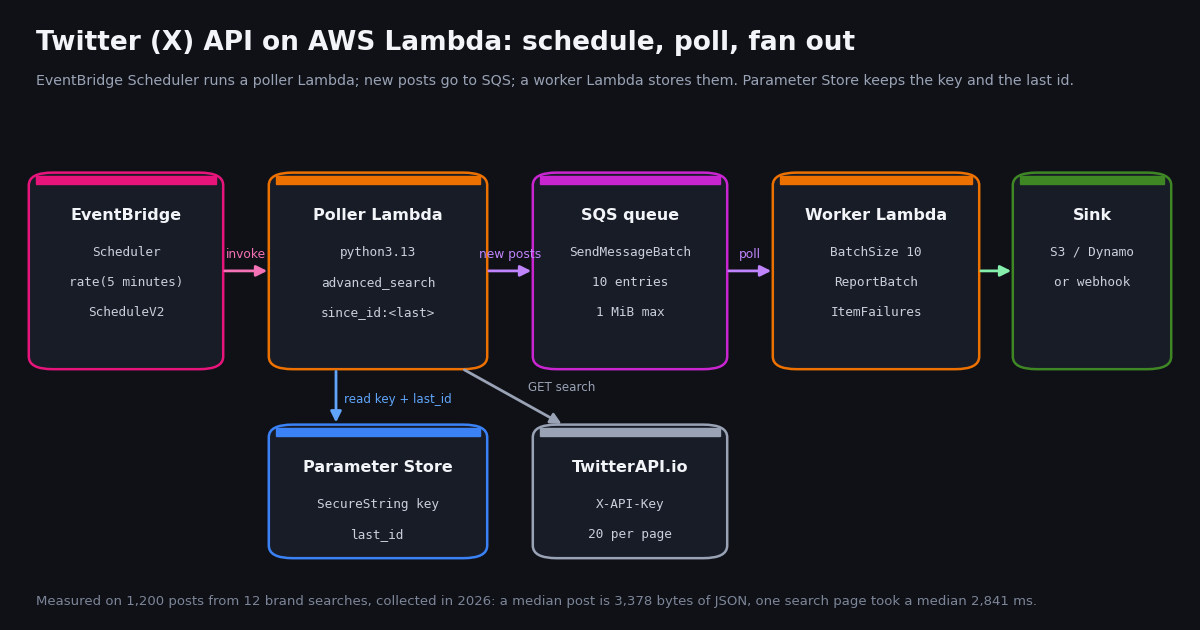
- Shape: EventBridge Scheduler (
ScheduleV2in AWS SAM) -> poller Lambda -> SQS -> worker Lambda -> S3, DynamoDB or a webhook. The fulltemplate.yamland both handlers are below. - Dedup: append
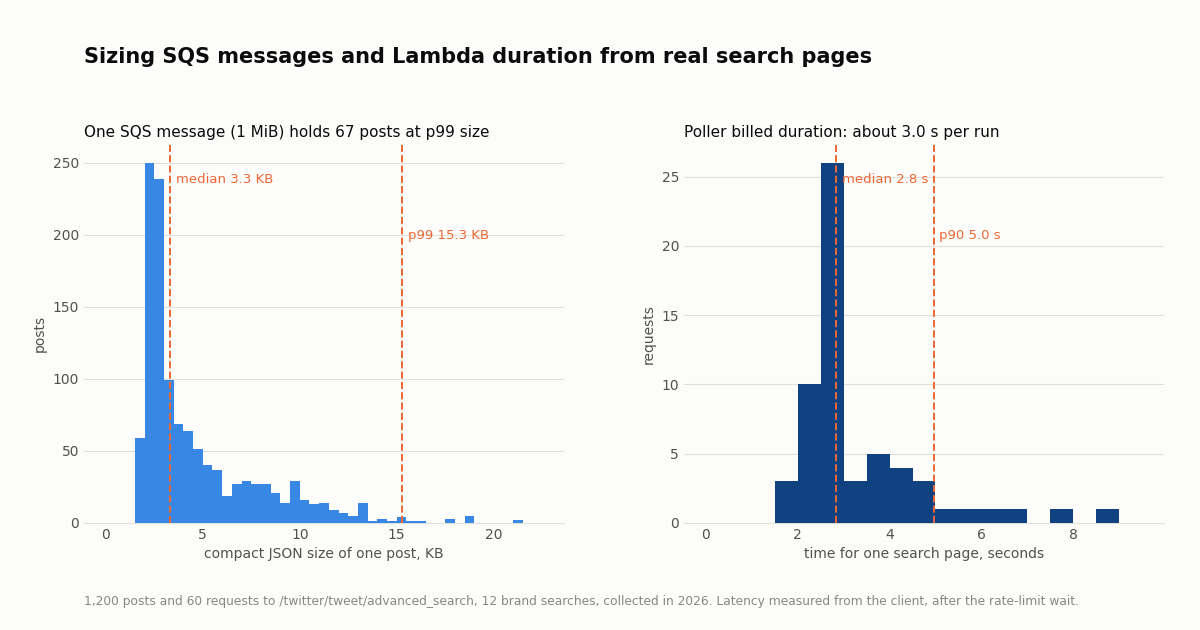
since_id:<last id>to the search query (documented ondocs.twitterapi.io) and store the newest id in Parameter Store after each run that found something. - SQS sizing: a median post is 3,378 bytes of JSON and the p99 is 15,627 bytes, so 67 p99-size posts would fit in one 1 MiB message. Send one post per message and let
SendMessageBatchgroup 10. - Latency is the Lambda bill: a search page took a median 2,841 ms (p90 4,959 ms). At 128 MB that is about $0.0064 per 1,000 poller runs before the free tier.
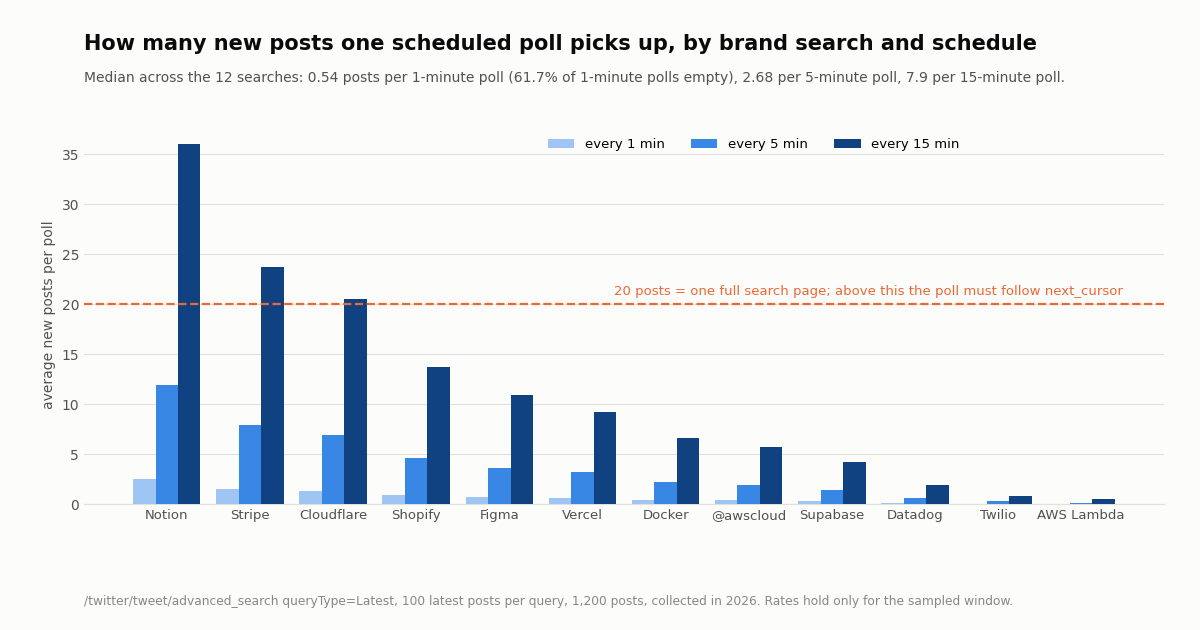
- Pick the schedule from the data: the median search had 0.54 new posts per 1-minute poll (61.7% empty) and 2.68 per 5-minute poll; busy brands overflow one 20-post page in 15 minutes.
- Cost: $0.15 per 1,000 posts returned on TwitterAPI.io vs $0.005 per post read ($5 per 1,000) on the official X API pay-per-usage rate card, about 33x; the empty-poll floor is $6.48 a month at 1 minute and $1.30 at 5 minutes.
Searches for "twitter api aws lambda" usually come from someone who already has an AWS account and wants X (Twitter) posts flowing into it on a schedule: brand mentions into S3 for analysis, keyword hits into a DynamoDB table behind a dashboard, or alerts into Slack. Many of the existing write-ups were written for the old free X API tiers and Tweepy, store four OAuth secrets, and run one function that does everything.
This guide builds the pipeline the way AWS's own services expect it to be built: a scheduled poller that only fetches what is new, a queue that absorbs bursts, and a worker that retries one post at a time. Every AWS limit used here (schedule syntax, SQS message size, batch rules, runtimes, prices) was checked against docs.aws.amazon.com and aws.amazon.com/pricing while writing, and every number about X data comes from a study we ran on 1,200 real posts. If you deploy on Cloudflare instead, the Cloudflare Workers version of this pipeline uses a Cron Trigger and KV; the Python reference covers the API calls in more depth.
3,378 bytes
The architecture: five AWS pieces and one API call
The pipeline has two Lambda functions with a queue between them. Splitting them is what makes it robust: the poller stays short and does one thing (ask for new posts, hand them off), and the worker can fail, retry and scale without ever re-polling X.
Why EventBridge Scheduler and not an EventBridge rule. Both can run a Lambda on a schedule, but Scheduler is the newer service built for it: it supports IANA time zones, a flexible time window, a retry policy and a dead-letter queue per schedule, and AWS SAM exposes it as the ScheduleV2 event type. Its schedule expressions are rate(value unit) with minutes, hours or days, or a six-field cron(minutes hours day-of-month month day-of-week year). AWS documents that all schedule types invoke their targets with 60-second precision, so one minute is the practical floor for a poll.
Why Parameter Store and not Secrets Manager. The poller needs one secret and one small piece of state. Standard parameters, including SecureString, are available at no additional charge on the AWS Systems Manager pricing page, and the same API (get_parameter, put_parameter) handles both. Secrets Manager adds rotation and cross-account sharing, which an API key you rotate by hand does not need; check its own pricing page if you prefer it.
Note on naming. AWS's runtime documentation now calls these "Lambda Event Functions (previously known as Lambda functions)". Nothing in this guide changes because of it; SAM still uses AWS::Serverless::Function.
Step 1: store the API key, then write template.yaml
Get an API key from the TwitterAPI.io dashboard. New accounts that pass the automatic bot check get up to $1 of free credits (up to 100,000 credits, no card, one per person or network, expiring after 31 days), which is enough for about 6,600 posts at $0.15 per 1,000. No X developer account, app approval or OAuth signing is needed for reads: every call is a GET with an X-API-Key header.
Store the key as a SecureString so it never sits in a template, a console environment variable or your Git history: aws ssm put-parameter --name /x-poller/api-key --type SecureString --value "$TWITTERAPI_IO_API_KEY". The template and the poller expect that path; change all three together if you rename it.
Lay the project out as poller/poller.py plus a poller/requirements.txt that lists requests, worker/worker.py, and template.yaml at the root, then run sam build and sam deploy --guided. boto3 ships with the Python runtimes, but AWS recommends packaging the SDK modules your code uses for full control of versions. The supported Python runtimes on Amazon Linux 2023 run from python3.12 to python3.15 per the Lambda runtimes page, and python3.11 still runs on Amazon Linux 2 with a deprecation date of June 30, 2027. This guide uses python3.13.
The template below declares the schedule, both functions, the queue with its dead-letter queue, and an S3 bucket for the output.
Four settings carry the design:
ReservedConcurrentExecutions: 1 on the poller. If one search is slow, the next tick must not start a second poller that reads the same last_id and queues the same posts twice. One reserved slot serializes them.
RetryPolicy: MaximumRetryAttempts: 0 on the schedule. A failed poll does not need a retry from EventBridge: the next scheduled run asks for everything since the same id and catches up. Retrying only overlaps runs.
VisibilityTimeout: 180 on the queue. AWS's SQS event source guide says to set the queue's visibility timeout to at least six times the function timeout; the worker times out at 30 seconds, so 180. It also recommends maxReceiveCount of at least 5 on the redrive policy before a message goes to the dead-letter queue.
FunctionResponseTypes: [ReportBatchItemFailures] on the worker's SQS event. Without it, one bad post makes the whole batch of 10 visible again and the other nine are processed twice.
AWSTemplateFormatVersion: "2010-09-09"
Transform: AWS::Serverless-2016-10-31
Description: X (Twitter) search poller -> SQS -> worker -> S3

Parameters:
  SearchQuery:
    Type: String
    Default: '"Stripe" -is:retweet'
  ScheduleExpression:
    Type: String
    Default: rate(5 minutes)

Globals:
  Function:
    Runtime: python3.13
    Architectures: [x86_64]
    MemorySize: 128

Resources:
  TweetsBucket:
    Type: AWS::S3::Bucket

  TweetsDLQ:
    Type: AWS::SQS::Queue
    Properties:
      MessageRetentionPeriod: 1209600        # 14 days, the SQS maximum

  TweetsQueue:
    Type: AWS::SQS::Queue
    Properties:
      VisibilityTimeout: 180                 # 6 x the worker timeout (AWS guidance)
      RedrivePolicy:
        deadLetterTargetArn: !GetAtt TweetsDLQ.Arn
        maxReceiveCount: 5

  PollerFunction:
    Type: AWS::Serverless::Function
    Properties:
      CodeUri: poller/                       # poller.py + requirements.txt (requests)
      Handler: poller.lambda_handler
      Timeout: 60                            # measured p99 page time was about 8 s
      ReservedConcurrentExecutions: 1        # never two polls at once
      Environment:
        Variables:
          SEARCH_QUERY: !Ref SearchQuery
          QUEUE_URL: !Ref TweetsQueue
          API_KEY_PARAM: /x-poller/api-key
          LAST_ID_PARAM: /x-poller/last-id
      Policies:
        - Statement:
            - Effect: Allow
              Action: [ssm:GetParameter, ssm:PutParameter]
              Resource: !Sub arn:aws:ssm:${AWS::Region}:${AWS::AccountId}:parameter/x-poller/*
            - Effect: Allow
              Action: kms:Decrypt                # for the SecureString; narrow to your key ARN
              Resource: "*"
            - Effect: Allow
              Action: sqs:SendMessage            # also covers SendMessageBatch
              Resource: !GetAtt TweetsQueue.Arn
      Events:
        Poll:
          Type: ScheduleV2
          Properties:
            ScheduleExpression: !Ref ScheduleExpression
            FlexibleTimeWindow:
              Mode: "OFF"
            RetryPolicy:
              MaximumRetryAttempts: 0          # the next tick retries; since_id catches up
              MaximumEventAgeInSeconds: 60

  WorkerFunction:
    Type: AWS::Serverless::Function
    Properties:
      CodeUri: worker/
      Handler: worker.lambda_handler
      Timeout: 30
      Environment:
        Variables:
          BUCKET: !Ref TweetsBucket
      Policies:
        - S3CrudPolicy:
            BucketName: !Ref TweetsBucket
      Events:
        Queue:
          Type: SQS
          Properties:
            Queue: !GetAtt TweetsQueue.Arn
            BatchSize: 10
            FunctionResponseTypes: [ReportBatchItemFailures]
Step 2: the poller, with since_id dedup and SQS fan-out
The poller reads the last seen id, appends since_id:<id> to the query, and walks pages with next_cursor until has_next_page is false or it hits MAX_PAGES. The since_id: operator is documented on the advanced search reference at docs.twitterapi.io as returning "only tweets newer than that ID", which is what makes the poller idempotent: a run that crashes before saving the new id simply fetches the same posts again on the next tick, and the worker's S3 key (the post id) makes the write idempotent too.
First run. With no saved id the poller takes one page (up to 20 posts) and saves the newest id, instead of paging back through history you did not ask for.
Ordering. Search results arrive newest first. The poller sorts the new posts by id ascending before queuing them, so a consumer that cares about order sees them oldest first. A standard queue does not guarantee order anyway; use a FIFO queue with a MessageGroupId if strict order matters.
Errors. HTTP 429 and 5xx responses get a 1, 2, 4, 8 second backoff inside the run. SendMessageBatch can return HTTP 200 with some entries in Failed, which the SQS API reference tells you to check; the poller raises so the last id is not advanced past posts that never reached the queue.
Query syntax. SEARCH_QUERY takes the same operators as the X search box: "Stripe" -is:retweet, @awscloud -from:awscloud, from:NASA -filter:replies. Queries are limited to 512 characters per the reference; the since_id: suffix counts toward that.
"""poller.py - EventBridge Scheduler invokes this every N minutes.
Searches X (Twitter) through TwitterAPI.io for new posts since the last seen id,
then fans each post out to SQS as its own message (10 per SendMessageBatch call).
"""
import json
import os
import time

import boto3
import requests

BASE = "https://api.twitterapi.io"
QUERY = os.environ["SEARCH_QUERY"]            # e.g. "Stripe" -is:retweet
QUEUE_URL = os.environ["QUEUE_URL"]
KEY_PARAM = os.environ["API_KEY_PARAM"]       # SecureString, e.g. /x-poller/api-key
LAST_ID_PARAM = os.environ["LAST_ID_PARAM"]   # String, e.g. /x-poller/last-id
MAX_PAGES = int(os.environ.get("MAX_PAGES", "10"))

ssm = boto3.client("ssm")
sqs = boto3.client("sqs")
_api_key = None  # cached across warm invocations


def api_key():
    global _api_key
    if _api_key is None:
        p = ssm.get_parameter(Name=KEY_PARAM, WithDecryption=True)
        _api_key = p["Parameter"]["Value"]
    return _api_key


def read_last_id():
    try:
        return ssm.get_parameter(Name=LAST_ID_PARAM)["Parameter"]["Value"]
    except ssm.exceptions.ParameterNotFound:
        return None


def search_page(query, cursor):
    for attempt in range(4):
        r = requests.get(
            f"{BASE}/twitter/tweet/advanced_search",
            headers={"X-API-Key": api_key()},
            params={"query": query, "queryType": "Latest", "cursor": cursor},
            timeout=20,
        )
        if r.status_code in (429, 500, 502, 503):
            time.sleep(2 ** attempt)          # 1, 2, 4, 8 s backoff
            continue
        r.raise_for_status()
        return r.json()
    raise RuntimeError(f"search failed after retries: HTTP {r.status_code}")


def send_batch(tweets):
    for i in range(0, len(tweets), 10):       # SendMessageBatch takes up to 10 entries
        chunk = tweets[i:i + 10]
        resp = sqs.send_message_batch(
            QueueUrl=QUEUE_URL,
            Entries=[{"Id": str(n), "MessageBody": json.dumps(t, separators=(",", ":"))}
                     for n, t in enumerate(chunk)],
        )
        if resp.get("Failed"):                # HTTP 200 can still carry failed entries
            raise RuntimeError(f"SQS rejected {len(resp['Failed'])} entries: {resp['Failed'][0]}")


def lambda_handler(event, context):
    last_id = read_last_id()
    query = f"{QUERY} since_id:{last_id}" if last_id else QUERY
    new, cursor = [], ""
    for _ in range(MAX_PAGES if last_id else 1):  # first run: one page only
        page = search_page(query, cursor)
        new.extend(page.get("tweets") or [])
        if not page.get("has_next_page") or not page.get("next_cursor"):
            break
        cursor = page["next_cursor"]
    seen, fresh = set(), []
    for t in new:
        if t["id"] not in seen and (last_id is None or int(t["id"]) > int(last_id)):
            seen.add(t["id"])
            fresh.append(t)
    fresh.sort(key=lambda t: int(t["id"]))    # oldest first into the queue
    if fresh:
        send_batch(fresh)
        ssm.put_parameter(Name=LAST_ID_PARAM, Value=fresh[-1]["id"], Type="String", Overwrite=True)
    print(json.dumps({"query": query, "fetched": len(new), "queued": len(fresh)}))
    return {"queued": len(fresh)}


if __name__ == "__main__":
    # Local dry run: needs AWS credentials for SSM/SQS, or stub the env vars and clients.
    print(lambda_handler({}, None))
Step 3: the worker, with partial batch failures
The worker receives up to 10 messages per invocation, stores each post as tweets/<id>.json in S3 and returns the ids of the messages it could not process. Lambda's SQS error-handling page documents the contract: return {"batchItemFailures": [{"itemIdentifier": messageId}]}; an empty list means the whole batch succeeded, and an exception thrown from the handler fails the whole batch, which is why the loop catches per record.
The fields it reads are the ones the search response actually carries: id, url, text, createdAt (for example Thu Oct 16 12:34:56 +0000 2026), lang, likeCount, retweetCount, replyCount, viewCount and the nested author object with userName and followers. Swap store() for a DynamoDB put_item keyed on the post id, or a requests.post to Slack or your own webhook; nothing else changes.
"""worker.py - consumes the queue in batches and stores each post in S3.
Returns only the failed message ids so SQS redelivers those and nothing else.
"""
import json
import os

import boto3

s3 = boto3.client("s3")
BUCKET = os.environ["BUCKET"]


def store(tweet):
    author = tweet.get("author") or {}
    doc = {
        "id": tweet["id"],
        "url": tweet.get("url"),
        "text": tweet.get("text"),
        "createdAt": tweet.get("createdAt"),
        "lang": tweet.get("lang"),
        "author": author.get("userName"),
        "followers": author.get("followers"),
        "likeCount": tweet.get("likeCount"),
        "retweetCount": tweet.get("retweetCount"),
        "replyCount": tweet.get("replyCount"),
        "viewCount": tweet.get("viewCount"),
    }
    s3.put_object(Bucket=BUCKET, Key=f"tweets/{tweet['id']}.json",
                  Body=json.dumps(doc).encode("utf-8"), ContentType="application/json")


def lambda_handler(event, context):
    failures = []
    for record in event["Records"]:
        try:
            store(json.loads(record["body"]))
        except Exception as exc:                 # one bad post must not fail the batch
            print(f"failed {record['messageId']}: {exc}")
            failures.append({"itemIdentifier": record["messageId"]})
    return {"batchItemFailures": failures}
What the study measured: how big a post is, and how long a page takes
Two AWS numbers decide whether this design is sized right: the SQS message limit and the poller's billed duration. Rather than guess, we ran 12 brand searches through /twitter/tweet/advanced_search (queryType=Latest, five pages each) and measured the compact JSON size of every post and the wall-clock time of every page.
The SQS limit is no longer the constraint it used to be. The SQS quotas page lists a maximum message size of 1,048,576 bytes (1 MiB), and the SendMessageBatch reference applies the same 1 MiB to the sum of a batch. Many older tutorials still quote 256 KiB. At either limit, one post per message is comfortable: the largest post we saw, a quote of a quote with media, was 21,772 bytes. About 10.2% of posts carried a nested quoted or reposted object, which is what pushes the long tail; stripping those nested objects only moved the median from 3,378 to 3,002 bytes.
One post per message, not one page per message. A full page would fit in one message too, but per-post messages are what make ReportBatchItemFailures useful (one bad post is retried alone), and SQS bills each 64 KB chunk of a payload as one request, so a 3 KB post costs one request either way.
Latency, not CPU, is the poller's bill. The poller spends nearly all its time waiting on the network. The median page took 2,841 ms, the p90 4,959 ms and the slowest 8,767 ms, measured from our client, so a 60-second timeout leaves room for several pages plus retries. Because the wait is I/O, raising memory from 128 MB to 256 MB doubles the GB-seconds without making the call faster.
Choosing the schedule: posts per poll at 1, 5 and 15 minutes
The schedule decides two things: how fresh the data is, and how many polls come back empty (each still bills the $0.00015 minimum). The study replayed the post timestamps of each search against 1, 5 and 15 minute windows.
Read it by search volume. The busy brand names (Notion at 150.4 posts an hour in the sampled window, Stripe at 93.7) almost never return an empty poll, and at 15 minutes they overflow one 20-post page every time, so the poller must follow next_cursor; MAX_PAGES: 10 covers 200 posts per run. The quiet ones (AWS Lambda at 1.9 an hour, Twilio at 3.3) find nothing in over 95% of 1-minute polls; for them a 5 or 15 minute rate loses little freshness and cuts the empty-poll floor.
A reasonable default. rate(5 minutes): across the 12 searches the median 5-minute poll found 2.68 new posts, only 13.2% of 5-minute polls were empty, and the busiest single 5-minute window held 18 posts, inside one page. Move to rate(1 minute) only when minutes matter, and to the push option below when seconds do.
These are rates for the sampled window only. Search volume for a brand swings with launches, outages and time of day, so run the measurement script at the end of this page on your own query at the hours you care about before you fix the schedule.
What it costs: the API, the AWS side, and the official X API
API spend. TwitterAPI.io bills search at 15 credits per post returned, $0.15 per 1,000 posts, with a minimum of 15 credits ($0.00015) per request, so an empty poll costs $0.00015 and a full 20-post page costs $0.003. The empty-poll floor is $6.48 a month for a 1-minute schedule (43,200 checks) and $1.30 for a 5-minute schedule. The official X API's pay-per-usage rate card (docs.x.com/x-api/getting-started/pricing) charges $0.005 per post read, $5 per 1,000, and caps pay-per-usage at 3 million post reads a month; that is about 33x the per-post price.
Monthly figures extrapolate each search's sampled rate over 30 days, add $0.00015 for every empty poll at that schedule, and leave out the official X API's per-request behavior on empty results, which its pricing page does not spell out. Plans from $29 to $1,499 a month exist for steady volume; see the pricing page rather than per-request math.
AWS side. From the AWS pricing pages: Lambda's free tier is 1 million requests and 400,000 GB-seconds a month, then $0.20 per million requests and $0.0000166667 per GB-second (x86, first tier, US East). EventBridge Scheduler includes 14 million invocations a month free, then $1.00 per million. SQS includes 1 million requests a month free, with each 64 KB chunk counted as one request. Standard Parameter Store parameters cost nothing extra.
Billed time adds an assumed 150 ms for the Parameter Store read and the SQS send to the measured page latency. A 1-minute schedule at 128 MB uses about 16,151 GB-seconds a month, about 4% of the 400,000 GB-second free tier, and the 43,200 scheduler invocations sit far inside the 14 million free. For a single poller the AWS bill rounds to zero while the free tier lasts; the API spend is the line to watch.
Push instead of poll: a filter rule that POSTs to a Lambda function URL
If 60 seconds is too slow, or you watch many queries, flip the direction. TwitterAPI.io's tweet filter rules run the search on our side and POST matches to a URL you register in the dashboard. On AWS that URL can be a Lambda function URL, and the receiver does what the poller did: put the posts on the same SQS queue. Everything downstream stays the same.
Register the rule. POST /oapi/tweet_filter/add_rule takes a tag, a value in the same search syntax (up to 255 characters) and interval_seconds. New rules start inactive; switch one on with /oapi/tweet_filter/update_rule and is_effect set to 1. Rule checks bill like polls: $0.00015 minimum per check plus $0.00015 per matched post.
Receive it. Each push is a JSON body with event_type (tweet, or test_webhook_url for the dashboard's test button), the rule's id, tag and value, a millisecond timestamp, and tweets[] in the same shape advanced_search returns. The request carries your own API key in the x-api-key header; compare it in constant time before trusting the body. The push times out after one second and is not retried, so the handler only enqueues and returns.
Keep a slow schedule (hourly) on the poller as a safety net: with since_id it picks up anything a dropped push missed, and the worker's id-keyed writes make the overlap harmless. The Twitter webhooks guide covers rules and payloads in depth.
"""push_receiver.py - a Lambda behind a function URL that receives TwitterAPI.io
filter-rule pushes and hands the posts to the same SQS queue as the poller.
"""
import hmac
import json
import os

import boto3

sqs = boto3.client("sqs")
QUEUE_URL = os.environ["QUEUE_URL"]
API_KEY = os.environ["API_KEY"]        # load from Parameter Store at cold start in production


def lambda_handler(event, context):
    headers = {k.lower(): v for k, v in (event.get("headers") or {}).items()}
    if not hmac.compare_digest(headers.get("x-api-key", ""), API_KEY):
        return {"statusCode": 401, "body": "unauthorized"}
    body = json.loads(event.get("body") or "{}")
    if body.get("event_type") != "tweet" or not body.get("tweets"):
        return {"statusCode": 200, "body": "ok"}     # e.g. the dashboard's test ping
    tweets = body["tweets"]
    for i in range(0, len(tweets), 10):
        sqs.send_message_batch(QueueUrl=QUEUE_URL, Entries=[
            {"Id": str(n), "MessageBody": json.dumps(t, separators=(",", ":"))}
            for n, t in enumerate(tweets[i:i + 10])])
    return {"statusCode": 200, "body": "ok"}          # answer well inside one second
How we collected this
Question. For a scheduled Lambda that searches X for brand mentions and fans posts out to SQS: how large is one post's JSON, how many fit an SQS message, how long does a search page take, and how many new posts would one poll find at 1, 5 and 15 minutes?
Queries. Twelve brand and product searches typical of monitoring: "Stripe", "Vercel", "Supabase", "Cloudflare", "Docker", "Shopify", "Figma", "Notion", "Datadog", "Twilio", @awscloud and "AWS Lambda".
Method and sample. /twitter/tweet/advanced_search with queryType=Latest, five pages per query, 60 requests and 1,200 posts, collected in 2026. Post size is the UTF-8 length of the compact JSON of each post as returned. Latency is the client-side time for each request after a local rate-limit wait, from one machine on one day; your Lambda region will differ. Posts per poll replay each query's timestamps against fixed windows across its sampled span.
What it cannot show. The 100 latest posts per query cover anywhere from under an hour to about two days, so per-hour rates describe that window only. Lambda billed duration adds an assumed overhead rather than a measured one. The study does not measure filter-rule push latency.
Privacy. Search results are written by private individuals, so raw pages were kept out of the repository. Only aggregates and de-identified rows (query label, byte size, flags, minute-rounded time; no ids, text, URLs or authors) are kept.
"""size_my_pipeline.py - before you deploy the Lambda poller, measure your own query:
posts per hour, posts per poll at 1/5/15 minutes, JSON bytes per post (for SQS sizing)
and page latency (for Lambda billed duration). Runs locally, no AWS needed.

    pip install requests
    export TWITTERAPI_IO_API_KEY=...          # from the twitterapi.io dashboard
    python size_my_pipeline.py '"Stripe" -is:retweet'
"""
import json
import os
import statistics
import sys
import time
from datetime import datetime

import requests

BASE = "https://api.twitterapi.io"
HEADERS = {"X-API-Key": os.environ["TWITTERAPI_IO_API_KEY"]}
PRICE_PER_TWEET = 0.00015      # 15 credits per post returned
SQS_MAX = 1_048_576            # SQS message and SendMessageBatch payload limit (1 MiB)


def search(query, pages=5):
    tweets, latencies, cursor = [], [], ""
    for _ in range(pages):
        t0 = time.perf_counter()
        r = requests.get(f"{BASE}/twitter/tweet/advanced_search", headers=HEADERS,
                         params={"query": query, "queryType": "Latest", "cursor": cursor}, timeout=30)
        latencies.append((time.perf_counter() - t0) * 1000)
        if r.status_code == 429:
            time.sleep(5)
            continue
        r.raise_for_status()
        body = r.json()
        tweets.extend(body.get("tweets") or [])
        if not body.get("has_next_page") or not body.get("next_cursor"):
            break
        cursor = body["next_cursor"]
    return tweets, latencies


def main(query):
    tweets, lat = search(query)
    if len(tweets) < 2:
        sys.exit("too few posts to measure; widen the query")
    ts = sorted(datetime.strptime(t["createdAt"], "%a %b %d %H:%M:%S %z %Y").timestamp() for t in tweets)
    hours = max((ts[-1] - ts[0]) / 3600, 1 / 60)
    per_hour = len(tweets) / hours
    sizes = sorted(len(json.dumps(t, separators=(",", ":")).encode()) for t in tweets)
    p99 = sizes[min(len(sizes) - 1, int(len(sizes) * 0.99))]
    print(f"{len(tweets)} posts over {hours:.1f} h = {per_hour:.1f} posts/hour")
    for minutes in (1, 5, 15):
        per_poll = per_hour * minutes / 60
        print(f"  every {minutes:>2} min: about {per_poll:.1f} new posts per poll"
              + ("  (more than one 20-post page: follow next_cursor)" if per_poll > 20 else ""))
    print(f"JSON per post: median {statistics.median(sizes):,.0f} B, p99 {p99:,} B "
          f"-> {SQS_MAX // p99} posts fit one SQS message at p99 size")
    print(f"page latency: median {statistics.median(lat):,.0f} ms, max {max(lat):,.0f} ms")
    month = per_hour * 24 * 30
    print(f"API spend if this rate held for 30 days: {month:,.0f} posts x ${PRICE_PER_TWEET} = ${month * PRICE_PER_TWEET:,.2f}"
          " (+ $0.00015 for each poll that finds nothing)")


if __name__ == "__main__":
    main(sys.argv[1] if len(sys.argv) > 1 else '"Stripe" -is:retweet')
Researching this?Free starter credits cover end-to-end testing — Google sign-in, no card. Get a key.
Questions readers ask
Can I call the Twitter (X) API from AWS Lambda?
Yes. A Lambda function can call any HTTPS API. With TwitterAPI.io it is one GET with an X-API-Key header, for example /twitter/tweet/advanced_search, with no OAuth signing; package the requests library with your function or use urllib from the standard library. The official X API also works from Lambda with a Bearer token at its own rate card.
Should I use EventBridge Scheduler or an EventBridge rule to run the poller?
EventBridge Scheduler. It is the service AWS built for schedules: rate() and cron() expressions, IANA time zones, a flexible time window, a retry policy and a dead-letter queue per schedule, and 14 million free invocations a month. In AWS SAM it is the ScheduleV2 event type. AWS documents that Scheduler invokes targets with 60-second precision, so one minute is the practical floor.
How do I avoid processing the same tweet twice?
Three layers. Append since_id:<last id> to the search query so each poll only returns newer posts; save the newest id only after the posts are on the queue; and make the worker's write idempotent by keying it on the post id (an S3 object key or a DynamoDB partition key). Reserved concurrency of 1 on the poller stops two runs from reading the same id.
What is the SQS message size limit, and will a tweet fit?
The SQS quotas page lists 1,048,576 bytes (1 MiB) per message and the same total for a SendMessageBatch of up to 10 messages. In our sample the median post was 3,378 bytes of JSON and the largest 21,772 bytes, so one post per message fits with a wide margin.
How much does a Twitter poller on Lambda cost per month?
On the AWS side, usually nothing while the free tier lasts: a 1-minute poller at 128 MB used about 4% of Lambda's 400,000 free GB-seconds in our estimate. API spend is $0.15 per 1,000 posts returned plus $0.00015 per empty poll, a floor of $6.48 a month at 1 minute or $1.30 at 5 minutes. The official X API charges $0.005 per post read.
Which Python runtime should I use?
Any Amazon Linux 2023 Python runtime the Lambda runtimes page lists as supported; python3.12 through python3.15 are on it, and this guide uses python3.13. Avoid starting new functions on python3.11, which runs on Amazon Linux 2.
Do I need an X developer account for this?
Not for reads through TwitterAPI.io: an API key from the dashboard is enough. Posting from Lambda is a separate, authenticated flow: one /twitter/user_login_v2 login ($0.10, with a proxy you supply) returns login_cookies, then each post through /twitter/create_tweet_v2 is $0.0006. That call acts as your account, so keep a human pace; X can rate-limit, lock or suspend it, the session can need a re-login, and each HTTP 200 call is billed.
Can I push tweets to Lambda instead of polling?
Yes. Create a tweet filter rule with /oapi/tweet_filter/add_rule, activate it with update_rule, and register a Lambda function URL as the webhook in the dashboard. The function checks the x-api-key header, puts the posts on SQS and answers within one second, since pushes are not retried.
Continue
- AWS docs: EventBridge Scheduler schedule types (rate(), six-field cron(), 60-second precision, time zones)
- AWS docs: Amazon SQS message quotas (1 MiB message size, 10 messages per batch)
- AWS docs: Lambda SQS error handling and ReportBatchItemFailures
- AWS docs: Lambda runtimes (supported Python versions and deprecation dates)
- TwitterAPI.io reference: advanced search (since_id operator, 20 per page, 512-character queries)
- X API pay-per-usage pricing ($0.005 per post read, 3M post reads a month cap)
- X (Twitter) API hub: endpoints, pricing and guides
- Twitter API on Cloudflare Workers: a Cron Trigger feed with KV
- Twitter (X) webhooks: filter rules and the push payload
- Twitter monitoring: keyword alerts, account lists and dashboards
- Twitter API with Python: the complete requests guide
- TwitterAPI.io pricing: $0.15 per 1,000 tweets returned
- TwitterAPI.io API reference and endpoint docs
- 01How to Clear Bookmarks on X (Twitter): One Post, All of Them, or a Folder
- 02Twitter (X) Video Length Limit in 2026: How Long a Video Can Be, by Account
- 03Twitter (X) API Examples: 11 Requests With Real Responses, Sizes and Latency
- 04How to Clear Twitter (X) Cache on iPhone, Android and Desktop
- 05How the X (Twitter) Algorithm Works, and How to Reset Your Feed
- 06Hermes Agent and Twitter (X): the Bundled xurl Skill, and a One-Key Skill That Reads X Data Through TwitterAPI.io
- 07Mass Delete Tweets — Bulk API Workflow + Free Tool Options
- 08The X Developer Portal (X Developer Console) for the Twitter (X) API: Sign-Up, Apps and Keys, Billing, Limits, and When You Do Not Need It
Writing about something you built with TwitterAPI.io? Our community rewards program pays API credits for honest tutorials, build logs and videos.
Stop reading. Start building.
Starter credits cover real testing on real data. Google sign-in, no card, no application queue.
Get an API keyAlready building with TwitterAPI.io? Publish an honest tutorial or build log about it and earn up to $200 a month in API credits.