Twiiit: How the Nitter Redirector for Twitter (X) Works, and Why It Breaks
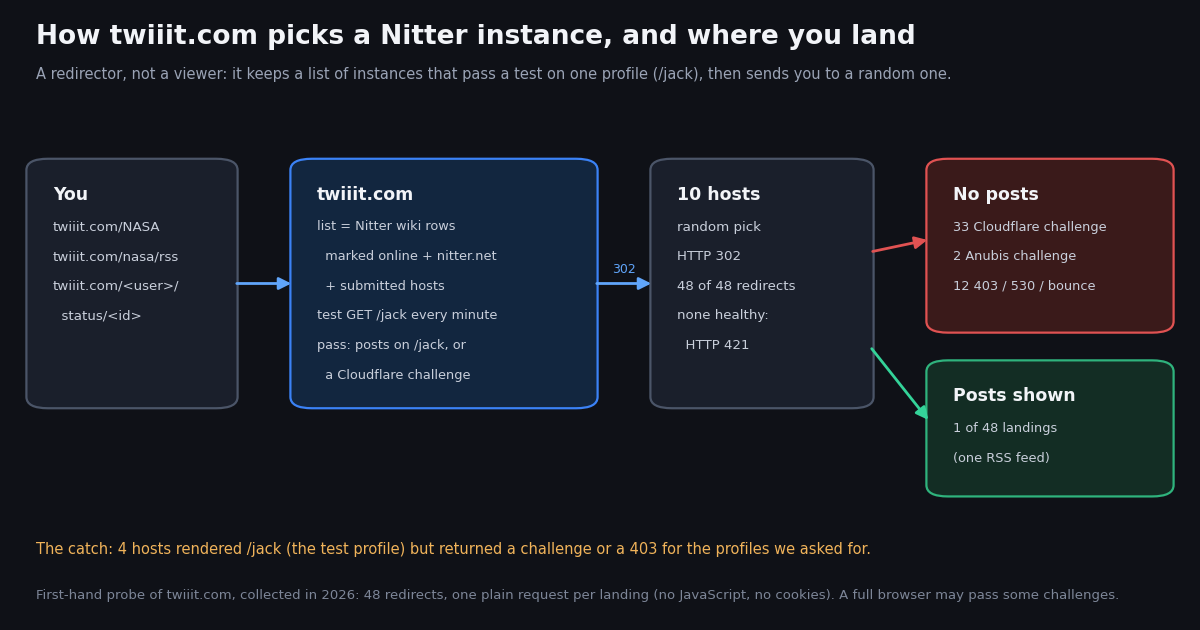
If you typed twiiit into a search bar, you probably have a twiiit.com/... link that stopped showing tweets, or you heard it is the trick for finding a Nitter instance that still works. This page is about that one service: what twiiit actually is, how its code decides where to send you, what happened when we followed its redirects, and why it fails. It is not a list of instances: our Nitter instances status check covers every host one by one, and the Nitter alternatives guide covers replacements for each thing Nitter did. Here the question is narrower: does the redirector itself still get you to posts?
We did not rely on descriptions. We opened twiiit.com, read its open-source server code on GitHub, followed 48 of its redirects for four public accounts (@NASA, its RSS feed, @BBCBreaking, @github) and loaded every page it sent us to, plus the one profile twiiit uses as its health check. Then we pulled the same accounts and four more through an API to see what a reader of those timelines actually needs: how fast they post, how much is video, and whether the one instance that answered was up to date.
Short version: twiiit is alive and honest about what it does, but the thing it measures is not the thing you need. It checks one profile on each instance, many instances let that profile through while challenging everything else, and a plain request almost never reached a post. Below is the evidence, a ten-line way to test it yourself, and the route that keeps working when no instance does.
What twiiit is (and is not): a redirector for Nitter instances
Twiiit describes itself on its home page as a "redirecting proxy for Nitter instances": enter a username, press go, and you are "redirected to a nitter instance serving that profile". Nitter is the open-source, JavaScript-free front end for X (Twitter) that many volunteers run on their own servers; twiiit does not render any posts itself. It is a router that sits in front of those servers and tries to send each visitor to one that works, so load spreads across instances instead of piling onto the most famous one.
The project is small and personal. Its source code is public at github.com/chr15m/twiiit.com (a Node.js Express app; the repository dates from February 2021, is not archived, and had its last code push in September 2026). The Nitter project's own wiki lists it under third-party services with the line "Randomly picks a server from this wiki". The home page says the site runs on a single DigitalOcean server in Singapore operated by its developer.
What we saw when we loaded it ourselves, from one residential network with a desktop browser user agent and no cookies:
URL formats it accepts. Anything that would work on a Nitter instance: a profile (/user), a profile's RSS feed (/user/rss) and a single post (/user/status/<id>). Because the path is passed through unchanged, you can take an x.com link, replace the host with twiiit.com and it will forward it. Search and other paths are forwarded too, but whether they work depends entirely on the instance you land on.
What its privacy FAQ says. IP addresses are not logged (they appear as 127.0.0.1 behind its proxy), but every requested URL and your browser's user agent are written to its access log, and logs go back to 2021. Your IP is then visible to whichever instance you are sent to, which twiiit cannot vouch for. The FAQ itself suggests Tor or a VPN if that matters to you. We found nothing unsafe on the site: it is a plain page and a plain redirect.
How twiiit picks a Nitter instance: what the code actually does
The home page says twiiit "pings each public instance listed in the wiki every five minutes to check if they are rate limited". The server code in the repository (server.js, about 340 lines) is more specific, and the details explain most of what goes wrong.
The /jack test. Twiiit decides whether an instance works by loading one profile, @jack. The Nitter wiki tells operators about it directly: "If you want your instance to show up on twiiit.com then whitelist /jack" in Cloudflare or other DoS protection, because "Twiiit uses that account to test responsiveness". So an instance can be configured to let /jack through while challenging every other path, and twiiit will keep sending people there.
Cloudflare challenges count as healthy. A commit in July 2025 titled "Assume Cloudflare check means available" makes a Cloudflare interstitial page pass the test. The reasoning is fair for humans (a real browser can often clear the check), but it means twiiit cannot tell a working instance behind Cloudflare from one that is fully blocking.
Submitted instances. In September 2026 the project added an endpoint that lets anyone propose an instance. A proposed host joins the pool if it passes the same /jack test. That is why most of the hosts twiiit sent us to are not on the Nitter wiki's main table at all: of the 10 we reached, only nitter.tiekoetter.com, nuku.trabun.org and nitter.kareem.one appear there.
Random, not sticky. Every request is a fresh random draw. Reloading the same twiiit link can land you somewhere different, which is both its main workaround (reload until one works) and the reason a bookmarked twiiit link behaves differently every time.
We followed 48 twiiit redirects: where they landed and what loaded
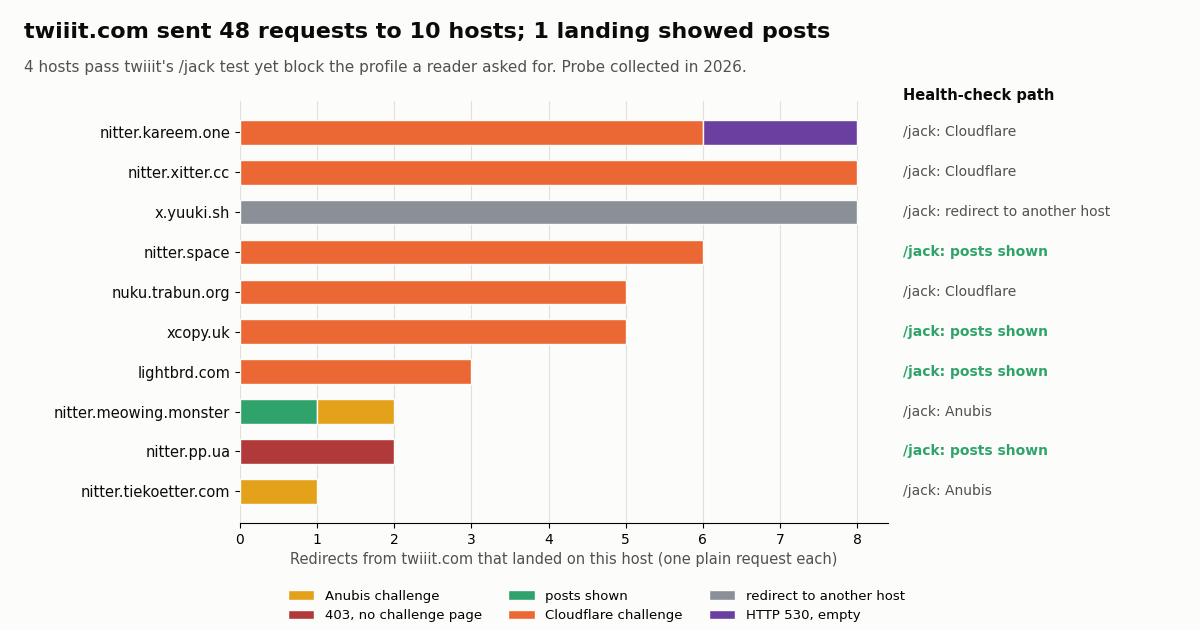
We sent 48 requests to twiiit.com, rotating four paths (/NASA, /nasa/rss, /BBCBreaking, /github) at a human pace, then loaded each page it redirected us to exactly once, the way a feed reader, a link preview or a script would: a plain request with a desktop browser user agent, no cookies and no JavaScript. Every single request got a 302, spread over 10 hosts. Then the landings:
Not one of the 36 profile-page landings rendered a timeline. The single success was an RSS feed: nitter.meowing.monster/nasa/rss returned 20 items (1 of 12 RSS landings worked). The median landing answered in 1.26 seconds, so the failures are fast refusals, not timeouts.
The chart puts each host's landings next to what the same host returned for /jack, the profile twiiit tests. That column is the story: nitter.space, xcopy.uk, lightbrd.com and nitter.pp.ua each rendered a real @jack timeline (21 items) to our plain request, then answered 403 or a Cloudflare challenge for @NASA, @BBCBreaking and @github. Twiiit's check saw a working instance; a reader saw a wall.
What this does and does not prove. A plain request is what scripts, RSS readers and link previewers send. A person in a full browser with JavaScript can often clear a Cloudflare or Anubis check after a few seconds, so for casual reading twiiit will succeed more often than 1 in 48, especially if you reload when you hit a challenge. What the probe does show is that twiiit is no longer a dependable way to fetch posts automatically, and that its "10 instances online" counter measures /jack, not your page.
Why twiiit breaks: three reasons, only one of them twiiit's fault
1. The health check tests the wrong page. Twiiit measures /jack and nothing else. Instance operators are asked to exempt /jack from their bot protection so they appear on twiiit, which means a passing check says little about any other profile, your RSS feed or a status link. In our probe that blind spot covered 4 of the 10 hosts. Counting a Cloudflare interstitial as healthy widens it further: three more hosts challenged /jack itself and were still in the pool.
2. The instances themselves are under strain. Twiiit can only redirect to what exists. Since X removed guest access in January 2024, Nitter needs real X accounts to fetch anything: the project's wiki page on session tokens says plainly that "Nitter requires real accounts to authenticate API requests" and that running a large public instance "is not feasible with a small amount of accounts". Each public instance therefore burns its operator's account sessions, which X can rate-limit or lock, and heavy scraping traffic makes operators put challenges in front of everything. That is why nearly every landing in our sample was a challenge.
3. The project is in legal limbo. The Nitter repository's own README records that "On 24 August 2026, cease and desist letters were sent by X Corp. demanding a permanent takedown of Nitter instances and the project's repository", and the repository has been archived (its banner reads archived on Oct 9, 2026), with a 10 October 2026 update that the maintainer is seeking funding and legal help. The best-known instances went first: in our sibling probe, xcancel.com answered HTTP 451 and nitter.net shows only a notice. Twiiit never sent us to either, which is its check doing its job, but the pool it can choose from keeps shrinking.
What twiiit does well. It is transparent (open code, a privacy FAQ), it removes dead hosts with backoff, it returns a clear 421 instead of a broken page when nothing is healthy, and it spreads load. If an instance works for you in a browser, twiiit is a reasonable way to find it. It just cannot make an instance work that X and its operators have locked down.
When twiiit does land: is the timeline fresh, and what do readers miss?
A fair question is whether the instances, when they answer, show current posts. For the one feed that answered, the answer is yes. We loaded the RSS feeds of @NASA, @BBCBreaking and @github on nitter.meowing.monster in the same session as the API pull and compared them post by post.
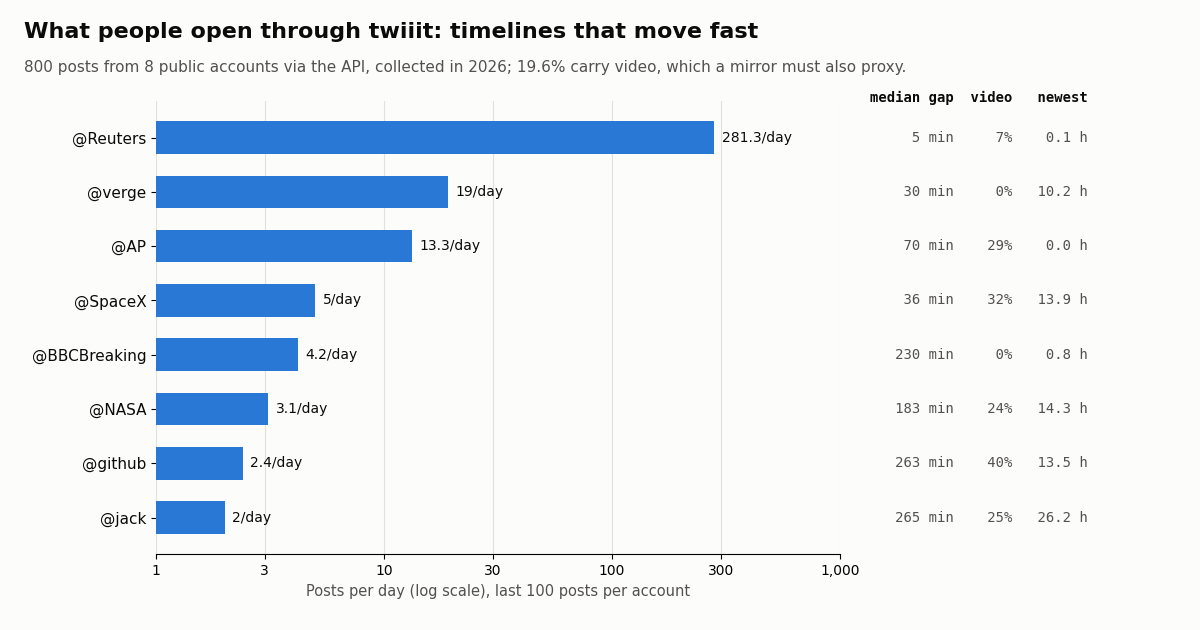
So staleness is not the problem; reachability is. The other thing to know is what the accounts people open through a mirror actually post. We pulled the newest 100 posts of eight public accounts through the API, including @jack, the profile twiiit tests every instance with:
Two things stand out. First, the pace: @Reuters posted about 281.3 times a day in our sample, with a median gap of 5 minutes, so an instance that is down for an hour hides a dozen posts, and a news reader that reloads twiiit until something works is always behind. Second, video: 19.6% of the 800 posts carry a video or GIF (40% for @github, 32% for @SpaceX), and a mirror that shows those posts has to serve that media too. Meanwhile @jack is one of the slowest accounts in the set (2 posts a day, 81% of them reposts, newest 26.2 hours old at collection), so passing a test on /jack says little about how an instance copes with a busy news account.
Using twiiit today: what to try, and how to test it in ten lines
Reading in a browser. Open twiiit.com/<username> and give a challenge page a few seconds to clear. If it shows "Just a moment..." for long, a 403 or an empty page, reload: each reload is a new random draw from the pool. If an instance works, bookmark that instance directly rather than the twiiit link, because twiiit will not send you back to it.
RSS feeds. twiiit.com/<username>/rss forwards to the instance's feed, but a feed reader polls on a schedule and gets a different host each time, most of which will challenge it. In our probe 1 of 12 RSS landings returned a feed. Our Twitter to RSS guide covers sturdier ways to get a feed.
Single posts. twiiit.com/<user>/status/<id> works the same way. For an embed or a link preview in chat apps, the redirect and challenges usually break the preview; fixers built for previews are a better fit.
Testing it yourself. Results vary by network and by the hour, so do not trust anyone's list, including ours. The check below asks twiiit for one redirect without following it, loads the target once, and only counts it as working if the HTML contains Nitter's timeline-item markup (a 200 alone can be a bot check). The full script at the end of this page adds the API fallback.
UA='Mozilla/5.0 (Macintosh; Intel Mac OS X 10_15_7) AppleWebKit/537.36 (KHTML, like Gecko) Chrome/129.0 Safari/537.36'
for i in 1 2 3 4 5; do
  target=$(curl -s -o /dev/null -A "$UA" -w '%{redirect_url}' https://twiiit.com/NASA)
  posts=$(curl -s -A "$UA" --max-time 20 "$target" | grep -c 'timeline-item')
  echo "$target  timeline items: $posts"
  sleep 3
doneThe reliable route for tweet reads: an API instead of a redirector
Twiiit, Nitter and every mirror share one weakness: they depend on someone else's server, someone else's X accounts and someone else's appetite for legal risk. If you need posts in a script, a dashboard, a feed or an alert, the dependable path is a read API, where there is no instance to go down and no challenge page to clear. With twitterapi.io the reads need no X account: you send an API key in the X-API-Key header and get JSON back.
One account's timeline. /twitter/user/last_tweets?userName=NASA returns the newest 20 posts per page, newest first, with has_next_page and next_cursor for more; /twitter/user/info returns the profile (followers, post count, verification). A profile plus its 20 newest posts costs about $0.0032 (18 credits for the profile, 15 per post).
Several accounts at once. /twitter/tweet/advanced_search with from:NASA OR from:SpaceX OR from:BBCBreaking and queryType=Latest gives one merged, newest-first stream, which is what a reader with several twiiit tabs was really after.
A single post. /twitter/tweets?tweet_ids=<id> returns the post with its text, media variants, counts and author, which covers the status-link use of twiiit.
What it costs next to the official X API, using each provider's published rate card:
Per 1,000 posts that is $0.15 against $5, about 33 times less on the X pay-per-usage rate card at docs.x.com/x-api/getting-started/pricing. Our whole study above, 800 posts across eight accounts in 40 requests, cost $0.12. New accounts that pass the automatic bot check get up to $1 of free credits (at most 100,000 credits, no card, one per person or network, expiring after 31 days); purchased credits never expire, and plans are on the pricing page. Before the first payment the limit is 0.2 requests a second, 20 once paid.
import os
import requests

BASE = "https://api.twitterapi.io"
HEADERS = {"X-API-Key": os.environ["TWITTERAPI_IO_API_KEY"]}

# The newest posts from several accounts in one search: what a twiiit tab per account used to show.
query = "from:NASA OR from:SpaceX OR from:BBCBreaking"
params = {"query": query, "queryType": "Latest"}
seen = 0
while seen < 60:
    r = requests.get(f"{BASE}/twitter/tweet/advanced_search", params=params, headers=HEADERS, timeout=30)
    r.raise_for_status()
    body = r.json()
    for t in body.get("tweets", []):
        seen += 1
        print(t["createdAt"], "@" + t["author"]["userName"], t["text"][:90].replace("\n", " "))
    if not body.get("has_next_page"):
        break
    params["cursor"] = body["next_cursor"]
Watching an account instead of refreshing a mirror
Much twiiit traffic is really monitoring: people reload a profile to see whether something new appeared. That job is cheaper and more reliable as a scheduled check than as a tab you keep refreshing through a redirector.
Polling. Run advanced_search with from:<account> and a since_time filter on a timer and keep the ids you have seen. You pay only for the data returned: a check that finds nothing costs the 15-credit minimum, $0.00015. Checking every 60 seconds for a month is 43,200 checks, a floor of $6.48; every 5 minutes, $1.30. Posts that do arrive cost $0.15 per 1,000.
Push instead of poll. For accounts or keywords you want delivered as they happen, filter rules (/oapi/tweet_filter/add_rule) and account monitoring (/oapi/x_user_stream/add_user_to_monitor_tweet) send matches to a webhook you host; see the docs at docs.twitterapi.io for setup and the pricing page for rates.
Pick by pace. From the table above, a 60-second check on @BBCBreaking (median gap 230 minutes) almost always finds nothing, while @Reuters (median gap 5 minutes) fills most windows. Match the interval to the account rather than polling everything at the fastest rate.
If you want the developer view of building a no-login viewer on top of these endpoints (caching, rate limits, rendering media), our Twitter viewer API developer guide goes deeper. For the general case of reading X without an account, see the no-account read-only API guide.
How we collected this
Question. Where does twiiit.com send a visitor today, does the page it sends them to show posts, and what do the timelines people open through it look like when read through an API?
Twiiit probe. From one residential network, with curl, a desktop Chrome user agent, no cookies and no JavaScript: the twiiit.com home page and four sample redirects; then 48 requests to twiiit.com rotating /NASA, /nasa/rss, /BBCBreaking and /github at a 2.5-second pace; one request to each redirect target (status, Cloudflare or Anubis markers, count of Nitter timeline-item elements and RSS items); and one request to /jack on each of the 10 hosts, the path twiiit's code tests. One session of about ten minutes, collected in 2026. We also read twiiit's server.js and README on GitHub and the Nitter wiki entries about it.
API sample. The newest 100 posts (5 pages of /twitter/user/last_tweets) for eight public organization and public-figure accounts: @NASA, @BBCBreaking, @github, @jack, @Reuters, @SpaceX, @AP and @verge. 800 posts, 40 requests, $0.12. Freshness compares the RSS feeds of nitter.meowing.monster for three of those accounts with the API's newest posts, fetched minutes apart.
What the sample cannot show. A full browser can pass some Cloudflare and Anubis checks that a plain request cannot, so human success rates through twiiit are higher than 1 in 48; we did not run a browser. Instance behavior changes by the hour and by network, and twiiit's pool changes as hosts are added or backed off. Ten minutes of 48 redirects is a snapshot, not an uptime figure. Per-account rates come from each account's newest 100 posts, so fast accounts cover hours and slow ones cover weeks.
Privacy. Aggregates only. The probe stores status codes and markers, not page bodies. The API sample covers organization and public-figure accounts only; no reposted, quoted or replying authors were analyzed. The analysis script, results and charts are in our study folder for this page.
"""twiiit_or_api.py - try the Nitter instance twiiit.com picks for you; if it shows no posts,
read the same timeline from twitterapi.io instead.

    pip install requests
    python twiiit_or_api.py NASA                       # probe only
    TWITTERAPI_IO_API_KEY=... python twiiit_or_api.py NASA   # probe, then fall back to the API

A 200 is not enough: a landing only counts when the HTML contains Nitter's timeline-item markup.
"""
import os
import sys

import requests

UA = "Mozilla/5.0 (Macintosh; Intel Mac OS X 10_15_7) AppleWebKit/537.36 (KHTML, like Gecko) Chrome/129.0 Safari/537.36"
BASE = "https://api.twitterapi.io"


def via_twiiit(handle):
    """Ask twiiit.com for an instance (one request, no redirect following), then load that page once."""
    r = requests.get(f"https://twiiit.com/{handle}", headers={"User-Agent": UA}, allow_redirects=False, timeout=30)
    if r.status_code == 421:
        return "twiiit: no healthy instance (HTTP 421)", None
    target = r.headers.get("Location")
    if r.status_code != 302 or not target:
        return f"twiiit answered HTTP {r.status_code}", None
    try:
        page = requests.get(target, headers={"User-Agent": UA}, timeout=25)
    except requests.RequestException as e:
        return f"{target}: unreachable ({type(e).__name__})", None
    if "timeline-item" in page.text:
        return f"{target}: posts rendered", target
    if "challenge-platform" in page.text or "Just a moment" in page.text:
        why = "Cloudflare challenge"
    elif "not a bot" in page.text:
        why = "bot challenge"
    else:
        why = "no timeline"
    return f"{target}: HTTP {page.status_code}, {why}", None


def via_api(handle, pages=2):
    """Profile + newest posts from twitterapi.io. No X account needed; 2 pages = up to 40 posts = $0.006."""
    headers = {"X-API-Key": os.environ["TWITTERAPI_IO_API_KEY"]}
    info = requests.get(f"{BASE}/twitter/user/info", params={"userName": handle}, headers=headers, timeout=30)
    info.raise_for_status()
    user = info.json().get("data")
    if not user:                                   # unknown users come back as HTTP 200, status "error"
        sys.exit(f"user not found: {handle}")
    print(f"@{user['userName']}  {user['followers']:,} followers  {user['statusesCount']:,} posts")
    cursor = None
    for _ in range(pages):
        params = {"userName": handle}
        if cursor:
            params["cursor"] = cursor
        r = requests.get(f"{BASE}/twitter/user/last_tweets", params=params, headers=headers, timeout=30)
        r.raise_for_status()
        body = r.json()
        data = body.get("data") or {}
        for t in data.get("tweets", []):
            kind = "repost" if t.get("retweeted_tweet") else "post"
            media = [m["type"] for m in (t.get("extendedEntities") or {}).get("media", [])]
            print(f"{t['createdAt']}  {kind:6} likes={t['likeCount']:<7} {','.join(media) or '-':12} {t['url']}")
        if not body.get("has_next_page"):
            break
        cursor = body.get("next_cursor")


if __name__ == "__main__":
    handle = sys.argv[1] if len(sys.argv) > 1 else "NASA"
    verdict, url = via_twiiit(handle)
    print("twiiit:", verdict)
    if url is None and os.environ.get("TWITTERAPI_IO_API_KEY"):
        print("falling back to the API")
        via_api(handle)
Questions readers ask
What is twiiit.com?
Twiiit is a free redirecting proxy for Nitter, the open-source front end for X (Twitter). It keeps a list of public Nitter instances it believes are healthy and answers every request with an HTTP 302 to a random one, passing your path through: twiiit.com/NASA goes to /NASA on some instance. It does not display posts itself. The code is open source on GitHub (chr15m/twiiit.com).
Is twiiit still working?
The redirector is up: in our probe collected in 2026 all 48 requests got a 302, spread across 10 instances. The instances are the problem. To a plain request, only 1 of 48 landings showed posts (an RSS feed), 33 were Cloudflare challenges, and none of 36 profile pages rendered. In a full browser some challenges clear, so reloading a few times can work for casual reading.
Why does twiiit send me to a page that says "Just a moment..." or 403?
That is the instance's bot protection, usually Cloudflare. Twiiit checks instances by loading one profile, /jack, and many operators exempt /jack so they stay listed; since July 2025 its code also treats a Cloudflare challenge as healthy. So twiiit believes the instance works while your profile gets challenged. Wait a few seconds, or reload to get a different instance.
What does twiiit error 421 mean?
Twiiit answers HTTP 421 with "Sorry, couldn't find a Nitter instance." when none of the instances in its pool passed the latest health check. There is nothing to fix on your side; try again later, or read the account another way.
How does twiiit choose which Nitter instance to use?
From its server code: it takes the Nitter wiki rows marked online, adds nitter.net and any instance submitted through twiiit.com/?add=, tests each by loading /jack, backs off failing hosts for 5 minutes up to two days, and then picks uniformly at random among the ones that passed. Every request is a new draw, so the same link can land on different instances.
Is twiiit safe and private?
It is a plain page with no ads, login prompts or third-party scripts in our check. Its own privacy FAQ says IP addresses are not logged but requested URLs and user agents are, and that your IP becomes visible to whichever Nitter instance you are sent to, which twiiit does not control. It suggests Tor or a VPN if that matters.
Can I use twiiit for an RSS feed?
twiiit.com/<user>/rss forwards to an instance's RSS feed, but each poll by your feed reader can land on a different instance, and most challenge non-browser clients: 1 of 12 RSS landings returned a feed in our probe. When it does answer it is current; for a dependable feed use a self-hosted setup or an API.
What is the most reliable way to read an account's tweets without Nitter?
For reading, a normal browser on x.com. For scripts, feeds or monitoring, a read API with no instance in between: twitterapi.io returns a profile plus its 20 newest posts for about $0.0032 with no X account, and 1,000 posts cost $0.15 versus $5 on the official X API pay-per-usage rate card.
Continue
- twiiit source code on GitHub (server.js: instance list, /jack health check, random redirect, HTTP 421)
- Nitter wiki: public instances and the twiiit /jack whitelisting note
- Nitter repository README: cease-and-desist letters of 24 August 2026, archived status
- Nitter wiki: instances require real X account sessions
- X API pricing: $0.005 per post read, $0.010 per user read, 3M post-read cap
- twitterapi.io docs: user last tweets endpoint
- X (Twitter) API guide: endpoints, pricing and access
- Nitter instances status check: every host probed
- Nitter alternatives by what you used it for
- Why xcancel stopped working and what replaces it
- Twitter web viewers that work without an account
- Turn a Twitter (X) account into an RSS feed
- Twitter viewer API developer guide
- Read X (Twitter) data without an X account
- Free Twitter ID finder tool
- twitterapi.io pricing and plans
- 01X Radar Explained: Twitter (X) Keyword Monitoring, Tiers, Limits and an API Alternative
- 02Twitter (X) Stalker Tools: What They Can See, What They Can't, and Where the Line Is
- 03Snaplytics Twitter (X) Viewer: What It Is, Whether It Works, and Safer Options
- 04Tweeload: What the Twitter (X) Video Downloader Does, and Whether It Is Safe
- 05Twillot Twitter (X) Viewer: What It Is, Whether It Works, and Is It Safe?
- 06twikit for Twitter (X): how it works, why it breaks, and how to migrate each call
- 07Twitter Banner Size: 1500 x 500 px and the Safe Zone That Survives Every Crop
- 08Usernames for Twitter (X): The Rules, 48 Ideas, and How to Check Availability in 2026
Stop reading. Start building.
Starter credits cover real testing on real data. Google sign-in, no card, no application queue.
Get an API key