Twitter (X) with Selenium in 2026: What a Browser Script Gets, and the API Equivalent
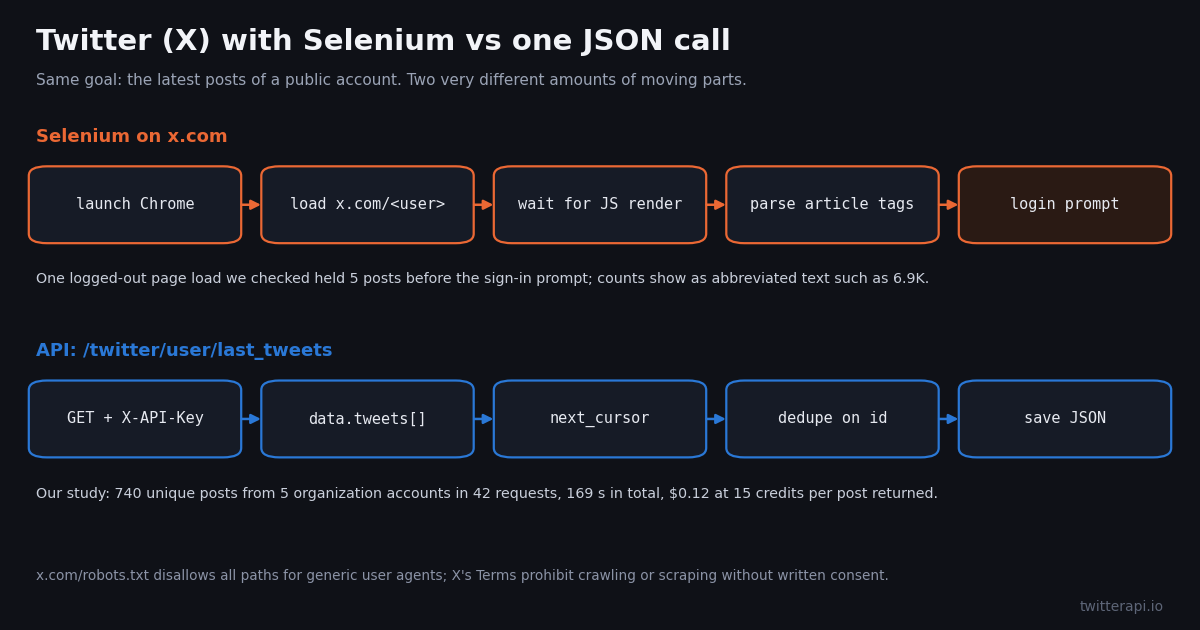
- Logged out, x.com shows a sliver: one public profile load returned 5 posts and a sign-in prompt. The login wall dates from June 30, 2023.
- The rules are explicit: X's Terms prohibit crawling or scraping without written consent;
x.com/robots.txtends withUser-agent: *andDisallow: /. - What breaks Selenium scripts: the login wall, JavaScript-rendered timelines, error 226 ("looks like it might be automated"), and
data-testidselectors that move between releases. - Rendered text is lossy: dates are relative ("Nov 27"), counts are rounded ("6.9K"), quote counts and
langare not on screen at all. - API equivalent:
/twitter/user/last_tweetswithhas_next_page/next_cursor. Our run: 740 unique posts, 42 requests, 169 s, $0.12. - Dedupe on
id: 60 of 800 rows in our run repeated an earlier page; you pay per post returned, so stop paging once you have enough.
People search for "twitter selenium" for one of two reasons. Some followed a tutorial written before 2023, when a headless Chrome could scroll a public timeline and collect tweets, and now their script returns nothing. Others are choosing a stack for a research or monitoring project and want to know whether a browser driver is still a reasonable way to read X.
This page answers both, factually. It describes what a logged-out browser is served on x.com today, what breaks Selenium scripts and why, what X's own Terms and robots.txt say, and what the same collection looks like as API calls. It gives no instructions for getting past X's limits: no login automation, no proxy rotation, no tips about looking less automated. The numbers come from a small study we ran on five public organization accounts, and from one logged-out page load we inspected.
5 posts
What Selenium actually gets from x.com in 2026
Selenium 4 drives a real browser, so it sees exactly what a human visitor without an account sees. We loaded one public profile, x.com/NASA, logged out, once, and inspected the HTML it was served. This is the page a Selenium script would start from.
Posts on the page: 5 article elements, 5 distinct post ids. Below them the page renders "Log in or sign up for X" with phone, Apple and Google sign-in buttons. There is no further timeline to scroll without an account.
Page weight: about 169 KB of HTML with 21 script tags, before any of the JavaScript bundles load. The timeline itself is a React application; the visible text is a thin layer over it.
What the visible text says: the author name and handle, a relative date ("Nov 27"), the post text, and four numbers in short form: replies, reposts, likes and views ("301", "959", "6.9K", "875K" on the first post). Exact counts appear only inside an aria-label such as "301 replies, 959 reposts, 6911 likes, 353 bookmarks, 875725 views".
What is not on screen: the quote count, the language code, the conversation id, the exact timestamp (it exists only as an epoch argument to a formatting script), and any author statistics beyond the profile header. A Selenium scraper that reads .text gets none of these.
One detail shows how lossy screen text is. The aria-label said 959 reposts, while the structured data embedded in the same page split that into 897 retweets and 62 quotes. A script that parses the visible number cannot tell those apart; the JSON fields retweetCount and quoteCount keep them separate.
# Selenium 4 (pip install selenium; needs Python 3.10+). One page load, no login,
# no scrolling. It only shows what a logged-out visitor is served. X's robots.txt
# disallows all paths for generic user agents and X's Terms prohibit crawling or
# scraping without written consent, so treat this as a diagnostic, not a pipeline.
from selenium import webdriver
from selenium.webdriver.common.by import By
from selenium.webdriver.support.ui import WebDriverWait
from selenium.webdriver.support import expected_conditions as EC

options = webdriver.ChromeOptions()
options.add_argument("--headless=new")
driver = webdriver.Chrome(options=options)  # Selenium Manager fetches a matching chromedriver
try:
    driver.get("https://x.com/NASA")
    WebDriverWait(driver, 20).until(EC.presence_of_element_located((By.TAG_NAME, "article")))
    articles = driver.find_elements(By.TAG_NAME, "article")
    print("posts rendered:", len(articles))
    for a in articles:
        # Visible text: relative date and abbreviated counts such as 6.9K
        print(a.text.replace("\n", " | ")[:160])
    print("sign-in prompt:", "Log in or sign up" in driver.page_source)
finally:
    driver.quit()
Why Twitter Selenium scripts break: login wall, rendering, error 226, selectors
The login wall. On June 30, 2023 X stopped serving timelines to logged-out visitors. Elon Musk replied the same day that it was a "Temporary emergency measure" because "We were getting data pillaged so much that it was degrading service for normal users!" Today a logged-out visitor is shown the top of a public profile, which is the sliver our page load showed; the scrolled timeline, search and replies sit behind the sign-in prompt.
JavaScript rendering. Timelines are built client-side and load more posts as you scroll. Selenium handles that by waiting for elements, which makes every run slow and timing-sensitive: a wait that is too short returns an empty list, one that is too long wastes minutes per account.
Error 226. Logged-in scripts often report "This request looks like it might be automated". It is X deciding that the session behaves like a bot. It is a signal to stop, not something to engineer around; our error 226 guide covers what it means for users and developers.
Selector churn. Scrapers usually key on data-testid attributes or CSS classes in the timeline. Those are internal to X's front end and change without notice, so a script that worked last month can silently collect nothing today.
Account risk. Any script that logs in acts as that account. X can rate-limit, lock or suspend it.
What X's Terms and robots.txt say about browser scraping
Two primary documents settle the policy question, and both are public.
Terms of Service. The current X Terms (effective October 9, 2026, at x.com/en/tos) say: "crawling or scraping the Services in any form, for any purpose without our prior written consent is expressly prohibited." The summary adds that "you cannot scrape the Services without X's express written permission". The Terms also set liquidated damages of $15,000 per 1,000,000 posts for requesting, viewing or accessing more than 1,000,000 posts in any 24-hour period in violation of the Terms.
robots.txt. x.com/robots.txt gives Googlebot and Bingbot a list of allowed and disallowed paths, adds groups for a few named crawlers, and ends with User-agent: * followed by Disallow: /. A Selenium script is not Googlebot; for every other agent, the whole site is off limits. It also asks for Crawl-delay: 1.
What this means in practice. Selenium is a fine tool for testing your own web app, and opening an x.com page in a test browser is not the problem. Building a data pipeline on top of x.com pages is what these documents rule out. For data you intend to store or analyze, use an interface that returns data: the official X API, or a third-party API such as TwitterAPI.io. This page is not legal advice; read the Terms yourself.
The API equivalent: 200 posts per account as JSON
The job a Selenium Twitter scraper is usually written for, "get the latest N posts of a public account", is one endpoint. GET /twitter/user/last_tweets?userName=<handle> returns data.tweets[] (20 per page, newest first) plus top-level has_next_page and next_cursor. No X account is needed for reads, no browser, no waits.
The script below pages until it has 200 posts or the timeline ends, keeps the first copy of each id, and writes a CSV with the exact counters. It uses only requests and the standard library. For a search instead of one account, the same loop works on /twitter/tweet/advanced_search with query=from:NASA and queryType=Latest, which returns a top-level tweets[].
Rate limits are per account plan: 0.2 requests per second before the first payment, 20 once paid, 50 on Scale, 500 on Business, up to 1,000 on request. At 0.2 requests per second the 10 pages for one account take about 50 seconds; and the result is exact JSON rather than parsed screen text.
import csv
import time
import requests

API_KEY = "YOUR_API_KEY"
BASE = "https://api.twitterapi.io"
HEADERS = {"X-API-Key": API_KEY}


def last_posts(user, want=200, max_pages=10):
    """Newest-first timeline posts for one public account, deduplicated on id."""
    seen, rows, cursor = set(), [], ""
    for _ in range(max_pages):
        params = {"userName": user}
        if cursor:
            params["cursor"] = cursor
        r = requests.get(f"{BASE}/twitter/user/last_tweets", headers=HEADERS, params=params, timeout=30)
        if r.status_code == 429:
            time.sleep(5)  # fixed wait, then retry the same page
            continue
        r.raise_for_status()
        body = r.json()
        if body.get("status") == "error":
            raise RuntimeError(body.get("msg"))
        for t in (body.get("data") or {}).get("tweets") or []:
            if t["id"] in seen:
                continue  # a later page can repeat rows: keep the first copy
            seen.add(t["id"])
            rows.append(t)
        if len(rows) >= want or not body.get("has_next_page"):
            break
        cursor = body.get("next_cursor") or ""
    return rows[:want]


posts = last_posts("NASA")
with open("nasa_posts.csv", "w", newline="", encoding="utf-8") as f:
    w = csv.writer(f)
    w.writerow(["id", "createdAt", "likeCount", "retweetCount", "replyCount",
                "quoteCount", "viewCount", "bookmarkCount", "lang", "text"])
    for t in posts:
        w.writerow([t["id"], t["createdAt"], t.get("likeCount"), t.get("retweetCount"),
                    t.get("replyCount"), t.get("quoteCount"), t.get("viewCount"),
                    t.get("bookmarkCount"), t.get("lang"), t.get("text", "")])
print(len(posts), "posts saved")
Our study: five public timelines through the API
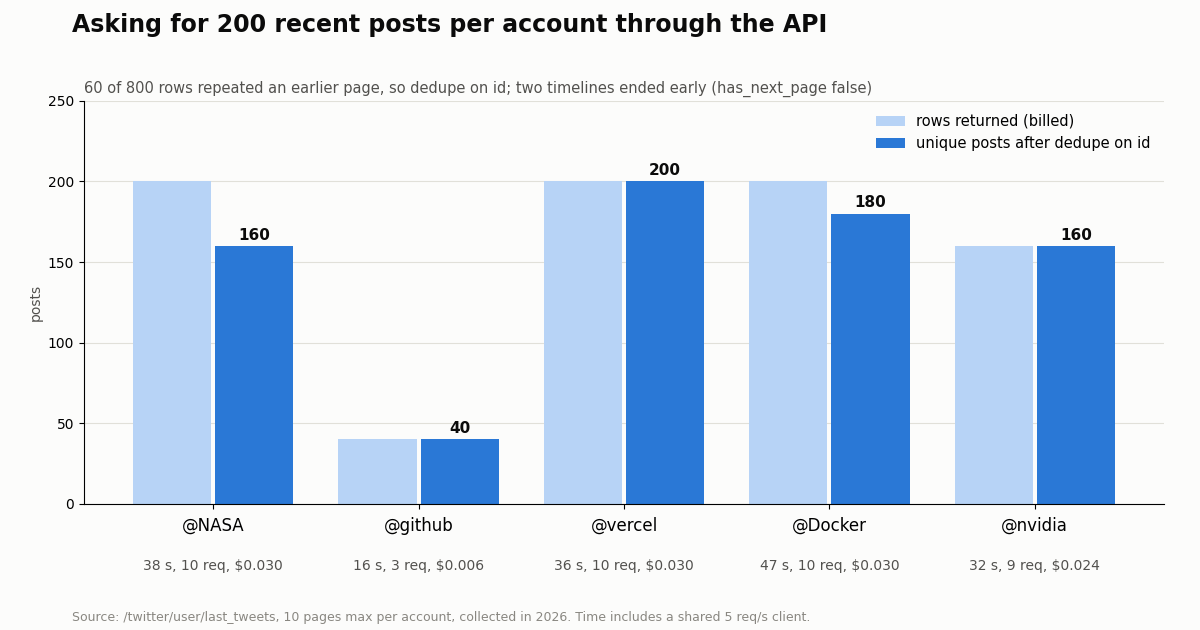
We asked /twitter/user/last_tweets for 200 recent posts from each of five organization accounts: @NASA, @github, @vercel, @Docker and @nvidia, up to 10 pages each. The run took 169 seconds in total over 42 requests and cost $0.12. Timing includes waiting on a shared client capped at 5 requests per second that other jobs used at the same time, so a dedicated key on a paid plan is usually quicker.
Two timelines ended early. @github returned 40 posts and @nvidia 160 before has_next_page came back false; the last request returned an empty page, billed at the 15-credit minimum. Plan for timelines that end before your target.
Some pages repeated earlier rows. 60 of 800 rows (7.5%) were exact repeats of an earlier page for @NASA and @Docker. Billing is per post returned, so those rows were paid for. Deduplicate on id (the script above does) and stop as soon as you have the count you need.
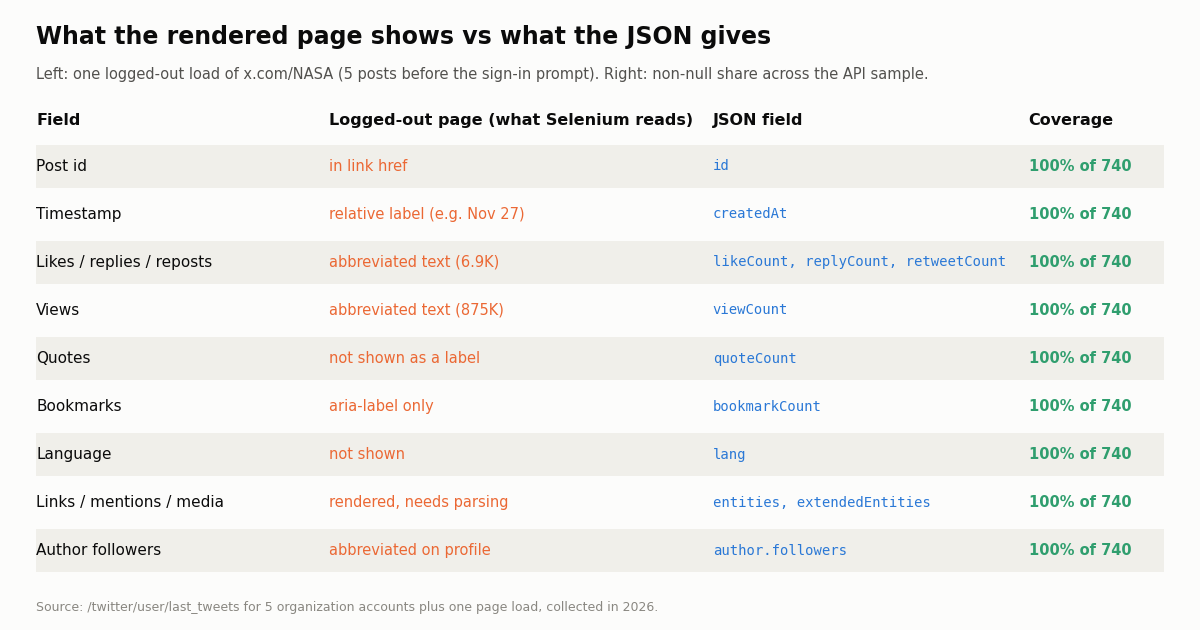
Every field was there. Across all 740 unique posts, id, createdAt, text, likeCount, retweetCount, replyCount, quoteCount, viewCount, bookmarkCount, lang, conversationId, entities and author.followers were non-null on 100% of posts.
Content mix differs a lot by account. Media was attached to 81% of @Docker posts and 22% of @vercel posts; reposts made up 46% of the @NASA sample. A browser scraper has to detect each of those cases from markup; the JSON marks them with extendedEntities.media and retweeted_tweet.
What the rendered page shows vs what the JSON gives
The table maps what a Selenium script can read from the logged-out page we inspected to the JSON field that carries the same thing, and how often that field was present in our API sample.
The difference matters as soon as you compute anything. Engagement rates from "6.9K" are rounded by up to 50 likes; posting-time analysis from "Nov 27" has no hour and, for older posts, no year; language filtering is impossible without lang. These are not Selenium bugs. They are what a page designed for people looks like to a program.
Moving a Selenium Twitter scraper to the API: field mapping
If you maintain an older Selenium script, the migration is mostly deleting code. The browser setup, waits, scroll loop and text parsing go away; what remains is a request loop and a field mapping. The comments below map common Selenium steps to the field that replaces them.
Keep your downstream code (the CSV writer, the database insert, the pandas analysis) and feed it from the JSON instead of from parsed text. Field names are camelCase on tweet objects (likeCount, createdAt), and createdAt uses the format %a %b %d %H:%M:%S %z %Y.
Selenium is also used to post. Writes are available through the API too, but they always act as a real account: one /twitter/user_login_v2 login ($0.10, with a proxy you supply) returns login_cookies, then each post through /twitter/create_tweet_v2 costs 60 credits ($0.0006). The call acts as that account, so X can rate-limit, lock or suspend it; keep a normal human pace; the session can need a re-login; billing is per HTTP 200 call.
# Selenium habit                      ->  JSON field from /twitter/user/last_tweets
# article.find_element(...).text       ->  t["text"]
# parse "6.9K" from the like button    ->  t["likeCount"]          (exact integer)
# parse "875K" views                   ->  t["viewCount"]
# read <a href=".../status/123">       ->  t["id"], t["url"]
# guess the year from "Nov 27"         ->  t["createdAt"]          ("Thu Oct 16 12:34:56 +0000 2026")
# scroll and wait for more articles    ->  body["has_next_page"], body["next_cursor"]
# regex links out of the text          ->  t["entities"]["urls"], t["entities"]["user_mentions"]
# find <img>/<video> in the article    ->  t["extendedEntities"]["media"]
# open the profile for follower count  ->  t["author"]["followers"]
from datetime import datetime

def parse_created(s):
    return datetime.strptime(s, "%a %b %d %H:%M:%S %z %Y")
Cost: Selenium is free to run, the data is not
Selenium itself costs nothing, but a browser pipeline on x.com has costs that do not show up on an invoice: the account it runs as, the time spent fixing selectors, and the policy exposure described above. The API side has a visible per-post price. Here it is next to X's official pay-per-usage rate card from docs.x.com/x-api/getting-started/pricing.
Per 1,000 posts that is $5 on the official rate card versus $0.15 on TwitterAPI.io, roughly 33 times less, and you pay only for the data returned. New accounts that pass the automatic bot check get free starter credits (no card, one per person or network, expiring after 31 days); purchased credits never expire. See the pricing page for current amounts and the monthly plans (Starter $29, Builder $99, Pro $199, Scale $499, Business $1,499).
How we collected this
Question. What does it take to collect 200 recent posts from a public X organization account through the API, and what does a logged-out browser (the page Selenium would drive) get instead?
Accounts. @NASA, @github, @vercel, @Docker, @nvidia: public organization accounts. /twitter/user/last_tweets, default settings (no replies), newest first, up to 10 pages per account.
Sample and window. 800 rows returned, 740 unique posts after deduplication on id, 42 requests, $0.12; the latest posts of each account at collection time. Collected in 2026.
Browser side. Selenium was not installed in our environment and was not run. We made one plain logged-out HTTPS request for x.com/NASA, no login, no scrolling, and counted what the returned HTML contained. We did not load further pages because x.com/robots.txt disallows all paths for generic user agents. The Selenium snippet on this page is shown for illustration and was not executed by us.
What the sample cannot show. Five accounts and one page load are not a benchmark. Timing depended on a shared rate-limited client; logged-out page contents can differ by account, region and time; we measured no failure rate for Selenium because we did not run it.
Privacy. Aggregates only, organization accounts only; reposted and quoted authors were not analyzed.
import csv
import time
import requests

API_KEY = "YOUR_API_KEY"
BASE = "https://api.twitterapi.io"
HEADERS = {"X-API-Key": API_KEY}


def last_posts(user, want=200, max_pages=10):
    """Newest-first timeline posts for one public account, deduplicated on id."""
    seen, rows, cursor = set(), [], ""
    for _ in range(max_pages):
        params = {"userName": user}
        if cursor:
            params["cursor"] = cursor
        r = requests.get(f"{BASE}/twitter/user/last_tweets", headers=HEADERS, params=params, timeout=30)
        if r.status_code == 429:
            time.sleep(5)  # fixed wait, then retry the same page
            continue
        r.raise_for_status()
        body = r.json()
        if body.get("status") == "error":
            raise RuntimeError(body.get("msg"))
        for t in (body.get("data") or {}).get("tweets") or []:
            if t["id"] in seen:
                continue  # a later page can repeat rows: keep the first copy
            seen.add(t["id"])
            rows.append(t)
        if len(rows) >= want or not body.get("has_next_page"):
            break
        cursor = body.get("next_cursor") or ""
    return rows[:want]


posts = last_posts("NASA")
with open("nasa_posts.csv", "w", newline="", encoding="utf-8") as f:
    w = csv.writer(f)
    w.writerow(["id", "createdAt", "likeCount", "retweetCount", "replyCount",
                "quoteCount", "viewCount", "bookmarkCount", "lang", "text"])
    for t in posts:
        w.writerow([t["id"], t["createdAt"], t.get("likeCount"), t.get("retweetCount"),
                    t.get("replyCount"), t.get("quoteCount"), t.get("viewCount"),
                    t.get("bookmarkCount"), t.get("lang"), t.get("text", "")])
print(len(posts), "posts saved")
Researching this?Free starter credits cover end-to-end testing — Google sign-in, no card. Get a key.
Questions readers ask
Can you still scrape Twitter with Selenium?
Technically Selenium can open x.com, but logged out you get only a few posts (our @NASA page load showed 5) before a sign-in prompt. X's Terms prohibit crawling or scraping without written consent and its robots.txt disallows all paths for generic agents, so a Selenium scraper is not a sound basis for a data project. Use an API for data.
Why does my Selenium Twitter script return no tweets?
The usual causes are the login wall (timelines and search need an account since June 30, 2023), waits that finish before the JavaScript timeline renders, and data-testid selectors that X has changed. None of these is fixable once and for all, because the front end keeps changing.
What is error 226 on X?
It is the message "This request looks like it might be automated". X shows it when a session behaves like a bot. For a script it means stop; our error 226 guide explains what it means for regular users and for developers.
Does Selenium need a separate chromedriver download?
Not since Selenium 4.6. Selenium Manager, bundled with every release from 4.6, detects your browser version and downloads the matching driver into ~/.cache/selenium; since 4.11 it can also download Chrome itself. The current selenium package on PyPI needs Python 3.10 or newer.
Is Selenium or the API faster for collecting tweets?
For data, the API. In our run, 10 pages of 20 posts took about 36 seconds for one account even through a shared 5 requests-per-second client, with exact counts and timestamps. A browser has to load scripts, wait for rendering and scroll, and logged out it stops after a handful of posts.
How much does it cost to get 1,000 tweets without Selenium?
On TwitterAPI.io, $0.15 per 1,000 posts returned (15 credits per post). On the official X API pay-per-usage rate card, a post read is $0.005, so $5 per 1,000. Profiles are $0.18 per 1,000 on TwitterAPI.io versus $0.010 per user read on the official card.
Can I use Selenium on x.com for testing my own app?
Selenium is a testing tool, and loading a page in a test browser is not data collection. Keep in mind the robots.txt rules for generic agents and the Terms' scraping clause if your test starts storing content from x.com.
Continue
- Selenium documentation: Selenium Manager (bundled since 4.6, browser downloads since 4.11)
- PyPI: selenium package (current release, Python 3.10+ requirement)
- X Terms of Service: crawling and scraping clause, liquidated damages
- x.com robots.txt: User-agent * Disallow /
- X API pricing: pay-per-usage rate card
- TwitterAPI.io docs: user last tweets endpoint and response fields
- X API overview: official tiers and alternatives
- Twitter scraping guide: methods and their trade-offs
- Error 226 "looks like it might be automated" explained
- Twitter scraper tools compared
- Getting X data without the official API
- Web scraping vs an API for X data
- Collect and analyze X data in Python
- Pay-per-use pricing per post and per profile
- 01How to Translate Tweets on Twitter (X): Auto-Translate, the Gear Icon and Language Settings
- 02How to Turn Off Autoplay on Twitter (X): App, Web and Auto-Advance
- 03Twitter (X) and the EU Digital Services Act (DSA): What the Commission Found, and What It Means for X Data
- 04Twitter (X) and Firebase: store posts in Firestore with a scheduled Cloud Function
- 05Twitter (X) Network Analysis with Python and networkx: A Real #reInvent Graph
- 06Twitter (X) Communities in 2026: How They Work, and Are They Still Running?
- 07AllMyTweets: What It Did, Its Limits, and How to See Every Tweet on Twitter (X)
- 08Twitter (X) Analytics Free — What's Actually $0 in 2026?
Writing about something you built with TwitterAPI.io? Our community rewards program pays API credits for honest tutorials, build logs and videos.
Stop reading. Start building.
Starter credits cover real testing on real data. Google sign-in, no card, no application queue.
Get an API keyAlready building with TwitterAPI.io? Publish an honest tutorial or build log about it and earn up to $200 a month in API credits.