X API Playground: Test the Twitter (X) API v2 Locally, Then Go Live
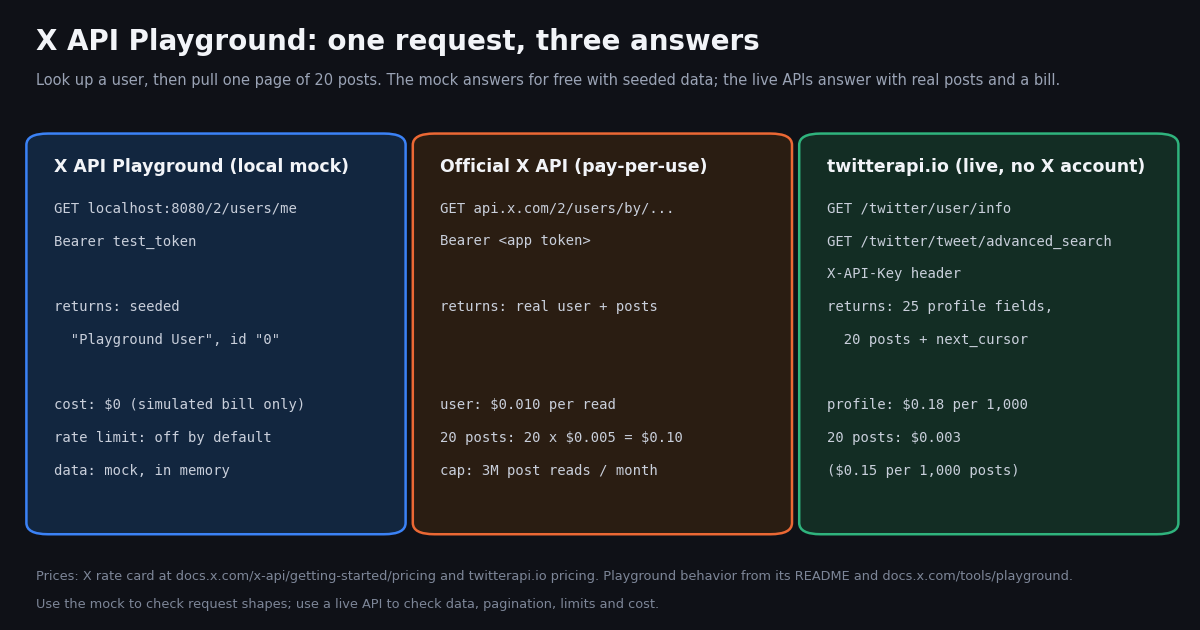
This page is about one specific tool, the X API Playground: the local mock server X's developer platform published on GitHub as xdevplatform/playground. It is not a map of the X Developer Portal (console, keys, billing, which our X Developer Portal guide covers) and not a survey of free access to the live X API (which our page on whether you can use the X API for free covers). Here we read the playground's docs, README, releases and issues, walk through the documented install and quick-start requests, and then put the same request side by side on the mock, the official X API, and twitterapi.io.
The short version: the playground is a good place to get request shapes and error handling right without spending money, and a poor place to learn anything about real data, real limits, or real cost. It also carries a name that X has used for two earlier, different tools, and its repository has been quiet since January 2026. Both facts matter if you are deciding whether to build your test setup on it.
Every fact about the playground below comes from docs.x.com/tools/playground, the repository README, its DOCUMENTATION.md, its releases and its issue tracker, read this year. We could not run the binary ourselves on the machine we wrote this on (Go was not installed), so the commands and sample responses are the documented ones, not output we captured; the twitterapi.io responses are live calls we made.
What the X API Playground is, and the two older playgrounds with the same name
The X API Playground is a standalone local HTTP server that simulates X API v2. X's docs describe it as "a local mock server that simulates the full X API v2" so you can "test endpoints, build prototypes, and explore the API without consuming real API credits". You run it on your own machine, point your client at http://localhost:8080 instead of https://api.x.com, and send the bearer token test_token. Nothing leaves your computer except an optional fetch of X's OpenAPI spec and pricing configuration.
The name is overloaded. Searching @XDevelopers' own posts for "playground" turns up three different products over four years, and old answers on forums often describe one of the earlier two:
Why this matters. If a tutorial says the playground "delivers real, live data" (the April 2022 announcement's wording), it is describing the old browser tool, not the mock server you install today. The current one never returns real posts.
Who built it. The December 2025 launch post came from Taylor Caldwell, whose X bio reads "X Developer Platform", and was quoted the same day by Chris Park, whose bio now reads "ex Head of Developer Platform". He framed it as a step toward X's pay-per-use (PPU) API release. In February 2026 @XDevelopers listed a new Console, Playground, XDK and MCP as the developer experience for pay-per-use accounts.
How to install and start the X API Playground (documented commands)
The playground needs Go 1.21 or later. The docs give two install paths, and the README adds a third (a pre-built binary from Releases):
Option 1, go install. go install github.com/xdevplatform/playground/cmd/playground@latest puts a playground binary in $GOPATH/bin (by default $HOME/go/bin), which must be on your PATH.
Option 2, build from source. Clone the repo and run go build -o playground ./cmd/playground. The repo has one command package, cmd/playground.
Option 3, pre-built binary: not available. Both the docs and the README point to the Releases page for binaries, but the 4 releases (v1.0.0, v1.1.0, v1.2.0, v1.2.1) have 0 downloadable assets attached. Plan on having Go installed.
Windows. An open pull request reports that the code fails to compile on Windows with undefined: syscall.SIGTSTP and proposes platform-specific signal handling; an open issue reports both install methods failing on Windows 11. Neither is merged or answered, so on Windows use WSL or a Linux container.
Once installed, playground start serves on http://localhost:8080. The flags are --port / -p (default 8080), --host (default localhost) and --refresh (force a refresh of the cached OpenAPI spec). playground status checks whether a server is running and playground refresh refreshes the spec cache. Configuration lives in ~/.playground/: config.json, state.json when persistence is on, an examples/ folder for custom responses, and the cached spec.
# Documented install (Go 1.21+). We did not run these ourselves: Go was not installed
# on the machine this page was written on. Commands copied from the README.
go install github.com/xdevplatform/playground/cmd/playground@latest
export PATH=$PATH:$(go env GOPATH)/bin
playground --help

# Start on the default port, or pick another one
playground start
playground start --port 3000 --host 0.0.0.0

# Build from source instead
git clone https://github.com/xdevplatform/playground.git
cd playground
go build -o playground ./cmd/playground
./playground startThe quick-start requests and what the mock sends back
You call the playground exactly like the real API, with X's /2/... paths and Authorization: Bearer test_token. The docs' quick start makes three calls: look up the authenticated user, create a post, and run a recent search. According to DOCUMENTATION.md, GET /2/users/me returns a seeded user with id "0", name "Playground User" and username "playground_user", and POST /2/tweets returns the new post with id "1". Because state is held in memory, the post you just created is then visible to lookups and searches, which is what X means by stateful operations.
Besides X's own paths, the playground adds management endpoints that are not part of the X API. They are where most of its testing value sits:
Error simulation. Off by default. When enabled, error_rate (0.0 to 1.0) sets how often a request fails and error_type picks rate_limit (429 by default), server_error or not_found. That is the simplest way to make sure your retry and backoff code actually runs.
Rate-limit simulation. Also off by default. Enabled, it defaults to 15 requests per 900-second window and sends x-rate-limit-limit, x-rate-limit-remaining and x-rate-limit-reset headers, the same header names the real API uses.
# Quick start from docs.x.com/tools/playground
curl -H "Authorization: Bearer test_token" \
  http://localhost:8080/2/users/me

curl -X POST -H "Authorization: Bearer test_token" \
  -H "Content-Type: application/json" \
  -d '{"text": "Hello from the playground!"}' \
  http://localhost:8080/2/tweets

curl -H "Authorization: Bearer test_token" \
  "http://localhost:8080/2/tweets/search/recent?query=hello"

# Turn on simulated rate limits (temporary, lost on restart)
curl -X PUT http://localhost:8080/config/update \
  -H "Content-Type: application/json" \
  -d '{"rate_limit": {"enabled": true}}'

# Simulated bill (same data as the Usage tab)
curl http://localhost:8080/api/accounts/0/costOne request, three ways: playground mock, official X API, twitterapi.io
Take the two calls almost every X integration starts with: look up an account, then pull one page of 20 recent posts. Here is what each option gives you for that pair.
On the official rate card at docs.x.com/x-api/getting-started/pricing, posts are $0.005 per resource read and users $0.010, so 1,000 posts cost $5. On twitterapi.io, tweets cost $0.15 per 1,000 and profiles $0.18 per 1,000, so the same 1,000 posts are about 33x cheaper ($5 / $0.15). Pay-per-use on X is capped at 3 million post reads a billing cycle, with Enterprise above that.
When we ran the live twitterapi.io half of this for real, /twitter/user/info for @XDevelopers returned 25 profile fields, and one /twitter/tweet/advanced_search page returned 20 posts, each with 30 top-level fields, plus has_next_page: true and a next_cursor. That is the part a mock cannot hand you: the real account, the real posts and the real shape of nested fields like quoted_tweet, article or extendedEntities.
One honest limit of the comparison. The playground mocks X's own /2/... paths. It cannot mock twitterapi.io, whose paths (such as /twitter/user/info) and response fields (likeCount, next_cursor) are different. If you plan to read data through twitterapi.io, the playground is only useful for the parts of your app that will talk to X's own API, such as posting from your own app account.
What a mock server cannot tell you
The playground answers "is my request well formed and does my code handle the response?". It does not answer "what will production do?". This table is the checklist we would run before trusting any code that only ever talked to the mock:
Real data is the big one. Search relevance, deleted and protected accounts, quoted posts, long-form articles, media variants and languages are what break parsers in production. A seed set you wrote yourself will not contain the case you forgot.
Validation is not always right either. Three open issues report the playground rejecting requests the real API accepts: valid expansions values rejected on GET /2/users/{id}/tweets, spec-listed expansions rejected when a parameter uses $ref, and multipart media upload chunks parsed as JSON. Another open issue shows its /2/users/me error message differing from the one api.x.com returns. A 400 from the mock is a hint, not proof your request is wrong.
Billing is an estimate by design. The usage tab multiplies your simulated calls by a pricing table (posts $0.005, users $0.01 in the documented example). Real X billing deduplicates resources within a 24-hour UTC window and treats owned reads differently, so the simulated bill and the real one can diverge. Our rate limit calculator is a quicker way to size the real request budget.
Is the X API Playground still maintained?
Before you build a test harness on any tool, check the repo. Here is what the GitHub API returned for xdevplatform/playground this year:
Reading the numbers. The project shipped four releases in its first three weeks (v1.2.0 added the usage and cost tracking that Taylor Caldwell announced in February 2026) and then went quiet. 5 of the 8 issues and pull requests on the tracker were opened after the last commit, and none has been closed. That does not mean it is broken: the mock is built to read the OpenAPI spec X publishes, and playground start --refresh pulls the latest spec. It does mean newer endpoints and fixes depend on that spec cache, not on code updates.
License. The README's last section says "MIT", but the repo has no LICENSE file and GitHub detects no license. If your company needs a license file before vendoring code, ask the maintainers through an issue first.
Where X's attention is now. The latest 20 posts on @XDevelopers' timeline when we collected this were about the Livestream API, the X Chat API, the Developer Exhibit and Grok bots; none mentioned the playground. The newest playground recommendation we found from an X staff account was in August 2026, in reply to a developer, alongside a note that a "new tool coming soon should also help greatly".
What developers said about the X API Playground on X
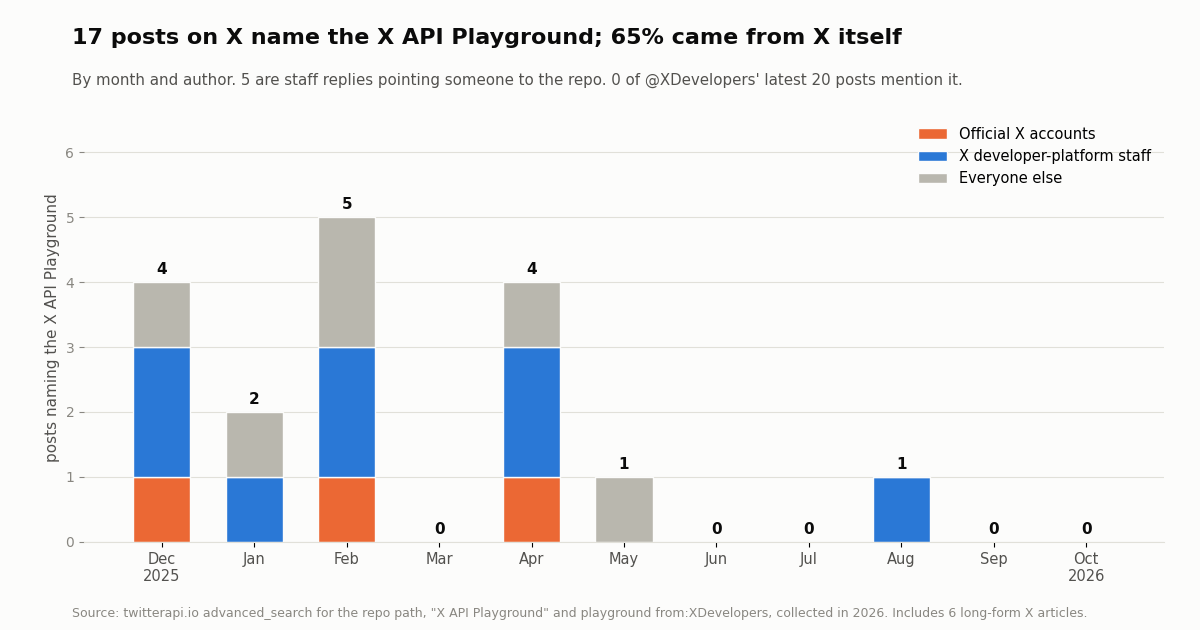
We searched X for the repo path, for "X API Playground", and for "playground" from @XDevelopers, then deduplicated. The result is small, which is itself a finding: 17 posts about the mock server, of which 3 came from official X accounts and 8 from X developer-platform staff, so 65% of the conversation was X talking about its own tool. 5 of the staff posts were replies pointing a developer to the repo, usually someone asking how to test before paying. 6 were long-form X articles (weekly recaps and an @XDevelopers article on X API upgrades) that the search index matched.
The announcements themselves drew real but modest attention next to the nearly 700,000 followers of @XDevelopers:
The launch post was bookmarked 104 times, about a third of its like count, which is the pattern you expect from a tool people save to try later rather than discuss.
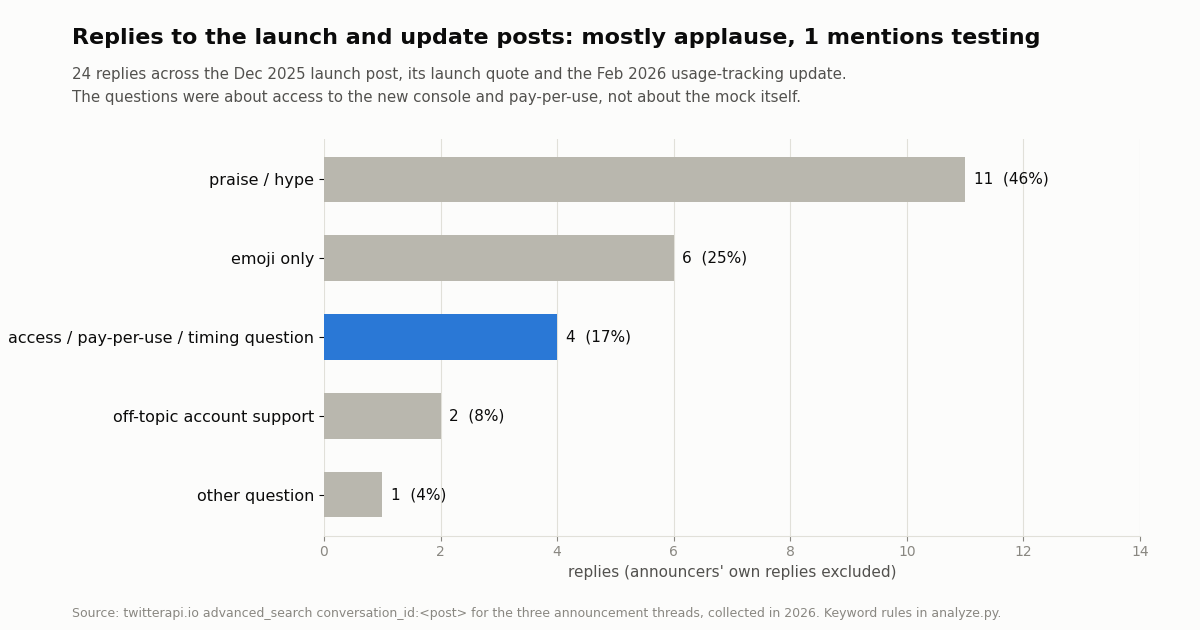
Then we read the 24 replies in those three threads (the announcers' own replies excluded). 11 were praise or hype and 6 were emoji only. The 4 real questions were not about the mock at all: they asked about access to the new developer console, when pay-per-use would launch, and whether webhooks would be included. Only 1 reply mentioned testing. The playground was launched as a waypoint to pay-per-use, and the audience read it that way.
What to take from it. If you are searching "x api playground" today, you are probably in the same position as those repliers: you want to know whether you can build on X without paying first. The playground answers half of that (you can build against a mock for free). The other half, real data at a known cost, is what the official pay-per-use credits or a third-party API answer.
The free paths that use real data. X currently offers $20 in X API credits when you save a first eligible card and buy credits, plus a match of your first auto-recharge up to $50. twitterapi.io gives new accounts that pass the automatic bot check up to $1 of free credits (at most 100,000 credits, no card, one per person or network, expiring after 31 days); at $0.15 per 1,000 tweets that covers a lot of real test reads.
A practical workflow: mock first, then a small live test
The cleanest way to use the playground is as the first of two stages, with the switch between them reduced to a base URL and a header.
Stage 1, mock. Point your client at http://localhost:8080, use test_token, and write tests for the response shapes you need, the error paths (switch on error simulation with a 0.2 error_rate and confirm your retries fire) and rate-limit handling (switch on the 15-per-900-second simulation and confirm you read x-rate-limit-reset). Export the state with GET /state/export and check it in as a fixture so CI starts from the same data every time.
Stage 2, live, small. Swap the base URL for a real one and run the same flow against a handful of real accounts and queries. Keep the first live run to a page or two per call: on twitterapi.io a full 20-tweet page costs $0.003 and an empty search costs the $0.00015 minimum; on the official API each post read is $0.005. Diff the real responses against your mock fixtures and add the fields you did not expect.
Stage 3, budget. Only now size the bill, from real call counts. Tweet reads on twitterapi.io are $0.15 per 1,000; subscriptions start at Starter $29 a month if you prefer a plan, and the pricing page lists the rest. The rate limit is 0.2 requests per second before the first payment and 20 once paid.
The Python example below is Stage 2 for the read half: it looks up an account and walks a search with next_cursor, counting what it would cost.
import requests

BASE = "https://api.twitterapi.io"
HEADERS = {"X-API-Key": "YOUR_API_KEY"}

# Same first call as the playground's /2/users/me, but for a real account
r = requests.get(f"{BASE}/twitter/user/info", headers=HEADERS,
                 params={"userName": "XDevelopers"}, timeout=30)
user = r.json().get("data") or {}
print(user.get("userName"), user.get("followers"), user.get("statusesCount"))How we collected this
Question. How much attention did the X API Playground get on X, who talked about it, what did people ask, and is the project still active?
Accounts and queries. twitterapi.io /twitter/tweet/advanced_search (Latest) for the repo path, for "X API Playground", and for playground from:XDevelopers; a Top search for playground posts from official developer accounts; conversation_id: searches for the three announcement threads; /twitter/user/last_tweets for @XDevelopers' latest 20 posts; /twitter/user/info for @XDevelopers and the two named staff accounts. Repo facts from the GitHub API (repo, releases, commits, issues).
Window and sample. Everything the search index returned for those queries, collected in 2026: 17 posts about the mock server, 24 replies, 20 timeline posts. 20 API requests returning 112 posts and 3 profiles, about $0.017 at list price.
What the sample cannot show. How many people installed or run the playground (no download or telemetry data is public, and there are no release binaries to count), discussion outside X (GitHub stars aside), and posts the search index did not return. Reply categories come from keyword rules in analyze.py, and with 24 replies, one reply moves a share by about four points.
Privacy. Aggregates only. Official X accounts and X staff posting in their professional role are named; repliers and other authors are private individuals and are not named or quoted. Raw search pages were not kept in the repository; the study folder holds the protocol, the analysis script, de-identified rows and the results.
"""Stage 2 after the X API Playground: the same lookup + search against live data.
Counts what the run would cost at twitterapi.io list prices."""
import requests

BASE = "https://api.twitterapi.io"
HEADERS = {"X-API-Key": "YOUR_API_KEY"}


def lookup(user_name):
    r = requests.get(f"{BASE}/twitter/user/info", headers=HEADERS,
                     params={"userName": user_name}, timeout=30)
    body = r.json()
    if body.get("status") == "error":
        raise SystemExit(body.get("msg"))  # e.g. "user not found"
    return body["data"]


def search(query, max_pages=3):
    tweets, cursor = [], ""
    for _ in range(max_pages):
        params = {"query": query, "queryType": "Latest"}
        if cursor:
            params["cursor"] = cursor
        r = requests.get(f"{BASE}/twitter/tweet/advanced_search",
                         headers=HEADERS, params=params, timeout=30)
        r.raise_for_status()
        page = r.json()
        tweets.extend(page.get("tweets", []))
        if not page.get("has_next_page"):
            break
        cursor = page.get("next_cursor", "")
    return tweets


user = lookup("XDevelopers")
print(f"@{user['userName']}: {user['followers']:,} followers, {user['statusesCount']:,} posts")

posts = search("from:XDevelopers -filter:replies")
for t in posts[:5]:
    print(t["createdAt"], t["likeCount"], t["text"][:80].replace("\n", " "))

# 18 credits per profile, 15 credits per tweet returned; $1 = 100,000 credits
cost = (18 + 15 * len(posts)) / 100_000
print(f"{len(posts)} posts + 1 profile = about ${cost:.4f}")Questions readers ask
What is the X API Playground?
It is X's official open-source local mock server for X API v2, published as xdevplatform/playground on GitHub. You run it on your machine, call http://localhost:8080 with X's /2/... paths and the bearer token test_token, and it returns validated mock responses without real data or credits. It also has a browser explorer at /playground.
Is the X API Playground free?
Yes. It runs locally with mock data and needs no API keys or billing. It shows a simulated usage and cost view based on a pricing table, but nothing is charged. Real calls are billed separately: on X's pay-per-use rate card, $0.005 per post read and $0.010 per user read.
How do I install the X API Playground?
Install Go 1.21 or later, then run go install github.com/xdevplatform/playground/cmd/playground@latest, make sure $GOPATH/bin is on your PATH, and run playground start. Or clone the repo and run go build -o playground ./cmd/playground. The docs mention pre-built binaries, but the releases had none attached when we checked.
Does the X API Playground return real tweets?
No. The current playground returns seeded mock data held in memory (a default "Playground User" with id "0", plus posts you create). The April 2022 "Twitter API Playground" did return live data, which is why older answers disagree. For real posts you need a live API key.
Can the X API Playground simulate rate limits and errors?
Yes, both are off by default. Rate-limit simulation defaults to 15 requests per 900-second window with x-rate-limit-* headers; error simulation can fail a set share of requests with rate-limit (429 by default), server-error or not-found responses. Real limits differ: X's recent search allows 450 requests per 15 minutes per app.
Does the X API Playground work on Windows?
Not reliably from source. An open pull request reports a compile error on Windows (undefined: syscall.SIGTSTP) and an open issue reports both install methods failing on Windows 11. Using WSL or a Linux container is the practical route until a fix is merged.
Is the X API Playground still maintained?
The last commit was in January 2026. The repo had 6 open issues and 0 closed, 2 open pull requests and none merged, when we checked. It still works off X's published OpenAPI spec, and playground start --refresh updates that spec cache.
Can I use the X API Playground to test twitterapi.io calls?
No. The playground mocks X's own /2/... endpoints. twitterapi.io uses different paths (such as /twitter/tweet/advanced_search) and fields (likeCount, next_cursor), so test it against the live API with a small budget: a full 20-tweet page costs $0.003.
Continue
- X developer docs: API Playground (install, quick start, features)
- GitHub: xdevplatform/playground (README, releases, issues)
- X API Playground user manual (config, management and usage endpoints)
- X developer docs: pay-per-usage pricing and credits
- X developer docs: X API v2 rate limits per endpoint
- twitterapi.io API documentation
- X API guide hub: endpoints, pricing and alternatives
- X Developer Portal: console, keys and billing
- Can you use the X API for free?
- xurl, the X API command-line tool
- Twitter (X) API pagination with cursors
- What to do when the X API rate limit is exceeded
- Twitter (X) API rate limit calculator
- twitterapi.io pricing per 1,000 tweets and profiles
- 01Grok for Startups: what the xAI credits cover, who qualifies, and where Twitter (X) data fits
- 02X Chat API: Building on Encrypted Twitter (X) DMs with the Chat XDK
- 03Grok Bot API: Every Way to Drive a Grok Bot From Code, and How to Feed Your Own Agent Twitter (X) Data
- 04Grok Bot Alternatives: Open-Source and Hosted Agents for Twitter (X)
- 05Muse Connectors: What Exists, Custom Connectors, MCP, and Live Twitter (X) Data
- 06Twitter (X) Archive — A Developer's Guide to Building Your Own Tweet Archive Search
- 07Export Twitter (X) Following List — API Tutorial
- 08Tracking Twitter (X) Account Views via API — A Developer Guide
Stop reading. Start building.
Starter credits cover real testing on real data. Google sign-in, no card, no application queue.
Get an API keyAlready building with TwitterAPI.io? Publish an honest tutorial or build log about it and earn up to $200 a month in API credits.