LM Studio MCP: Connect MCP Servers (and Live Twitter (X) Data) to a Local Model

- Where: LM Studio 0.3.17 or newer, right sidebar, Program tab, Install > Edit mcp.json; saving the file loads the servers (per the LM Studio docs).
- Format: Cursor's
mcp.jsonnotation:"mcpServers": { "name": { "url": ..., "headers": {...} } }for remote servers,command+argsfor local ones. - Safety: every tool call opens a confirmation dialog; you can edit arguments and allow a tool once or always (manage it later in App Settings > Tools & Integrations).
- API: from 0.4.0, the native
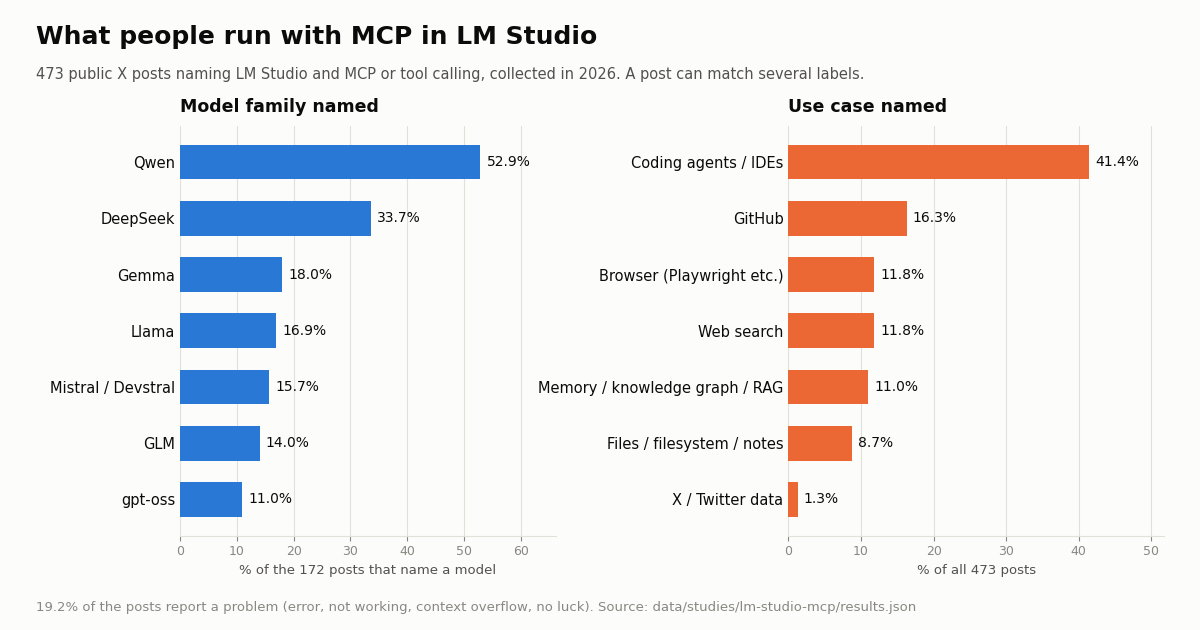
chatendpoint underhttp://localhost:1234/api/v1acceptsintegrations(ephemeral MCP servers ormcp/<name>from mcp.json) once the matching Server Settings switch is on. - Models: of 172 X posts that named a model, 52.9% named Qwen; 19.2% of all 473 posts reported a problem (study collected in 2026).
- X data: the hosted
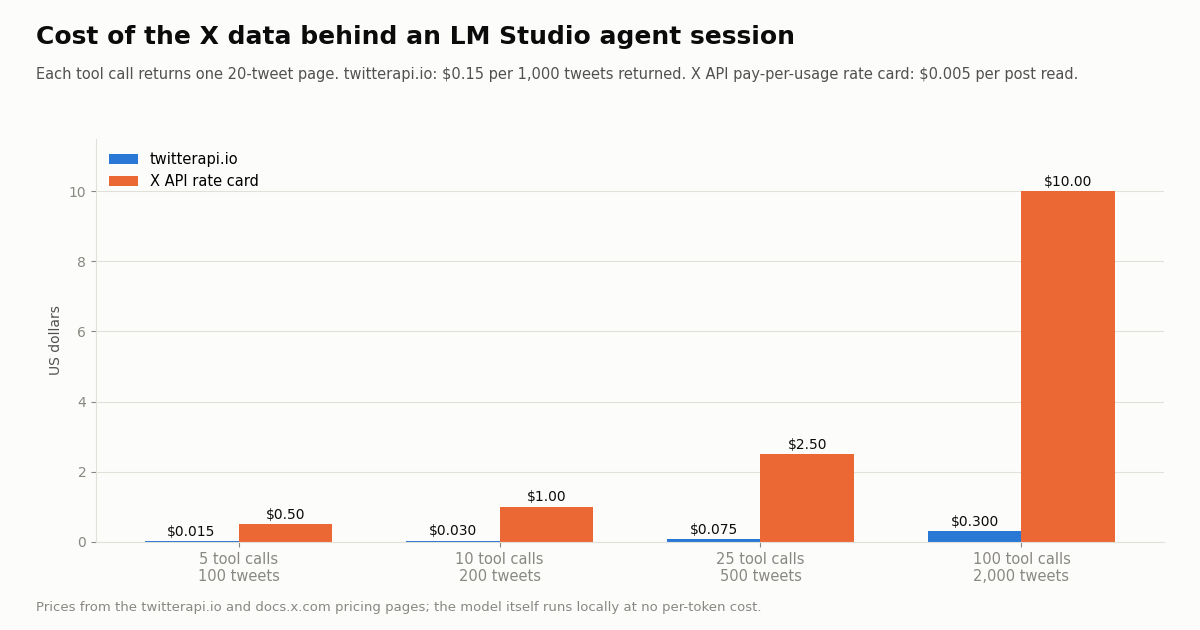
https://mcp.twitterapi.io/mcpserver goes into mcp.json with a Bearer key; 10 tool calls that return 200 tweets cost $0.03 at $0.15 per 1,000 tweets, versus $1.00 on X's $0.005-per-post rate card.
LM Studio started as a desktop app for downloading and chatting with local models. Since version 0.3.17 it is also an MCP host: the same app can start local MCP servers or call remote ones, hand their tools to the model you loaded, and run each call after you approve it. That makes a local model useful for jobs it cannot do from its weights alone, like reading a GitHub repo, searching the web or pulling the latest posts from an X account.
This guide covers the setup end to end: where mcp.json lives in the app, the exact JSON for local and remote servers, the deeplink button, the API route added in 0.4.0, which models call tools reliably, and the errors people actually hit. The worked example connects LM Studio to live X (Twitter) data through our hosted MCP server. Every configuration snippet is taken from the LM Studio docs or our own MCP server page; we did not run LM Studio for this article, and we say so where it matters.
We also measured the conversation: 809 public X posts from four searches, of which 473 name LM Studio together with MCP or tool calling, plus the last 300 posts of the official @lmstudio account, all collected in 2026.
Qwen, in 52.9% of the 172 posts that name a model (473 public X posts about LM Studio with MCP or tool calling, collected in 2026); 19.2% of all posts report a problem.
What "LM Studio MCP" means: host, server, tool call
MCP (Model Context Protocol) splits an AI tool setup into two roles. An MCP server is a program that exposes tools and resources, for example a GitHub server, a Playwright browser server or a Twitter (X) data server. An MCP host is the application that connects to those servers and makes their tools available to a model. The LM Studio release notes for 0.3.17 use exactly these two terms and name LM Studio and Claude Desktop as examples of hosts.
In LM Studio the chain looks like this: you load a model, LM Studio reads mcp.json, starts or connects to each server listed there, and passes the tool definitions to the model with your message. If the model decides to call a tool, LM Studio intercepts the call, shows it to you, runs it on approval, and feeds the result back so the model can answer. The model never talks to the server directly; LM Studio does.
Version matters. MCP in the chat UI needs LM Studio 0.3.17 (build 10) or newer. MCP through LM Studio's own REST API needs 0.4.0 or newer. As this article was reviewed, the LM Studio changelog lists 0.4.28 as the latest release, so any current install has both.
Local and remote servers both work. A local server is a process LM Studio spawns on your machine (one process per server, per the release notes), usually through npx for Node packages or uvx for Python ones. A remote server is a URL LM Studio calls over HTTP, usually with an API key in a header. Remote servers need nothing installed besides LM Studio itself.
Step by step: add an MCP server in LM Studio
1. Update LM Studio. Check that you are on 0.3.17 or newer (0.4.0 or newer if you also want MCP over the API).
2. Load a model with tool use. LM Studio marks models with native tool-use support with a hammer badge. Any model can try, but the docs say native support generally performs better.
3. Open mcp.json. In the right-hand sidebar switch to the Program tab and click Install > Edit mcp.json. The file opens in LM Studio's in-app editor, so you do not need to find it on disk.
4. Paste the server entry. Add your server inside the mcpServers object. The docs add one gotcha: when you paste an entry into an existing file, copy only the content between "mcpServers": { and the closing }, or you end up with a nested mcpServers key.
5. Save. When you save mcp.json, LM Studio loads the servers defined in it automatically. For local servers that run through npx or uvx, those programs must be installed and on your system PATH, or the server will not start.
6. Ask a question that needs the tool. When the model calls a tool you see a confirmation dialog with the arguments. You can edit them, allow the call once, or always allow that tool; always-allowed tools are managed later in App Settings > Tools & Integrations.
The LM Studio docs show the shape with Hugging Face's remote server: a url of https://huggingface.co/mcp and an Authorization: Bearer <YOUR_HF_TOKEN> header. Every remote server uses the same two keys.
{
  "mcpServers": {
    "twitterapi-io": {
      "url": "https://mcp.twitterapi.io/mcp",
      "headers": {
        "Authorization": "Bearer your_key_here"
      }
    }
  }
}mcp.json for live Twitter (X) data: the twitterapi.io MCP server
The block above is the full entry for our hosted MCP server, in the same url + headers shape the LM Studio docs use. Replace your_key_here with the API key from your twitterapi.io dashboard; the server reads it from the Authorization header as a Bearer token. Nothing is installed locally: LM Studio calls https://mcp.twitterapi.io/mcp over HTTP.
The server exposes 12 tools (listed on our MCP server page): search_tweets (advanced search with the full operator set such as from:, since: and lang:), get_user_info, get_user_about, get_user_followers, get_user_followings, get_user_last_tweets, get_user_mentions, get_tweets_by_ids, get_tweet_replies, get_tweet_quotes, get_tweet_retweeters and get_trends. These tools read public data, and reading needs no X account.
Prefer a one-click install? LM Studio's deeplink format is lmstudio://add_mcp?name=<server-name>&config=<base64 of the server JSON>, and the docs page for the "Add to LM Studio" button includes a generator. Paste the inner object ({"url": ..., "headers": {...}}) under a name such as twitterapi-io, and remember the key ends up inside the link, so do not publish a link that contains your real key.
Keep the tool list small for small models. The LM Studio docs warn that some MCP servers were designed for Claude, ChatGPT or Gemini and can use excessive tokens, which can bog down a local model and trigger frequent context overflows. Twelve tool definitions are modest, but on a 4,000 to 8,000 token context every definition counts. Through the API you can pass allowed_tools to expose only what a task needs; the docs note this can also speed up prompt processing.
Posting is a separate product. Write actions (post, like, follow, DM and so on) are REST endpoints that act through an authenticated session: one /twitter/user_login_v2 login ($0.10, with a proxy you supply) returns login_cookies, and each write is then 60 credits ($0.0006). The call acts as that account, so X can rate-limit, lock or suspend it; keep a human pace, expect occasional re-login, and note that billing is per HTTP 200 call. For a local agent, start with the read tools.
MCP through the LM Studio API (0.4.0 and newer)
If you script LM Studio instead of chatting in the app, the native REST API can attach MCP servers to a request. Per the LM Studio developer docs there are two ways, and each has its own switch in Server Settings.
The docs recommend the mcp.json route for servers that need a command (for example the Playwright server, which acts on your computer) and for servers you use often, and the ephemeral route for one-off requests and remote tool execution. The request below is the docs' own example with our server swapped in.
The response's output array mixes reasoning, message and tool_call items; each tool_call carries tool, arguments, output and a provider_info block that names the server and its type. That is the easiest place to see whether a model actually called the tool or answered from memory.
LM Studio also serves an OpenAI-compatible chat completions endpoint with a tools parameter. There you define functions yourself and LM Studio parses tool calls into choices[0].message.tool_calls; if it cannot parse a correctly formatted call, the text lands in message.content instead. That route does not attach MCP servers for you.
LMS_API=http://localhost:1234/api/v1   # LM Studio's native REST API
curl "$LMS_API/chat" \
  -H "Authorization: Bearer $LM_API_TOKEN" \
  -H "Content-Type: application/json" \
  -d '{
    "model": "ibm/granite-4-micro",
    "input": "Summarize the last 20 posts from @lmstudio",
    "integrations": [
      {
        "type": "ephemeral_mcp",
        "server_label": "twitterapi-io",
        "server_url": "https://mcp.twitterapi.io/mcp",
        "allowed_tools": ["get_user_last_tweets"],
        "headers": { "Authorization": "Bearer your_twitterapi_key" }
      }
    ],
    "context_length": 8000
}'Which local models call MCP tools reliably
LM Studio's tool-use docs split models into two levels. Native support means the model's chat template supports tools (usually because it was trained for tool use) and LM Studio supports that model's tool-call format; these models show the hammer badge. Default support means LM Studio injects its own system prompt and tool-call format; the docs say results vary by model, and smaller or untrained models may emit malformed calls that LM Studio cannot parse.
The docs list Qwen2.5-Instruct, Llama 3.1 and 3.2, and Ministral 8B as examples of native support, and call the list subject to change. We did not benchmark models ourselves for this article. What we can show is what people who use LM Studio with MCP name in public posts:
Qwen leads by a wide margin: 91 of the 172 posts that name any model family mention it. A mention is not an endorsement (some posts list several models, and some report that a model failed), so read the table as "what people try", not "what works". The practical advice from the docs stands: start with a hammer-badge model, check that tool calls arrive as tool_call items, and only then add more servers.
Context length is the other lever. Every tool definition and every tool result goes into the context window. A search that returns 20 posts with full metadata is several thousand tokens of JSON; on a small context the model may lose the question. Ask for fewer results, use allowed_tools, and raise the context length when you load the model if your hardware allows it.
What people use MCP in LM Studio for, and what breaks
The use-case split from the same posts shows where local agents are today. Coding dominates; data tools are still rare.
19.2% of posts report a problem (91 of 473): words like error, not working, context overflow, timeout or "no luck". From the docs and those reports, the usual causes are a short list.
The server never starts. Local servers launched with npx or uvx fail silently when Node or uv is missing from the PATH LM Studio sees. Install them, restart LM Studio, and check the server's status in the Program tab. A remote server avoids this entirely.
The JSON is nested twice. Pasting a full config, including its outer mcpServers key, into an existing mcpServers object is the gotcha the docs call out. One mcpServers key, one entry per server.
The model answers without calling the tool. Default-support models often describe a tool call in plain text instead of emitting one. Switch to a hammer-badge model, or check the raw output: if the call text is there but malformed, LM Studio could not parse it.
Context overflow. Large tool lists plus large tool results fill a small context fast. Trim tools, ask for fewer results, raise the context length.
401 or empty results from a remote server. The header must be exactly Authorization: Bearer <key> inside headers, and the key must be valid. For our server, a quick REST call with the same key (code below) tells you whether the key works before you debug LM Studio.
What it costs to give a local agent X data
The model in LM Studio runs on your own hardware, so the only metered part of an X-reading agent is the data. On twitterapi.io, tweet tools are billed per tweet returned: 15 credits per tweet, which is $0.15 per 1,000 tweets ($1 = 100,000 credits), with a 15-credit floor, so a search that finds nothing costs $0.00015. A full 20-tweet page costs $0.003. Profiles are $0.18 per 1,000. The official X API pay-per-usage rate card (docs.x.com pricing page) charges $0.005 per post read and $0.010 per user read, capped at 3 million post reads a month before Enterprise; per 1,000 tweets that is $5 against $0.15, roughly 33 times more.
The table assumes each search_tweets or get_user_last_tweets call returns one full 20-tweet page; calls that return fewer tweets cost less, down to the 15-credit floor. New accounts that pass the automatic bot check get up to $1 of free credits (at most 100,000 credits, no card, one per person or network, expiring after 31 days), which covers about 6,600 tweets, plenty for testing an LM Studio setup. Purchased credits never expire.
Rate limits are per account, not per tool: 0.2 requests per second before the first payment and 20 once paid, which is more than an interactive LM Studio chat with a confirmation dialog on every call will ever use.
Does LM Studio itself talk about MCP? The @lmstudio timeline
We read the last 300 posts of the official @lmstudio account, covering 292 days. The account posts about 7.2 times a week, and 67.0% of its posts are replies; 74 are original posts.
Only 1 of 300 posts mentions MCP, against 339 posts about LM Studio and MCP from 2026 in our search sample. That one post is a release note for LM Studio 0.4.12 whose change list includes MCP servers with OAuth working on Windows, and it drew 598 likes, against a median of 13.5 for the account overall. MCP support is shipped and documented, but its day-to-day explanation lives in the docs and in community posts, not on the official feed. That is why the docs pages cited below, not X, are the source to trust for menu names and switches.
How we collected this
Question. What do people report when they use MCP servers inside LM Studio (models, use cases, problems, config terms), and how much of the official @lmstudio feed is about MCP and tool use?
Data. Four X searches with the twitterapi.io /twitter/tweet/advanced_search endpoint (Latest): "lm studio" mcp (532 posts), lmstudio mcp (168), "lm studio" "tool call" (69) and an mcp.json query (100), deduplicated to 809 unique posts. We kept the 473 whose text names LM Studio and also mentions MCP or tool calling. Plus /twitter/user/last_tweets for @lmstudio, 300 posts. 63 requests in total, collected in 2026.
Window. The newest matching posts at collection time; the kept posts run from 2024 to 2026 (133 from 2025, 339 from 2026). 71.2% are in English, 11.0% in Japanese.
Method. Transparent keyword rules (regular expressions over lower-cased text) for model families, use cases, config terms and problem words; the rules are in data/studies/lm-studio-mcp/analyze.py, the aggregates in results.json.
What the sample cannot show. Keyword rules count mentions, not success: a post that names Qwen may report that it failed. Search returns what X indexes for these phrases, so posts that discuss LM Studio and MCP without those words are missed. We did not run LM Studio or any model for this article; the configuration comes from the LM Studio docs.
Privacy. Aggregates only. Search authors are private individuals: their raw posts stayed out of the repository, and the published sample has no ids, handles, URLs or text. Only the @lmstudio organization account is named.
"""lm_studio_x_agent.py - give a local LM Studio model live X (Twitter) data.

Step 1 calls the twitterapi.io REST API directly, so you can see the exact data
(and the cost) a tool call will put into your model's context.
Step 2 asks a model loaded in LM Studio (0.4.0 or newer, server running on
localhost:1234, "Allow per-request MCPs" enabled in Server Settings) to answer a
question with the hosted twitterapi.io MCP server attached as an ephemeral server.
Request and response shapes follow the LM Studio developer docs.

pip install requests
export TWITTERAPI_IO_API_KEY=...   # from your twitterapi.io dashboard
export LMS_MODEL=...               # a model id from your LM Studio model list
export LM_API_TOKEN=...            # only if you turned on API auth in LM Studio
"""
import os
import requests

API = "https://api.twitterapi.io"
KEY = os.environ["TWITTERAPI_IO_API_KEY"]
LMS_API = "http://localhost:1234/api/v1"  # LM Studio native REST API


def lms_output(body):
    """Items of an LM Studio native chat response: reasoning, message, tool_call."""
    return body.get("output", [])


def search_tweets(query, max_pages=2):
    """Latest posts for an X search query, following next_cursor."""
    tweets, cursor = [], ""
    for _ in range(max_pages):
        params = {"query": query, "queryType": "Latest"}
        if cursor:
            params["cursor"] = cursor
        r = requests.get(f"{API}/twitter/tweet/advanced_search",
                         headers={"X-API-Key": KEY}, params=params, timeout=30)
        r.raise_for_status()
        body = r.json()
        tweets += body.get("tweets", [])
        if not body.get("has_next_page"):
            break
        cursor = body.get("next_cursor", "")
    return tweets


def last_tweets(user_name):
    """One page (up to 20) of an account's newest posts."""
    r = requests.get(f"{API}/twitter/user/last_tweets",
                     headers={"X-API-Key": KEY}, params={"userName": user_name}, timeout=30)
    r.raise_for_status()
    return r.json().get("data", {}).get("tweets", [])


# --- Step 1: the raw data a tool call returns -------------------------------
posts = search_tweets('"lm studio" mcp')
print(f"{len(posts)} posts, about ${len(posts) * 0.00015:.4f} at 15 credits per tweet")
for t in posts[:5]:
    print(t["createdAt"], t["likeCount"], t["text"][:90].replace("\n", " "))

# --- Step 2: let the local model call the hosted MCP server -----------------
headers = {"Content-Type": "application/json"}
if os.environ.get("LM_API_TOKEN"):
    headers["Authorization"] = f"Bearer {os.environ['LM_API_TOKEN']}"

resp = requests.post(f"{LMS_API}/chat", headers=headers, timeout=300, json={
    "model": os.environ["LMS_MODEL"],
    "input": "What has @lmstudio posted recently? Three bullet points.",
    "integrations": [{
        "type": "ephemeral_mcp",
        "server_label": "twitterapi-io",
        "server_url": "https://mcp.twitterapi.io/mcp",
        "allowed_tools": ["get_user_last_tweets", "search_tweets"],
        "headers": {"Authorization": f"Bearer {KEY}"},
    }],
    "context_length": 8000,
})
resp.raise_for_status()
for item in lms_output(resp.json()):
    if item.get("type") == "tool_call":
        print("tool call:", item.get("tool"), item.get("arguments"))
    elif item.get("type") == "message":
        print(item.get("content"))
Researching this?Free starter credits cover end-to-end testing — Google sign-in, no card. Get a key.
Questions readers ask
Does LM Studio support MCP?
Yes. LM Studio is an MCP host from version 0.3.17 (build 10). It supports both local servers (processes it starts, such as npx or uvx packages) and remote servers (a URL with optional headers). From 0.4.0 you can also use MCP servers through LM Studio's REST API.
Where is mcp.json in LM Studio?
Open it from the app: right-hand sidebar, Program tab, Install > Edit mcp.json. It opens in LM Studio's in-app editor, and saving it loads the servers. The LM Studio docs describe this route rather than a file path, so use the in-app editor.
What format does LM Studio's mcp.json use?
Cursor's mcp.json notation: a top-level mcpServers object with one entry per server. A remote entry has url and optional headers (for example Authorization: Bearer <token>); a local entry has command and args. If you paste into an existing file, copy only the server entries, not a second mcpServers key.
Why does my model not call the MCP tools?
Usually the model lacks native tool-use support. LM Studio marks native models with a hammer badge; other models get a default tool-call format and, per the docs, results vary and small models may output malformed calls that LM Studio cannot parse. Try a hammer-badge model, keep the tool list short, and check the context length.
Can LM Studio use remote MCP servers that need an API key?
Yes. Put the key in the server's headers in mcp.json, for example "headers": { "Authorization": "Bearer your_key_here" }. Through the API, ephemeral servers accept a headers field in the request. The twitterapi.io server at https://mcp.twitterapi.io/mcp uses exactly this Bearer header.
Does LM Studio ask before running a tool?
Yes. When a model calls a tool, LM Studio shows a confirmation dialog with the arguments, which you can edit. You can allow the call once or always allow that tool; always-allowed tools are managed in App Settings > Tools & Integrations.
How do I use MCP servers through the LM Studio API?
Use LM Studio 0.4.0 or newer and POST to the native chat endpoint under http://localhost:1234/api/v1 with an integrations array. For a server in mcp.json, enable "Allow calling servers from mcp.json" in Server Settings and reference it like mcp/playwright. For a one-off server, enable "Allow per-request MCPs" and pass an ephemeral_mcp item with server_label, server_url, optional allowed_tools and headers.
How much does it cost to give an LM Studio model Twitter (X) data?
The model runs locally, so you pay only for the data. On twitterapi.io tweets are $0.15 per 1,000 returned (a full 20-tweet page is $0.003), versus $0.005 per post read on X's pay-per-usage rate card. A session of 10 tool calls returning 200 tweets is $0.03 on twitterapi.io and $1.00 on the X rate card.
Continue
- LM Studio docs: Use MCP Servers (0.3.17+, mcp.json, Cursor notation, gotchas)
- LM Studio docs: Add to LM Studio button (lmstudio://add_mcp deeplink format)
- LM Studio developer docs: MCP via API (0.4.0+, ephemeral vs mcp.json, Server Settings)
- LM Studio developer docs: Tool Use (native vs default support, hammer badge)
- LM Studio blog: MCP in LM Studio (0.3.17 release, tool call confirmations)
- X API pricing: pay-per-usage rate card
- X (Twitter) API guide: endpoints, pricing and access
- What an MCP server is and how hosts call one
- Build your own MCP server step by step
- Test MCP servers with MCP Inspector
- Use Cursor with the Twitter (X) API
- twitterapi.io MCP server: 12 Twitter (X) data tools
- twitterapi.io pricing per tweet and per profile
- 01PhantomBuster Pricing: Plans, Execution Hours and What X (Twitter) Data Really Costs
- 02Sprinklr Pricing: What It Costs Now That Self-Serve Has Ended
- 03Goose MCP: How to Add MCP Servers (Extensions) to goose, Desktop and CLI
- 04ChatGPT Apps SDK Tutorial: Build a ChatGPT App That Answers With Live Twitter (X) Data
- 05Ollama MCP: How to Give a Local Model MCP Tools (with Live Twitter (X) Data)
- 06RAG vs MCP: Retrieval vs Live Tools, Measured on Twitter (X) Data
- 07MCP Server Workflow Automation: the 14 Best MCP Servers for Claude Code, Codex and Cursor, Twitter (X) Data Included
- 08Google AI Studio Free Tier Limits: What the Gemini API Allows in 2026
Writing about something you built with TwitterAPI.io? Our community rewards program pays API credits for honest tutorials, build logs and videos.
Stop reading. Start building.
Starter credits cover real testing on real data. Google sign-in, no card, no application queue.
Get an API keyAlready building with TwitterAPI.io? Publish an honest tutorial or build log about it and earn up to $200 a month in API credits.