PhantomBuster Pricing: Plans, Execution Hours and What X (Twitter) Data Really Costs
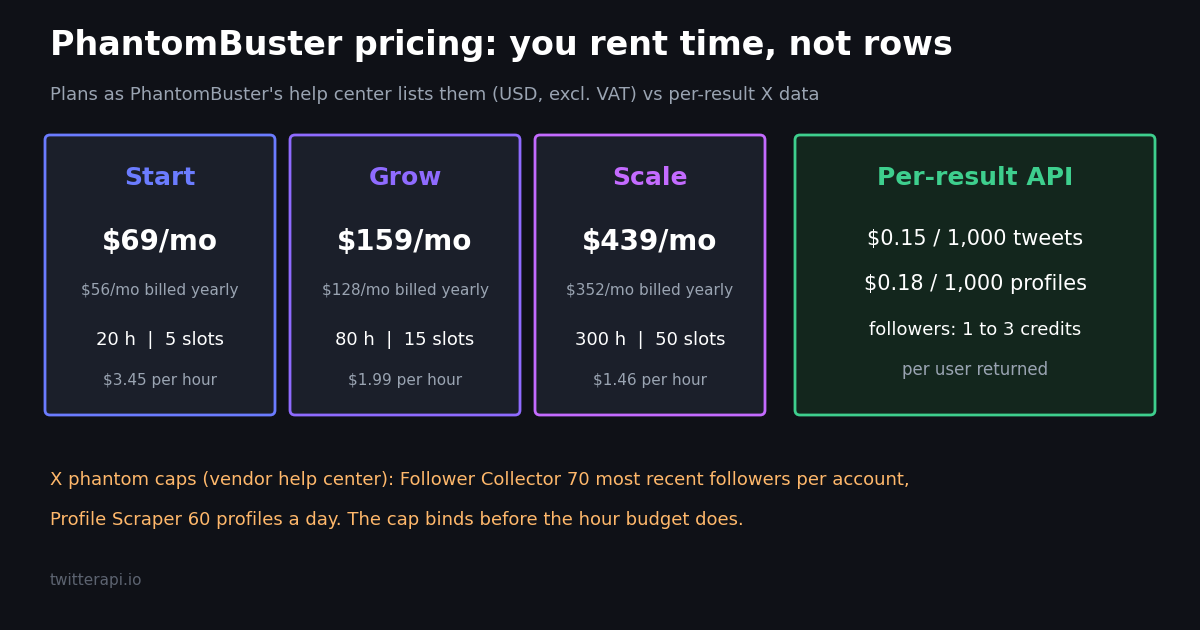
- Three paid plans: Start $69, Grow $159, Scale $439 a month (or $56, $128, $352 a month billed annually), per PhantomBuster's help center; prices exclude VAT.
- You buy time and slots: 20, 80 or 300 execution hours a month and 5, 15 or 50 Phantom slots, plus AI, email, URL Finder and CAPTCHA credits that reset each cycle.
- Trial and Free plan: 14 days, 2 hours, no card; then a Free plan with 30 minutes a month, 1 slot and a 10-row export cap.
- X caps bind first: the X Follower Collector returns at most 70 recent followers per account and the Profile Scraper 60 profiles a day, so hours are rarely the limit for X data.
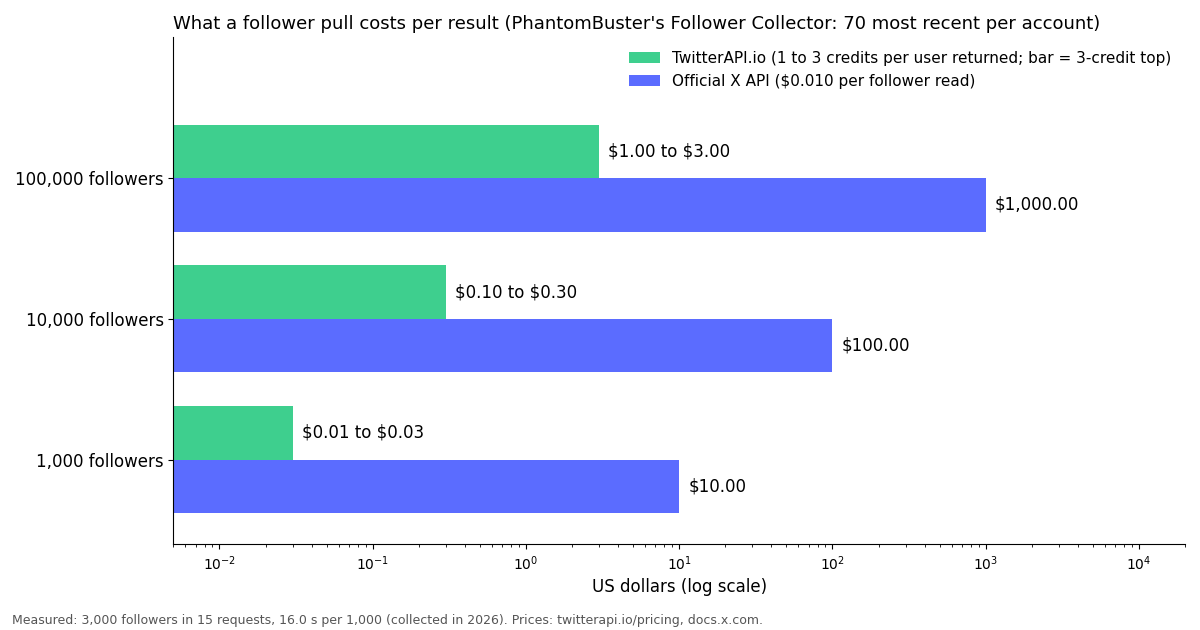
- Per-result X data: 1,000 followers cost $0.01 to $0.03 here (1 to 3 credits per user returned) vs $10 at the X API's $0.010 per follower read; we measured 16 seconds per 1,000.
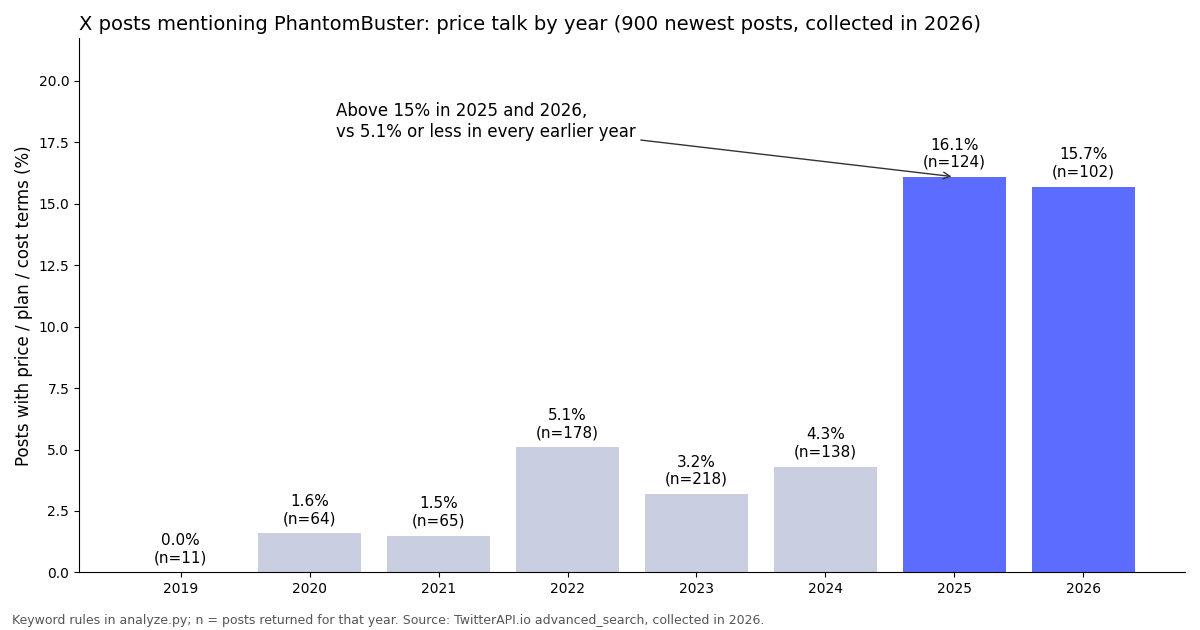
- Price talk is rising: in 900 X posts mentioning PhantomBuster, price or plan terms appear in 16.1% of 2025 posts and 15.7% of 2026 posts, vs 5.1% or less in earlier years.
PhantomBuster is a cloud automation tool that runs prebuilt scripts, called Phantoms, against LinkedIn, Sales Navigator, Instagram, X (Twitter) and other sites, usually logged in with your own session. Its price is not set per row of data or per user seat. It is set by execution time (how many hours your Phantoms may run each month) and slots (how many Phantoms you can keep configured at once), with separate credit pools for AI, email discovery, URL finding and CAPTCHA solving.
This page lays out the plans exactly as PhantomBuster's own help center and pricing blog state them, explains what each meter really limits, and then does the math that most pricing pages skip: what a plan buys when the job is X data. For that we ran a study collected in 2026: the status of PhantomBuster's own X accounts, 900 recent X posts that mention PhantomBuster, and timed follower pulls from three large organization accounts on a per-result API.
If you are choosing between tools rather than plans, our PhantomBuster alternatives guide compares the options for X data in depth; this page stays on cost.
16.1% in 2025 and 15.7% in 2026, vs 5.1% or less before (900 posts, collected in 2026)
PhantomBuster plans and prices in 2026
PhantomBuster's pricing page (phantombuster.com/pricing) renders in JavaScript and returned no plan text to our fetch, so every figure below comes from two vendor sources read this session: the help center article "What Each PhantomBuster Plan Includes" (support.phantombuster.com) and PhantomBuster's own pricing explainer on its blog. Both list the same three paid plans.
Currency and tax. The help center says prices exclude VAT, customers in Europe are typically billed in EUR and everyone else in USD, and the currency is fixed at the first payment. The dollar figures above are the USD list prices.
Users are not the meter. All paid plans include Phantoms, Workflows, unlimited CSV and JSON exports, API access and up to 100 workspace members, and the help center states that plans "are not differentiated by number of users". Resources are shared across the workspace.
Above Scale. For needs beyond the Scale plan the help center points to Customer Care for a custom plan; no public price is given.
About the plan names. Many third-party reviews still call the tiers Starter, Pro and Team. PhantomBuster's own pages now use Start, Grow and Scale with the prices above; we quote only the vendor's names.
The credit pools that come with each plan
Execution time is not the only allowance. Each plan carries four monthly credit pools and a storage quota, listed in the same help center article.
Credits do not roll over. Unused credits reset at the start of each billing cycle, per the help center. PhantomBuster's pricing explainer adds that an email credit is spent on each discovery attempt whether or not an email is found, that add-on credit packs can be bought, and that execution time and slots have no mid-cycle top-ups: if you run out of hours, the route is a plan upgrade.
Priority support is included on Grow and Scale, not on Start.
For X (Twitter) data work most of these pools are idle: the X phantoms export profile and post fields, and the AI and email credits matter mainly for LinkedIn lead enrichment, which is where most PhantomBuster users point the tool (see the study below).
What execution hours buy, and the price per hour
PhantomBuster's explainer describes execution time as how long your automations can run in each billing cycle. Dividing each plan price by its hours gives the list price of one hour of runtime.
Bigger plans cost less per hour. Scale's hour is less than half of Start's on monthly billing. That only helps if you can actually use the hours, and on X the limits that bind are per account and per day, not per hour.
What a Phantom does with an hour on X. The Follower Collector help page gives its speed as "around 35 seconds per 2,000 followers". At that pace a single hour would move far more rows than any account is allowed to return, because the same page states that the Phantom "can only extract up to 70 of the most recent followers per account". PhantomBuster's automation rate limits article lists the Profile Scraper at 60 profiles a day (10 per launch, 6 launches) and calls these limits "a technical account limit only", with further non-public X rules on top.
The practical reading. For X data, the plan decides how many Phantoms and accounts you can juggle, not how much data one job returns. A buyer who only needs X data should size the job first and then ask whether the per-account caps fit it.
The X (Twitter) phantoms and their published limits
PhantomBuster's automation rate limits article lists a limit for each X Phantom. These are the vendor's figures, read this session.
Two wordings for one cap. The rate limits article says 70 followers per launch; the Follower Collector help page says up to 70 of the most recent followers per account, older ones unreachable. Plan around the stricter reading until you test it.
Your session does the work. The Follower Collector help page lists "a connected X/Twitter account" as a requirement and warns that an account language outside English, Polish, French, Japanese or Russian may cause an "Invalid session cookie" error. Every X Phantom runs as your logged-in account, so X can rate-limit, lock or suspend that account if it judges the activity automated.
The Free plan exports 10 rows. Per the same help page, CSV exports on the Free plan include only the first 10 rows, so a real test of an X Phantom needs the trial or a paid plan.
Cost of X data: execution hours vs per-result pricing
Because PhantomBuster sells a flat monthly bundle and an API bills per row, the fair comparison is per job. The table uses only published prices: PhantomBuster's caps from its help center, our per-result prices (followers 1 to 3 credits per user returned, profiles $0.18 per 1,000, tweets $0.15 per 1,000, with $1 = 100,000 credits) and the official X API pay-per-usage rate card on docs.x.com ($0.010 per follower or user read, $0.005 per post read).
Where per-result pricing wins clearly. Any job that needs more than 70 followers of an account, or more than 60 profiles a day, is outside what the X Phantoms publish, and on a per-result API it is a few cents. A full follower list of a 97,313-follower account costs about $0.97 to $2.92 in credits, against $973.13 at X's $0.010 per follower read.
The ratio vs the official API. For tweets the gap is $5 vs $0.15 per 1,000 tweets on X's pay-per-usage rate card, about 33x. For followers it is $10 vs $0.01 to $0.03 per 1,000.
No subscription needed. API credits are pay-as-you-go and purchased credits never expire; new accounts that pass the automatic bot check get up to $1 of free credits (at most 100,000 credits, no card, one per person or network, expiring after 31 days). Monthly plans (Starter $29, Builder $99, Pro $199, Scale $499, Business $1,499 a month) are on the pricing page for teams that prefer a fixed bill. Reads need no X account.
Measured: how fast and how many requests a 1,000-follower pull takes
To check the per-result figures against a real run, we pulled the 1,000 newest followers of three large organization accounts through the follower endpoint at page size 200 and timed each pull on the wall clock.
Every page was full. Each of the 15 requests returned 200 followers, with no duplicates, so 1,000 followers took 5 requests per account.
About 16 seconds per 1,000. The timing includes the rate limiter of our shared study client (several studies ran at once), so a single caller on a paid account should be at or below it. Paid accounts run at 20 requests a second (50 on Scale, 500 on Business, up to 1,000 on request); before the first payment the limit is 0.2 requests a second.
Locked accounts appear in the list. Between 7.5% and 12.3% of the returned followers were protected accounts. Their basic profile fields come back in the follower list; their posts do not.
What the pull cost. At 1 to 3 credits per user returned, the 3,000 follower records cost between $0.03 and $0.09.
What X posts about PhantomBuster say about price
We collected the 900 newest X posts that mention PhantomBuster (they reach back to 2019) and classified them with transparent keyword rules (published in the study's analyze.py). Shares below are from that general query only, so the price-focused second query does not inflate them.
Price talk jumped in 2025. Price, plan or cost terms appear in 16.1% of 2025 posts and 15.7% of 2026 posts, against 5.1% or less in every earlier year. Several of the newer posts we read list monthly tool stacks in which PhantomBuster is one subscription among several.
LinkedIn dominates, X is a side use. 22.7% of the posts mention LinkedIn or Sales Navigator, 6.9% mention Twitter or X and 3.7% Instagram. 25.2% talk about scraping and 25.2% about leads.
Neighbors in the stack. The tools named most often alongside PhantomBuster are Apollo and Zapier (67 posts each), Clay (45) and Apify (30), counted across both queries.
AI agents are new. 3.6% of posts mention MCP or Claude; at least one of them argues that slot-based pricing fits AI agents that chain Phantoms poorly.
PhantomBuster on X itself. An account named PhantomBuster, @officialpbuster, created in 2021 and linking to phantombuster.com, had 1,370 followers and 498 posts at collection time. Of its newest 200 posts, 199 are from 2023 and 1 from 2024, the newest a Black Friday offer of 40% off annual plans.
What that means for a buyer. It says nothing about the product's quality. It does mean X is not where PhantomBuster announces price or plan changes today: check the help center article and the pricing page before you buy, as we did.
Which PhantomBuster plan fits, and when to price X data per result
Start ($69 a month, $56 annual) fits one person running a handful of LinkedIn or Sales Navigator Phantoms on a schedule: 5 slots and 20 hours cover several daily launches.
Grow ($159, $128 annual) fits a small team that needs more Phantoms configured at once (15 slots) or heavy email and URL lookups (2,500 email and 10,000 URL Finder credits).
Scale ($439, $352 annual) is for agencies running many client workspaces' worth of Phantoms (50 slots, 300 hours). Above it, PhantomBuster quotes a custom plan.
When to price X data per result instead. If the job is full follower lists, bulk profile lookups, keyword monitoring or tweet archives on X, the per-account caps of the X Phantoms limit it whatever the plan, and each run uses your own X session. A per-result API reads the same public data without an X account and bills only for what comes back: $0.15 per 1,000 tweets, $0.18 per 1,000 profiles, 1 to 3 credits per follower returned.
Try before you commit. PhantomBuster's 14-day trial gives 2 hours and 10-row exports; on our side the sign-up credit is enough to run the follower script on this page for a few thousand rows.
How we collected this
Question. What does X data cost when pulled through PhantomBuster's plans versus per-result pricing, what do X posts about PhantomBuster discuss, and how fast is a real 1,000-follower pull?
Accounts and queries. Profile lookups for PhantomBuster's X handles and three organization accounts (@zapier, @HubSpot, @NotionHQ); the newest 200 posts of @officialpbuster; the 900 newest posts for the query phantombuster plus 60 posts for phantombuster with price, plan or cost terms (954 unique after merging); the 1,000 newest followers of each organization account.
Window and size. Collected in 2026: whatever each endpoint returned newest-first at collection time. 80 requests in total; the tweets returned cost about $0.17 at $0.15 per 1,000.
What the sample cannot show. Search returns posts that X still serves, so deleted posts and suspended authors are missing; keyword rules miss sarcasm and other languages; follower timing includes our shared client's rate limiter; PhantomBuster's run speed and caps are the vendor's published figures, not something we ran.
Privacy. Aggregates only. Search authors and followers are private individuals: their raw pages were not kept in the repository and no handle, ID or text of theirs appears here. Only organization accounts are named.
import requests

API_KEY = "YOUR_API_KEY"  # from the TwitterAPI.io dashboard
BASE = "https://api.twitterapi.io"
HEADERS = {"X-API-Key": API_KEY}


def follower_count(user_name):
    r = requests.get(f"{BASE}/twitter/user/info",
                     headers=HEADERS, params={"userName": user_name}, timeout=30)
    r.raise_for_status()
    body = r.json()
    if body.get("status") == "error" or not body.get("data"):
        raise SystemExit(f"lookup failed: {body.get('msg')}")
    data = body["data"]
    if data.get("unavailable"):
        raise SystemExit(f"account unavailable: {data.get('unavailableReason')}")
    return data["followers"]


def pull_followers(user_name, limit=1000):
    """Newest followers first, 200 per page; billed per follower returned."""
    rows, cursor = [], ""
    while len(rows) < limit:
        params = {"userName": user_name, "pageSize": 200}
        if cursor:
            params["cursor"] = cursor
        r = requests.get(f"{BASE}/twitter/user/followers",
                         headers=HEADERS, params=params, timeout=30)
        r.raise_for_status()
        page = r.json()
        for u in page.get("followers", []):
            rows.append({
                "screen_name": u.get("screen_name"),
                "followers_count": u.get("followers_count"),
                "statuses_count": u.get("statuses_count"),
                "created_at": u.get("created_at"),
                "protected": u.get("protected"),
            })
        if not page.get("has_next_page"):
            break
        cursor = page.get("next_cursor") or ""
    return rows[:limit]


if __name__ == "__main__":
    account = "zapier"
    total = follower_count(account)
    sample = pull_followers(account, limit=1000)
    # 1 to 3 credits per follower returned; $1 = 100,000 credits
    low, high = len(sample) / 100_000, len(sample) * 3 / 100_000
    print(f"{account}: {total:,} followers; pulled {len(sample):,}")
    print(f"cost of this pull: ${low:.2f} to ${high:.2f}")
    print(f"full list at the same rate: ${total / 100_000:,.2f} to ${total * 3 / 100_000:,.2f}")
Researching this?Free starter credits cover end-to-end testing — Google sign-in, no card. Get a key.
Questions readers ask
How much does PhantomBuster cost?
Per PhantomBuster's help center, Start is $69 a month, Grow $159 and Scale $439, or $56, $128 and $352 a month billed annually (20% off). Prices exclude VAT; customers in Europe are usually billed in EUR. A custom plan above Scale is quoted by Customer Care.
Does PhantomBuster have a free plan?
Yes. After the 14-day trial, a workspace that does not upgrade moves to a Free plan with 30 minutes of execution time a month, 1 Phantom slot, 50 MB of storage, no AI or email credits, and exports and API output capped at 10 rows.
What is included in the PhantomBuster free trial?
14 days, no credit card, 2 hours of execution time in total, 5 slots, 1,000 AI credits, 50 email credits, 100 URL Finder credits and 50 CAPTCHA credits, with exports capped at 10 rows. Moving to a paid plan during the trial ends it and starts billing, per PhantomBuster's pricing explainer.
What is PhantomBuster execution time?
It is how long your Phantoms may run in each billing cycle: 20 hours a month on Start, 80 on Grow and 300 on Scale. Execution time and slots cannot be topped up mid-cycle; you upgrade instead. Credits reset each cycle and do not roll over.
Does PhantomBuster have API pricing?
There is no separate API price list: the help center includes API access in every paid plan, so API use is covered by the plan you pick. On the trial and the Free plan, API output is capped at 10 rows.
How many Twitter followers can PhantomBuster export?
Its Follower Collector help page says it can only extract up to the 70 most recent followers per account, and its rate limits article lists 70 followers per launch. A per-result API returns full follower lists at 1 to 3 credits per user returned, about $0.01 to $0.03 per 1,000.
Is PhantomBuster worth it for X (Twitter) data?
For LinkedIn-centered lead work, where most PhantomBuster posts on X point it, the bundle of slots and credits can make sense. For X data alone, the per-account caps (70 followers, 60 profiles a day) bind before the hours do, so pricing the job per result is usually the clearer comparison.
Do unused PhantomBuster hours roll over?
The help center says unused credits reset each billing cycle and do not carry over; it does not state a rollover for execution hours, and the pricing explainer says hours cannot be topped up mid-cycle. Treat hours as use-it-or-lose-it unless PhantomBuster confirms otherwise.
Continue
- X developer docs: X API pricing (pay-per-usage rate card: $0.005 per post read, $0.010 per user and follower read, 3M post-read cap)
- TwitterAPI.io docs: Get user followers (page size up to 200, newest first)
- TwitterAPI.io docs: Get user info by username
- TwitterAPI.io docs: Advanced Search endpoint
- X automation rules (help.x.com)
- X (Twitter) API overview: endpoints and per-result pricing
- PhantomBuster alternatives for X data, compared
- Apify pricing explained for X scraping jobs
- Hootsuite pricing and what its X features cost
- How to get all followers of a Twitter account
- TwitterAPI.io pricing: pay per tweet, profile and follower returned
- 01Sprinklr Pricing: What It Costs Now That Self-Serve Has Ended
- 02Goose MCP: How to Add MCP Servers (Extensions) to goose, Desktop and CLI
- 03ChatGPT Apps SDK Tutorial: Build a ChatGPT App That Answers With Live Twitter (X) Data
- 04LM Studio MCP: Connect MCP Servers (and Live Twitter (X) Data) to a Local Model
- 05Ollama MCP: How to Give a Local Model MCP Tools (with Live Twitter (X) Data)
- 06Composio Pricing in 2026: Plans, Tool Calls and the Twitter (X) Data Bill
- 07Clay Pricing in 2026: Plans, Data Credits, Actions and the Cost of a Twitter (X) Column
- 08Exa Pricing: What Exa's Search API Costs per Endpoint, With Worked Examples
Writing about something you built with TwitterAPI.io? Our community rewards program pays API credits for honest tutorials, build logs and videos.
Stop reading. Start building.
Starter credits cover real testing on real data. Google sign-in, no card, no application queue.
Get an API keyAlready building with TwitterAPI.io? Publish an honest tutorial or build log about it and earn up to $200 a month in API credits.