Goose MCP: How to Add MCP Servers (Extensions) to goose, Desktop and CLI
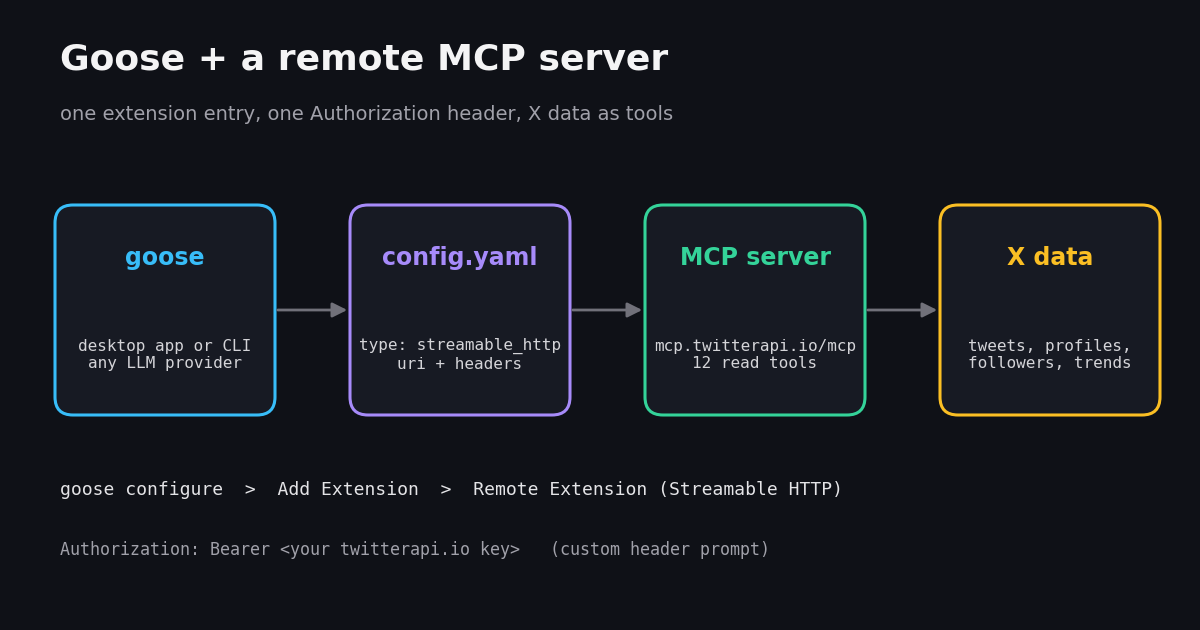
- Extensions are MCP servers. goose calls them extensions; add one with
goose configure> Add Extension, in the desktop app, or underextensions:in~/.config/goose/config.yaml. - Two transports in the current docs:
stdio(local command:cmd,args,envs) andstreamable_http(remote:uri, optionalheaders). The docs do not list SSE. - Auth for hosted servers goes in a custom header: the wizard asks Would you like to add custom headers?; answer
AuthorizationandBearer <key>. - Recipes turn a prompt into a reusable YAML file;
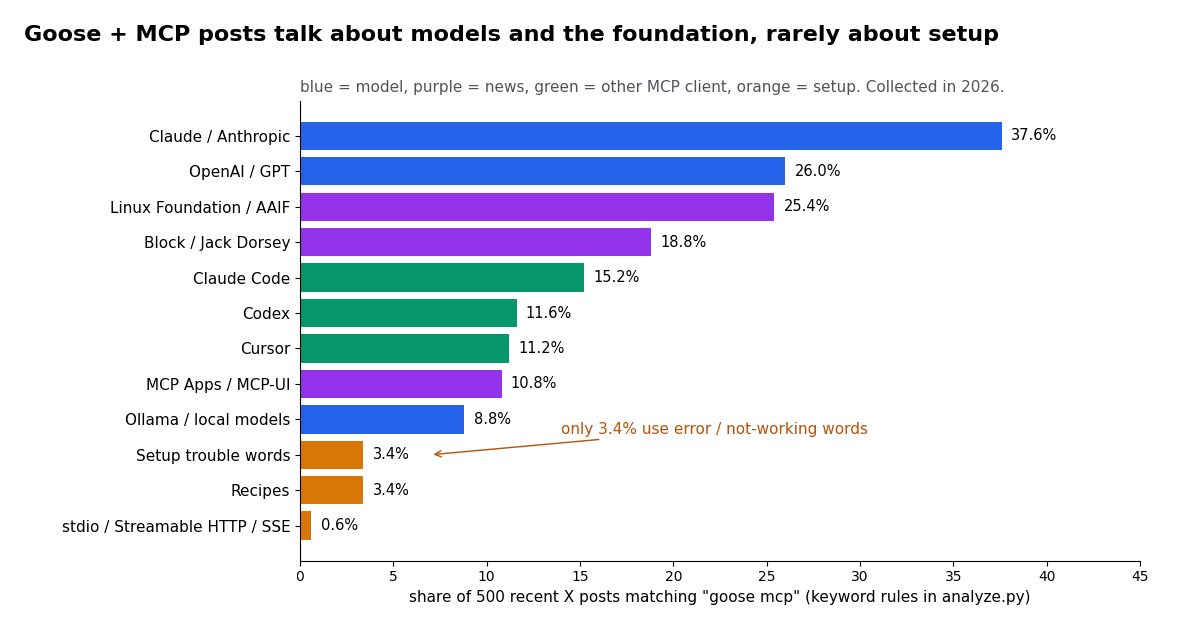
goose run --recipe file.yaml --params topic=...runs it headless andgoose schedule addputs it on a cron. - What people post: of 500 recent X posts matching "goose mcp", 37.6% name Claude or Anthropic and 25.4% the Linux Foundation / AAIF, while only 3.4% use error or not-working words.
- Cost of X data inside goose: a 10-call agent session that reads 200 posts costs about $0.03 on our API ($0.15 per 1,000 tweets returned) versus $1.00 at the X API pay-per-usage rate card ($0.005 per post read).
goose is an open-source AI agent with a desktop app, a CLI and an API. Its GitHub README describes it as "an open source, extensible AI agent that goes beyond code suggestions", says it works with 15+ model providers (Anthropic, OpenAI, Google, Ollama, OpenRouter, Azure and Bedrock among them) and states that it is part of the Agentic AI Foundation (AAIF) at the Linux Foundation. It started at Block, whose old documentation host block.github.io/goose still turns up in links, and the repository now lives at github.com/aaif-goose/goose under the Apache-2.0 license.
Everything goose can do beyond chatting comes from extensions, and every extension is a Model Context Protocol (MCP) server. That makes "goose mcp" really two questions: how do I plug an MCP server into goose, and how does goose behave as an MCP client once it is plugged in. This guide answers both from the goose docs and source fetched this session, then builds a concrete agent: goose reading live X (Twitter) data through a hosted MCP server, packaged as a recipe that runs every morning.
One note on method: we did not run goose on our own machines for this page. Every command, menu name and YAML field below is quoted from the official goose documentation or the goose source code, and we say so where the docs are silent. The data in the study sections comes from public X posts we collected through our API in 2026.
3.4%
What goose means by an extension (and which ones ship built in)
In MCP terms goose is the client (the host application) and each extension is a server that exposes tools. When an extension is enabled, goose lists its tools to the model, the model decides when to call them, and goose relays the call to the server and the result back to the model. The goose docs page on using extensions lists the types you can add: built-in extensions that ship with goose, command-line extensions that goose launches as a local process over standard IO, and remote extensions reached over Streamable HTTP.
Built-in extensions. Per the docs, goose ships with Developer, Computer Controller, Memory, Tutorial and Auto Visualiser, plus a set of platform extensions that run inside the agent process (Analyze, Apps, Chat Recall, Code Mode, Extension Manager, Skills, Summon, Todo and Top of Mind). From the CLI you can start a session with one switched on: goose session --with-builtin developer.
Command-line (stdio) extensions. goose starts the server as a child process and talks to it over stdin and stdout. This is how most open-source MCP servers on npm or PyPI run: npx -y <package> or uvx <package>. The server runs with your user's permissions on your machine.
Remote (Streamable HTTP) extensions. goose connects to a URL. Nothing runs locally, the server can be shared by a team, and authentication happens in an HTTP header or through OAuth. The docs show remote extensions that obtain an OAuth client ID automatically, and the GitHub MCP walkthrough shows the header route with a personal access token.
What is not listed. The current using-extensions page names stdio and Streamable HTTP only; the older Server-Sent Events (SSE) transport does not appear. If a server you want only speaks SSE, check its docs for a Streamable HTTP endpoint (some servers expose both) or run a local bridge as a stdio extension.
Add an MCP server with goose configure (CLI)
The interactive wizard is the safest way to get a valid entry, because it writes the YAML for you (goose also has a secret store, which the docs mention for OAuth client secrets). Run goose configure, choose Add Extension, then pick the type. The menus accept typing to filter, per the CLI commands reference.
For a local stdio server, choose Command-line Extension and answer the prompts: a name, the command to run (for example npx -y @modelcontextprotocol/server-github), a timeout in seconds, a description, and any environment variables the server needs, such as an access token.
For a remote server, choose Remote Extension (Streamable HTTP). The GitHub MCP page in the goose docs walks through exactly this with GitHub's hosted server at api.githubcopilot.com/mcp/: name the extension, paste the endpoint URI, accept the default timeout of 300 seconds, write a description, answer yes to Would you like to add custom headers?, enter Authorization as the header name and Bearer plus your token as the value, then decline a second header. goose confirms the extension was added.
The same flow works for any hosted MCP server that takes a bearer token. The block below shows the answers for the X data server used in the rest of this guide; the comment lines paraphrase the prompts, so expect the exact wording on your screen to differ slightly by version.
Desktop app. Add a custom extension from the app's extensions settings with the same fields, or click an install link. goose registers a goose://extension?... deeplink: goose://extension?url=<remote-streamable-http-url>&type=streamable_http&id=<id>&name=<name>&description=<description> for remote servers and goose://extension?cmd=<command>&arg=<argument>&... for stdio ones, all parameters URL-encoded. The app asks you to confirm before it installs anything, and then prompts for any secret the extension needs.
$ goose configure
# Configure goose  >  Add Extension
#   What type of extension would you like to add?
#   > Remote Extension (Streamable HTTP)
#   name ............ twitterapi-io
#   endpoint URI .... https://mcp.twitterapi.io/mcp
#   timeout ......... 300
#   description ..... Read X (Twitter) posts, profiles, followers and trends
#   Would you like to add custom headers?  Yes
#     header name ... Authorization
#     header value .. Bearer your_key_here
# Add another header? NoOr edit config.yaml by hand (and fix common errors)
goose keeps its settings in ~/.config/goose/config.yaml on macOS and Linux (the docs' example path). Extensions are a map under the extensions: key, one entry per server. The docs show a stdio entry with name, cmd, args, enabled, envs, type: stdio and timeout: 300, and a remote entry with name, type: streamable_http, uri, enabled and timeout, plus client_id, client_secret_key and scopes when the server uses OAuth.
For header auth, the goose source declares a headers field on the Streamable HTTP extension config (alongside uri, envs, env_keys, timeout, available_tools and the OAuth fields, in the tests of crates/goose/src/agents/extension.rs). The entry below is what the wizard answers above describe. If goose rejects your hand-written version, delete it and let goose configure write it, then compare.
Keep the key out of shared files. Anything in config.yaml is plain text. Do not commit the file to a dotfiles repo with a live key in it, and be careful what you paste when asking for help: goose info -v prints detailed settings, including enabled extensions, per the CLI reference.
Trim the tool list. available_tools limits which of a server's tools goose exposes to the model. Fewer tools means a shorter tool list in every prompt and fewer wrong picks, which matters most with smaller local models.
Check it loaded. Run goose info -v to see the parsed settings and enabled extensions, then start goose session and ask the model which tools it has. For a one-off test without touching the config, goose session --with-streamable-http-extension "<url>" attaches a remote server for that session only (this flag takes a URL, so it suits servers that need no header).
The tools never appear. Run goose info -v and check the extension is listed and enabled. For a remote server, confirm the URI includes the full path (for our server, /mcp). For stdio, run the cmd and args yourself in a terminal: if the server crashes there, it crashes in goose too.
401 or 403 from a remote server. The header value must be the whole string Bearer <key>, with the word Bearer and one space. Re-run goose configure, remove the extension and add it again rather than hand-editing quotes in YAML.
Calls time out. The timeout field is in seconds and the docs examples use 300. Long searches or large follower pulls should be split into smaller tool calls in the prompt rather than given a huge timeout.
A recipe cannot see the tool. If your recipe has an extensions block, only the extensions listed there load. Remove the block (as in the recipe above) or list the extension explicitly, then goose recipe validate again.
The model ignores the tool or loops. Smaller local models pick tools less reliably. Trim available_tools to what the task needs, name the tool in the prompt, and cap the number of calls.
An SSE-only server. The current docs list stdio and Streamable HTTP. Look for the server's Streamable HTTP endpoint, or wrap it in a local stdio bridge.
extensions:
  twitterapi-io:
    name: twitterapi-io
    type: streamable_http
    uri: https://mcp.twitterapi.io/mcp
    headers:
      Authorization: "Bearer your_key_here"
    enabled: true
    timeout: 300
description: Read X (Twitter) posts, profiles, followers and trendsWorked example: give goose live X (Twitter) data
Most MCP tutorials stop at a filesystem or GitHub server. A more useful test of an agent is data it cannot already know: what people are posting right now. Our hosted MCP server at https://mcp.twitterapi.io/mcp exposes 12 read tools over Streamable HTTP and authenticates with Authorization: Bearer <your key>, which is exactly the header shape goose's wizard asks for.
The tools goose will see (as listed on the server's page): search_tweets (advanced search with operators such as from:, since: and lang:), get_user_info, get_user_about, get_user_followers, get_user_followings, get_user_last_tweets, get_user_mentions, get_tweets_by_ids (up to 50 IDs at once), get_tweet_replies, get_tweet_quotes, get_tweet_retweeters and get_trends.
No X account needed. The server reads public data with your API key; you do not log in to X, and no developer-portal approval is involved. New accounts that pass the automatic bot check get up to $1 of free credits (at most 100,000 credits, no card, one per person or network, expiring after 31 days), enough for thousands of tweet reads while you test.
What to ask first. Good opening prompts are narrow and verifiable: "Use search_tweets to find the 20 latest English posts about goose recipes and list the three most common questions", or "Get the last tweets of @goose_oss and tell me which releases mention MCP". Narrow prompts keep tool calls, and therefore cost, predictable.
Writes are separate. The MCP server only reads. If an agent workflow later needs to post or reply, that runs through our REST API with an authenticated session: one /twitter/user_login_v2 login ($0.10, with a proxy you supply) returns login_cookies, and each post, like or follow (for example /twitter/create_tweet_v2) is then 60 credits, $0.0006, billed per HTTP 200 call. The call acts as that account, so X can rate-limit, lock or suspend it; keep a human pace, and expect the session to need a re-login now and then.
Package it as a recipe: a daily X keyword digest, run on a schedule
A recipe is goose's way of saving a task. Per the recipe reference, title and description are required, plus at least one of instructions or prompt (and prompt is required for headless runs). Optional fields include version (default 1.0.0), parameters, extensions, settings, response, activities, retry and sub_recipes. Parameters take a key, an input_type (string, number, boolean, date, file or select), a requirement (required, optional or user_prompt), a description and, for optional ones, a default; you reference them in the prompt as {{ key }}.
The recipe below asks for at most three search calls and forbids invented posts, which keeps the run cheap and auditable. It has no extensions block on purpose: the recipe reference says that when a recipe does list extensions, only the listed ones are available, and its extension schema documents stdio fields (cmd, args, env_keys) but no uri or header field. So this recipe leans on the extension you enabled in config.yaml. Validate it and do one manual run to confirm the tool shows up before you schedule it.
Limit the call budget in the prompt. Agents happily call a search tool ten times when three would do. A stated ceiling ("at most 3 search calls") is the simplest cost control you have, and it shows up directly in the cost table further down.
Ask for counts and links. Asking the model to report how many posts it read, and to link one post per theme, makes hallucinated summaries easy to spot.
Per the CLI commands reference, goose run takes --recipe <file> and one --params KEY=VALUE per parameter, and --no-session skips writing a session file. goose recipe validate <file> checks the recipe first.
goose schedule manages cron jobs for recipes: add with --schedule-id, --cron and --recipe-source; list; sessions to see past runs; run-now; and remove. The docs example uses a six-field cron expression with seconds first, "0 0 9 * * *" for 09:00 daily, and goose schedule cron-help explains the format. Because a scheduled run cannot answer a prompt, give every parameter a default, as the recipe above does.
Pick the model per run. goose run --provider <name> --model <model> overrides the configured model for a single run, which is handy for testing whether a smaller or local model (goose supports Ollama) still calls the tool correctly.
The commands, in order. goose recipe validate x-digest.yaml, then a manual goose run --recipe x-digest.yaml --params topic="goose mcp lang:en", then goose schedule add --schedule-id x-digest --cron "0 0 9 * * *" --recipe-source ./x-digest.yaml, and goose schedule run-now --schedule-id x-digest to test the scheduled path immediately.
version: "1.0.0"
title: "X keyword digest"
description: "Summarize the latest X (Twitter) posts about one topic"
parameters:
  - key: topic
    input_type: string
    requirement: optional
    default: "goose mcp"
    description: "Search query; X search operators such as lang:en or -filter:replies are allowed"
prompt: |
  Use the twitterapi-io search_tweets tool to fetch the latest posts for: {{ topic }}
  Make at most 3 search calls. Then write a digest with:
  1. five themes, each with one representative post link,
  2. any question or complaint that appears more than twice,
  3. the number of posts you read.
Do not invent posts; quote only what the tool returned.What people post about goose and MCP (study)
To see what goose users actually talk about, we collected the 500 most recent X posts returned for the search goose mcp (Latest), covering about 462 days, and classified each post with transparent keyword rules (published in analyze.py in the study folder). 85.0% of the posts contain both words in the text; the rest match through links or quoted posts. 338 of the 500 were posted in 2026.
Models dominate the conversation. 37.6% of the posts name Claude or Anthropic, 26.0% OpenAI or GPT, 10.8% Gemini and 8.8% Ollama or local models. goose is model-agnostic, and people talk about it in terms of which model they plug in.
The foundation news traveled. 25.4% mention the Linux Foundation or the Agentic AI Foundation and 18.8% mention Block or Jack Dorsey. 10.8% mention MCP Apps or MCP-UI, the interactive-UI extension of the protocol.
Setup talk is rare. Only 3.4% of the posts use error or not-working words, 3.4% mention recipes, and just 3 posts (0.6%) name a transport at all. Configuration questions likely get asked elsewhere (GitHub issues, community chat) rather than on X, which is one reason this page spells out the YAML.
Posts also compare goose with other MCP clients: 15.2% name Claude Code, 11.6% Codex and 11.2% Cursor. The engagement is modest: the median post had 8 likes and 912 views (90th percentile: 62 likes, 11,064 views), and 59.6% carry a link, 179 of them to GitHub.
What the official @goose_oss account posts
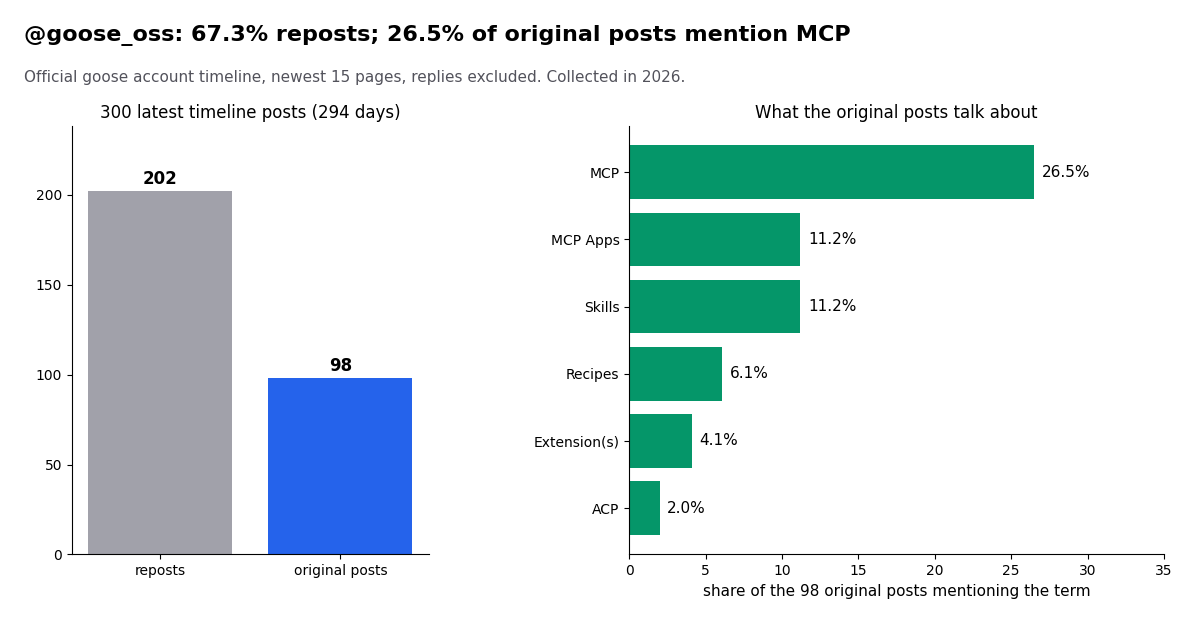
The project's own X account is @goose_oss. We read its newest 300 timeline posts (replies excluded), which span 294 days, about 1.02 posts a day. 67.3% of them (202) are reposts, typically of community demos and tutorials; the remaining 98 original posts work out to about 2.3 a week.
MCP is the most common topic. 26.5% of the original posts mention MCP, 11.2% MCP Apps, 11.2% skills, 6.1% recipes and 4.1% the word extension. 61.2% carry a link; the most linked domains are block.github.io (12 posts), aaif.io and goose-docs.ai, so the account is a decent changelog feed for new extension and MCP features.
To follow the account from goose itself, the get_user_last_tweets tool reads the same timeline: "Get the last 20 tweets of @goose_oss and list any that announce a new extension or MCP feature" makes a tidy weekly recipe.
What a goose agent costs to run on X data
An MCP tool call that searches X returns up to 20 posts per page on our API, and you pay only for the data returned: 15 credits per tweet, which is $0.15 per 1,000 tweets ($1 = 100,000 credits). A search that finds nothing is billed the 15-credit minimum, $0.00015; a full 20-post page costs $0.003. Profiles are 18 credits each ($0.18 per 1,000).
The official X API's pay-per-usage rate card (docs.x.com/x-api/getting-started/pricing) charges $0.005 per post read and $0.010 per user read, capped at 3M post reads a month before Enterprise. Per 1,000 posts that is $5.00 against $0.15, about 33x. The table assumes each search call returns a full page of 20 posts; real runs that return fewer cost less on both.
This study as a benchmark. Collecting the data for this page took 52 requests that returned 999 posts and 2 profiles: about $0.15 on our API, versus about $5.01 at the X rate card.
Model tokens are extra and usually bigger. Each tool result goes back into the model's context. A page of posts with full author objects is a sizable block of text, so on a paid model the token bill for a digest can exceed the data bill; ask the tool for fewer posts or a narrower query when that matters. Subscription plans (Starter $29 to Business $1,499 a month) and rate limits (0.2 requests per second before the first payment, 20 once paid) are on the pricing page.
How we collected this
Question. What do people say on X when they post about goose and MCP, and how much does the official account talk about MCP and extensions? Sources. (a) The search goose mcp with queryType Latest on /twitter/tweet/advanced_search, 25 pages, 500 posts after de-duplication, covering the most recent 462 days of matches. (b) The @goose_oss timeline via /twitter/user/last_tweets, 15 pages, 300 posts. A broader query (goose plus extension, without MCP) returned 199 posts of which only 21.1% were about AI agents at all, so we report it only as a size check and left it out of the analysis.
Method. Each search post was tagged by case-insensitive keyword rules (for example setup trouble = error, not working, broken, fails, timeout, 401, crash) published in analyze.py. A post can match several rules, so shares do not sum to 100%. Collected in 2026.
What the sample cannot show. Keyword rules miss sarcasm, screenshots and non-English phrasing; the search returns what X's Latest index surfaces, not every post; and X posts are a poor proxy for goose's user base, most of whom never post about their setup. The timeline sample covers the newest 300 posts only.
Privacy. Aggregates only. We publish no handles, post IDs, URLs or text from private individuals; raw search pages were kept outside the repository. @goose_oss is an organization account and is named.
import os
import requests

BASE = "https://api.twitterapi.io"
HEADERS = {"X-API-Key": os.environ["TWITTERAPI_IO_KEY"]}
PRICE_PER_TWEET = 0.00015  # 15 credits per tweet returned; $1 = 100,000 credits


def search_latest(query, max_pages=3):
    """Same data the MCP search_tweets tool reads: /twitter/tweet/advanced_search."""
    tweets, cursor = [], ""
    for _ in range(max_pages):
        params = {"query": query, "queryType": "Latest"}
        if cursor:
            params["cursor"] = cursor
        r = requests.get(f"{BASE}/twitter/tweet/advanced_search",
                         headers=HEADERS, params=params, timeout=30)
        r.raise_for_status()
        body = r.json()
        tweets.extend(body.get("tweets", []))
        if not body.get("has_next_page"):
            break
        cursor = body.get("next_cursor", "")
    return tweets


if __name__ == "__main__":
    query = "goose mcp lang:en"
    tweets = search_latest(query)
    for t in tweets[:10]:
        author = t.get("author") or {}
        print(t["createdAt"], "@" + author.get("userName", "?"),
              t.get("likeCount", 0), "likes |", t["text"][:90].replace("\n", " "))
    cost = len(tweets) * PRICE_PER_TWEET
    print(f"{len(tweets)} tweets returned -> about ${cost:.4f} at $0.15 per 1,000 tweets")
    print(f"X API pay-per-usage rate card for the same reads: ${len(tweets) * 0.005:.2f}")
Researching this?Free starter credits cover end-to-end testing — Google sign-in, no card. Get a key.
Questions readers ask
Is goose an MCP client or an MCP server?
goose is an MCP client (host). Each extension you add is an MCP server, either launched locally over stdio or reached over Streamable HTTP, and goose exposes that server's tools to whichever model you configured.
Where is the goose config file?
The goose docs give ~/.config/goose/config.yaml as the path on macOS and Linux. Extensions sit under the extensions: key, one entry per server. goose configure edits the same file interactively.
Does goose support SSE MCP servers?
The current using-extensions page names two transports, stdio and Streamable HTTP, and does not list SSE. Use the server's Streamable HTTP endpoint if it has one, or a local stdio bridge.
How do I pass an API key to a remote MCP server in goose?
In goose configure, choose Remote Extension (Streamable HTTP) and answer yes to the custom headers prompt: header name Authorization, value Bearer <your key>. The goose GitHub MCP docs show the same steps with a personal access token.
Can goose use local models with MCP extensions?
Yes. goose's README lists Ollama among its 15+ providers, and extensions work the same way regardless of provider. Smaller models pick tools less reliably, so trim the tool list and name the tool in your prompt.
How do I run a goose recipe on a schedule?
Use goose schedule add --schedule-id <id> --cron "0 0 9 * * *" --recipe-source ./recipe.yaml. The cron string has six fields with seconds first; goose schedule cron-help explains it. Give every recipe parameter a default, because a scheduled run cannot prompt you.
Who maintains goose now?
The goose GitHub README says goose is part of the Agentic AI Foundation (AAIF) at the Linux Foundation, and the repository lives at github.com/aaif-goose/goose. It was started at Block, whose old docs host block.github.io/goose still appears in links.
How much does it cost to give goose X (Twitter) data?
On our API you pay only for the data returned: $0.15 per 1,000 tweets (15 credits each), so a 10-call session reading 200 posts is about $0.03. At the X API pay-per-usage rate card ($0.005 per post read) the same 200 posts cost $1.00. Model tokens are billed separately by your model provider.
Continue
- goose docs: Using Extensions (extension types, config.yaml entries, deeplinks, built-in extensions)
- goose docs: GitHub Extension (Remote Extension wizard with a custom Authorization header)
- goose docs: Recipe Reference (fields, parameters, extensions behavior)
- goose docs: CLI commands (goose run, session, info, recipe validate, schedule)
- goose on GitHub (README: AAIF at the Linux Foundation, providers, Apache-2.0; source of the extension config)
- X API pricing (pay-per-usage rate card)
- X (Twitter) API guide: endpoints, pricing and access
- Twitter MCP server: X data tools for AI agents
- What an MCP server is and how clients use it
- Codex MCP: add MCP servers to OpenAI Codex
- Build your own MCP server step by step
- MCP Inspector: test a server before wiring it into an agent
- Pay-per-use pricing for tweets and profiles
- 01PhantomBuster Pricing: Plans, Execution Hours and What X (Twitter) Data Really Costs
- 02Sprinklr Pricing: What It Costs Now That Self-Serve Has Ended
- 03ChatGPT Apps SDK Tutorial: Build a ChatGPT App That Answers With Live Twitter (X) Data
- 04LM Studio MCP: Connect MCP Servers (and Live Twitter (X) Data) to a Local Model
- 05Ollama MCP: How to Give a Local Model MCP Tools (with Live Twitter (X) Data)
- 06Browser Use MCP Server: Setup, CLI and Twitter (X) Reads in 2026
- 07ChatGPT MCP: how to add an MCP server to ChatGPT
- 08Chrome DevTools MCP Server: What It Is, Setup, Tools and Flags (2026)
Writing about something you built with TwitterAPI.io? Our community rewards program pays API credits for honest tutorials, build logs and videos.
Stop reading. Start building.
Starter credits cover real testing on real data. Google sign-in, no card, no application queue.
Get an API keyAlready building with TwitterAPI.io? Publish an honest tutorial or build log about it and earn up to $200 a month in API credits.