TweetBeaver is gone: every TweetBeaver function and how to get the same data today
For about six years TweetBeaver was the first bookmark in a lot of OSINT toolkits. It was a plain PHP site: you clicked "Sign in with Twitter", picked a tile such as "Convert @name to ID" or "Download a user's followers list", typed a handle, and got a CSV. Its own About page put it simply: "TweetBeaver can gather data on any non-private account and returns most searches as a csv for easier filtering and analysis." Investigators, journalists and researchers used it because it did one thing per tile and did not ask for a developer account.
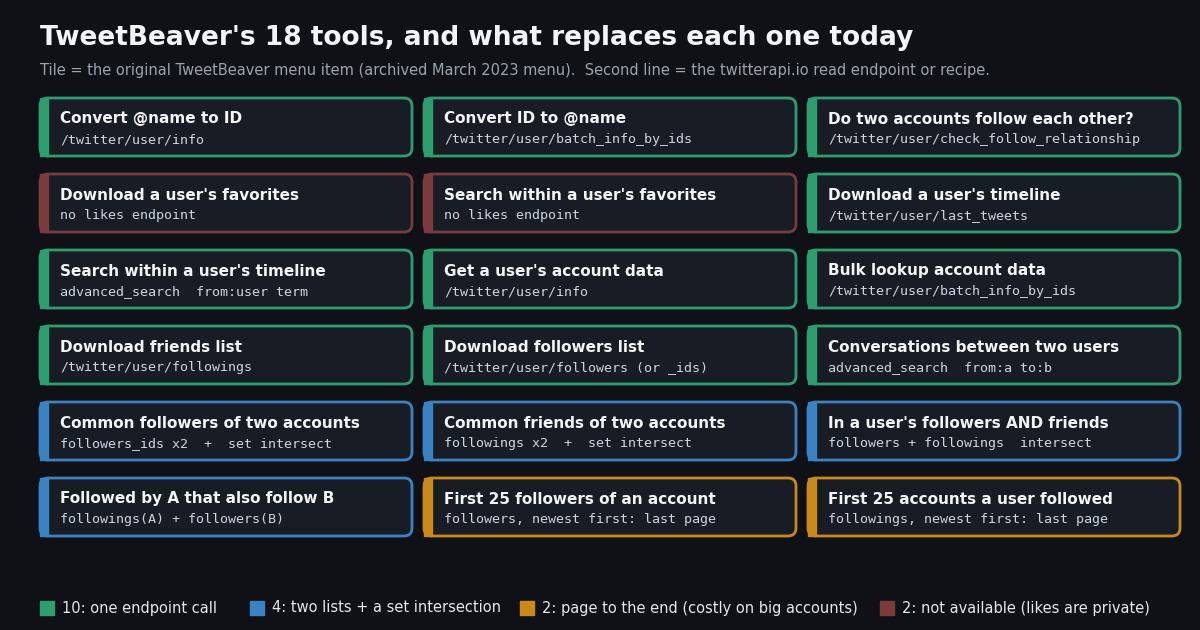
This page is the replacement manual for that menu. It does not survey OSINT on X in general (that is the hub page on Twitter OSINT, linked below), and it does not repeat the twint migration guide. It takes TweetBeaver's 18 tiles in their original order, says which endpoint replaces each one, shows working Python for every group, and reports what those calls actually returned when we ran them on 25 public organization and media accounts in October 2026, including the rows, how far back a timeline reaches and what each function costs per account.
Everything quoted about TweetBeaver comes from its archived pages on the Wayback Machine (the menu, About and FAQ). Status checks on the dead tools were made with plain HTTP requests in October 2026. Prices come from docs.twitterapi.io and docs.x.com, and the study's raw sample, analysis script and results file are published alongside the page.
What TweetBeaver was, and how it closed
TweetBeaver ran on the Twitter API through a standard OAuth app. The archived About page credits "TwitterOAuth by Abraham, the most popular PHP library for use with the Twitter OAuth REST API". Every search ran with the signed-in visitor's own access tokens, which is why the FAQ answered "Why must I sign in with Twitter?" with "TweetBeaver accesses Twitter data through the Twitter API which requires authorization in order to limit the number of searches made by each user." Rate limits were Twitter's per-user limits, and so was the cap on how much history it could return. The FAQ is blunt about it: "Why are there limits to how many tweets and favorites I can download? These limits are put in place by Twitter."
The FAQ also explains a detail people still remember: the authorization screen said TweetBeaver could post on your behalf. In the FAQ's words, "Some of TweetBeaver's functionality requires the read/write permission level despite never needing to post tweets on your behalf. If you're concerned you can create a separate account just for research, revoke access after using or just don't use the tool." Asked "Anything else planned for TweetBeaver?", the answer was "No"; asked "Can I contact TweetBeaver?", also "No". It was a one-person utility, and it was always going to stop the day the API it used stopped.
That day came in 2023. Twitter announced the end of free API access in February 2023 and cut it off in early April 2023; Engadget's report from that week lists apps that broke, including Social Bearing (covered below). The Wayback Machine shows TweetBeaver's full menu with the "TweetBeaver needs you to sign in with Twitter" banner in a March 2023 capture. The next capture, in May 2023, shows a single line: "Tweetbeaver has closed due to Twitter API changes". The same notice was still there in captures through 2024.
What the domain does now. We requested https://tweetbeaver.com, http://tweetbeaver.com and the old tool path https://tweetbeaver.com/getids.php in October 2026. All three returned HTTP 301 to an unrelated Vietnamese-language betting site. A Wayback capture from early 2026 shows the domain serving an unrelated Romanian-language content site. Neither has anything to do with the original tool, so do not sign in to anything on that domain expecting TweetBeaver.
All 18 TweetBeaver functions, mapped to today's endpoints
The table follows the tile order of the last archived menu. Endpoint paths are relative to https://api.twitterapi.io; every call is a GET with an X-API-Key header and needs no X account, no OAuth app and no "Sign in with Twitter". The status column says how direct the replacement is: one call means a single endpoint answers the question, set means two list pulls plus an intersection you run in Python, walk means the answer sits on the last page of a newest-first list, and gone means there is no data source.
Ten tiles are one endpoint, four are a set operation, two are a walk and two are gone. Two of the one-call tiles also have free, no-login versions on this site: the Twitter ID finder for tiles 1 and 2, and the follow checker for tile 3. For a one-off lookup those are faster than writing code; the scripts below are for when you need hundreds of lookups or a CSV.
What each function returns today: a test on 25 public organization accounts
A mapping table says an endpoint exists. It does not say what comes back. So we ran the core TweetBeaver functions on 25 well-known public organization and media accounts in October 2026: @NASA, @BBCWorld, @Reuters, @AP, @nytimes, @WHO, @UN, @NatGeo, @CNN, @guardian, @WSJ, @TheEconomist, @esa, @SpaceX, @Microsoft, @Google, @github, @Spotify, @NBA, @FIFAWorldCup, @WWF, @INTERPOL_HQ, @bellingcat, @Wikipedia and @NWS. Between them they have 591,058,274 followers; the smallest has 346,535 (@INTERPOL_HQ), the largest 92,321,567 (@NASA).
For each account we made four calls: the profile (TweetBeaver tiles 1 and 8), the first timeline page (tile 6), the first page of followers and the first page of friends at 20 rows each (tiles 11 and 10). For five of them (@NASA, @Reuters, @WHO, @bellingcat, @NWS) we followed the timeline cursor to page 10. That is 145 calls, 1,400 posts and 1,021 user records. The table gives what came back and what each function costs per account, with the official X API's pay-per-usage price for the same read beside it.
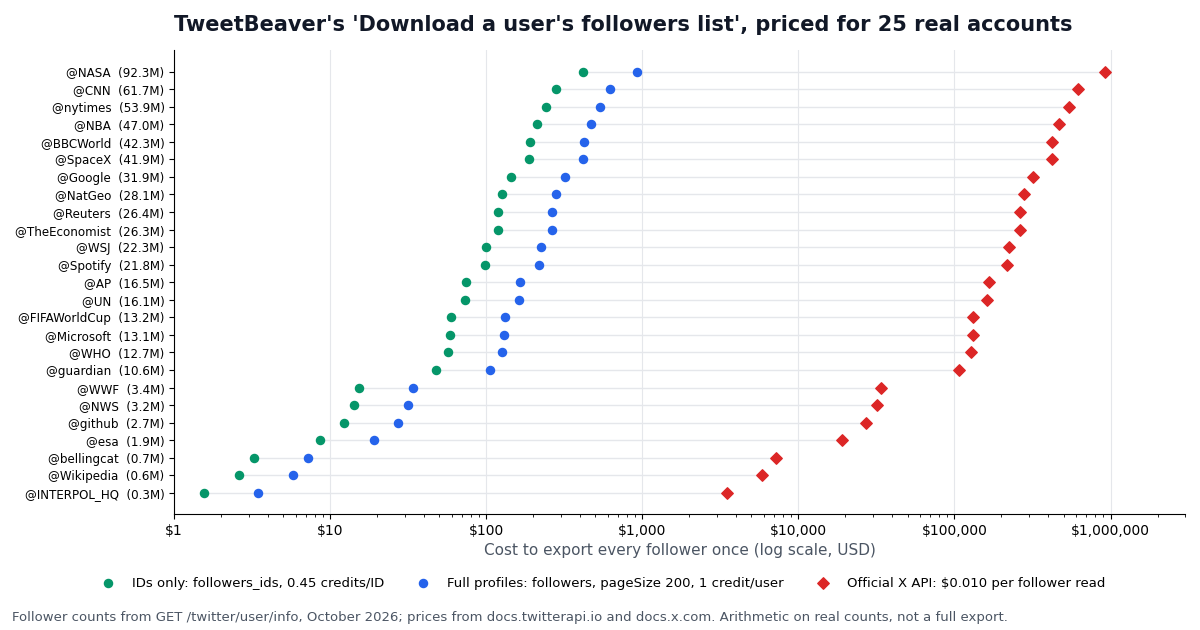
Three things in that table matter for anyone replacing TweetBeaver. First, the per-call functions are effectively free at TweetBeaver's scale: resolving 1,000 handles to IDs is $0.18, and the median account's whole friends list is under a cent. Second, completeness was not the problem. Every page came back full except where the account had nothing more to give, and the one short follower page (19 of 20 for @TheEconomist) still pointed to a next page, which is what the docs mean by "up to" a page size. Third, the cost of a full follower export is driven entirely by follower count, which is the subject of the next chart.
The bio and location shares are worth a sentence for OSINT work. Among the newest followers of these 25 organizations, only about a third had any bio and a quarter had a location string. Among the accounts the organizations themselves follow, 96.2% had a bio. A big account's newest followers are mostly new, sparse profiles, so a follower list on its own says little about an account's real audience; the friends list says much more about who the account pays attention to.
One timing note: we called the endpoints through the twitterapi.io MCP server, a read-only tool client, and that client adds its own overhead, so we do not report per-call latency from this run. The "calls" and "hours at 20 req/s" columns are arithmetic: the call count divided by the paid rate limit of 20 requests per second, which is the floor on wall-clock time for a single key at that tier.
How far back a timeline reaches: the same 10 pages, 18 hours to 457 days
TweetBeaver's "Download a user's timeline" had a hard ceiling. The v1.1 timeline endpoint it called returned only a user's most recent posts, the limit twint's README summed up as "Twitter API limits to last 3200 Tweets only". People still think of a timeline export in those terms, so we measured what a fixed number of pages actually covers.
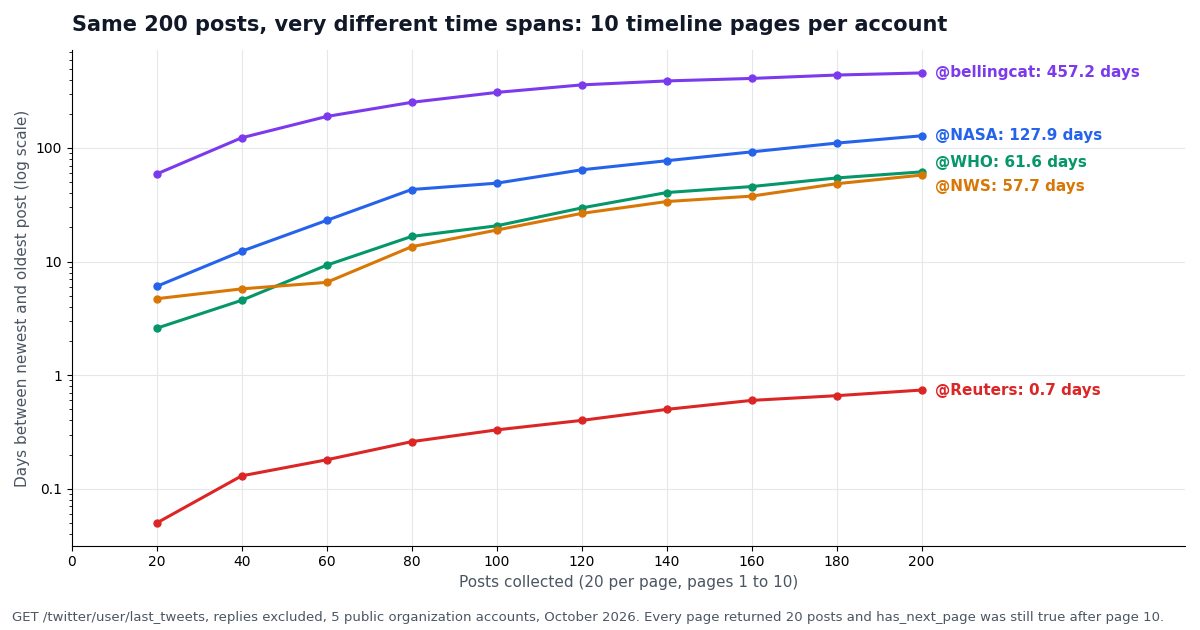
On the first page alone, the 20 newest posts spanned a median of 4.71 days across the 25 accounts. The range was huge: @Reuters' 20 newest posts covered about 1.2 hours, @WWF's covered 121 days. Three accounts had gone quiet: @guardian's newest post dates from November 2024 (its bio says the account is archived), @Wikipedia's from February 2025 and @bellingcat's from January 2026. The endpoint still returned their latest 20 posts; a timeline export of a quiet account simply ends in the past.
The 10-page walks make the point sharper. Each of the five accounts returned exactly 20 posts on every page, 200 in total, with no duplicate IDs and has_next_page still true after page 10. But 200 posts covered 0.74 days of @Reuters (about 18 hours), 57.7 days of @NWS, 61.6 days of @WHO, 127.9 days of @NASA and 457.2 days of @bellingcat, back to October 2024. For a newsroom account, TweetBeaver's 3,200-post ceiling is about two weeks of output; for a research account it is years.
So budget a timeline pull in posts, not in days. A 3,200-post export is 160 pages and $0.48 whatever the account. If what you actually need is a date range ("everything @WHO posted last month"), use advanced_search with from:WHO since:YYYY-MM-DD until:YYYY-MM-DD (UTC, until is exclusive) instead of paging the timeline from today backwards: you pay only for posts inside the window. The search operators reference linked below covers the date and type filters.
Two smaller findings from the sample. Retweets were 15.2% of first-page posts overall but very uneven: 14 of 20 on @UN, 12 of 20 on @Google, none on most news accounts. Replies were 0% because last_tweets leaves replies out unless you pass includeReplies=true, which is the switch to flip if you want TweetBeaver's full timeline behavior.
Tiles 1, 2, 8 and 9: name to ID, ID to name, account data and bulk lookups
These four tiles are one endpoint each and cost the least of anything on the menu. GET /twitter/user/info?userName=NASA returns the user object in data with camelCase fields: id, userName, name, createdAt, followers, following, statusesCount, favouritesCount, mediaCount, location, description, isBlueVerified, protected, pinnedTweetIds and more (25 fields in the recorded response). id is TweetBeaver's "Convert @name to ID" answer, and the rest is "Get a user's account data". An unknown handle does not 404: it comes back as HTTP 200 with status: "error", msg: "user not found" and data: null, so check data before using it.
"Convert ID number to @name" and "Bulk lookup user account data" are GET /twitter/user/batch_info_by_ids?userIds=11348282,742143, which returns users[] with the same camelCase fields. It bills by the number of users returned: 18 credits per user below 100, 1 credit per user at 100 or more (see the pricing page at /pricing). The docs do not state a maximum batch size, so the script uses batches of 100; a batch where a few IDs are suspended returns fewer than 100 users and is billed at the 18-credit rate. In our run, @NASA resolved to 11348282 and @BBCWorld to 742143, the same IDs those accounts have had since 2007; an ID is the identifier to store, because handles change.
Prices side by side: 18 credits is $0.00018 a profile, or $0.18 per 1,000. The official X API charges $0.010 per user read (docs.x.com pricing), $10 per 1,000, about 55 times more. For a one-off lookup without code, the free ID finder tool on this site does tiles 1 and 2 in the browser.
"""TweetBeaver: "Convert @name to ID", "Convert ID number to @name",
"Get a user's account data" and "Bulk lookup user account data".

  /twitter/user/info            one handle -> full profile (the user object is in `data`)
  /twitter/user/batch_info_by_ids  comma-separated numeric IDs -> `users[]`

18 credits ($0.00018) per profile. Needs TWITTERAPI_IO_KEY (key from twitterapi.io/dashboard).
Usage: python ids.py NASA esa 11348282 21436960   -> accounts.csv
"""
import csv
import os
import sys

import requests

HEADERS = {"X-API-Key": os.environ["TWITTERAPI_IO_KEY"]}
FIELDS = ["id", "userName", "name", "createdAt", "followers", "following", "statusesCount",
          "favouritesCount", "mediaCount", "location", "description", "isBlueVerified", "protected"]


def by_handle(handle):
    """@name -> ID and account data in one call. An unknown handle is HTTP 200 with data null."""
    r = requests.get("https://api.twitterapi.io/twitter/user/info",
                     params={"userName": handle.lstrip("@")}, headers=HEADERS, timeout=30)
    r.raise_for_status()
    body = r.json()
    if body.get("status") == "error" or not body.get("data"):
        print(f"@{handle}: {body.get('msg')}", file=sys.stderr)
        return None
    return body["data"]


def by_ids(ids, batch=100):
    """ID -> @name (and the same profile fields) for many IDs, one request per batch."""
    users = []
    for i in range(0, len(ids), batch):
        r = requests.get("https://api.twitterapi.io/twitter/user/batch_info_by_ids",
                         params={"userIds": ",".join(ids[i:i + batch])}, headers=HEADERS, timeout=30)
        r.raise_for_status()
        users.extend(r.json().get("users") or [])
    return users


if __name__ == "__main__":
    args = sys.argv[1:] or ["NASA", "esa", "11348282", "21436960"]
    handles = [a for a in args if not a.isdigit()]
    ids = [a for a in args if a.isdigit()]
    rows = [u for u in map(by_handle, handles) if u] + by_ids(ids)
    with open("accounts.csv", "w", newline="", encoding="utf-8") as f:
        w = csv.DictWriter(f, fieldnames=FIELDS, extrasaction="ignore")
        w.writeheader()
        w.writerows(rows)
    for u in rows:
        print(u["id"], "@" + u["userName"], u.get("followers"), "followers")
Tiles 6, 7 and 14: timeline download, timeline search and conversations between two users
"Download a user's timeline" is GET /twitter/user/last_tweets?userName= followed by cursor= pages. Two shape details trip people up: the posts are nested at data.tweets, while has_next_page and next_cursor sit at the top level; and errors come back as status: "error" with the reason in msg. Each post carries id, createdAt (for example Wed Oct 14 22:03:08 +0000 2026, always UTC), text, likeCount, retweetCount, replyCount, quoteCount, viewCount, bookmarkCount, lang, isReply, url, and the full retweeted_tweet or quoted_tweet object when there is one. TweetBeaver's CSV had fewer columns than that.
"Search within a user's timeline" becomes a search with the author operator: GET /twitter/tweet/advanced_search?query=from:NASA artemis&queryType=Latest. This is better than TweetBeaver's version in one important way. TweetBeaver searched only the posts it could download, so a term older than the 3,200-post window was invisible. Search is not tied to that window, and you can add since: / until: to scope it. The response is flat: tweets, has_next_page, next_cursor, with no status wrapper.
"Find conversations between two users" is one query: (from:NASA to:esa) OR (from:esa to:NASA). It returns the replies each account sent the other. To pull a whole thread around one of those replies, GET /twitter/tweet/thread_context?tweetId= returns the chain. Billing for all three is the same: 15 credits per post returned, so a full page of 20 is $0.003 and an empty page is billed the 15-credit minimum ($0.00015).
"""TweetBeaver: "Download a user's timeline", "Search within a user's timeline" and
"Find conversations between two users".

  /twitter/user/last_tweets      newest first, up to 20 posts a page, list in data.tweets
  /twitter/tweet/advanced_search X search grammar (from:, to:, since:, until:), top-level tweets

15 credits per post returned ($0.15 per 1,000 posts): a full 20-post page is $0.003.
"""
import csv
import os
import sys

import requests

HEADERS = {"X-API-Key": os.environ["TWITTERAPI_IO_KEY"]}
COLS = ["id", "createdAt", "text", "likeCount", "retweetCount", "replyCount", "quoteCount",
        "viewCount", "lang", "isReply", "url"]


def timeline(handle, limit=3200, replies=False):
    rows, cursor = [], ""
    while len(rows) < limit:
        r = requests.get("https://api.twitterapi.io/twitter/user/last_tweets",
                         params={"userName": handle, "cursor": cursor,
                                 "includeReplies": "true" if replies else "false"},
                         headers=HEADERS, timeout=30)
        r.raise_for_status()
        body = r.json()
        if body.get("status") == "error":
            raise SystemExit(f"last_tweets: {body.get('msg')}")
        tweets = (body.get("data") or {}).get("tweets") or []
        rows.extend(tweets)
        if not tweets or not body.get("has_next_page"):
            break
        cursor = body["next_cursor"]
    return rows[:limit]


def search(query, limit=1000):
    rows, cursor = [], ""
    while len(rows) < limit:
        r = requests.get("https://api.twitterapi.io/twitter/tweet/advanced_search",
                         params={"query": query, "queryType": "Latest", "cursor": cursor},
                         headers=HEADERS, timeout=30)
        r.raise_for_status()
        body = r.json()
        tweets = body.get("tweets") or []
        rows.extend(tweets)
        if not tweets or not body.get("has_next_page"):
            break
        cursor = body["next_cursor"]
    return rows[:limit]


def save(rows, path):
    with open(path, "w", newline="", encoding="utf-8") as f:
        w = csv.DictWriter(f, fieldnames=COLS, extrasaction="ignore")
        w.writeheader()
        w.writerows(rows)
    print(f"{len(rows)} posts -> {path}")


if __name__ == "__main__":
    a = sys.argv[1] if len(sys.argv) > 1 else "NASA"
    b = sys.argv[2] if len(sys.argv) > 2 else "esa"
    save(timeline(a, limit=200), f"{a}_timeline.csv")                       # Download a user's timeline
    save(search(f"from:{a} artemis"), f"{a}_search_artemis.csv")              # Search within a user's timeline
    save(search(f"(from:{a} to:{b}) OR (from:{b} to:{a})"), f"{a}_{b}_conversations.csv")  # Conversations
Tiles 10 and 11: download a followers list or a friends list to CSV
TweetBeaver called the accounts a user follows "friends", the old v1.1 name. Here they are followings. Both lists are GET /twitter/user/followers and GET /twitter/user/followings with userName, cursor and pageSize (20 to 200, default 200). Results are newest first: "Sorted by follow date, most recent followers appear on the first page" (docs.twitterapi.io). Each item is snake_case, unlike the profile endpoint: id, screen_name, name, created_at, followers_count, friends_count, statuses_count, location, description, protected, verified.
Page size is also the price lever. The docs price these lists at 1 credit per user for a full 200-user page, 2 credits for 100 to 199 and 3 credits for 20 to 99, with a 60-credit minimum per call. So always ask for 200 unless you only want a peek: a 200-user page is $0.002, while ten 20-user pages for the same 200 users are $0.006. Our study used 20-user pages on purpose, to keep the sample small, and paid $0.0006 a page.
If you need only the IDs (for set operations, or to diff a list over time), GET /twitter/user/followers_ids returns up to 5,000 IDs per call, and on full 4,000 to 5,000-ID pages the price drops to 0.45 credits per ID. For @AP that is $74.35 for the whole list instead of $165.23 with profiles. You can resolve only the IDs you care about afterwards with batch_info_by_ids.
There is also a no-code route on this site for one specific case: the export-following-list tool exports an account's following list to a file from your dashboard credits. Use it when you need a single list once; use the script when you need many accounts, a schedule or other columns.
"""TweetBeaver: "Download a user's followers list" and "Download a user's friends list".

  /twitter/user/followers   and   /twitter/user/followings
  newest first, pageSize 20-200, items in followers[] / followings[] (snake_case fields)

At pageSize=200 the price is 1 credit per user, so a full page of 200 is $0.002.
Usage: python graph.py bellingcat followings
"""
import csv
import os
import sys

import requests

HEADERS = {"X-API-Key": os.environ["TWITTERAPI_IO_KEY"]}
URLS = {"followers": "https://api.twitterapi.io/twitter/user/followers",
        "followings": "https://api.twitterapi.io/twitter/user/followings"}
COLS = ["id", "screen_name", "name", "created_at", "followers_count", "friends_count",
        "statuses_count", "location", "description", "protected", "verified"]


def graph(handle, kind="followers", limit=None):
    """kind is "followers" (TweetBeaver followers list) or "followings" (friends list)."""
    out, cursor = [], ""
    while limit is None or len(out) < limit:
        r = requests.get(URLS[kind], params={"userName": handle, "cursor": cursor, "pageSize": 200},
                         headers=HEADERS, timeout=30)
        r.raise_for_status()
        body = r.json()
        if body.get("status") == "error":
            raise SystemExit(f"{kind}: {body.get('msg')}")
        users = body.get(kind) or []
        out.extend(users)
        if not users or not body.get("has_next_page"):
            break
        cursor = body["next_cursor"]
    return out if limit is None else out[:limit]


if __name__ == "__main__":
    handle = sys.argv[1] if len(sys.argv) > 1 else "bellingcat"
    kind = sys.argv[2] if len(sys.argv) > 2 else "followings"
    rows = graph(handle, kind, limit=2000)
    with open(f"{handle}_{kind}.csv", "w", newline="", encoding="utf-8") as f:
        w = csv.DictWriter(f, fieldnames=COLS, extrasaction="ignore")
        w.writeheader()
        w.writerows(rows)
    print(f"{len(rows)} {kind} of @{handle} -> {handle}_{kind}.csv")
Tiles 3, 12, 13, 15 and 16: follow checks and the common-followers family
"Check if two accounts follow each other" has a dedicated endpoint. GET /twitter/user/check_follow_relationship?source_user_name=a&target_user_name=b returns data.following (a follows b) and data.followed_by (b follows a) for 100 credits, $0.001 per check. The free follow checker tool on this site runs the same check in the browser.
The other four tiles in this group were always set operations; TweetBeaver just ran them on its server. Common followers of A and B is followers(A) & followers(B). Common friends is followings(A) & followings(B). "Accounts in a user's followers and friends lists" (mutuals) is followings(A) & followers(A). "Accounts followed by one user that also follow another named user" is followings(A) & followers(B). Match on the numeric id, never on the handle, because handles change and IDs do not.
The cost is whatever the two lists cost, and that is where these tools need care. Friends lists are small: the median account in our sample follows 847 accounts, five calls and under a cent. Follower lists can be enormous: across our 25 accounts, pulling every follower ID once would cost $2,659.76, and with full profiles $5,910.58. So the script below uses the cheap followers_ids endpoint for the follower side, and checks the follower count with one profile call before it starts, refusing to run past a dollar limit you set. For two accounts with a few thousand followers each, a common-followers query is a few cents; for two news organizations it is a budget decision.
This is also where TweetBeaver's design hid a limit. Its common-followers tools ran on Twitter's per-user rate limits, so on large accounts they returned partial results or stalled. Here the limit is your requests-per-second tier (20 per second once paid) and your budget, and the script tells you both before it spends anything.
"""TweetBeaver: "Check if two accounts follow each other", "Find common followers of two
accounts", "Find common friends of two accounts", "Find accounts in a user's followers and
friends lists" and "Find accounts followed by one user that also follow another named user".

  /twitter/user/check_follow_relationship  one call, 100 credits ($0.001)
  /twitter/user/followers_ids              up to 5,000 IDs a page; 0.45 credits per ID on full pages
  /twitter/user/followings                 friends with profiles, 1 credit per user at pageSize 200

The set tools are two list pulls plus a Python set intersection, so they cost what the two
lists cost. cost_guard() prices the pull from the follower count before it starts.
"""
import os
import sys

import requests

HEADERS = {"X-API-Key": os.environ["TWITTERAPI_IO_KEY"]}


def follows(a, b):
    r = requests.get("https://api.twitterapi.io/twitter/user/check_follow_relationship",
                     params={"source_user_name": a, "target_user_name": b}, headers=HEADERS, timeout=30)
    r.raise_for_status()
    d = r.json().get("data") or {}
    return d.get("following"), d.get("followed_by")


def cost_guard(handle, max_usd=2.0):
    r = requests.get("https://api.twitterapi.io/twitter/user/info",
                     params={"userName": handle}, headers=HEADERS, timeout=30)
    r.raise_for_status()
    n = (r.json().get("data") or {}).get("followers") or 0
    usd = n * 0.45 / 100_000
    if usd > max_usd:
        raise SystemExit(f"@{handle} has {n:,} followers: about ${usd:,.2f} in ID pages. Raise max_usd to go on.")


def follower_ids(handle):
    cost_guard(handle)
    ids, cursor = set(), ""
    while True:
        r = requests.get("https://api.twitterapi.io/twitter/user/followers_ids",
                         params={"userName": handle, "count": 5000, "cursor": cursor},
                         headers=HEADERS, timeout=30)
        r.raise_for_status()
        body = r.json()
        ids.update(str(i) for i in body.get("ids") or [])
        if not body.get("has_next_page"):
            return ids
        cursor = body["next_cursor"]


def friends(handle):
    """Accounts `handle` follows, keyed by ID (friends lists are usually small)."""
    out, cursor = {}, ""
    while True:
        r = requests.get("https://api.twitterapi.io/twitter/user/followings",
                         params={"userName": handle, "cursor": cursor, "pageSize": 200},
                         headers=HEADERS, timeout=30)
        r.raise_for_status()
        body = r.json()
        out.update({str(u["id"]): u["screen_name"] for u in body.get("followings") or []})
        if not body.get("has_next_page"):
            return out
        cursor = body["next_cursor"]


if __name__ == "__main__":
    a = sys.argv[1] if len(sys.argv) > 1 else "bellingcat"
    b = sys.argv[2] if len(sys.argv) > 2 else "INTERPOL_HQ"
    print("follows each other:", follows(a, b))                  # (a follows b, b follows a)
    fa, fb = friends(a), friends(b)
    print("common friends:", sorted(fa[i] for i in fa.keys() & fb.keys()))
    ids_a = follower_ids(a)
    print("followers and friends of", a, ":", sorted(fa[i] for i in fa.keys() & ids_a))
    print("followed by", a, "that also follow", b, ":", sorted(fa[i] for i in fa.keys() & follower_ids(b)))
    common = ids_a & follower_ids(b)
    print("common followers:", len(common), "IDs (resolve them with batch_info_by_ids)")
Tiles 17 and 18: the first 25 followers or first 25 accounts followed
These two tiles answer an investigator's favorite question: who were the earliest followers, or the first accounts this one followed? Both lists come back newest first, so the answer is on the last page, and there is no endpoint that starts from the oldest end. The only way to get there is to walk every page.
For friends lists that is cheap and quick. @bellingcat follows 75 accounts, one call. @Spotify follows 15,552, 78 calls and about $0.16. For follower lists it depends entirely on size. From the study's real counts: the first 25 followers of @bellingcat (716,560 followers) means 3,583 calls and about $7.17; of @INTERPOL_HQ (346,535), 1,733 calls and about $3.47; of @NASA (92,321,567), 461,608 calls, about $923, and at least 6.4 hours at 20 requests per second. The script prices the walk from the profile first and stops if it would cost more than you allow.
Treat the result with care. The list reflects current follows only: an early follower who later unfollowed, or whose account was deleted or suspended, is not on the last page any more. TweetBeaver had the same blind spot, because it read the same kind of list.
"""TweetBeaver: "Get the first 25 users to follow an account" and "Get the first 25 accounts
followed by a user".

Both lists come back newest first, so the earliest entries are on the LAST page. There is no
shortcut: the script walks every page, keeps only a 25-row window, and refuses to start when the
walk would cost more than max_usd (1 credit per user at pageSize 200).
"""
import os
import sys
from collections import deque

import requests

HEADERS = {"X-API-Key": os.environ["TWITTERAPI_IO_KEY"]}
URLS = {"followers": "https://api.twitterapi.io/twitter/user/followers",
        "followings": "https://api.twitterapi.io/twitter/user/followings"}


def first_n(handle, kind="followers", n=25, max_usd=5.0):
    total = list_size(handle, kind)
    usd = max(total, 60) / 100_000
    if usd > max_usd:
        raise SystemExit(f"@{handle}: {total:,} {kind} -> about ${usd:,.2f} and {total // 200 + 1:,} calls.")
    window, cursor = deque(maxlen=n), ""
    while True:
        r = requests.get(URLS[kind], params={"userName": handle, "cursor": cursor, "pageSize": 200},
                         headers=HEADERS, timeout=30)
        r.raise_for_status()
        body = r.json()
        window.extend(body.get(kind) or [])
        if not body.get("has_next_page"):
            break
        cursor = body["next_cursor"]
    return list(reversed(window))            # earliest first


def list_size(handle, kind):
    """Follower or following count from the profile (18 credits), used to price the walk."""
    r = requests.get("https://api.twitterapi.io/twitter/user/info",
                     params={"userName": handle}, headers=HEADERS, timeout=30)
    r.raise_for_status()
    data = r.json().get("data") or {}
    return data.get("followers" if kind == "followers" else "following") or 0


if __name__ == "__main__":
    handle = sys.argv[1] if len(sys.argv) > 1 else "bellingcat"
    for i, u in enumerate(first_n(handle, "followings"), 1):
        print(i, "@" + u["screen_name"], u.get("created_at"))
Tiles 4 and 5: why a user's favorites cannot be downloaded any more
"Download a user's favorites" and "Search within a user's favorites" were among TweetBeaver's most used tiles; its meta keywords listed "favorites" next to "timeline". They read the public likes list, which in 2023 was still visible on anyone's profile. In June 2024 X made likes private: you can see your own Likes tab, and nobody else's. Like counts on each post remain public.
So there is no honest replacement. No read endpoint on twitterapi.io returns another account's likes, and none appears in the endpoint manifest. The write-side /twitter/like_tweet_v2 likes a post as your own logged-in account; that is a different product and does not read anyone's history.
What you can still do: use likeCount on posts, which every tweet object carries, to see how much engagement a post drew. To see who amplified a post, GET /twitter/tweet/retweeters?tweetId= lists the accounts that reposted it and GET /twitter/tweet/quotes?tweetId= returns the quote posts. Those two lists were never in TweetBeaver, and they cover much of what investigators used favorites for: showing which accounts push a given message.
The other dead OSINT utilities: Social Bearing, tinfoleak, twayback, foller.me
TweetBeaver was not the only casualty. The same queries that bring people here ("social bearing", "tinfoleak", "twayback") are for tools from the same toolkits that stopped working for the same reason. We checked each one in October 2026. URLs are given as text for reference; the status column is what a plain request returned.
The pattern is the same in every row. These tools were thin front ends on the free Twitter API, and when the free API went in 2023 their makers had a choice between paying for data and shutting down. Most shut down, and the code that survives on GitHub calls endpoints that no longer exist. Rebuilding on a paid read API costs a fraction of a cent per lookup, but it is a decision you make for yourself; nobody is maintaining a free front end for you any more.
What a TweetBeaver-style workload costs per month
TweetBeaver was free because Twitter's API was free to it. The replacement is pay-per-call, so it helps to price a realistic month. Take an investigator who, each month, resolves 2,000 handles, exports 50 timelines of 3,200 posts, pulls 200 friends lists and 20 follower lists of accounts with about 50,000 followers, and runs 500 follow checks.
The arithmetic uses 18 credits per profile, 15 per post, 1 per list user at pageSize 200 and 100 per follow check ($1 = 100,000 credits), against $0.010 per user read, $0.005 per post read and $0.010 per follower or following read on the official X API (docs.x.com pricing). For posts that is about 33x cheaper per read than the official X API pay-per-use rate; for list users the gap is far wider. The official API also caps pay-per-usage at 3 million post reads a month.
Two practical limits apply on our side. Before your first payment the rate limit is 0.2 requests per second, enough to try every script on this page but not to walk a large follower list; once paid it is 20 per second, which is what the hour estimates above assume. Up to $1 in free credits for new accounts that pass the bot check; expires after 31 days; see /pricing.
How we collected this
Question. If you rebuild each TweetBeaver function on twitterapi.io read endpoints, what does each call actually return for well-known public accounts, how far back does a timeline reach, and what does each function cost per account?
Sample. 25 public organization and media accounts chosen before collection (listed in the study section), no private individuals. For each: one profile call, the first timeline page, the first followers page and the first friends page at 20 rows. For a pre-chosen subset of five, timeline pages 2 to 10. Totals: 145 calls, 1,400 posts, 1,021 user records. One follower call (@guardian) failed on the first attempt with a proxy error and succeeded on one retry.
Window and client. One collection pass in October 2026, through the twitterapi.io MCP server's read-only tools. That client returns a trimmed view of each response (profiles with 11 or 12 fields, list items with ID, handle, display name and, when set, bio and location), so the field counts on this page come from the full recorded REST responses, and the bio and location shares are computed from the trimmed view, in which an empty field is simply absent. The client's overhead makes per-call latency unmeasurable, so we report call counts and the rate-limit floor instead.
Costs. Every dollar figure is arithmetic: real counts from the run (rows returned, each account's follower, following and post counts) multiplied by published prices from docs.twitterapi.io and docs.x.com. We did not run a full follower export of any account; the export costs are what one would cost.
What the sample cannot show. It covers large organization accounts, so follower pages are dominated by very new followers and timeline depths reflect organizational posting rates; a personal or niche account will look different. Ten pages is not the end of any timeline we walked, so this run does not tell you how far back last_tweets can go in total. And the page sizes are the docs' maximums, not guarantees: one page came back one row short.
Privacy. Follower and following records were stored without handles, names, IDs or text, and only aggregate shares are published. The raw sample (organization post IDs and counts, no text), the analysis script and the results file are in the site repository under data/studies/tweetbeaver/.
"""tweetbeaver.py: the TweetBeaver menu as one command-line tool on twitterapi.io (reads only).

  python tweetbeaver.py getid NASA                    Convert @name to ID
  python tweetbeaver.py getscreenname 11348282 742143 Convert ID number to @name
  python tweetbeaver.py getdata NASA                  Get a user's account data
  python tweetbeaver.py bulkdata NASA esa WHO         Bulk lookup user account data  -> CSV
  python tweetbeaver.py mutualfollow NASA esa         Check if two accounts follow each other
  python tweetbeaver.py timeline NASA 3200            Download a user's timeline     -> CSV
  python tweetbeaver.py searchtimeline NASA artemis   Search within a user's timeline -> CSV
  python tweetbeaver.py conversations NASA esa        Find conversations between two users -> CSV
  python tweetbeaver.py followers bellingcat 2000     Download a user's followers list -> CSV
  python tweetbeaver.py friends bellingcat            Download a user's friends list   -> CSV
  python tweetbeaver.py commonfriends bellingcat INTERPOL_HQ    Find common friends of two accounts
  python tweetbeaver.py commonfollowers bellingcat INTERPOL_HQ  Find common followers (cost-guarded)
  python tweetbeaver.py followsback bellingcat        Accounts in a user's followers AND friends lists
  python tweetbeaver.py friendsfollowing bellingcat WHO  Followed by the first that also follow the second
  python tweetbeaver.py firstfriends bellingcat       First 25 accounts followed by a user
  python tweetbeaver.py firstfollowers INTERPOL_HQ    First 25 users to follow an account (cost-guarded)

"Download / Search within a user's favorites" are not here: X made likes private in June 2024 and
no read endpoint returns another account's likes.

Prices: 18 credits per profile, 15 per post, 1 per follower/following at pageSize 200, 0.45 per
follower ID on full 5,000-ID pages, 100 per follow check; $1 = 100,000 credits.
Rate: 0.2 requests/s before your first payment, 20/s once paid; the client backs off on HTTP 429.
"""
import csv
import os
import sys
import time

import requests

S = requests.Session()
S.headers["X-API-Key"] = os.environ["TWITTERAPI_IO_KEY"]
MAX_USD = float(os.environ.get("TB_MAX_USD", "5"))       # refuse bigger list pulls unless raised


def get(url, params):
    for attempt in range(5):
        r = S.get(url, params=params, timeout=30)
        if r.status_code == 429:                          # over your requests-per-second tier
            time.sleep(5 * (attempt + 1))
            continue
        r.raise_for_status()
        body = r.json()
        if body.get("status") == "error":
            raise SystemExit(f"{url.rsplit('/', 1)[-1]}: {body.get('msg') or body.get('message')}")
        return body
    raise SystemExit("still rate-limited after 5 tries")


def profile(handle):
    data = get("https://api.twitterapi.io/twitter/user/info", {"userName": handle.lstrip("@")})["data"]
    if not data:
        raise SystemExit(f"@{handle}: not found")
    return data


def profiles_by_id(ids):
    users = []
    for i in range(0, len(ids), 100):
        users += get("https://api.twitterapi.io/twitter/user/batch_info_by_ids",
                     {"userIds": ",".join(ids[i:i + 100])}).get("users") or []
    return users


def pages(url, params, key, nested=False, limit=None):
    """Follow next_cursor; `nested` = list sits in data[key] (last_tweets) instead of top level."""
    out, cursor = [], ""
    while limit is None or len(out) < limit:
        body = get(url, {**params, "cursor": cursor})
        items = ((body.get("data") or {}) if nested else body).get(key) or []
        out += items
        if not items or not body.get("has_next_page"):
            break
        cursor = body["next_cursor"]
    return out if limit is None else out[:limit]


def timeline(h, limit):
    return pages("https://api.twitterapi.io/twitter/user/last_tweets",
                 {"userName": h, "includeReplies": "false"}, "tweets", nested=True, limit=limit)


def search(q, limit=1000):
    return pages("https://api.twitterapi.io/twitter/tweet/advanced_search",
                 {"query": q, "queryType": "Latest"}, "tweets", limit=limit)


def guard(h, kind, per_user):
    n = profile(h)["followers" if kind == "followers" else "following"]
    usd = n * per_user / 100_000
    if usd > MAX_USD:
        raise SystemExit(f"@{h} has {n:,} {kind}: about ${usd:,.2f}. Set TB_MAX_USD to go on.")


def followers(h, limit=None):
    guard(h, "followers", 1)
    return pages("https://api.twitterapi.io/twitter/user/followers",
                 {"userName": h, "pageSize": 200}, "followers", limit=limit)


def friends(h, limit=None):
    return pages("https://api.twitterapi.io/twitter/user/followings",
                 {"userName": h, "pageSize": 200}, "followings", limit=limit)


def follower_ids(h):
    guard(h, "followers", 0.45)
    return {str(i) for i in pages("https://api.twitterapi.io/twitter/user/followers_ids",
                                  {"userName": h, "count": 5000}, "ids")}


def write(rows, path, cols):
    with open(path, "w", newline="", encoding="utf-8") as f:
        w = csv.DictWriter(f, fieldnames=cols, extrasaction="ignore")
        w.writeheader()
        w.writerows(rows)
    print(f"{len(rows)} rows -> {path}")


POST_COLS = ["id", "createdAt", "text", "likeCount", "retweetCount", "replyCount", "viewCount", "url"]
USER_COLS = ["id", "screen_name", "name", "created_at", "followers_count", "friends_count",
             "statuses_count", "location", "description"]
PROFILE_COLS = ["id", "userName", "name", "createdAt", "followers", "following", "statusesCount",
                "location", "description"]


def main(cmd, *a):
    if cmd == "getid":
        print(profile(a[0])["id"])
    elif cmd == "getscreenname":
        for u in profiles_by_id(list(a)):
            print(u["id"], "@" + u["userName"])
    elif cmd == "getdata":
        for k, v in profile(a[0]).items():
            print(f"{k:28} {v}")
    elif cmd == "bulkdata":
        write([profile(h) for h in a], "accounts.csv", PROFILE_COLS)
    elif cmd == "mutualfollow":
        d = get("https://api.twitterapi.io/twitter/user/check_follow_relationship",
                {"source_user_name": a[0], "target_user_name": a[1]}).get("data") or {}
        print(f"@{a[0]} follows @{a[1]}: {d.get('following')}; @{a[1]} follows @{a[0]}: {d.get('followed_by')}")
    elif cmd == "timeline":
        write(timeline(a[0], int(a[1]) if len(a) > 1 else 3200), f"{a[0]}_timeline.csv", POST_COLS)
    elif cmd == "searchtimeline":
        write(search(f"from:{a[0]} {' '.join(a[1:])}"), f"{a[0]}_search.csv", POST_COLS)
    elif cmd == "conversations":
        write(search(f"(from:{a[0]} to:{a[1]}) OR (from:{a[1]} to:{a[0]})"), "conversations.csv", POST_COLS)
    elif cmd == "followers":
        write(followers(a[0], int(a[1]) if len(a) > 1 else None), f"{a[0]}_followers.csv", USER_COLS)
    elif cmd == "friends":
        write(friends(a[0]), f"{a[0]}_friends.csv", USER_COLS)
    elif cmd == "commonfriends":
        fa, fb = ({str(u["id"]): u for u in friends(x)} for x in a[:2])
        write([fa[i] for i in fa.keys() & fb.keys()], "common_friends.csv", USER_COLS)
    elif cmd == "commonfollowers":
        ids = sorted(follower_ids(a[0]) & follower_ids(a[1]))
        print(len(ids), "common followers")
        write(profiles_by_id(ids[:1000]), "common_followers.csv", PROFILE_COLS)
    elif cmd == "followsback":
        fr = {str(u["id"]): u for u in friends(a[0])}
        write([fr[i] for i in fr.keys() & follower_ids(a[0])], f"{a[0]}_mutuals.csv", USER_COLS)
    elif cmd == "friendsfollowing":
        fr = {str(u["id"]): u for u in friends(a[0])}
        write([fr[i] for i in fr.keys() & follower_ids(a[1])], "friends_following.csv", USER_COLS)
    elif cmd in ("firstfriends", "firstfollowers"):
        rows = friends(a[0]) if cmd == "firstfriends" else followers(a[0])
        write(rows[::-1][:25], f"{a[0]}_{cmd}.csv", USER_COLS)   # lists are newest first
    else:
        raise SystemExit(__doc__)


if __name__ == "__main__":
    main(*(sys.argv[1:] or ["getid", "NASA"]))
Questions readers ask
Is TweetBeaver still working?
No. The tool closed in 2023 when free Twitter API access ended; archived captures from May 2023 onward show "Tweetbeaver has closed due to Twitter API changes". In October 2026 tweetbeaver.com redirects to an unrelated betting site, so there is nothing to sign in to.
What is the best TweetBeaver alternative?
For one-off lookups, free no-login tools cover the most-used tiles: the Twitter ID finder (name to ID and back) and the follow checker (does A follow B). For CSV exports, bulk lookups and the common-followers tools, the tweetbeaver.py script on this page runs each TweetBeaver function on twitterapi.io endpoints, with no X login, from $0.00018 per profile and $0.003 per 20-post timeline page.
Can I still download someone's likes (favorites) on Twitter / X?
No. X made likes private in June 2024: only the account owner can see its Likes tab. No read API returns another account's likes, so TweetBeaver's "Download a user's favorites" and "Search within a user's favorites" cannot be rebuilt. Like counts on individual posts are still public, and the retweeters and quotes endpoints show who amplified a post.
Why did TweetBeaver ask for permission to post from my account?
Its FAQ explained that some functions required Twitter's read/write permission level "despite never needing to post tweets on your behalf", and suggested a separate research account if that worried you. The replacements here need no X account and no OAuth permission at all: reads use an API key in an X-API-Key header.
How many tweets can I download from a user's timeline?
TweetBeaver was limited to the most recent 3,200 posts by the v1.1 API. /twitter/user/last_tweets pages 20 posts at a time; in our test, all five accounts we walked still had more pages after 10 (200 posts). For a specific period, search from:user since:YYYY-MM-DD until:YYYY-MM-DD instead, so you only pay for posts in the window. A 3,200-post export costs $0.48.
How much does it cost to download all followers of an account?
1 credit per follower at pageSize 200 ($10 per million) with full profiles, or 0.45 credits per ID ($4.50 per million) with followers_ids. In our sample the median account (@AP, 16.5 million followers) works out to $165.23 with profiles or $74.35 as IDs; the official X API's $0.010 per follower read would be $165,227.82.
Is it legal to use these tools for OSINT?
The endpoints return only public data, the same profiles, posts and follow lists anyone can open on X. How you use it is up to you and your jurisdiction: follow X's terms and your own legal and ethical rules, avoid profiling private individuals, and keep personal data you collect to what the investigation needs. The Twitter OSINT hub page linked below has a section on lawful use.
Continue
- TweetBeaver on the Wayback Machine: the 18-tile menu (March 2023 capture) and the "Tweetbeaver has closed due to Twitter API changes" notice (May 2023 onward)
- Engadget, April 2023: Twitter shut off its free API, and the apps that broke, including Social Bearing
- Tom Elliott, creator of Social Bearing: the post socialbearing.com now redirects to, with the shutdown notice
- tinfoleak on GitHub: feature list, Python 2.7 and Twitter API key requirements, last release v2.4
- twayback on GitHub: README notice that the tool no longer works as intended after X's login requirement
- X API pay-per-usage pricing (the official, pricier route): $0.005 per post read, $0.010 per user read, $0.010 per follower or following read
- twitterapi.io followers endpoint: newest-first order, pageSize 20 to 200, per-page credit tiers and 60-credit minimum
- OSINT on Twitter (X): public data points and the endpoints behind them
- Twitter (X) profiler: rebuild an account report from the API
- Twint not working: migrate every twint flag to an API
- How to search for deleted tweets, and what still works
- Twitter (X) search operators: from:, to:, since:, until: and more
- Export a Twitter (X) following list via API
- Free Twitter (X) ID finder: username to user ID and back
- Free Twitter (X) follow checker: does one account follow another?
- Export a Twitter (X) following list to a file
- twitterapi.io pay-per-call pricing
- Get an API key from the dashboard
- 01How to Use LangChain with the Twitter (X) API
- 02Twint (Twitter scraper): why it stopped working and how to migrate
- 03Twitter (X) profiler: how to profile an account in 2026
- 04Birdclaw (X/Twitter archive tool): what it stores and how to feed it any account
- 05What Is a Twitter (X) Chatbot, and How Do You Build One in 2026?
- 06Twitter Monitoring Tools — Build or Buy
- 07Twitter (X) Viewer API — A Developer's Read-Only Guide
- 08Twitter (X) Competitor Analysis — A Developer's API Guide
Stop reading. Start building.
Starter credits cover real testing on real data. Google sign-in, no card, no application queue.
Get an API key