F5Bot for Twitter (X): Keyword Alerts on the Platform F5Bot Skips
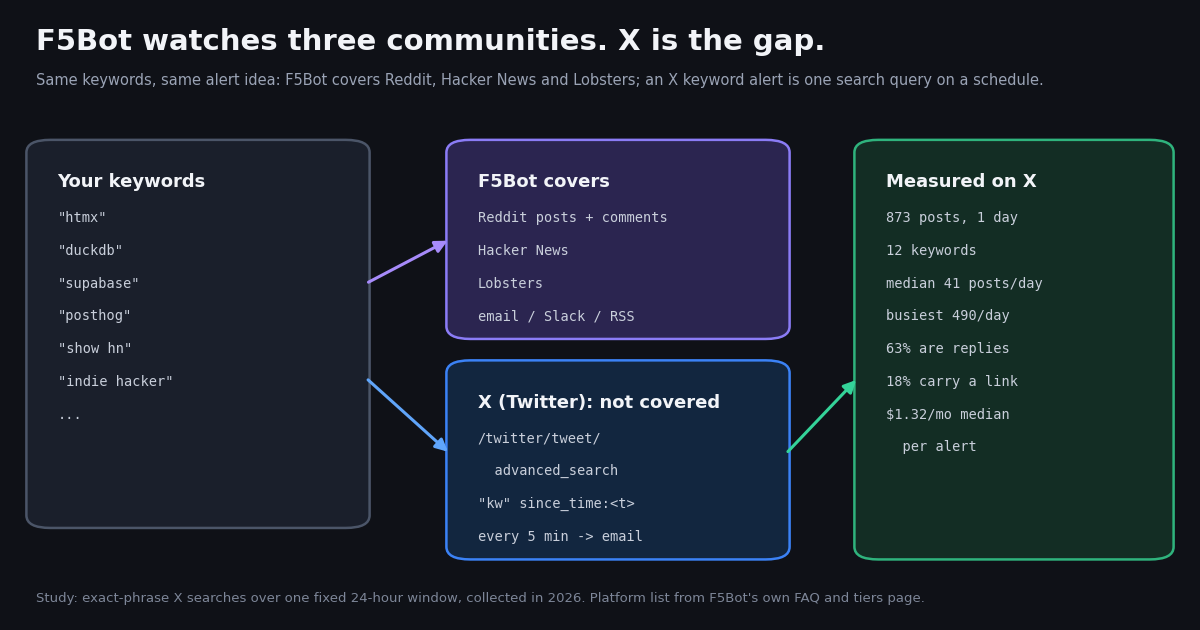
This page is about F5Bot specifically: what the service covers, the X (Twitter) gap it leaves, and how to rebuild an F5Bot-style alert for X with measured volumes and costs. If you want the general engineering pattern for keyword alerts on X (scoring, delivery channels, the official API path in depth), our developer guide to Twitter (X) alerts for keywords covers that; here we start from an F5Bot keyword list and answer "what happens if I point the same list at X?"
F5Bot is a long-running keyword alert service built by Lewis Van Winkle and released in 2017 (f5bot.com/about). You enter brand names, project names or phrases, and it emails you when they show up in a Reddit post or comment, on Hacker News or on Lobsters. Its homepage says it sends over 430,000 alerts a day. What it does not do is watch X, and for many of the same audiences (developer tools, open-source maintainers, indie founders) X is where launches, complaints and buying questions show up first.
So we took a keyword list shaped like an F5Bot account (four open-source projects, four developer products, four startup phrases), ran each one as an exact-phrase search on X over the same 24-hour window, and measured what an alert would actually deliver: posts per day, how much of it is replies or link posts, and what each alert costs per month. The numbers below drive every recommendation on the page.
What F5Bot covers (and what it does not)
Everything in this section comes from F5Bot's own pages, fetched this session: the homepage, the FAQ (f5bot.com/faq) and the tiers page (f5bot.com/tiers). We quote rather than paraphrase where the wording matters.
Platforms. The FAQ answer to "What sites are monitored?" is "Currently Reddit, Hacker News, and Lobste.rs." The homepage says the same: "F5Bot monitors Reddit, Hacker News, and Lobsters for your keywords." On Reddit it scans both submissions and comments, including titles and URLs. There is no mention of X or Twitter anywhere on the homepage, FAQ or tiers page.
How matching works. Keywords are case-insensitive and matched as entered; the FAQ states plainly "F5Bot does not support regular expressions or wildcards." Flags refine a keyword: whole for whole-word matches, only-subreddit= and no-url= to include or exclude subreddits, in-title / in-body / in-url on paid plans, and no-comments for posts only. Paid plans also offer AI filtering, described as matching "based on a natural language description instead of exact keywords."
Delivery. Email by default, with instant, batched or scheduled digests depending on plan; RSS and JSON feeds, Slack and Discord webhooks, and API and webhook access on higher tiers. The FAQ says it checks for new content "every few minutes", and that the alert delay after a match depends on the plan.
The design intent. The FAQ is candid about scope: "F5Bot is designed to alert you about fairly uncommon keywords or phrases. If you're trying to monitor a very popular brand, this might not be the right tool for you." Each tier has a per-keyword daily cap and an account-wide daily cap, and a keyword that goes over its cap is disabled until you re-enable it.
If your audience lives on Reddit, Hacker News or Lobsters, F5Bot remains a fit for those three. The rest of this page is about the platform it leaves out.
F5Bot plans and limits, side by side with an X keyword alert
The F5Bot rows are copied from its tiers page as published this session; prices are monthly plans (yearly plans are offered with one month free). The last column describes the X alert this page builds, using only the twitterapi.io rate card. Platform coverage is the row that decides it: the comparison only makes sense if you need X.
What none of the F5Bot plans include: X (Twitter) posts. Upgrading changes keyword counts, caps, delivery and filtering, not the platform list. F5Bot's account-wide daily alert limits (20 on Free up to 200,000 on Platinum) and the AI filtering token allowance are on the same tiers page if you need them.
What the X alert costs instead. Tweet endpoints on twitterapi.io bill 15 credits per tweet returned ($0.15 per 1,000 tweets), with a 15-credit minimum per request, and $1 = 100,000 credits. A check that finds nothing costs the $0.00015 minimum, so polling every 5 minutes for a month (8,640 checks) has a floor of $1.30 per query, and every matching post adds $0.00015. New accounts that pass the automatic bot check get up to $1 of free credits (at most 100,000 credits, no card, one per person or network, expiring after 31 days), and purchased credits never expire.
Study: how much X traffic do F5Bot-style keywords produce?
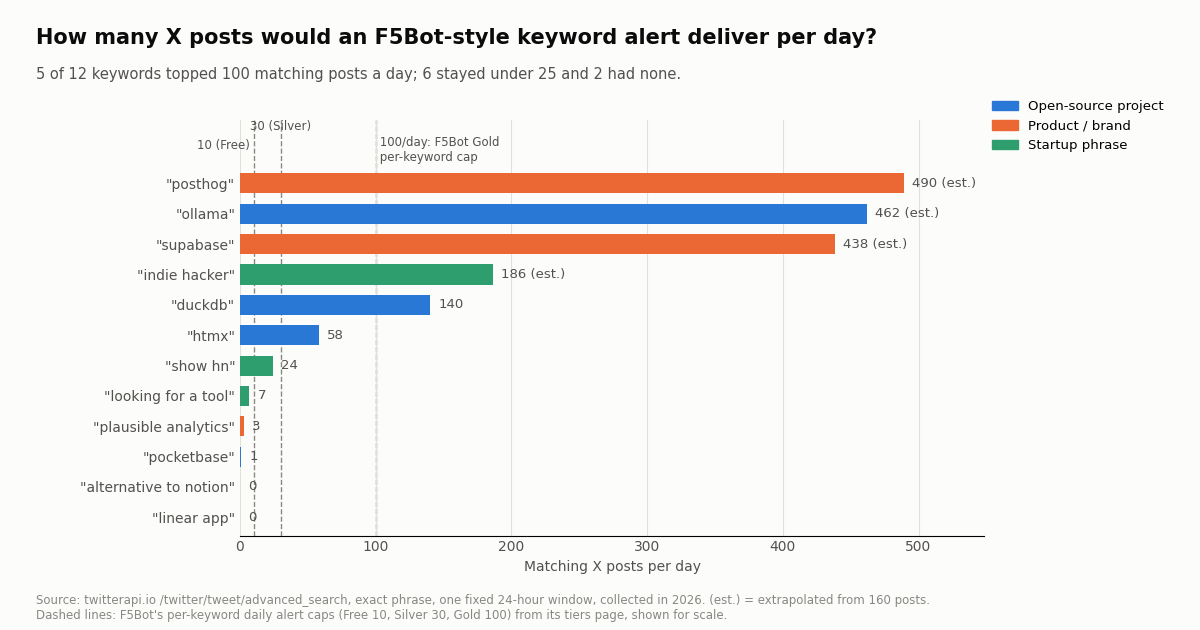
F5Bot's FAQ warns that it is built for "fairly uncommon keywords" and that busy terms run into caps. So the first question for anyone moving the same list to X is volume: will an X alert send three posts a day or three hundred? We searched 12 keywords of the kinds F5Bot's homepage lists as use cases (brand monitoring, competitor tracking, open-source and content tracking, lead phrases), each as an exact phrase, over one fixed 24-hour window, collected in 2026.
Read it as a spread, not a ranking. The median keyword produced 41 matching posts a day. Five of 12 topped 100 a day, six stayed under 25, and two produced nothing in the window. Rows marked (est.) hit our 8-page (160-post) collection limit before the start of the window, so their daily rate is extrapolated from the hours those 160 posts covered (7.8 to 20.6 hours); the other eight are exact 24-hour counts.
Brand names pick up handle mentions. An exact-phrase search for posthog also matches posts that mention the company's account, which is why 91.9% of its matches are replies: most are people replying in threads that tag the brand. That is useful for support and community teams and noise for a launch tracker; the filters in the next section separate the two.
Two-word product names need care. linear app and alternative to notion returned nothing as exact phrases in the window, while one-word project names were busy. On X people write the brand, the handle or a link, rarely a descriptive phrase. Test a keyword over a past day before you trust it as an alert.
What the matches look like: replies, links and language
Volume is only half of an alert. The other half is how much of it you would act on. Across all 873 posts in the sample, 63.2% were replies, 17.5% carried a link to a site outside X, 6.1% were quote posts and 79.3% were tagged English. The exact-phrase searches returned no plain reposts.
Replies dominate brand terms. For htmx (84.5%) and posthog (91.9%) most matches sit inside someone else's thread. If your alert exists to catch new conversations (a launch, a bug report, a buying question), add -filter:replies and keep only top-level posts. For a support inbox, keep them.
Link share tells you which keywords carry news. show hn (45.8%) and duckdb (42.1%) matches often link out to a blog post, a repository or a Hacker News thread. filter:links turns those keywords into a reading list. indie hacker (3.7%) and posthog (3.7%) are almost all talk, so a link filter would silence them.
Language is a real filter. duckdb matches were only 61.4% English; indie hacker was 97.5%. If your team answers in one language, lang:en cuts the rest before it reaches an inbox, and costs nothing extra because filtered posts are never returned.
Authors are mostly small accounts. The median author behind a match had 274 to 533 followers for the four busiest keywords (posthog, indie hacker, ollama, supabase); quieter phrases such as looking for a tool drew larger accounts (median 2,821), on very small samples. We report only aggregates; no individual author is profiled here.
These operators follow X's search syntax as documented in the community reference at github.com/igorbrigadir/twitter-advanced-search, which the twitterapi.io search docs point to for examples.
The recipe: an F5Bot-style X alert in one script
F5Bot's model is simple: a list of keywords, a check every few minutes, an email when something new matches. On X the same loop is one HTTP call per keyword. The design decisions that make it cheap and reliable:
1. Search, do not scan timelines. /twitter/tweet/advanced_search takes the X search syntax (query, plus queryType=Latest for newest first) and returns a top-level tweets array with has_next_page and next_cursor. Add since_time:<unix seconds> so each run only receives posts created after the previous run; an idle check returns an empty list and costs the $0.00015 minimum.
2. Overlap a little and dedupe by id. Re-read two minutes before the last run and keep a set of tweet IDs already sent. The overlap is a cheap guard against a post that is indexed just after a run starts, and the ID set keeps it from alerting twice.
3. Follow next_cursor when a keyword is busy. A page holds up to 20 posts. At 5-minute polling, our busiest keyword (about 490 posts a day) averages under 2 posts per check, but bursts happen; loop while has_next_page is true, with a page cap as a safety net.
4. Group quiet keywords. Every separate query pays its own polling floor. The five keywords under 10 posts a day in our study produced 11 posts a day together; as five alerts they cost $6.50 a month at 5-minute polling, as one OR query about $1.35.
5. Deliver where your team reads. A Slack incoming webhook is one POST of JSON with a text field (docs.slack.dev); email works the same with smtplib. F5Bot's digest options map to how often you run the script: every 5 minutes for near-instant alerts, hourly or daily for a digest.
The script below implements all five. It keeps state in a small JSON file, runs once per invocation, and is meant for cron.
"""x_keyword_alert.py - an F5Bot-style keyword alert for X (Twitter).

One pass per run: search every keyword for posts newer than the last run,
skip what was already sent, and deliver new matches to Slack (or print them).
Run it from cron every 5 minutes:
    */5 * * * *  TWITTERAPI_IO_API_KEY=... SLACK_WEBHOOK_URL=... python3 x_keyword_alert.py

    pip install requests
"""
import json
import os
import time

import requests

API = "https://api.twitterapi.io"
HEADERS = {"X-API-Key": os.environ["TWITTERAPI_IO_API_KEY"]}
SLACK = os.environ.get("SLACK_WEBHOOK_URL")          # optional; prints when unset
STATE = "x-alert-state.json"
MAX_PAGES = 5                                         # safety cap per keyword per run

# Same kind of list you would give F5Bot. Quiet terms share one query (one poll floor);
# busy terms get their own query with noise filters.
ALERTS = {
    "quiet-brands": '"pocketbase" OR "plausible analytics" OR "linear app"',
    "duckdb": '"duckdb" -filter:replies',
    "show-hn": '"show hn" filter:links',
    "buyer-intent": '"looking for a tool" OR "alternative to notion" lang:en',
}


def load_state():
    if os.path.exists(STATE):
        with open(STATE) as f:
            return json.load(f)
    return {"since_time": int(time.time()) - 3600, "seen": []}


def search(query, since_time):
    """Yield every post newer than since_time, following next_cursor."""
    params = {"query": f"{query} since_time:{since_time}", "queryType": "Latest"}
    for _ in range(MAX_PAGES):
        r = requests.get(f"{API}/twitter/tweet/advanced_search", headers=HEADERS, params=params, timeout=30)
        r.raise_for_status()
        body = r.json()
        for t in body.get("tweets") or []:
            yield t
        if not body.get("has_next_page") or not body.get("next_cursor"):
            break
        params["cursor"] = body["next_cursor"]


def deliver(alert, t):
    author = (t.get("author") or {}).get("userName", "")
    line = f"[{alert}] @{author}: {t.get('text', '')[:280]}\n{t.get('url') or t.get('twitterUrl')}"
    if SLACK:
        requests.post(SLACK, json={"text": line}, timeout=15).raise_for_status()
        time.sleep(1)                                 # keep a gentle pace toward Slack
    else:
        print(line, "\n")


def main():
    state = load_state()
    order = state["seen"]
    seen = set(order)
    started = int(time.time())
    since = state["since_time"] - 120                 # 2 minutes of overlap, deduped by id
    sent = 0
    for alert, query in ALERTS.items():
        fresh = [t for t in search(query, since) if t["id"] not in seen]
        for t in reversed(fresh):                     # API returns newest first
            deliver(alert, t)
            seen.add(t["id"])
            order.append(t["id"])
            sent += 1
    state["since_time"] = started
    state["seen"] = order[-5000:]
    with open(STATE, "w") as f:
        json.dump(state, f)
    print(f"{sent} new match(es)")


if __name__ == "__main__":
    main()
Polling or push: two ways to run the alert
Polling (the script above). You own the schedule. Cost is the polling floor plus $0.00015 per post returned, and nothing has to be hosted beyond a cron job. This is the closest match to how F5Bot itself works ("checks for new content every few minutes").
Push with a filter rule. If you would rather not run a scheduler, register the same query as a rule: POST /oapi/tweet_filter/add_rule with tag (up to 255 characters), value (the search query, up to 255 characters) and interval_seconds (0.05 to 86,400, default 60). The docs state that a new rule is not active until you call /oapi/tweet_filter/update_rule to activate it. Matches are then posted to a webhook URL you host. Our developer guide to Twitter (X) webhooks walks through the receiver.
Which to pick. Polling is easier to reason about for a handful of keywords and a digest-style workflow. A rule fits when you want matches within a minute and already run an HTTPS endpoint. Both read the same search index, so the volumes in our study apply to either.
Monthly cost per alert at the volumes we measured
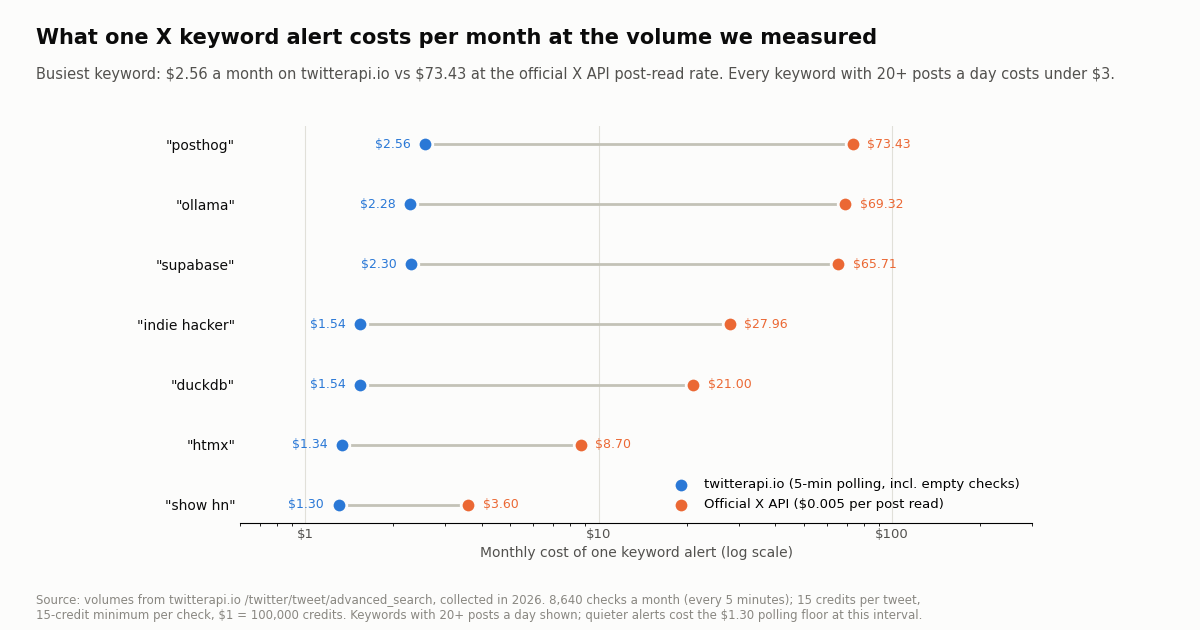
We priced each keyword as one alert polled every 5 minutes for a 30-day month (8,640 checks). On twitterapi.io each post returned is 15 credits and each empty check is the 15-credit minimum. The official X API column uses the pay-per-usage rate card at docs.x.com/x-api/getting-started/pricing: $0.005 per post read, which is about 33x the $0.15 per 1,000 tweets on twitterapi.io.
The polling floor dominates small alerts. For every keyword under about 100 posts a day, the $1.30 a month floor is most of the bill: duckdb returned 140 posts a day and still cost $1.54, because 70.1% of its 5-minute checks came back empty. That is why grouping quiet keywords into one query matters more than the per-post price.
Busy alerts stay small too. Even the busiest keyword (posthog, about 490 posts a day) cost $2.56 a month on twitterapi.io. The same posts read through the official X API would be $73.43. All 12 alerts together came to $19.36 a month on twitterapi.io against $271.37 at the official post-read rate, and the official pay-per-usage plan is capped at 3 million post reads a month with Enterprise above that.
Rate limits are not a constraint here. Twelve queries every 5 minutes is 0.04 requests per second, inside the 0.2 requests per second allowed before your first payment (20 once paid). Subscription plans (Starter $29 up to Business $1,499 a month) exist for heavier use; see the pricing page for what each includes.
Which setup fits your F5Bot keyword list
You track a project or product name and want to know when people talk about it on X. Use one alert per busy name with -filter:replies if you only want new conversations; expect tens to hundreds of posts a day for an active developer brand, at $1.30 to $2.56 a month per alert in our study.
You track launches and links (Show HN posts, release announcements). Add filter:links and run the script hourly; a digest is easier to read than a stream of 24 to 140 posts a day.
You track buying phrases ("looking for a tool", "alternative to ..."). Exact phrases are quiet on X: 7 and 0 posts a day in our window. Put them in one OR query with lang:en, run it every 5 minutes, and pay the floor once.
You need one inbox for every platform. Keep F5Bot (or a similar Reddit and Hacker News tool) for those sites and send the X script's output to the same Slack channel or email folder. Two feeds, one place to read them.
You need analysis, not alerts. Volume trends, share of voice and sentiment across many terms are a different job; our guides to Twitter (X) monitoring and to searching mentions on X cover the data side.
How we collected this
Question. If F5Bot-style keywords were tracked on X, how many matching posts a day would an alert deliver, what share are replies, link posts and reposts, and what would one alert cost per month on twitterapi.io vs the official X API rate card?
Query. Twelve keywords in three groups: open-source projects (htmx, pocketbase, duckdb, ollama), developer products (supabase, posthog, plausible analytics, linear app) and startup phrases (show hn, indie hacker, alternative to notion, looking for a tool). Each ran as "<keyword>" since_time:<start> until_time:<end> on /twitter/tweet/advanced_search with queryType=Latest, up to 8 pages.
Window and sample. One fixed 24-hour window shared by all keywords, collected in 2026. 873 posts from 55 requests (13,215 credits, $0.13). Four keywords hit the 8-page limit; their daily rates are extrapolated from the span the 160 posts covered and marked (est.).
Cost model. 8,640 checks a month (every 5 minutes); 15 credits per post returned, a 15-credit minimum per check, $1 = 100,000 credits; official X API at $0.005 per post read. Empty-check shares come from the 5-minute windows inside each keyword's covered span.
What the sample cannot show. One day is one day: launches, outages and weekends move these numbers a lot, and a quiet keyword can spike. Exact phrase matching misses misspellings and posts that only link the product. We measured volume and shape, not relevance; whether a match is worth answering is your call. We did not measure F5Bot's own delivery on Reddit or Hacker News.
Privacy. Keyword searches return mostly private individuals, so raw API pages were kept out of the repository. We publish aggregates and de-identified rows only (no post IDs, URLs, text, author IDs or handles), and no individual is profiled.
"""x_keyword_alert.py - an F5Bot-style keyword alert for X (Twitter).

One pass per run: search every keyword for posts newer than the last run,
skip what was already sent, and deliver new matches to Slack (or print them).
Run it from cron every 5 minutes:
    */5 * * * *  TWITTERAPI_IO_API_KEY=... SLACK_WEBHOOK_URL=... python3 x_keyword_alert.py

    pip install requests
"""
import json
import os
import time

import requests

API = "https://api.twitterapi.io"
HEADERS = {"X-API-Key": os.environ["TWITTERAPI_IO_API_KEY"]}
SLACK = os.environ.get("SLACK_WEBHOOK_URL")          # optional; prints when unset
STATE = "x-alert-state.json"
MAX_PAGES = 5                                         # safety cap per keyword per run

# Same kind of list you would give F5Bot. Quiet terms share one query (one poll floor);
# busy terms get their own query with noise filters.
ALERTS = {
    "quiet-brands": '"pocketbase" OR "plausible analytics" OR "linear app"',
    "duckdb": '"duckdb" -filter:replies',
    "show-hn": '"show hn" filter:links',
    "buyer-intent": '"looking for a tool" OR "alternative to notion" lang:en',
}


def load_state():
    if os.path.exists(STATE):
        with open(STATE) as f:
            return json.load(f)
    return {"since_time": int(time.time()) - 3600, "seen": []}


def search(query, since_time):
    """Yield every post newer than since_time, following next_cursor."""
    params = {"query": f"{query} since_time:{since_time}", "queryType": "Latest"}
    for _ in range(MAX_PAGES):
        r = requests.get(f"{API}/twitter/tweet/advanced_search", headers=HEADERS, params=params, timeout=30)
        r.raise_for_status()
        body = r.json()
        for t in body.get("tweets") or []:
            yield t
        if not body.get("has_next_page") or not body.get("next_cursor"):
            break
        params["cursor"] = body["next_cursor"]


def deliver(alert, t):
    author = (t.get("author") or {}).get("userName", "")
    line = f"[{alert}] @{author}: {t.get('text', '')[:280]}\n{t.get('url') or t.get('twitterUrl')}"
    if SLACK:
        requests.post(SLACK, json={"text": line}, timeout=15).raise_for_status()
        time.sleep(1)                                 # keep a gentle pace toward Slack
    else:
        print(line, "\n")


def main():
    state = load_state()
    order = state["seen"]
    seen = set(order)
    started = int(time.time())
    since = state["since_time"] - 120                 # 2 minutes of overlap, deduped by id
    sent = 0
    for alert, query in ALERTS.items():
        fresh = [t for t in search(query, since) if t["id"] not in seen]
        for t in reversed(fresh):                     # API returns newest first
            deliver(alert, t)
            seen.add(t["id"])
            order.append(t["id"])
            sent += 1
    state["since_time"] = started
    state["seen"] = order[-5000:]
    with open(STATE, "w") as f:
        json.dump(state, f)
    print(f"{sent} new match(es)")


if __name__ == "__main__":
    main()
Questions readers ask
Does F5Bot monitor Twitter (X)?
No. F5Bot's FAQ lists the monitored sites as "Currently Reddit, Hacker News, and Lobste.rs", and none of its plans (Free, Silver, Gold, Platinum, Diamond) add X. For X you need a separate alert, such as a scheduled /twitter/tweet/advanced_search call per keyword.
Is F5Bot free?
F5Bot has a Free plan for personal use with 5 keywords, a 10-alerts-per-keyword daily cap and alerts delayed up to 2 hours. Paid plans listed on its tiers page are Silver $9.99, Gold $49.99 and Platinum $214.99 a month, with Diamond (Enterprise) starting at $500 a month.
What is the best F5Bot alternative for Twitter keyword alerts?
For X specifically, a search-based alert you control: one exact-phrase query per keyword with since_time: every few minutes, deduped by tweet ID and posted to Slack or email. In our study that cost $1.30 to $2.56 a month per keyword on twitterapi.io at 5-minute polling, with no per-keyword cap.
How many X posts will a keyword alert send me?
It depends heavily on the keyword. In one 24-hour window, 12 F5Bot-style keywords ranged from 0 to about 490 matching posts a day, with a median of 41. Developer brand names were the busiest; exact multi-word phrases were often near zero.
How do I cut noise from an X keyword alert?
Use search operators. -filter:replies drops thread replies (63% of all matches in our sample), filter:links keeps only posts with links, lang:en keeps one language, and -word excludes a term. Filtered posts are never returned, so they cost nothing.
Can I get X alerts in Slack or by email like F5Bot?
Yes. The script on this page posts each new match to a Slack incoming webhook (a JSON POST with a text field) or prints it; swapping in smtplib sends email instead. Running it hourly or daily turns it into a digest.
Do I need an X account or developer approval?
No. Reading search results through twitterapi.io needs only an API key, no X account. New accounts that pass the automatic bot check get up to $1 of free credits (at most 100,000 credits, no card, one per person or network, expiring after 31 days).
Continue
- twitterapi.io API reference: advanced_search (query, queryType, cursor; tweets, has_next_page, next_cursor; up to 20 per page)
- twitterapi.io API reference: add a tweet filter rule (tag, value, interval_seconds; new rules inactive until update_rule)
- X API pay-per-usage pricing ($0.005 per post read, 3M post reads a month cap), the official and pricier route
- Community reference for X search operators (exact phrase, OR, filter:replies, filter:links, lang:, since_time:)
- Slack docs: sending messages with incoming webhooks (JSON POST with a text field)
- Twitter (X) API overview: endpoints, pricing and limits
- Twitter (X) alerts for keywords: a developer guide
- How to search mentions on Twitter (X) via the API
- Twitter (X) webhooks: filter rules and the push payload
- Tweet notifications: polling, webhook rule or stream
- Twitter (X) monitoring with an API
- Twilert alternative for X keyword alerts
- Syften alternative for X community monitoring
- twitterapi.io pricing: pay per tweet returned
- 01TweetGrok Twitter (X) Viewer: What It Is, Whether It Works, and Safer Options
- 02Is X.com (Twitter) Down Right Now, or Is It Just You?
- 03Brandwatch API Explained: Consumer Research vs Engage, Access, and What You Get for Twitter (X)
- 04A Meltwater Alternative for Teams That Mainly Need X (Twitter) Mentions
- 05Sprout Social API in 2026: What It Returns, What It Costs, and Where Twitter (X) Data Runs Out
- 06TweetDeck (X Pro) Alternatives in 2026: Columns, Monitoring and Scheduling for Twitter (X)
- 07Scrape Creators Alternative for Twitter (X) Data: Coverage and Real Cost per 1,000 Tweets
- 08Apify Twitter (X) Scraper — A Developer's Alternative Comparison
Stop reading. Start building.
Starter credits cover real testing on real data. Google sign-in, no card, no application queue.
Get an API key