Twilert Alternative: Twitter (X) Keyword Alerts via API in 2026
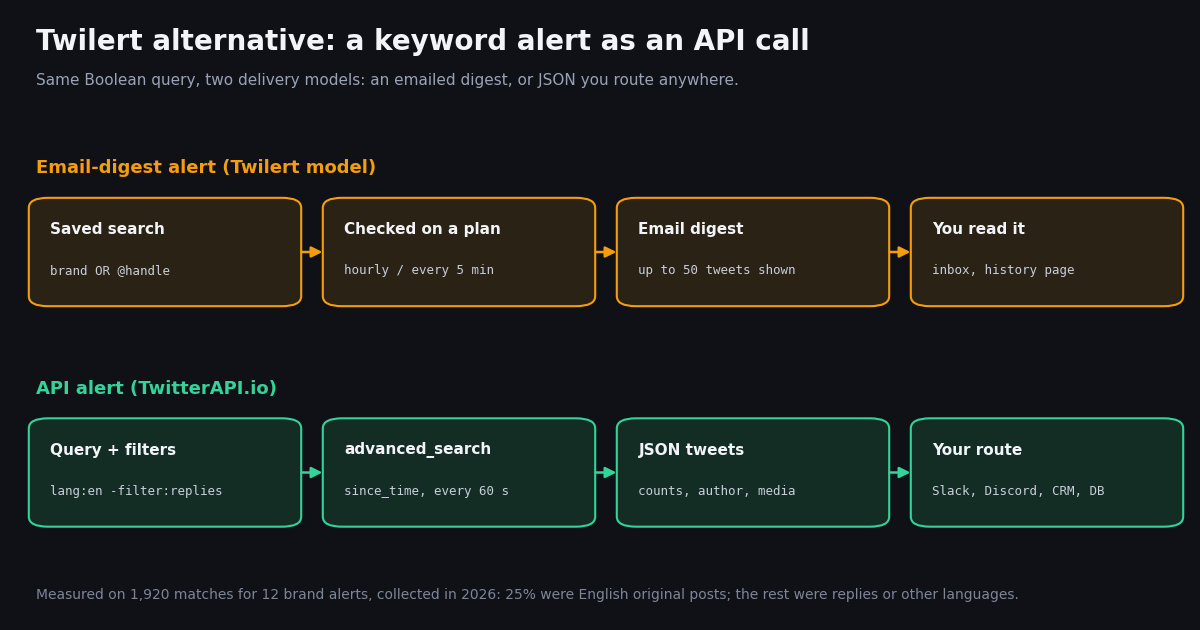
This page is about Twilert the product: what it does, what its plans cost right now, and when an API-based keyword alert is the better replacement. It is not the general tutorial; our developer guide to Twitter keyword alerts covers the five-step alert pipeline in depth, and the Twitter monitoring tools roundup compares tool categories. Here the question is narrower: you use or are evaluating Twilert, and you want to know whether a programmable alert would serve you better.
We checked Twilert's pricing, home and FAQ pages this session, then ran a first-hand study: 12 keyword alerts typed the way a Twilert user would type them (bare brand names such as Figma, Shopify, Stripe and Notion), each searched on live X data over a 7-day window. We measured how many tweets each alert would deliver, how much of it is noise, how fresh the newest match is, and what each alert costs per month when run as an API poll.
Short version: the email digest is a reading tool. The moment your alerts need to trigger something (a Slack post, a ticket, a lead score, a dashboard), the per-tweet API model gives you the raw data, faster checks and no alert count, and with sensible filters it stays in the low dollars per month.
What Twilert does (and what it was built for)
Twilert has been described since its launch as Google Alerts for Twitter: The Next Web covered it in a December 2008 article under exactly that framing, and Twilert's own home page quotes Mashable, Adweek, Inc. and Social Media Today describing it the same way. The workflow is simple. You save a search for a brand name, a handle, a hashtag or a phrase; Twilert checks X on a schedule and emails you a digest of the matches.
Search syntax. Twilert's FAQ documents standard X search operators inside alerts: from: and to: for accounts, OR between terms, quoted exact phrases, -word exclusions, -RT to drop retweets, exclude:links, -from: to drop a sender and lang:en for language.
Geo targeting. A "filter by location" tool lets you type a city, venue or place, or draw a circle on a map, to keep only tweets sent from that area.
Digests and history. Alerts arrive as email digests on a weekly, daily, hourly or (on Professional and Agency) near real-time schedule. Per the FAQ, an email shows a maximum of 50 tweets; the rest sit in the alert's search history, which is a Professional or Agency feature.
Teams and agencies. Agency adds 10 users, email groups (send an alert to colleagues or clients who cannot edit it) and white-labeled emails with your sender name and logo.
Feeds. Professional lists "Programmatic RSS, JSON Feeds"; Agency lists RSS, JSON and ATOM feeds. That is the closest Twilert gets to an integration surface; the pricing page does not describe a webhook or a query API.
Twilert's home page states it signs users in with X ("Sign in with X.com") and claims 52,340 active alerts and 29,726 total users since 2008. Those are the vendor's own figures, not something we measured.
Twilert pricing in 2026: the plans, checked this session
We read twilert.com/pricing and twilert.com/frequently-asked-questions directly this session. Prices are monthly; the page shows no annual prices. It also shows struck-through "original prices" with discount percentages that do not add up (for example "242.50% Off" on Agency), so we report only the price you actually pay.
Two details matter more than the headline prices. First, the fastest check on any plan is every 5 minutes ("Near Real-Time *every 5 Minutes"), and only from Professional up. Second, the unit is the alert: 20 saved searches on Professional, 100 on Agency. Above 100 alerts, the pricing page offers no larger plan.
If a price on this page no longer matches twilert.com/pricing when you read it, trust Twilert's page; we record the date of our check internally and re-review it.
Twilert vs an API-based keyword alert: the comparison matrix
The matrix below compares the two Twilert plans that offer 5-minute checks with a keyword alert built on TwitterAPI.io's search and filter-rule endpoints. Twilert facts come from its pricing and FAQ pages; TwitterAPI.io facts come from docs.twitterapi.io and our pricing page.
Where the API covers more. Speed (poll every 60 seconds, or set a filter rule's interval_seconds as low as 0.05 per the add_rule docs), scale (no alert count: 20 or 2,000 queries are just requests), data (every tweet arrives as JSON with likeCount, retweetCount, viewCount, lang, author.followers, media and the quoted tweet, so you can score and route matches instead of reading them), and storage (you keep everything you save, with no 50,000-tweet ceiling per alert).
Where the API asks more of you. You write or deploy a small script, or use a no-code tool that can make HTTP calls. Twilert's map-based geo picker and white-labeled client emails are product features you would rebuild yourself; if a branded email digest for clients is the deliverable, Twilert Agency remains a fit.
Pricing structure. Twilert charges per alert slot whatever each alert finds. The API charges for data returned: 15 credits per tweet, which is $0.15 per 1,000 tweets, with a 15-credit ($0.00015) minimum per request, so a check that finds nothing costs $0.00015. Rate limits are 0.2 requests per second before your first payment and 20 per second once paid. New accounts that pass the automatic bot check get up to $1 of free credits (at most 100,000 credits, no card, one per person or network, expiring after 31 days); purchased credits never expire.
What a brand-name alert actually delivers: volume and noise
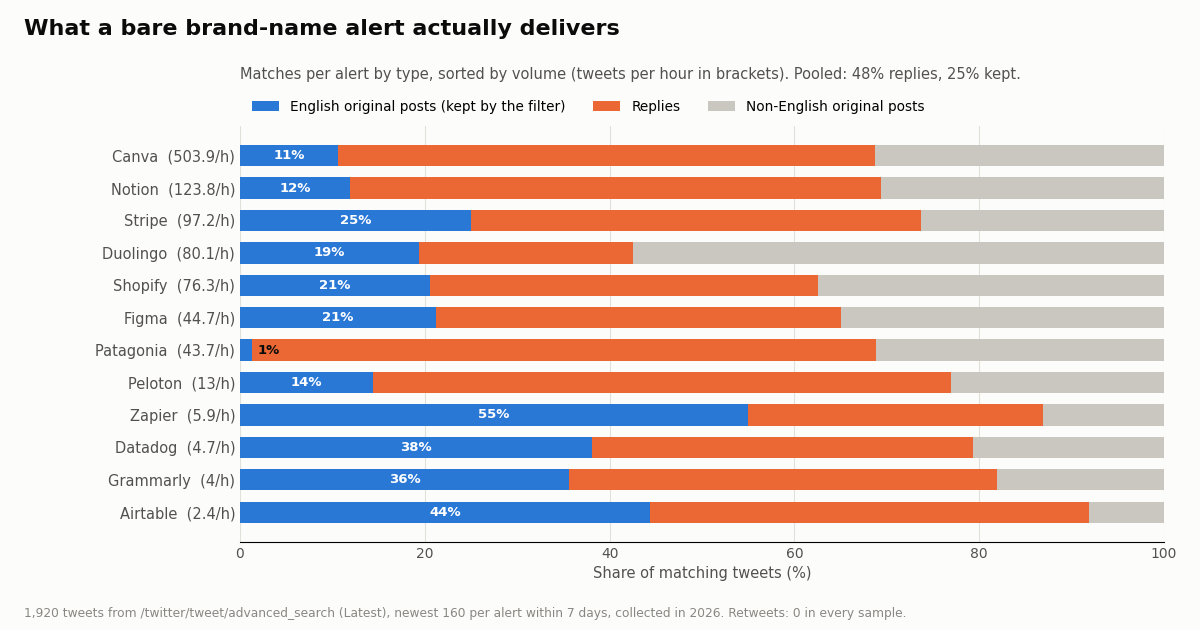
Pricing per alert hides the real variable: how much a query matches. We searched 12 bare brand names on /twitter/tweet/advanced_search (Latest) over a 7-day window, newest 160 matches each, 1,920 tweets in total. Volume spans more than two orders of magnitude: Airtable matched 2.4 tweets an hour, Canva 503.9. The median alert matched 44.2 an hour, about 1,061 a day.
Most of it is not what a brand team means by a mention. Pooled across all 12 alerts, 48% of matches were replies (often threads where the brand name appears in a long conversation) and 48% were in a language other than English. Native retweets were 0%: the Latest search returned none in any sample. After keeping only English original posts, 25% of matches remained.
Ambiguity is the other noise source. Patagonia is a clothing brand and a region of South America: only 1% of its matches were English original posts, and 82% were not English. Stripe and Notion are common words; their samples kept 25% and 12%. Across all alerts, 16% of matches did not contain the term in the visible text at all (the match came from a handle, a link or a display name).
This matters for an email digest. Unfiltered, five of the 12 alerts (Canva, Notion, Stripe, Duolingo, Shopify) would pass 50,000 matches in a 30-day month, which is Twilert's stored-tweet figure per alert, and Canva's 503.9 an hour is about 42 tweets in every 5-minute window, close to the 50 tweets an email shows. With an API you filter in the query and then score what is left in code.
Freshness and cost: what each alert costs as an API poll
For each alert we recorded the age of the newest matching tweet at the moment we fetched it. The median was 1 minute; for the five highest-volume alerts it was under a minute. The largest gap was 54.5 minutes, for Datadog, which matched only 4.7 tweets an hour, so that figure reflects a quiet stretch, not indexing delay.
In other words the search index is current to within about a minute for busy terms, and the limiting factor for alert speed is how often you check. Twilert's fastest advertised schedule is every 5 minutes on Professional and Agency, and hourly on Solopreneur. With the API you choose: a cron job every 5 minutes, a loop every 60 seconds, or a filter rule that checks on the server side and pushes matches to your webhook.
The cost of checking more often is the empty-check minimum. For the quiet alerts, most 5-minute windows contain nothing: 83% for Airtable, 75% for Grammarly, 69% for Datadog. Each empty check costs $0.00015. A separate poll every 60 seconds for a whole month is 43,200 checks, $6.48 even if nothing ever matches; every 5 minutes it is $1.30. That floor is why combining alerts into one query pays off.
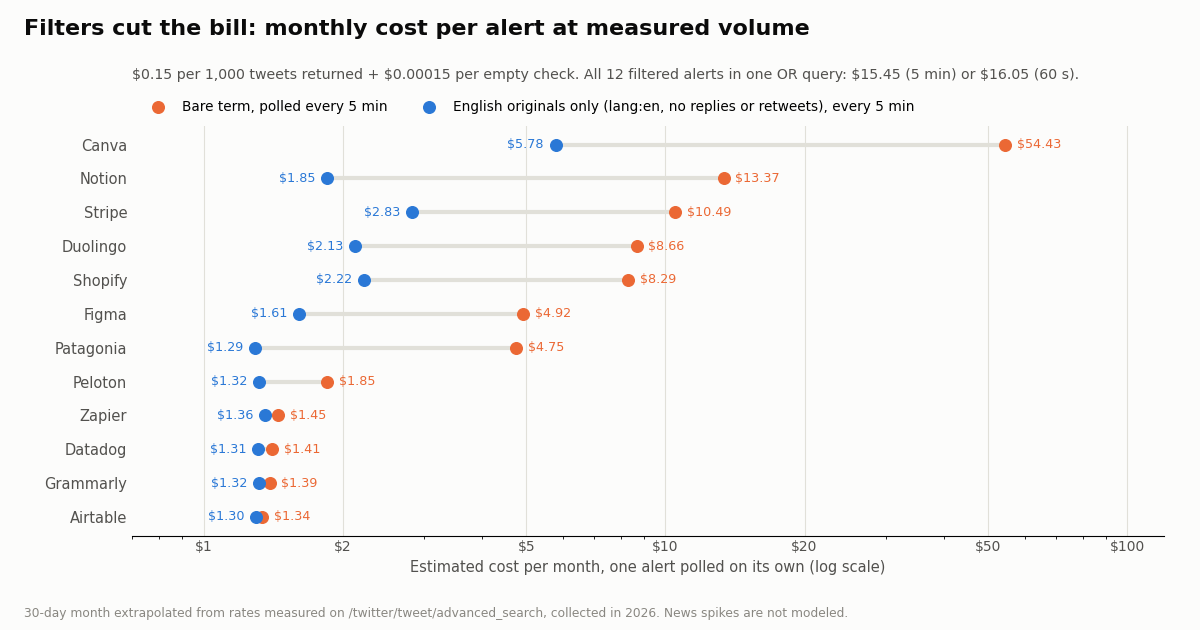
We turned the measured rates into a monthly bill: tweets matched in a 30-day month times $0.15 per 1,000, plus $0.00015 for every check that found nothing (the measured share of empty windows times the number of checks). The filtered column assumes the query carries lang:en -filter:replies -filter:retweets, so only English original posts are returned and billed.
Filtered and polled on its own every 5 minutes, each alert costs between $1.29 and $5.78 a month; for the quiet ones the $1.30 polling floor is nearly the whole bill. Unfiltered, the busiest alert (Canva) would cost $54.43, because you pay for every reply and every non-English post it drags in.
Combine them and the floor disappears. The five quiet alerts (Peloton, Zapier, Airtable, Datadog, Grammarly) cost $6.61 a month as five separate 5-minute polls, but $1.61 as one OR query, because a single check now covers all five terms. All 12 filtered alerts in one query come to $15.45 a month at 5 minutes and $16.05 at 60 seconds. For comparison, Twilert Professional is $19 a month for 20 alerts at 5-minute checks, and Agency is $97 for 100.
TwitterAPI.io vs the official X API for keyword alerts
If you are replacing Twilert with code, the other route is the official X API. Its pay-per-usage rate card (docs.x.com/x-api/getting-started/pricing) lists $0.005 per post read, and pay-per-usage plans are capped at 3 million post reads per monthly billing cycle, with Enterprise above that. TwitterAPI.io's search returns tweets at $0.15 per 1,000, against $5.00 per 1,000 post reads on X's rate card, a ratio of about 33x.
At our measured volumes, the 12 filtered alerts would read 103,032 tweets a month. On X's rate card that is $515.16; on TwitterAPI.io it is $15.45 at 5-minute checks. The unfiltered version would read 719,784 tweets, $3,598.92 on X's card, which is the clearest argument for filtering in the query whichever API you use.
Reads on TwitterAPI.io need no X account and no developer-app approval: an API key from the dashboard is enough. If your alert workflow also needs to act (reply to a mention, like or repost), that runs through an authenticated session: one /twitter/user_login_v2 login ($0.10, with a proxy you supply) returns login_cookies, and each post, like, repost or follow is then $0.002 through endpoints such as /twitter/create_tweet_v2. Those calls act as that account, so X can rate-limit, lock or suspend it; keep a human pace, expect the session to need a re-login now and then, and note that every HTTP 200 call is billed.
A working keyword-alert recipe: poll or push
The script at the end of this page is a complete Twilert-style alert in about 90 lines of Python. It builds one query from all your alerts ((figma OR zapier OR airtable OR grammarly) lang:en -filter:replies -filter:retweets since_time:<last run>), pages through /twitter/tweet/advanced_search with has_next_page and next_cursor, drops tweets it has already seen, routes each match to the alert whose word appears in the text, and posts one digest per alert to a Slack incoming webhook (or prints it).
Use since_time, not a fixed page. The search accepts since_time:<unix seconds> (and until_time:), per the advanced search docs; the docs note that the since:YYYY-MM-DD_HH:MM:SS_UTC form is not supported. Asking only for tweets since the last run means an idle check returns nothing and costs the $0.00015 minimum.
Overlap by a minute and dedupe by id. Tweets can be indexed a moment after they are posted, so the script starts each window 60 seconds before the previous run ended and drops repeats with a set of seen ids.
Route in code. One OR query is cheaper than many separate ones, but it returns a mixed stream. Matching the lowercased text against each alert's words puts every tweet in the right bucket; matches that came only from a handle or link land in no bucket, which also trims noise.
Score before you notify. The tweet JSON gives you likeCount, viewCount and author.followers, so you can send only matches above a threshold to Slack and store the rest. That is the step an email digest cannot do for you.
Stay inside the rate limit. Before your first payment the limit is 0.2 requests per second, about one request every 5 seconds; one combined query per run fits easily. Paid accounts get 20 requests per second.
If you would rather not run a scheduler, TwitterAPI.io can check for you. /oapi/tweet_filter/add_rule takes a tag, a value (the same search syntax, up to 255 characters) and interval_seconds, documented as a minimum of 0.05 and a maximum of 86,400 seconds. New rules start inactive, so you call /oapi/tweet_filter/update_rule with the same fields plus is_effect set to 1. Matching tweets are then delivered to the webhook URL you set in the dashboard (a WebSocket option is also documented).
Use a rule when you want matches pushed within seconds; use polling when a 5-minute or 60-second digest is enough and you prefer to keep everything in one cron job. For filter-rule pricing, see the pricing page rather than this article. The full receiver pattern is in our webhooks guide.
import os
import requests

API = "https://api.twitterapi.io"
H = {"X-API-Key": os.environ["TWITTERAPI_IO_API_KEY"]}
rule = {"tag": "brand-alerts",
        "value": "(figma OR zapier OR airtable) lang:en -filter:replies",   # max 255 characters
        "interval_seconds": 60}

r = requests.post(f"{API}/oapi/tweet_filter/add_rule", headers=H, json=rule, timeout=30)
r.raise_for_status()
rule_id = r.json()["rule_id"]
# New rules start inactive: send every field again with is_effect=1 to switch it on.
requests.post(f"{API}/oapi/tweet_filter/update_rule", headers=H,
              json={**rule, "rule_id": rule_id, "is_effect": 1}, timeout=30).raise_for_status()
print(requests.get(f"{API}/oapi/tweet_filter/get_rules", headers=H, timeout=30).json())
Which to choose: decision guide
Choose an API-based alert when the matches must reach software (Slack, Discord, a CRM, a support queue, a database), you need checks faster than every 5 minutes, you track more than 100 terms, you want to score matches by engagement or author reach, or you want to keep every match without a per-alert storage figure. At the volumes we measured, a dozen filtered brand alerts cost $15.45 a month polled every 5 minutes.
Keep Twilert when the whole workflow is a person reading an email, you need its map-based location picker, or you deliver white-labeled digests to clients from an agency account.
Either way, filter in the query. The single biggest lever in our data was not the tool but the query: 48% of bare brand-name matches were replies and 48% were not English. Adding lang:en -filter:replies -filter:retweets (and - exclusions for ambiguous words, such as Patagonia -chile -argentina) is what turns a noisy feed into a usable alert.
How we collected this
Question. How many matching tweets would a typical Twilert-style keyword alert deliver, how much of it is noise, how fresh are the newest matches, and what would each alert cost per month as an API poll?
Queries. 12 bare brand or product names typed as a Twilert user would type them, with no operators: Figma, Shopify, Duolingo, Peloton, Zapier, Airtable, Canva, Patagonia, Datadog, Grammarly, Stripe, Notion. Stripe, Notion and Patagonia were chosen partly because they are ambiguous words.
Method and window. /twitter/tweet/advanced_search with queryType=Latest and since_time set 7 days before collection, newest 160 matches per alert (8 pages of 20), collected in 2026. 96 requests, 1,920 tweets, $0.29 of credits. Hourly rates are the sample size divided by the time between the oldest and newest match; monthly figures extrapolate to 30 days at $0.15 per 1,000 tweets plus $0.00015 per empty check. Combined-query empty shares are estimated from the merged hourly rate.
What the sample cannot show. For busy alerts, 160 matches cover under an hour (Canva about 20 minutes), so their rates reflect one time of day; launches, outages and news spikes are not modeled. Noise is measured by tweet type and language, not by a human judging relevance. The filtered cost is simulated by applying the filter to the bare-term sample, not measured with a separate filtered query. Newest-match age is one fetch per alert.
Privacy. Keyword searches surface posts by private individuals, so raw pages were never stored in the repository. We publish aggregates only and a de-identified sample (alert, timing offset, reply/quote flags, language, text length) with no tweet ids, URLs, text or author identifiers. Brands are named because they are public companies.
"""keyword_alerts.py - Twilert-style keyword alerts as one API poll.

Every run asks /twitter/tweet/advanced_search for tweets that match ANY of your
alerts since the last run, sorts each match to the alert(s) it belongs to, and
posts a short digest per alert to a Slack incoming webhook (or prints it).

    pip install requests
    export TWITTERAPI_IO_API_KEY=...          # from the twitterapi.io dashboard
    export SLACK_WEBHOOK_URL=...              # optional; without it the digest is printed
    python keyword_alerts.py                  # run from cron every 5 minutes, or loop it
"""
import json
import os
import time

import requests

API_KEY = os.environ["TWITTERAPI_IO_API_KEY"]
SLACK = os.environ.get("SLACK_WEBHOOK_URL")
STATE = "alert_state.json"

# One entry per alert: the words that route a match to it. Quote multi-word phrases.
ALERTS = {
    "Figma": ["figma"],
    "Zapier": ["zapier"],
    "Airtable": ["airtable"],
    "Grammarly": ["grammarly"],
}
# The noise filter measured on this page: English, no replies, no retweets.
FILTERS = "lang:en -filter:replies -filter:retweets"


def build_query(since):
    terms = " OR ".join(sorted({w if " " not in w else f'"{w}"' for ws in ALERTS.values() for w in ws}))
    return f"({terms}) {FILTERS} since_time:{since}"


def search(query, max_pages=10):
    """Yield tweets newest first, following next_cursor while has_next_page is true."""
    cursor = ""
    for _ in range(max_pages):
        r = requests.get(
            "https://api.twitterapi.io/twitter/tweet/advanced_search",
            headers={"X-API-Key": API_KEY},
            params={"query": query, "queryType": "Latest", "cursor": cursor},
            timeout=30,
        )
        if r.status_code == 429:          # slow down and let the next run catch up
            time.sleep(5)
            continue
        r.raise_for_status()
        body = r.json()
        for t in body.get("tweets") or []:
            yield t
        if not body.get("has_next_page") or not body.get("next_cursor"):
            break
        cursor = body["next_cursor"]


def route(tweet):
    text = (tweet.get("text") or "").lower()
    return [name for name, words in ALERTS.items() if any(w in text for w in words)]


def deliver(alert, tweets):
    lines = [f"*{alert}*: {len(tweets)} new"]
    for t in tweets[:20]:
        a = t.get("author") or {}
        lines.append(f"- @{a.get('userName')} ({a.get('followers', 0):,} followers, "
                     f"{t.get('likeCount', 0)} likes): {t['text'][:180]!r} {t['url']}")
    msg = "\n".join(lines)
    if SLACK:
        requests.post(SLACK, json={"text": msg}, timeout=15).raise_for_status()
    else:
        print(msg, end="\n\n")


def main():
    state = json.load(open(STATE)) if os.path.exists(STATE) else {}
    now = int(time.time())
    since = state.get("since", now - 3600)      # first run: look back one hour
    seen = set(state.get("seen", []))
    buckets = {name: [] for name in ALERTS}
    for t in search(build_query(since)):
        if t["id"] in seen:
            continue
        seen.add(t["id"])
        for name in route(t):                   # matched via handle or link only: no bucket
            buckets[name].append(t)
    for name, tweets in buckets.items():
        if tweets:
            deliver(name, tweets)
    # Overlap one minute so late-indexed tweets are not missed; seen ids drop the duplicates.
    state = {"since": now - 60, "seen": list(seen)[-5000:]}
    json.dump(state, open(STATE, "w"))


if __name__ == "__main__":
    main()
Questions readers ask
What is Twilert?
Twilert is a keyword-alert service for Twitter (X) at twilert.com. You save a search for a brand, handle, hashtag or phrase and it emails you matching tweets on a weekly, daily, hourly or (on paid Professional and Agency plans) every-5-minutes schedule. It is often described as Google Alerts for Twitter.
How much does Twilert cost?
Twilert's pricing page, checked this session, lists a free daily alert, Solopreneur at $9 a month (5 alerts), Professional at $19 a month (20 alerts, checks every 5 minutes, 50,000 stored tweets per alert, RSS and JSON feeds) and Agency at $97 a month (100 alerts, 10 users, white-label email). Prices are monthly; no annual prices are shown.
Is Twilert free?
Partly. Twilert offers a Free-Forever Daily Alert; its home page title advertises one free daily alert on any topic. More alerts, hourly or 5-minute checks and searchable history require a paid plan.
What is the best Twilert alternative for developers?
If you want alerts that feed code rather than an inbox, run the same search through an API. On TwitterAPI.io, /twitter/tweet/advanced_search returns matching tweets as JSON at $0.15 per 1,000; in our study, 12 filtered brand alerts combined into one query cost about $15.45 a month at 5-minute checks. For push delivery, a filter rule sends matches to your webhook.
How do I get Twitter keyword alerts in Slack or Discord?
Poll /twitter/tweet/advanced_search with your keywords and a since_time cursor, then POST each new match to a Slack incoming webhook or a Discord channel webhook. The script on this page does the Slack version; our Twitter to Discord bot guide covers Discord.
How often can a keyword alert check for new tweets?
Twilert's fastest advertised schedule is every 5 minutes, on Professional and Agency. With the API you choose the interval: poll every 60 seconds or faster within your rate limit, or create a filter rule whose interval_seconds can be as low as 0.05 per the docs. In our study the newest match was a median of 1 minute old at fetch time.
Why does my Twitter alert return so much noise?
Bare brand names match replies in long threads, other languages and unrelated meanings. In our 12-alert study, 48% of matches were replies and 48% were not English. Add lang:en -filter:replies -filter:retweets, and exclude the wrong meanings of ambiguous words with minus terms.
Do I need an X developer account to build keyword alerts?
Not with TwitterAPI.io: reads need only an API key from the dashboard, no X account. New accounts that pass the automatic bot check get up to $1 of free credits (at most 100,000 credits, no card, one per person or network, expiring after 31 days). The official X API needs a developer account and bills $0.005 per post read on its pay-per-usage rate card.
Continue
- TwitterAPI.io docs: advanced search (query, queryType, cursor, since_time / until_time)
- TwitterAPI.io docs: add tweet filter rule (tag, value, interval_seconds 0.05 to 86,400; rules start inactive)
- X API pricing: $0.005 per post read, 3M post-read monthly cap on pay-per-usage
- Slack docs: sending messages using incoming webhooks
- Python requests library (GitHub)
- X (Twitter) API overview and endpoints
- developer guide to Twitter (X) keyword alerts
- Twitter monitoring tools compared
- Twitter search operators for API queries
- real-time Twitter webhooks with filter rules
- send Twitter keyword alerts to Discord
- F5Bot alternative for keyword mention alerts
- TwitterAPI.io pricing and credits
- 01TweetGrok Twitter (X) Viewer: What It Is, Whether It Works, and Safer Options
- 02Is X.com (Twitter) Down Right Now, or Is It Just You?
- 03Brandwatch API Explained: Consumer Research vs Engage, Access, and What You Get for Twitter (X)
- 04A Meltwater Alternative for Teams That Mainly Need X (Twitter) Mentions
- 05Sprout Social API in 2026: What It Returns, What It Costs, and Where Twitter (X) Data Runs Out
- 06Nitter Is Archived: Which Nitter Alternatives Still Work in 2026?
- 07Data365 Alternative: Pay-Per-Data X (Twitter) API Instead of a EUR 300 Subscription
- 08Tweet Tunnel Alternative: How to See Old Tweets Now That TweetTunnel Is Gone
Stop reading. Start building.
Starter credits cover real testing on real data. Google sign-in, no card, no application queue.
Get an API key