How to Clear Bookmarks on X (Twitter): One Post, All of Them, or a Folder
- Remove one: tap the filled bookmark icon on a saved post. The post stays on X; only your saved copy goes.
- Remove all: three-dot menu at the top of Bookmarks, then Clear all Bookmarks, where your app shows it. It has come and gone across versions, so check your own menu.
- iPhone moved it: since X's History tab (May 2026), Bookmarks is a tab inside History on many iPhone accounts.
- Folders are a paid-tier feature; deleting a folder is not the same as clearing all bookmarks. Read the confirmation text.
- Back up first: clearing has no undo. Export with a script or the official API before you press anything.
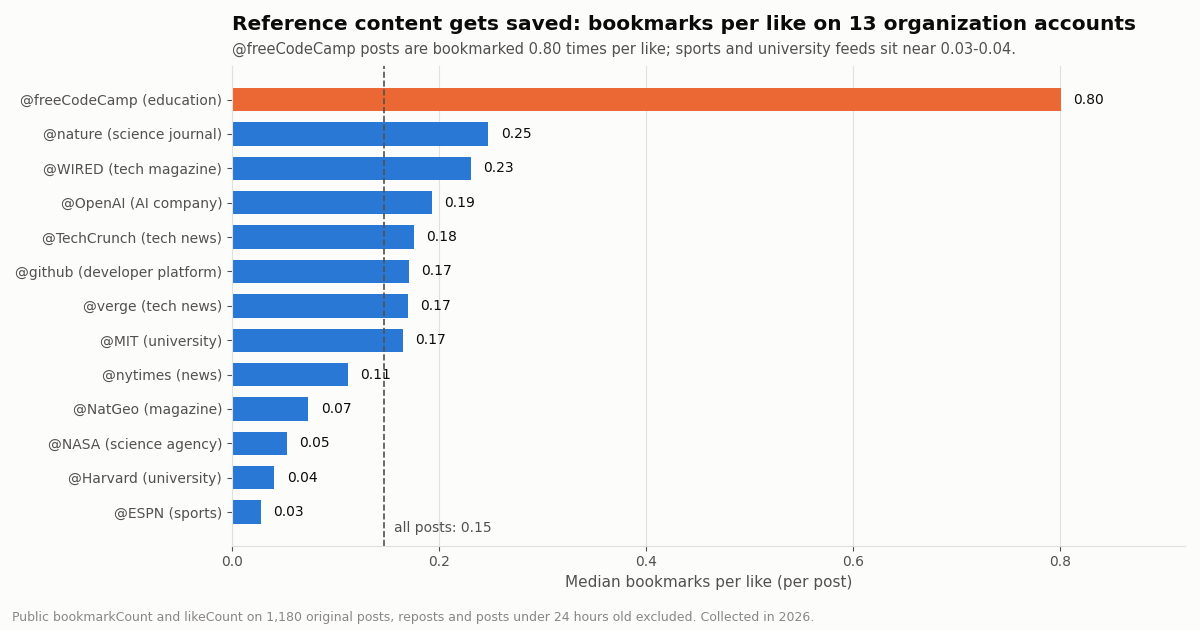
- What people save: a median of 0.15 bookmarks per like across 1,180 public posts; @freeCodeCamp posts reached 0.80 (collected in 2026).
Bookmarks on X are a private reading list. They pile up quietly because nobody else sees them, and when the list reaches a few hundred posts it stops being useful. This page covers the three things people actually want to do: remove one bookmark, wipe the whole list, or delete a folder, on the web, on iPhone and on Android, and what each action does and does not remove.
X changes these menus often. The Bookmarks entry on iPhone became History in May 2026, and the Clear all option has appeared and disappeared across app versions. We say plainly below which steps we confirmed from X's own documentation and reporting, and which ones you need to check in your own app. If you want the privacy question instead (can other people see what you saved?), our separate guide on whether people can see your Twitter bookmarks answers that; if you want to export and search your bookmarks with an AI assistant, see our X bookmarks AI guide.
We also measured something the how-to guides skip: how often people bookmark public posts at all. Every post on X carries a public bookmarkCount, so we read it on 1,180 organization posts and compared it with likes and views. The answer explains why bookmark lists grow so fast, and it is a good reason to back up before you clear.
0.15
Where your bookmarks are, and how to remove one
Web. Bookmarks live at x.com/i/bookmarks, reachable from the Bookmarks item in the left sidebar. Sign in to the account that owns the list: bookmarks are per account, and switching accounts shows a different, possibly empty list.
iPhone. TechCrunch reported in May 2026 that the Bookmarks button in the X app's left-side menu was renamed History, a page with four tabs: Bookmarks, Likes, Videos and Articles. X's head of product Nikita Bier announced it and said the History section remains private to you. The report said it was initially available on iOS, so on many iPhones you now tap your profile picture, open History, then the Bookmarks tab. Older app versions still show a plain Bookmarks item.
Android. We could not find an announcement of the History change for Android, so on Android the entry is still usually called Bookmarks in the side menu. Menu names change between versions; if you cannot find it, look in the side menu for either word.
To remove one bookmark, open that screen, find the post, and tap the filled bookmark icon in the post's action row. The icon empties and the post leaves your list.
What happens next. The author is not notified: X's API documentation states that bookmarks are private and only visible to the user who created them. The post stays on X with its likes and replies. The post's public bookmark total is an aggregate number that anyone can see, but it never shows who saved it.
Removed by mistake? Bookmark the post again. If it was in a folder, you will need to put it back in that folder too.
Surface by action: what each control removes
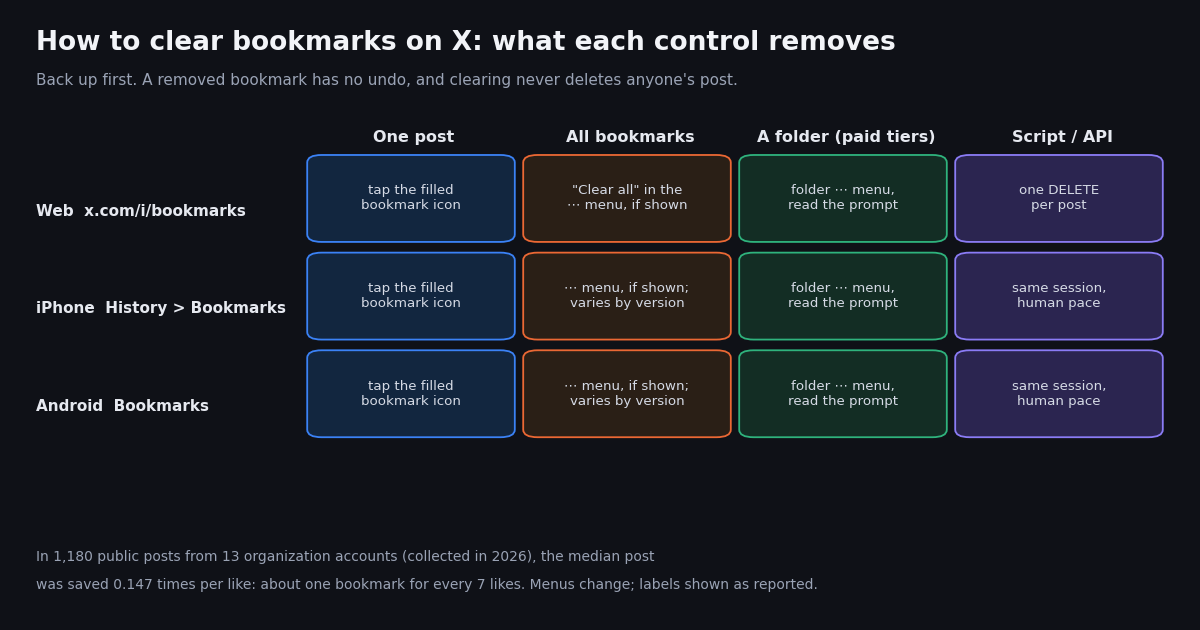
This table is the short version of the page. It maps each place you can act (web, iPhone, Android, the official API and a script) to the action and to what actually disappears. Nothing in it deletes a post from X: every action only edits your private list.
The common thread. Only the Clear all option removes everything in one step, and none of these controls has an undo or a trash folder. If a bookmark matters, copy it somewhere before you clear.
How to clear all bookmarks at once (and why you may not see the option)
Step 1. Open the Bookmarks screen on the account you want to clear.
Step 2. Tap the three-dot menu at the top of the screen.
Step 3. Choose Clear all Bookmarks and confirm in the dialog. Every saved post is removed from the list in one step.
If the option is missing. It is not universal. Searching public posts on X this year turned up both kinds of reports: people who found Clear All Bookmarks on their phone (and some who tapped it by accident), and people asking X where the option went or to bring it back, with complaints going back to late 2024. X does not publish a changelog for this menu that we could fetch, and X's help page on bookmarks (help.x.com/en/using-x/bookmarks) blocks automated access, so we cannot confirm which surfaces show it on your account today. Update the app, check both the web and the phone, and if neither shows it, your only built-in choice is removing posts one at a time.
What Clear all does not do. It does not delete posts, unlike anything, or touch your Likes tab in History. Whether it also empties bookmark folders on paid tiers is not something we could confirm from X's documentation, so read the confirmation text before you tap.
There is no undo. The confirmation dialog is the last chance. If there is anything in the list you want to keep, do the backup in the next sections first.
Bookmark folders: what deleting a folder does
Bookmark folders let you sort saved posts into named groups. They are a paid feature: X's help page for its paid tier (help.x.com/en/using-x/x-premium, blocked for automated fetch, cited by URL) lists Bookmark folders among its features, and X Premium is now sold to new buyers as part of The X Subscription (xAI's documentation at docs.x.ai/x-subscription/x-premium maps the old Premium benefits to the Plus tier and Premium+ benefits to Premium and above). Folder names are private, like the bookmarks in them.
Deleting a folder is done from the folder's own menu. What happens to the posts inside is the part people worry about: we could not confirm from a primary source whether they stay in your main Bookmarks list or go with the folder, and the behavior has varied in third-party reports. The confirmation dialog says which one applies on your account, so read it. If you want to keep the posts, move them out of the folder first.
Clearing versus deleting folders. Clear all Bookmarks and Delete folder are separate controls. If your goal is a clean slate on a paid tier, plan to do both, and back up before either.
If your subscription lapses. Folders are a paid-tier feature, so check your folders before canceling and export anything you want to keep. See our X Premium guide for the current tiers.
Back up your bookmarks before you clear them
Clearing is permanent and X keeps no copy you can restore. Bookmarks are private to you (X's API docs say so), so nobody else has a backup either. Three ways to keep one:
1. Your X data archive. Request it in Settings under Your account, then Download an archive of your data (help.x.com/en/managing-your-account/how-to-download-your-x-archive). Several third-party guides report that the archive does not contain a bookmarks file; we could not confirm that from X's own help text, so open the archive when it arrives and look before you rely on it.
2. The official X API. GET /2/users/:id/bookmarks lists your bookmarks and GET /2/users/:id/bookmarks/folders lists folders, with a user access token (OAuth 2.0 PKCE). X's pay-per-usage rate card (docs.x.com/x-api/getting-started/pricing) charges $0.005 per post read, so exporting 1,000 bookmarks is about $5 of reads, plus a developer app setup.
3. A script on your own session. TwitterAPI.io's /twitter/bookmarks_v2 returns the bookmarks of an account you log in with, in the same tweet format as its other endpoints, with has_next_page and next_cursor. The script at the end of this page saves them to a CSV before it removes anything. It needs one /twitter/user_login_v2 login ($0.10, with a proxy you supply) that returns login_cookies; the calls then act as your account.
What to keep. At minimum the post URL. With the URL you can reopen the post later even after it leaves your list, unless the author deletes it or protects the account.
Bulk clear tools and scripts: the risks and the safer routes
Search results for this question are full of browser extensions and web services that promise to clear every bookmark in one click. They work in one of two ways, and both deserve a careful look before you install anything.
Browser extensions run inside your logged-in X tab and click the bookmark icon for you, post after post. They see everything the page sees, including your private bookmarks and messages screens if they choose to. Check who publishes the extension, how many permissions it asks for ("read and change all your data on all websites" is a red flag for a single-purpose tool) and whether it is still updated.
Web services either ask you to authorize an app through X's official login, which gives them a token scoped to what you approve, or ask for your password or session cookies directly. Never hand a password or cookies to a site you do not control: a session cookie is as good as your password until it expires.
Account risk. Any tool that removes hundreds of bookmarks in seconds is doing it as your account. X can rate-limit, lock or suspend accounts that act faster than a person would. A slow, one-at-a-time pace is safer than a burst, whichever tool you use.
The lower-risk bulk option is the built-in Clear all Bookmarks control where X shows it. If it is missing, removing posts by hand over a few sessions, or a script you run yourself on your own account at a human pace, keeps your login in your hands.Your own script. If you have thousands of bookmarks and no Clear all option, a script that removes them one at a time is the remaining route. There is no bulk endpoint on either side: X's manage-bookmarks quickstart documents only DELETE /2/users/{id}/bookmarks/{tweet_id}, one post per call, with a user access token that has the bookmark.write scope.
Official X API. Create a developer app, run the OAuth 2.0 PKCE flow for your own account, list the bookmarks with GET /2/users/:id/bookmarks, and call the DELETE endpoint for each. Post reads are $0.005 each on X's pay-per-usage rate card.
TwitterAPI.io session. Log in once with /twitter/user_login_v2 ($0.10, with a proxy you supply) to get login_cookies, list with /twitter/bookmarks_v2, and remove with /twitter/unbookmark_tweet_v2. Session actions such as posting, liking and following are 60 credits ($0.0006) per call; check the pricing page for the bookmark endpoints. The call acts as your account, so X can rate-limit, lock or suspend it; keep a human pace (the script waits a few seconds between removals); the session can need a fresh login; and every HTTP 200 call is billed, whatever X decided.
Reading public posts needs no login. If all you want is the public numbers on posts (likes, bookmarkCount, views), our read endpoints need no X account: $0.15 per 1,000 tweets returned, compared with $5 per 1,000 post reads on X's pay-per-usage rate card, about 33x. That is how we ran the study below. New accounts that pass the automatic bot check get up to $1 of free credits (up to 100,000 credits, no card, one per person or network, expiring after 31 days).
# Remove ONE bookmark on your own session (TwitterAPI.io)
import os, requests
r = requests.post(
    "https://api.twitterapi.io/twitter/unbookmark_tweet_v2",
    headers={"X-API-Key": os.environ["TWITTERAPI_IO_API_KEY"]},
    json={"login_cookies": os.environ["LOGIN_COOKIES"],
          "proxy": os.environ["PROXY"],
          "tweet_id": "1234567890123456789"},
    timeout=60,
)
print(r.status_code, r.json().get("status"), r.json().get("msg"))What people actually bookmark: 1,180 public posts measured
Your own bookmarks are private, but every public post shows how many times it was saved in total. We read that bookmarkCount on 1,180 original posts from 13 organization accounts and compared it with likes and views. Collected in 2026.
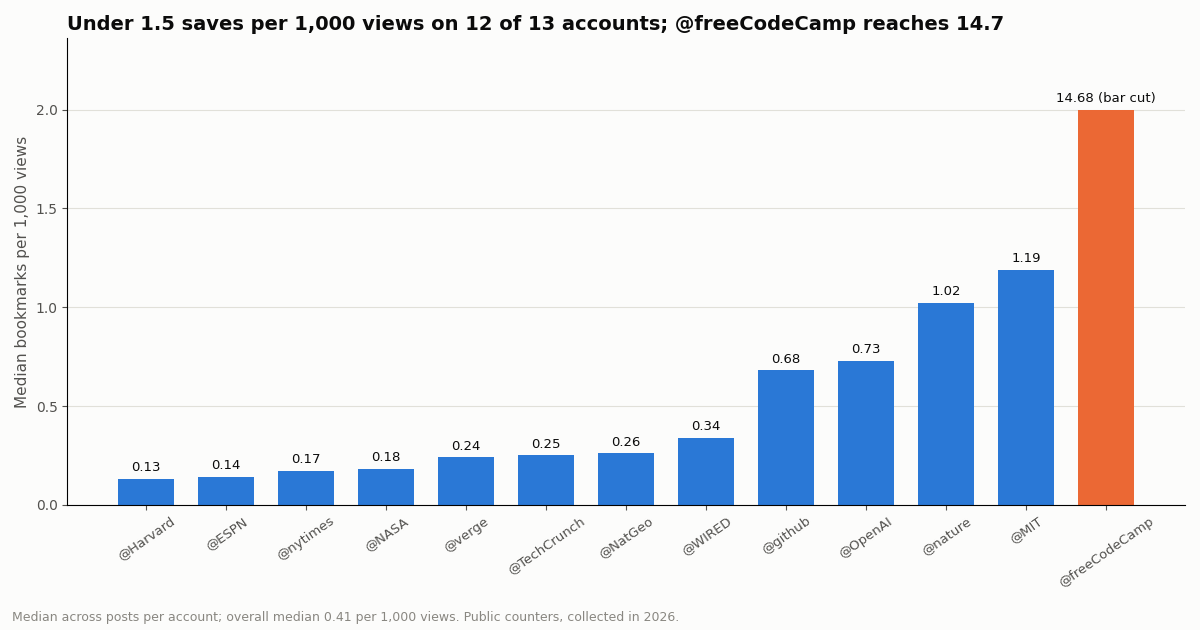
The baseline. The median post was bookmarked 0.15 times per like, about one save for every 7 likes, and 0.41 times per 1,000 views. Only 0.9% of posts had zero bookmarks, and only 0.8% had more bookmarks than likes. Bookmarks track likes closely (Spearman rank correlation 0.88) and views less closely (0.64).
The account matters far more than the format. @freeCodeCamp, which posts tutorials and learning resources, was saved 0.80 times per like and 14.7 times per 1,000 views, and supplied 83.5% of the top tenth of posts by bookmarks per like. Sports and campus news sat at the other end: @ESPN 0.03 and @Harvard 0.04. Without @freeCodeCamp, the median across the other 1,067 posts is 0.13 per like.
A second sample, same pattern. Our guide on whether people can see your Twitter bookmarks measured a different set of posts earlier and also found that the account mattered more than the format. This sample adds saves per 1,000 views and an education account, and the gap between reference content and news is wider than any format effect.
What this means for your own list. People save things they plan to come back to: guides, references, papers, code. That is exactly the kind of post that is useful again later, so a quick backup before clearing is worth the minute it takes.
Do links, photos or videos get bookmarked more?
Raw medians by post type mostly reflect which accounts post which formats, so we also divided each post's bookmarks per like by its own account's median. A value of 1.00x means the format is saved at that account's usual rate.
Reading the table. Within the same account, links (1.00x), photos (0.92x) and videos (1.02x) are saved at close to the account's usual rate. Text-only posts (1.19x) and quote posts (1.27x) come out higher, but each group has only 17 posts, so treat that as a hint rather than a finding. Photos make up 84.4% of the top tenth by bookmarks per like against 24.3% of all eligible posts, almost entirely because @freeCodeCamp posts its guides as images.
Correlation, not rules. This is what happened in our sample, not how X ranks or treats bookmarks. Views also depend on how long a post has been up, which is why we left out posts younger than a day.
How we collected this
Question. How often are public posts bookmarked relative to likes and views, and which accounts and post types are saved relatively more?
Accounts. 14 public organization accounts: @NASA, @nytimes, @github, @TechCrunch, @WIRED, @NatGeo, @Harvard, @nature, @verge, @Reuters, @ESPN, @MIT, @freeCodeCamp and @OpenAI. @Reuters posts so often that all of its sampled posts were less than a day old, so it dropped out and 13 accounts remain.
Method. Up to six pages (about 120 posts) of each account's recent timeline from /twitter/user/last_tweets, newest first, without replies. 1,680 posts came back from 84 requests, about $0.25 at $0.15 per 1,000 tweets. We dropped 250 reposts (their counters belong to the original author) and 250 posts younger than 24 hours, leaving 1,180. Post types: link (an outside URL, no media), photo, video (including GIFs), text only, quote post. Medians throughout; the account-relative ratio divides each post's bookmarks per like by its account's median.
What the sample cannot show. It says nothing about any individual's bookmarks, which are private. It covers large organization accounts, not personal accounts, and only their latest posts in 2026. Bookmark and view counts keep rising after posting, so older posts in the window had more time to collect them.
Privacy. Aggregates only, organization accounts only; no analysis of reposted or quoted authors; raw pages were not kept in the repository.
"""backup_then_clear_bookmarks.py - save a copy of your own X bookmarks to CSV,
then (only if you ask for it) remove them one at a time at a human pace.

Runs on YOUR OWN account through an authenticated session:
  1. POST /twitter/user_login_v2 once (user_name, email, password, proxy you supply,
     optional totp_secret) returns login_cookies. Keep them private.
  2. POST /twitter/bookmarks_v2 lists the bookmarks of that account (cursor paging).
  3. POST /twitter/unbookmark_tweet_v2 removes one bookmark per call.
Every call acts as your account: X can rate-limit, lock or suspend it, the session can
need a fresh login, and each HTTP 200 call is billed. This is not a way around any limit.

    pip install requests
    export TWITTERAPI_IO_API_KEY=...      # twitterapi.io dashboard
    export LOGIN_COOKIES=...              # from /twitter/user_login_v2
    export PROXY=http://user:pass@host:port
    python backup_then_clear_bookmarks.py            # backup only (default)
    CLEAR=yes python backup_then_clear_bookmarks.py  # backup, then remove
"""
import csv
import os
import time

import requests

BASE = "https://api.twitterapi.io"
HEADERS = {"X-API-Key": os.environ["TWITTERAPI_IO_API_KEY"]}
SESSION = {"login_cookies": os.environ["LOGIN_COOKIES"], "proxy": os.environ["PROXY"]}
PAUSE_SECONDS = 4  # one action every few seconds, like a person tapping the icon


def list_bookmarks(max_pages=100):
    """Yield every bookmarked post, newest first, following next_cursor."""
    body = {**SESSION, "count": 20}
    for _ in range(max_pages):
        r = requests.post(f"{BASE}/twitter/bookmarks_v2", headers=HEADERS, json=body, timeout=60)
        r.raise_for_status()
        data = r.json()
        if data.get("status") == "error":
            raise SystemExit(f"bookmarks_v2: {data.get('msg')}")
        yield from data.get("tweets", [])
        if not data.get("has_next_page") or not data.get("next_cursor"):
            return
        body["cursor"] = data["next_cursor"]
        time.sleep(PAUSE_SECONDS)


def backup(posts, path="x-bookmarks-backup.csv"):
    fields = ["id", "url", "createdAt", "author", "text", "likeCount", "bookmarkCount", "links"]
    with open(path, "w", newline="", encoding="utf-8") as f:
        w = csv.DictWriter(f, fieldnames=fields)
        w.writeheader()
        for t in posts:
            urls = [u.get("expanded_url") for u in (t.get("entities") or {}).get("urls", []) if u.get("expanded_url")]
            w.writerow({
                "id": t.get("id"), "url": t.get("url"), "createdAt": t.get("createdAt"),
                "author": (t.get("author") or {}).get("userName"), "text": t.get("text"),
                "likeCount": t.get("likeCount"), "bookmarkCount": t.get("bookmarkCount"),
                "links": " ".join(urls),
            })
    print(f"saved {len(posts)} bookmarks to {path}")


def remove(tweet_id):
    r = requests.post(f"{BASE}/twitter/unbookmark_tweet_v2", headers=HEADERS,
                      json={**SESSION, "tweet_id": tweet_id}, timeout=60)
    if r.status_code == 429:
        time.sleep(60)  # back off, then try once more
        r = requests.post(f"{BASE}/twitter/unbookmark_tweet_v2", headers=HEADERS,
                          json={**SESSION, "tweet_id": tweet_id}, timeout=60)
    r.raise_for_status()
    data = r.json()
    return data.get("status") != "error", data.get("msg")


if __name__ == "__main__":
    posts = list(list_bookmarks())
    backup(posts)                      # always keep the copy first: removal has no undo
    if os.environ.get("CLEAR") != "yes":
        raise SystemExit("backup only; set CLEAR=yes to remove them")
    done = 0
    for t in posts:
        ok, msg = remove(t["id"])
        if not ok:
            print(f"stopped at {t['id']}: {msg}")  # a login prompt or a limit: stop, do not retry in a loop
            break
        done += 1
        time.sleep(PAUSE_SECONDS)
    print(f"removed {done} of {len(posts)}")
Researching this?Free starter credits cover end-to-end testing — Google sign-in, no card. Get a key.
Questions readers ask
How do I clear all bookmarks on X at once?
Open Bookmarks, tap the three-dot menu at the top and choose Clear all Bookmarks, then confirm. The option is not shown on every account or app version, so check both the web (x.com/i/bookmarks) and the app. If neither shows it, remove posts one at a time.
How do I clear all bookmarks on X on iPhone?
On many iPhones the Bookmarks menu item is now History; open it and choose the Bookmarks tab. Then use the three-dot menu on that screen and Clear all Bookmarks where your version offers it. Older versions still show a Bookmarks item in the side menu.
Can I undo Clear all Bookmarks?
No. There is no undo or trash folder. Back up the post URLs first, either through the official X API, a script on your own account, or by checking whether your X data archive includes them.
Does deleting a bookmark notify the author or delete the post?
No. Bookmarks are private to the account that created them, per X's API documentation. Removing one only edits your list; the post stays on X with its likes and replies.
What happens to posts when I delete a bookmark folder?
We could not confirm this from a primary X source, and reports differ. Read the confirmation dialog when you delete the folder, and move posts you want to keep out of the folder first. Folders are a paid-tier feature.
Why did the Clear all Bookmarks option disappear?
X has added and removed it across app versions; public posts on X from late 2024 onward include people asking where it went. Update the app and check the web Bookmarks page as well.
Is there an API to delete all bookmarks?
No bulk endpoint is documented. The official X API removes one bookmark per call with DELETE /2/users/:id/bookmarks/:tweet_id and a bookmark.write user token. TwitterAPI.io's /twitter/unbookmark_tweet_v2 also removes one per call on your own logged-in session; keep a human pace.
Are bookmark extensions safe to use?
Only if you trust the publisher. Extensions run inside your logged-in session and web services may ask for your password or cookies. Prefer X's built-in Clear all option, and never hand your password or cookies to a site you do not control.
Continue
- X API docs: Bookmarks introduction (bookmarks are private to the user who created them; list, add, remove and folder endpoints)
- X API docs: Manage bookmarks quickstart (DELETE /2/users/{id}/bookmarks/{tweet_id}, bookmark.write scope, one post per call)
- TechCrunch: X launches a History tab for bookmarks, likes, videos, and articles (iOS Bookmarks renamed History)
- xAI docs: X Premium customers and The X Subscription tiers
- X API pricing: pay-per-usage rate card ($0.005 per post read)
- TwitterAPI.io API reference (bookmarks_v2, unbookmark_tweet_v2, user_login_v2, last_tweets)
- X (Twitter) API overview and endpoints
- Can people see your Twitter (X) bookmarks?
- Export X bookmarks and search them with AI
- Tweet metadata fields, including bookmarkCount
- How to download tweets with an API
- Bulk unlike and unretweet on X with your own script
- X Premium and The X Subscription tiers
- TwitterAPI.io pricing per tweet and per profile
- 01Twitter (X) Video Length Limit in 2026: How Long a Video Can Be, by Account
- 02Twitter (X) API on AWS Lambda: an EventBridge poller with SQS fan-out
- 03Twitter (X) API Examples: 11 Requests With Real Responses, Sizes and Latency
- 04How to Clear Twitter (X) Cache on iPhone, Android and Desktop
- 05How the X (Twitter) Algorithm Works, and How to Reset Your Feed
- 06X (Twitter) Bookmarks + AI: Export Them, Then Let a Model Sort and Search Them
- 07Can People See Your Twitter (X) Bookmarks? What Others See, and the One Public Number
- 08How to Clear Your Twitter (X) History: Searches, Watch History, and Posts
Writing about something you built with TwitterAPI.io? Our community rewards program pays API credits for honest tutorials, build logs and videos.
Stop reading. Start building.
Starter credits cover real testing on real data. Google sign-in, no card, no application queue.
Get an API keyAlready building with TwitterAPI.io? Publish an honest tutorial or build log about it and earn up to $200 a month in API credits.