Twitter (X) API Examples: 11 Requests With Real Responses, Sizes and Latency
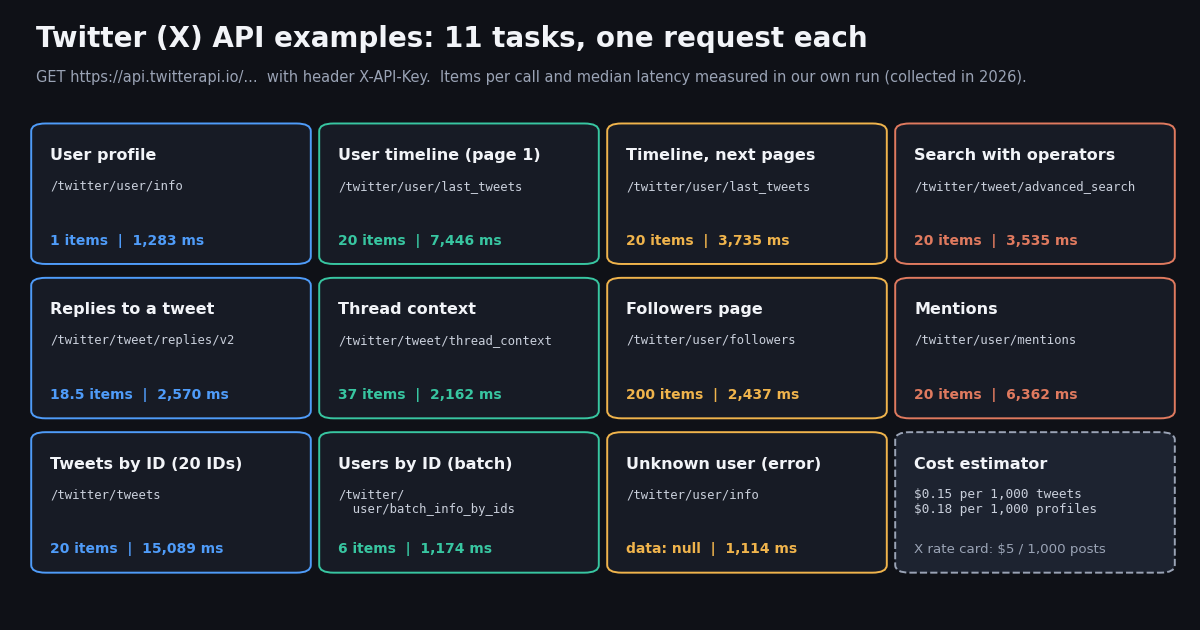
- One header, one base URL. Every example is one GET to
https://api.twitterapi.iowithX-API-Key; no OAuth, no X developer account. - Measured, not guessed. 61 live requests across 11 tasks, at least 5 calls each, collected in 2026: median latency 2.6 s, p90 9.5 s.
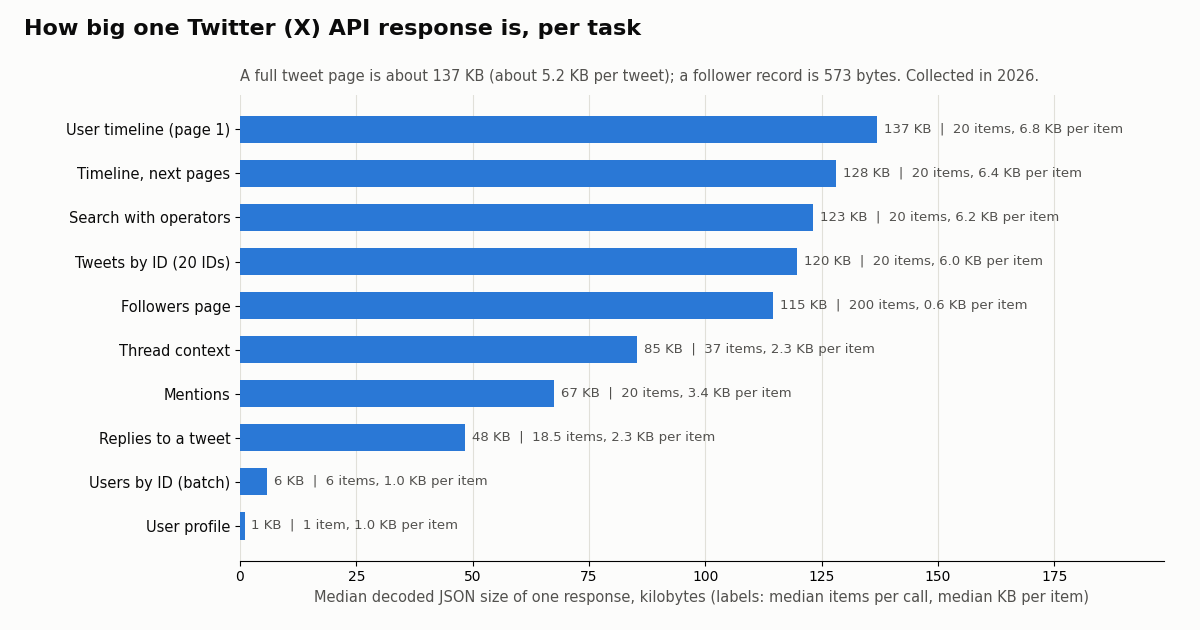
- Size planning. A 20-tweet page was about 137 KB; a profile 970 bytes; a follower record 573 bytes.
- Two shape gotchas. Timelines nest tweets under
data.tweets; search, replies and mentions return top-leveltweets. In 6 of 6 reply calls the first item was the requested post itself. - Cost per example. A full 20-tweet page is $0.003 here and $0.10 at X's $0.005-per-post-read rate card; a 200-follower page is $0.002 to $0.006 here and $2.00 at $0.010 per follower read.
- Errors. An unknown handle is HTTP 200 with
status: "error"andmsg: "user not found"; retry only 429 and 5xx with backoff.
Search results for Twitter API examples are full of code written for endpoints that no longer behave the way the sample assumes: v1.1 snippets, OAuth 1.0a signing helpers, and sample repositories that need a paid X developer project before the first line runs. What a developer actually wants is short: the request, what comes back, how big it is, how long it takes, and what it costs. This page is that, for the eleven tasks that cover the majority of X data work.
Each example below is one HTTP GET in Python requests, followed by a trimmed response from a real call we made, and the size and latency we measured over at least five calls per task. If you came here for the X developer application form question "How will you use the Twitter API or Twitter data?", that is a different page: see our guide to answering the developer sign-up question (linked below). If you want a full client in one language rather than one-request recipes, the per-language guides for Python, Go, PHP, Java, C# and Rust are linked at the end.
Setup is the same for every snippet: pip install requests, put your key in an environment variable (export TWITTERAPI_IO_KEY=...), and run. New accounts that pass the automatic bot check get up to $1 of free credits (up to 100,000 credits, no card, one per person or network, expiring after 31 days), which is enough to run every example on this page many times over.
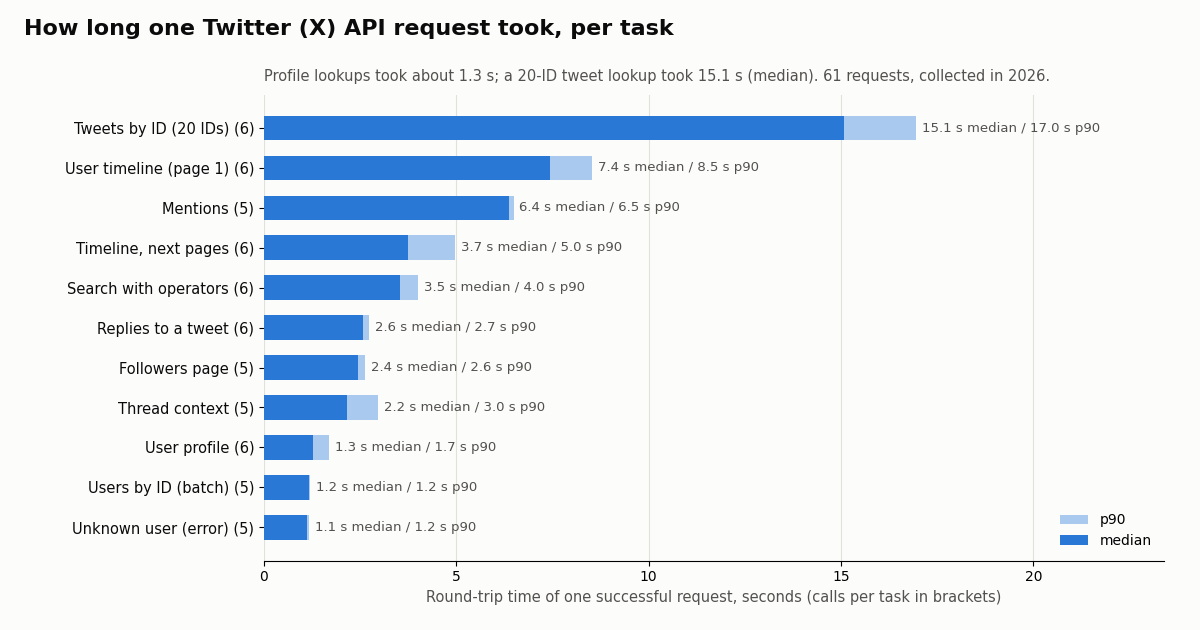
2.6 s median (9.5 s p90) over 61 live requests, collected in 2026. A profile took 1.3 s and 970 bytes; a 20-tweet page about 137 KB.
The eleven examples at a glance, with what we measured
Before the code, the numbers. We called each endpoint at least five times against public organization accounts (NASA, GitHub, Docker, Vercel, NVIDIA, SpaceX and others), timed every successful request, and recorded the decoded JSON size and the number of items returned. That is 61 requests and 1,915 items (879 tweets plus profiles and follower records), collected in 2026. The table is the reference card; the sections that follow give the request for each row.
Reading the table. Time is the round trip of one successful request from our machine, not an SLA: it moves with network path, time of day and load. The 20-ID tweet lookup was the slow outlier at 15.1 s median, so batch IDs and run those lookups off the request path. Profile lookups were consistently near 1.3 s. Sizes are the decoded JSON, before any gzip on the wire.
Why the size matters. If you store raw responses, a 20-tweet page at well over 100 KB adds up quickly: 1,000 pages is over 100 MB of JSON. Keep the fields you use (id, createdAt, text, the counts, author.userName) and drop the rest at ingest, or store gzip-compressed.
Examples 1 and 2: a user profile by handle, and many profiles by ID
A profile is the smallest useful request: one handle in, one user object out. /twitter/user/info?userName=NASA returns data with id, userName, name, followers, following, statusesCount, createdAt, isBlueVerified, isAutomated and more. The same call as a one-liner is curl -H "X-API-Key: $TWITTERAPI_IO_KEY" "https://api.twitterapi.io/twitter/user/info?userName=NASA".
Real response (trimmed). {"id": "11348282", "userName": "NASA", "name": "NASA", "followers": 92110305, "following": 115, "statusesCount": 74583, "createdAt": "2007-12-19T20:20:32.000000Z", "isBlueVerified": true, "isAutomated": false} with status: "success". Over 6 calls the body was 970 bytes median and the request took 1.3 s median, 1.7 s p90.
Many users at once. When you already hold numeric IDs (from a follower list, an author field, a database), /twitter/user/batch_info_by_ids?userIds=11348282,13334762,... returns a top-level users array in camelCase. In our run a 6-ID batch came back in 1.2 s median at 5,860 bytes, about 977 bytes per user, so one batch call costs about the same time as a single lookup.
Field-name gotcha. Profiles from user/info and batch_info_by_ids are camelCase (userName, followers, statusesCount); follower and search-user lists are snake_case (screen_name, followers_count, statuses_count). Normalize in one place if you mix them.
Cost. Profiles are $0.18 per 1,000 returned, so one lookup is $0.00018 and the 6-user batch about $0.00108. On the official X API rate card a user read is $0.010, so the same six users are $0.06.
import os
import requests

BASE = "https://api.twitterapi.io"
HEADERS = {"X-API-Key": os.environ["TWITTERAPI_IO_KEY"]}

# 1. One profile by handle
r = requests.get(f"{BASE}/twitter/user/info", headers=HEADERS,
                 params={"userName": "NASA"}, timeout=30)
r.raise_for_status()
body = r.json()
if body.get("status") == "error":          # unknown handle: HTTP 200, data is null
    print("lookup failed:", body.get("msg"))
else:
    u = body["data"]
    print(u["id"], u["userName"], u["followers"], u["createdAt"])

# 2. Many profiles by numeric ID in one request
ids = ["11348282", "13334762"]               # NASA, GitHub
r = requests.get(f"{BASE}/twitter/user/batch_info_by_ids", headers=HEADERS,
                 params={"userIds": ",".join(ids)}, timeout=30)
r.raise_for_status()
for u in r.json().get("users", []):
    print(u["id"], u["userName"], u["followers"], u["statusesCount"])
Examples 3 and 4: a user timeline and the pagination loop
/twitter/user/last_tweets?userName=github returns the account's latest posts, newest first, 20 per page. Note the nesting: the tweets are under data.tweets, while has_next_page and next_cursor sit at the top level. Add includeReplies=true if you also want the account's replies.
Real response (trimmed). The first NASA post in our run: {"createdAt": "Tue Nov 24 22:04:39 +0000 2026", "likeCount": 895, "retweetCount": 156, "replyCount": 59, "viewCount": 121664, "bookmarkCount": 93, "isReply": false}. Timestamps are strings like Tue Nov 24 22:04:39 +0000 2026; parse them with datetime.strptime(s, "%a %b %d %H:%M:%S %z %Y").
What we measured. The first page of six accounts was 137 KB median (6.8 KB per tweet) and took 7.4 s median. Following the cursor through 6 further pages of @github returned 120 tweets at 3.7 s median per page (5.0 s p90). One of those page requests needed 3 retries after HTTP 503 responses before it succeeded, which is exactly why the loop belongs inside a retry wrapper.
Loop rules. Stop when has_next_page is false or next_cursor is empty, cap the number of pages you will follow, and store the newest tweet ID you saw so the next run can stop early when it reaches it. That one stored ID is the difference between re-reading a timeline and reading only what is new.
Cost. A full 20-tweet page is 20 x $0.00015 = $0.003; the same 20 posts at X's $0.005 per post read are $0.10, about 33x more per 1,000 tweets ($5 against $0.15).
import os
import requests

BASE = "https://api.twitterapi.io"
HEADERS = {"X-API-Key": os.environ["TWITTERAPI_IO_KEY"]}

def timeline(user, max_pages=5, include_replies=False):
    """Yield a user's latest tweets, newest first, following next_cursor."""
    params = {"userName": user, "includeReplies": str(include_replies).lower()}
    for _ in range(max_pages):
        r = requests.get(f"{BASE}/twitter/user/last_tweets", headers=HEADERS,
                         params=params, timeout=60)
        r.raise_for_status()
        body = r.json()
        data = body.get("data") or {}           # tweets sit under data, cursor at top level
        for t in data.get("tweets", []):
            yield t
        if not body.get("has_next_page") or not body.get("next_cursor"):
            break
        params["cursor"] = body["next_cursor"]


for t in timeline("github", max_pages=3):
    print(t["createdAt"], t["likeCount"], t["viewCount"], t["text"][:60])
Example 5: keyword search with operators
/twitter/tweet/advanced_search takes query (the same operator syntax as X's search box) and queryType (Latest or Top), and returns up to 20 tweets per page in a top-level tweets array, with has_next_page and next_cursor. Queries can be up to 512 characters.
Operators we used in the study. from:NASA filter:media, from:github filter:links, from:Docker -filter:replies, from:vercel min_faves:20, from:nvidia lang:en and from:SpaceX -filter:retweets. Every one returned a full page of 20.
Time windows. Use since_time: and until_time: with Unix seconds, or since_id: with a tweet ID for incremental polling. The documentation for this endpoint (docs.twitterapi.io/api-reference/endpoint/tweet_advanced_search) says the date-style since:/until: forms are not supported here, and recommends splitting large date ranges into windows rather than paging very deep on one broad query.
What we measured. 6 searches, 123 KB median per page (6.2 KB per tweet), 3.5 s median and 4.0 s p90.
Cost. Search is billed per tweet returned like every other tweet endpoint: $0.003 for a full page. A search that finds nothing is billed the 15-credit minimum, $0.00015, which is what an idle polling loop pays per empty check.
import os
import requests

BASE = "https://api.twitterapi.io"
HEADERS = {"X-API-Key": os.environ["TWITTERAPI_IO_KEY"]}

import time

def search(query, query_type="Latest", max_pages=3):
    """Advanced search. Tweets are top-level here (not under data)."""
    params = {"query": query, "queryType": query_type, "cursor": ""}
    for _ in range(max_pages):
        r = requests.get(f"{BASE}/twitter/tweet/advanced_search", headers=HEADERS,
                         params=params, timeout=60)
        r.raise_for_status()
        body = r.json()
        for t in body.get("tweets", []):
            yield t
        if not body.get("has_next_page"):
            break
        params["cursor"] = body["next_cursor"]


day_ago = int(time.time()) - 86400
q = f"from:NASA filter:media -filter:replies since_time:{day_ago}"
for t in search(q):
    print(t["id"], t["createdAt"], t["likeCount"], t["url"])
Examples 6 and 7: replies to a tweet and the full thread
/twitter/tweet/replies/v2?tweetId=... returns direct replies to one post, page by page. /twitter/tweet/thread_context?tweetId=... returns the conversation around a post: the chain of parents it replies to and the replies beneath it. Both return top-level tweets, has_next_page and next_cursor.
A detail the docs do not spell out. In our run the first item of the response was the requested tweet itself in 6 of 6 reply calls and in 5 of 5 thread calls. Filter it out by ID (t["id"] != tweet_id) before you count replies, or your counts will be off by one per page.
What we measured. Replies to six high-traffic organization posts: 18.5 items median per first page, 48 KB, 2.6 s median. Thread context: 37 items median per call, 85 KB, 2.2 s median. Reply and thread tweets were smaller than timeline tweets (about 2.3 KB each against 6.8 KB); we did not break down why, so size your storage from your own replies.
Privacy note. Reply authors are mostly private individuals, so we do not reproduce their posts here; our study kept only counts and sizes from these responses.
Cost. Billed per tweet returned: a 37-item thread response is about $0.00555, against $0.185 for the same number of post reads at $0.005 each.
import os
import requests

BASE = "https://api.twitterapi.io"
HEADERS = {"X-API-Key": os.environ["TWITTERAPI_IO_KEY"]}

TWEET_ID = "2125349905409438136"   # a NASA post from our run; use any public tweet ID

# Direct replies (first page). Item 0 was the requested tweet itself in every call we made.
r = requests.get(f"{BASE}/twitter/tweet/replies/v2", headers=HEADERS,
                 params={"tweetId": TWEET_ID}, timeout=60)
r.raise_for_status()
body = r.json()
replies = [t for t in body.get("tweets", []) if t["id"] != TWEET_ID]
print(len(replies), "replies on this page; more:", body.get("has_next_page"))

# The whole thread around a tweet (parents and replies)
r = requests.get(f"{BASE}/twitter/tweet/thread_context", headers=HEADERS,
                 params={"tweetId": TWEET_ID}, timeout=60)
r.raise_for_status()
for t in r.json().get("tweets", []):
    print(t["id"], t.get("inReplyToId"), t["text"][:50])
Examples 8 to 10: followers, mentions and tweets by ID
Followers. /twitter/user/followers?userName=github returns about 200 profiles per page in a top-level followers array, newest followers first, with snake_case fields (screen_name, followers_count, created_at, statuses_count, can_dm, protected, ...). In our run every page held 200 records, 115 KB median, 573 bytes per follower, 2.4 s median. Pricing is 1 to 3 credits per follower returned depending on the page tier, so a 200-follower page is $0.002 to $0.006; X's rate card lists $0.010 per follower read, $2.00 for the same 200.
Mentions. /twitter/user/mentions?userName=github returns posts that mention the handle, 20 per page, in top-level tweets. We measured 67 KB median per page and 6.4 s median. Mentions are written by the public at large, so treat them as data about private people: aggregate, do not republish. Our guide to the mentions endpoint covers sinceTime / untilTime windows and polling.
Tweets by ID. /twitter/tweets?tweet_ids=id1,id2,... hydrates up to 50 IDs per call (51 returns HTTP 400), and the tweets array does not keep your input order, so key results by id. With 20 IDs per call it was the slowest task in our run: 15.1 s median, 17.0 s p90, for 120 KB. Use it in a background job (refreshing engagement counts, re-checking saved posts), not on a page a user is waiting for.
Missing IDs. A deleted or protected post simply does not come back. Compare the IDs you sent with the IDs you received rather than assuming one result per input.
import os
import requests

BASE = "https://api.twitterapi.io"
HEADERS = {"X-API-Key": os.environ["TWITTERAPI_IO_KEY"]}

# Followers: one page of about 200 profiles, snake_case fields, top-level "followers"
r = requests.get(f"{BASE}/twitter/user/followers", headers=HEADERS,
                 params={"userName": "github"}, timeout=60)
r.raise_for_status()
page = r.json()
for f in page.get("followers", [])[:5]:
    print(f["screen_name"], f["followers_count"], f["created_at"])
print("next cursor:", page.get("next_cursor") if page.get("has_next_page") else None)

# Mentions: posts that mention a handle, top-level "tweets"
r = requests.get(f"{BASE}/twitter/user/mentions", headers=HEADERS,
                 params={"userName": "github"}, timeout=60)
r.raise_for_status()
print(len(r.json().get("tweets", [])), "mentions on the first page")

# Tweets by ID: up to 50 IDs per call; results are not in input order, so key by id
ids = ["2125349905409438136"]
r = requests.get(f"{BASE}/twitter/tweets", headers=HEADERS,
                 params={"tweet_ids": ",".join(ids)}, timeout=60)
r.raise_for_status()
by_id = {t["id"]: t for t in r.json().get("tweets", [])}
for i in ids:
    t = by_id.get(i)
    print(i, t["likeCount"] if t else "not returned (deleted or protected)")
Example 11: error handling and 429 backoff
Lookup errors come back as HTTP 200. An unknown handle on /twitter/user/info returned HTTP 200 with {"status": "error", "msg": "user not found", "data": null} in all 5 of our calls (53 bytes, 1.1 s median). Check status before you read data, or your code will crash on None.
HTTP errors. A missing or invalid parameter is HTTP 400 with the reason in detail. Going over your key's requests-per-second limit is HTTP 429. Gateway trouble shows as 5xx; the search endpoint documentation says a 503 is not charged and should be retried after a few seconds. Retry 429 and 5xx with exponential backoff plus jitter; never retry other 4xx, fix the request instead.
Know your rate limit. Keys run at 0.2 requests per second before the first payment (one request every five seconds), 20 once paid, 50 on Scale, 500 on Business, and up to 1,000 on request. If you are running these examples on free credits, set the base delay to 5 seconds or the pagination loop will hit 429s.
Official X API, for comparison. X returns 429 with error code 88 and exposes x-rate-limit-remaining and x-rate-limit-reset headers; it budgets requests per 15-minute window (for example 300 per app for user lookup by username and 450 per app for recent search, per docs.x.com/x-api/fundamentals/rate-limits). The full matrix of status codes, billed vs unbilled responses and a negative cache is in our error-handling guide.
import os
import random
import time
import requests

BASE = "https://api.twitterapi.io"
HEADERS = {"X-API-Key": os.environ["TWITTERAPI_IO_KEY"]}
RETRY = {429, 500, 502, 503, 504}
BASE_DELAY = 1.0   # use 5.0 before your first payment (0.2 requests per second)


def get(url, params, tries=5):
    """GET with backoff on 429 / 5xx; fail fast on other 4xx; surface status:error bodies."""
    for attempt in range(tries):
        try:
            r = requests.get(url, headers=HEADERS, params=params, timeout=60)
        except requests.RequestException:
            time.sleep(BASE_DELAY * 2 ** attempt + random.random())
            continue
        if r.status_code in RETRY:
            time.sleep(BASE_DELAY * 2 ** attempt + random.random())
            continue
        if r.status_code == 400:
            raise ValueError(f"bad request: {r.json().get('detail')}")
        r.raise_for_status()
        body = r.json()
        if body.get("status") == "error":
            raise LookupError(body.get("msg"))   # e.g. "user not found"
        return body
    raise RuntimeError(f"gave up on {url} after {tries} tries")


try:
    get(f"{BASE}/twitter/user/info", {"userName": "qz_no_such_account_123"})
except LookupError as e:
    print("not found:", e)
What each example costs, next to the official X API rate card
TwitterAPI.io bills per result returned: $0.15 per 1,000 tweets (15 credits each, $1 = 100,000 credits) and $0.18 per 1,000 profiles, with a 15-credit minimum ($0.00015) on a request that returns nothing, and no per-request cap. Followers are 1 to 3 credits per user by page tier. The official X API pay-per-usage rate card (docs.x.com/x-api/getting-started/pricing) lists $0.005 per post read, $0.010 per user read and $0.010 per follower or following read, with pay-per-usage capped at 3 million post reads a month and Enterprise above that.
The ratio. Per 1,000 tweets that is $0.15 here against $5 on X's rate card, about 33x. For profiles it is $0.18 against $10 per 1,000. Purchased credits never expire; subscriptions (Starter $29, Builder $99, Pro $199, Scale $499, Business $1,499 a month) are on the pricing page for higher rate limits.
Polling budget. If an example runs on a schedule, the empty checks are the floor: a search every 60 seconds that finds nothing is 43,200 checks a month, $6.48; every 5 minutes, $1.30. Everything returned on top is billed per tweet.
Writes are separate. All eleven examples are reads, which need no X account. Posting, liking, following or sending a DM runs through an authenticated session instead: one /twitter/user_login_v2 login ($0.10, with a proxy you supply) returns login_cookies, and each action such as /twitter/create_tweet_v2 is then 60 credits, $0.0006, billed per HTTP 200 call. Those calls act as that account, so X can rate-limit, lock or suspend it; keep a normal human pace, and expect the session to need a fresh login now and then.
# Rough cost of a job, from the published per-result prices (USD)
OUR = {"tweet": 0.15 / 1000, "profile": 0.18 / 1000, "follower_max": 3 / 100000}
X_RATE_CARD = {"tweet": 0.005, "profile": 0.010, "follower": 0.010}   # docs.x.com pay-per-usage
MIN_PER_REQUEST = 0.00015   # 15 credits, charged when a request returns nothing


def estimate(tweets=0, profiles=0, followers=0, empty_requests=0):
    ours = (tweets * OUR["tweet"] + profiles * OUR["profile"]
            + followers * OUR["follower_max"] + empty_requests * MIN_PER_REQUEST)
    x = tweets * X_RATE_CARD["tweet"] + profiles * X_RATE_CARD["profile"] + followers * X_RATE_CARD["follower"]
    return round(ours, 4), round(x, 2)


# 50,000 tweets, 2,000 profiles, 10,000 followers, 1,000 empty polls
print(estimate(tweets=50_000, profiles=2_000, followers=10_000, empty_requests=1_000))
How we collected this
Question. For the common X data tasks a developer copies from an examples page, what does one real request return: items per call, response size and round-trip time?
Accounts and calls. Public organization accounts only (NASA, GitHub, Docker, Vercel, NVIDIA, SpaceX, Microsoft, Google, OpenAI, Spotify). Eleven tasks, five or six calls each, 61 requests and 1,915 items in one session, collected in 2026. Searches used from: one of those accounts plus one operator; replies and threads used each account's recent post with the highest reply count.
Method. Each request went through our rate-limited read client (up to 5 requests per second, shared with other jobs). We timed each HTTP attempt from open to the end of the body read and report the successful attempt, so client-side rate-limit waits and retry sleeps are excluded; retries are counted separately. An earlier pass was discarded because its timer still included retry backoff. Size is the decoded JSON body re-serialized compactly in UTF-8, not the gzip size on the wire.
What this sample cannot show. It is one session from one location. Latency depends on network path, time of day and load, so read it as an order of magnitude, not a benchmark or a guarantee. Sizes depend on the accounts: media-heavy organizations produce larger tweet objects than text-only ones.
Privacy. Profiles and timelines are of organization accounts. Responses that contain private individuals (replies, threads, followers, mentions) were analyzed for counts and sizes only and never stored with the study; the published sample holds per-call numbers with no IDs, handles, URLs or text.
"""Twitter (X) API examples, end to end: profile -> timeline -> search -> replies.

pip install requests
export TWITTERAPI_IO_KEY=...   # from https://twitterapi.io/dashboard
"""
import os
import random
import time

import requests

BASE = "https://api.twitterapi.io"
HEADERS = {"X-API-Key": os.environ["TWITTERAPI_IO_KEY"]}
tweets_read = 0


def call(url, params):
    """One GET with backoff on 429 / 5xx. Returns the decoded JSON body."""
    for attempt in range(5):
        r = requests.get(url, headers=HEADERS, params=params, timeout=60)
        if r.status_code in (429, 500, 502, 503, 504):
            time.sleep(2 ** attempt + random.random())
            continue
        r.raise_for_status()
        return r.json()
    raise RuntimeError(f"gave up: {url}")


# 1) profile
info = call(f"{BASE}/twitter/user/info", {"userName": "NASA"})
if info.get("status") == "error":
    raise SystemExit(info.get("msg"))
user = info["data"]
print(f"@{user['userName']}: {user['followers']:,} followers, {user['statusesCount']:,} posts")

# 2) latest tweets, two pages (tweets live under data.tweets)
params = {"userName": "NASA"}
latest = []
for _ in range(2):
    body = call(f"{BASE}/twitter/user/last_tweets", params)
    latest += (body.get("data") or {}).get("tweets", [])
    if not body.get("has_next_page"):
        break
    params["cursor"] = body["next_cursor"]
tweets_read += len(latest)
print(len(latest), "timeline tweets")

# 3) search with operators (tweets are top-level here)
since = int(time.time()) - 7 * 86400
body = call(f"{BASE}/twitter/tweet/advanced_search",
            {"query": f"from:NASA filter:media since_time:{since}", "queryType": "Latest", "cursor": ""})
found = body.get("tweets", [])
tweets_read += len(found)
print(len(found), "media posts in the last 7 days (first page)")

# 4) replies to the busiest original post
originals = [t for t in latest if not t.get("isReply") and not t.get("retweeted_tweet")]
if originals:
    top = max(originals, key=lambda t: t.get("replyCount") or 0)
    body = call(f"{BASE}/twitter/tweet/replies/v2", {"tweetId": top["id"]})
    replies = [t for t in body.get("tweets", []) if t["id"] != top["id"]]
    tweets_read += len(body.get("tweets", []))
    print(len(replies), "replies on the first page of", top["url"])

print(f"tweets read: {tweets_read}, about ${tweets_read * 0.15 / 1000:.4f} at $0.15 per 1,000")
Researching this?Free starter credits cover end-to-end testing — Google sign-in, no card. Get a key.
Questions readers ask
Where can I find working Twitter API examples?
This page has eleven, each a single Python requests call with a real trimmed response: profile, profiles by ID, timeline, pagination, search, replies, thread, followers, mentions, tweets by ID and error handling. X's own sample repository (github.com/xdevplatform/Twitter-API-v2-sample-code) covers the official v2 endpoints in several languages and needs a bearer token from an X developer project.
What does a Twitter API request look like?
On TwitterAPI.io it is a plain HTTPS GET: curl -H "X-API-Key: $KEY" "https://api.twitterapi.io/twitter/user/info?userName=NASA". The response is JSON with status, msg and data. There is no OAuth signing step and no X account is needed for reads.
How do I paginate Twitter API results?
Read has_next_page and next_cursor from each response and pass the cursor back as cursor on the next request; stop when has_next_page is false. Cap the number of pages and store the newest tweet ID you saw so the next run can stop early.
Why does my code crash with None when a user does not exist?
An unknown handle returns HTTP 200 with status: "error", msg: "user not found" and data: null. Check status before reading data. HTTP 400 is a bad parameter (reason in detail), 429 is your per-key request rate, and 5xx should be retried with backoff.
How much does it cost to run these examples?
Tweets are $0.15 per 1,000 returned and profiles $0.18 per 1,000, with a $0.00015 minimum on a request that returns nothing. A full 20-tweet page is $0.003. New accounts that pass the automatic bot check get up to $1 of free credits (up to 100,000 credits, no card, one per person or network, expiring after 31 days).
How fast is a Twitter API request?
In our run, collected in 2026, the median across 11 tasks was 2.6 s. Profile lookups were about 1.3 s, a page of search results 3.5 s, and a 20-ID tweet lookup 15.1 s. Treat these as one session's measurements, not a guarantee.
Do I need Tweepy or another library?
No. Every endpoint here is a GET with one header, so requests (or fetch, net/http, HttpClient) is enough. Tweepy targets the official X API and its OAuth flows; it is not needed for these endpoints.
Continue
- X developer docs: pay-per-usage pricing (post, user and follower read rates, 3M post-read cap)
- X developer docs: rate limits (429, code 88, x-rate-limit headers, per-endpoint windows)
- X developer platform on GitHub: official v2 sample code by language
- TwitterAPI.io docs: advanced search parameters, operators and paging
- TwitterAPI.io docs: X-API-Key authentication and request rates
- Requests (Python HTTP library) documentation
- X API hub: endpoints, pricing and guides
- Twitter API Python guide: a full client
- Twitter API in Go
- Twitter API in PHP
- Twitter API in Java
- Twitter API in C#
- Twitter API in Rust
- Answering "How will you use the Twitter API?" on the X developer form
- Twitter (X) API error handling: status codes and backoff
- Twitter (X) API pagination with next_cursor
- Twitter (X) API mentions endpoint guide
- TwitterAPI.io API reference documentation
- 01How to Clear Bookmarks on X (Twitter): One Post, All of Them, or a Folder
- 02Twitter (X) Video Length Limit in 2026: How Long a Video Can Be, by Account
- 03Twitter (X) API on AWS Lambda: an EventBridge poller with SQS fan-out
- 04How to Clear Twitter (X) Cache on iPhone, Android and Desktop
- 05How the X (Twitter) Algorithm Works, and How to Reset Your Feed
- 06Tweepy vs TwitterAPI.io
- 07X API Voucher: Every Twitter (X) API Free-Credit Program, Who Gets It, How It Expires, and What Happens at $0
- 08How to Search Twitter (X) by Location in 2026: Near Me, Operators, and the API
Writing about something you built with TwitterAPI.io? Our community rewards program pays API credits for honest tutorials, build logs and videos.
Stop reading. Start building.
Starter credits cover real testing on real data. Google sign-in, no card, no application queue.
Get an API keyAlready building with TwitterAPI.io? Publish an honest tutorial or build log about it and earn up to $200 a month in API credits.