twikit for Twitter (X): how it works, why it breaks, and how to migrate each call
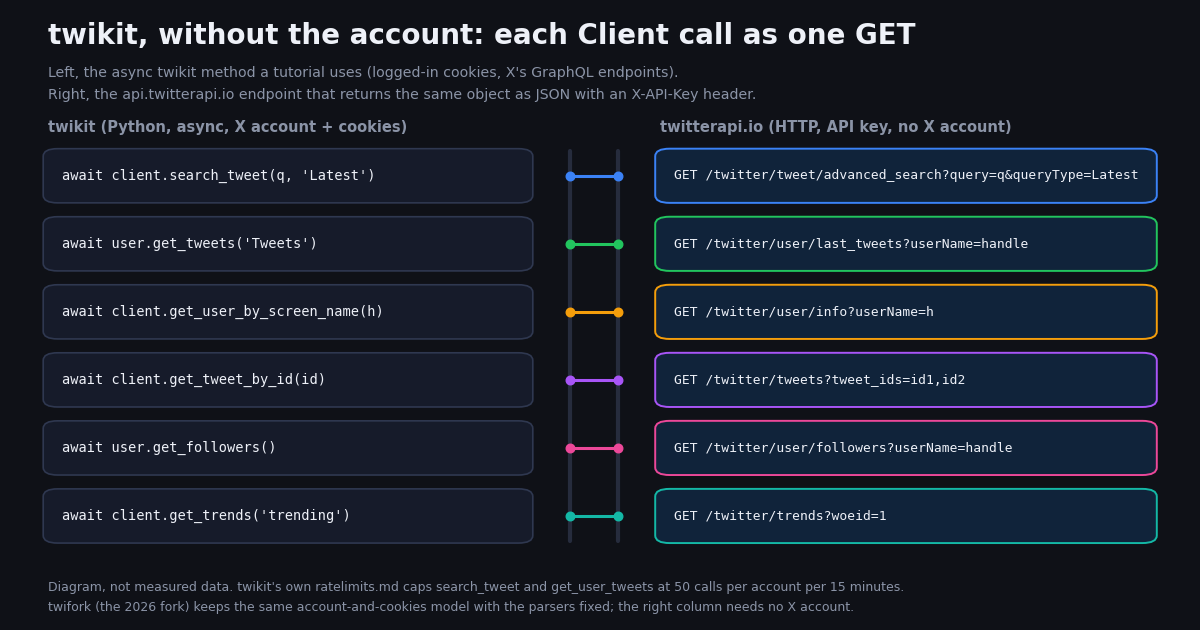
twikit is what people reached for when snscrape and twint stopped answering: a pip install, a Client('en-US'), an await client.login(auth_info_1=..., password=...), and then await client.search_tweet('python', 'Latest') returned real Tweet objects with favorite_count, view_count and a nested user. No developer portal, no bill. The library grew to 4.7k stars and 573 forks on GitHub, had its docs translated into Japanese and Chinese, and became the default answer in forum threads about scraping X in 2024 and 2025.
This page is for the developer who has twikit in a project today, or is about to add it, and wants a straight answer to three questions. How does it actually work, and what does that imply for the account you log in with? Is it still maintained, and what exactly did the twifork fork change? And if you would rather not run X accounts, proxies and a parser that X can break, what does each twikit call become on a hosted Twitter (X) API, with what fields, at what speed, for how much money? The wrapper at the end keeps await client.search_tweet(...) working so the migration is an import change.
Everything stated about twikit and twifork comes from the GitHub repositories (README, ratelimits.md, tweet.py, user.py, the issue tracker, releases) and PyPI as read this year. The coverage, page-size, timing and cost numbers come from a study we ran ourselves in 2026: the five most common twikit jobs run through their replacement endpoints, 82 requests, 1,199 tweets, 20 organization profiles and one followers page. Where the honest answer is "twikit does this and the API does not", the page says so.
What twikit is, and how it gets tweets without an API key
twikit's GitHub README describes it as "A Simple Twitter API Scraper" and states the two selling points in one line each: "This library uses scraping and does not require an API key" and "This library is free to use." The PyPI summary is "Twitter API wrapper for python with no API key required." The feature list covers both reads and writes: create tweets, search tweets, retrieve trending topics, retrieve a user's tweets, send direct messages, upload media. It is MIT-licensed, requires Python 3.8 or newer, and since version 2.0.0 (July 2024) every method is a coroutine: the synchronous client was discontinued, so client.search_tweet(...) became await client.search_tweet(...) and old code had to change.
The mechanism is the part most tutorials skip. twikit does not call api.x.com/2/.... It logs in the way a browser does, await client.login(auth_info_1='username', auth_info_2='email', password='...', cookies_file='cookies.json'), keeps the resulting session cookies, and then calls the GraphQL endpoints the x.com front end uses for a signed-in user: SearchTimeline for search_tweet, UserTweets for get_user_tweets, UserByScreenName for get_user_by_screen_name, TweetDetail for get_tweet_by_id, Followers for get_user_followers. Those names are twikit's own, from the endpoint column of its ratelimits.md. Since version 2.2.0 it also computes the x-client-transaction-id header X added to those requests, by downloading and parsing a script from x.com at start-up; version 2.3.0 added enable_ui_metrics, described in the release notes as a way to reduce the chance of account suspension.
Three consequences follow directly. First, you need an X account for every client, and the account is what X sees: twikit's exception list includes AccountLocked, AccountSuspended, Unauthorized and TooManyRequests, and the fork's ToProtectYourAccount.md tells you to "avoid sending consecutive requests and allow time for a cooldown", to save cookies instead of logging in repeatedly because logins are "closely monitored", and to avoid "excessive messaging". Second, rate limits are per account and per endpoint, which is the next section. Third, every parser in the library matches the shape of X's responses on the day it was written, so a change on X's side turns into a KeyError on yours; that is the 2026 story in the section after.
# The twikit tutorial shape (twikit >= 2.0 is async only). Needs an X account, its cookies, and ideally a proxy.
import asyncio
from twikit import Client

client = Client('en-US')  # Client('en-US', proxy='http://user:pass@host:port') in practice

async def main():
    # First run: username/email/password; later runs: cookies_file alone (logins are watched)
    await client.login(auth_info_1='USERNAME', auth_info_2='EMAIL', password='PASSWORD',
                       cookies_file='cookies.json')

    tweets = await client.search_tweet('python asyncio', 'Latest')   # 50 calls / 15 min / account
    for t in tweets:
        print(t.id, t.created_at, t.user.screen_name, t.favorite_count, t.view_count, t.text[:60])
    more = await tweets.next()                                         # Result[Tweet] pagination

    user = await client.get_user_by_screen_name('github')              # 95 / 15 min / account
    print(user.id, user.followers_count, user.statuses_count, user.is_blue_verified)
    posts = await user.get_tweets('Tweets')                            # 50 / 15 min / account

asyncio.run(main())
twikit rate limits, account locks and error 226: what breaks in practice
twikit documents its limits in ratelimits.md in the repository: "The rate limits reset every 15 minutes." They are per endpoint and per logged-in account, and the reads most pipelines use are the tightest ones.
Do the arithmetic for a scheduled job. Fifty search_tweet calls at 20 tweets each is 1,000 tweets per account per 15 minutes; 10,000 tweets is 500 calls, so either ten accounts in one window or one account for about two and a half hours, plus the proxies to keep those accounts apart. When a limit is hit twikit raises TooManyRequests with a rate_limit_reset timestamp, and the fork's changelog mentions fixing a recursion error in that handling, which tells you people hit it often enough to find the bug.
Locks and the 226 message. The tracker's long-running write-side issue is #170, "Hit error 'This request looks like it might be automated.'", opened in August 2024 and still open with comments into 2026; the full text X returns is "Authorization: This request looks like it might be automated. To protect our users from spam and other malicious activity, we can't complete this action right now." It appears on create_tweet and replies with media, and the thread's suggestions are retry after a few seconds, use a cleaner proxy, and let the account age. Issue #247 is the same error on direct messages (code 226), and #392 the same on authorization in late 2025. Our separate guide to that error (linked below) covers the code from X's side; for a twikit user the point is that the account you logged in with is the thing being judged.
Login is the other soft spot. Issues open in 2026 include "Login issue" (#414), "We were unable to confirm you're human" (#311) and a biometric liveness check appearing at login or unlock (#430). twifork's README is blunt about where this ended: "Password login cannot be made to work ... Export your cookies from a browser session instead", and "Guest access is closed on X's side; use cookies." In other words, the login(auth_info_1=..., password=...) call in every tutorial is now the step most likely to fail, and the working path is a human signing in once in a browser and handing the cookie jar to the script.
None of this is a bug in twikit. It is the cost model of a logged-in scraper: free in dollars, paid in accounts, proxies, cooldowns and the afternoons spent re-exporting cookies. Whether that is a good trade depends on volume, which the cost section puts in numbers.
Is twikit still maintained? Upstream vs twifork
The upstream repository is not archived and still has a maintainer account attached to it, but the code has not moved. The last release on PyPI is 2.3.3 from February 7, 2025 (2.3.0 through 2.3.3 all shipped in the first week of that February); the last code commits were in April 2025 (edit_tweet_ids support); the one commit in 2026 is "Update README.md". Meanwhile 135 issues and 25 pull requests were open when we checked, and the two that matter were both opened in 2026 and have no upstream fix.
Issue #408, "ClientTransaction broken ... Couldn't get KEY_BYTE indices". X changed the structure of the ondemand.s.js script that twikit downloads to compute the x-client-transaction-id header, the regular expression in transaction.py stopped matching, and every request failed with Exception: Couldn't get KEY_BYTE indices or AttributeError: 'ClientTransaction' object has no attribute 'key'. The thread has more than 25 comments and three kinds of workaround: patch the regex by hand, monkey-patch the class before importing Client, or install the fork.
Issue #425, "KeyError since April 23 2026". X moved several user fields out of the legacy object the parser reads, so user.py fails on legacy['pinned_tweet_ids_str'] and related keys when you fetch tweets or a profile. A sibling, #417 "KeyError in User.__init__ and Client.request", reports the same class of failure.
twifork is the fork those threads point to. Its PyPI summary: "A Twitter / X API scraper for Python - no API key required. A maintained fork of d60/twikit, fixed for the 2026 breakages that make the upstream release unusable." Author PawiX25, MIT, Python 3.10 or newer, releases 2.3.3, 2.3.4, 2.3.5 and 2.4.0 all in 2026, about 60 stars and 8 forks when read. It is a drop-in: pip install twifork, and your code still says from twikit import Client. The changelog lists, among other items, updated webpack-bundle parsing for ClientTransaction and the restored transaction-id animation key, defensive parsing for missing optional fields in user and request objects, support for X moving user fields out of legacy into new sub-objects, KeyError fixes in tweet retrieval and user timelines, a rebuilt get_trends(), corrected rate-limit handling to remove a recursion error, pagination and entry-unpacking fixes in timelines, and source_url / quoted_status_id on media and tweets.
If you are staying with the library, the practical reading is: use twifork, treat the cookie export as a manual step, keep one account per 50 search calls per quarter hour, and budget for the next parser break, because the fork fixes X's last change, not the next one. If that list is longer than you want, the rest of this page is the other route.
Three routes forward, and what each one costs you
Be explicit about the trade before changing code. twikit gives you reads and writes as a logged-in user for no money; it costs accounts, proxies, per-account limits and maintenance. A hosted HTTP API gives you reads with no X account and no parser to maintain, metered per item returned. The official X API is the no-maintenance route with the highest per-read price and an approval step.
The ratio between the two paid routes is about 33x per 1,000 tweets ($5.00 against $0.15, docs.x.com pay-per-usage rate card against the twitterapi.io pricing page). Against twikit the comparison is not a ratio but a question: how many accounts and how much of your time does a job take, and is that worth more than $0.15 per 1,000 tweets. For a one-off academic pull on a single account, often not. For anything scheduled, the arithmetic in the cost section usually says to pay for the reads.
The rest of the guide assumes the hosted route, because it is the one that maps onto twikit's methods and attributes one for one. Developers coming from Tweepy or snscrape rather than twikit have their own migration pages (linked below); the shape of the API is the same.
The migration table: every twikit method, mapped to an endpoint
Each row is one method from twikit's Client or User class (names as in twikit.readthedocs.io and the source), and the GET that replaces it. Paths are relative to https://api.twitterapi.io, every call carries an X-API-Key header, and pagination is the same everywhere: a cursor parameter in, has_next_page and next_cursor out. Two shape details from the response reference: advanced_search, tweets, followers and user/search return their list at the top level (tweets[], followers[], users[]), while last_tweets nests it at data.tweets and user/info returns the profile in data. Errors come back as status: "error" with the reason in msg.
Three details to carry into the code. First, twikit's count parameter asked for up to 20 or 40 items; here a page is up to 20 tweets (ads and non-tweet cards are filtered out), so count rows toward your target, not pages; in our study 59 of 60 search and timeline pages held exactly 20 and one held 19. Second, the product='Latest' and 'Top' literals map one for one onto queryType; 'Media' becomes the filter:media operator in the query string, and the same operator trick turns a Media timeline into from:handle filter:media. Third, twikit's Tweet.replies and reply_to came free with get_tweet_by_id because TweetDetail returns the thread; here the tweet and its thread are two endpoints (tweets and thread_context), each billed per tweet returned.
# Before: twikit (upstream or twifork), an X account and its cookies
from twikit import Client
client = Client('en-US')
await client.login(auth_info_1='USERNAME', password='PASSWORD', cookies_file='cookies.json')
result = await client.search_tweet('python asyncio', 'Latest')
for t in result:
    print(t.id, t.created_at, t.user.screen_name, t.favorite_count, t.text)
result = await result.next()

# After: twikit_compat.py (end of this page), an API key, no X account. Same awaits, same attribute names.
from twikit_compat import Client
client = Client()                                    # reads TWITTERAPI_IO_KEY
result = await client.search_tweet('python asyncio', 'Latest')
for t in result:
    print(t.id, t.created_at, t.user.screen_name, t.favorite_count, t.text)
result = await result.next()
# 20 tweets per page = 300 credits = $0.003; no login, no cookies, no per-account 15-minute window
Attribute mapping: twikit's Tweet and User classes against the API objects
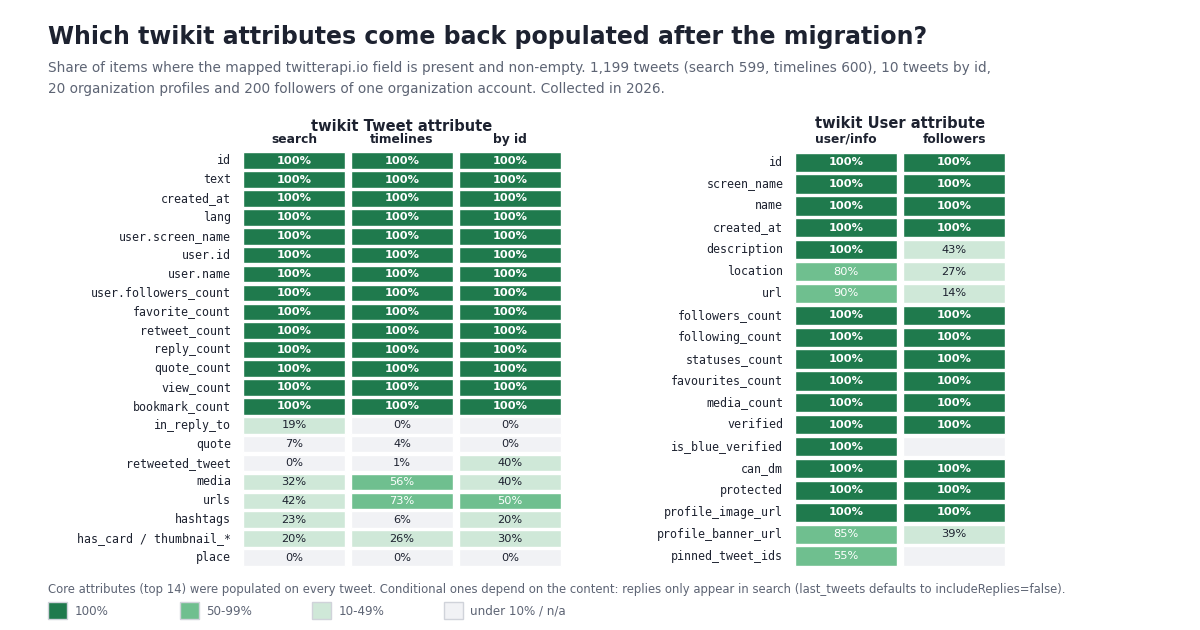
This table decides whether code downstream of twikit changes. The left column is the Attributes section of the Tweet class docstring in twikit/tweet.py, verbatim; the middle is the path in the tweet object that advanced_search, last_tweets and tweets return; the right is the share of tweets in our 2026 sample where that path was populated (search / timelines), so you can see which columns will be full and which only fill when the tweet has that thing.
The User class maps the same way, and the profile endpoint was fuller than the tweet endpoint: of 22 User attributes we mapped onto /twitter/user/info, 15 were populated on all 20 organization profiles (id, screen_name, name, created_at, description, followers_count, following_count, statuses_count, favourites_count, media_count, verified, is_blue_verified, can_dm, protected, profile_image_url), url on 90%, profile_banner_url on 85%, location on 80% and pinned_tweet_ids on 55%, which are properties of the accounts, not of the API. Note the renames: screen_name is userName, followers_count is followers, following_count is following, verified is isVerified, profile_image_url is profilePicture, profile_banner_url is coverPicture, and created_at here is ISO 8601 (2008-02-11T04:41:50.000000Z) rather than the classic format. can_media_tag, want_retweets, default_profile, listed_count, is_translator and withheld_in_countries have no equivalent in user/info (several do appear on the author object inside tweets).
One pleasant surprise for twikit users: the followers endpoint speaks twikit's dialect. /twitter/user/followers returns snake_case objects in which 15 attribute names are identical to twikit's User class (id, screen_name, name, created_at, description, location, url, followers_count, following_count, statuses_count, favourites_count, verified, can_dm, protected, profile_banner_url); only media_count (media_tweets_count) and profile_image_url (profile_image_url_https) differ. On the 200 followers in our one page, the counts, flags and image URL were populated on 100%; description on 43%, location on 27%, url on 14%, because most individual accounts leave those blank.
What a migrated twikit job returns today: pages, post mix, pace
We ran the five twikit calls above through their replacements and timed every request from the calling shell. The search_tweet stand-in was advanced_search with query=python asyncio and queryType=Latest, 30 pages; the get_user_tweets stand-in was last_tweets for @github, @Docker and @nodejs, 10 pages each with the default includeReplies=false; get_user_by_screen_name was user/info for 20 organization accounts; get_tweet_by_id was one tweets call with 10 ids from the @github timeline; User.get_followers was one user/followers page for @Docker. All 82 requests went through a client capped at 5 requests per second, one process per page.
Pages are full. Twenty-nine of 30 search pages and all 30 timeline pages held exactly 20 tweets; one search page held 19 after filtering. The last search page still reported has_next_page: true. twikit's count=20 default for search_tweet means a one-for-one page size; its count=40 on get_user_tweets means two of our pages per one of its calls, at the same per-tweet price.
Search is not a timeline. The search sample was 74% original posts, 19% replies and 7% quotes, with 0 retweets in 599 tweets, from 355 distinct authors, 84% in English. The three organization timelines were 93% to 98% originals with a few quotes and retweets and no replies because includeReplies was off; pass includeReplies=true to match twikit's 'Replies' tweet type. The python asyncio Latest results reached 617 days back in 30 pages, so a niche developer query runs out of recent posts quickly; a scheduled job on such a topic should use since: and until: in the query rather than paging.
Text is long. Median text in search was 284 characters, the 90th percentile 1,739 and the longest 20,234 (an article-length post); 51% of search tweets exceeded 280. twikit exposed full_text for the same reason. A fixed-width column truncates; text holds the whole post.
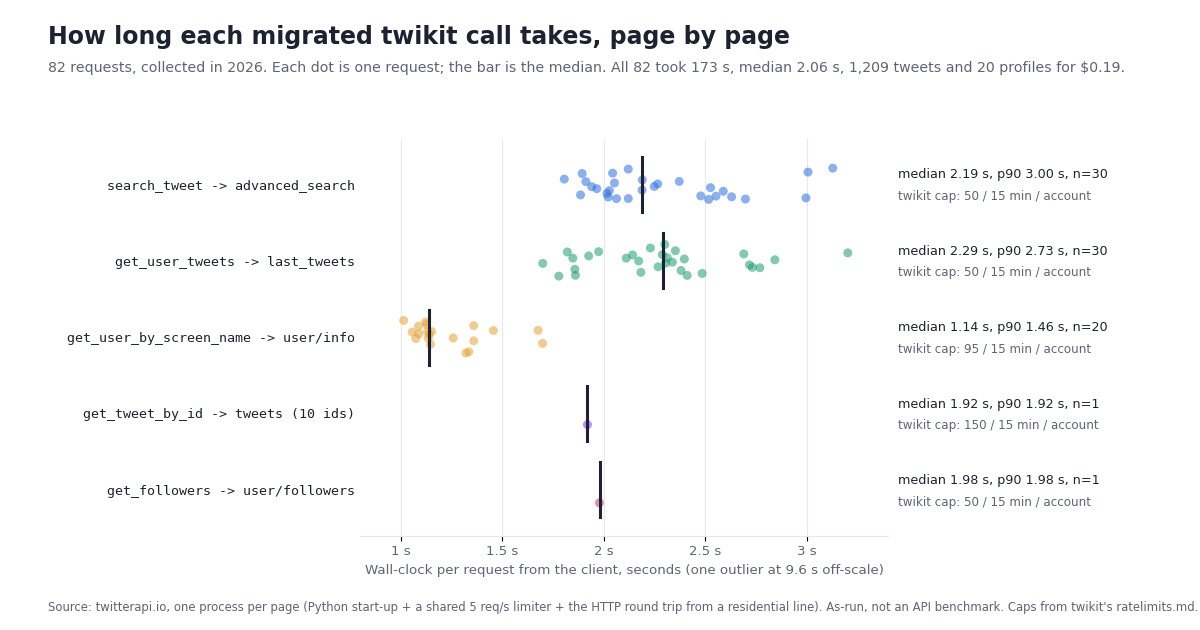
Pace. Across all 82 requests the median was 2.06 seconds per request and the 90th percentile 2.70, with one 9.6-second outlier on a search page; the whole study took 173 seconds. By endpoint: advanced_search median 2.19 s (p90 3.00), last_tweets 2.29 s (2.73), user/info 1.14 s (1.46), the tweets and followers calls 1.9 and 2.0 s. Each figure includes a Python interpreter start-up and a shared rate-limiter wait, so treat it as what a careful script sees, not as an API benchmark; the 599 search tweets arrived at 7.9 tweets per second. For comparison, the 30 search pages used 60% of what twikit's ratelimits.md allows one account in a 15-minute window, and the 30 timeline pages another 60% of a second limit; here they were 30 GETs each with no account to rotate. New API accounts are limited to 0.2 requests per second until the first payment, 20 per second after.
Cost: twikit is free, so what does the same job cost, and what would the official X API charge?
twikit costs nothing in API fees. The replacement is metered, so here is the meter, with the official X API's pay-per-usage rate card beside it. Prices are from the twitterapi.io pricing page and docs.x.com/x-api/getting-started/pricing; the ratios are arithmetic. The first row is this page's study.
The worked example most twikit users care about is the scheduled job. Ten thousand tweets a day is 500 search_tweet calls, which on twikit means ten accounts each spending a full 15-minute window, or one account for two and a half hours, plus proxies and the occasional lock. Here it is 10,000 x 15 = 150,000 credits = $1.50 a day at $1 per 100,000 credits, $45 over 30 days; the official route for the same reads is 10,000 x $0.005 = $50 a day, $1,500 a month. New accounts that pass the automatic bot check get $1 of free credits (100,000 credits, no card; one per person or network, others get $0.10; the credits expire after 31 days), which is about 6,600 tweets, enough to rerun your twikit query through the wrapper and diff the two outputs before paying anything. Purchased credits never expire; subscriptions start at Starter $29 a month and the pricing page has the tiers.
One billing rule shapes the loop: you pay only for the data returned, so a narrow query is cheap and an over-broad one is not. A since:-bounded daily pull on a quiet topic costs the 15-credit minimum ($0.00015) on days it finds nothing and $0.003 per full page otherwise. twikit code that pulled everything and filtered in Python should move the filter into the query (lang:en, min_faves:, -filter:replies, filter:media) where it reduces the bill.
Writes, the compatibility wrapper, and how we collected this
Writes. twikit's write methods (create_tweet, favorite_tweet, retweet, follow_user, send_dm) run as the logged-in account, and that is where error 226 lives in its tracker. The API has the same actions, with the same ownership: one POST /twitter/user_login_v2 logs in an X account you own through a proxy you supply ($0.10) and returns login_cookies; each subsequent /twitter/create_tweet_v2, /twitter/like_tweet_v2, /twitter/retweet_tweet_v2, /twitter/follow_user_v2 or /twitter/unfollow_user_v2 call carries those cookies and costs $0.002. The call acts as that account, so X can rate-limit, lock or suspend it exactly as it would under twikit; keep a human pace, expect the session to need a re-login, and note that each HTTP 200 call is billed. Reads need no X account at all, which is the half of twikit most pipelines actually used.
The wrapper. The main code block at the end of this page is twikit_compat.py. It re-implements the twikit calls most code uses, Client.search_tweet, Client.get_user_by_screen_name, Client.get_user_tweets, Client.get_tweet_by_id, User.get_tweets and User.get_followers, as coroutines, so await stays where it was; Result iterates and has .next(); Tweet and User objects expose twikit's attribute names (favorite_count, created_at_datetime, user.screen_name, is_blue_verified), built from the mapping table above. It does not emulate login, get_timeline, favorited, the edit metadata or get_user_tweets(..., 'Likes'), for the reasons in the table; code that touches those gets an AttributeError rather than a silently empty value. It is about 120 lines and uses requests in a thread so an existing asyncio program does not block.
How we collected this. Question: what does a migrated twikit job return, and how fast? Query: python asyncio, queryType=Latest, 30 pages of /twitter/tweet/advanced_search. Accounts: @github, @Docker and @nodejs, 10 pages each of /twitter/user/last_tweets with the default includeReplies=false; 20 organization accounts (@github, @Docker, @nodejs, @ThePSF, @rustlang, @golang, @kubernetesio, @vercel, @CloudflareDev, @awscloud, @googledevs, @Microsoft, @mozilla, @gitlab, @pypi, @ProjectJupyter, @djangoproject, @HashiCorp, @nginx, @Redisinc) through /twitter/user/info, all 20 returned status: "success"; 10 ids from the first @github page through /twitter/tweets, 10 of 10 returned; one page of /twitter/user/followers for @Docker. Window: the most recent items at collection time (the search sample spanned 617 days, the timelines 117 to 1,171). Sample: 1,199 tweets plus 10 by id, 20 profiles, 200 followers; 82 requests. Collected in 2026 through a rate-limited client capped at 5 requests per second, one process per page so the wall-clock could be measured. A field counts as populated when present and not null, not an empty string, list or object; counts of 0 are populated.
What the sample cannot show. One developer query, three organization timelines and twenty organization profiles are not all of X. Reply, media and link shares depend on the query and the account type; organizations post more links and fewer replies than individuals, and a consumer topic would have a different language mix than the 84% English here. The pace figures include interpreter start-up and a shared limiter, not the API's ceiling. We did not run get_trends, get_list_tweets, get_community_tweets or search_user; their rows in the migration table come from the endpoint reference, not from this run. We did not run twikit itself against X during the study; its behavior is quoted from its repository and tracker.
Aggregates only. The accounts named on this page are the organization accounts listed above; search authors and followers are not identified, and their raw pages were not kept beyond the aggregates. The analysis script, the results file, the per-request timings and the gzip-compressed raw pages for the organization accounts are kept with the study.
"""twikit_compat.py - the twikit calls most code uses, re-implemented over twitterapi.io (reads).

    pip install requests
    export TWITTERAPI_IO_KEY=...                 # key from twitterapi.io/dashboard; no X account, no cookies

    from twikit_compat import Client            # was: from twikit import Client
    client = Client()                           # was: Client('en-US') + await client.login(...)
    result = await client.search_tweet('python asyncio', 'Latest')
    for t in result: print(t.id, t.created_at, t.user.screen_name, t.favorite_count, t.text)
    result = await result.next()

Attribute names follow twikit's Tweet and User classes (favorite_count, created_at_datetime, user.screen_name,
followers_count, is_blue_verified ...). Not emulated: login, get_timeline, favorited/bookmarked, edit metadata,
get_user_tweets(..., 'Likes').
Cost: 15 credits per tweet returned ($0.15 per 1,000; a full 20-tweet page is $0.003; an empty page is billed the
15-credit minimum, $0.00015); profiles 18 credits; followers 1-3 credits per user.
"""
import asyncio
import os
import time
from datetime import datetime

import requests

BASE = "https://api.twitterapi.io"
HEADERS = {"X-API-Key": os.environ["TWITTERAPI_IO_KEY"]}
CREATED_AT = "%a %b %d %H:%M:%S %z %Y"          # tweet createdAt: "Thu Oct 16 12:34:56 +0000 2026"


def _get_sync(url, params):
    for attempt in range(5):
        r = requests.get(url, params=params, headers=HEADERS, timeout=30)
        if r.status_code == 429:                 # 0.2 requests/s before the first payment, 20 after
            time.sleep(2 ** attempt)
            continue
        r.raise_for_status()
        body = r.json()
        if body.get("status") == "error":        # reason is in msg
            raise RuntimeError(body.get("msg") or "twitterapi.io error")
        return body
    raise RuntimeError("rate limited after 5 attempts")


async def _get(url, params):
    return await asyncio.to_thread(_get_sync, url, params)


class User:
    """twikit.User attribute names over an author object (camelCase) or a followers row (snake_case)."""

    def __init__(self, client, d):
        self._client = client
        d = d or {}
        self.id = d.get("id")
        self.screen_name = d.get("userName") or d.get("screen_name")
        self.name = d.get("name")
        self.created_at = d.get("createdAt") or d.get("created_at")
        self.description = d.get("description")
        self.location = d.get("location")
        self.url = d.get("url")
        self.followers_count = d.get("followers", d.get("followers_count"))
        self.following_count = d.get("following", d.get("following_count"))
        self.statuses_count = d.get("statusesCount", d.get("statuses_count"))
        self.favourites_count = d.get("favouritesCount", d.get("favourites_count"))
        self.media_count = d.get("mediaCount", d.get("media_tweets_count"))
        self.verified = d.get("isVerified", d.get("verified"))
        self.is_blue_verified = d.get("isBlueVerified")
        self.can_dm = d.get("canDm", d.get("can_dm"))
        self.protected = d.get("protected")
        self.profile_image_url = d.get("profilePicture") or d.get("profile_image_url_https")
        self.profile_banner_url = d.get("coverPicture") or d.get("profile_banner_url")
        self.pinned_tweet_ids = d.get("pinnedTweetIds") or []

    async def get_tweets(self, tweet_type="Tweets", count=20, cursor=None):
        return await self._client.get_user_tweets(self.id, tweet_type, count, cursor, screen_name=self.screen_name)

    async def get_followers(self, count=20, cursor=None):
        return await self._client.get_user_followers(self.id, count, cursor, screen_name=self.screen_name)


class Tweet:
    """twikit.Tweet attribute names over a twitterapi.io tweet object."""

    def __init__(self, client, t):
        ent = t.get("entities") or {}
        self.id = t.get("id")
        self.text = self.full_text = t.get("text", "")
        self.created_at = t.get("createdAt")
        self.lang = t.get("lang")
        self.user = User(client, t.get("author"))
        self.favorite_count = t.get("likeCount", 0)
        self.retweet_count = t.get("retweetCount", 0)
        self.reply_count = t.get("replyCount", 0)
        self.quote_count = t.get("quoteCount", 0)
        self.view_count = t.get("viewCount")
        self.bookmark_count = t.get("bookmarkCount")
        self.in_reply_to = t.get("inReplyToId") if t.get("isReply") else None
        qt, rt = t.get("quoted_tweet") or None, t.get("retweeted_tweet") or None
        self.is_quote_status = qt is not None
        self.quote = Tweet(client, qt) if qt else None
        self.retweeted_tweet = Tweet(client, rt) if rt else None
        self.media = (t.get("extendedEntities") or {}).get("media") or []    # dicts with type, media_url_https
        self.urls = [u.get("expanded_url") or u.get("url") for u in ent.get("urls") or []]
        self.hashtags = [h.get("text") for h in ent.get("hashtags") or []]
        self.has_card = bool(t.get("card"))
        self.place = t.get("place") or None

    @property
    def created_at_datetime(self):
        return datetime.strptime(self.created_at, CREATED_AT)


class Result(list):
    """twikit.Result: iterate the page, `await result.next()` for the following one."""

    def __init__(self, items, fetch_next, next_cursor):
        super().__init__(items)
        self._fetch_next, self.next_cursor = fetch_next, next_cursor

    async def next(self):
        if not self.next_cursor:
            return Result([], self._fetch_next, None)
        return await self._fetch_next(self.next_cursor)


class Client:
    """twikit.Client reads over twitterapi.io. No login(): the API key in the header is the credential."""

    async def search_tweet(self, query, product="Latest", count=20, cursor=None):
        """client.search_tweet(q, 'Latest'|'Top'|'Media') -> /twitter/tweet/advanced_search, up to 20 per page."""
        q = query + (" filter:media" if product == "Media" else "")
        params = {"query": q, "queryType": "Top" if product == "Top" else "Latest", "cursor": cursor or ""}
        body = await _get(f"{BASE}/twitter/tweet/advanced_search", params)
        nxt = body.get("next_cursor") if body.get("has_next_page") else None
        return Result([Tweet(self, t) for t in body.get("tweets") or []],
                      lambda c: self.search_tweet(query, product, count, c), nxt)

    async def get_user_by_screen_name(self, screen_name):
        """-> /twitter/user/info (profile in data; unknown handle: status error, msg 'user not found')."""
        body = await _get(f"{BASE}/twitter/user/info", {"userName": screen_name})
        return User(self, body.get("data"))

    async def get_user_tweets(self, user_id, tweet_type="Tweets", count=20, cursor=None, screen_name=None):
        """-> /twitter/user/last_tweets (data.tweets, 20 per page). 'Replies' sets includeReplies=true;
        'Media' is a from:handle filter:media search; 'Likes' has no equivalent."""
        if tweet_type == "Likes":
            raise AttributeError("another account's likes are not available without that account")
        if tweet_type == "Media":
            return await self.search_tweet(f"from:{screen_name}", "Media", count, cursor)
        params = {"userId": user_id, "includeReplies": "true" if tweet_type == "Replies" else "false",
                  "cursor": cursor or ""}
        body = await _get(f"{BASE}/twitter/user/last_tweets", params)
        nxt = body.get("next_cursor") if body.get("has_next_page") else None
        return Result([Tweet(self, t) for t in (body.get("data") or {}).get("tweets") or []],
                      lambda c: self.get_user_tweets(user_id, tweet_type, count, c, screen_name), nxt)

    async def get_tweet_by_id(self, tweet_id):
        """-> /twitter/tweets?tweet_ids= (tweets[]). Thread and replies are /twitter/tweet/thread_context and
        /twitter/tweet/replies, billed per tweet returned."""
        body = await _get(f"{BASE}/twitter/tweets", {"tweet_ids": tweet_id})
        tweets = body.get("tweets") or []
        if not tweets:
            raise RuntimeError(f"tweet {tweet_id} not found")
        return Tweet(self, tweets[0])

    async def get_user_followers(self, user_id, count=20, cursor=None, screen_name=None):
        """-> /twitter/user/followers (followers[], about 200 per page, snake_case like twikit's User)."""
        params = {"userName": screen_name, "cursor": cursor or ""} if screen_name else {"userId": user_id, "cursor": cursor or ""}
        body = await _get(f"{BASE}/twitter/user/followers", params)
        nxt = body.get("next_cursor") if body.get("has_next_page") else None
        return Result([User(self, u) for u in body.get("followers") or []],
                      lambda c: self.get_user_followers(user_id, count, c, screen_name), nxt)


async def main():
    client = Client()
    result = await client.search_tweet("python asyncio", "Latest")
    for t in result[:3]:
        print(t.id, t.created_at_datetime.date(), t.user.screen_name, t.favorite_count, t.view_count, t.text[:60])
    user = await client.get_user_by_screen_name("github")
    print(user.screen_name, user.followers_count, user.statuses_count, user.is_blue_verified)
    posts = await user.get_tweets("Tweets")
    print(len(posts), "posts; next page:", bool(posts.next_cursor))
    # 20 search tweets + 1 profile + 20 timeline posts = 300 + 18 + 300 credits = $0.00618


if __name__ == "__main__":
    asyncio.run(main())
Questions readers ask
Is twikit still working in 2026?
The upstream release (2.3.3, February 7, 2025) is not. Two open issues broke it in 2026: #408, where X changed the script twikit parses to compute the x-client-transaction-id header ("Couldn't get KEY_BYTE indices"), and #425, a KeyError after X moved user fields the parser expected. There is no upstream fix; the last code commit was April 2025. The twifork fork fixes both and works, with the same account-and-cookies model.
What is twifork and is it a drop-in replacement for twikit?
twifork is a maintained fork of d60/twikit by PawiX25, version 2.4.0 released in 2026, MIT, Python 3.10+. pip install twifork and your code keeps from twikit import Client. It fixes the transaction header parsing, the moved user fields, get_trends, a rate-limit recursion error and timeline pagination, and documents that password login cannot be made to work: you export cookies from a browser session instead.
What are twikit's rate limits?
Per logged-in account, per endpoint, resetting every 15 minutes, from the repository's ratelimits.md: search_tweet 50, get_user_tweets (Tweets or Replies) 50, get_user_by_screen_name 95, get_tweet_by_id 150, get_user_followers 50, get_user_following 500, follow_user 15. Fifty searches at 20 tweets each is 1,000 tweets per account per window; exceeding a limit raises TooManyRequests with a rate_limit_reset time.
Why does twikit say "This request looks like it might be automated"?
That is X's error 226, returned to the account twikit is logged in as, usually on writes such as create_tweet or direct messages (twikit issues #170, #247, #392). The tracker's suggestions are to retry after a few seconds, use a cleaner proxy and let the account age. Reads through a hosted API carry no X account, so there is nothing for the message to attach to; writes through any route act as the account and can still see it.
What replaces client.search_tweet in twikit?
GET https://api.twitterapi.io/twitter/tweet/advanced_search?query=<q>&queryType=Latest with an X-API-Key header; product='Top' is queryType=Top, 'Media' is filter:media in the query. The response is a top-level tweets[] with has_next_page and next_cursor, up to 20 per page. The twikit_compat.py wrapper on this page exposes it as await client.search_tweet(q, 'Latest') with twikit's attribute names.
How do twikit's Tweet attributes map to the API fields?
favorite_count is likeCount; retweet_count, reply_count, quote_count, view_count and bookmark_count keep their names in camelCase; created_at is createdAt in the same classic format; user.screen_name is author.userName; user.followers_count is author.followers; in_reply_to is inReplyToId; quote is quoted_tweet; media is extendedEntities.media; urls and hashtags are under entities. In our 2026 sample all 14 core attributes were populated on 100% of 1,199 tweets. favorited, bookmarked and the edit metadata have no equivalent.
How do I get a user's tweets like twikit get_user_tweets?
GET /twitter/user/last_tweets?userName=<handle> (or userId=), following next_cursor until has_next_page is false. Tweets are nested at data.tweets, 20 per page, newest first, retweets included; twikit's 'Replies' tweet type is includeReplies=true, 'Media' is an advanced_search for from:handle filter:media, and another account's 'Likes' has no equivalent.
How much does it cost to replace a twikit job?
15 credits per tweet returned, $0.15 per 1,000; a full 20-tweet page is $0.003 and an empty page is billed the 15-credit minimum ($0.00015). Profiles are 18 credits each; followers 1 to 3 credits per user. Our 82-request study (1,209 tweets, 20 profiles, 200 followers) cost $0.19; the same reads at the official X API's $0.005 per post and $0.010 per user or follower come to $8.25. New accounts that pass the automatic bot check get $1 of free credits (no card, one per person or network, expiring after 31 days).
Continue
- d60/twikit on GitHub: README ('This library uses scraping and does not require an API key'), 4.7k stars, 573 forks, MIT, 135 open issues, 25 open PRs, last commit a README edit in 2026
- twikit ratelimits.md: per-account limits per 15 minutes (search_tweet 50, get_user_tweets 50, get_user_by_screen_name 95, get_tweet_by_id 150, get_user_followers 50)
- twikit issue #408: ClientTransaction broken, 'Couldn't get KEY_BYTE indices' (open, 2026; workarounds include the twifork fork)
- twifork on PyPI: 'a maintained fork of d60/twikit, fixed for the 2026 breakages', 2.4.0, Python >=3.10, MIT, imports as twikit
- twikit on PyPI: latest 2.3.3 (February 7, 2025), Python >=3.8, MIT, 'Twitter API wrapper for python with no API key required'
- X API pay-per-usage pricing: $0.005 per post read, $0.010 per user read, $0.010 per follower/following read, 3M post reads a month cap
- Twitter (X) scraping: a developer's guide to every approach
- How to scrape Twitter (X) without the official API
- snscrape not working: why it returns blocked (404) and how to migrate
- Twint not working: the flag-by-flag migration
- Tweepy vs TwitterAPI.io: the Python migration guide
- Twitter error 226, "this request looks like it might be automated": causes and fixes
- twitterapi.io pay-per-call pricing
- Get an API key from the dashboard
- 01X Communities API: How Do You Read Community Posts and Post to a Community?
- 02Twitter (X) Search Not Working? The October 2026 list: Search Outage, Other Causes and Fixes
- 03How Will You Use the Twitter (X) API or Twitter Data? Answering the Developer Sign-Up Question
- 04Twitter (X) Welcome Message: Is the API Still Alive, and How to Send One in 2026
- 05xurl: the X API CLI for Twitter (X) — Install, Auth, Commands and What Each Read Costs
- 06Twitter Banner Size: 1500 x 500 px and the Safe Zone That Survives Every Crop
- 07Usernames for Twitter (X): The Rules, 48 Ideas, and How to Check Availability in 2026
- 08Twitter (X) Counter API — A Developer's Guide to Follower Counts
Stop reading. Start building.
Starter credits cover real testing on real data. Google sign-in, no card, no application queue.
Get an API key