Twitter (X) Shopify Integration: Post Products and Pull Mentions Back
- What Shopify offers for X today: one free app by X on the Shopify App Store (
apps.shopify.com/x), focused on X Ads and the X Pixel. The 2022 Twitter sales channel listing now returns a 404. - Outbound (store to X):
products/createwebhook, HMAC check on the raw body, then one/twitter/create_tweet_v2call per product. 60 credits ($0.0006) per write versus $0.200 per post with a URL on X's own pay-per-usage rate card. - Inbound (X to store):
/twitter/tweet/advanced_searchfor"your brand" -from:yourhandle, polled on a schedule; $0.15 per 1,000 tweets returned, no X account needed. - Study: 10 DTC brand accounts, 865 original posts: 24.9% link to the store, and half of those links go through a brand redirect or tracking host rather than the store domain itself.
- Engagement: store-link posts had a median of 4.5 engagements per 1,000 views versus 4.2 for no-link posts in the pooled sample.
- Reality check: 4 of the 10 brands had posted nothing in the last 90 days. An auto-post feed only helps if someone also reads the replies and mentions it creates.
People who search for "twitter shopify" usually want one of three things: a button inside Shopify that connects the store to X, a way to announce new products on X without copying them by hand, or a way to see what customers say about the store on X. The first one has changed a lot since 2022, the second needs a few dozen lines of code, and the third is a search query you run on a schedule. This guide covers all three, in that order, and states plainly what we verified on Shopify's and X's own pages this year and what we did not.
We also measured what an auto-post feed would actually compete with. We pulled the latest public timeline posts of 11 direct-to-consumer brand accounts plus @Shopify itself, through our own API, and counted how often brands link to their store, how often they attach media, how often they post at all, and whether a store link changes engagement. The numbers are in the study section and in the two charts below; the method is at the end.
24.9%
What Shopify offers for X (Twitter) in 2026
The X app on the Shopify App Store. The only listing we found at apps.shopify.com/x is published by X, is free, and is titled "X - Create and manage ad campaigns effortlessly with X Ads." Its listed features are campaign creation and management, a one-click X Pixel install for conversion tracking, and AI-powered targeting. The listing shows a launch date of May 4, 2022, sits in the Marketplaces category with "Listing management" and "Product sync" tags, and carries a mixed rating from customers (3.6 out of 5 when we checked). If your goal is paid reach on X with conversion tracking back to Shopify, this is the official route, and you should read its own compatibility notes on the listing before installing.
The old Twitter sales channel. On June 22, 2022, Shopify's changelog announced a Twitter sales channel that let merchants located in the United States sync their catalog and showcase up to 50 products on their Twitter profile, with checkout on the merchant's own product page. Today the old listing address apps.shopify.com/twitter returns HTTP 404, and Shopify's help-center pages for a Twitter or X sales channel redirect to the general sales-channels index. That index lists Facebook, Instagram, TikTok, Google, Amazon, Temu, Shop, Shopify Collective, the Buy Button and WordPress, and does not mention X or Twitter. Blog posts that still walk you through "installing the Twitter sales channel" describe a flow we could not find this year.
No-code automation platforms. General workflow tools (the n8n, Make and Zapier category) publish Shopify-to-X templates such as "post a tweet when a product is created". They are a reasonable choice when you do not want to host code, but every one of them still needs an X write path underneath, either X's own API with its developer account and pay-per-usage billing, or a connected account. Read their per-task pricing and their X connector's current status before you depend on one.
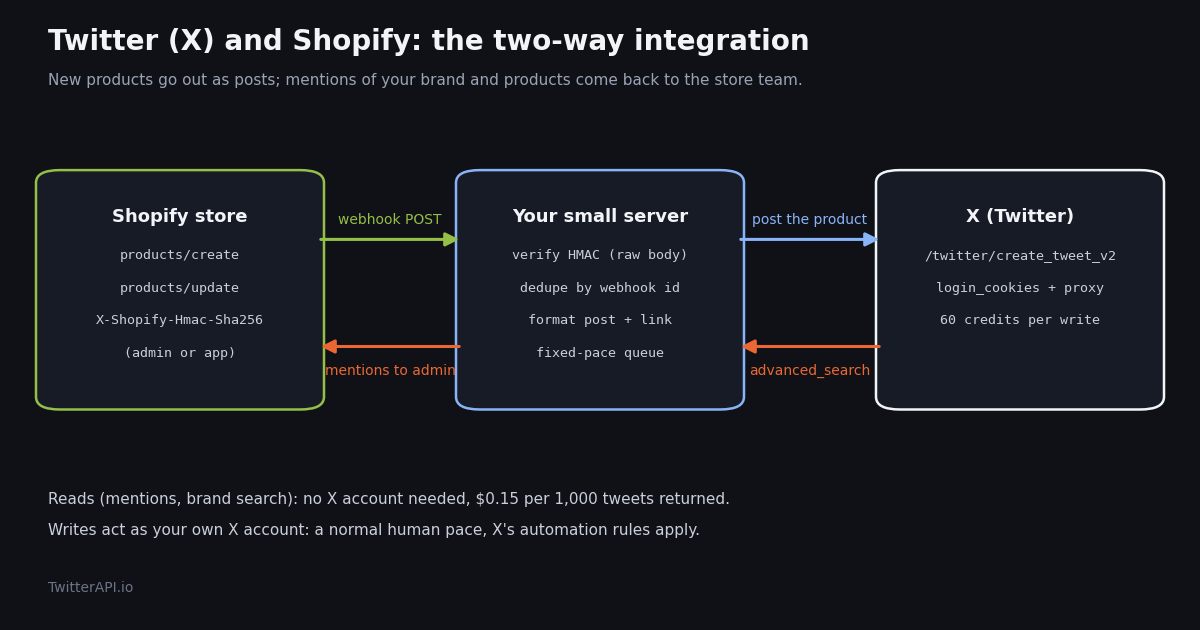
What none of these give you. None of the options above pulls what people say about your products on X back into the store team's view. For that, and for full control over what gets posted and when, the rest of this guide builds a small two-way bridge: Shopify webhooks out, X search back in.
The architecture: one small server between Shopify and X
The integration has two loops and one small server you host (a serverless function works too, as long as it answers Shopify within its time limit).
Loop 1, store to X. Shopify sends a products/create webhook to your HTTPS endpoint the moment a product is created. Your server checks the X-Shopify-Hmac-Sha256 header, answers 200 right away, filters out drafts, formats a post (title, price, product URL) and places it on a queue. A worker drains the queue at a fixed pace and calls /twitter/create_tweet_v2 once per product.
Loop 2, X to store. On a schedule (every 5 or 15 minutes is plenty for a store), the same server calls /twitter/tweet/advanced_search with a query such as "your brand" -from:yourhandle and queryType=Latest, keeps the newest tweet id it has seen, and writes new matches to wherever your team already looks: a Slack channel, a Google Sheet, a CRM, or a metafield or note in the Shopify admin through your own app.
The server holds three secrets: the Shopify app's client secret (for HMAC), your TwitterAPI.io API key (sent as the X-API-Key header), and the login_cookies string of the X account that will post. Keep all three in environment variables, never in the theme or in client-side code.
Step 1: subscribe to products/create and verify the HMAC
Topic names. Shopify's webhook reference lists products/create, products/update and products/delete as separate topics. Each delivery also carries X-Shopify-Topic (the topic name) and X-Shopify-Shop-Domain (the store's myshopify.com domain), which lets one endpoint serve several topics or stores.
The signature. Per Shopify's HTTPS delivery docs, every delivery carries X-Shopify-Hmac-Sha256: a base64-encoded HMAC-SHA256 of the raw request body, keyed with your app's client secret. Compute it over the exact bytes you received, before any JSON parsing, and compare with a constant-time function. Reject anything that does not match. Frameworks that parse JSON for you (Express json(), some serverless runtimes) can change the bytes, which is the classic reason a correct secret still fails verification.
Answer fast. Shopify's docs give a one-second connection timeout and five seconds for the whole request, treat anything outside the 200 range (including redirects) as a failure, and retry a failed delivery 8 times over the next 4 hours. A subscription created through the Admin API is removed after 8 consecutive failures. So do not call X inside the webhook handler: verify, enqueue, return 200.
De-duplicate. Retries mean the same event can arrive more than once. Shopify gives each delivery its own X-Shopify-Webhook-Id, and retries of one event share an X-Shopify-Event-Id, so store the event id (or simply the product id) and skip anything you have already posted.
Skip drafts. The products/create sample payload carries id, title, handle, body_html, vendor, status ("active" in the sample), published_at, variants[] with price, and images[] / image. Merchants often create a product as a draft and publish it days later, so post only when status is active, and consider listening to products/update to catch the moment a draft becomes active. The public product URL is your storefront domain plus /products/ plus handle.
import base64, hashlib, hmac, os

SHOPIFY_SECRET = os.environ["SHOPIFY_CLIENT_SECRET"].encode()


def shopify_hmac_ok(raw_body: bytes, header_value: str) -> bool:
    """True when X-Shopify-Hmac-Sha256 matches the raw request body."""
    digest = hmac.new(SHOPIFY_SECRET, raw_body, hashlib.sha256).digest()
    expected = base64.b64encode(digest).decode()
return hmac.compare_digest(expected, header_value or "")Step 2: post the product to X with create_tweet_v2
One login, then cheap writes. Writes on TwitterAPI.io run through an authenticated session of the X account that posts. One /twitter/user_login_v2 call (user name, email, password, optional totp_secret, and a proxy you supply) costs $0.10 and returns login_cookies. Each post after that is one /twitter/create_tweet_v2 call at 60 credits, which is $0.0006.
The request. The docs at docs.twitterapi.io list three required body fields for /twitter/create_tweet_v2: login_cookies, tweet_text and proxy (format http://username:password@ip:port; the docs ask for a good residential proxy and warn against free ones). Optional fields include media_ids (from /twitter/upload_media_v2, also a write call), reply_to_tweet_id, attachment_url for a quote post, community_id, and is_note_tweet for long posts on subscribed accounts.
The response. The documented 200 response carries status (success or error), message and tweet_id. We did not post anything for this guide, so the snippet below shows the documented shape, not a response we captured. Store tweet_id next to the Shopify product id so you can delete or reply later.
Caveats that come with every write. The call acts as your own X account, so X's automation rules apply to it and X can rate-limit, lock or suspend that account. Keep a normal human pace: post only your own new products, one at a time, with a fixed pause between posts, and this is not a way around any limit. A session can expire and need a fresh login. Billing is per call at 60 credits; the docs state that calls returning "status": "error" are not charged, so check status on every response and alert on errors instead of retrying in a loop.
What to write. Our study below found that brands attach media to 63.9% of their original posts. If a product has images, upload the first one and pass its id in media_ids; otherwise keep the text short: product name, price, one line of copy, and the URL. Posts that include a URL are where the price gap with X's own API is widest (next section).
Post your own products, one at a time. Use a fixed pause between posts (the example uses 60 seconds) and post only new, active products from your own store on your own account. If you import 500 products at once, Shopify will fire 500 products/create webhooks: keep them all on the queue but post only the ones you actually want announced, or turn the feed off during bulk imports.
Handle a lost session. If /twitter/create_tweet_v2 starts returning status: error with a session-related message, stop the worker and log in again rather than retrying. Repeated failing writes do not help the account.
Keep a kill switch. One environment variable that pauses the post worker lets the team stop the feed during a sale-price mistake or an incident in seconds.
Mind Shopify's limits too. Shopify removes Admin-API webhook subscriptions after 8 consecutive delivery failures, so monitor your endpoint's uptime and re-register the subscription from your deploy script if it goes missing.
{
  "status": "success",
  "message": "",
  "tweet_id": "<id of the new post>"
}Step 3: pull brand and product mentions back into the store
The query. /twitter/tweet/advanced_search takes X's search syntax in query and queryType=Latest or Top. For a store, start with the brand name in quotes and exclude your own account: "your brand" -from:yourhandle. Add product names with OR, and add url:yourstore.com to catch people sharing your product links. The response is a top-level tweets[] array with has_next_page and next_cursor; each tweet carries id, text, createdAt, likeCount, replyCount, viewCount, entities.urls[] and an author object with userName and followers.
How much comes back. In our probe, the query "kylie cosmetics" -from:KylieCosmetics returned 40 posts from 39 distinct authors spanning 134.5 hours, about 7.13 posts a day, and only 7.5% of them carried a link. The query url:colourpop.com -from:ColourPopCo returned 40 posts that reached back over two years, about 0.05 a day. In other words, people talk about a brand by name far more often than they share its store links, so the name query is the one that fills the feed.
Where to send it. Shopify has no built-in inbox for X mentions, so put them where the team already works: a Slack channel, a shared Google Sheet, a CRM record per customer handle, or, if you are building a Shopify app, an embedded admin page that lists the latest mentions per product. Keep the id of the newest tweet you stored and stop paging once you reach it, so each run fetches only new posts.
What it costs. Search results bill at $0.15 per 1,000 tweets returned. At 7 posts a day, a month of mentions is roughly 213 tweets, about $0.03. The polling floor adds to that: a check that finds nothing costs $0.00015, so checking every 5 minutes for a month (8,640 checks) is up to $1.30, and every 15 minutes is a third of that. No X account is needed for reads.
Respect privacy on the mention side. Store what you need to reply (tweet id, text, author handle, time) and nothing more. If you show mentions in the Shopify admin, show them to staff only.
Cost: TwitterAPI.io versus the official X API for a store
X's own pay-per-usage rate card at docs.x.com/x-api/getting-started/pricing lists $0.005 per post read, $0.010 per user read, $0.015 per post created, and $0.200 per post created with a URL. A product announcement nearly always carries the product URL, so on that rate card it falls in the $0.200 line. Pay-per-usage is capped at 3 million post reads a month, with Enterprise above that, and X adds $20 in API credits when you save a first card and buy credits.
For reads, $5.00 against $0.15 per 1,000 tweets is about 33x. For a post with a link, $0.200 against $0.0006 is about 333x on the official pay-per-usage rate card. These are the per-unit prices each side publishes; see /pricing for our credit packs and plans (Starter $29, Builder $99, Pro $199, Scale $499 and Business $1,499 a month). New accounts that pass the automatic bot check get free starter credits (no card, one per person or network, expiring after 31 days); purchased credits never expire.
Rate limits. Our read rate is 0.2 requests a second before the first payment and 20 once paid, which is far above what a store's mention poller needs.
What 10 DTC brands actually post on X (our study)
Before automating product posts, it helps to know what the posts would sit next to. We pulled the latest timeline posts of 11 direct-to-consumer brand accounts known for selling online, plus @Shopify as a platform reference: 1,099 posts in total, of which 865 were original brand posts (not replies or reposts) from the 10 brand accounts that returned posts. @glossier returned an empty timeline.
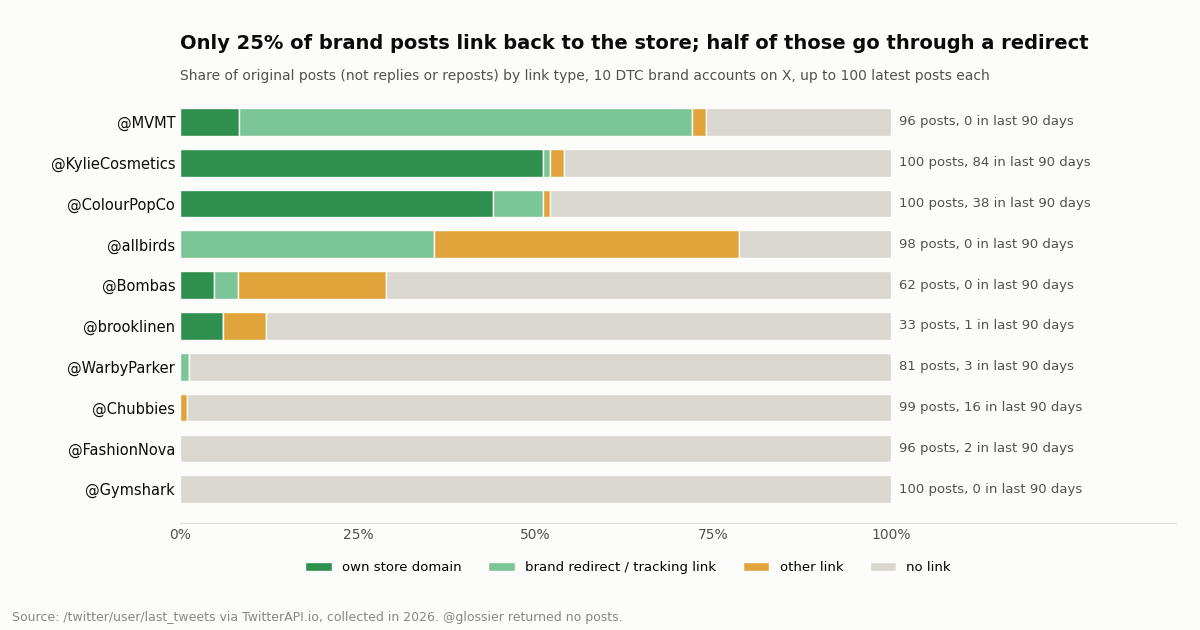
Store links are the exception, not the rule. Pooled, 24.9% of original brand posts linked to the brand's store (215 of 865), and only 12.5% linked to the store domain itself; the other half went through a brand-run redirect or tracking host (for example a visitlink.me subdomain or a separate short domain). Another 63 posts linked somewhere else, and 587 (67.9%) carried no link at all. Three brands (Gymshark, FashionNova, Chubbies) posted no store links in their latest 100 posts.
Media is the norm. 63.9% of original brand posts carried media: 345 with photos, 206 with video and 2 with an animated GIF. For an auto-post feed, that argues for uploading the product image rather than posting text and a link.
Many brand accounts are quiet. Only 6 of the 10 brands posted anything in the 90 days before collection, and four (allbirds, Gymshark, Bombas, MVMT) had gone quiet for between about 9 months and over 2 years. The median brand in the sample posted 1.11 times a week across its sampled window. An automated product feed can keep an account from going silent, but it does not replace someone reading and answering the replies it creates.
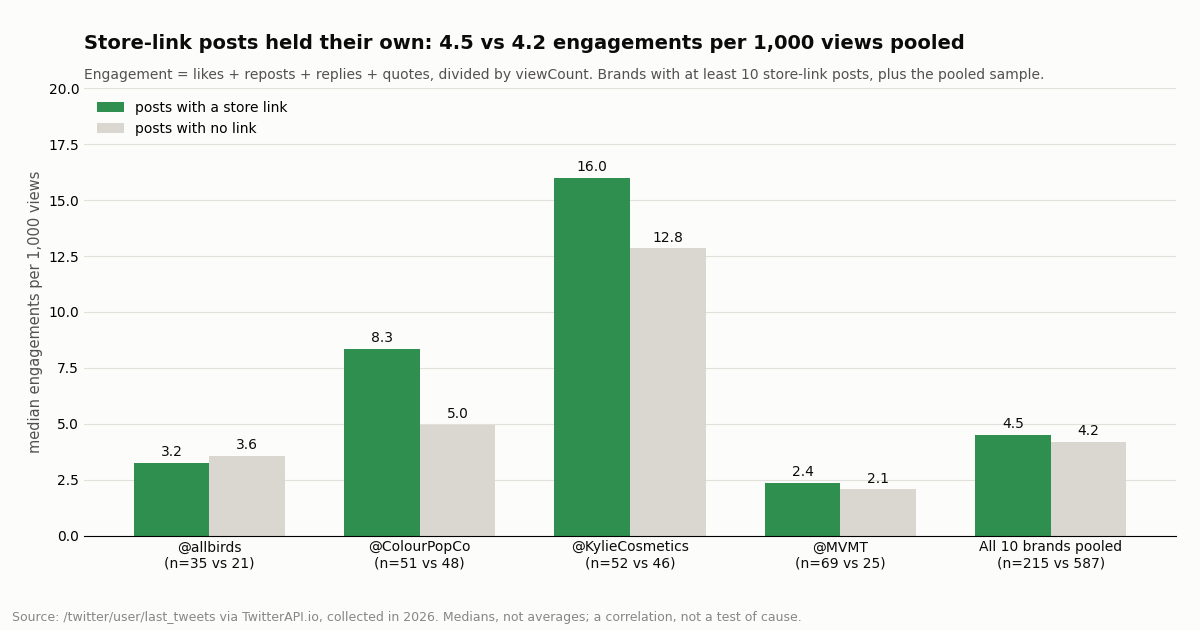
A store link did not hurt engagement per view. Pooled, store-link posts had a median of 28 engagements (likes, reposts, replies and quotes) versus 19 for no-link posts, and 4.5 versus 4.2 engagements per 1,000 views. Per brand the picture is mixed: ColourPop 8.3 versus 5.0 and Kylie Cosmetics 16.0 versus 12.8 favor the link posts, while allbirds is slightly the other way (3.2 versus 3.6). This is a correlation in a small sample, not a test of cause: link posts are often launches, which draw attention for their own reasons.
Store-link posts versus no-link posts
The chart compares median engagements per 1,000 views for brands with at least 10 store-link posts in their sample, plus the pooled sample. Medians are used because a single viral post can swamp an average.
What to take from it. Marketers often ask whether X shows posts with outbound links to fewer people. In this sample, brand posts with a store link drew about the same response per view as posts without one. Measure your own account rather than relying on this: once your feed runs for a few weeks, read the viewCount, likeCount and retweetCount of your own posts with /twitter/user/last_tweets and compare link and no-link posts the same way.
How we collected this
Question. How often do direct-to-consumer brands post on X, how often do those posts link back to the store or carry media, and do store-link posts get more or less engagement per view than posts without a link?
Accounts. allbirds, Gymshark, glossier, WarbyParker, Bombas, ColourPopCo, FashionNova, KylieCosmetics, Chubbies, brooklinen and MVMT, plus Shopify as a platform reference (excluded from the brand totals). These are public organization accounts; we did not analyze the people they repost or quote.
Method. /twitter/user/last_tweets through our rate-limited read client, default settings (replies excluded), up to 5 pages (about 100 posts) per account, newest first. A store link is any entities.urls[].expanded_url whose host is the brand's own store domain; a brand redirect is a host that contains the brand's name (for example a tracking subdomain). Engagement is likeCount + retweetCount + replyCount + quoteCount, divided by viewCount where it is above zero. The mention probe used two /twitter/tweet/advanced_search queries (Latest, 2 pages each) and is reported as counts only.
Sample and cost. 1,099 timeline posts plus 80 search results, 60 requests, about $0.18 in credits. Collected in 2026.
What the sample cannot show. It covers each account's latest 100 posts, so windows differ widely (from about 99 days to several years). It shows what brands post, not what sells: we have no click or revenue data. Brands that post through ads only, or whose store links sit in replies, are under-counted. Ten accounts is a small group, so treat the per-brand numbers as examples, not benchmarks.
Privacy. Aggregates only. Raw timelines are kept only for brand accounts; search results, which are mostly from private individuals, were reduced to counts and not stored.
"""Shopify -> X product feed plus an X -> store mention poller.

pip install flask requests
Env: SHOPIFY_CLIENT_SECRET, TWITTERAPI_KEY, X_LOGIN_COOKIES, X_PROXY, STORE_URL, BRAND_QUERY
Writes act as your own X account: only your own account, a normal human pace, X's automation
rules apply, it can be rate-limited/locked/suspended; this is not a way around any limit.
"""
import base64, hashlib, hmac, json, os, queue, threading, time

import requests
from flask import Flask, abort, request

BASE = "https://api.twitterapi.io"
HEADERS = {"X-API-Key": os.environ["TWITTERAPI_KEY"]}
SECRET = os.environ["SHOPIFY_CLIENT_SECRET"].encode()
STORE_URL = os.environ["STORE_URL"].rstrip("/")          # e.g. https://shop.example.com
POST_PAUSE_SECONDS = 60                                     # fixed pause between posts
seen_events, posts = set(), queue.Queue()
app = Flask(__name__)


def hmac_ok(raw: bytes, header: str) -> bool:
    digest = base64.b64encode(hmac.new(SECRET, raw, hashlib.sha256).digest()).decode()
    return hmac.compare_digest(digest, header or "")


@app.post("/webhooks/shopify")
def shopify_webhook():
    raw = request.get_data()                               # raw bytes, before JSON parsing
    if not hmac_ok(raw, request.headers.get("X-Shopify-Hmac-Sha256", "")):
        abort(401)
    event_id = request.headers.get("X-Shopify-Event-Id") or request.headers.get("X-Shopify-Webhook-Id")
    if event_id in seen_events:
        return "", 200                                     # Shopify retry of an event we queued
    seen_events.add(event_id)
    product = json.loads(raw)
    if request.headers.get("X-Shopify-Topic") == "products/create" and product.get("status") == "active":
        price = (product.get("variants") or [{}])[0].get("price")
        url = f"{STORE_URL}/products/{product['handle']}"
        text = f"New: {product['title']}" + (f" ({price})" if price else "") + f"\n{url}"
        posts.put({"product_id": product["id"], "text": text[:280]})
    return "", 200                                         # answer within Shopify's 5 s limit


def post_worker():
    while True:
        job = posts.get()
        r = requests.post(f"{BASE}/twitter/create_tweet_v2", headers=HEADERS, timeout=30, json={
            "login_cookies": os.environ["X_LOGIN_COOKIES"],
            "tweet_text": job["text"],
            "proxy": os.environ["X_PROXY"],
        })
        body = r.json()
        if body.get("status") == "success":
            print("posted product", job["product_id"], "as tweet", body.get("tweet_id"))
        else:
            print("post failed, pausing the feed:", body.get("message"))
            return                                        # log in again before restarting
        time.sleep(POST_PAUSE_SECONDS)


def poll_mentions(last_seen_id=None, every_seconds=900):
    """Every 15 minutes, fetch new posts about the brand and hand them to the team."""
    while True:
        cursor, newest, fresh = "", last_seen_id, []
        while True:
            r = requests.get(f"{BASE}/twitter/tweet/advanced_search", headers=HEADERS, timeout=30, params={
                "query": os.environ["BRAND_QUERY"],             # e.g. '"acme socks" -from:acmesocks'
                "queryType": "Latest",
                "cursor": cursor,
            })
            data = r.json()
            page = data.get("tweets", [])
            stop = False
            for t in page:
                if last_seen_id and int(t["id"]) <= int(last_seen_id):
                    stop = True
                    break
                fresh.append(t)
                newest = max(newest or t["id"], t["id"], key=int)
            if stop or not data.get("has_next_page") or not last_seen_id:
                break                                      # first run: newest page only
            cursor = data.get("next_cursor", "")
        for t in fresh:
            print(t["createdAt"], "@" + t["author"]["userName"], t["likeCount"], t["text"][:100])
        last_seen_id = newest
        time.sleep(every_seconds)


if __name__ == "__main__":
    threading.Thread(target=post_worker, daemon=True).start()
    threading.Thread(target=poll_mentions, daemon=True).start()
    app.run(port=8080)
Researching this?Free starter credits cover end-to-end testing — Google sign-in, no card. Get a key.
Questions readers ask
Does Shopify still have a Twitter (X) sales channel?
We could not find one this year. The 2022 Twitter sales channel listing at apps.shopify.com/twitter returns a 404, and Shopify's help-center sales-channel index lists Facebook, Instagram, TikTok, Google, Amazon, Temu and others but not X. The current X listing on the Shopify App Store, published by X, focuses on X Ads campaigns and the X Pixel.
How do I automatically post new Shopify products to X?
Subscribe to the products/create webhook, verify the X-Shopify-Hmac-Sha256 header on the raw body, skip drafts, then call /twitter/create_tweet_v2 with your account's login_cookies, the post text and a proxy. Post one product at a time with a fixed pause. A no-code automation platform can do the same with its own Shopify and X connectors if you prefer not to host code.
How much does it cost to post Shopify products to X?
On TwitterAPI.io each post is 60 credits ($0.0006) after a $0.10 login, so 30 product posts in a month cost about $0.018 plus the login. On X's own pay-per-usage rate card a post with a URL is $0.200, so the same 30 posts would be $6.00.
Can I see what people say about my Shopify store on X?
Yes. Run /twitter/tweet/advanced_search with a query like "your brand" -from:yourhandle and queryType=Latest on a schedule and store new results. Reads need no X account and cost $0.15 per 1,000 tweets returned. In our probe a well-known cosmetics brand drew about 7 posts a day by name from other accounts.
Do posts with a store link get less engagement on X?
Not in our sample. Across 10 DTC brand accounts, store-link posts had a median of 4.5 engagements per 1,000 views versus 4.2 for posts without a link. It is a small sample and a correlation, so measure your own account once your feed runs.
Is it safe to auto-post from Shopify to my X account?
The posts act as your own X account, so X's automation rules apply and X can rate-limit, lock or suspend the account. Post only your own products, at a normal human pace with a fixed pause, pause the feed during bulk imports, and log in again when the session expires instead of retrying.
Why does my Shopify webhook HMAC check fail?
Almost always because the body was parsed or re-serialized before hashing. Compute the HMAC-SHA256 over the exact raw bytes with your app's client secret, base64-encode it, and compare it with X-Shopify-Hmac-Sha256 using a constant-time comparison.
Continue
- Shopify: HTTPS webhook delivery, HMAC verification, timeouts and retries
- Shopify webhook topics reference (products/create sample payload, headers)
- Shopify App Store: the X app by X (X Ads and X Pixel)
- Shopify changelog: the 2022 Twitter sales channel announcement
- X API pay-per-usage pricing (official rate card)
- TwitterAPI.io docs: create_tweet_v2 request and response fields
- Twitter (X) API overview: endpoints, pricing and access
- Auto-post to Twitter (X) from your own app
- How to search mentions of a brand on Twitter (X)
- Send Twitter (X) mentions into your CRM
- Log Twitter (X) posts to Google Sheets
- TwitterAPI.io pricing: pay only for the data returned
- TwitterAPI.io API documentation
- 01How to Translate Tweets on Twitter (X): Auto-Translate, the Gear Icon and Language Settings
- 02How to Turn Off Autoplay on Twitter (X): App, Web and Auto-Advance
- 03Twitter (X) and the EU Digital Services Act (DSA): What the Commission Found, and What It Means for X Data
- 04Twitter (X) and Firebase: store posts in Firestore with a scheduled Cloud Function
- 05Twitter (X) Network Analysis with Python and networkx: A Real #reInvent Graph
- 06Make.com Twitter (X) Integration After the X App Was Removed
- 07Twitter (X) Scheduling Tool — A Developer's API Integration Guide
- 08Twitter (X) Enterprise API: What It Includes, Who Needs It, and What It Costs
Writing about something you built with TwitterAPI.io? Our community rewards program pays API credits for honest tutorials, build logs and videos.
Stop reading. Start building.
Starter credits cover real testing on real data. Google sign-in, no card, no application queue.
Get an API keyAlready building with TwitterAPI.io? Publish an honest tutorial or build log about it and earn up to $200 a month in API credits.