Twitter (X) API Endpoints: the X API v2 Map, What Each Read Costs, and the TwitterAPI.io Path for the Same Job
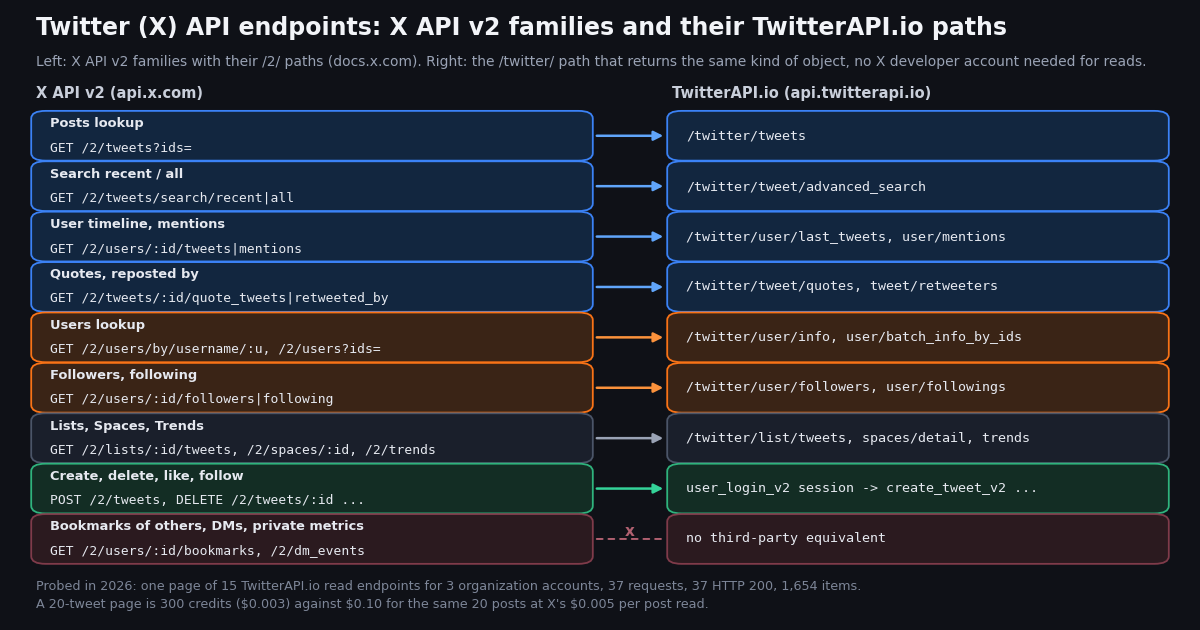
If you search for a list of Twitter API endpoints you get three kinds of page: the npm README of a client library, forum threads from the 2023 tier changes asking which endpoints a given plan still includes, and Postman collections that list paths without prices. None of them answers the question developers actually have in 2026: for each X API v2 endpoint family, where is the doc, what does one read cost now that billing is per resource, and if I do not want an X developer account, which third-party endpoint returns the same object? This page is that map.
It is built in three layers. The first is the official X API v2 structure as documented at docs.x.com/x-api/, verified this session: the family, the /2/ path, and the per-resource price from the pay-per-usage rate card. The second is the TwitterAPI.io endpoint that does the same job, taken only from the published OpenAPI spec at docs.twitterapi.io, with the response key you read and the credits a page costs. The third is the part no documentation gives you: we called one page of each of 15 read endpoints for three organization accounts (@NASA, @nytimes, @github) and recorded status, items, fields, wall time and the implied cost, so every cell in the "what you get" column is measured, not copied.
Two things this page is not. It is not the authentication guide; how to obtain tokens for either API is covered in our Twitter (X) access token page, and the X developer portal walkthrough covers app setup. And it does not pretend every X endpoint has a mirror: bookmarks of another user, direct messages, non-public metrics, post counts and the streaming endpoints are listed plainly as having no third-party equivalent.
How to read the map: two billing models, two auth models, one object per family
The X API v2 charges per resource returned. The rate card we fetched from docs.x.com/x-api/getting-started/pricing lists five read prices (posts $0.005, users $0.010, following and followers $0.010, likes $0.001, profile update $0.005), two write prices (post create $0.015, $0.200 with a URL), a cap of 3 million post reads per monthly billing cycle on pay-per-usage with an Enterprise plan above it, and the sign-up incentive of $20 in credits when you save a first eligible card plus a match of the first auto-recharge up to $50. Families not on that list (lists, spaces, trends, DMs, communities) are not priced on that page, so check the console before relying on them.
TwitterAPI.io also charges per item returned, in credits at $1 = 100,000 credits: tweet endpoints are 15 credits per tweet with a 15-credit minimum per request (so an empty search is $0.00015 and a full 20-tweet page is $0.003, no per-request cap), profiles are 18 credits per user ($0.18 per 1,000), and followers or followings pages are 1 to 3 credits per user returned depending on the page tier. Reads need an X-API-Key header and no X account. Rate limits are 0.2 requests a second before the first payment, 20 once paid, 50 on Scale, 500 on Business, up to 1,000 on request. New accounts that pass the automatic bot check get up to $1 of free credits (at most 100,000 credits, no card, one per person or network, expiring after 31 days); purchased credits never expire.
Authentication differs more than pricing does. Every X API v2 call needs an app in the developer portal and either an app-only bearer token or a user-context token (OAuth 1.0a or OAuth 2.0 with PKCE); the reverse-chronological home timeline, bookmarks, DMs and every write require user context. On TwitterAPI.io every read is the API key alone; only the write family needs a session, created once with /twitter/user_login_v2 and reused as login_cookies.
Response shapes also differ in a way the tables below make explicit. X v2 returns data (an array or object) plus includes and meta with next_token. TwitterAPI.io returns a top-level list whose key depends on the endpoint (tweets, users, followers, followings, trends, or data.tweets for last_tweets and data for user/info) plus has_next_page and next_cursor. Page cursors are covered in our pagination guide; here we only note which endpoints returned a cursor in the probe.
Posts family: lookup, search, timelines and mentions
These are the endpoints most integrations live on. The X docs index at docs.x.com/x-api/llms.txt confirms the four doc paths; posts/lookup/introduction states that GET /2/tweets returns up to 100 Posts in one request, and posts/timelines/introduction states that the user Post timeline reaches up to 3,200 most recent Posts and the mention timeline up to 800. Every row is priced at $0.005 per post read on X. On TwitterAPI.io each row is a tweet endpoint at 15 credits per tweet, and the probe confirmed 20 tweets per page on all three accounts for last_tweets, mentions and advanced_search, and exactly the 5 requested ids back from /twitter/tweets.
Three details from the probe matter when you switch. last_tweets nests its list under data.tweets, unlike every other tweet endpoint, and it excludes replies unless you pass includeReplies=true. advanced_search is one endpoint for both of X's search windows; from:NASA with queryType=Latest returned the same 20-tweet page shape as the timeline call, and the page shape does not change when you add since: or until:. And tweets by id is the only tweet endpoint in the probe that returned no has_next_page key, which makes sense because you supplied the list.
Engagement on a post: quotes, replies, reposts, likes and the thread
X v2 exposes engagement as separate endpoints under the post id, documented at posts/quote-tweets/introduction, posts/get-reposted-by, posts/get-liking-users and posts/likes/quickstart/likes-lookup; replies have no endpoint of their own and are fetched by searching conversation_id:. On TwitterAPI.io quotes, replies, retweeters and the whole thread are each one call that takes tweetId. For the probe we picked the most-replied tweet on each account's latest page and called all four.
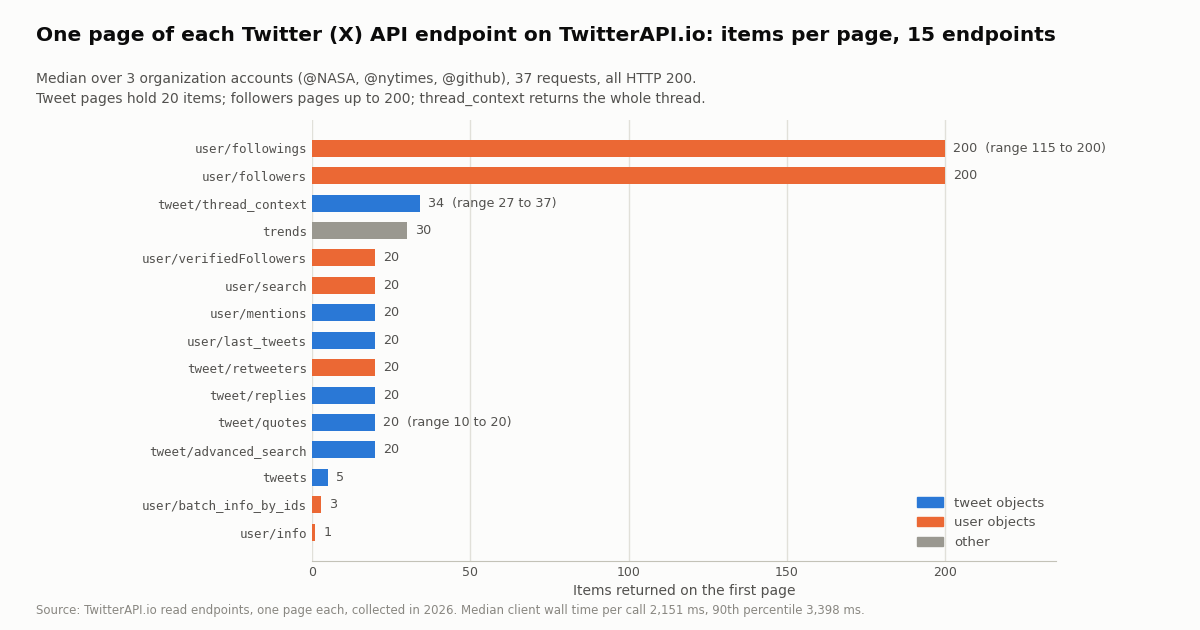
thread_context is the odd one out: it returned 27, 34 and 37 tweets for the three accounts rather than a fixed 20, because it returns the thread as X renders it (root, the author's own continuation posts and the replies X ranks first); it carried has_next_page: true and a cursor for @NASA and @nytimes and false for @github's shorter 27-tweet thread. Its tweet objects had 26 fields against 30 on the other tweet endpoints; the 26 are the common core listed in the fields section below, so nothing you would normally read is missing. The slowest call of the whole probe was a replies page for @NASA at 11,551 ms, against a median of 3,165 ms for that endpoint, which is why the code at the end of this page sets a 30-second timeout rather than 10.
Users family: lookup, batch lookup, followers, following and user search
The X docs at users/follows/introduction list GET /2/users/:id/followers and GET /2/users/:id/following for reads and POST /2/users/:id/following plus DELETE /2/users/:source_user_id/following/:target_user_id for managing follows; user lookup lives at users/lookup/introduction and user search at users/search/introduction. On X, users are $0.010 per user read and followers or following are $0.010 per user returned. On TwitterAPI.io a profile is 18 credits and a followers page is 1 to 3 credits per user.
The probe surfaced the one trap in this family: there are two user-object dialects. user/info, batch_info_by_ids and tweet/retweeters return camelCase objects (userName, followers, following, statusesCount, isBlueVerified, canDm, isAutomated), 25 fields on the lookup endpoints and 17 on retweeters. followers, followings, user/search and verifiedFollowers return snake_case objects (screen_name, followers_count, following_count, statuses_count, profile_image_url_https), 17 to 21 fields; the followers pages also carry a userName alias next to screen_name, and user/search adds username and isBlueVerified. Write one normalizer and route by endpoint.
Two other probe facts: the followings response uses the key followings, not followers, which is easy to miss if you copy the followers loop; and @NASA's followings page came back with 115 users and has_next_page: false (the account follows fewer than a page's worth), so a page is "up to 200", not always 200. /twitter/user/verifiedFollowers (takes user_id, returned 20 per page) and /twitter/user/followers_ids (ids only, no profile metadata) have no direct v2 counterpart but are cheaper ways to answer "who follows this account" at scale.
Lists, Spaces, Trends, Communities, streams, and the endpoints with no third-party equivalent
The remaining read families are smaller and, on X, are not individually priced on the rate card we fetched. The list, space and trends paths on TwitterAPI.io come from the published OpenAPI spec; we probed trends (30 items for WOEID 1, each wrapped as {"trend": {...}} with a metadata block giving refresh_interval_millis) and left lists and communities to their own pages because they need an id you must already hold.
The following X endpoints have no TwitterAPI.io read equivalent in the published spec. We list them because a map that hides gaps is not a map.
Writes: manage Posts, likes, reposts, follows and media through a login session
X v2 writes are documented at posts/manage-tweets/introduction (POST /2/tweets, DELETE /2/tweets/:id), posts/likes/quickstart/manage-likes, posts/retweets/quickstart/manage-retweets, users/follows/introduction (POST /2/users/:id/following), lists/manage-lists/introduction and media/introduction; all need user-context auth, and the rate card prices a created post at $0.015, or $0.200 if it carries a URL.
TwitterAPI.io has a write family too, and it works differently: you log an X account in once with /twitter/user_login_v2 ($0.10, with a proxy you supply) and receive login_cookies; each subsequent action is $0.002 per call. The call acts as that account, so X can rate-limit, lock or suspend it; keep a human pace; the session can need a re-login; and each HTTP 200 call is billed whether or not X accepted the action.
The spec also carries a _v3 generation (/twitter/user_login_v3, /twitter/send_tweet_v3, /twitter/like_tweet_v3, /twitter/retweet_v3) that keys actions by user_name after a login instead of passing cookies on every call. Either way, reads never touch any of this: no X account is needed to run every table above this section.
What one page of each endpoint returned: items, fields, status and wall time
Documentation tells you the maximum page size. The probe tells you what came back on a given day for three real accounts: one page of 15 TwitterAPI.io read endpoints for @NASA, @nytimes and @github, 37 requests in total, every one of them HTTP 200 with no API-level error (status: "error" never appeared), 1,654 items, and an upper-bound cost of 10,398 credits, about $0.10. The table lists the median items per page, the response key you read, whether a cursor came back, how many fields each item carried, and the wall time of the client call (which includes the study client's rate-limit spacing of up to 0.2 s and ran while other probes shared the same client).
Tweet objects are consistent across endpoints. All seven tweet-returning endpoints carried the same 26 core fields on every item: id, url, twitterUrl, text, createdAt, lang, type, source, author, likeCount, retweetCount, replyCount, quoteCount, viewCount, bookmarkCount, conversationId, isReply, inReplyToId, inReplyToUserId, inReplyToUsername, entities, extendedEntities, card, place, quoted_tweet and retweeted_tweet. Timeline, search, mentions, replies and quotes add four more (isPinned, isQuote, isRetweet, isConversationControlled, 30 in total); tweets by id adds article, article_summary and isLimitedReply on top of those (33). So a parser written against advanced_search reads every other tweet endpoint unchanged.
Wall time. The median call took 2,151 ms and the 90th percentile 3,398 ms; trends was fastest at 1,132 ms and the single slowest call was a replies page at 11,551 ms. These are client wall times for a page of 20 to 200 items from a shared, rate-limited study client, not a latency benchmark; budget a 30-second timeout and retry once on a 5xx.
Cost per page on both rate cards
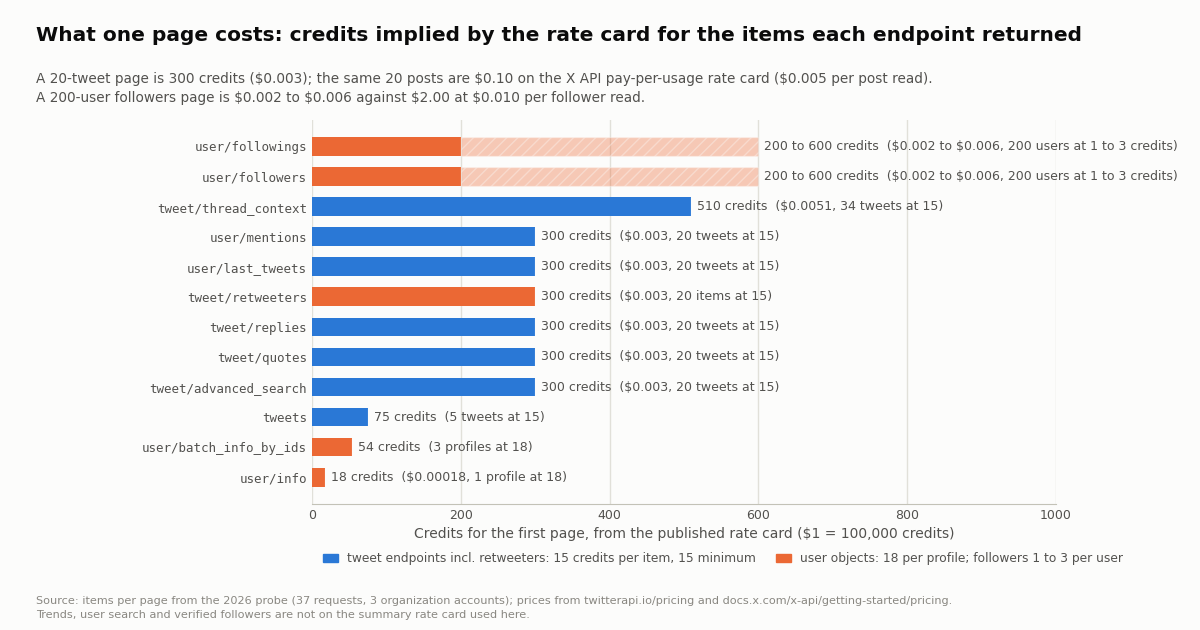
Because both APIs bill per resource, the cost of a page is the item count times the unit price. The table applies each rate card to the median page the probe returned. X prices come from docs.x.com/x-api/getting-started/pricing: $0.005 per post read and $0.010 per user, follower or following read. TwitterAPI.io prices are 15 credits per tweet (15-credit minimum per request), 18 credits per profile, and 1 to 3 credits per follower or following returned, at $1 = 100,000 credits. Trends, user search and verified followers are left out because they are not on the summary rate card used here; see twitterapi.io/pricing for those.
Per 1,000 tweets the two cards sit at $0.15 and $5.00, about 33x apart, on every tweet endpoint; the gap is wider on followers because X prices each follower at the full user rate while TwitterAPI.io tiers the page. The minimum matters at the other end: an empty TwitterAPI.io search still costs 15 credits ($0.00015), so a poll that finds nothing every 60 seconds for a month is 43,200 checks, $6.48, and every 5 minutes $1.30. The whole 37-request probe, with followers pages counted at the 3-credit tier, came to at most 10,398 credits, about $0.10; the same 1,654 items would be $0.005 or $0.010 each on X. Subscription plans (Starter $29, Builder $99, Pro $199, Scale $499, Business $1,499 a month) add bonus credits on top of the per-item prices; the pricing page has the current numbers.
How we collected this
Question: for each TwitterAPI.io read endpoint that stands in for an X API v2 family, what does one page really return (status, item count, top-level keys, per-item fields, wall time) and what does that page cost under the published rate card, so the endpoint map can show measured values instead of documented maximums.
Accounts: three public organization accounts, @NASA, @nytimes and @github, chosen because each has a deep timeline, mentions, followers in the hundreds of thousands or more, and at least one recent post with replies, quotes and reposts.
Method: for each account, one page of /twitter/user/info, /twitter/user/last_tweets, /twitter/user/mentions, /twitter/user/followers, /twitter/user/followings, /twitter/tweet/advanced_search (from:<account>, queryType=Latest), /twitter/tweets with the first 5 ids from the timeline page, and /twitter/tweet/replies, /twitter/tweet/quotes, /twitter/tweet/retweeters and /twitter/tweet/thread_context for the most-replied tweet on that page; plus one call each of /twitter/user/batch_info_by_ids (the 3 ids), /twitter/user/verifiedFollowers, /twitter/user/search (nasa) and /twitter/trends (WOEID 1). 37 requests through a rate-limited, read-only client, collected in 2026. For every call we logged the HTTP status, the client wall time, the item count, the list key, has_next_page, whether next_cursor was present, and the set of field names on the items; the analysis script turns those into per-endpoint medians, field unions and intersections, and rate-card credits.
What the sample cannot show: one page per endpoint per account is a coverage check, not a benchmark. Wall times include the client's own request spacing and were measured while other studies shared the same client, so they are upper bounds on server time. Page sizes for quotes and followings vary with how much exists (@github's tweet had 10 quotes; @NASA's page of followings had 115 users), so "20" and "200" are typical, not guaranteed. Lists, communities and spaces were not probed because they need an id the study did not hold, and no write endpoint was exercised. Costs are the rate card applied to the item counts, not a bill; followers pages are shown as the 1-to-3-credit range because the per-page tier was not measured.
Aggregates and field-name inventories only. The three accounts are organizations; the followers, followings, retweeters, replies, user-search and verified-followers pages list private individuals and were read only to count items and field names, then discarded. The gzip-compressed raw pages of the organization accounts' own profiles, timelines, mentions, search results, quotes and threads are kept with the study together with the analysis and chart scripts.
"""endpoint_map_probe.py - call one page of the main TwitterAPI.io read endpoints for one account
and print what each returns: items, the key you read, and the credits the rate card implies.

    pip install requests
    export TWITTERAPI_IO_API_KEY=...   # twitterapi.io dashboard; reads need no X account
    python endpoint_map_probe.py NASA

Prices: tweet endpoints 15 credits per tweet (15 minimum per request), profiles 18 credits,
followers / followings 1 to 3 credits per user; $1 = 100,000 credits.
"""
import os
import sys
import time

import requests

BASE = "https://api.twitterapi.io"
H = {"X-API-Key": os.environ["TWITTERAPI_IO_API_KEY"]}
acct = sys.argv[1] if len(sys.argv) > 1 else "NASA"


def get(url, **params):
    t0 = time.perf_counter()
    r = requests.get(url, headers=H, params=params, timeout=30)   # a replies page took 11.5 s in our probe
    ms = int((time.perf_counter() - t0) * 1000)
    r.raise_for_status()                      # HTTP 400 carries the reason in r.json()["detail"]
    body = r.json()
    if body.get("status") == "error":         # e.g. msg "user not found", with HTTP 200
        raise RuntimeError(body.get("msg"))
    return body, ms


# 1. Users lookup (X: GET /2/users/by/username/:username) -> data{...}, camelCase, 18 credits
info, ms = get(f"{BASE}/twitter/user/info", userName=acct)
u = info["data"]
print(f"user/info        {ms:>5} ms  id={u['id']} followers={u['followers']} statuses={u['statusesCount']}  18 credits")

# 2. User timeline (X: GET /2/users/:id/tweets) -> data.tweets[], 20 per page, newest first
page, ms = get(f"{BASE}/twitter/user/last_tweets", userName=acct)
tweets = page["data"]["tweets"]
print(f"last_tweets      {ms:>5} ms  {len(tweets)} tweets, has_next_page={page['has_next_page']}  {15 * len(tweets)} credits")
ids = [t["id"] for t in tweets[:5]]
top = max(tweets, key=lambda t: t["replyCount"])

# 3. Posts lookup (X: GET /2/tweets?ids=) -> tweets[], no cursor
body, ms = get(f"{BASE}/twitter/tweets", tweet_ids=",".join(ids))
print(f"tweets           {ms:>5} ms  {len(body['tweets'])} tweets  {15 * len(body['tweets'])} credits")

# 4. Search, both of X's windows (GET /2/tweets/search/recent and /all) -> tweets[]
body, ms = get(f"{BASE}/twitter/tweet/advanced_search", query=f"from:{acct}", queryType="Latest")
n = len(body["tweets"])
print(f"advanced_search  {ms:>5} ms  {n} tweets  {max(15, 15 * n)} credits")

# 5. Mentions, quotes, replies and the thread: all read tweets[] with the same 26 core fields
for name, url, params in [
    ("mentions", f"{BASE}/twitter/user/mentions", {"userName": acct}),
    ("quotes", f"{BASE}/twitter/tweet/quotes", {"tweetId": top["id"]}),
    ("replies", f"{BASE}/twitter/tweet/replies", {"tweetId": top["id"]}),
    ("thread_context", f"{BASE}/twitter/tweet/thread_context", {"tweetId": top["id"]}),
]:
    body, ms = get(url, **params)
    n = len(body["tweets"])
    print(f"{name:<16} {ms:>5} ms  {n} tweets  {max(15, 15 * n)} credits")

# 6. Reposted by (X: GET /2/tweets/:id/retweeted_by) -> users[], camelCase user objects
body, ms = get(f"{BASE}/twitter/tweet/retweeters", tweetId=top["id"])
print(f"retweeters       {ms:>5} ms  {len(body['users'])} users (userName, followers)")

# 7. Followers / following (X: GET /2/users/:id/followers, /following) -> snake_case user objects
body, ms = get(f"{BASE}/twitter/user/followers", userName=acct)
print(f"followers        {ms:>5} ms  {len(body['followers'])} users (screen_name, followers_count), 1-3 credits each")
body, ms = get(f"{BASE}/twitter/user/followings", userName=acct)
print(f"followings       {ms:>5} ms  {len(body['followings'])} users  <- key is followings, not followers")


# 8. Walking any paginated endpoint: has_next_page + next_cursor
def walk(url, pages, **params):
    cursor = None
    for _ in range(pages):
        if cursor:
            params["cursor"] = cursor
        body, _ = get(url, **params)
        yield body
        if not body.get("has_next_page") or not body.get("next_cursor"):
            break
        cursor = body["next_cursor"]


total = sum(len(p["tweets"]) for p in walk(f"{BASE}/twitter/user/mentions", 3, userName=acct))
print(f"mentions, 3 pages: {total} tweets  {15 * total} credits (${15 * total / 100000:.4f})")
Questions readers ask
What are the main Twitter (X) API v2 endpoints?
They are grouped into families under api.x.com/2/: Posts (lookup GET /2/tweets, search /2/tweets/search/recent and /all, timelines /2/users/:id/tweets and /mentions, quotes, reposted-by, likes, bookmarks, streams, POST /2/tweets), Users (lookup /2/users and /2/users/by/username, followers, following, search, blocks, mutes), Lists, Spaces, Direct Messages, Trends, Communities, Media upload and Compliance. The docs index at docs.x.com/x-api/llms.txt lists every family; the tables on this page give the docs path for each.
Which Twitter API endpoints are free?
On the pay-per-usage model there is no free tier of endpoints: each read is priced per resource ($0.005 per post, $0.010 per user, follower or following, $0.001 per like) and X grants $20 of credits when you save a first eligible card plus a match of the first auto-recharge up to $50. On TwitterAPI.io reads are also per item (15 credits per tweet, 18 per profile, 1 to 3 per follower), and new accounts that pass the automatic bot check get up to $1 of free credits (at most 100,000 credits, no card, one per person or network, expiring after 31 days).
How much does one Twitter API endpoint call cost?
It depends on what the page returns, because both APIs bill per resource. A 20-post page is $0.10 on the X API rate card ($0.005 per post) and 300 credits ($0.003) on TwitterAPI.io (15 credits per tweet); 1,000 tweets are $5.00 against $0.15, about 33x. A profile read is $0.010 against 18 credits ($0.00018). A 200-user followers page is $2.00 against 200 to 600 credits ($0.002 to $0.006). An empty TwitterAPI.io search still costs the 15-credit minimum ($0.00015).
Does every X API endpoint have a third-party equivalent?
No. Public reads do: timelines, mentions, search, post lookup, quotes, replies, reposters, user lookup, followers, following, user search, lists, spaces, trends and communities all have a /twitter/ path. There is no third-party read of another user's bookmarks or direct messages, of non-public or organic metrics, of liked posts, of post counts, or of the filtered and sample streams (TwitterAPI.io uses filter rules that push to a webhook instead). This page lists those gaps explicitly.
What is the difference between the user Post timeline and search for one account?
On X, GET /2/users/:id/tweets reaches up to 3,200 most recent Posts of one user and GET /2/tweets/search/recent covers 7 days across all users. On TwitterAPI.io, /twitter/user/last_tweets returns the account's latest 20 per page (replies excluded unless includeReplies=true) under data.tweets, while /twitter/tweet/advanced_search with from:<account> returns the same 20-tweet page shape under tweets and accepts since: and until: operators, which makes it the right call for incremental polling.
Why do followers and user lookup return different field names?
Because the followers family and the lookup family use different object dialects. /twitter/user/info, /twitter/user/batch_info_by_ids and /twitter/tweet/retweeters return camelCase (userName, followers, following, statusesCount, isBlueVerified); /twitter/user/followers, /twitter/user/followings, /twitter/user/search and /twitter/user/verifiedFollowers return snake_case (screen_name, followers_count, following_count, statuses_count). Our probe found 25 fields on the lookup objects and 17 to 21 on the followers-style objects; write one normalizer keyed by endpoint.
Can I post, like or follow through TwitterAPI.io?
Yes, through a login session: one /twitter/user_login_v2 call ($0.10, with a proxy you supply) returns login_cookies, and each /twitter/create_tweet_v2, delete_tweet_v2, like_tweet_v2, retweet_tweet_v2, follow_user_v2 or unfollow_user_v2 call is then $0.002. The call acts as that account, so X can rate-limit, lock or suspend it; keep a human pace, expect to re-login sometimes, and note that each HTTP 200 call is billed. Reads never need any of this.
How do I paginate Twitter API endpoints?
X API v2 returns meta.next_token and you pass it back as pagination_token. TwitterAPI.io returns has_next_page and next_cursor; pass next_cursor as cursor until has_next_page is false. In our probe every list endpoint except /twitter/tweets (you supply the ids), /twitter/user/info, /twitter/user/batch_info_by_ids and /twitter/trends came back with a cursor on the first page.
Continue
- X API pay-per-usage pricing: $0.005 per post, $0.010 per user and per follower read, $0.015 per post created, 3M post-read cap
- X API v2 introduction: endpoint families and example /2/ paths
- X API v2 Posts lookup: GET /2/tweets and GET /2/tweets/:id, up to 100 Posts per request
- X API v2 timelines: /2/users/:id/tweets (3,200 Posts), /mentions (800), reverse_chronological (user context)
- X API v2 follows: GET /2/users/:id/followers and /following, manage follows
- TwitterAPI.io OpenAPI spec: the source of every /twitter/ and /oapi/ path on this page
- X API hub: pricing, limits and every guide
- X API v2 explained: the platform, its tiers and migration
- Twitter (X) access tokens: how to authenticate each API
- X API cost breakdown: what the pay-per-usage card adds up to
- Twitter (X) API pagination: cursors and next_token
- X developer portal: creating an app and keys
- TwitterAPI.io API reference: every /twitter/ endpoint
- Pay-per-item pricing and plans
- twitter-api-v2 (npm) quick start for Node.js
- 01Twitter (X) Statistics 2026: Attributed Figures and First-Hand Data on the Biggest Accounts
- 02Twitter (X) to SMS: Get a Text Message When an Account Posts
- 03Tweet Hunter (TweetHunter) Review: What It Automates, What It Costs, and the API Route for the Data Half
- 04How to Search Twitter (X) for Images: Operators, What They Return, and the API Route
- 05SOCMINT on Twitter (X): What Social Media Intelligence Is, and a Worked Method
- 06Twitter Trends — Find, Track, Automate
- 07Twitter to RSS: How to Get an RSS Feed of Any X Account, Search or List
- 08Most Liked Tweets of All Time
Stop reading. Start building.
Starter credits cover real testing on real data. Google sign-in, no card, no application queue.
Get an API key