Slack and Twitter (X): send posts to Slack, and post to X from Slack
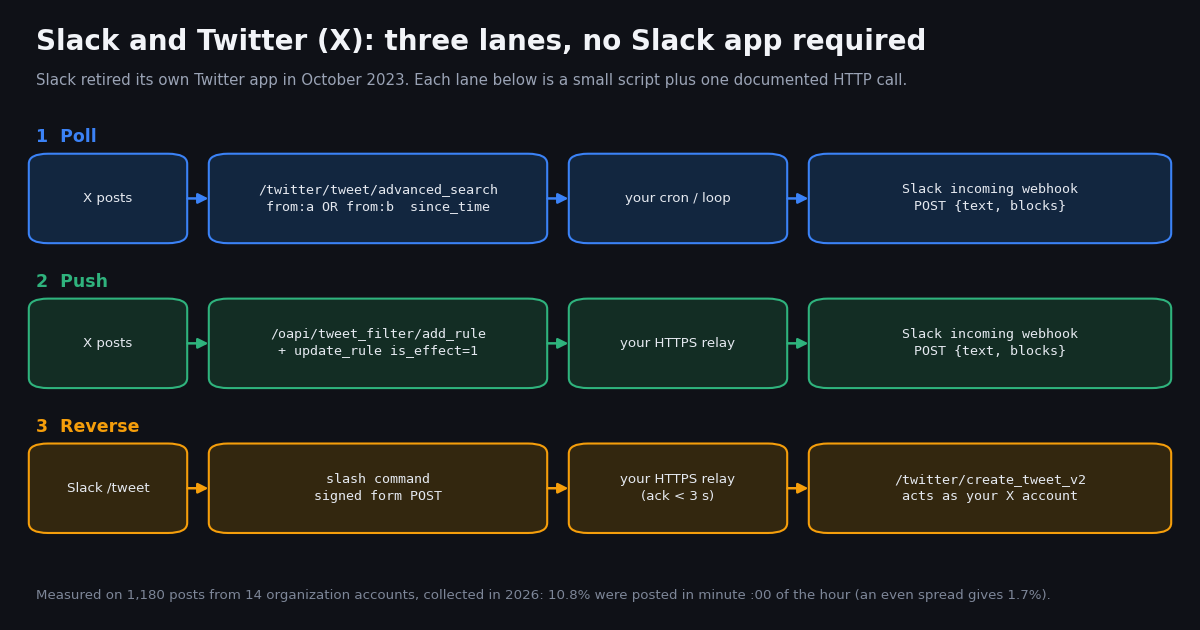
- Slack's Twitter app is retired. Slack lists it as retired on October 19, 2023 "due to upstream API limitations"; links to X posts still unfurl if your workspace settings allow it.
- Twitter to Slack = one webhook POST. A Slack incoming webhook takes JSON with a required
textand optionalblocks, and answersok. Copy the Block Kit template on this page. - Poll or push. Poll
/twitter/tweet/advanced_searchwithsince_time, or create a rule with/oapi/tweet_filter/add_rule(thenupdate_rulewithis_effect: 1) and let it push to a relay. - One query beats many. For 14 accounts every 5 minutes: about $1.30 a month as one
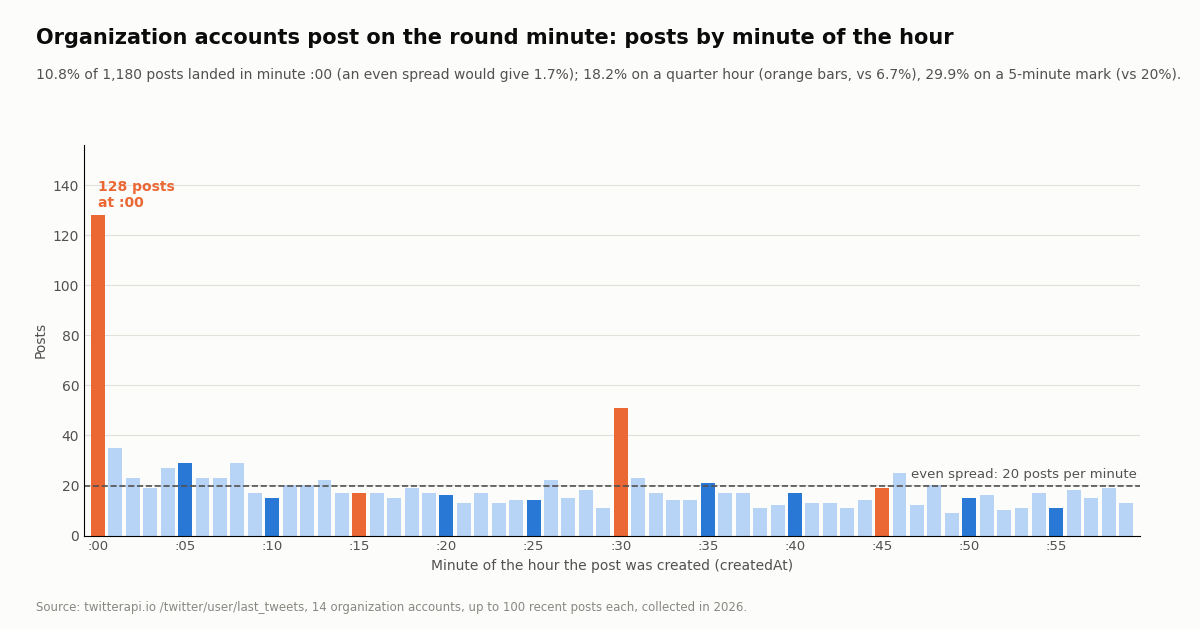
from:a OR from:bquery vs $18.20 as 14 separate polls (study, collected in 2026). - Do not poll on the round minute. 10.8% of the sampled posts landed in minute :00. Shifting a 5-minute cron by one minute cut the simulated mean wait from 164 s to 140 s.
- Slack to Twitter works through a signed slash command and
/twitter/create_tweet_v2($0.0006 per write action after a $0.10 login). It acts as your own X account, so keep a human pace.
Search "slack twitter" and many of the results still describe a Twitter app you install from the Slack App Directory. That app is gone. Slack's help center lists it under retired features (announced October 18, 2023, retired October 19, 2023) with the note "The Twitter app for Slack is no longer available due to upstream API limitations", and the directory listing itself says Slack has paused the ability to set up new instances or modify existing configurations. What still works on Slack's side is link unfurling, "if permitted by your Slack settings". Everything else, a channel that fills with new posts from accounts or keywords you care about, or a way to post to X from Slack, is now something you wire up.
This guide wires it up with plain HTTP and no automation platform. You get a polling script that turns each X post into a Block Kit message, a push relay for filter rules, a signed /tweet slash command for the reverse direction, and a measured answer to the two questions that decide the design: how often a poller actually finds something, and how long a post waits before it shows up in the channel. If you would rather click a workflow together, the n8n route is covered in a separate guide linked at the end; this page is the code route.
The numbers come from our own study: the latest posts of 14 organization accounts (Slack, Stripe, Supabase, Figma, Notion, Linear, OpenAI, Anthropic, Google for Developers, AWS, MongoDB, Docker, Node.js), 1,180 posts, collected in 2026 through the same read endpoints the scripts use.
10.8% of 1,180 posts from 14 organization accounts, collected in 2026 (an even spread gives 1.7%). A 5-minute poll shifted one minute off the round minute cut the simulated mean wait from 164 s to 140 s.
What happened to the Twitter app for Slack
The official integration stopped being an option in two steps, both documented by Slack. First the App Directory listing (slack.com/apps/A0F7XDW93-twitter) was changed to say that the underlying service appears to be down, with no estimated time for resolution, and that Slack has paused the ability to set up new instances of the Twitter integration or modify existing configurations. We checked that listing this session and it still carries that notice. Then Slack's feature-retirements page (slack.com/help/articles/4426294050451) moved the Twitter app to its retired list: announced October 18, 2023, retired October 19, 2023, "no longer available due to upstream API limitations".
Slack does not spell out the "upstream API limitations"; they followed X's 2023 API changes, after which reads became a paid product. X now sells reads on a pay-per-usage rate card: $0.005 per post read and $0.010 per user read, with pay-per-usage capped at 3 million post reads per monthly billing cycle (docs.x.com/x-api/getting-started/pricing). Any Slack integration has to buy its reads somewhere, which is why the directory app was never replaced by a free one.
What still works without code. Slack says links to X posts "will continue to unfurl if permitted by your Slack settings", so pasting a post link into a channel still shows a preview. Automation platforms (Zapier, Make, n8n, IFTTT and similar) offer Slack plus X steps; they still need X data from somewhere, and their X steps change with X's API.
What you build instead. Three lanes, each a short script: Lane 1 polls for new posts and posts them to Slack; Lane 2 lets a filter rule push new posts to a relay that posts them to Slack; Lane 3 goes the other way, from a Slack slash command to a post on X. The table compares them.
Step 1: create a Slack incoming webhook and send a test message
Slack's incoming-webhooks guide (docs.slack.dev/messaging/sending-messages-using-incoming-webhooks) gives the setup: in your Slack app settings choose Create New App, open Incoming Webhooks and switch on Activate Incoming Webhooks, click Add New Webhook to Workspace, pick the channel (for a private channel you must already be a member) and authorize. The new URL appears under Webhook URLs for Your Workspace and looks like https://hooks.slack.com/services/T00000000/B00000000/XXXXXXXXXXXXXXXXXXXXXXXX.
The URL is the credential. Slack's docs say the URL contains a secret, should not be shared publicly or committed to a public repository, and that Slack actively searches out and revokes leaked secrets. Keep it in an environment variable.
The request. POST the URL with Content-type: application/json. text is required; blocks is optional and holds Block Kit layout blocks. A success is HTTP 200 with the plain-text body ok. A webhook posts only to the channel chosen at install time, with the app's own name and icon: it cannot override the channel, username or icon per message, so the post's author goes inside the message, not in the sender name.
The errors worth handling. invalid_payload (bad JSON or unescaped text: fix it before retrying), no_text (the text field is missing), channel_is_archived, action_prohibited (an admin restricted posting), no_active_hooks or no_service (the webhook was disabled or removed), channel_not_found and posting_to_general_channel_denied. None of these improves with a retry.
Rate. Slack's rate-limit page puts incoming webhooks at one message per second, with short bursts allowed, and answers sustained overload with HTTP 429 and a Retry-After header in seconds. The scripts below pause 1.1 seconds between messages and honor Retry-After. In our study the busiest single 5-minute window held 7 posts (from @SlackAPI), so a per-message pause never backs up a feed of organization accounts.
Notifications. Per Slack's formatting docs, desktop notifications take their text from the blocks, but mobile notifications use only the top-level text, so always fill text with a one-line summary even when you send blocks.
curl -X POST "$SLACK_WEBHOOK_URL" \
  -H 'Content-type: application/json' \
  --data '{"text": "Test from the X to Slack feed"}'
# expected response body: okA copy-paste Block Kit template for an X post
A plain text message works, but a Block Kit layout reads better in a busy channel: who posted, the post, its numbers, and a button back to X. The template uses four block types. A context block carries the author line (and optionally the avatar as a small image element). A section block carries the post text as mrkdwn, with the first photo, or a video's poster frame, as an image accessory. A second context block shows likes, reposts and views. An actions block holds an "Open on X" link button.
Limits that matter. A section's text holds up to 3,000 characters and a section can carry up to 10 fields of 2,000 characters each (Slack's section block reference). In our sample the median post text was 257 characters, the 95th percentile 736, and only 2 of 1,180 posts exceeded 3,000 characters, so a simple cut at 2,990 characters plus " ..." is enough.
Escaping. Slack treats &, < and > as control characters in mrkdwn; replace them with &, < and > and escape nothing else. Link syntax is <url|text>, which is why the button is the safer way to carry the post URL.
Media. In the sample 37.9% of posts carried a video, 24.3% a photo, 0.8% an animated GIF and 36.9% no media. For video and GIFs, extendedEntities.media[].media_url_https is a still frame, which is what the accessory shows; the video itself plays on X. Set unfurl_links to false so Slack does not add a second preview of the same post under your message.
Reposts. 26.9% of the sampled posts were reposts and 7.0% quotes. A repost's own text is truncated, so read the text and media from retweeted_tweet and say "reposted @handle" in the author line, as the script does.
{
  "text": "New post from @supabase: Supabase Storage now supports ...",
  "unfurl_links": false,
  "blocks": [
    {
      "type": "context",
      "elements": [
        { "type": "image", "image_url": "https://pbs.twimg.com/profile_images/.../avatar_normal.jpg", "alt_text": "Supabase avatar" },
        { "type": "mrkdwn", "text": "*Supabase* @supabase  |  posted on X" }
      ]
    },
    {
      "type": "section",
      "text": { "type": "mrkdwn", "text": "Supabase Storage now supports ... (post text, & < > escaped, max 3,000 characters)" },
      "accessory": { "type": "image", "image_url": "https://pbs.twimg.com/media/....jpg", "alt_text": "Image attached to the post" }
    },
    {
      "type": "context",
      "elements": [
        { "type": "mrkdwn", "text": "142 likes  |  31 reposts  |  12,480 views" }
      ]
    },
    {
      "type": "actions",
      "elements": [
        { "type": "button", "text": { "type": "plain_text", "text": "Open on X" }, "url": "https://x.com/supabase/status/..." }
      ]
    }
  ]
}Step 2 (Lane 1): poll with since_time, and what a 14-account feed would see
The polling script keeps two things on disk: the Unix time of the last pass and the IDs it has already posted. Each pass asks /twitter/tweet/advanced_search for (from:a OR from:b ...) since_time:<last pass minus 120 s> with queryType=Latest, reads the top-level tweets[], follows has_next_page and next_cursor if a burst produced more than one page, drops IDs it has seen, sorts oldest first and posts each one to Slack. The 120-second overlap covers posts that become searchable a little after their createdAt; the seen-IDs list removes the duplicates the overlap creates.
Why search and not the timeline. /twitter/user/last_tweets always returns the latest page of an account, up to 20 posts, and each returned post is billed. Polled every 5 minutes that is a full page, $0.003, on every pass, about $25.92 a month for one account. A search with since_time returns only what is new, so an idle pass bills the $0.00015 minimum and a busy pass bills $0.00015 per new post. Use last_tweets once to backfill, then search.
One query for many accounts. Put every account in one from: OR query. The minimum is billed per pass, not per account, so 14 separate polls cost 14 minimums where one combined poll costs one. The study table further down shows the difference: $1.30 against $18.20 a month at a 5-minute interval.
Keyword feeds. Set X_QUERY to any search instead, for example "your product" lang:en -filter:replies min_faves:5. Keyword feeds can be far busier than organization accounts; watch the per-pass page count and keep MAX_PAGES as a cost cap.
The full script is in the code block at the end of this page. Run it from cron, or with --loop 300, on any small machine or a scheduled CI job.
Before picking an interval, it helps to know how often anything happens. We read the latest posts (up to 100 per account, replies excluded) of 14 organization accounts and measured posting rate, the gap between consecutive posts, and the share of 5-minute polls that would have found at least one new post.
Together the 14 accounts post about 15.8 times a day. The busiest single account, @supabase, averaged 2.71 posts a day, and even there fewer than 1% of 5-minute polls would have found anything. At 60 seconds, a combined query for all 14 accounts would come back empty about 98.9% of the time; at 5 minutes, 94.7%; at 15 minutes, 84.8% (modeled from the combined posting rate, assuming posts arrive independently).
Reading the table. The posts-per-day figure is the sample size divided by the days the sample spans, so it is a long-run average. @SlackHQ's 100 latest posts reach back about ten years, so its rate is near zero even though it posted in short bursts (median gap 3.5 hours). @stripe and @awscloud returned fewer pages (40 and 20 posts) at collection time, so their rates rest on smaller samples.
Picking the poll interval: delay, cost, and the round-minute trap
A poller adds delay: a post waits from its createdAt until the next pass. If posts were spread evenly across the clock the average wait would be half the interval. They do not. In our sample 10.8% of posts were created in minute :00 of the hour (an even spread gives 1.7%), 18.2% on a quarter hour (vs 6.7%), and 33.1% in the first 15 seconds of a minute (vs 25%). That pattern is consistent with scheduled publishing; we did not measure the posting tool, and X's source field is usually empty.
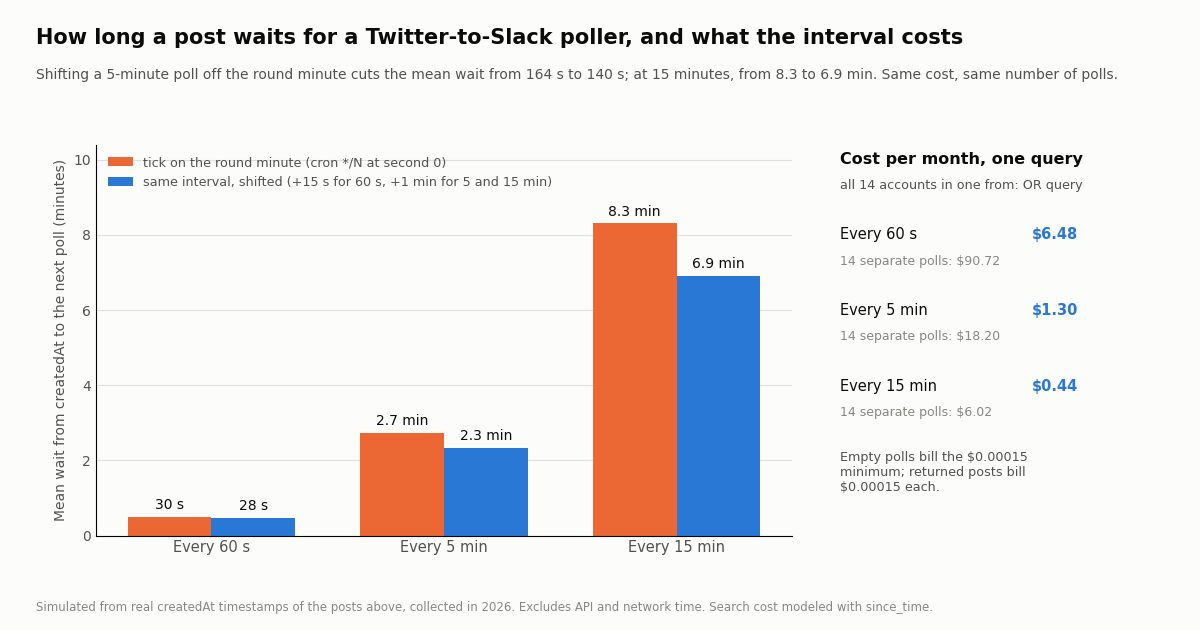
Why it matters: a cron line like */5 * * * * fires at second 0 of minute :00, :05, :10 and so on. A post scheduled for 14:00 lands a few seconds after the 14:00 pass and waits nearly the whole interval for the 14:05 pass. We replayed every post's real timestamp against a fixed poll schedule:
The takeaway. Shift the schedule off the round minute: 1-59/5 * * * * for a 5-minute poll cut the simulated mean wait from 164 to 140 seconds and the median from 173 to 133; at 15 minutes the mean fell from 8.3 to 6.9 minutes. It costs nothing: same number of passes. At 60 seconds the effect is small (30 vs 28 seconds), because the interval is already short.
Costs. All three costs are dominated by the polling floor, not by posts: an idle pass bills the $0.00015 minimum, and the 15.8 posts a day themselves add about $0.07 a month at $0.15 per 1,000. Polled as 14 separate queries the same feed costs $90.72, $18.20 and $6.02 a month at the three intervals.
What the wait excludes. The simulation measures schedule delay only. API response time, the time a new post takes to become searchable, and Slack's own delivery add to it; we did not post to a real Slack workspace in this study, so treat the numbers as the controllable part of the delay.
Against the official X API. On reads, twitterapi.io bills $0.15 per 1,000 posts returned (15 credits per post, $1 = 100,000 credits), with a $0.00015 minimum when a search returns nothing; no X account is needed. X's pay-per-usage rate card (docs.x.com/x-api/getting-started/pricing) bills $0.005 per post read, which is $5 per 1,000 posts, about 33 times the per-post price, and caps pay-per-usage at 3 million post reads a month before Enterprise.
New accounts that pass the automatic bot check get free starter credits (no card, one per person or network, expiring after 31 days); see the pricing page for the amount. Purchased credits never expire. Before your first payment the API allows 0.2 requests per second, which is plenty for a 60-second or 5-minute Slack feed; once paid it is 20 per second.
Step 3 (Lane 2): push with a filter rule and a small relay
If you want sub-minute delivery for many feeds without running a scheduler, move the polling to twitterapi.io's side. POST /oapi/tweet_filter/add_rule takes tag (your label, up to 255 characters), value (the filter in search syntax, up to 255 characters, so a from: list of roughly ten handles per rule) and interval_seconds (minimum 0.05, maximum 86,400, default 60), and returns rule_id, status and msg. A new rule is not active: call POST /oapi/tweet_filter/update_rule with rule_id, tag, value, interval_seconds and is_effect: 1 (the update endpoint's minimum interval is 0.1 seconds). GET /oapi/tweet_filter/get_rules lists your rules, and the dashboard can edit them too.
Matches are POSTed as JSON to the webhook URL set in your twitterapi.io dashboard. As described in our webhook guide, each delivery carries an event_type, the rule's id, tag and value, and a tweets array of the same post objects the search returns, with your API key in an x-api-key header. The relay checks that header in constant time, answers 200 immediately, and hands the batch to a worker thread that formats each post with the same to_blocks() function and posts it to Slack at one message per second.
Where to host it. Anything with a public HTTPS URL: a small VM, a container service, or a serverless function. If you use a serverless function, keep an instance warm or push the batch to a queue before returning, because a frozen function never finishes the Slack call.
When to choose push. Push pays off when you have several feeds, want short intervals, or do not want cron. For a single 5-minute feed, Lane 1 is fewer moving parts. For a fixed list of accounts where seconds matter, the Twitter Stream product delivers their posts on a flat monthly plan.
"""relay.py - Lane 2: a twitterapi.io filter rule pushes matching posts here; we forward
them to Slack with the same Block Kit layout as twitter_to_slack.py.

    pip install flask requests
    export TWITTERAPI_IO_API_KEY=...  SLACK_WEBHOOK_URL=...
    CREATE_RULE=1 python relay.py     # once: create + activate the rule, then serve
Set this server's public HTTPS URL as the webhook URL in the twitterapi.io dashboard.
"""
import hmac
import os
import queue
import threading
import time

import requests
from flask import Flask, request

from twitter_to_slack import post_to_slack, to_blocks    # the polling script on this page

API = "https://api.twitterapi.io"
X_KEY = os.environ["TWITTERAPI_IO_API_KEY"]
H = {"X-API-Key": X_KEY}


def create_rule(tag, value, interval_seconds=60):
    r = requests.post(f"{API}/oapi/tweet_filter/add_rule", headers=H,
                      json={"tag": tag, "value": value, "interval_seconds": interval_seconds}, timeout=30)
    r.raise_for_status()
    body = r.json()
    if body.get("status") != "success":
        raise RuntimeError(body.get("msg"))
    rule_id = body["rule_id"]
    # a new rule is inactive: send every field again with is_effect=1
    r = requests.post(f"{API}/oapi/tweet_filter/update_rule", headers=H,
                      json={"rule_id": rule_id, "tag": tag, "value": value,
                            "interval_seconds": interval_seconds, "is_effect": 1}, timeout=30)
    r.raise_for_status()
    return rule_id


app = Flask(__name__)
jobs = queue.Queue()
seen = set()


@app.post("/x-to-slack")
def receive():
    if not hmac.compare_digest(request.headers.get("x-api-key", ""), X_KEY):
        return "", 401
    jobs.put(request.get_json(silent=True) or {})
    return "", 200                       # answer at once; Slack is called by the worker


def worker():
    while True:
        body = jobs.get()
        if body.get("event_type") != "tweet":       # the dashboard test sends another event type
            continue
        for t in body.get("tweets") or []:
            if t["id"] in seen:
                continue
            seen.add(t["id"])
            try:
                post_to_slack(to_blocks(t))
            except Exception as exc:
                print("slack error:", exc)
            time.sleep(1.1)


threading.Thread(target=worker, daemon=True).start()

if __name__ == "__main__":
    if os.environ.get("CREATE_RULE"):
        print("rule", create_rule("slack-feed", "from:supabase OR from:vercel OR from:stripe", 60))
    app.run(host="0.0.0.0", port=int(os.environ.get("PORT", "8080")))
Slack to Twitter: post to X from a slash command
The reverse search, "slack to twitter", usually means a team that drafts posts in Slack and wants one command to publish them. Create a slash command (for example /tweet) in the same Slack app and point its Request URL at your relay. Per Slack's slash-command docs, Slack sends a form-encoded POST (application/x-www-form-urlencoded) with fields such as command, text, user_id and response_url, and your app must answer within 3,000 milliseconds or the user sees a timeout. The old token field is deprecated; verify requests with your app's signing secret instead.
Verification. Slack's request-verification guide: read X-Slack-Request-Timestamp and reject requests more than five minutes old, build the base string v0:<timestamp>:<raw body>, compute an HMAC SHA-256 with the signing secret, prefix the hex digest with v0=, and compare it in constant time with X-Slack-Signature.
Posting. The relay calls POST /twitter/create_tweet_v2 with login_cookies, tweet_text and proxy (required; a proxy you supply), plus optional reply_to_tweet_id, attachment_url for a quote, or media_ids from /twitter/upload_media_v2. The response has tweet_id, status and message. The login_cookies come from one /twitter/user_login_v2 login ($0.10); each write action is then 60 credits, $0.0006, billed on every HTTP 200 response even if X then declines the action. On X's own rate card, creating a post is $0.015, or $0.200 with a URL (docs.x.com).
Caveats you must accept. The call acts as that X account: X can rate-limit, lock or suspend it, and the session can need a new login. Use it only for your own account, at a normal human pace; X's automation rules apply, and this is not a way around any limit. The relay below lets only listed Slack users post, enforces a fixed one-minute pause between posts, and reports X's answer back to the user privately through response_url. Do not wire it to anything that posts without a person typing the command.
"""slack_to_x.py - Lane 3 (Slack to Twitter): a /tweet slash command posts to YOUR X account.

Writes act as that account: X can rate-limit, lock or suspend it. Only your own account,
a normal human pace, X's automation rules apply; this is not a way around any limit.
    pip install flask requests
    export SLACK_SIGNING_SECRET=...  TWITTERAPI_IO_API_KEY=...
    export X_LOGIN_COOKIES=...   # from one /twitter/user_login_v2 login ($0.10)
    export X_PROXY=http://user:pass@host:port   # your own proxy, required by create_tweet_v2
    export ALLOWED_SLACK_USERS=U0123ABCD,U0456EFGH
"""
import hashlib
import hmac
import os
import threading
import time

import requests
from flask import Flask, request

API = "https://api.twitterapi.io"
SECRET = os.environ["SLACK_SIGNING_SECRET"].encode()
ALLOWED = set(os.environ["ALLOWED_SLACK_USERS"].split(","))
app = Flask(__name__)
last_post = [0.0]


def signed(req):
    ts = req.headers.get("X-Slack-Request-Timestamp", "0")
    if abs(time.time() - int(ts)) > 300:            # Slack: reject requests older than 5 minutes
        return False
    base = b"v0:" + ts.encode() + b":" + req.get_data()
    mine = "v0=" + hmac.new(SECRET, base, hashlib.sha256).hexdigest()
    return hmac.compare_digest(mine, req.headers.get("X-Slack-Signature", ""))


def post_tweet(text, response_url):
    r = requests.post(f"{API}/twitter/create_tweet_v2",
                      headers={"X-API-Key": os.environ["TWITTERAPI_IO_API_KEY"]},
                      json={"login_cookies": os.environ["X_LOGIN_COOKIES"], "tweet_text": text,
                            "proxy": os.environ["X_PROXY"]}, timeout=60)
    body = r.json()
    if body.get("status") == "success":
        msg = f"Posted: tweet id {body.get('tweet_id')}"
    else:                                           # create_tweet_v2 returns the reason in "message"
        msg = f"X did not post it: {body.get('message')} (the session may need a new login)"
    requests.post(response_url, json={"response_type": "ephemeral", "text": msg}, timeout=15)


@app.post("/slack/tweet")
def tweet():
    if not signed(request):
        return "", 401
    f = request.form
    if f.get("user_id") not in ALLOWED:
        return "You are not allowed to post to the company X account.", 200
    text = (f.get("text") or "").strip()
    if not text or len(text) > 280:
        return "Usage: /tweet <text up to 280 characters>", 200
    if time.time() - last_post[0] < 60:            # fixed pause: no more than one post a minute
        return "Please wait a minute between posts.", 200
    last_post[0] = time.time()
    threading.Thread(target=post_tweet, args=(text, f["response_url"])).start()
    return "Sending to X ...", 200                  # Slack needs an answer within 3 seconds


if __name__ == "__main__":
    app.run(host="0.0.0.0", port=int(os.environ.get("PORT", "8080")))
Troubleshooting a Twitter to Slack feed
Slack answers invalid_payload. The JSON is malformed or a block is invalid: check &, <, > escaping in mrkdwn, that image elements have both image_url and alt_text, and that the button has a non-empty url. Send the same payload with only text to confirm the webhook itself works.
Slack answers no_active_hooks, no_service or 404. The webhook was removed, the app was uninstalled, or Slack revoked a leaked URL. Create a new webhook and update the environment variable.
Duplicate messages. Two passes overlapped (that is intended) but the seen-IDs file was not saved, for example because the job runs in a fresh container each time. Store the state in a small key-value store or table instead of a local file.
Nothing arrives, no errors. Check the query with a manual search first. For Lane 2, confirm the rule was activated (is_effect: 1 via update_rule) and that the dashboard webhook URL points at the relay's HTTPS path.
Messages arrive minutes late. Compare your schedule with the minute-of-hour chart: a */5 cron on round minutes is the worst case for scheduled posts. Shift it, or shorten the interval and accept the higher floor.
HTTP 429 from Slack. You are posting faster than about one message per second to the channel; honor Retry-After and keep the per-message pause.
The slash command times out. The relay did the X call before answering. Answer at once and post the result through response_url, as in the code above.
How we collected this
Question. How often would a Twitter-to-Slack poller find a new post from typical organization accounts, how long would a post wait before the next pass, and what would each interval cost per month?
Accounts and method. @SlackHQ, @SlackAPI, @stripe, @supabase, @figma, @NotionHQ, @linear, @OpenAI, @AnthropicAI, @googledevs, @awscloud, @MongoDB, @Docker and @nodejs, read with /twitter/user/last_tweets (replies excluded, newest first, up to 5 pages each). 65 requests returned 1,180 posts, which cost about $0.18 at $0.15 per 1,000. Collected in 2026.
Analysis. Posts per day = posts in the sample divided by the days it spans. Poll hit rates come from counting the fixed windows that contain at least one post. Waits replay each post's createdAt against a fixed poll schedule at second 0 of the interval and at shifted offsets. Monthly costs use 30 days, the $0.00015 minimum for an empty pass and $0.00015 per post returned; the combined-query figure models empty passes from the summed posting rate.
What the sample cannot show. Fourteen organization accounts are not news accounts or keyword feeds, which post far more often and would see more non-empty polls and fewer round-minute peaks. The latest 100 posts reach back from ten days to ten years depending on the account, so posting rates are long-run averages that hide launch weeks. Replies were not collected. We did not post to Slack, so Slack delivery time and the time a post takes to become searchable are not in the wait figures.
Privacy. Aggregates only, from public organization accounts; no private individuals are profiled and no reposted or quoted authors are analyzed. Raw pages are kept only for files with five or fewer distinct authors; the analysis script, results and de-identified rows are in the study folder.
"""twitter_to_slack.py - post new X (Twitter) posts from chosen accounts, or a keyword
search, into a Slack channel through a Slack incoming webhook (Lane 1: polling).
pip install requests
export TWITTERAPI_IO_API_KEY=... # twitterapi.io dashboard
export SLACK_WEBHOOK_URL=https://hooks.slack.com/services/T.../B.../...
python twitter_to_slack.py # one pass: run it from cron
python twitter_to_slack.py --loop 300 # or stay running and poll every 300 s
Cron tip from our study: organization accounts often post on the round minute, so
run a 5-minute poll at 1,6,11,... (e.g. "1-59/5 * * * *") rather than "*/5".
Cost: one advanced_search pass. A pass that finds nothing costs the $0.00015 minimum
(15 credits); each post returned costs $0.00015. No X account needed for reads.
"""
import argparse
import json
import os
import time
from datetime import datetime
import requests
API = "https://api.twitterapi.io"
X_KEY = os.environ["TWITTERAPI_IO_API_KEY"]
SLACK = os.environ["SLACK_WEBHOOK_URL"]
WATCH = ["supabase", "vercel", "stripe"] # accounts to relay, without the @
QUERY = os.environ.get("X_QUERY") # or a search, e.g. '"supabase" lang:en -filter:replies'
STATE_FILE = "slack-feed-state.json"
OVERLAP = 120 # seconds re-read on every pass; the seen-ids set removes duplicates
MAX_PAGES = 5 # safety cap per pass (a full page is up to 20 posts = $0.003)
SECTION_LIMIT = 3000 # Block Kit section text limit
def load_state():
if os.path.exists(STATE_FILE):
with open(STATE_FILE) as f:
return json.load(f)
return {"since_time": int(time.time()) - 600, "seen": []}
def save_state(state):
state["seen"] = state["seen"][-2000:]
with open(STATE_FILE, "w") as f:
json.dump(state, f)
def build_query(since_time):
base = QUERY or "(" + " OR ".join(f"from:{h}" for h in WATCH) + ")"
return f"{base} since_time:{since_time}"
def fetch_new(since_time):
"""Only posts newer than since_time come back, so an idle pass returns an empty list."""
tweets, cursor = [], None
for _ in range(MAX_PAGES):
params = {"query": build_query(since_time), "queryType": "Latest"}
if cursor:
params["cursor"] = cursor
r = requests.get(f"{API}/twitter/tweet/advanced_search",
headers={"X-API-Key": X_KEY}, params=params, timeout=30)
r.raise_for_status()
body = r.json()
page = body.get("tweets") or []
tweets.extend(page)
if not page or not body.get("has_next_page") or not body.get("next_cursor"):
break
cursor = body["next_cursor"]
return tweets
def parse_time(s):
# createdAt looks like "Thu Oct 16 12:34:56 +0000 2026", not ISO 8601
return datetime.strptime(s, "%a %b %d %H:%M:%S %z %Y")
def esc(s):
"""Slack mrkdwn treats & < > as control characters."""
return s.replace("&", "&").replace("<", "<").replace(">", ">")
def to_blocks(t):
a = t.get("author") or {}
rt = t.get("retweeted_tweet")
src = rt or t # a repost's own text is cut short
text = esc(src.get("text") or "")
if len(text) > SECTION_LIMIT - 10:
text = text[: SECTION_LIMIT - 10] + " ..."
url = t.get("url") or t.get("twitterUrl") or ""
head = f"*{esc(a.get('name', ''))}* @{a.get('userName', '')}"
if rt:
head += f" reposted @{(rt.get('author') or {}).get('userName', '')}"
section = {"type": "section", "text": {"type": "mrkdwn", "text": text or "(no text)"}}
media = ((src.get("extendedEntities") or {}).get("media")) or []
if media and media[0].get("media_url_https"):
# photos, and the poster frame of a video or GIF
section["accessory"] = {"type": "image", "image_url": media[0]["media_url_https"],
"alt_text": "Media attached to the post"}
stats = (f"{t.get('likeCount') or 0:,} likes | {t.get('retweetCount') or 0:,} reposts | "
f"{t.get('viewCount') or 0:,} views")
return {
"text": f"New post from @{a.get('userName', '')}: {(src.get('text') or '')[:150]}",
"unfurl_links": False,
"blocks": [
{"type": "context", "elements": [{"type": "mrkdwn", "text": head}]},
section,
{"type": "context", "elements": [{"type": "mrkdwn", "text": stats}]},
{"type": "actions", "elements": [{"type": "button", "url": url,
"text": {"type": "plain_text", "text": "Open on X"}}]},
],
}
def post_to_slack(payload):
for _ in range(5):
r = requests.post(SLACK, json=payload, timeout=15)
if r.status_code == 429: # Slack sends Retry-After in seconds
time.sleep(int(r.headers.get("Retry-After", "1")))
continue
if r.status_code != 200: # e.g. invalid_payload, channel_is_archived
raise RuntimeError(f"Slack {r.status_code}: {r.text}")
return
raise RuntimeError("Slack kept answering 429")
def run_once():
state = load_state()
started = int(time.time())
seen = set(state["seen"])
fresh = [t for t in fetch_new(state["since_time"] - OVERLAP) if t["id"] not in seen]
fresh.sort(key=lambda t: parse_time(t["createdAt"])) # oldest first in the channel
for t in fresh:
post_to_slack(to_blocks(t))
state["seen"].append(t["id"])
time.sleep(1.1) # Slack: about one message per second per channel
state["since_time"] = started
save_state(state)
print(f"{datetime.now():%H:%M:%S} posted {len(fresh)}")
if __name__ == "__main__":
ap = argparse.ArgumentParser()
ap.add_argument("--loop", type=int, default=0, help="poll every N seconds instead of once")
args = ap.parse_args()
while True:
try:
run_once()
except Exception as exc: # keep going; the next pass catches up through OVERLAP
print("error:", exc)
if not args.loop:
break
time.sleep(args.loop)
Researching this?Free starter credits cover end-to-end testing — Google sign-in, no card. Get a key.
Questions readers ask
Is there still an official Twitter app for Slack?
No. Slack's feature-retirements page lists the Twitter app as retired on October 19, 2023 (announced October 18) and says it is no longer available due to upstream API limitations. Its App Directory listing says Slack paused new setups and configuration changes. Links to X posts still unfurl in Slack if your workspace settings allow it.
How do I get tweets into a Slack channel without Zapier or n8n?
Create a Slack app with an incoming webhook for the channel, then run a small script that searches for new posts (for example /twitter/tweet/advanced_search with from: handles and since_time) and POSTs each one to the webhook as JSON with text and blocks. The full script and a Block Kit template are on this page.
How do I post to Twitter (X) from Slack?
Add a slash command such as /tweet to your Slack app and point it at a relay that verifies Slack's signature, answers within 3 seconds, and calls /twitter/create_tweet_v2 with your account's login_cookies. It acts as your own X account, so X can rate-limit, lock or suspend it: restrict who can use the command and keep a human pace.
How often should a Twitter to Slack bot check for new posts?
For organization accounts, every 5 minutes is usually enough: in our sample even the busiest account posted under three times a day, and a combined 5-minute query for 14 accounts would be empty about 94.7% of the time, at about $1.30 a month. Schedule it off the round minute (for example 1-59/5 in cron), because many posts are published at minute :00.
Can a Slack incoming webhook post to several channels or change its name?
No. Per Slack's docs a webhook posts only to the channel chosen when it was created, with the app's own name and icon, and cannot override channel, username or icon. Create one webhook per channel, or use chat.postMessage with a bot token if you need more control.
Why do my tweets in Slack show up twice?
Either Slack unfurled the post link under your message (set unfurl_links to false), or your poller re-read the overlap window without remembering which IDs it already posted. Keep a persistent seen-IDs list.
What does a Twitter to Slack feed cost?
With twitterapi.io, reads cost $0.15 per 1,000 posts returned and an empty search pass costs the $0.00015 minimum. One combined query polled every 60 seconds is about $6.48 a month, every 5 minutes about $1.30, before the posts themselves. X's official pay-per-usage rate is $0.005 per post read.
Continue
- Slack help center: feature retirements (Twitter app retired October 19, 2023; links still unfurl)
- Slack developer docs: sending messages with incoming webhooks (setup, payload, errors)
- Slack developer docs: section block (3,000-character text, 10 fields)
- Slack developer docs: verifying requests with the signing secret
- twitterapi.io API reference: add a tweet filter rule (inactive until update_rule)
- X API pay-per-usage pricing ($0.005 per post read), the official and pricier route
- X (Twitter) API overview and endpoints
- n8n workflow that sends new tweets to Slack without code
- Twitter (X) to Discord bot with webhooks
- Twitter API Telegram bot guide
- Twitter (X) webhooks: filter rules and the push payload
- Twitter Stream: fixed account lists pushed in seconds
- Pay-per-use pricing and starter credits
- 01Twitter (X) Account Locked: Why It Happens and How to Unlock It
- 02The Library of Congress Twitter (X) Archive: What Happened and Can You Access It?
- 03Databricks Twitter (X) Pipeline: Load Tweets into a Delta Table in 2026
- 04Twitter (X) CRM: Sync X Profiles and Buying Signals into HubSpot or Salesforce
- 05Twitter (X) Likes API: What You Can Read, Like and Unlike in 2026
- 06Nitter Is Archived: Which Nitter Alternatives Still Work in 2026?
- 07Sprout Social API in 2026: What It Returns, What It Costs, and Where Twitter (X) Data Runs Out
- 08Twitter (X) Video Length Limit in 2026: How Long a Video Can Be, by Account
Writing about something you built with TwitterAPI.io? Our community rewards program pays API credits for honest tutorials, build logs and videos.
Stop reading. Start building.
Starter credits cover real testing on real data. Google sign-in, no card, no application queue.
Get an API keyAlready building with TwitterAPI.io? Publish an honest tutorial or build log about it and earn up to $200 a month in API credits.