Twitter (X) Update Profile API: Change Name, Bio, Avatar and Banner From Code
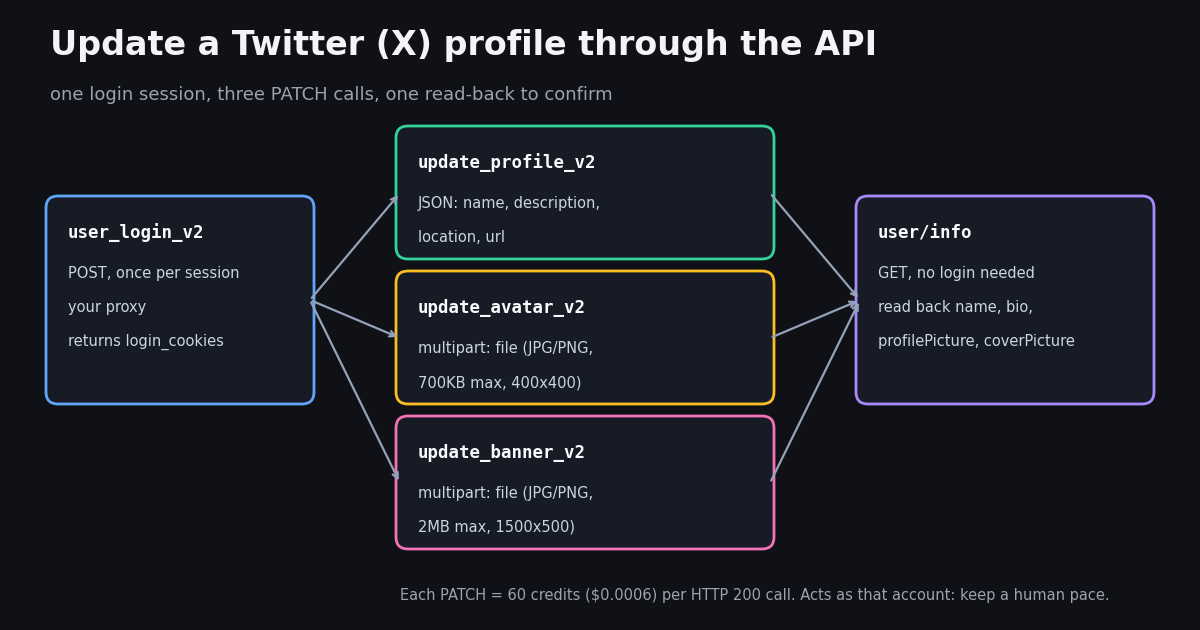
- Three write calls cover the whole profile:
update_profile_v2(JSON:name,description,location,url),update_avatar_v2andupdate_banner_v2(multipartfileupload). - Every write needs a session:
login_cookiesfrom/twitter/user_login_v2plus aproxystring you supply; 60 credits ($0.0006) per HTTP 200 call, $0.10 per login. - Hard limits from the docs: name 50, bio 160, location 30 characters; avatar JPG/PNG up to 700KB (400x400 recommended); banner JPG/PNG up to 2MB (1500x500 recommended).
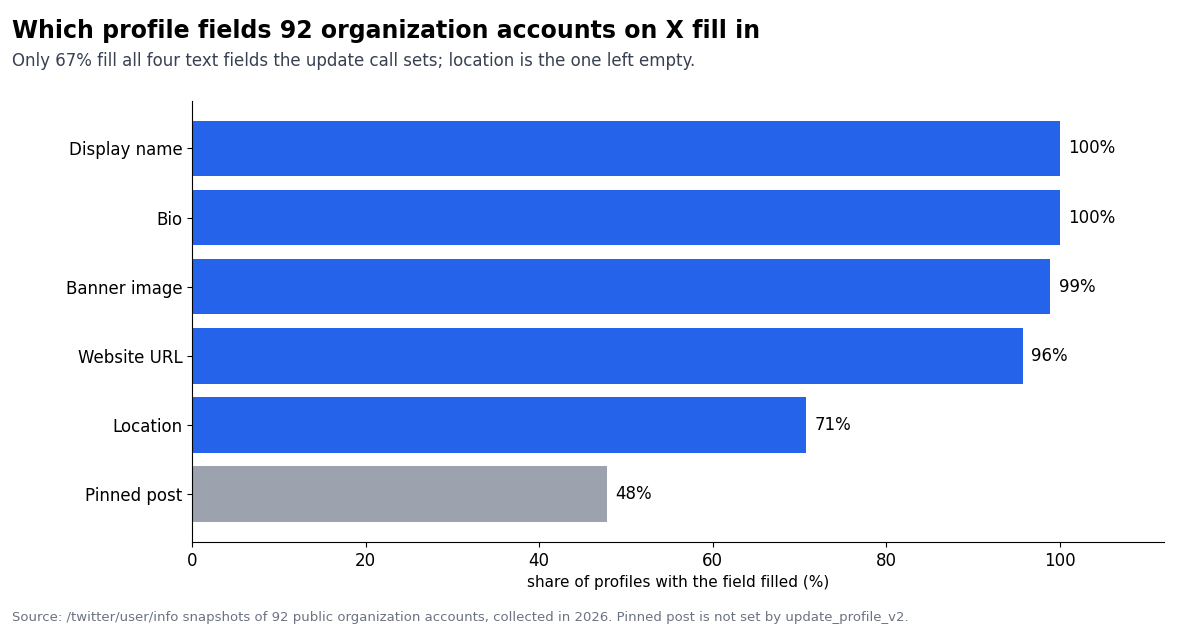
- What a maintained profile looks like: across 92 organization accounts, 96% set a website and 99% a banner, but only 71% fill location and 67% fill all four text fields.
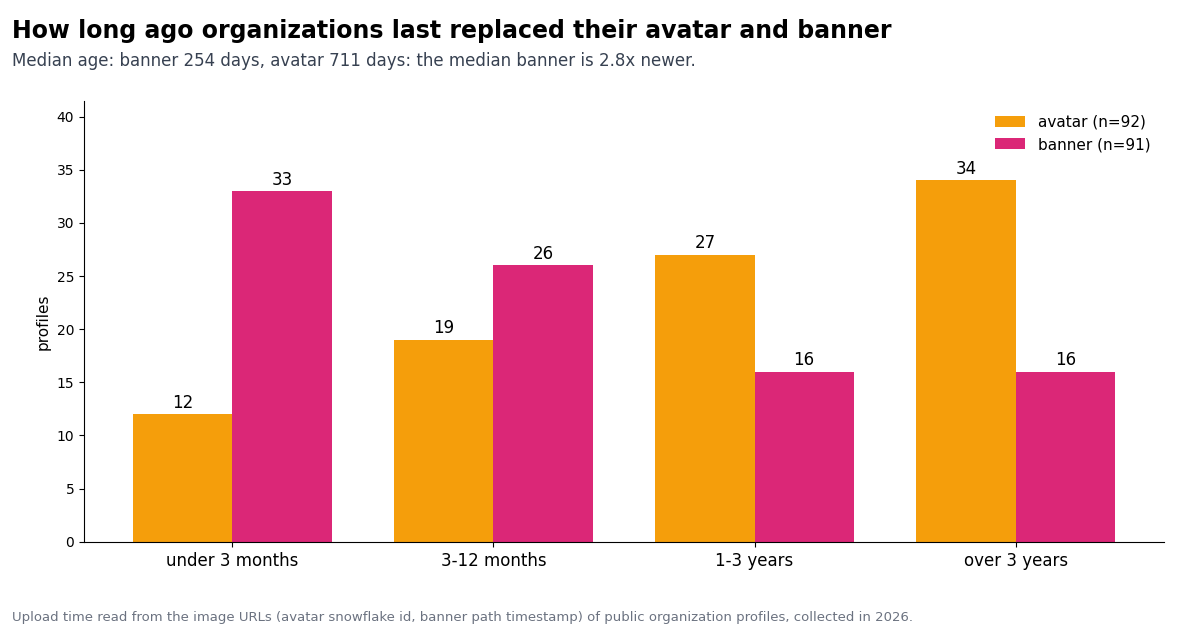
- Banners change, avatars stay: median banner age 254 days vs 711 days for the avatar; 36% of banners were replaced in the last 90 days, only 13% of avatars.
- Verify with a read:
/twitter/user/inforeturnsname,description,location,url,profilePictureandcoverPicturefor $0.18 per 1,000 profiles, no X account needed.
Changing a profile by hand takes a minute. Changing it from code is what you need when a product launch swaps the banner, a support account adds an outage notice to its bio, a rebrand renames a display name, or a bot account you operate keeps its website link current. The work is small, but the details are not obvious: the text fields and the images use different endpoints and different body formats, each field has a character limit that fails the call when exceeded, and every write acts as a real logged-in account.
This guide covers the three profile write endpoints on TwitterAPI.io exactly as their reference pages describe them, what the official X API offers today (and what we could not confirm), one end-to-end Python script that updates the text, the avatar and the banner and then reads the profile back, and a small study of public organization profiles: which fields they fill, how long their bios run against the 160-character limit, and how long ago they last replaced their avatar and banner.
One honest note before the code. No test account was available for this build, so we did not run a live write round trip. The request formats, limits and response fields below are the documented shapes from docs.twitterapi.io, fetched while writing; every number in the study comes from real read calls we ran ourselves.
67%
The three profile write endpoints at a glance
A Twitter (X) profile has six editable parts that matter to an API: display name, bio, location, website, avatar and banner. TwitterAPI.io splits them across three PATCH calls. All three authenticate with your X-API-Key header and act as the account whose login_cookies you send.
Text fields are all optional. update_profile_v2 changes only the fields you include. Send {"description": "..."} with the session fields and the name, location and website stay as they are. That makes it safe to script a single-field change, such as swapping a status line in the bio, without re-sending the rest.
Images are file uploads, not URLs or media IDs. The avatar and banner calls take the image bytes in a file form field. You do not upload media first and pass an ID, and you cannot pass a remote URL; download the image and send the bytes.
What these calls do not change. There is no username (handle) field on any of them, so a handle change stays a manual step in X's settings. The pinned post is a separate action, and so are privacy settings and the professional-profile category. If you need the handle change, our guide on changing a Twitter username walks through the manual steps.
Step 1: get a session with user_login_v2
Every profile write needs login_cookies, a base64 string that represents a logged-in session for the account. You get it from /twitter/user_login_v2, a POST with user_name, email, password and proxy, plus totp_secret when the account has app-based two-factor authentication. A successful response carries status, message, login_cookies and user_id.
One login, many writes. The login costs $0.10. Store login_cookies securely and reuse it for every write in the session instead of logging in before each call. Sessions do not last forever: when a write starts returning an authentication error, log in again.
The proxy is yours. Both the login and every write call require a proxy string in the form http://username:password@ip:port. The reference pages recommend a good residential proxy and advise against free ones. Use one stable proxy for one account; the account's sessions are tied to how X sees the login.
Building cookies yourself. The reference pages also describe building login_cookies from an existing browser session: base64-encode a JSON object holding the auth_token and ct0 cookie values. That avoids a password login for an account you are already signed in to, but treat those cookie values like a password.
Writes act as the account. X can rate-limit, lock or suspend an account that behaves unusually, so run these calls only on your own account, at a normal human pace, under X's automation rules. Nothing here is a way around any X limit.
import requests

BASE = "https://api.twitterapi.io"
HEADERS = {"X-API-Key": "YOUR_TWITTERAPI_IO_KEY"}

r = requests.post(f"{BASE}/twitter/user_login_v2", headers=HEADERS, json={
    "user_name": "your_own_handle",
    "email": "you@example.com",
    "password": "your-password",
    "proxy": "http://username:password@ip:port",
    # "totp_secret": "BASE32SECRET",  # only if the account uses an authenticator app
}, timeout=60)
data = r.json()
print(data.get("status"), data.get("message"))
login_cookies = data.get("login_cookies")  # reuse this for every write in the session
Step 2: update name, bio, location and website
/twitter/update_profile_v2 is a PATCH with a JSON body. Besides login_cookies and proxy, it accepts four optional fields. The limits below are the ones the endpoint's reference page states; validate them in your own code before sending, because a value over the limit fails the call.
Documented response. On HTTP 200 the body has two fields: status (success or error) and message, for example Profile updated successfully. An HTTP 400 returns an object with an integer error and a message. Check status, not just the HTTP code: a 200 with status: error means X did not apply the change. The example below is the documented shape, not a response we captured.
Character counting. Python's len can differ from X's own count for emoji and combined characters, so a bio that is 158 characters in Python can still be rejected. Leave a few characters of margin, or test your longest bio once by hand. In our study the upper quartile of organization bios ran to 122 characters, so you rarely need the full 160.
The website field and t.co. When you read the profile back, url comes back as a t.co short link, and the expanded address sits in the entities object of the user/info response. Compare against the expanded value when you verify a change, or the check will always report a difference.
PATCH https://api.twitterapi.io/twitter/update_profile_v2
X-API-Key: YOUR_TWITTERAPI_IO_KEY
Content-Type: application/json

{
  "login_cookies": "<base64 string from user_login_v2>",
  "proxy": "http://username:password@ip:port",
  "description": "Public X data for research and dashboards. Status on our site.",
  "location": "Remote"
}

// documented 200 response shape
{
  "status": "success",
  "message": "Profile updated successfully"
}Step 3: change the profile picture and banner
The avatar and banner calls are PATCH requests with a multipart/form-data body. That is the detail people miss: send the image as a file part named file, and send login_cookies and proxy as ordinary form fields in the same request. A JSON body will not work for these two.
Documented responses. Both return the same two fields as the text call: status and message (for example Avatar updated successfully or Banner updated successfully), with the same 400 error object. Again, that is the shape from the reference pages; we did not run a live upload for this guide.
Prepare the image first. Resize and compress before upload so the file is under the limit, and keep the important part of a banner away from the bottom-left corner, where the avatar overlaps it on many layouts. For the exact safe zones and how the banner crops on mobile and desktop, see our Twitter banner size guide rather than guessing.
In requests, pass files={"file": (filename, handle, mime)} and data={"login_cookies": ..., "proxy": ...} to requests.patch. Do not set the Content-Type header yourself: requests writes the multipart boundary for you, and a hand-set header without it breaks the upload.
import requests

BASE = "https://api.twitterapi.io"
HEADERS = {"X-API-Key": "YOUR_TWITTERAPI_IO_KEY"}
form = {"login_cookies": "<base64 string>", "proxy": "http://username:password@ip:port"}

with open("banner-1500x500.jpg", "rb") as fh:
    r = requests.patch(f"{BASE}/twitter/update_banner_v2", headers=HEADERS,
                       files={"file": ("banner-1500x500.jpg", fh, "image/jpeg")},
                       data=form, timeout=120)
print(r.status_code, r.json().get("status"), r.json().get("message"))
What the official X API offers for profile updates
The official API's history matters here because many tutorials still point at it. The legacy v1.1 reference documented POST account/update_profile (name, url, location, description; only the parameters you send change), POST account/update_profile_image (raw multipart image data) and POST account/update_profile_banner (banner data with optional width, height and offsets). Those pages live on the old developer.x.com reference.
What docs.x.com shows now. The current documentation site has v2 pages titled Update profile (PUT /2/users/me), Update profile image (PUT /2/users/me/profile_image), Update profile banner (PUT /2/users/me/profile_banner), Delete profile banner (DELETE /2/users/me/profile_banner) and Update account settings (PUT /2/users/me/settings). When we fetched them while writing this guide, the pages rendered without a request schema, they were not listed in the Users navigation or in docs.x.com/llms.txt, and the public OpenAPI file at api.x.com/2/openapi.json did not contain those routes. Treat them as published but not yet fully documented, and check the live reference before you build on them.
Pricing on the official side. X's pay-per-usage rate card at docs.x.com/x-api/getting-started/pricing lists a User: Read line at $0.010 per resource, Post: Create at $0.015 per request and a Content: Manage line at $0.005 per request, but no line named for profile updates, so we could not confirm what a v2 profile write costs. A Profile Update: Read line ($0.005 per resource) and a profile.update.* event price exist, but those cover reading profile-change events through the X Activity API, not making the change.
Auth model difference. The official writes need a developer app and a user-context token for the account (OAuth 1.0a or OAuth 2.0 with user scopes). The TwitterAPI.io calls need your API key plus a login session for the account. Either way the change is made as that account, under X's rules.
On reads the gap is concrete: $0.010 against $0.00018 per profile is about 55x on the official pay-per-usage card. On writes we print both sides only where both are published.
What a complete organization profile looks like
Before scripting changes, it helps to know what the fields look like on accounts that maintain their profiles on purpose. We read the public profiles of 92 organization accounts (developer tools, AI labs, consumer brands, sports leagues, news outlets, games studios and public institutions) with /twitter/user/info and measured each field the write calls can set.
The location line is the gap. Name, bio and website are close to universal, but 29% of these organizations leave location empty, which is why only 67% have all four text fields set. If you are filling a new brand account from a script, location is the field teams forget.
Bios are shorter than the limit. Half of the bios run 73 characters or fewer, the middle half sits between 42 and 122, and only 8 of 92 reach 150 or more. A quarter mention another @handle (a support or developer account), and a quarter carry a domain or link inside the bio text in addition to the website field. If your script generates bio text, aim for one clear sentence plus one pointer.
Pinned posts are a separate decision. 48% of these accounts pin a post. update_profile_v2 does not set it, so we show it here only for context; counting it, 35% have every part filled.
How often organizations replace avatars and banners
Profile images carry their own timestamps. The avatar URL in profilePicture contains a snowflake media ID, and a snowflake encodes its creation time: shift the ID right by 22 bits and add X's epoch (1288834974657 ms). The banner URL in coverPicture ends in a plain Unix timestamp in seconds. Both tell you when the current image was uploaded, which makes them a cheap way to check whether your own update landed and to see how often other accounts change theirs.
Banners are the part that changes. 33 of 91 banners were uploaded in the last three months and 65% within a year; the median banner is 2.8x newer than the median avatar. Organizations treat the banner as a campaign surface (launches, seasons, events) and the avatar as the logo, which they keep for years: 34 of 92 avatars are more than three years old.
What this means for a script. If you automate one image, automate the banner, on the schedule of your launches, and leave the avatar as a deliberate, rare change. A banner job that runs per campaign is one update_banner_v2 call each time, $0.0006, plus a $0.10 login if the session has expired.
Use the timestamp to verify. After update_banner_v2 returns success, read the profile and compare the trailing number in coverPicture with the time you made the call. A new timestamp means X stored the new banner; an unchanged URL means the change did not apply, whatever the response said.
import re
import time

TWEPOCH_MS = 1288834974657

def avatar_uploaded_unix(profile_picture_url):
    m = re.search(r"profile_images/(\d+)/", profile_picture_url or "")
    return ((int(m.group(1)) >> 22) + TWEPOCH_MS) / 1000 if m else None

def banner_uploaded_unix(cover_picture_url):
    m = re.search(r"profile_banners/\d+/(\d+)", cover_picture_url or "")
    return int(m.group(1)) if m else None

# age in days of the banner on a profile read from /twitter/user/info
# (time.time() - banner_uploaded_unix(data["coverPicture"])) / 86400
Costs, pacing and failure handling
A full profile refresh is one login and three writes: $0.10 + 3 x $0.0006 = $0.1018. Re-using a live session drops the login, so a monthly banner change on a session that is still valid is $0.0006. The read-back with /twitter/user/info is 18 credits, $0.00018 per profile. Credits come from a balance you top up; $1 is 100,000 credits, purchased credits never expire, and new accounts that pass the automatic bot check get free starter credits (no card, one per person or network, expiring after 31 days). The current amounts are on the pricing page.
Billing per call. Writes are billed per HTTP 200 call at 60 credits. The endpoint reference pages add that a call whose response status is error is not charged. Do not retry a failed write in a tight loop: read the message, fix the cause, and try once more.
Pacing. Profile changes are not something a person does every few seconds. Put a fixed pause (we use 20 seconds in the script) between the text, avatar and banner calls, change one account, and do not schedule frequent bio rewrites. Only your own account, a normal human pace, X's automation rules apply, and the account can be rate-limited, locked or suspended; this is not a way around any limit.
Common failures and what they mean.
Rate limits on our side. Accounts get 0.2 requests per second before the first payment and 20 once paid (50 on Scale, 500 on Business). A profile workflow needs a handful of calls, so these limits never bind; the limit that matters is how X treats the account.
How we collected this
Question. For the fields a profile-update call can set, what does a maintained organization profile look like, and how recently have organizations replaced their avatar and banner?
Accounts. 92 public organization accounts: developer platforms and tools, AI labs, consumer and retail brands, games studios and consoles, sports leagues, news outlets and public institutions. No private individuals.
Method and window. One /twitter/user/info request per account (92 requests, 1,656 credits, about $0.02), a single snapshot collected in 2026. Avatar upload time comes from the snowflake ID in profilePicture; banner upload time from the timestamp in coverPicture. Bio length is measured in Python characters on the text the endpoint returns, which can differ slightly from X's own count.
What it cannot show. The image timestamps tell you when the current image was uploaded, not how many times it changed before. The sample is hand-picked large organizations, not a representative sample of X accounts, and it says nothing about personal accounts. We did not run any write call: the write sections describe the documented request and response shapes, not responses we captured.
Privacy. Aggregates only, organization accounts only. The study files (protocol, analysis script, results and de-identified per-profile rows) live in the site repository under data/studies/twitter-update-profile-api/.
import time
import requests

API_KEY = "YOUR_TWITTERAPI_IO_KEY"
BASE = "https://api.twitterapi.io"
HEADERS = {"X-API-Key": API_KEY}
PROXY = "http://username:password@ip:port"   # your own proxy, required by every write call
PAUSE_SECONDS = 20                          # fixed pause between write calls

# Only your own account, a normal human pace, X's automation rules apply,
# it can be rate-limited/locked/suspended; this is not a way around any limit.


def login(user_name, email, password, totp_secret=None):
    body = {"user_name": user_name, "email": email, "password": password, "proxy": PROXY}
    if totp_secret:
        body["totp_secret"] = totp_secret
    r = requests.post(f"{BASE}/twitter/user_login_v2", headers=HEADERS, json=body, timeout=60)
    r.raise_for_status()
    data = r.json()
    if data.get("status") != "success" or not data.get("login_cookies"):
        raise RuntimeError(f"login failed: {data.get('message')}")
    return data["login_cookies"]


def check(resp, label):
    if resp.status_code == 400:
        raise RuntimeError(f"{label}: HTTP 400 {resp.text[:200]}")
    resp.raise_for_status()
    data = resp.json()
    if data.get("status") != "success":
        raise RuntimeError(f"{label}: {data.get('message')}")
    print(label, "->", data.get("message"))


def update_text_fields(cookies, name=None, description=None, location=None, url=None):
    body = {"login_cookies": cookies, "proxy": PROXY}
    for key, value, limit in (("name", name, 50), ("description", description, 160), ("location", location, 30)):
        if value is not None:
            if len(value) > limit:
                raise ValueError(f"{key} is {len(value)} characters; the limit is {limit}")
            body[key] = value
    if url is not None:
        body["url"] = url
    r = requests.patch(f"{BASE}/twitter/update_profile_v2", headers=HEADERS, json=body, timeout=60)
    check(r, "update_profile_v2")


def update_image(cookies, path, kind):
    # kind is "avatar" (JPG/PNG, 700KB max, 400x400) or "banner" (JPG/PNG, 2MB max, 1500x500)
    endpoint = f"{BASE}/twitter/update_avatar_v2" if kind == "avatar" else f"{BASE}/twitter/update_banner_v2"
    mime = "image/png" if path.lower().endswith(".png") else "image/jpeg"
    with open(path, "rb") as fh:
        files = {"file": (path.split("/")[-1], fh, mime)}
        form = {"login_cookies": cookies, "proxy": PROXY}
        r = requests.patch(endpoint, headers=HEADERS, files=files, data=form, timeout=120)
    check(r, f"update_{kind}_v2")


def read_back(user_name):
    r = requests.get(f"{BASE}/twitter/user/info", headers=HEADERS, params={"userName": user_name}, timeout=30)
    r.raise_for_status()
    body = r.json()
    if body.get("status") != "success" or not body.get("data"):
        raise RuntimeError(body.get("msg"))
    d = body["data"]
    return {k: d.get(k) for k in ("name", "description", "location", "url", "profilePicture", "coverPicture")}


if __name__ == "__main__":
    handle = "your_own_handle"
    before = read_back(handle)
    cookies = login(handle, "you@example.com", "your-password", totp_secret=None)
    update_text_fields(cookies,
                       name="Acme Data",
                       description="Public X data for research and dashboards. Docs and status on our site.",
                       location="Remote",
                       url="https://example.com")
    time.sleep(PAUSE_SECONDS)
    update_image(cookies, "avatar-400x400.png", "avatar")
    time.sleep(PAUSE_SECONDS)
    update_image(cookies, "banner-1500x500.jpg", "banner")
    time.sleep(PAUSE_SECONDS)
    after = read_back(handle)
    for key in before:
        if before[key] != after[key]:
            print(f"{key}: changed")
Researching this?Free starter credits cover end-to-end testing — Google sign-in, no card. Get a key.
Questions readers ask
Can I update a Twitter profile with the API?
Yes. On TwitterAPI.io, /twitter/update_profile_v2 changes the display name, bio, location and website, and /twitter/update_avatar_v2 and /twitter/update_banner_v2 change the images. Each needs login_cookies from /twitter/user_login_v2 and a proxy you supply, and costs 60 credits ($0.0006) per HTTP 200 call. The call acts as that account, so keep to your own account and a human pace.
Does X API v2 have an update profile endpoint?
docs.x.com has v2 pages for PUT /2/users/me (update profile), PUT /2/users/me/profile_image and PUT /2/users/me/profile_banner. When we fetched them their request schemas were not shown and the routes were not in the public OpenAPI file, so check the live reference before building. The legacy v1.1 reference documented account/update_profile, update_profile_image and update_profile_banner.
How do I change a Twitter profile picture through the API?
Send a PATCH to /twitter/update_avatar_v2 as multipart/form-data with the image in a part named file (JPG or PNG, up to 700KB, 400x400 recommended) plus login_cookies and proxy as form fields. The documented response has status and message.
Can the API change my Twitter username?
No. None of the profile write endpoints has a username field. The handle change is done by hand in X's account settings.
What is the character limit for a Twitter bio set through the API?
The description field of update_profile_v2 accepts up to 160 characters; name up to 50 and location up to 30. Python's character count can differ from X's for emoji and combined characters, so leave a margin.
Why does the website I set show up as a t.co link?
X wraps profile links in its t.co shortener. /twitter/user/info returns the short link in url and the expanded address in the entities object, so compare against the expanded value when you verify the change.
How do I confirm the profile change worked?
Read the profile with /twitter/user/info (no X account needed, $0.18 per 1,000 profiles) and compare name, description, location, the expanded website, and the image URLs. A new banner has a new timestamp at the end of coverPicture; a new avatar has a new ID in profilePicture.
Continue
- TwitterAPI.io docs: update_profile_v2
- TwitterAPI.io docs: update_avatar_v2
- TwitterAPI.io docs: update_banner_v2
- X API docs: Update profile (PUT /2/users/me)
- X API v1.1 reference: POST account/update_profile
- X API pricing (pay-per-usage rate card)
- Twitter (X) API overview and endpoint hub
- Twitter user API: read every profile field
- Twitter banner size and safe zones
- How to change your Twitter username
- Twitter login and post API guide
- X API media upload guide
- TwitterAPI.io pricing and credits
- 01How to Translate Tweets on Twitter (X): Auto-Translate, the Gear Icon and Language Settings
- 02How to Turn Off Autoplay on Twitter (X): App, Web and Auto-Advance
- 03Twitter (X) and the EU Digital Services Act (DSA): What the Commission Found, and What It Means for X Data
- 04Twitter (X) and Firebase: store posts in Firestore with a scheduled Cloud Function
- 05Twitter (X) Network Analysis with Python and networkx: A Real #reInvent Graph
- 06Twitter (X) Profile Analytics — How to Pull User Metrics via API
- 07Does X / Twitter Show Who Viewed Your Profile?
- 08Twitter (X) Private Profile Viewer: Can You See Protected Tweets?
Writing about something you built with TwitterAPI.io? Our community rewards program pays API credits for honest tutorials, build logs and videos.
Stop reading. Start building.
Starter credits cover real testing on real data. Google sign-in, no card, no application queue.
Get an API keyAlready building with TwitterAPI.io? Publish an honest tutorial or build log about it and earn up to $200 a month in API credits.