Twitter (X) Customer Service in 2026: How Brands Do It, How Fast They Reply, What It Costs
This page is for the business side of Twitter customer service: a brand, shop, airline, SaaS or game studio that gets questions and complaints on X and wants to answer them well. It covers how big support accounts actually behave (measured, not surveyed), the tools you can run it with, what those cost, and a small do-it-yourself loop for teams that already have a helpdesk. If you landed here looking for a phone number to call X itself about your own account, there isn't one to give you. X handles account problems through its forms at help.x.com/en/forms, which is the right place for that.
Most articles on this topic repeat the same few survey numbers about what customers expect. We wanted something you can check. So we pulled the last 100 posts of 10 large support accounts, including their replies, then fetched every post they were answering and timed the gap. The result is a benchmark of how fast big brands really reply on X, how many of their replies push the conversation to DMs, and which ones have quietly stopped answering in public.
What Twitter (X) customer service is in 2026
Customer service on X has three surfaces. Public mentions are posts that tag your handle ("@YourBrandHelp my order never arrived") or reply to one of your posts; anyone can see them and your answer. Direct Messages are private conversations where you can ask for an order number, an email address or a booking reference without exposing it. Untagged posts are complaints that name your brand without the @, which you only find by searching for them.
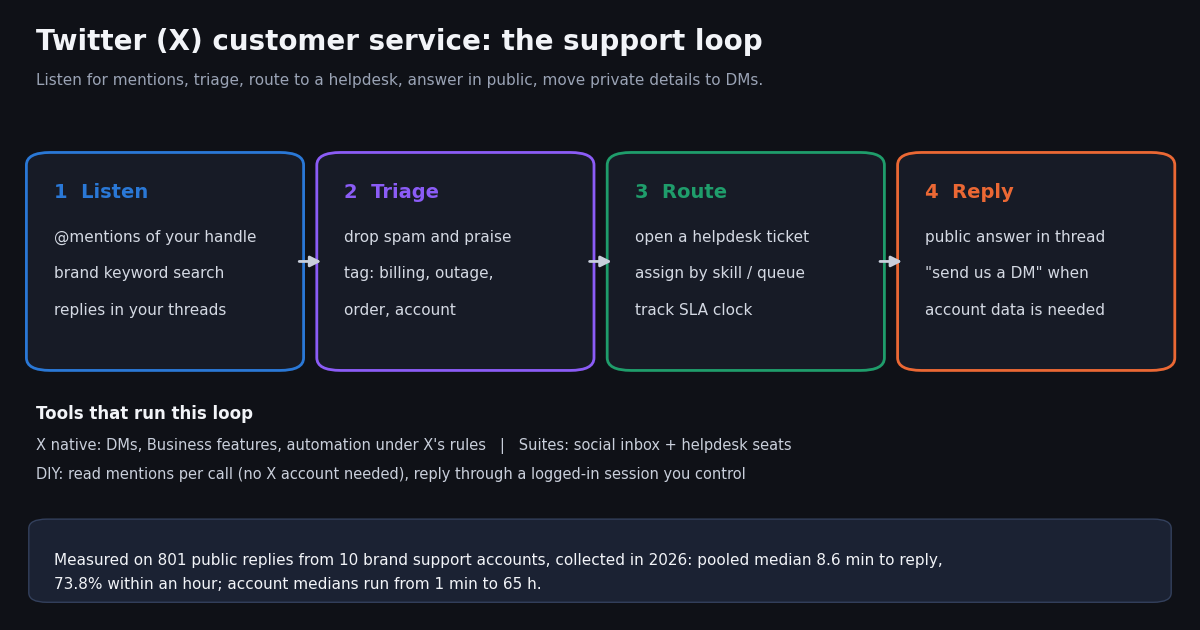
A care team's job is the same loop on every surface: listen, triage, route, reply, close. Listening means catching every mention quickly. Triage separates real support requests from praise, jokes, spam and sales leads. Routing puts the request into the queue of someone who can solve it, usually as a ticket in the helpdesk that also handles email and chat. Replying happens in public first, with a short acknowledgment, and moves to DMs for anything personal.
Why bother when you already have email support? Because the complaint is already public. A reply in the thread shows everyone else reading it that the brand is listening, and an unanswered complaint stays visible too. The airlines, carriers and retailers in our study treat X as a real support channel with dedicated handles (@AmericanAir, @TMobileHelp, @AmazonHelp). Others have stepped back from it. Both choices show up clearly in the data below.
How fast do big brands reply on X? The benchmark
We measured 10 support accounts. For each one we read its last 100 posts with replies included, fetched each post the brand was answering, and computed minutes from that post to the brand's reply. Replies to the brand's own earlier posts (thread chains) were left out. So were posts that were deleted or unavailable. That leaves 801 measured replies out of 867.
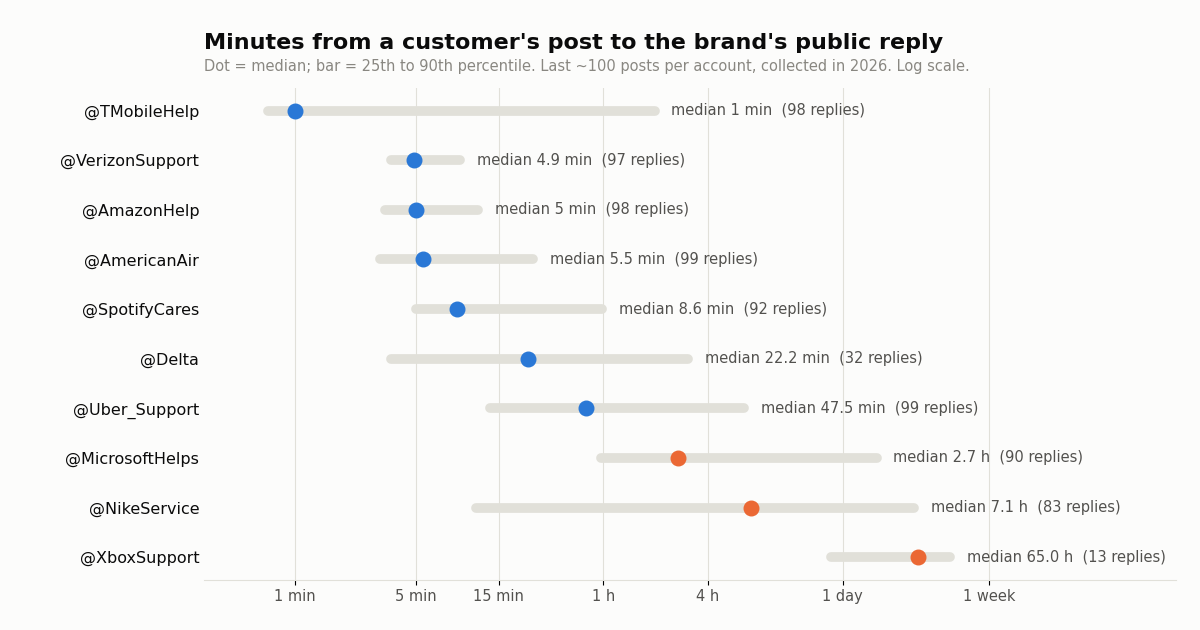
The pooled median is 8.6 minutes; the median of the ten account medians is 15.4 minutes. Four accounts answer in about five minutes or less at the median. @TMobileHelp's median was 1 minute, but its 90th percentile was 118.5 min. Most replies come almost instantly and a minority wait. @VerizonSupport was the most consistent: 97.9% within an hour and a 90th percentile of 9 min.
The slow end tells a different story. @MicrosoftHelps took 2.7 h at the median and @NikeService 7.1 h. @XboxSupport answered only 14 of its last 100 posts as replies, with a 65.0 h median. That reads as an account that now mostly broadcasts and rarely replies, not as a slow live desk.
Volume, DMs and who quietly stopped answering in public
Speed is only half the picture. The other half is how much each account replies at all and what the reply does. The table shows how many of each account's last 100 posts were replies, how much time those 100 posts covered, and how often the post being answered was the customer's opening post rather than a follow-up.
The span column separates live desks from slow ones. @AmazonHelp's 100 most recent posts were all replies and covered about 21 minutes, roughly 286 public replies an hour at the time we collected. @Delta's 100 posts covered 421 days and only 64 were replies. 29 of those continued its own threads, so just 32 were answers to customers. @NikeService's 100 covered 386 days. These brands still take X complaints, but most of the conversation clearly happens somewhere else.
DMs are where the fix happens. 61.8% of all brand replies mentioned a DM, a direct message or a message link. That share was 99% for @TMobileHelp, 92.9% for @VerizonSupport and 91.3% for @MicrosoftHelps. It was only 9% for @AmazonHelp and 12% for @SpotifyCares, which more often send people to a help page or answer in the thread. Carriers need account access, so their public reply is mostly a doorway to a private one.
Two accounts left the sample. @AppleSupport had no replies among its last 100 posts, and its newest post was 231 days old when we collected. @SouthwestAir's last 100 posts were almost all replies (99), but the newest was 124 days old. Both had stopped answering in public, so we replaced them with the next accounts on our list. One more candidate, @comcastcares, no longer exists as a user.
The response-time distribution: what "fast" means on X
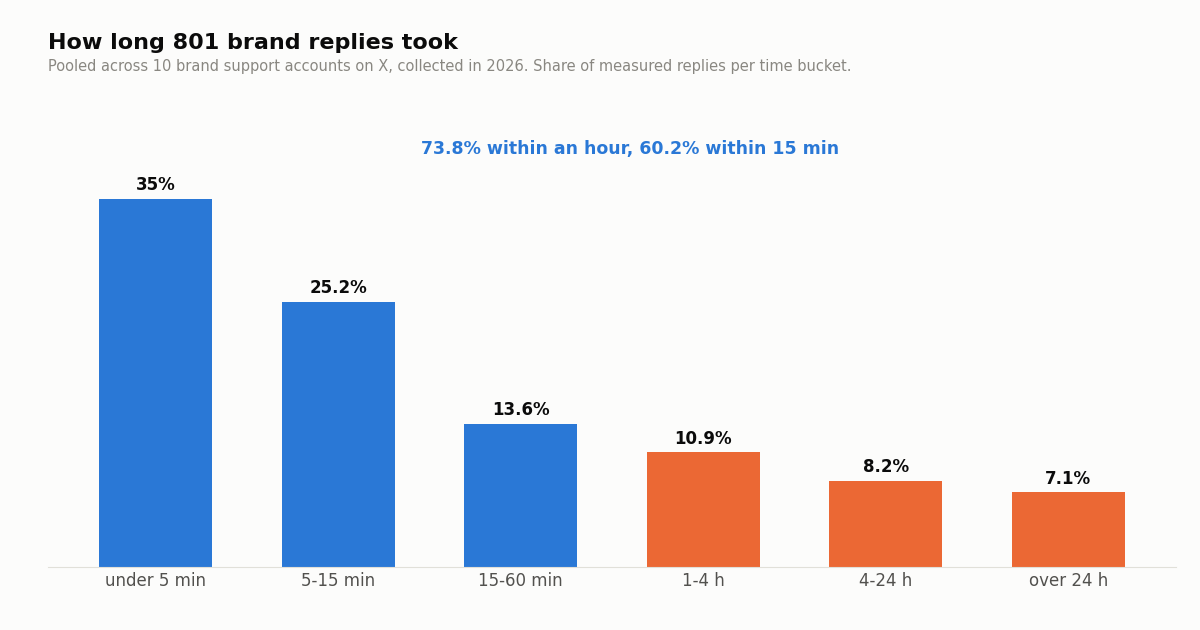
Pooling all 801 replies: 35% came in under 5 minutes, 25.2% in 5 to 15 minutes, 13.6% in 15 to 60 minutes, 10.9% in 1 to 4 hours, 8.2% in 4 to 24 hours and 7.1% after more than a day.
For a team setting a target, that suggests a realistic ladder. A first public reply within 15 minutes matches the large staffed desks. Within an hour beats most of the sample. Same day is the floor below which the channel starts working against you, because the complaint stays visible while it waits.
Replies were spread around the clock: every UTC hour had brand replies in the pooled sample. Hourly counts ranged from 11 to 78. 4 accounts replied in 20 or more distinct UTC hours even within their short windows. Large brands staff X like a phone line, across time zones. A small team can't, and that is exactly where routing to an existing helpdesk and an honest auto-acknowledgment help.
Three ways to run customer service on X
1. Natively in the X app. One or a few people watch notifications and DMs from the brand account. It costs nothing beyond staff time. It stops working once more than one person needs to see who answered what, when you need a ticket history, or when you want to measure response time. If you automate any part of it, X's automation rules apply (help.x.com/en/rules-and-policies/x-automation). Automated accounts can carry X's automated-account label (help.x.com/en/using-x/automated-account-labels).
2. A social-care suite. Products such as Sprout Social, Hootsuite and Zendesk bring X mentions and DMs into a shared inbox, so agents can be assigned and replies can be tagged and reported on. Some connect to a helpdesk. You pay per seat or per agent, and you get the user interface, the audit trail and the reporting. That fits teams of several agents who work social all day.
3. A DIY loop on an API. Read new mentions (and keyword searches for untagged complaints) on a schedule. Drop noise, send the rest into the helpdesk you already use as tickets, and reply from the helpdesk or a small script. You build and run it yourself. You pay for data, not seats, and every conversation lands in the same queue as email and chat. That fits teams that already have a helpdesk and only need X piped into it.
Many teams combine them. A suite or helpdesk handles the conversations, and a cheap read loop watches for untagged brand mentions and outage spikes that the inbox never sees.
What the social-care suites cost (pricing pages checked this session)
Prices below are from each vendor's own pricing page as we read it this session. Names are in prose and URLs as plain text. Check them again before you buy, because plan names and prices change often.
Sources: sproutsocial.com/pricing, hootsuite.com/plans (its page states the plan prices but did not show whether they are per user), zendesk.com/pricing. Zendesk's cheaper Support Team plan ($19 per agent a month billed annually) does not include social channels.
Reading the numbers. A three-agent social desk on Sprout Social Standard lists at about $597 a month. On Zendesk Suite Team it is $165 a month billed annually. Those seats buy the inbox, assignment, the reporting and the vendor's maintained connection to X. If you only need mentions flowing into a helpdesk you already pay for, a data feed is a much smaller line item. If you need the full agent workspace, the suite is the product and the API is not a replacement for it.
The DIY path: read mentions, route to your helpdesk, reply in thread
The loop below reads new mentions of your support handle with GET /twitter/user/mentions (userName, sinceTime in unix seconds, cursor; 20 per page). It follows has_next_page and next_cursor and keeps a set of seen ids, so overlapping windows never open a duplicate ticket. Each new mention goes through a crude keyword triage and then to your helpdesk's inbound webhook (most helpdesks offer an email or webhook intake). Reading needs only an API key, no X account.
Replying is a write, and writes act as your account. To post the answer in the thread, log your support account in once with POST /twitter/user_login_v2 ($0.10, with a proxy you supply). It returns login_cookies. Each reply through POST /twitter/create_tweet_v2 with reply_to_tweet_id then costs $0.002, and so does a DM through POST /twitter/send_dm_to_user, which only reaches people who have enabled DMs. The call acts as that account, so X can rate-limit, lock or suspend it. Keep a human pace, put a person in front of every reply, and expect the session to need a re-login now and then. Billing is per HTTP 200 call.
For untagged complaints, add a second query on GET /twitter/tweet/advanced_search such as "YourBrand" -from:YourBrandHelp with queryType=Latest. Our guides on finding mentions and on auto replies cover the search syntax and reply safety in depth.
"""care_loop.py - a small X (Twitter) customer-service loop.

Reads new @mentions of your support handle with twitterapi.io (no X account
needed for reads), drops noise, opens a ticket in your helpdesk via its
inbound webhook, and (optionally, after a human approves) replies in thread
as your support account.

    pip install requests
    export TWITTERAPI_IO_API_KEY=...  SUPPORT_HANDLE=YourBrandHelp
    export HELPDESK_WEBHOOK_URL=https://your-helpdesk.example/inbound
    python care_loop.py
"""
import json
import os
import time

import requests

BASE = "https://api.twitterapi.io"
KEY = os.environ["TWITTERAPI_IO_API_KEY"]
HANDLE = os.environ["SUPPORT_HANDLE"]
HELPDESK = os.environ["HELPDESK_WEBHOOK_URL"]
STATE = "care_state.json"
H = {"X-API-Key": KEY}

URGENT = ("outage", "down", "charged twice", "refund", "hacked", "cancel")


def load_state():
    if os.path.exists(STATE):
        return json.load(open(STATE))
    return {"since": int(time.time()) - 3600, "seen": []}


def new_mentions(since):
    """All mentions since a unix time, following next_cursor."""
    out, cursor = [], ""
    while True:
        r = requests.get(f"{BASE}/twitter/user/mentions", headers=H, timeout=30,
                         params={"userName": HANDLE, "sinceTime": since, "cursor": cursor})
        r.raise_for_status()
        body = r.json()
        if body.get("status") == "error":
            raise RuntimeError(body.get("msg"))
        out += body.get("tweets") or []
        cursor = body.get("next_cursor") or ""
        if not body.get("has_next_page") or not cursor or not body.get("tweets"):
            return out


def triage(t):
    text = t["text"].lower()
    if t["author"]["userName"].lower() == HANDLE.lower():
        return None                      # our own posts
    if any(w in text for w in URGENT):
        return "urgent"
    return "normal"


def open_ticket(t, priority):
    requests.post(HELPDESK, timeout=15, json={
        "channel": "x",
        "priority": priority,
        "external_id": t["id"],
        "conversation_id": t.get("conversationId"),
        "requester": t["author"]["userName"],
        "body": t["text"],
        "url": t["url"],
        "created_at": t["createdAt"],
    }).raise_for_status()


def reply_in_thread(login_cookies, proxy, tweet_id, text):
    """Acts as your support account: call only after a human approved the text."""
    r = requests.post(f"{BASE}/twitter/create_tweet_v2", headers=H, timeout=30, json={
        "login_cookies": login_cookies,
        "proxy": proxy,
        "tweet_text": text,
        "reply_to_tweet_id": tweet_id,
    })
    r.raise_for_status()
    return r.json().get("tweet_id")


def main():
    state = load_state()
    while True:
        started = int(time.time())
        seen = set(state["seen"])
        for t in new_mentions(state["since"]):
            if t["id"] in seen:
                continue
            seen.add(t["id"])
            p = triage(t)
            if p:
                open_ticket(t, p)
                print(p, t["id"], t["createdAt"])
        state = {"since": started - 120, "seen": list(seen)[-5000:]}
        json.dump(state, open(STATE, "w"))
        time.sleep(60)          # one empty check costs the $0.00015 minimum


if __name__ == "__main__":
    main()
What a DIY care loop costs next to the official X API
On twitterapi.io, reading tweets costs $0.15 per 1,000 tweets returned (15 credits each), with a 15-credit minimum per request. A mention check that finds nothing therefore costs $0.00015. Checking every 60 seconds for a month is 43,200 checks, a $6.48 floor, or $1.30 a month at every 5 minutes. Replies through a logged-in session are $0.002 each.
The official X API prices come from its pay-per-usage rate card at docs.x.com/x-api/getting-started/pricing: $0.005 per post read, $0.015 per post created ($0.20 with a URL), $0.010 per DM event read and $0.015 per DM created, capped at 3 million post reads a month. That is about 33x more per 1,000 tweets read ($5 against $0.15). The official API also offers the Account Activity API, which pushes mentions and DMs by webhook. Its docs list Enterprise or Pay Per Use access with 3 subscriptions and 1 webhook on Pay Per Use, and they say it is being deprecated in favor of the X Activity API.
Pick by what you need to own. The official API is the route for first-party OAuth and DM webhooks. A per-call read API is the low-cost way to feed mentions and searches into a helpdesk. Credits are bought upfront and purchased credits never expire. New accounts that pass the automatic bot check get up to $1 of free credits (at most 100,000 credits, no card, one per person or network, expiring after 31 days). Plans and rate limits are on the pricing page.
How we collected this
Question. How fast, and how much, do large brand support accounts on X reply in public, and how often do those replies push the customer to DMs?
Accounts. We checked 14 candidate support handles with GET /twitter/user/info. @comcastcares returned "user not found", and @AskPlayStation was a 90-follower account with 4 posts, not the brand. We measured the first 10 candidates that existed and had posted within 30 days: @AmazonHelp, @Delta, @XboxSupport, @SpotifyCares, @Uber_Support, @AmericanAir, @TMobileHelp, @NikeService, @VerizonSupport and @MicrosoftHelps. @AppleSupport and @SouthwestAir were excluded as inactive in public.
Method and sample. GET /twitter/user/last_tweets with includeReplies=true, 5 pages (100 posts) per account, collected in 2026. Then every post the brand replied to was fetched with GET /twitter/tweets in batches of 50 ids (100-id batches returned HTTP 400). Response time is the brand reply's createdAt minus the answered post's createdAt, counted only when the answered post's author is not the brand. Sample: 1000 brand posts, 867 replies, 801 measured. The study used 99 requests and cost about $0.30 in credits.
What it cannot show. We only see complaints a brand did answer, so unanswered posts and true first-response rates are invisible. Each account's window is its latest 100 posts, a few minutes for Amazon and about a year for Delta, so a single busy or quiet period can move a median. DM handling, resolution and satisfaction happen out of view. Replies to a customer's follow-up count the same as replies to an opening post (the opener share is in the second table). The DM figure is a keyword match on the reply text and links.
Privacy. Brand accounts are organizations and are named. The customers who wrote to them are private individuals. Their posts were read only for a timestamp, an author id and the thread position, kept outside the repository and deleted. They are never named, quoted or counted individually. The published sample holds one de-identified row per measured reply (account, minutes, UTC hour, opener flag, DM flag, reply length) with no ids, links, text or handles.
# Measure any support account's public response time (what our study did).
import datetime as dt, os, statistics, requests

BASE, H = "https://api.twitterapi.io", {"X-API-Key": os.environ["TWITTERAPI_IO_API_KEY"]}
parse = lambda s: dt.datetime.strptime(s, "%a %b %d %H:%M:%S %z %Y")


def brand_replies(user, pages=5):
    out, cursor = [], ""
    for _ in range(pages):
        r = requests.get(f"{BASE}/twitter/user/last_tweets", headers=H, timeout=30,
                         params={"userName": user, "includeReplies": "true", "cursor": cursor}).json()
        data = r.get("data") or {}
        out += [t for t in data.get("tweets") or [] if t.get("isReply") and t.get("inReplyToId")]
        cursor = r.get("next_cursor") or ""          # pagination fields are top-level
        if not r.get("has_next_page") or not cursor:
            break
    return out


def parents(ids):
    got = {}
    for i in range(0, len(ids), 50):   # 50 ids per call worked; 100 returned HTTP 400
        r = requests.get(f"{BASE}/twitter/tweets", headers=H, timeout=30,
                         params={"tweet_ids": ",".join(ids[i:i + 50])}).json()
        got.update({t["id"]: t for t in r.get("tweets") or []})
    return got


replies = brand_replies("AmazonHelp")
par = parents(list({t["inReplyToId"] for t in replies}))
mins = [(parse(t["createdAt"]) - parse(par[t["inReplyToId"]]["createdAt"])).total_seconds() / 60
        for t in replies
        if t["inReplyToId"] in par and par[t["inReplyToId"]]["author"]["id"] != t["author"]["id"]]
print(len(mins), "measured, median minutes:", round(statistics.median(mins), 1))
Questions readers ask
How do I contact Twitter (X) customer service about my own account?
X does not run a public phone line for account support. Use its help forms at help.x.com/en/forms (hacked, locked or suspended account, login problems, reports). This page is about businesses giving customer service on X, not about reaching X itself.
Is Twitter still good for customer service in 2026?
For many large brands, yes. In our sample, carriers, airlines and retailers still answered in minutes (pooled median 8.6 minutes, 73.8% within an hour). Some brands have stepped back: @AppleSupport had no replies among its last 100 posts and @SouthwestAir had not posted for 124 days. If your customers complain on X, the complaint is public either way, so at least monitor and route it.
What is a good response time for customer service on X?
Among the 10 brand accounts we measured, 60.2% of replies came within 15 minutes and 73.8% within an hour. A first public reply within an hour beats most of that sample, within 15 minutes matches the fastest desks, and anything past the same day leaves a visible unanswered complaint.
Should brands reply publicly or move to DMs?
Both, in that order. 61.8% of the brand replies we measured asked the customer to DM, and carriers did it in over 90% of replies because they need account details. Acknowledge publicly so others see the brand responded, then take order numbers, emails and anything personal to DMs.
What tools do brands use for Twitter customer service?
Small teams work in the X app. Larger teams use a social-care suite (Sprout Social, Hootsuite, or a helpdesk with an X channel such as Zendesk Suite) for a shared inbox, assignment and reporting. Teams with an existing helpdesk often build a small loop that reads mentions through an API and opens tickets.
How much does a Twitter customer service tool cost?
From each vendor's pricing page this session: Sprout Social $79 to $399 per seat a month (Standard $199), Hootsuite plans from $99 to $399, Zendesk Suite Team $55 per agent a month billed annually ($69 monthly). A DIY read loop on twitterapi.io costs $0.15 per 1,000 tweets returned plus a $6.48 a month floor for 60-second idle checks, and replies through a logged-in session are $0.002 each.
Can I automate replies to customers on X?
Partly, and carefully. Acknowledgments and routing can be automated within X's automation rules (help.x.com/en/rules-and-policies/x-automation), but a human should approve the actual answer. Posting through an API acts as your account, so X can rate-limit, lock or suspend it if it looks spammy. Keep a human pace and never send unsolicited bulk replies or DMs.
Can I measure a competitor's response time on X?
Yes, for public brand accounts. Read the account's recent posts with replies included, fetch each post it answered, and subtract the timestamps. The Python example at the end of this page does exactly that, and it is how we built the benchmark. Report aggregates and leave the individual customers out.
Continue
- X API pay-per-usage pricing (post read $0.005, post create $0.015, DM event read $0.010, DM create $0.015)
- X Account Activity API: mention and DM webhooks, access and subscription limits, deprecation note
- X API Direct Messages manage endpoints (/2/dm_conversations)
- twitterapi.io API reference: get user mentions (userName, sinceTime, untilTime, cursor; 20 per page)
- twitterapi.io API reference: create or reply to a tweet (reply_to_tweet_id, login_cookies, $0.002)
- twitterapi.io API reference: send a DM (only to users who enabled DMs, $0.002)
- X (Twitter) API overview: endpoints, pricing and access
- Twitter (X) auto reply: rules and a mention-responder setup
- Build a Twitter (X) chatbot that answers mentions and DMs
- How to search mentions on Twitter (X), tagged and untagged
- Twitter (X) monitoring tools compared
- Twitter (X) sentiment analysis for brand mentions
- Reply to tweets programmatically: a tutorial
- Pay-per-call pricing and plans
- 01X Radar Explained: Twitter (X) Keyword Monitoring, Tiers, Limits and an API Alternative
- 02Twitter (X) Stalker Tools: What They Can See, What They Can't, and Where the Line Is
- 03Snaplytics Twitter (X) Viewer: What It Is, Whether It Works, and Safer Options
- 04Tweeload: What the Twitter (X) Video Downloader Does, and Whether It Is Safe
- 05Twillot Twitter (X) Viewer: What It Is, Whether It Works, and Is It Safe?
- 06Data365 Alternative: Pay-Per-Data X (Twitter) API Instead of a EUR 300 Subscription
- 07Getting Real Political Data From Twitter (X)
- 08Twitter (X) Bookmarklets: 6 Working Scripts for x.com in 2026
Stop reading. Start building.
Starter credits cover real testing on real data. Google sign-in, no card, no application queue.
Get an API key