Twitter (X) WordPress Integration: Show a Feed and Auto-Post With a Small Plugin
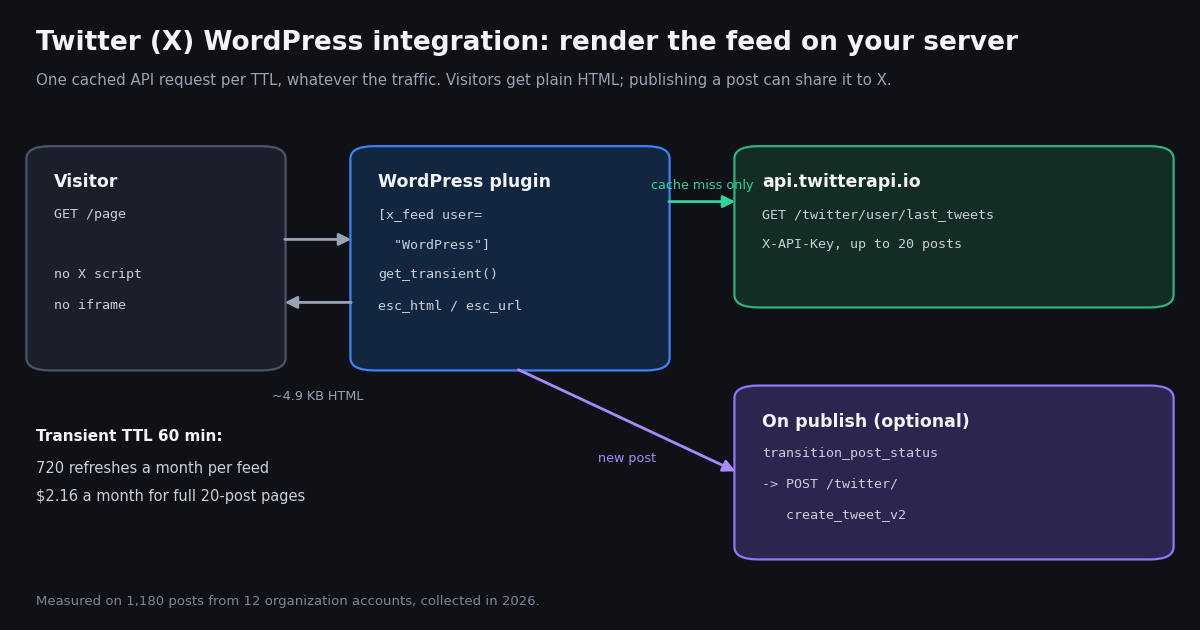
- Embedded timelines can fail without notice. X still documents Profile and List timelines, but our probe of the syndication endpoint behind them got one HTTP 200, then two HTTP 429 responses (limit 30, remaining 0).
- Server-side is the durable route:
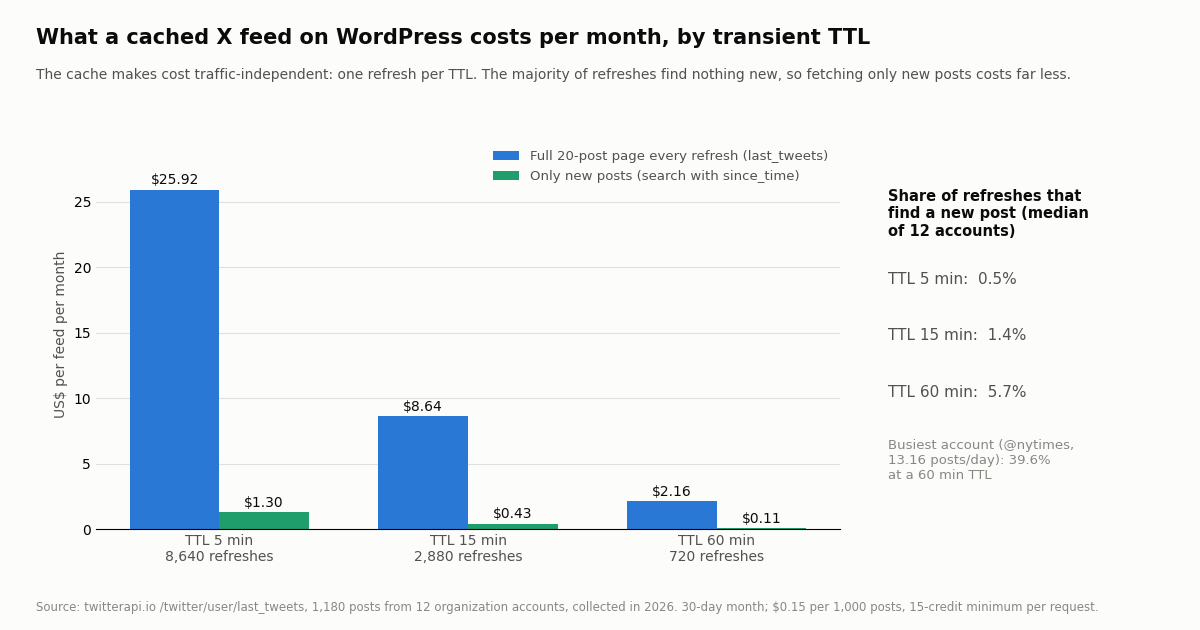
wp_remote_getto/twitter/user/last_tweets, cache in a transient, render withadd_shortcode, escape withesc_htmlandesc_url. - Cost follows the TTL, not traffic: a 60-minute TTL is 720 refreshes and $2.16 a month per feed on full pages; 5 minutes is $25.92.
- The majority of refreshes find nothing new: median 0.5% of 5-minute and 5.7% of 60-minute windows held a post, so fetching only new posts costs about $0.11 a month at 60 minutes.
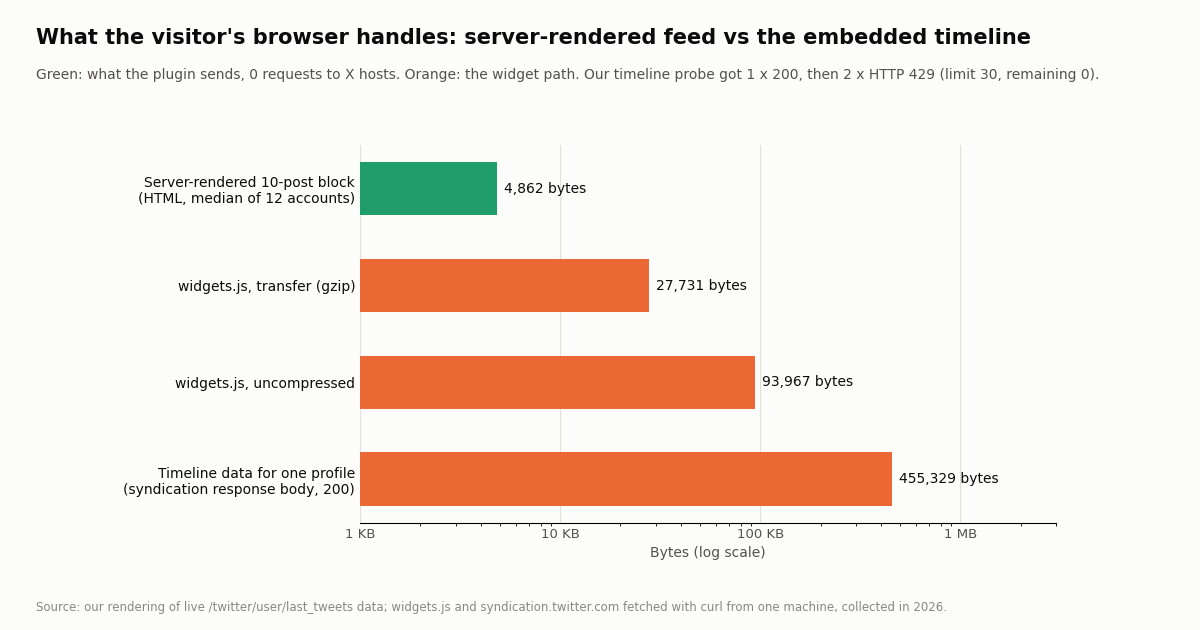
- Page weight: a server-rendered 10-post block is about 4.9 KB of HTML;
widgets.jsalone is 27,731 bytes over the wire before any timeline data loads. - Auto-post on publish uses
transition_post_statusand/twitter/create_tweet_v2($0.0006 per call); it acts as your X account, so keep a human pace and expect re-logins.
Search for a way to add a Twitter feed to WordPress and you get plugin roundups. Many of those plugins are front ends for a hosted aggregator or for X's own embedded timeline, which means your feed depends on a service you do not control, and on a widget that loads in every visitor's browser. When the widget is rate limited, the box on your page is blank.
This guide takes the other route. You will build a single-file WordPress plugin (about 120 lines) that fetches an account's latest posts on the server, caches them in a transient, and renders them through a shortcode as plain HTML. We measured what that costs at three cache lifetimes on real timelines, what the visitor downloads compared with the embedded timeline, and how to add the reverse direction: sharing each new WordPress post to X when you publish it.
If you only need to embed one post inside an article, you do not need any of this: the oEmbed and copy-paste routes in our guide to embedding tweets on a website cover that, and WordPress's core Twitter Embed block turns a pasted post URL into an embed on its own.
$2.16 vs $0.11
Three ways to put an X feed on WordPress, and what each depends on
Every Twitter (X) WordPress integration falls into one of three patterns. They differ less in features than in where the posts come from and who carries the failure when that source is down.
1. X's embedded timeline. You generate an anchor at publish.x.com (for example <a class="twitter-timeline" href="https://x.com/XDevelopers">), paste it into a Custom HTML block, and X's widgets.js turns it into an iframe. X's timeline documentation lists two types, Profile and List, and states that the Likes, Collections and Moments timelines were retired on January 13, 2023. The posts load from X's logged-out syndication service in each visitor's browser. WordPress's own Twitter Embed block (in core since WordPress 3.4) produces the same widget when you paste a profile or list URL; its Embeds documentation still lists collection, likes and Moment URLs too, which X no longer serves.
2. A hosted feed plugin. Many plugins in the WordPress directory connect to an aggregator service: you link an account in the vendor's dashboard and paste their shortcode. Setup is quick; the data source, refresh rate and limits are the vendor's, and the plan price usually scales with the number of feeds or views.
3. Your own server-side plugin. WordPress calls an X data API, caches the answer, and prints HTML. You own the code and the cache, the visitor's browser never talks to X, and the bill depends on how often the cache refreshes. That is the route this page builds.
Good for: the embedded timeline suits a hobby site where a blank box now and then is acceptable. A hosted plugin suits a site owner who will never touch code. The server-side plugin suits anyone who wants the feed to render every time, match the theme, and avoid third-party scripts on the page.
What the embedded X timeline does today
X's documentation still describes the embedded timeline the same way: generate it at publish.x.com, cap it with data-tweet-limit (1 to 20 posts), restyle it with data-chrome tokens (noheader, nofooter, noborders, noscrollbar, transparent). Two details matter for WordPress sites. First, X's page says the timeline "will not poll for new Posts until the page is refreshed", so it is a snapshot, not a live stream. Second, if you hide the header, X requires you to add your own X attribution and link to the source timeline.
The reliability problem sits behind the widget. A profile timeline is fed by syndication.twitter.com/srv/timeline-profile/screen-name/<handle>. We sent three unauthenticated requests to it for @WordPress from one machine, three seconds apart, in 2026. The first returned HTTP 200 with a 455,329-byte body and x-rate-limit-remaining: 1; the next two returned HTTP 429 with x-rate-limit-limit: 30 and x-rate-limit-remaining: 0. The limit is counted per client, so visitors behind a busy shared network (an office, a mobile carrier, a VPN) can find it used up before your page asks.
Our guide to embedding tweets on a website goes through the other two failure causes (a render error inside X's widget script, and ad or tracker blockers) and a two-minute DevTools check. For a WordPress site the conclusion is the same: if the feed matters, render it on the server.
The plugin: wp_remote_get, a transient and a shortcode
The full plugin is in the code block at the end of this page. Save it as wp-content/plugins/x-feed-twitterapi/x-feed-twitterapi.php, add two constants to wp-config.php, activate it under Plugins, and put [x_feed user="WordPress" count="10"] in any post, page or Shortcode block. It is plain WordPress API with no Composer dependencies. Here is what each part does and which documented behavior it relies on.
Fetching. wp_remote_get( $url, $args ) returns an array on success or a WP_Error on failure, per its reference on developer.wordpress.org, so the plugin checks is_wp_error() first and then wp_remote_retrieve_response_code() and wp_remote_retrieve_body(). The request goes to GET https://api.twitterapi.io/twitter/user/last_tweets?userName=<handle> with your key in the X-API-Key header. The docs for that endpoint say each page returns up to 20 posts, newest first, under data.tweets, with has_next_page and next_cursor at the top level; replies are excluded unless you pass includeReplies=true. A feed widget needs only the first page, so the plugin never follows the cursor. No X account or X developer app is needed for reads.
Caching. set_transient( $name, $value, $expiration ) stores the value for $expiration seconds; names must be 172 characters or fewer, and a value of 0 means no expiration (and autoloading, which you do not want for a feed). The plugin keys the transient on an MD5 of the handle. When a persistent object cache such as Redis is installed, WordPress keeps transients there instead of in wp_options, which is better for busy sites. Either way, code should treat get_transient() returning false as normal (an expired entry or a flushed cache) and refetch.
Failure handling. When the API or the network fails, the plugin serves the last good copy (saved with update_option( ..., false ) so it is not autoloaded) and retries five minutes later. A visitor sees slightly older posts instead of an empty box.
Rendering. add_shortcode( 'x_feed', $callback ) registers the tag; the callback receives $atts, $content and the tag name, and must return its HTML rather than echo it, per the shortcode reference. shortcode_atts() merges the defaults, the handle is stripped to letters, digits and underscores, and every piece of post data passes through esc_html(), esc_url() or esc_attr(). Post text is user-generated content from X; printing it unescaped would let any post inject markup into your page.
Storing less. The plugin keeps only the six fields it renders. In our sample a raw 20-post page was a median of 162,724 bytes of JSON (8,136 bytes per post), because each post carries its author object, entities, media and counters. The trimmed array is a small fraction of that, which keeps wp_options or the object cache lean.
// wp-config.php (above the "That's all, stop editing!" line)
define( 'TWAPI_KEY', 'paste-your-key-here' );
define( 'TWAPI_FEED_TTL', 3600 );          // 60 min: 720 refreshes a month per account

// Only if you enable share-on-publish (see the write caveats on this page):
define( 'TWAPI_LOGIN_COOKIES', '...' );    // from one POST /twitter/user_login_v2 call
define( 'TWAPI_PROXY', 'http://user:pass@host:port' );
What a cached feed costs per month, measured on 12 organization accounts
Because the transient answers every visitor until it expires, the number of API requests is set by the TTL alone. A feed seen by ten visitors a day and one seen by a hundred thousand make the same number of calls. TwitterAPI.io bills 15 credits per post returned ($0.15 per 1,000 posts), with a 15-credit minimum per request, so a full 20-post page costs $0.003 and a request that finds nothing costs $0.00015.
We pulled the latest posts of 12 organization accounts (WordPress, WordPress.com, WooCommerce, Automattic, GitHub, Vercel, Docker, Cloudflare, Stripe, Shopify, NASA and The New York Times), 1,180 posts in total, and replayed each timeline against 5, 15 and 60 minute cache windows. Two strategies: refresh the full page every time (what the plugin does), or ask only for posts newer than the newest cached one (the variant in the next section), where an empty refresh costs the 15-credit minimum.
The full-page figures are exact arithmetic (refreshes times $0.003 in a 30-day month). The new-posts-only figures come from the measured timelines: at a 5-minute TTL the median account had a new post in 0.5% of windows, so nearly every refresh is billed at the minimum, and the monthly cost lands at the polling floor of about $1.30. Even the busiest account in the sample, @nytimes at 13.16 posts a day, had a new post in 39.6% of hourly windows.
How to choose the TTL. For a sidebar or footer feed, 60 minutes is a sensible default: the median account posted 1.54 times a day, so an hourly refresh rarely shows a post late by more than an hour, and it costs $2.16 a month per feed even with full pages. Go to 15 minutes for a news or launch page, and switch to the new-posts-only fetch below at that point. A 5-minute full-page refresh ($25.92 a month) spends almost all of its money re-downloading posts you already have.
Compared with the official X API. X's pay-per-usage rate card on docs.x.com lists $0.005 per post read: $5.00 per 1,000 posts against $0.15 per 1,000 posts returned here, about 33x per post. Reading from X directly also means a developer app whose credentials live on your server, and pay-per-usage is capped at 3 million post reads a month, with Enterprise above that.
Refreshing more often: fetch only the posts you have not cached
/twitter/user/last_tweets always returns the newest page, so a short TTL re-buys the same 20 posts again and again. When you need a fresher feed, ask the search endpoint for posts newer than the newest one in your cache: GET /twitter/tweet/advanced_search with query=from:<handle> since_time:<unix seconds> and queryType=Latest. It returns only new posts in a top-level tweets array (not under data), and an empty answer is billed at the 15-credit minimum.
Keep the full last_tweets call for the first fill and for a daily rebuild (it is the simpler way to pick up deletions), and use the incremental call between rebuilds. Merge new posts in front of the cached list, dedupe by post URL, and keep the first 20. With the timelines we measured, that turns a 15-minute feed from $8.64 into about $0.43 a month.
One caution: a new post can reach search results a little later than the profile timeline. For a feed that refreshes every 15 minutes this does not matter; set since_time a minute or two before the newest cached post and let the dedupe step absorb the overlap.
// Drop-in replacement for twapi_fetch_posts() when the feed refreshes often (TTL 5-15 min):
// ask only for posts newer than the newest one already cached. An empty answer costs the 15-credit minimum.
function twapi_fetch_new_posts( $user, $since_unix ) {
    $url = add_query_arg( array(
        'query'     => 'from:' . $user . ' since_time:' . (int) $since_unix,
        'queryType' => 'Latest',
    ), 'https://api.twitterapi.io/twitter/tweet/advanced_search' );
    $res = wp_remote_get( $url, array( 'timeout' => 15, 'headers' => array( 'X-API-Key' => TWAPI_KEY ) ) );
    if ( is_wp_error( $res ) || 200 !== wp_remote_retrieve_response_code( $res ) ) {
        return null;
    }
    $body = json_decode( wp_remote_retrieve_body( $res ), true );
    return $body['tweets'] ?? array();    // search returns tweets[] at the top level, not under data
}
// Merge: new posts first, then the cached list; dedupe by URL; keep the first 20.
Page weight: server-rendered HTML vs the embedded timeline
We rendered the first 10 posts of each account with the same markup the plugin emits and measured the HTML. The block weighed between 3,737 and 6,104 bytes, median 4,862, before your server's gzip. The visitor's browser makes no request to any X host for it; links to the profile and to each post are ordinary anchors.
The embedded timeline costs the visitor more before a single post appears. platform.x.com/widgets.js redirects to platform.twitter.com/widgets.js, which transferred 27,731 bytes (93,967 bytes uncompressed JavaScript to parse and run) in our fetch. The timeline then loads in an iframe whose data comes from the syndication endpoint; the one successful response in our probe carried a 455,329-byte body for a single profile.
Plain HTML also means the feed is in the page your server sends, so it is visible without JavaScript, styles with your theme's CSS, and adds no layout shift when an iframe resizes. The flip side: images, video players and the reply and like buttons of the widget are not included. If you want media thumbnails, read extendedEntities.media[].media_url_https from the same response and add an <img loading="lazy"> with explicit width and height.
Auto-post new WordPress posts to X on publish
The other half of a Twitter WordPress integration is the reverse direction: when you publish an article, share it to X. The plugin hooks transition_post_status, which WordPress fires with $new_status, $old_status and the WP_Post whenever a post changes status. It also fires on ordinary updates, so the plugin acts only when the new status is publish, the old one is not, and the post type is post. A post meta flag (_twapi_tweet_id) makes the share idempotent, which matters because the block editor can save a post more than once and an unpublished-then-republished post passes the status check again.
The share itself runs from wp_schedule_single_event( time() + 60, 'twapi_share_post', ... ) so the editor is not kept waiting on a network call. WordPress runs scheduled events when someone visits the site after the time has passed, and ignores an identical event scheduled within 10 minutes of an existing one, per its reference. On a low-traffic site, a real system cron hitting wp-cron.php makes the timing predictable.
The write call. Writes on TwitterAPI.io run through an authenticated session, not an OAuth app. You call POST /twitter/user_login_v2 once with the account's user_name, email, password, a proxy you supply and, recommended, the 2FA totp_secret; it costs $0.10 and returns login_cookies. Each POST /twitter/create_tweet_v2 then takes login_cookies, tweet_text and proxy and costs 60 credits, $0.0006 per call, returning tweet_id, status and message. Our login and post API guide walks through the login step.
What you accept with the write flow. The call acts as that X account: whatever it posts is that account's speech, and X can rate-limit, lock or suspend the account if the pattern looks automated or spammy. Use only your own account, at a normal human pace (one share per article is that pace), and remember that X's automation rules apply; this is not a way around any limit. The session can need a re-login when cookies expire or X asks for verification, so treat an error as a signal to log in again by hand, not to retry. Every call that returns HTTP 200 is billed, including a 200 whose body says status: error, which is why the plugin stores the message in _twapi_share_error and stops.
Compared with the official X API. On X's rate card a post costs $0.015, and a post that contains a URL costs $0.200, which is every share of a WordPress article. The session route is $0.0006 per call plus $0.10 per login. The official route uses OAuth with a developer app, which is the right choice when you build a plugin other site owners will connect their own accounts to.
Hardening checklist before you ship the plugin
Keep the key out of the database and the repo. Define TWAPI_KEY (and, if used, TWAPI_LOGIN_COOKIES and TWAPI_PROXY) in wp-config.php or environment variables, never in post content, theme files or a settings field visible to editors.
Escape on output, every field. Post text, display names and handles come from X users. esc_html() for text, esc_url() for every href, esc_attr() for attributes. nl2br() runs after esc_html(), never before.
Show attribution. Keep each post's author name and @handle linked to the profile and the timestamp linked to the post, and label the block ("Posts by @WordPress on X"). X's timeline documentation asks for attribution when its own header is hidden; doing the same for a self-rendered feed is the honest default.
Plan for page caches. A full-page cache (a caching plugin, a CDN) stores the rendered page including the feed, so the visible refresh interval is the longer of the page-cache lifetime and your transient TTL. Purge or exclude the page if the feed must be fresh.
Watch the cost in one place. The dashboard shows credits used. With one feed at a 60-minute TTL, a sudden jump means something is skipping the cache, usually an object cache that is not persisting transients, or a typo in the handle that makes every request fail and retry every five minutes.
Multiple feeds. Each distinct handle gets its own transient and its own refresh cycle, so cost scales with the number of accounts, not pages. Five feeds at a 60-minute TTL are five times $2.16 on full pages.
How we collected this
Question. What does a server-rendered X feed on a WordPress site cost and weigh: posts per day per account, JSON bytes per post, how many refreshes at a 5, 15 or 60 minute TTL find a new post, the monthly cost of each strategy, and the HTML weight of a 10-post block.
Accounts and endpoint. The latest posts of 12 organization accounts (@WordPress, @WordPressdotcom, @WooCommerce, @Automattic, @github, @vercel, @Docker, @Cloudflare, @stripe, @Shopify, @NASA, @nytimes) through GET /twitter/user/last_tweets, default settings (no replies), up to 5 pages each. 60 requests, 1,180 posts, about $0.18 of credits. Collected in 2026.
Window. Each account's latest posts at collection time; the span runs from the oldest to the newest post in its sample, from about a week for @nytimes to several months for slower accounts.
Method. Monthly costs replay each account's real post times against fixed windows and scale to a 30-day month; a window with no post is billed at the 15-credit minimum in the new-posts-only model. HTML weight is the byte length of our own rendering of the first 10 posts with the plugin's markup. The widget figures come from direct fetches of widgets.js and of the syndication endpoint for one profile from one machine.
What the sample cannot show. Twelve accounts are not every account: a personal account that posts in bursts, or one that replies a lot (replies are excluded by default), will see different shares. Posting rates drift by season and news cycle. Three syndication requests from one machine show that the per-client limit exists and can be hit, not how often your visitors hit it. Byte counts depend on how many posts carry media and quoted posts.
Privacy. Aggregates only, organization accounts only; no reposted or quoted authors were analyzed, and raw responses (which include other accounts through reposts and quotes) were not kept in the repository.
<?php
/**
 * Plugin Name: X Feed via TwitterAPI.io
 * Description: [x_feed user="WordPress" count="10"] renders an account's latest X posts as plain HTML,
 *              cached in a transient. Optional: share new posts to X on publish.
 * Version: 1.0.0
 */
if ( ! defined( 'ABSPATH' ) ) { exit; }

// Put these in wp-config.php, never in the plugin file:
// define( 'TWAPI_KEY', 'your key from the twitterapi.io dashboard' );
// define( 'TWAPI_FEED_TTL', 3600 );   // seconds; one API request per TTL per account, whatever the traffic

function twapi_fetch_posts( $user ) {
    $url = add_query_arg( array( 'userName' => $user ), 'https://api.twitterapi.io/twitter/user/last_tweets' );
    $res = wp_remote_get( $url, array(
        'timeout' => 15,
        'headers' => array( 'X-API-Key' => TWAPI_KEY ),
    ) );
    if ( is_wp_error( $res ) || 200 !== wp_remote_retrieve_response_code( $res ) ) {
        return null;
    }
    $body = json_decode( wp_remote_retrieve_body( $res ), true );
    if ( ! is_array( $body ) || ( $body['status'] ?? '' ) === 'error' ) {
        return null;
    }
    $out = array();
    foreach ( $body['data']['tweets'] ?? array() as $t ) {
        $src    = $t['retweeted_tweet'] ?? $t;       // show a repost under its original author
        $author = $src['author'] ?? array();
        $out[]  = array(
            'text'     => (string) ( $src['text'] ?? '' ),
            'url'      => (string) ( $src['url'] ?? '' ),
            'created'  => strtotime( $src['createdAt'] ?? 'now' ),
            'name'     => (string) ( $author['name'] ?? '' ),
            'handle'   => (string) ( $author['userName'] ?? '' ),
            'reposted' => isset( $t['retweeted_tweet'] ),
        );
    }
    return $out;    // store only the fields we render, a small fraction of the raw JSON
}

function twapi_get_feed( $user ) {
    $key   = 'twapi_feed_' . md5( strtolower( $user ) );
    $cache = get_transient( $key );
    if ( false !== $cache ) {
        return $cache;
    }
    $posts = twapi_fetch_posts( $user );
    if ( null === $posts ) {
        // API or network error: keep showing the last good copy, retry in 5 minutes
        $stale = get_option( $key . '_last', array() );
        set_transient( $key, $stale, 5 * MINUTE_IN_SECONDS );
        return $stale;
    }
    $ttl = defined( 'TWAPI_FEED_TTL' ) ? (int) TWAPI_FEED_TTL : HOUR_IN_SECONDS;
    set_transient( $key, $posts, $ttl );
    update_option( $key . '_last', $posts, false );
    return $posts;
}

function twapi_feed_shortcode( $atts ) {
    $a     = shortcode_atts( array( 'user' => 'WordPress', 'count' => 10 ), $atts, 'x_feed' );
    $user  = preg_replace( '/[^A-Za-z0-9_]/', '', $a['user'] );
    if ( '' === $user || ! defined( 'TWAPI_KEY' ) ) {
        return '';
    }
    $posts = array_slice( twapi_get_feed( $user ), 0, max( 1, min( 20, (int) $a['count'] ) ) );
    $html  = '<div class="twp-feed"><p class="twp-head"><a href="' . esc_url( 'https://x.com/' . $user ) . '" rel="noopener">'
           . esc_html( 'Posts by @' . $user . ' on X' ) . '</a></p><ul>';
    foreach ( $posts as $p ) {
        $html .= '<li class="twp-post">'
               . '<a class="twp-author" href="' . esc_url( 'https://x.com/' . $p['handle'] ) . '">'
               . esc_html( $p['name'] . ' @' . $p['handle'] ) . '</a>'
               . ( $p['reposted'] ? '<span class="twp-rp"> reposted by @' . esc_html( $user ) . '</span>' : '' )
               . '<p class="twp-text">' . nl2br( esc_html( $p['text'] ) ) . '</p>'
               . '<a class="twp-time" href="' . esc_url( $p['url'] ) . '"><time datetime="' . esc_attr( gmdate( 'c', $p['created'] ) ) . '">'
               . esc_html( wp_date( get_option( 'date_format' ), $p['created'] ) ) . '</time></a></li>';
    }
    return $html . '</ul></div>';    // shortcodes return their output, never echo it
}
add_shortcode( 'x_feed', 'twapi_feed_shortcode' );

// ---- Optional: share a post to X when it is first published (define TWAPI_LOGIN_COOKIES and TWAPI_PROXY).
// The call acts as that X account: X can rate-limit, lock or suspend it. One post per publish, a normal human
// pace, X's automation rules apply; this is not a way around any limit. Billed per HTTP 200 call.
function twapi_on_transition( $new_status, $old_status, $post ) {
    if ( 'publish' !== $new_status || 'publish' === $old_status || 'post' !== $post->post_type ) {
        return;
    }
    if ( ! defined( 'TWAPI_LOGIN_COOKIES' ) || ! defined( 'TWAPI_PROXY' ) || get_post_meta( $post->ID, '_twapi_tweet_id', true ) ) {
        return;    // not configured, or already shared (the block editor can save twice)
    }
    wp_schedule_single_event( time() + 60, 'twapi_share_post', array( $post->ID ) );    // keep the editor fast
}
add_action( 'transition_post_status', 'twapi_on_transition', 10, 3 );

function twapi_share_post( $post_id ) {
    if ( get_post_meta( $post_id, '_twapi_tweet_id', true ) ) {
        return;
    }
    $text = wp_strip_all_tags( get_the_title( $post_id ) ) . ' ' . get_permalink( $post_id );
    $res  = wp_remote_post( 'https://api.twitterapi.io/twitter/create_tweet_v2', array(
        'timeout' => 60,
        'headers' => array( 'X-API-Key' => TWAPI_KEY, 'Content-Type' => 'application/json' ),
        'body'    => wp_json_encode( array(
            'login_cookies' => TWAPI_LOGIN_COOKIES,
            'tweet_text'    => $text,
            'proxy'         => TWAPI_PROXY,
        ) ),
    ) );
    $body = is_wp_error( $res ) ? array() : json_decode( wp_remote_retrieve_body( $res ), true );
    if ( ( $body['status'] ?? '' ) === 'success' && ! empty( $body['tweet_id'] ) ) {
        update_post_meta( $post_id, '_twapi_tweet_id', sanitize_text_field( $body['tweet_id'] ) );
    } else {
        // a 200 with status "error" is still billed: log it and stop, do not retry in a loop
        update_post_meta( $post_id, '_twapi_share_error', sanitize_text_field( $body['message'] ?? 'request failed' ) );
    }
}
add_action( 'twapi_share_post', 'twapi_share_post' );
Researching this?Free starter credits cover end-to-end testing — Google sign-in, no card. Get a key.
Questions readers ask
How do I add a Twitter (X) feed to WordPress without a plugin?
Paste the embedded-timeline anchor from publish.x.com into a Custom HTML block; widgets.js renders it. It needs no code, but the posts load from X's syndication service in each visitor's browser, which has a per-client rate limit, so the box can come up blank. Our probe got HTTP 429 on two of three requests. If the feed matters, render it on the server with the small plugin on this page.
Why is my embedded Twitter timeline blank on WordPress?
The usual cause is on X's side: the syndication request behind the widget answered HTTP 429 (rate limited, counted per client network), or a blocker stopped platform.twitter.com from loading. Open DevTools, filter the Network tab on timeline-profile, and check the status. Your markup cannot fix a 429; a server-rendered feed avoids it.
Does WordPress still embed single X posts from a pasted URL?
Yes, WordPress core has a Twitter Embed block (since WordPress 3.4): paste a post URL and it embeds through X's oEmbed endpoint and widgets.js. That is for individual posts inside articles; our guide to embedding tweets covers it. A feed of an account's latest posts is a different job, which this page handles.
How often should the feed refresh?
Every 60 minutes suits a sidebar or footer: 720 refreshes and $2.16 a month per feed with full pages. In our sample the median account posted 1.54 times a day and only 5.7% of hourly windows held a new post. For 5 to 15 minute refreshes, fetch only new posts with advanced_search and since_time.
Do I need an X developer account or API keys from X?
Not for reading. The plugin uses a TwitterAPI.io key in the X-API-Key header and needs no X account or X developer app. Sharing posts to X is different: it acts as your X account through a login session (user_login_v2, then create_tweet_v2), with the caveats described above.
Can WordPress post to X automatically when I publish?
Yes. Hook transition_post_status, act only when a post moves to publish from another status, and send the title plus permalink to /twitter/create_tweet_v2 ($0.0006 per call, after a $0.10 login). Keep it to one share per article, store the returned tweet_id so a second save does not share twice, and stop on an error message instead of retrying. X can rate-limit, lock or suspend the account if the pattern looks automated.
Will the feed slow down my site?
No for visitors: the HTML is part of your page, a median of 4,862 bytes for 10 posts, with no request to X hosts. The only slow moment is the one request on a cache miss, capped by the 15-second timeout in wp_remote_get; on failure the plugin serves the last good copy.
Continue
- X for Websites: embedded timelines (Profile and List types, data-tweet-limit, data-chrome, attribution, Likes/Collections/Moments retired January 13, 2023)
- WordPress developer reference: set_transient (expiration, 172-character name limit, object cache storage)
- WordPress developer reference: wp_remote_get (array or WP_Error return)
- WordPress developer reference: transition_post_status hook
- WordPress developer reference: add_shortcode (callbacks return output)
- TwitterAPI.io reference: user last tweets (20 per page, newest first, data.tweets, cursor)
- X API pay-per-usage pricing ($0.005 per post read, $0.015 per post created, $0.200 with a URL), the official and pricier route
- X (Twitter) API overview: endpoints, prices and limits
- Embed tweets on a website: embed code, oEmbed and static cards
- Twitter API in PHP: a Guzzle client guide
- Twitter auto post: three ways to schedule and publish
- Twitter to RSS: build your own feed
- Twitter (X) login and post API guide
- Twitter advanced search API: operators like from: and since_time
- TwitterAPI.io pricing: pay per post returned
- 01Twitter (X) Account Locked: Why It Happens and How to Unlock It
- 02The Library of Congress Twitter (X) Archive: What Happened and Can You Access It?
- 03Databricks Twitter (X) Pipeline: Load Tweets into a Delta Table in 2026
- 04Twitter (X) CRM: Sync X Profiles and Buying Signals into HubSpot or Salesforce
- 05Twitter (X) Likes API: What You Can Read, Like and Unlike in 2026
- 06How to Make Your Twitter (X) Account Private, and Public Again
- 07Twitter (X) Dataset Export — A Researcher's Guide
- 08Can People See Your Twitter (X) Bookmarks? What Others See, and the One Public Number
Writing about something you built with TwitterAPI.io? Our community rewards program pays API credits for honest tutorials, build logs and videos.
Stop reading. Start building.
Starter credits cover real testing on real data. Google sign-in, no card, no application queue.
Get an API keyAlready building with TwitterAPI.io? Publish an honest tutorial or build log about it and earn up to $200 a month in API credits.