The Twitter (X) REST API: Methods, Paths, Auth and JSON, Explained
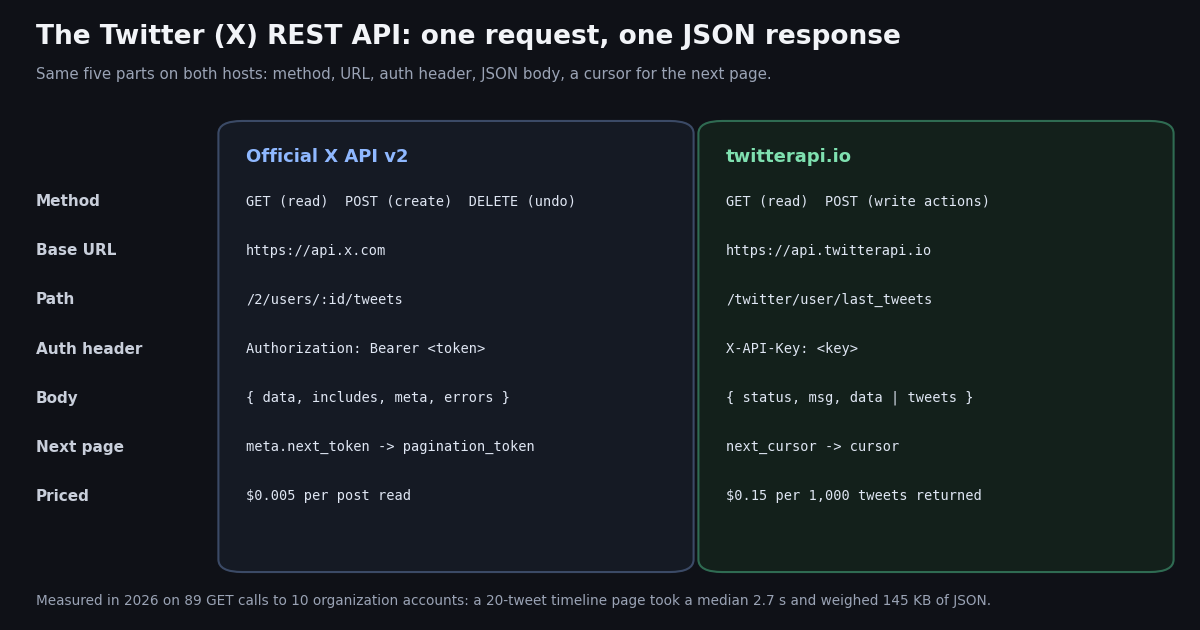
- REST on X means: one URL per resource, an HTTP verb for the action (
GETread,POSTcreate,DELETEundo), JSON in and out. The official base ishttps://api.x.com/2/...; v1.1 paths are labeled legacy on docs.x.com. - Auth is a header:
Authorization: Bearer <token>for app-only reads on X, OAuth 1.0a or OAuth 2.0 user context for writes;X-API-Key: <key>on twitterapi.io, where reads need no X account. - Pagination is a cursor, not a page number: X returns
meta.next_token(send it aspagination_token); twitterapi.io returnshas_next_page+next_cursor(send it ascursor). Stop only when the flag says so. - Measured in 2026: 89 GET calls on 10 organization accounts. Median latency 1.3 s for a profile, 2.7 s for a 20-tweet timeline page, 2.7 s for 200 followers, 12.2 s for a 20-id batch lookup.
- Payloads are heavy: a timeline page was a median 145 KB, about 7.6 KB per tweet, against 586 bytes per follower record. 6 timeline pages had fewer than 20 tweets yet still said
has_next_page: true. - Cost per 1,000 posts read: $5 on the official X API pay-per-usage card ($0.005 per post) vs $0.15 on twitterapi.io, about 33x apart. Writes on twitterapi.io go through a login session at 60 credits ($0.0006) per action.
People who search for the Twitter REST API usually want one of three things: to understand what REST means for X in practice before they write code, to find the right method and path for an operation they already have in mind, or to check whether the old v1.1 REST API they remember still exists. This page answers all three in REST terms: resources and URLs, HTTP methods, authentication headers, the JSON envelope, cursor pagination and status codes, and how the REST API relates to the other ways X data moves (the GraphQL API the x.com web app uses, filtered streams, webhooks).
The core of the page is one table that maps 25 everyday operations to their HTTP method and path on the official X API v2, checked this session against X's published OpenAPI document at api.x.com/2/openapi.json, and to the equivalent path on twitterapi.io from our own endpoint list, with "not offered" where we have none. For the version history of v1.1 versus v2 and the paid tiers, read our separate X API v2 guide; for a call-by-call cookbook, the Twitter API examples page. This page stays on the REST mechanics.
Then we measured what those REST calls look like on the wire. In 2026 we ran 91 read-only GET requests (seven endpoints, 10 organization accounts such as @vercel, @github, @NASA and @stripe) and recorded latency, JSON size, items per page and how the cursor behaved over three pages. Every number below comes from that run.
2.7 s and 145 KB of JSON per page (90th percentile 4.3 s), measured on 29 /twitter/user/last_tweets pages from 10 organization accounts, collected in 2026.
What "REST" means for the X (Twitter) API
REST (representational state transfer) is an architectural style for web APIs, not a product or a protocol. In practice, a REST API gives each thing you care about a URL, lets you act on it with the HTTP methods every client already speaks, keeps each request self-contained (the credentials travel with every call, there is no session on the server), and returns a representation of the resource, nowadays almost always JSON. X's own introduction describes the current platform as "v2 REST endpoints for Posts, users, Spaces, lists, DMs, and trends" (docs.x.com/x-api/introduction).
Resources. On the official API the nouns are in the path: /2/tweets (posts), /2/users, /2/lists, /2/spaces, /2/dm_conversations, /2/trends. A specific resource adds its id: /2/tweets/{id}, /2/users/{id}. Relationships hang off the owner: /2/users/{id}/followers, /2/users/{id}/following, /2/tweets/{id}/retweeted_by.
Methods. GET reads and never changes anything, POST creates (a post, a like, a follow, a list membership), DELETE removes (a post, a like, a follow). X's v2 spec mostly models "undo" as DELETE on the relationship URL, for example DELETE /2/users/{source_user_id}/following/{target_user_id} to unfollow, and DELETE /2/users/{id}/likes/{tweet_id} to unlike.
Representations. Responses are JSON. A v2 success puts the primary object or array in data, expanded related objects (authors, media, referenced posts) in includes, paging and counts in meta, and partial failures in errors. You choose extra fields per request with tweet.fields, user.fields and expansions; by default you get a minimal object.
Versioning in the path. The 2 in https://api.x.com/2/tweets is the version. X's versioning page lists v2 as current ("all new features"), v1.1 as legacy ("limited support, minimal updates") and Enterprise as a separate high-volume line (docs.x.com/x-api/fundamentals/versioning). The old api.twitter.com/1.1/statuses/user_timeline.json style that many tutorials still show is the v1.1 REST API; new projects should not start there, and many individual v1.1 endpoints no longer answer at all (our v1.1 page tracks which).
twitterapi.io follows the same REST conventions with a flatter path scheme: every read is a GET on the https://api.twitterapi.io host with paths under /twitter/ and query parameters, write actions are POST with a JSON body, and the version suffix sits on the resource name where it exists (/twitter/tweet/replies/v2, /twitter/create_tweet_v2), never as a /v1/ or /v2/ path prefix. The curl block below shows one GET on each host, the error shape for an unknown user, and page 2 of a timeline.
# GET: one user profile. The same request on both hosts, two different auth headers.

# Official X API v2 (app-only Bearer token from the X Developer Console)
curl -s "https://api.x.com/2/users/by/username/vercel?user.fields=public_metrics,created_at" \
  -H "Authorization: Bearer $X_BEARER_TOKEN"
# -> {"data": {"id": "...", "name": "...", "username": "vercel", "public_metrics": {...}}}

# twitterapi.io (API key from the dashboard, no X developer account)
curl -s "https://api.twitterapi.io/twitter/user/info?userName=vercel" \
  -H "X-API-Key: $TWITTERAPI_IO_API_KEY"
# -> {"status": "success", "msg": "success", "data": {"id": "...", "userName": "vercel", "followers": ...}}

# Unknown user: X answers with an errors array; twitterapi.io answers HTTP 200 with
# {"status": "error", "msg": "user not found", "data": null}, so check status, not only the HTTP code.
curl -s "https://api.twitterapi.io/twitter/user/info?userName=this_handle_does_not_exist_000" \
  -H "X-API-Key: $TWITTERAPI_IO_API_KEY"

# Cursor pagination: page 2 of a timeline (pass next_cursor back as cursor)
curl -s "https://api.twitterapi.io/twitter/user/last_tweets?userName=vercel&cursor=$NEXT_CURSOR" \
-H "X-API-Key: $TWITTERAPI_IO_API_KEY"Operation map: 25 common operations, official v2 path vs twitterapi.io path
Each official path below was checked against X's OpenAPI document (api.x.com/2/openapi.json, version 2.175 when we fetched it) and each twitterapi.io path against our published endpoint list. Path parameters in braces are ids, not handles, on the official API: you resolve a handle to an id first with the username lookup. On twitterapi.io the user endpoints accept userName directly.
Two design differences show up in the table. The official API is strictly resource-oriented (undo is a DELETE on the relationship), while twitterapi.io names the action in the path and uses POST for every write, which keeps one request shape for all of them. And the official API wants numeric ids in paths, so a handle-based workflow there starts with a lookup call; ours accepts handles on the user endpoints. For the full endpoint inventory with per-family cost detail, see our endpoint map page; this table is the REST-shaped subset people ask about.
Authentication and writes: Bearer and OAuth on X, one API key header on twitterapi.io
REST APIs are stateless, so every request carries its credentials in a header. The official X API supports three schemes, all listed in its OpenAPI document as BearerToken, OAuth2UserToken and UserToken (OAuth 1.0a), and explained on docs.x.com/fundamentals/authentication/overview.
App-only Bearer token. Authorization: Bearer <token>, generated for your app in the X Developer Console. It reads public data on behalf of the app and is accepted by read endpoints such as GET /2/tweets/search/recent, GET /2/users/{id}/tweets and GET /2/users/{id}/followers (the spec lists BearerToken among their security options).
User context. Any action as an account, and reads of private data, need a token for that user: OAuth 2.0 Authorization Code with PKCE (scopes such as tweet.write, follows.write, users.read) or OAuth 1.0a with the four keys. POST /2/tweets lists only OAuth2UserToken (with tweet.read, tweet.write, users.read) and UserToken; a Bearer token gets a 403 there. Our access token guide walks through generating each kind.
twitterapi.io. One header, X-API-Key: <key>, copied from the dashboard. Reads need no X account, no developer app and no OAuth dance. Write actions add a second credential inside the JSON body: login_cookies from one /twitter/user_login_v2 call ($0.10, with a proxy you supply), then each post, like, repost, follow or unfollow is 60 credits ($0.0006). Those calls act as that X account, so X can rate-limit, lock or suspend it; keep a human pace, expect the session to need a fresh login now and then, and note that write calls are billed per HTTP 200 response.
Every example so far was a GET. Writes are the same REST pattern with a body: POST a JSON document to a collection URL and get the created resource's id back.
Official X API. POST /2/tweets with a user-context OAuth token and a body such as {"text": "..."}; optional objects add a reply target, a quote, media ids or a poll. The pay-per-usage card lists Post: Create at $0.015 per request, or $0.200 when the post contains a URL (docs.x.com/x-api/getting-started/pricing). Deleting is DELETE /2/tweets/{id}.
twitterapi.io. POST /twitter/create_tweet_v2 with a JSON body. The endpoint page on docs.twitterapi.io lists the request fields login_cookies, tweet_text and proxy (required) plus optional reply_to_tweet_id, attachment_url (quote), community_id, is_note_tweet and media_ids, and a 200 response with tweet_id, status and message. The price on that page is 60 credits ($0.0006) per call. The response shown in the code below is the documented shape; we did not create a post for this page, and no write calls were part of the study.
The account rules apply to every write: the call acts as that X account, so use only your own account at a normal human pace; X's automation rules apply and the account can be rate-limited, locked or suspended. The example uses a fixed pause between writes for that reason, and nothing on this page is a way around any limit.
Keep keys server-side. A REST key in a browser bundle or a mobile app is public. Call the API from your backend, store the key in an environment variable or a secret manager, and rotate it from the dashboard if it leaks. Our page on the API key header covers the common mistakes, such as sending x-api-key as a query parameter.
"""POST on a REST API: create a post on twitterapi.io. Documented shape, not a captured response.

The call acts as YOUR X account: only your own account, a normal human pace, X's automation
rules apply, and the account can be rate-limited, locked or suspended. This is not a way around any limit.
"""
import os
import time

import requests

BASE = "https://api.twitterapi.io"
H = {"X-API-Key": os.environ["TWITTERAPI_IO_API_KEY"]}
PROXY = os.environ["MY_PROXY"]          # http://user:pass@host:port, a proxy you supply

# 1. One login per session ($0.10). Returns login_cookies for the *_v2 write endpoints.
r = requests.post(f"{BASE}/twitter/user_login_v2", headers=H, timeout=60, json={
    "user_name": os.environ["X_USER"], "email": os.environ["X_EMAIL"],
    "password": os.environ["X_PASSWORD"], "totp_secret": os.environ["X_TOTP_SECRET"], "proxy": PROXY,
})
r.raise_for_status()
cookies = r.json()["login_cookies"]

# 2. Create a post: 60 credits ($0.0006) per call, billed per HTTP 200 response.
r = requests.post(f"{BASE}/twitter/create_tweet_v2", headers=H, timeout=60, json={
    "login_cookies": cookies, "tweet_text": "Release notes are live.", "proxy": PROXY,
})
r.raise_for_status()
body = r.json()                         # documented: {"tweet_id": "...", "status": "success", "message": "..."}
if body.get("status") != "success":
    raise SystemExit(body.get("message"))   # e.g. the session needs a fresh login
print("created", body["tweet_id"])
time.sleep(30)                          # fixed pause before any next write; keep a human pace

# For comparison, the official X API v2 create call is POST https://api.x.com/2/tweets
# with a user-context OAuth token and a JSON body {"text": "..."}; $0.015 per request on its rate card.The JSON you get back: envelopes, fields and payload size
Official v2 envelope. data holds the object or array; includes holds expanded objects referenced by id (includes.users for authors when you ask for expansions=author_id); meta carries counts and cursors; errors lists partial failures. By default a post is a minimal object; metrics, dates and entities arrive only when requested in tweet.fields (the response schema in the OpenAPI document lists data, includes, meta and errors, with meta holding newest_id, oldest_id, result_count, next_token and previous_token). That keeps payloads small but means a join on the client between data and includes.
twitterapi.io envelope. Fields are returned whole, with the author embedded in every tweet, so there is no join. Timelines nest under data.tweets (/twitter/user/last_tweets); search, mentions, replies and batch lookups return a top-level tweets array; follower lists return a top-level followers array in snake_case (screen_name, followers_count). A tweet carries id, url, text, createdAt ("Thu Oct 16 12:34:56 +0000 2026", not ISO 8601), likeCount, retweetCount, replyCount, quoteCount, viewCount, bookmarkCount, entities, extendedEntities.media, quoted_tweet, retweeted_tweet and an author object with userName, followers and isBlueVerified.
What that costs in bytes. Embedding the author and every field makes our payloads heavy, and it is worth knowing before you store them. Across the study, a 20-tweet timeline page was a median 145 KB of compact JSON (largest 248 KB), which works out to a median 7,629 bytes per tweet; a search page 134 KB (6,928 bytes per tweet). Replies were lighter at 2,772 bytes per tweet, mentions 3,567. A profile from /twitter/user/info was about 1 KB, and a follower record 586 bytes.
Sizes are the parsed body re-serialized as compact UTF-8 JSON, which is close to what you would store, not the compressed bytes on the wire. If you keep raw responses, keep only the fields you use: id, createdAt, text, the counts and author.userName are a small fraction of a full tweet object. Our Twitter JSON page annotates one complete tweet field by field.
Pagination: next_token on X, next_cursor on twitterapi.io, and what the cursor did over three pages
Neither API pages by number. Both hand you an opaque cursor that points at the next slice, which stays correct while new posts arrive at the top of the list.
Official v2. Ask for max_results (endpoint-specific: 10 to 100 on recent search, 5 to 100 on user timelines and mentions, 1 to 1,000 on followers, per the OpenAPI spec), read meta.next_token from the response and send it back as pagination_token (recent search also accepts next_token). "When there are no more results, next_token is omitted" (docs.x.com/x-api/fundamentals/pagination). previous_token walks back.
twitterapi.io. Each list response carries has_next_page and next_cursor; send the cursor back as cursor with the same other parameters. Page size is fixed by the endpoint (20 tweets on timelines and search, about 200 followers).
What we saw over three pages. We walked /twitter/user/last_tweets for 10 accounts: 29 pages, 522 unique tweets, 9 of 10 accounts reached page 3. Two behaviors matter for your loop. First, 6 pages from 2 accounts returned fewer than 20 tweets (as few as 4) while still reporting has_next_page: true, and the next page was full again. A loop that stops on a short page would have quit early. Second, 1 account's cursor ended with an empty page and has_next_page: false, which is the real end. Across all pages 3 tweet ids appeared twice, so de-duplicate on id.
The loop that follows from it: request, add the items to a dictionary keyed by id, stop when has_next_page is false or next_cursor is empty, and cap the number of pages so a bug cannot page forever. Our pagination guide covers both APIs in more depth, including resuming from a saved cursor.
// Node 18+ (built-in fetch). Walk a timeline by cursor until has_next_page is false.
const BASE = "https://api.twitterapi.io";
const KEY = process.env.TWITTERAPI_IO_API_KEY;

async function timeline(userName, maxPages = 3) {
  const tweets = [];
  let cursor = "";
  for (let page = 0; page < maxPages; page++) {
    const qs = new URLSearchParams({ userName, ...(cursor ? { cursor } : {}) });
    const res = await fetch(`${BASE}/twitter/user/last_tweets?${qs}`, { headers: { "X-API-Key": KEY } });
    if (res.status === 429) { await new Promise((r) => setTimeout(r, 5000)); page--; continue; }
    if (!res.ok) throw new Error(`HTTP ${res.status}: ${await res.text()}`);
    const body = await res.json();
    if (body.status === "error") throw new Error(body.msg);      // e.g. "user not found" on HTTP 200
    tweets.push(...(body.data?.tweets ?? []));                  // a short page does NOT mean the end
    if (!body.has_next_page || !body.next_cursor) break;        // only these two fields end the walk
    cursor = body.next_cursor;
  }
  return tweets;
}

const posts = await timeline("vercel");
const unique = new Map(posts.map((t) => [t.id, t]));           // de-duplicate on id across pages
console.log(unique.size, "posts; newest:", posts[0]?.createdAt);Status codes and error bodies: what to retry and what to fix
REST uses the HTTP status line for the outcome. X's response-codes page (docs.x.com/x-api/fundamentals/response-codes-and-errors) lists the codes you will meet; the right reaction differs per code.
X error body. Problems carry title, detail and type, a URI such as https://api.x.com/2/problems/invalid-request. Rate-limit state travels in x-rate-limit-limit, x-rate-limit-remaining and x-rate-limit-reset headers, and limits are per 15-minute window unless noted (docs.x.com/x-api/fundamentals/rate-limits).
twitterapi.io. A missing or invalid parameter is HTTP 400 with the text in detail. A lookup that finds nothing is not a 404: an unknown handle returns HTTP 200 with status: "error", msg: "user not found" and data: null, so check status in every response body. 429 means you went over your request rate: 0.2 requests per second before the first payment, 20 once paid, 50 on Scale, 500 on Business, and up to 1,000 on request.
Timeouts are an error class too. In our run, 2 calls to the batch lookup /twitter/tweets ran past the 40-second read timeout of our client and succeeded on retry. Set an explicit timeout on every request (the example code uses 45 seconds), retry timeouts, 429 and 5xx with exponential backoff, and never retry a 400 or 401 unchanged. Our error-handling guide has a full retry wrapper.
How fast each REST call was: latency per endpoint
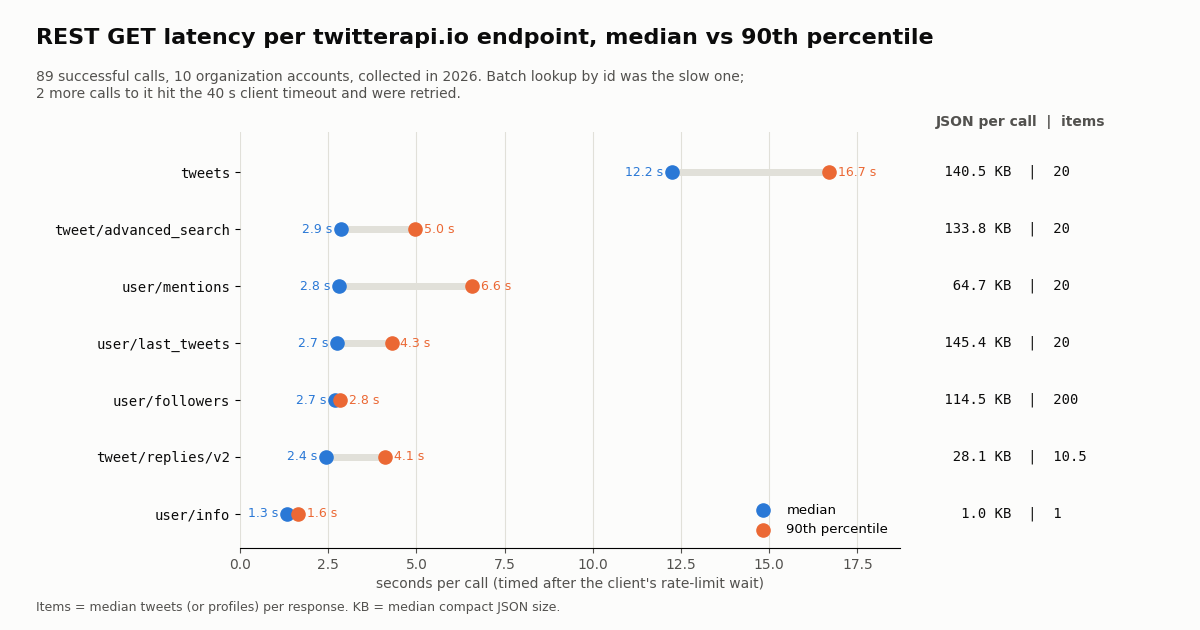
We timed every successful call from the moment our rate-limited client released it until the parsed JSON was back, so time spent waiting for our own request budget is excluded. All 89 responses were HTTP 200 with a success status.
Single-resource reads are quick, lists take seconds. A profile (/twitter/user/info) came back in a median 1.3 s (1.6 s at the 90th percentile). Pages of tweets clustered between 2.4 s and 2.9 s at the median: replies 2.4 s, timelines 2.7 s, mentions 2.8 s, search 2.9 s. A page of 200 followers was the steadiest call: median 2.7 s, 90th percentile 2.8 s.
The batch lookup by id was the slow one. /twitter/tweets with 20 ids took a median 12.2 s and up to 20.8 s, on top of the 2 calls that timed out at 40 seconds and were retried. It returned all 178 of the 178 ids we asked for, in the order we sent them on 10 of 10 calls (match on id anyway; the order is not a documented guarantee). If you hydrate stored ids in bulk, run batches in parallel within your rate limit rather than in a single sequential loop, and set a long timeout.
Tails are long. Mentions had a 6.6 s 90th percentile and one call at 18.6 s; search reached 10.4 s once. Across all 89 calls the median was 2.7 s and the 90th percentile 10.1 s, pulled up by the batch lookups. Design for seconds, not milliseconds: fetch in the background, cache, and never put a list call on the request path of a page your users are waiting for.
These timings describe one collection pass from one machine in 2026. They are not a service-level promise, and they will differ by time of day, region and query.
REST vs GraphQL, streams and webhooks: the other ways X data moves
GraphQL. The x.com website and apps do not call the public REST API. They call an internal GraphQL API under x.com/i/api/graphql/<queryId>/<OperationName>, with query ids that change without notice and access tied to a logged-in browser session. It is not a documented developer product, which is why code that copies those calls breaks without notice. If you have seen operation names such as UserByScreenName or SearchTimeline in a browser's network tab, that is the GraphQL side; our Twitter GraphQL API page explains it. For a developer, the stable contracts are the documented REST APIs.
Filtered stream. On the official API, GET /2/tweets/search/stream is a long-lived HTTP connection that pushes posts matching rules you manage at /2/tweets/search/stream/rules. It is still HTTP, but not request-response: you hold the connection open and read posts as they arrive. On twitterapi.io, the equivalent is a filter rule (/oapi/tweet_filter/add_rule) whose matches are pushed to your webhook URL or a websocket; see our streaming API page.
Webhooks. Instead of polling a REST endpoint, a webhook makes the API call you: X registers your URL with /2/webhooks, then delivers account events (Account Activity, /2/account_activity/...) or filtered-stream matches (/2/tweets/search/webhooks) to it, and twitterapi.io's filter rules POST matches to yours. Polling REST is simpler and usually enough for anything that tolerates a minute of delay; push is worth it when you watch many rules or need sub-minute delivery.
v1.1 vs v2. Both are REST. v1.1 used api.twitter.com/1.1/...json paths, OAuth 1.0a everywhere and fully populated objects by default; v2 uses api.x.com/2/..., adds OAuth 2.0, and returns minimal objects with opt-in fields and expansions. docs.x.com labels v1.1 legacy. Our X API v2 guide covers the migration; this page assumes v2 on the official side.
How we collected this
Question: what do everyday REST GET calls to the twitterapi.io X API look like on the wire: latency per endpoint, JSON size per response and per item, items per page, how often a page reports another page, and how the cursor behaves over consecutive pages.
Accounts and endpoints: 10 public organization accounts (@vercel, @github, @Docker, @CloudflareDev, @OpenAIDevs, @nvidia, @NASA, @Xbox, @stripe, @figma). Per account: /twitter/user/info, three pages of /twitter/user/last_tweets, one page of /twitter/tweet/advanced_search for from:<account> (Latest), /twitter/tweets with the 20 ids from the first timeline page, /twitter/tweet/replies/v2 for the latest own post with replies, one page of /twitter/user/mentions and one page of /twitter/user/followers.
Sample and method: 91 requests in a single pass, collected in 2026 through our rate-limited, read-only client: 89 successful responses plus 2 that hit the client's 40-second timeout and were retried. 1,127 tweets and 2,010 profile records came back. Latency was timed from the moment the shared rate limiter released each call until the parsed JSON was returned. Payload size is the parsed body re-serialized as compact UTF-8 JSON. The run cost up to $0.23 at published per-result prices (follower records counted at the upper 3-credit tier).
What the sample cannot show: one pass from one location is a snapshot, not a latency benchmark or an uptime figure; times vary by hour, region, query and load. Organization accounts have long histories and active replies, so private or small accounts may return smaller pages. We did not call the official X API, so the official-side paths, auth rules, limits and prices come from docs.x.com and its OpenAPI document, not from measurement. No write endpoints were called.
Aggregates only. The accounts named are organizations. Mentions, replies, search and follower pages contain posts and profiles of private individuals; those raw responses were analyzed in memory and not kept, and the published per-request sample has no ids, text or handles. Raw profile and timeline pages of the organization accounts are kept, gzip-compressed, with the analysis script.
"""twitter_rest_client.py - a small REST client for the X (Twitter) API through twitterapi.io.

    pip install requests
    export TWITTERAPI_IO_API_KEY=...      # twitterapi.io dashboard; no X developer account needed for reads
    python twitter_rest_client.py vercel

What it does, one GET per resource: profile, timeline walked by cursor, a search, a batch lookup
by id, and the replies to the latest post. Reads bill per item returned: 15 credits per tweet
($0.15 per 1,000 tweets) and 18 credits per profile; $1 = 100,000 credits.
"""
import os
import sys
import time

import requests

BASE = "https://api.twitterapi.io"
SESSION = requests.Session()
SESSION.headers["X-API-Key"] = os.environ["TWITTERAPI_IO_API_KEY"]


def get(url, params, retries=4):
    """One REST GET with the error handling this API needs."""
    for attempt in range(retries):
        try:
            r = SESSION.get(url, params=params, timeout=45)   # batch lookups took up to 21 s in our study
        except requests.Timeout:
            time.sleep(2 ** attempt)
            continue
        if r.status_code == 429 or r.status_code >= 500:     # rate limit or transient server error
            time.sleep(2 ** attempt)
            continue
        if r.status_code == 400:                              # missing / invalid parameter: text in "detail"
            raise ValueError(r.json().get("detail"))
        r.raise_for_status()
        body = r.json()
        if body.get("status") == "error":                     # HTTP 200 can still carry an error
            raise LookupError(body.get("msg"))
        return body
    raise RuntimeError(f"gave up on {url}")


def user_info(user_name):
    return get(f"{BASE}/twitter/user/info", {"userName": user_name})["data"]


def timeline(user_name, max_pages=3):
    """Follow next_cursor; stop only when has_next_page is false (short pages happen mid-walk)."""
    tweets, seen, cursor = [], set(), None
    for _ in range(max_pages):
        params = {"userName": user_name}
        if cursor:
            params["cursor"] = cursor
        body = get(f"{BASE}/twitter/user/last_tweets", params)
        for t in (body.get("data") or {}).get("tweets") or []:
            if t["id"] not in seen:                           # pages can overlap by a few ids
                seen.add(t["id"])
                tweets.append(t)
        if not body.get("has_next_page") or not body.get("next_cursor"):
            break
        cursor = body["next_cursor"]
    return tweets


def search(query, query_type="Latest"):
    body = get(f"{BASE}/twitter/tweet/advanced_search", {"query": query, "queryType": query_type})
    return body.get("tweets") or []


def tweets_by_id(ids):
    """Up to 50 ids per call; match results by id rather than trusting the order."""
    out = {}
    for i in range(0, len(ids), 50):
        body = get(f"{BASE}/twitter/tweets", {"tweet_ids": ",".join(ids[i:i + 50])})
        out.update({t["id"]: t for t in body.get("tweets") or []})
    return out


def replies(tweet_id):
    return get(f"{BASE}/twitter/tweet/replies/v2", {"tweetId": tweet_id}).get("tweets") or []


if __name__ == "__main__":
    handle = sys.argv[1] if len(sys.argv) > 1 else "vercel"
    u = user_info(handle)
    print(f"@{u['userName']}: {u['followers']:,} followers, {u['statusesCount']:,} posts, joined {u['createdAt']}")

    posts = timeline(handle)
    print(f"timeline: {len(posts)} unique posts over up to 3 pages")

    found = search(f"from:{handle}")
    print(f"search from:{handle}: {len(found)} posts on the first page")

    by_id = tweets_by_id([t["id"] for t in posts[:20]])
    print(f"batch lookup: {len(by_id)} of {min(20, len(posts))} ids returned")

    talked_about = next((t for t in posts if (t.get("replyCount") or 0) > 0 and not t.get("retweeted_tweet")), None)
    if talked_about:
        rs = replies(talked_about["id"])
        print(f"replies to {talked_about['url']}: {len(rs)} on the first page")
Researching this?Free starter credits cover end-to-end testing — Google sign-in, no card. Get a key.
Questions readers ask
Is the Twitter (X) API a REST API?
Yes. The official X API v2 is a REST API on the api.x.com host, under /2/ paths, with resource URLs (/2/tweets, /2/users/{id}/followers), standard HTTP methods and JSON responses; docs.x.com describes it as v2 REST endpoints for posts, users, Spaces, lists, DMs and trends. The x.com website itself uses a separate internal GraphQL API that is not a documented developer product.
What is the base URL of the Twitter REST API?
api.x.com for the official API, with the version in the path: api.x.com/2/tweets. Older v1.1 code used api.twitter.com/1.1/...json paths, which docs.x.com now labels legacy. twitterapi.io uses api.twitterapi.io with paths under /twitter/ and /oapi/, for example /twitter/user/last_tweets.
Is Twitter REST API v1.1 still available?
docs.x.com lists v1.1 as legacy with limited support and minimal updates, and recommends v2 for all new projects; new features ship only on v2. If a tutorial shows statuses/user_timeline.json or search/tweets.json, it is v1.1 code and should be ported to the v2 paths in the table on this page.
How do I authenticate to the Twitter REST API?
On the official API, send Authorization: Bearer <token> for app-only reads, and an OAuth 2.0 user-context token (PKCE) or OAuth 1.0a user tokens for anything done as an account, such as POST /2/tweets. On twitterapi.io, send X-API-Key: <key> from the dashboard; reads need no X account. Write actions there use login_cookies from one /twitter/user_login_v2 call.
How does pagination work in the X REST API?
With cursors. The official API returns meta.next_token, which you send back as pagination_token; when next_token is missing, you are done. twitterapi.io returns has_next_page and next_cursor, which you send back as cursor. In our study, 6 timeline pages returned fewer than 20 tweets while still reporting has_next_page true, so stop on the flag, never on a short page, and de-duplicate on id.
What does a Twitter REST API call cost?
The official pay-per-usage card charges $0.005 per post read, $0.010 per user read and $0.015 per post created ($0.200 with a URL), with pay-per-usage capped at 3 million post reads a month. twitterapi.io charges per result: $0.15 per 1,000 tweets returned and $0.18 per 1,000 profiles, with a 15-credit ($0.00015) minimum per request; new accounts that pass the automatic bot check get free starter credits (no card, one per person or network, expiring after 31 days). See /pricing.
Why does the API return HTTP 200 for a user that does not exist?
On twitterapi.io, an unknown handle returns HTTP 200 with status "error", msg "user not found" and data null, rather than a 404. Check the status field in every body as well as the HTTP code. HTTP 400 is reserved for missing or invalid parameters and carries the reason in detail. The official X API returns not-found problems in an errors array, sometimes alongside data on a 200.
How fast is a Twitter REST API call?
In our 2026 run of 89 GET calls through twitterapi.io, a profile took a median 1.3 s, a 20-tweet timeline page 2.7 s, a page of 200 followers 2.7 s, and a 20-id batch lookup 12.2 s, with 2 batch lookups needing a retry after a 40-second timeout. Plan for seconds per list call and fetch in the background.
Continue
- X API introduction: v2 REST endpoints, base URL and Bearer token examples
- X API v2 OpenAPI document: every path, method, parameter limit and security scheme
- X API pagination: next_token, previous_token and pagination_token
- X API response codes and error bodies (title, detail, type; partial errors)
- X API versioning: v2 current, v1.1 legacy
- X API pay-per-usage pricing ($0.005 per post read, $0.015 per post created)
- twitterapi.io API reference: create_tweet_v2 request and response fields
- X API hub: pricing, limits and every developer guide
- X API v2 explained: v1.1 vs v2 and the paid tiers
- Twitter API v1.1: which legacy endpoints still answer
- Twitter (X) GraphQL API: the web app's internal API
- Twitter API examples: a request cookbook
- Twitter (X) API endpoints: the full map with costs
- Twitter API pagination with next_token and cursors
- Twitter JSON: one tweet object annotated
- Twitter (X) access tokens: Bearer, OAuth 1.0a and OAuth 2.0
- Twitter API error handling: retries, 429 and timeouts
- Twitter streaming API: filtered streams and push rules
- The X-API-Key header: sending your key correctly
- twitterapi.io pricing: pay per tweet and profile returned
- 01How to Hyperlink on Twitter (X): What Works, What Doesn't, and What 1,032 Posts Show
- 02How to See Deleted Twitter (X) Messages: What Can and Cannot Come Back
- 03Twitter (X) API to BigQuery: Load Tweets with Python and Query Them in SQL
- 04Twitter (X) Follow API: Follow, Verify and Undo a Follow from Code
- 05Twitter (X) API in Ruby with Net::HTTP, Faraday and Rails
- 06"Please Use the Official X App" When Signing In to Twitter (X): Why It Happens and How to Get Back In
- 07How to Download Pictures from Twitter at Full Quality
- 08xcancel Not Working? The xcancel Alternatives That Still Work
Writing about something you built with TwitterAPI.io? Our community rewards program pays API credits for honest tutorials, build logs and videos.
Stop reading. Start building.
Starter credits cover real testing on real data. Google sign-in, no card, no application queue.
Get an API keyAlready building with TwitterAPI.io? Publish an honest tutorial or build log about it and earn up to $200 a month in API credits.